Silicon Valley Technology Commentary & Archives · Est. 2006 3,045 Posts · 2006–2026
Showing posts with label RSS (215 posts). Show all posts

November 09, 2026

November 09, 2026 · 4 MIN READ · BY LOUIS GRAY

The Internet Turned Into TV, but Television Has No Blue Links

The Internet Turned Into TV, but Television Has No Blue Links

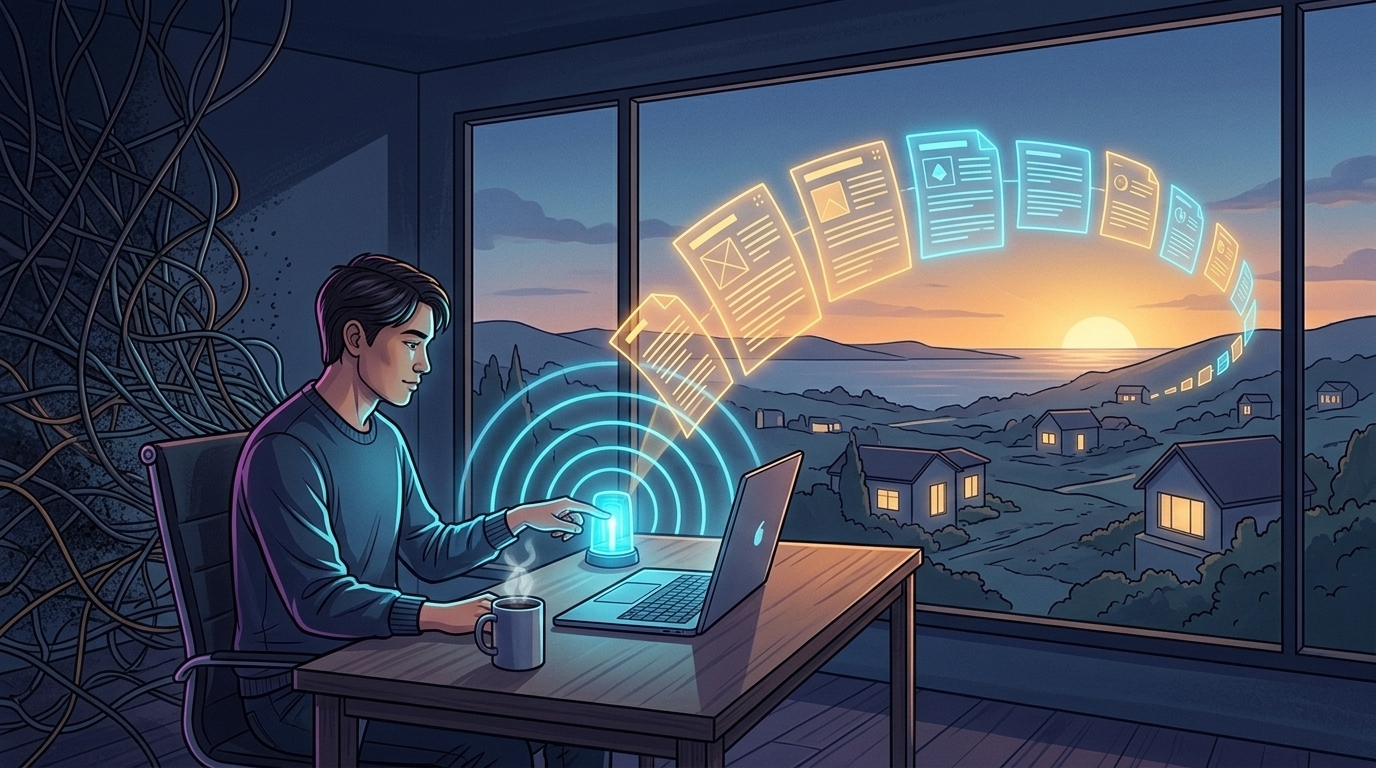
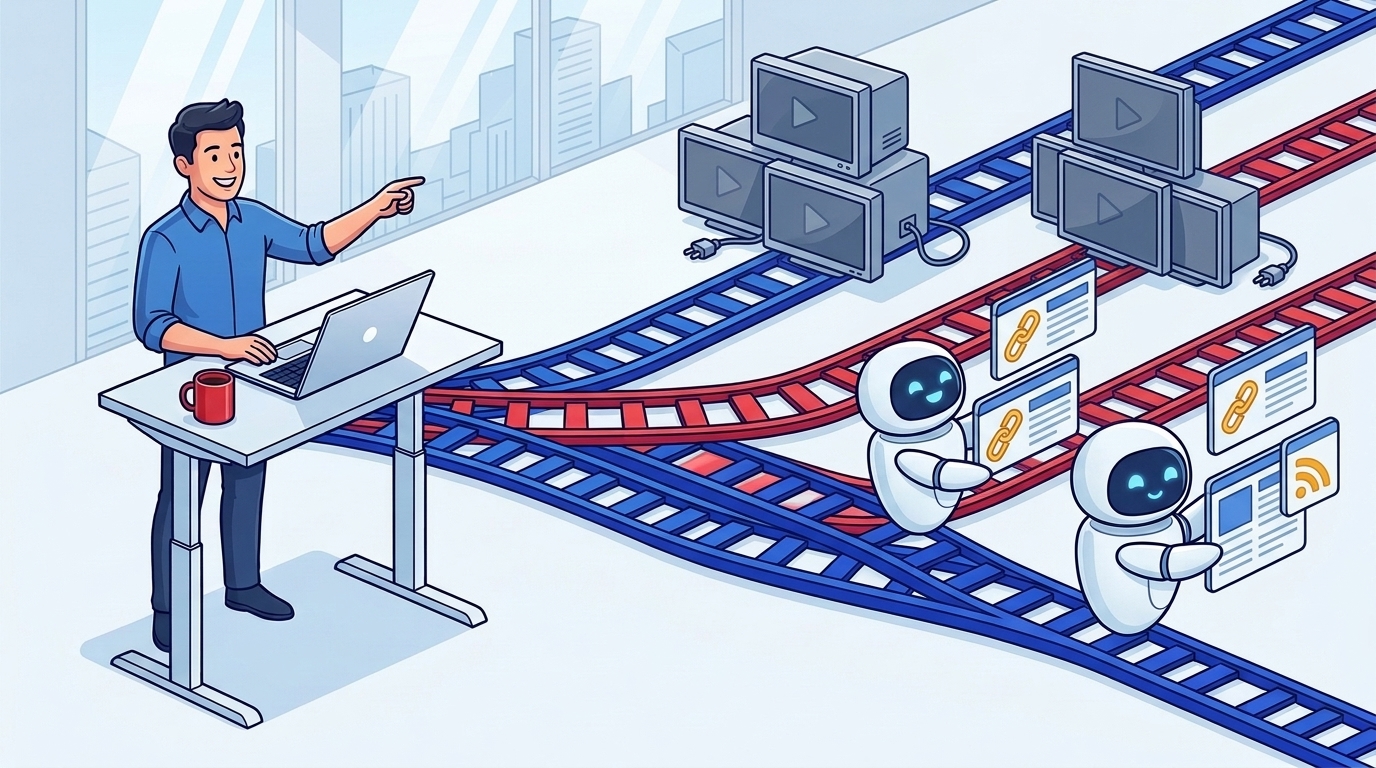
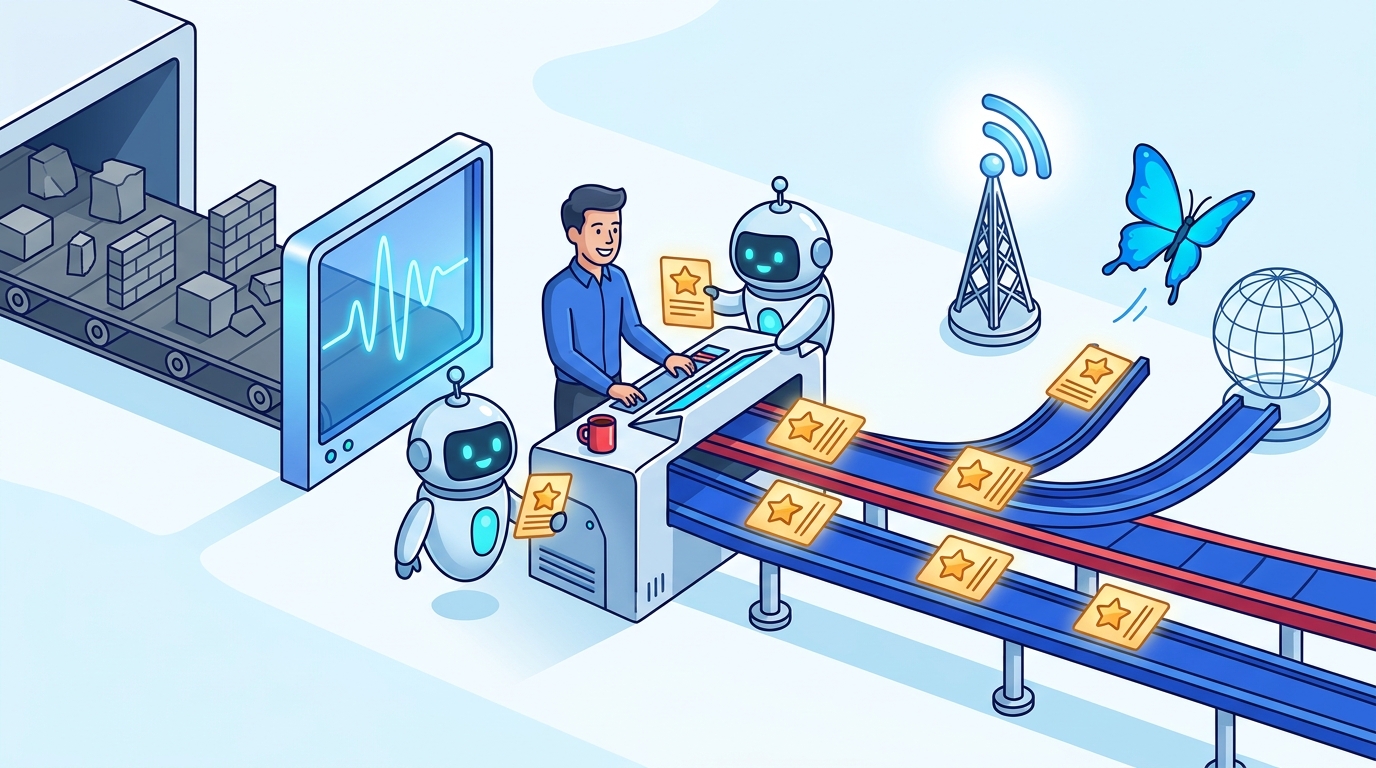
Routing blue links past unplugged TVs [Image via Gemini]

One of my favorite web authors, Ryan Broderick, who I read religiously, dropped another one of his truth bombs today in Garbage Day, decrying the continued decimation of text-based content that once defined the web, only to see it morph into something that is video first, or as he says "officially TV now". As we've observed over the last two-plus decades, Web behavior has rotated from newsgroups and reading full text articles, following links across the web, to short-form video consumption and Netflix-style episodic bingeing, with powerful algorithms suggesting you keep watching -- with sleep as the natural enemy.

Like I've said recently, you can't force old habits on new people who have been raised in a world of infinite bandwidth and infinite choice any more than you can ask kids to turn off the cartoons or put down the YouTube and pick up a newspaper. In today's post, Ryan calls time on the old "internet of libraries, replaced by an "internet of televisions", where, as he puts it, no one is famous, everyone is a celebrity on rented terms, and getting real traction with written words gets harder by the month -- made even more real as the hub and spoke model of RSS readers and centralized discovery lost momentum each year in favor of chasing ephemeral likes and practically non-monetizable "views", whose definition changes regularly to suit the platform.

Just a few weeks ago, I highlighted Garbage Day when saying how filtertainment eviscerated our informed monoculture. Every leap in bandwidth eventually fills the container you give it. We marched from static text sites passed around via links and email, to real-time social streams, to pocket screens pumping high-definition video straight into our earbuds. Not that this really comes as a surprise. In 2010, I warned about accelerating information streams on connected devices with "no off button, ever." When you give a tired population a choice between demanding prose and effortless video dopamine, the couch wins almost every night.

Video winning the mass-market feed isn't a mystery, if that's the market you want.

What breaks the open web for writers is a simpler mechanical truth: television has no blue links. When someone leans back into an algorithmic Reel, a video podcast on YouTube, or a zero-click chatbot answer, there is no natural exit ramp carrying a curious mind three hops deeper to an unfamiliar blog. I traced the roots of this choke point back in 2018, examining how a decade of silos throttled open content distribution and left the web linking less and talking more.

Publishing has always rested on creation, discovery, and distribution. Once Google Reader, FriendFeed, Digg, and Technorati disappeared, dominant platforms stopped acting as filtered pass-throughs. They actively throttled outbound URLs to hoard watch time, training creators to perform natively inside the silo for instant feedback while an essay on your own domain sat waiting for visitors who never arrived.

Waiting around for algorithmic cable boxes to hand text writers organic reach is a losing game. If the giant social apps want to be television, those of us who still think, build, and connect through reading have to wire up our own switchboard again. That conviction is why I built Webnerd.ai, which I introduced last month as a personal project that has no expectations of millions of users, but rejuvenates that feeling of discovery and sharing.

Do your part by cutting out the broadcast middleman: subscribe directly to blogs, personal newsletter inboxes, feeds and publications in folders you control, backed by practical AI summaries and stream audio that save time while still sending clicks straight to the original author.

Even more important is solving the traction gap where open-web discovery always worked best -- from person to person. Algorithms optimize for passive session length, while human readers vouch for voices worth keeping. Curated starter bundles help newcomers find active blogs on day one, while one-click sharing inside the app or right from the browser toolbar with the Webnerd.ai Chrome Extension turns every reader into a distribution node. When I flag a great piece, it lands on my public shared stream, cross-posts to Bluesky, and feeds its own subscribable RSS stream, keeping those blue underlines traveling across the open web.

Broadcast TV never killed books or independent magazines, and Instagram's binge button won't kill sharp writing either. Let the big platforms fight over the living room. The library is still open -- we just have to pass the good reads around ourselves.

Disclosures, per always: I work at Google and use Gemini and Antigravity tools a lot. I built Webnerd.ai, its Chrome Extension, and this blog's CMS with Antigravity's help. Nobody at Google reviews my posts, ever.
November 08, 2026

November 08, 2026 · 2 MIN READ · BY LOUIS GRAY

Human Curation from the Webnerd.ai Stream: v2

Human Curation from the Webnerd.ai Stream: v2

webnerd v2 option2 signal switchyard 1794206654413
My job: Finding the best articles and amplifying them out. [Image via Gemini]

Signal From the Stream: Handcrafted Words in a High-Wattage World

With Webnerd.ai bringing fast paced consumption and sharing back to my daily routine, the muscle of scanning, filtering and amplifying is back. This week is no different.

After a decade's effort in building out siloed social networks that aim to keep their content boxed in, independent blogging has endured and continues to push back. I'd be remiss if I didn't point out Paul Ford's post, The Web Is More Than Enough, where he showcased launching an entire browser-based office suite where all activity lives right in the URL, reminding us that the open web remains the most durable application platform on earth. Over at Techdirt, Mike Masnick called out Reddit bricking up login walls, saying its defensive posture runs against Aaron Swartz's open access roots.

What we all saw this week with the US midterm elections is that closed networks force closed thinking. Republicans learned that X is the echo chamber. It was an inevitable result after Elon's acquisition and government meddling chased away all the left-leaning free thinkers to new places.  As Andy Baio called out, we know closed social feeds confuse algorithmic echo chambers with real-world consensus.

(I told you already that X was toxic, but maybe the right wing has figured this out now too?)

We are all continuing to learn where AI fits in our workflow and how much we invest in it. This is true at the corporate level as well. Tomasz Tunguz ran the math on an 80-gigawatt AI ceiling for 2027, showing how doubling GPU rental rates are pushing inference bills to new heights, while cheap AI intrusion tools are straining security teams at unprecedented levels.

AI is doing incredible things in terms of resetting expectations for employees at all levels. It's reset expectations for middle managers and reset expectations for new hires. At Anthropic, Felix Rieseberg said he has retired traditional coding interviews because hunger beats whiteboard tenure in an agentic world. And John Battelle captured the emotional knot of modern tech workers in Baring It All To Claude, which can mean trusting a model with your life's work, and hoping for the best.

When platforms wall themselves off and algorithms chase outrage, sitting down with an RSS reader and sharing good writing by hand isn't nostalgia. It's how we keep the web human. I'll be doing my part over at Webnerd.ai, and sharing out to RSS or Bluesky or wherever you like. That's what standards are for.

Disclosures per always: I work at Google. No doubt some of the companies mentioned here are partners, competitors or customers. Don't interpret my interest as being filtered with that lens. I built Webnerd.ai (and have no plans to monetize it).

November 02, 2026

November 02, 2026 · 4 MIN READ · BY LOUIS GRAY

Webnerd.ai Chrome Extension Debuts to Subscribe and Share Faster

Webnerd.ai Chrome Extension Debuts to Subscribe and Share Faster

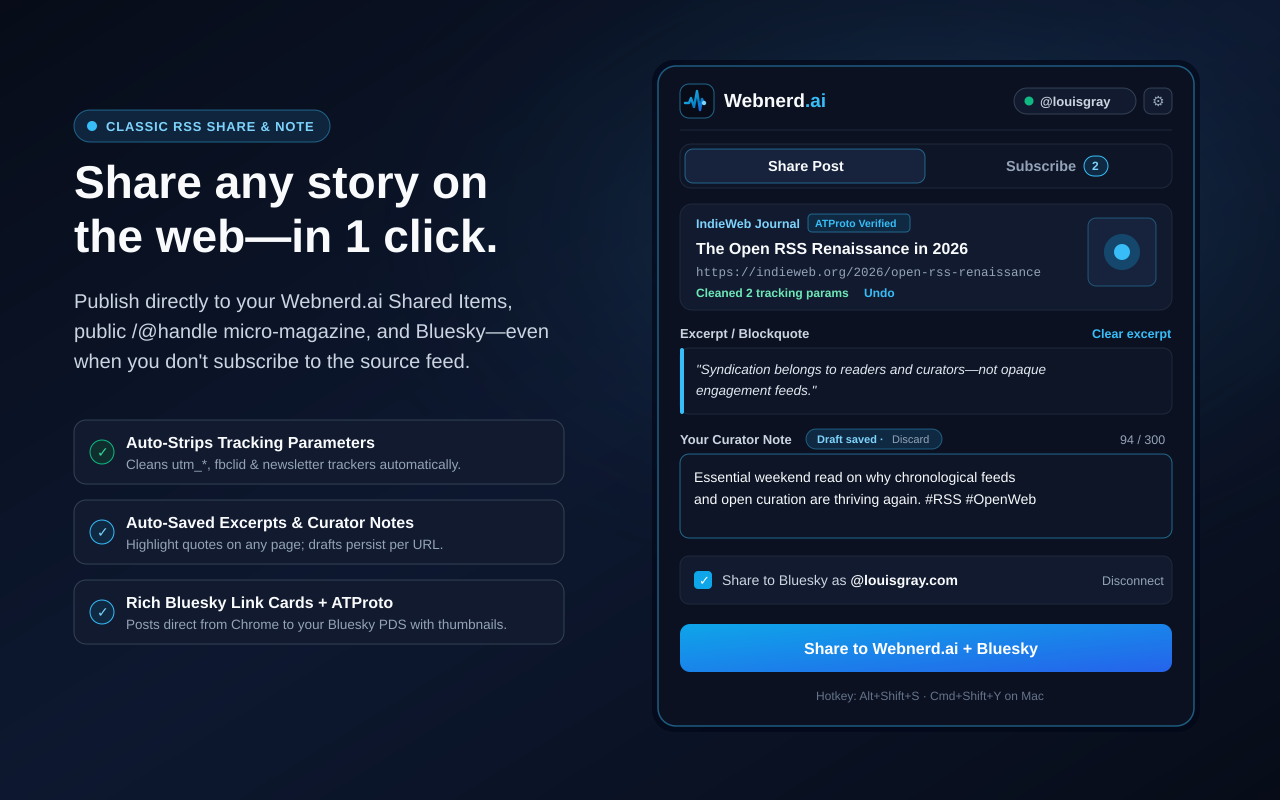
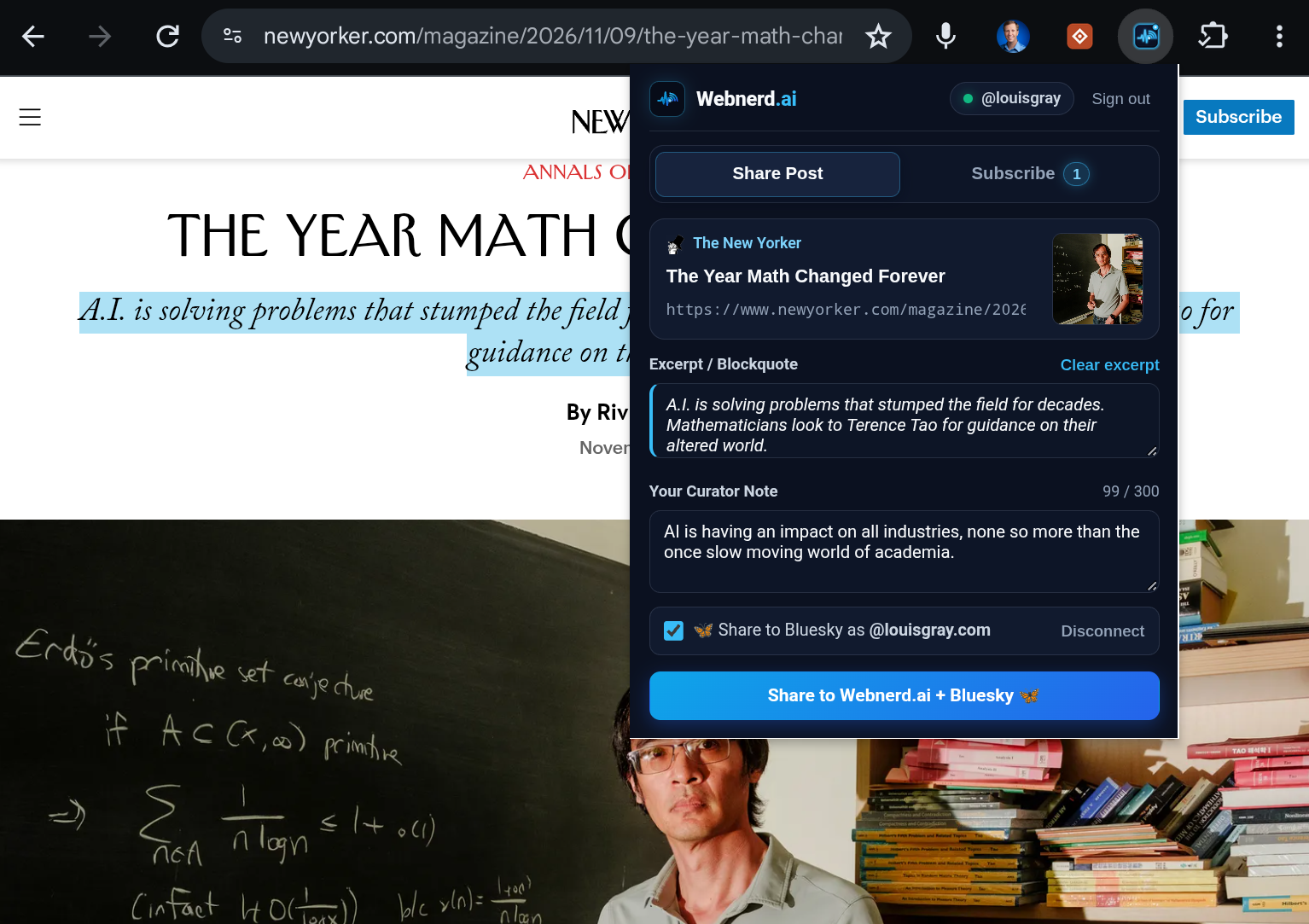
Webnerd.ai Chrome Extension Share Post tab showing cleaned URL parameters, highlighted blockquote excerpt, auto-saved curator note, and Bluesky cross-posting
Webnerd.ai Share & Subscribe -- live now in the Chrome Web Store.

Webnerd.ai Chrome Extension

The Web content model consists of three major parts: creation, discovery and distribution. The last decade-plus has seen tremendous turbulence as one-time hubs came and went, and content creators lost a grip on how their content could be consumed and shared easily from both dedicated fans and casual visitors. Couple that with shorter attention spans and all matter of marketing hacks that have distracted core audiences, and it's a tough slog out there for journalists and bloggers.

One of the motions I've missed in our consumption and flow has been the fast option to share and subscribe as I encounter the best content on the web. So I've built a Chrome extension for Webnerd.ai that has three major functions:

1. Subscribe to new sources and add them to your folders as you browse.
2. Add individual items to your shares in Webnerd.ai, even without subscribing.
3. Share directly to Bluesky, with optional caption.

Starting today, Webnerd.ai Share & Subscribe is officially public on the Chrome Web Store, working across Chrome and other modern browsers, such as Brave, Arc, Vivaldi, and Edge.

Screenshot 20261102 075333
With the Webnerd.ai Extension, discover available feeds and add them.

Back in our Web 2.0 peak, I had bookmarklets for Google Reader and FriendFeed as mainstays in my browser and I could see top stories spread from person to person. The act of sharing content helps expose great new sources to my network, and in turn, I learn from them.

Here are some benefits of the Webnerd.ai extension:

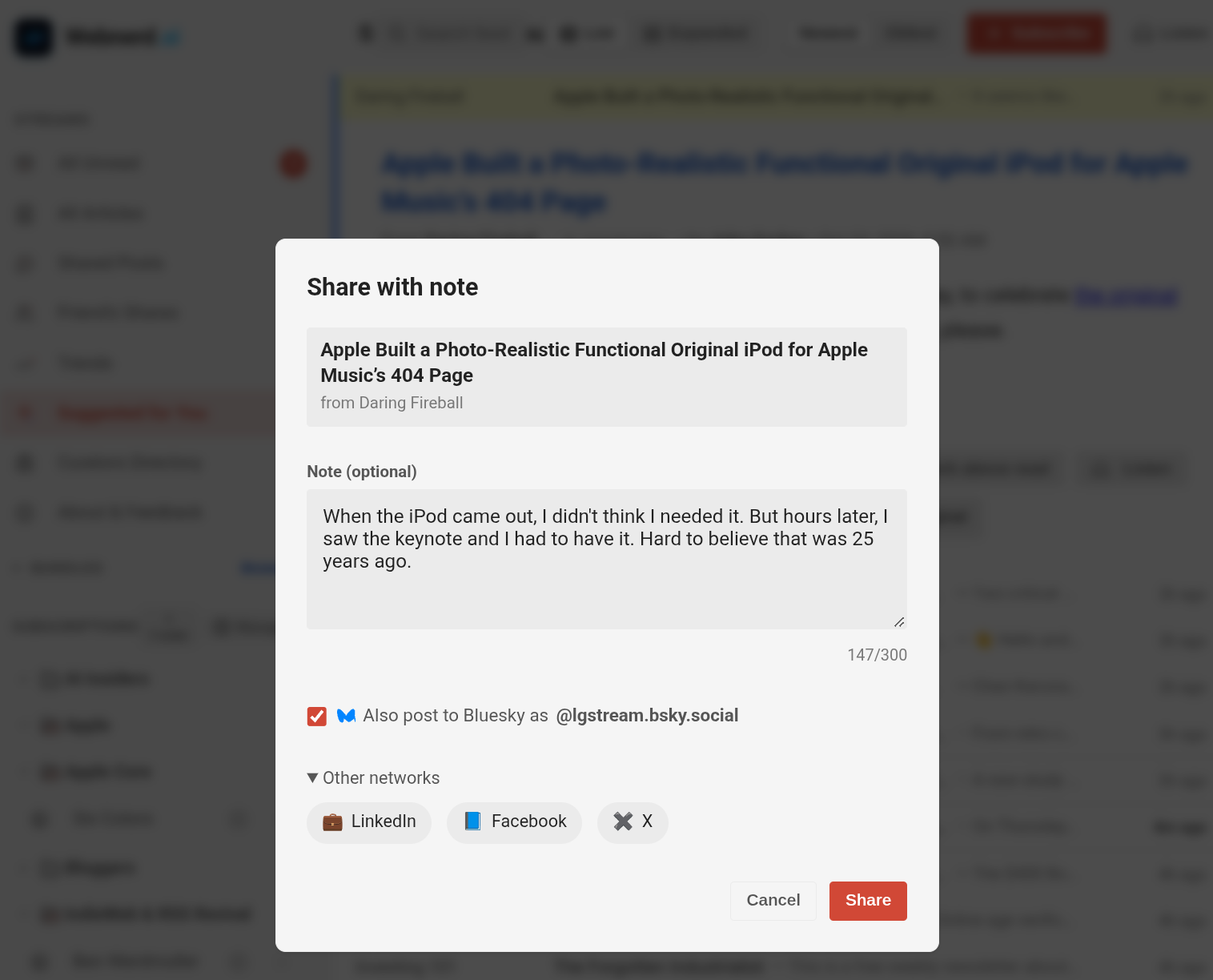
One click publishes the story directly to your Webnerd.ai Shared Items, your personal curated stream (like mine at @louis-gray), and its accompanying RSS feed.

The extension is tuned for fast link-blogging while you read, including:

  • Auto-Saved Quotes & Notes: Highlight any passage on the page before opening the extension and it drops right in as a clean blockquote.
  • Automatic Tracker Stripping: Marketing parameters like utm_*, fbclid, gclid, and newsletter tracking tokens get scrubbed automatically before you share.
  • Simultaneous Bluesky Cards & Standard.site Endorsements: Keep the Bluesky box checked to cross-post straight to your feed (such as my LG Stream) with rich OpenGraph link cards, compressed thumbnails, clickable hashtag facets, and cryptographic site.standard.graph.recommend endorsements via AT Protocol OAuth 2.1.
Screenshot 20261102 075508
You can share articles to Webnerd.ai or downstream, with comment.

Live Feed Radar, Cadence Previews, and One-Click Folders

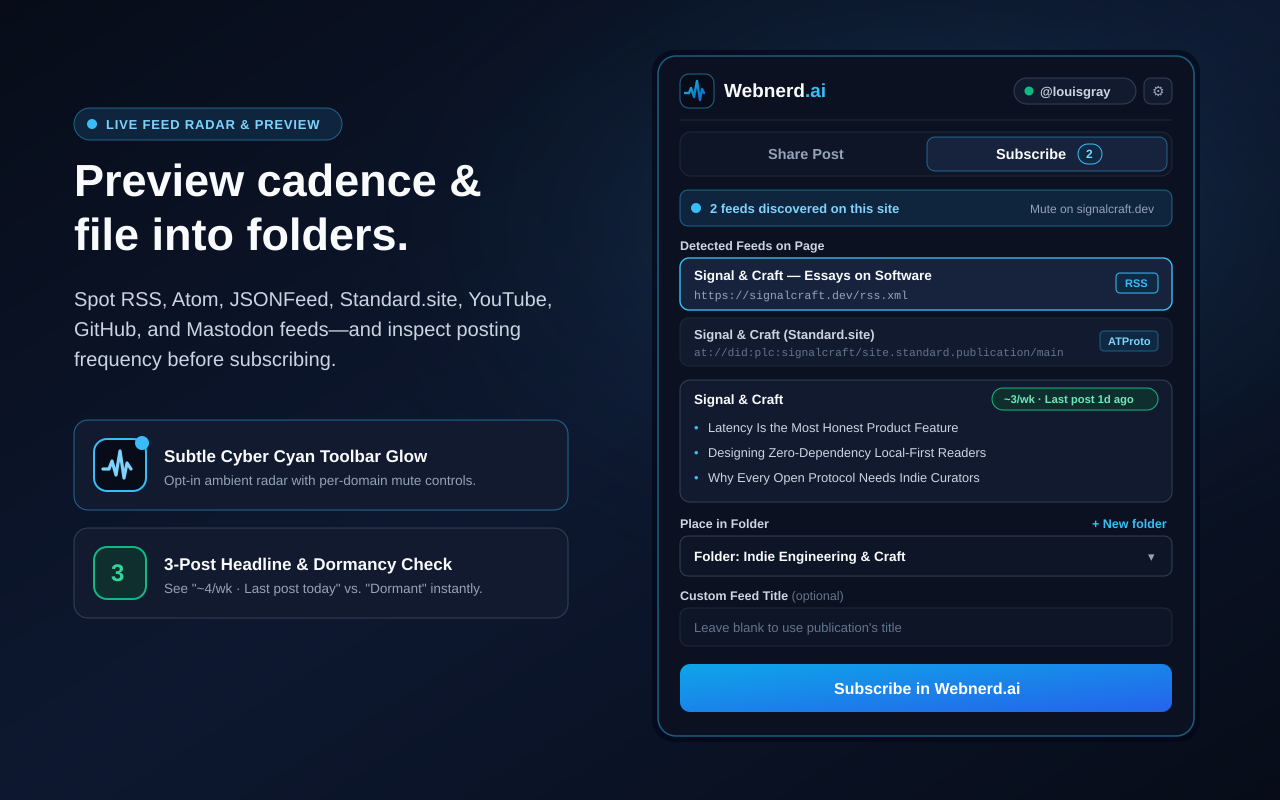
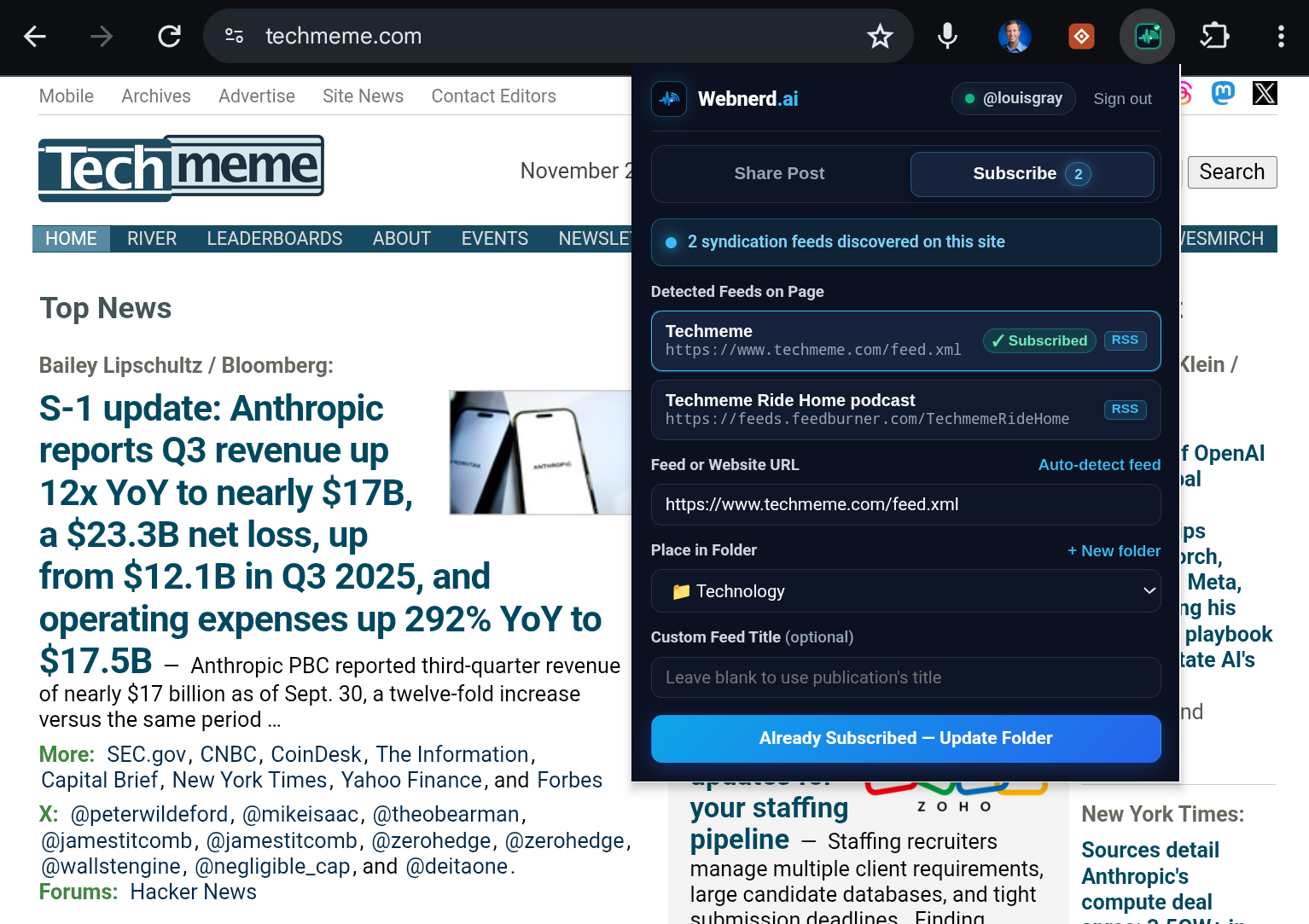
Webnerd.ai Chrome Extension Subscribe tab showing detected RSS and ATProto Standard.site feeds, a 3-post cadence preview, and folder selection
Spot hidden feeds with an optional glow, check the posting cadence, and add as you go.

Modern browsers stripped the orange RSS icon out of the address bar years ago, indicating millions of readers that feeds died when they were actually hiding in plain sight. Turn on the extension's opt-in Toolbar Glow  and the toolbar icon gently illuminates whenever a page publishes RSS, Atom, JSONFeed, or AT Protocol Standard.site publications -- including subscribable channels and profiles across Substack, Medium, YouTube, GitHub, Mastodon, Bluesky, and Reddit.

And if you are worried you're going to subscribe to a site that posts way too often, you can previews a feed's latest three headlines alongside an instant cadence check, so you know right away if a blog is active. From there, file the writer directly into any of your existing Webnerd.ai folders or spin up a new folder inline.

Right-Click Quick Share and Privacy-First Permissions

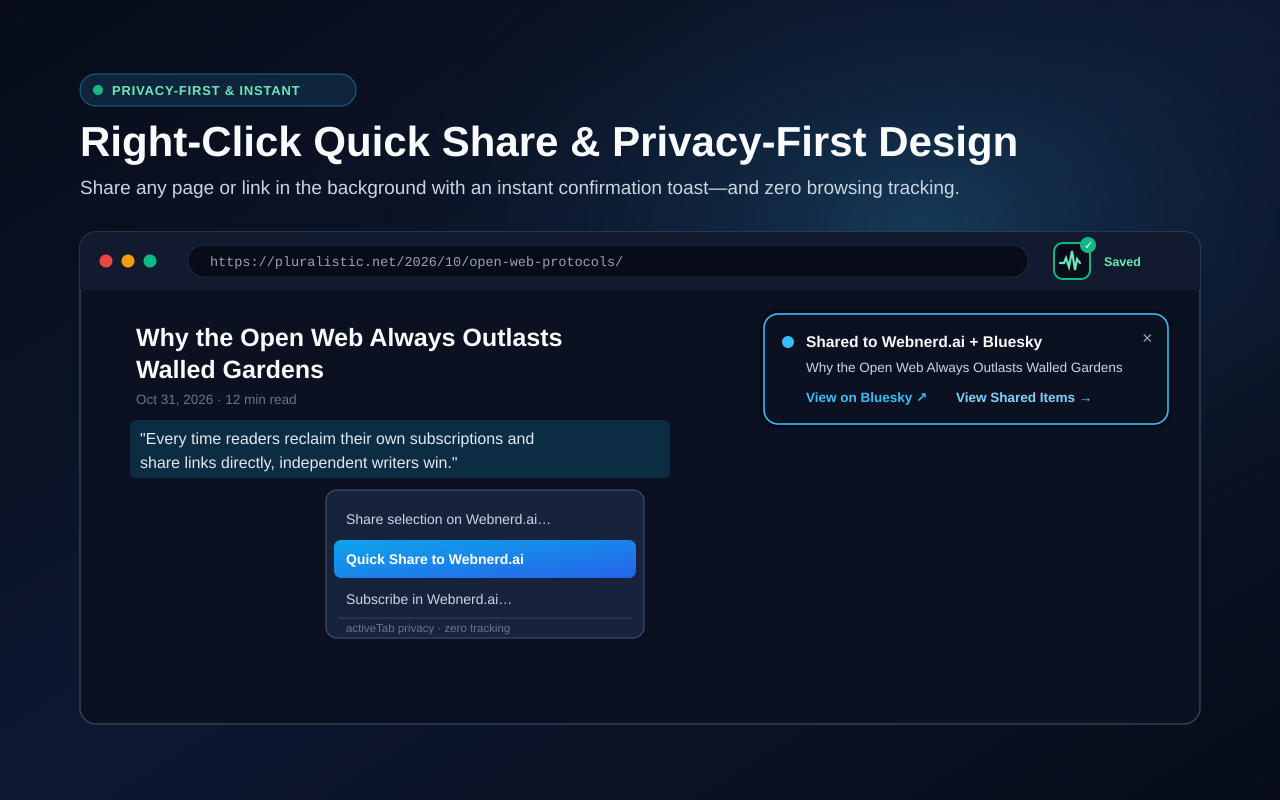
Browser view showing right-click Quick Share to Webnerd.ai context menu, activeTab zero-tracking notice, and on-page Shared to Webnerd.ai + Bluesky toast
Right-click any page, quote, or link to Quick Share in the background with zero browsing tracking.

When you're moving fast, right-click any page, highlighted quote, or outbound link and hit Quick Share to Webnerd.ai. It publishes in the background and pops a clean confirmation toast in the corner of the page with direct links to view your post on Bluesky or in Shared Items.

Just as important is what the extension refuses to do. Too many browser add-ons demand blanket access to read every page you visit around the clock. I couldn't care less about your browsing history. Out of the box, Webnerd.ai runs on minimal activeTab permissions -- zero background tracking of your browsing activity -- only inspecting the current tab when you click the icon, tap the hotkey, or trigger the context menu (unless you explicitly opt into the ambient Feed Radar glow).

install Webnerd.ai Share & Subscribe from the Chrome Web Store, pin the pulse icon to your toolbar, and tap 1-Click Pair over at webnerd.ai/extension to connect your existing Webnerd.ai session. Give it a spin on your open tabs today and ping me on Bluesky with what you want to see next -- the native Android app is up next.

Disclosures, per always: I work at Google and use Gemini and Antigravity tools a lot. I built Webnerd.ai, its Chrome Extension, and this blog's CMS with Antigravity's help. Nobody at Google reviews my posts, ever.
November 01, 2026

November 01, 2026 · 3 MIN READ · BY LOUIS GRAY

Human Curation from the Webnerd.ai Stream: v1

Human Curation from the Webnerd.ai Stream: v1

Curating and sharing the week's sharpest open-web stories on Webnerd.ai [Image via Gemini]
Even in an AI world, the human filter provides value. [Image via Gemini]

Signal From the Stream: Looking Back at My Week on Webnerd.ai

The web has always been about discovery and sharing. Whether it was from blogrolls or a bullet list item of links on our blogs, we have acted as curators, showing our audiences what we found valuable, and inherently filtering out the noise. In the peak of Web 2.0 experimentation with classic RSS, I could add an item to Delicious and it would flow through Friendfeed to Twitter, or I could share an item I found in Google Reader and have it show up downstream in Buzz. What a time.

Building one-click sharing directly into Webnerd.ai brought that muscle memory back. Every story I flag lands on my public shared page, syndicates to LG Stream on Bluesky, and publishes its own dedicated RSS feed anyone can subscribe to in their reader of choice. In the meantime, old school bloggers like Dave Winer have continuously posted links to share the best of the web on their domain. I respect it. I used to do a better job of highlighting individual blogs, so let's bring that muscle memory back too.

It seems wacky to think Anthropic's IPO filing was just this week. CNBC (via Techmeme) highlighted the company's more than

31 billion in cash and short-term investments, while Timothy B. Lee said its business was surprisingly strong. Latent Space highlighted how Anthropic uses Claude itself, and The Verge focused on how Anthropic can keep Wall Street pressure at bay.

But the week wasn't by any means totally bullish. Like many other companies, Microsoft is continuing to optimize spending by reducing headcount, offering voluntary buyouts to 60,000 employees. Tom Warren and Azeem Azhar at Exponential View connected the dots plainly: when capital spending continues to accelerate, payroll cuts make room for machines. Meanwhile, long time Google watcher John Battelle put a rattled Friday market selloff in long-term Silicon Valley perspective.

Beyond the money line, Sean Goedecke published a pair of excellent posts, arguing that getting good at AI takes deliberate practice, and reminding developers that you can just ask AI to do things when agency becomes your bottleneck. Go subscribe to Sean right now.

That builder energy showed up across the product beat too, from Simon Willison testing webframe as a headless browser sandbox, to Google shipping Gemini 4 Carbon and Genie 4, pricing the Google Xreal Aura glasses at

,099, and Waymo tapping Toyota's bZ4X for Tokyo robotaxis. Yes, I work at Google, but we're a big enough company that sometimes seeing this news is like being happy for your cousins. Go team and such.

Like I said last night, AI is impacting just about everything, and humans need to adjust. Alex Kantrowitz at Big Technology captured burned-out security teams enduring "Black October" as AI uncovers software flaws faster than defenders can patch, and Molly White traced why a $6.4 billion Binance heist pointed straight back to North Korea. Add Reddit forcing everyone to log in just to read human answers, and the open web lost another front porch. Algorithms optimize for lock-in, not discovery. Curating links by hand, and tapping share in Webnerd.ai so good writing travels further, is a great way for us to help discovery continue.

Disclosures per always: I work at Google. No doubt some of the companies mentioned here are partners, competitors or customers. Don't interpret my interest as being filtered with that lens. I built Webnerd.ai (and have no plans to monetize it).

October 29, 2026

October 29, 2026 · 7 MIN READ · BY LOUIS GRAY

Webnerd.ai Levels Up with AT Protocol, Newsletters, Audio and more

Webnerd.ai Levels Up with AT Protocol, Newsletters, Audio and more

Webnerd.ai

When I debuted Webnerd.ai last weekend, the goal was pretty straightforward: bring back the fast, high-signal, human-curated morning reading ritual I loved in the heyday of classic RSS, updated for how the open web actually works in 2026. But just as much as I've enjoyed returning to that routine,  I've appreciated steering the roadmap with Antigravity. A decade plus ago, I'd point to companies that blogged weekly with their updates and bug fixes as leaders in their space, communicating to readers what was new. Now, I can make multiple updates daily, or make fixes in minutes myself -- and have even debuted a release notes section you can subscribe to from right within the app. It's an RSS inception, basically.

Over the last few weeks of living inside Webnerd.ai whenever possible, curating my shared stream and pushing links out to LG Stream on Bluesky, every "I wish it did this" or "I wonder if it could..." moment has turned into working code rapidly. Sean Goedecke, whose blog has rapidly become one of my favorites of 2026, published a piece today titled "You can just ask AI to do things", and honestly, there is no better summary of the world we live in now. If you can think it, you can build it.

Because things have moved fast since the weekend, here is a quick highlight reel of new features in Webnerd.ai right now.

First-Class Open Identity: AT Protocol OAuth, PDS Sync, and Standard.site

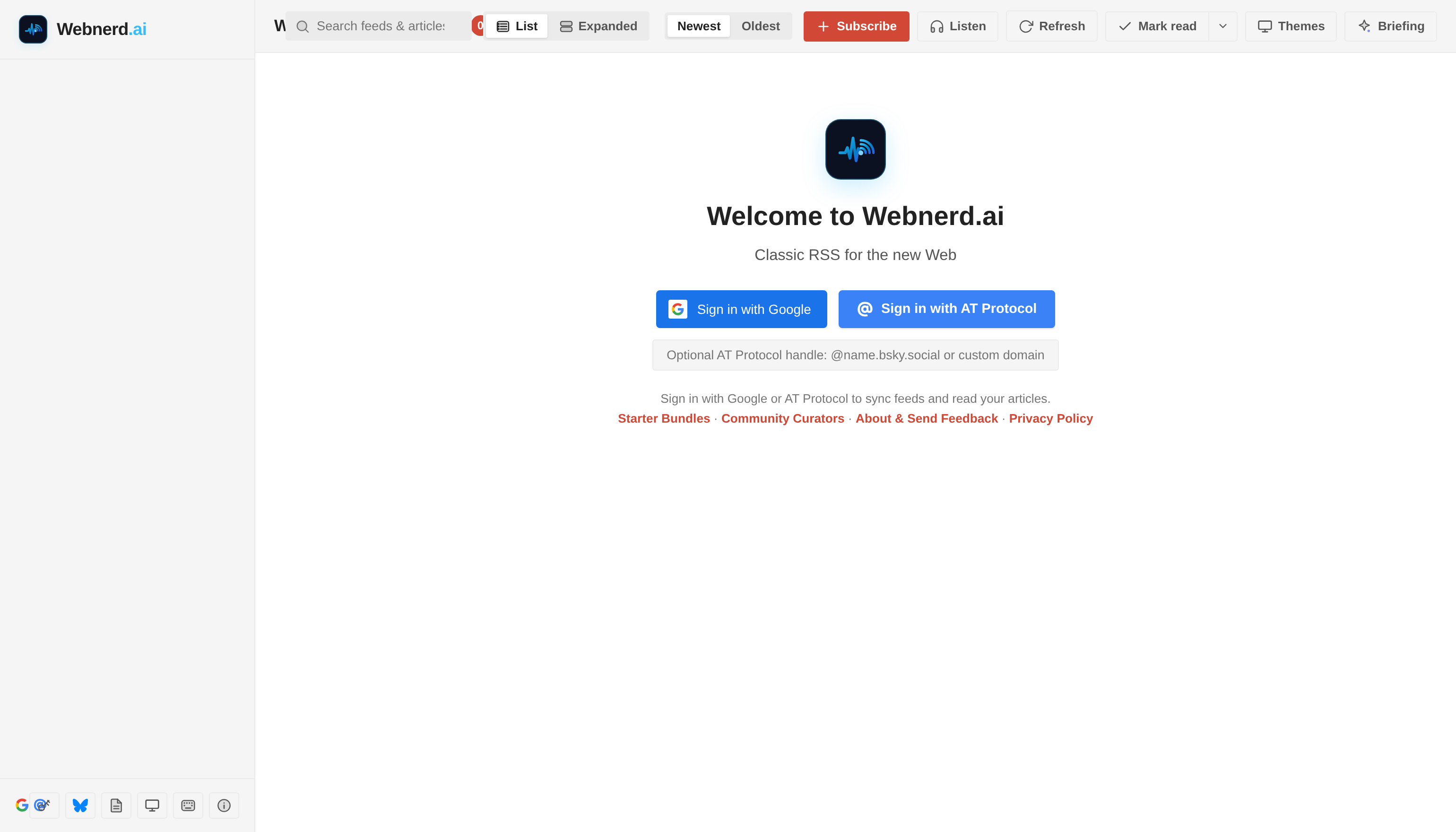
If you're going to build a home for the open web, you shouldn't lock people's reading identity behind a single provider. Current employer aside, I started with Google sign-in because that's what I knew. But in fast response to public request,  Sign in with Google now sits side-by-side with native Sign in with AT Protocol. Whether you use a bsky.social address or verify with your own domain like louisgray.com, you can jump straight in without extra modals or app-password gymnastics.

Refreshed Webnerd.ai welcome screen with 1-click Google Sign-In alongside native AT Protocol login
One click with Google, or bring your decentralized AT Protocol ID.

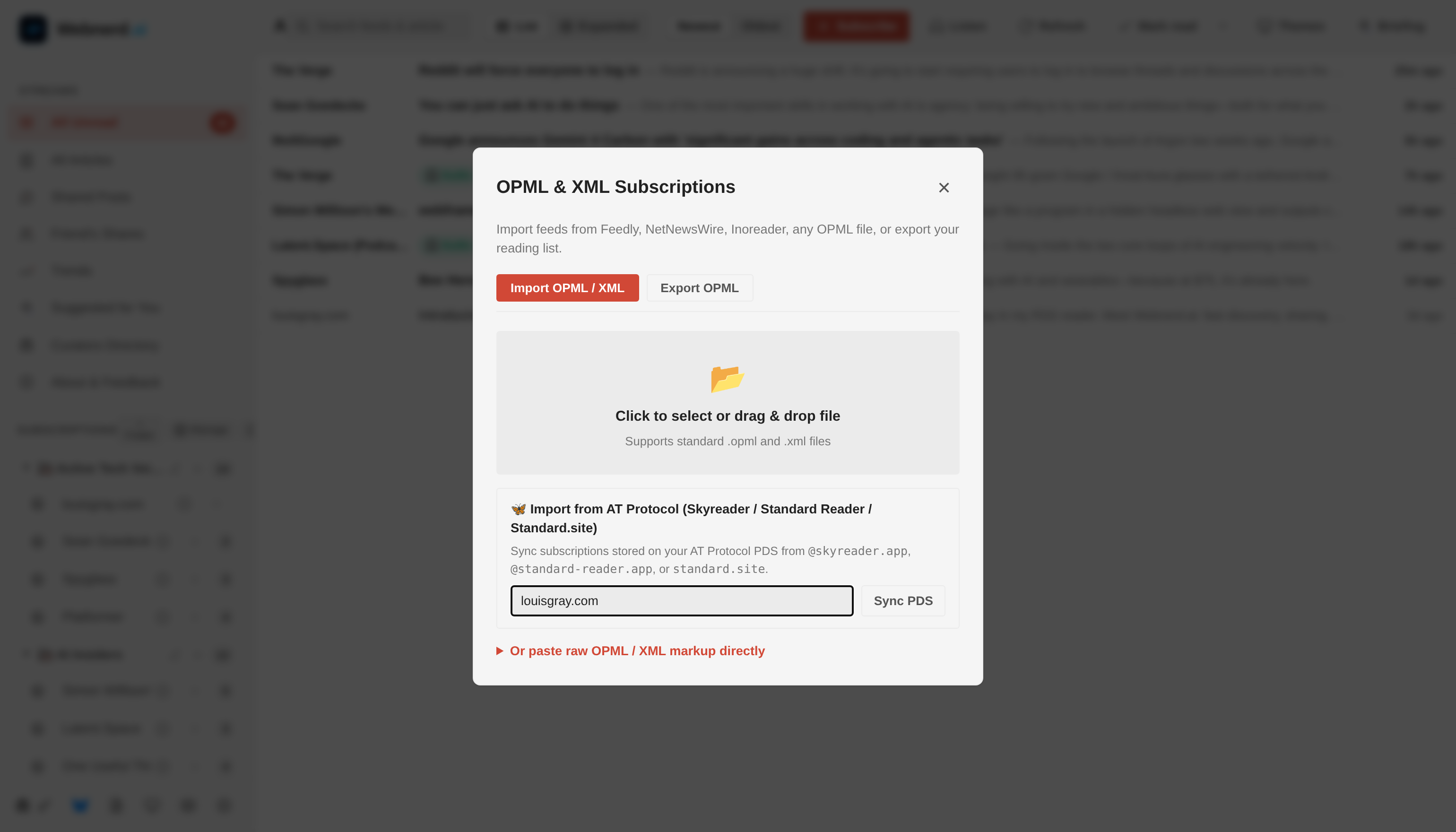
Even better, your decentralized identity isn't just a login badge, it carries your reading graph. Inside the OPML & Subscriptions hub, you can still drag and drop a classic XML file, or you can hit Sync PDS to pull decentralized subscription lists straight from your Personal Data Server across tools like Skyreader, Standard Reader, and Standard.site. Think about that for a second. Am I an expert on those? No. Could I work with Antigravity to build support here? Yes. So I did.

OPML & XML Subscriptions modal showing traditional OPML import/export alongside 1-click AT Protocol PDS sync
Classic OPML portability meets one-click AT Protocol PDS subscription sync.

Webnerd.ai also now speaks native at:// and standard:domain publications directly in the Subscribe dialog, and when you share a story from a Standard.site publication, Webnerd automatically writes a cryptographic site.standard.graph.recommend endorsement record to your PDS (and cleans it up if you unshare). Open standards work best when apps actually interoperate instead of just talking about it or seeing an acronymn as a checkbox.

Rescuing Newsletters from Inbox Purgatory

As much as I appreciate newsletter platforms like Substack and Beehiiv quietly keeping RSS alive under the hood, plenty of great writers still send email-only newsletters, and in my view, an email inbox sandwiched between flight confirmations, calendar invites, and shipping receipts is not the best place to read long-form writing.

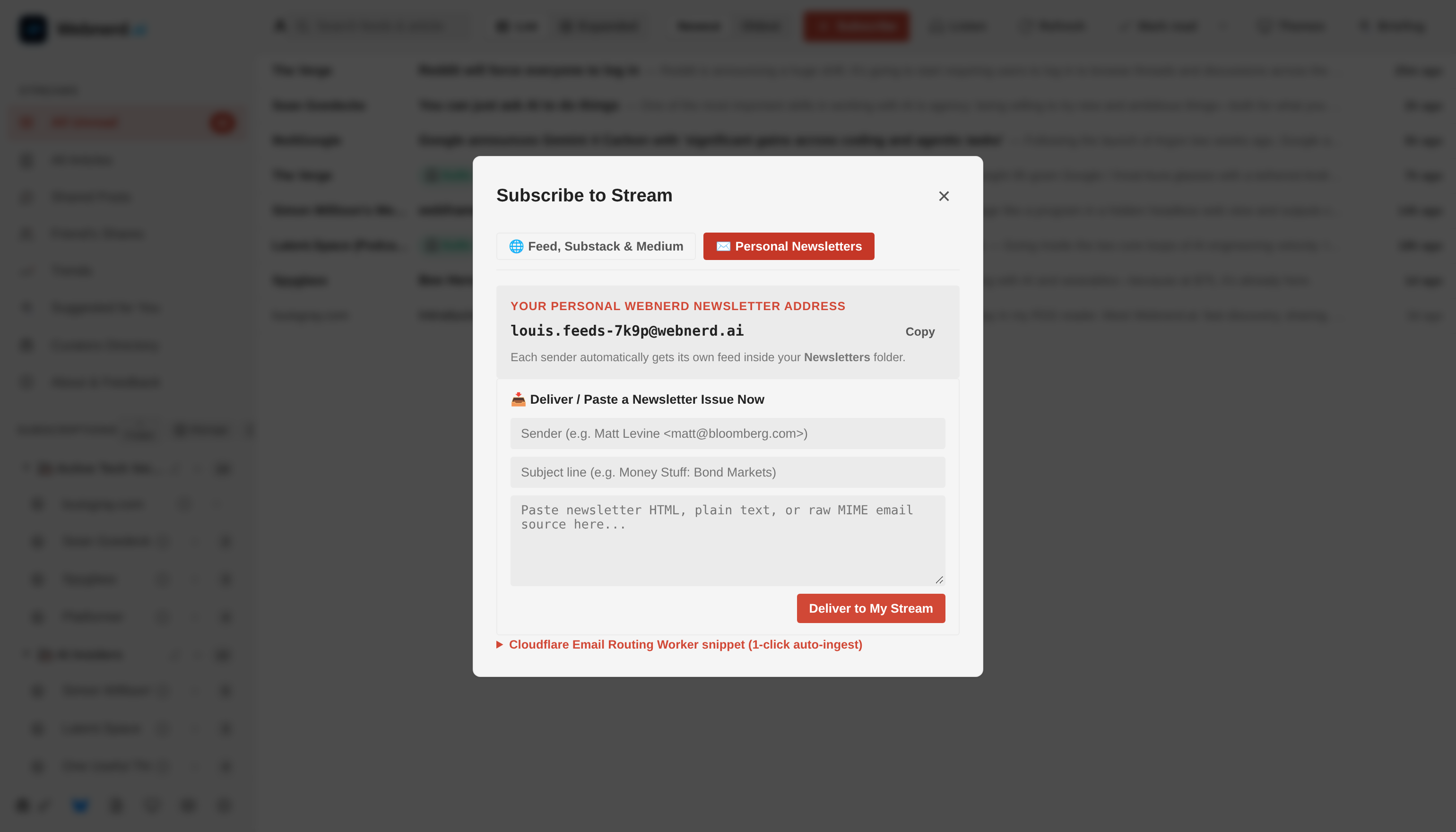
Subscribe to Stream modal open on the Personal Newsletters tab showing a dedicated @webnerd.ai inbox address
Every account now gets a personal @webnerd.ai newsletter address that turns email dispatches into clean RSS feeds.

You can now open + Subscribe and switch to the new Personal Newsletters tab, and you'll find your own dedicated @webnerd.ai address. Use it when signing up for newsletters (or forward existing ones via Gmail filters or the included one-click Cloudflare Email Routing snippet), and Webnerd automatically spins up a separate, clean feed for each sender inside your Newsletters folder. Newsletters belong alongside the rest of your reading, not competing with work email.

Listening to Your Stream & Real Power-Reader Triage

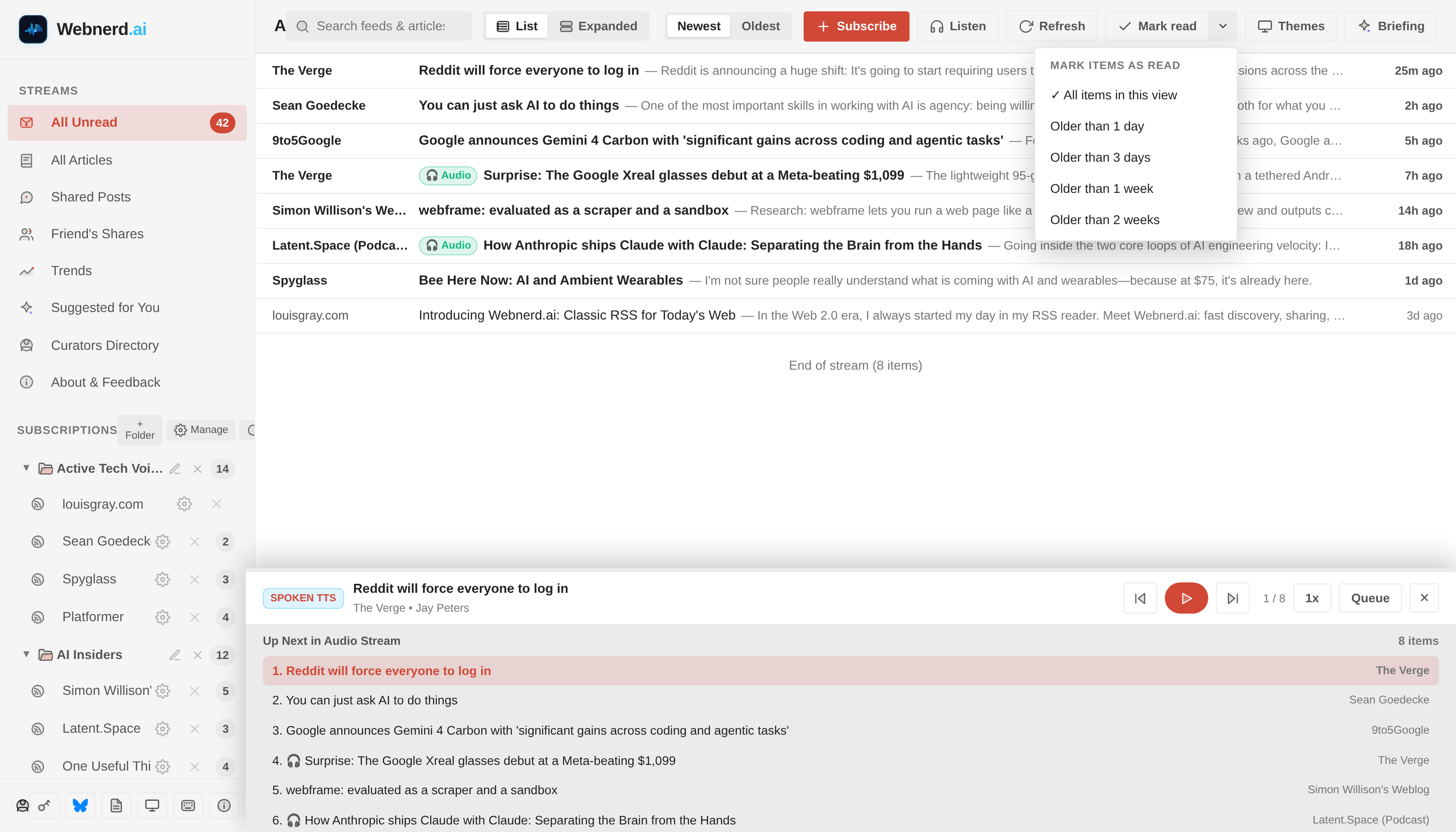
Sometimes even my eyes need a break from screens, or I want to catch up on my feeds while walking the dog. Hitting the new Listen button in the top bar (or on any individual post) launches a docked audio player right at the bottom of your stream.

Signed-in Webnerd.ai power-reader view showing the top toolbar, granular Mark-as-Read menu, and docked Audio/TTS Stream Player
Listening through my morning feeds with the docked Audio & Spoken TTS queue.

If a feed item includes a native podcast or audio enclosure (flagged with an Audio badge), Webnerd plays the original audio directly; if it's a written post, it seamlessly reads the article aloud via a spoken Text-to-Speech queue with 1x to 2x playback speeds, an Up Next drawer, and automatic mark-as-read as each story finishes.

And because anyone subscribing to 100+ feeds may eventually face inbox-style bankruptcy, I've gone deep on power-reader ergonomics:

  • Granular Mark-as-Read: A new split dropdown lets you clear items Older than 1 day, 3 days, 1 week, or 2 weeks, or Mark above as read as you scroll — so you can declare peace on Tuesday's news while keeping this morning's stories untouched.
  • Folder & Subscription Management: You can now add, rename, drag-and-drop, delete, and merge folders inline or from a dedicated Manage Subscriptions view, toggle Newest / Oldest sort order, and pull Full Text readability views on stub feeds that only publish a sentence or two in XML.
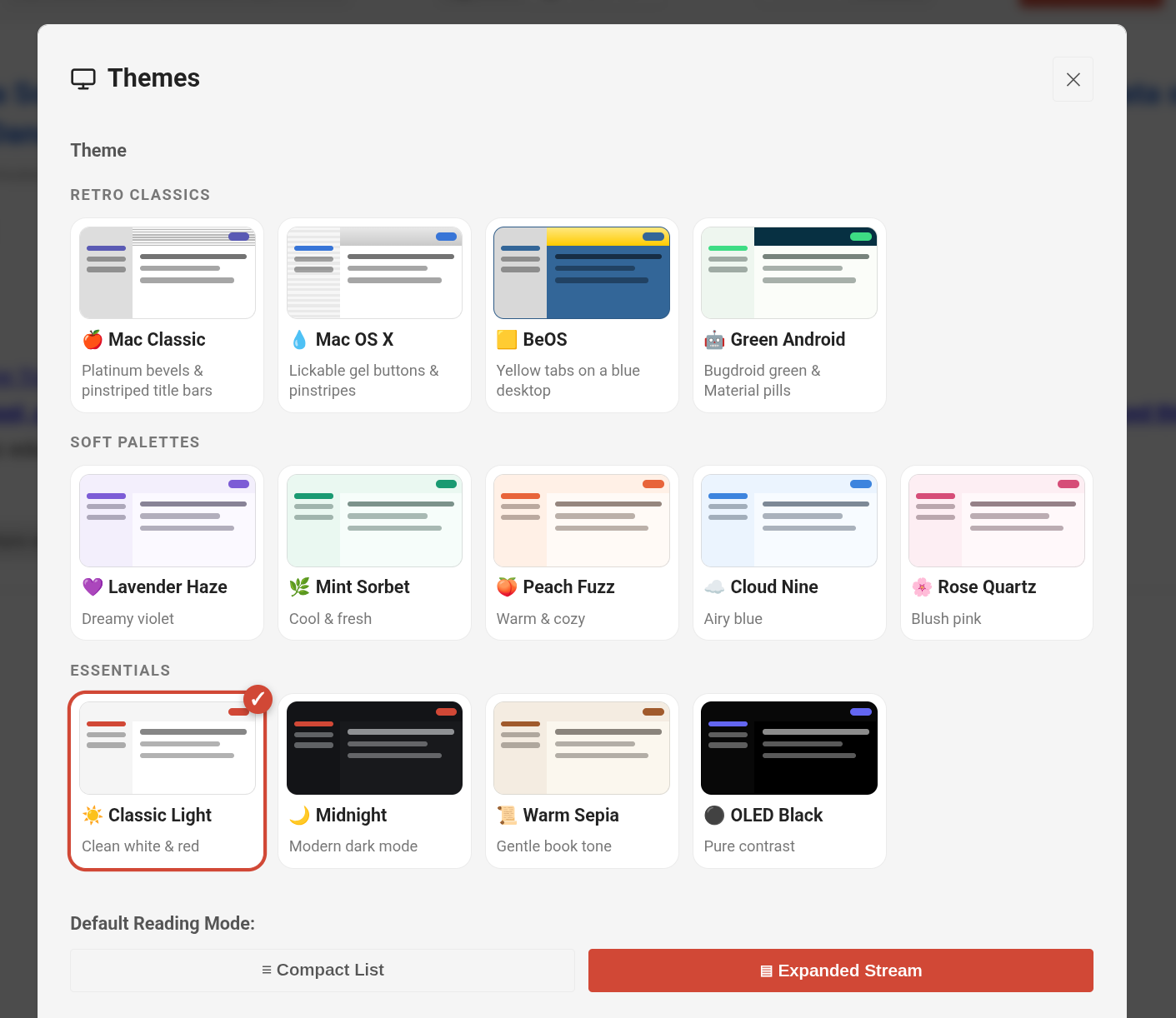
  • More Classic Themes: Alongside Cloud Nine, Warm Sepia, and OLED Black, desktop nostalgia nerds can also switch into Mac Classic, Mac OS X Aqua, BeOS, and Green Android.

AI on Your Terms — Never Between You and Your Feeds

I wrote earlier this month about how filtertainment eviscerated our informed monoculture. The whole point of an RSS reader is that you choose the sources, and nobody hides a post  because an algorithm decided outrage would keep you scrolling longer.

Where AI does shine in a reader is synthesis on demand — when you explicitly ask for it.

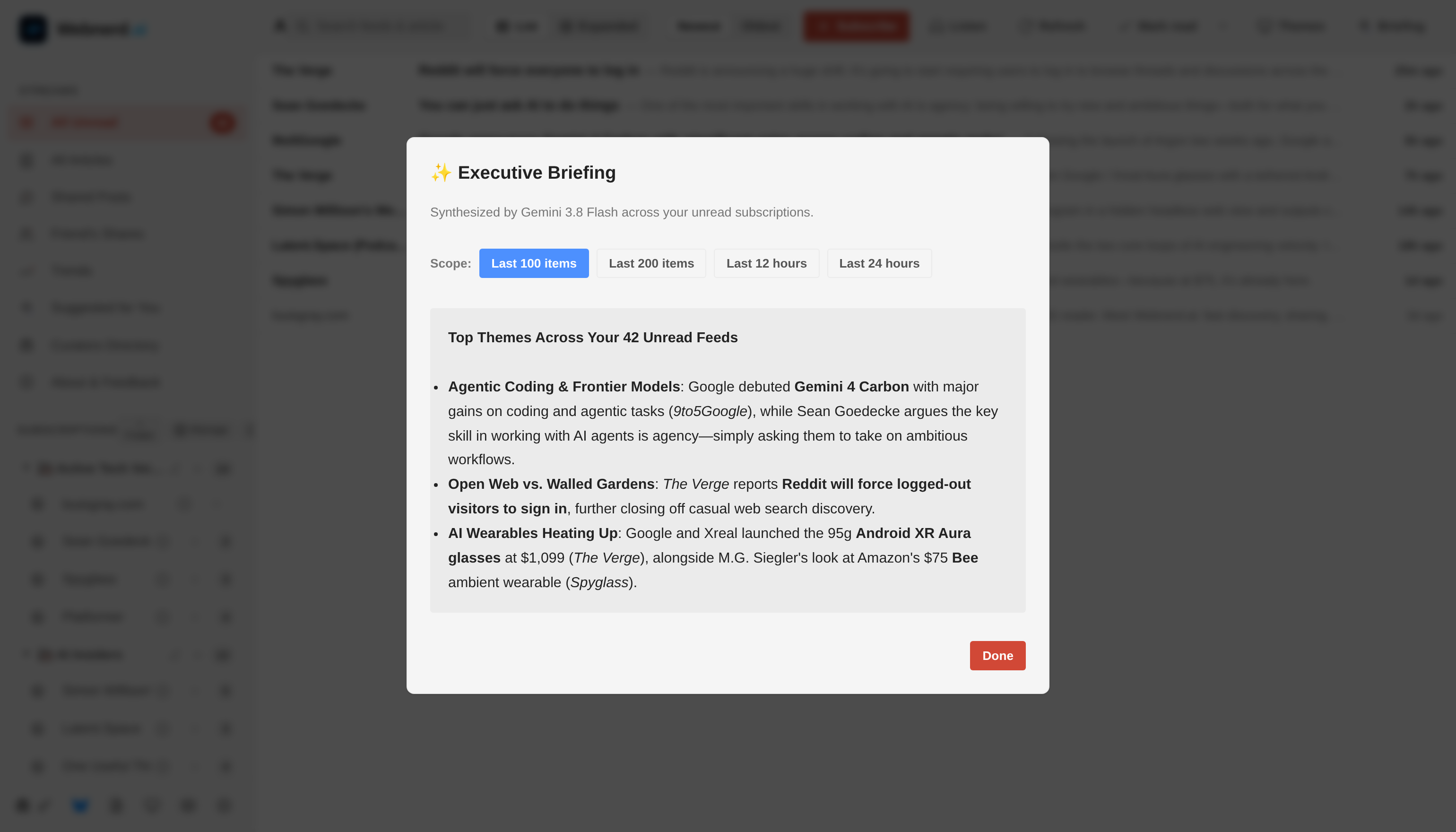
Executive Briefing modal synthesized by Gemini 3.8 Flash across unread feeds
Optional Executive Briefings synthesize what happened across your feeds.

Tap Briefing in the toolbar (or hit B on your keyboard) and Gemini 3.8 Flash synthesizes an executive summary across your unread stream — scoped to your Last 100 items, Last 200 items, Last 12 hours, or Last 24 hours — clustering breaking storylines and citing the exact outlets in your subscriptions. Every expanded card also has an optional one-tap TL;DR button when a 4,000-word essay drops five minutes before your next meeting. AI acts as your research assistant, never your gatekeeper.

Mobile Overhaul, Instant Startup, and Eating Our Own RSS Dogfood

Under the hood, Webnerd.ai now boots through a single-round-trip bootstrap endpoint paired with a local snapshot cache for sub-16ms first-frame paint — so opening the tab feels instantaneous even on spotty mobile Wi-Fi.

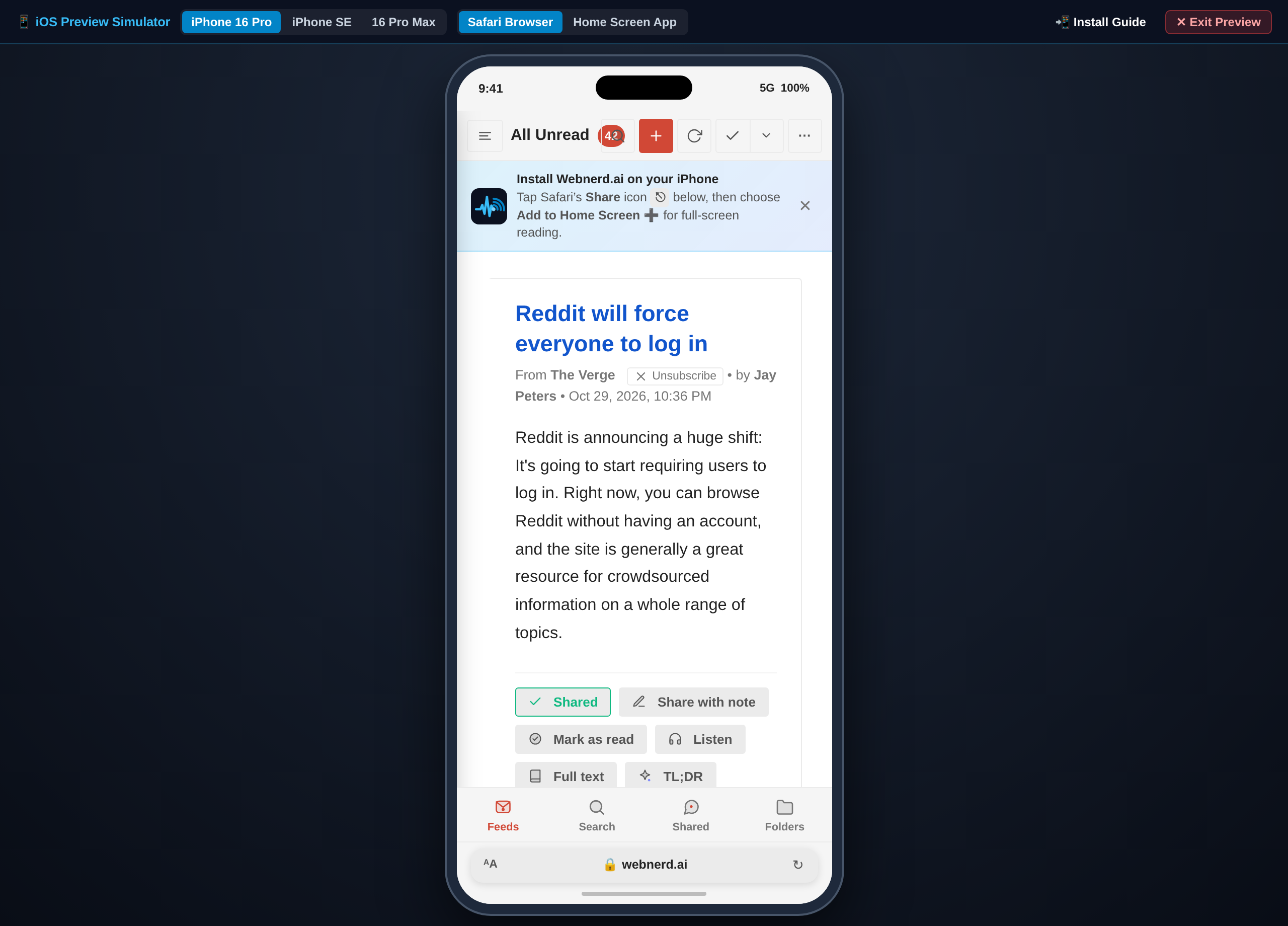
On phones, we replaced cramped desktop menus with a thumb-friendly 4-tab mobile layout (Feeds, Search, Shared, and Folders), edge-swipe gestures, and a guided Add to Home Screen full-screen web app setup on iOS while I continue working on a native Android companion app - coming soon.

Mobile Webnerd.ai iPhone view showing the Add to Home Screen prompt, expanded card actions, and 4-tab bottom navigation
The redesigned four-tab mobile experience and full-screen iPhone web app.

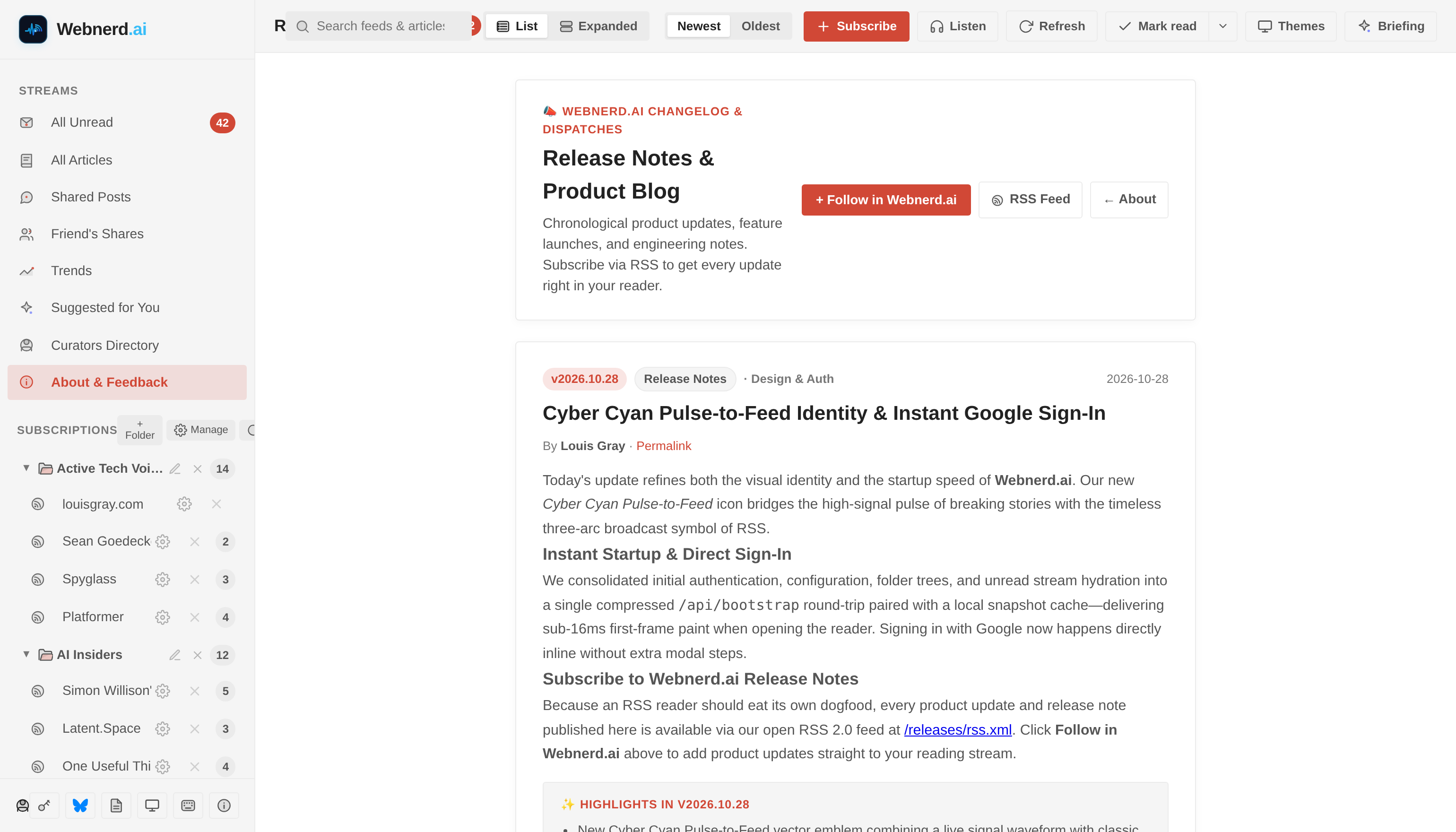
Finally, you can't build an RSS reader and not publish your own changelog via RSS. Webnerd.ai now has an official Release Notes & Product Blog at webnerd.ai/releases, complete with a one-click + Follow in Webnerd.ai button and its own RSS feed at webnerd.ai/releases/rss.xml.

Webnerd.ai Release Notes & Product Blog at /releases with native RSS feed subscription
Eating our own dogfood: Webnerd.ai's product changelog lives at /releases with its own RSS feed.

If you tried Webnerd.ai over the weekend, or haven't yet, take the new audio player, newsletter inbox, or AT Protocol sync for a spin. If something bugs you or you have an idea for what an RSS reader in 2026 ought to do next, ping me on Bluesky — there's a pretty good chance Antigravity and I will have it shipped by the next weekend.

Disclosures, per always: I work at Google and use Gemini and Antigravity tools a lot. I built Webnerd.ai and this blog's CMS with Antigravity's help. Nobody at Google reviews my posts, ever.
October 24, 2026

October 24, 2026 · 5 MIN READ · BY LOUIS GRAY

Introducing Webnerd.ai: Classic RSS for Today's Web

Introducing Webnerd.ai: Classic RSS for Today's Web

Webnerd.aiIn the Web 2.0 era, I always started my day in my RSS reader. A mainstay of this blog at its peak was covering the debuts and new features from many different approaches to staying caught up on friends and the news, not just from Google Reader (RIP), but Feedly, Lazyfeed, Flipboard, TweetDeck, Shyftr, my6sense and too many others to mention.

In the ensuing years, as some of those products have come and gone or evolved, we've also seen that the open web is thriving in new ways. New blogs and countless newsletters on Substack, Beehiiv and Medium mean top voices are publishing incredible work every single day. But I have missed out on that classic RSS reader feeling. So I made my own.

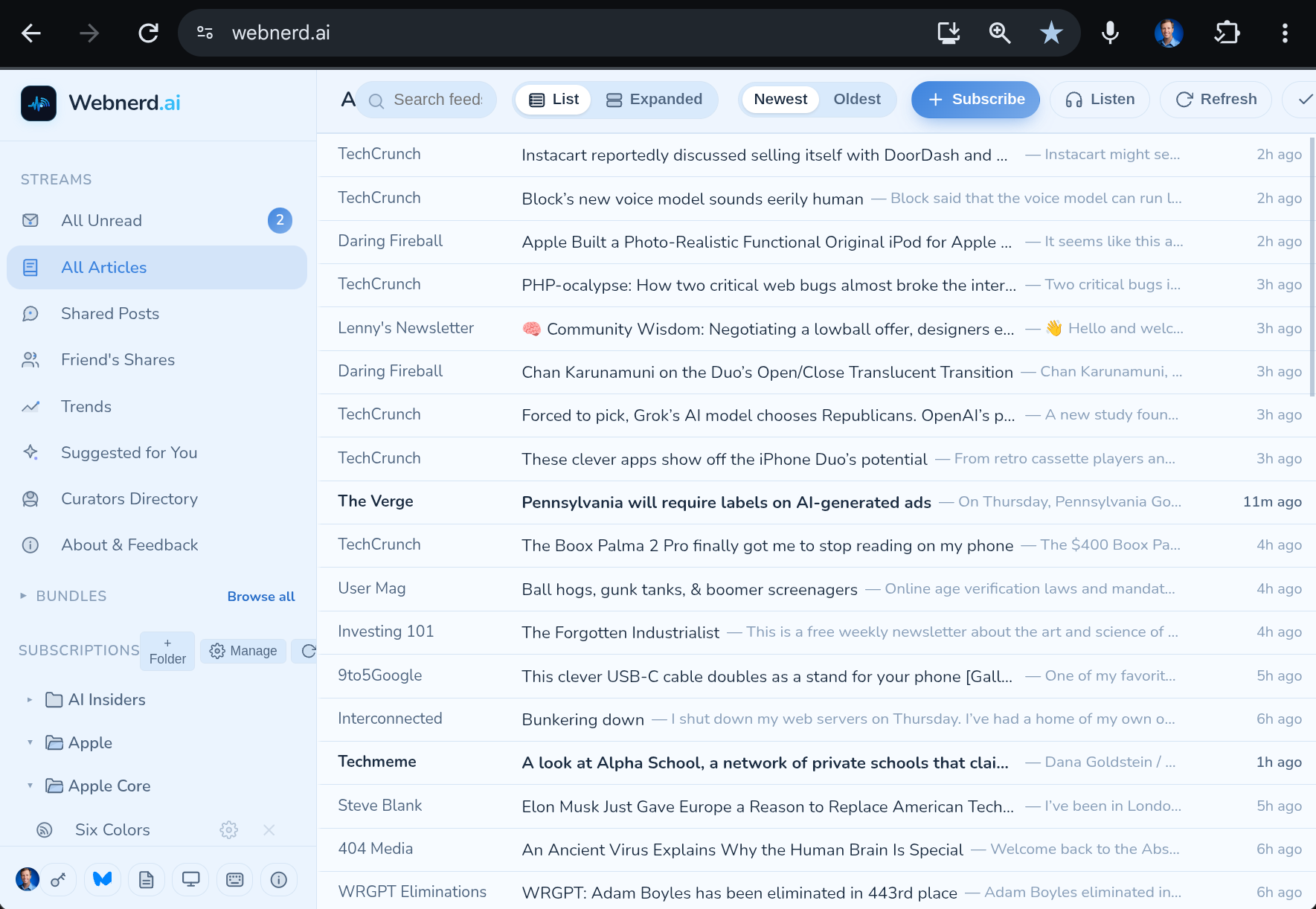
Screenshot_20261024-114435.png
Webnerd.ai -- with the Cloud Nine theme.

With Antigravity, I can now transform my ideas into reality. It's called Webnerd.ai. I've been enjoying it myself for weeks, and I figure it's time to share it with the rest of you. I do not expect millions of users, but for those who love RSS, designed for power readers and sharers, I think you'll like it.

Screenshot_20261024-112745.png
Pick from many themes to browse with color.

For old-school RSS junkies, Webnerd.ai should feel really familiar. It features trends, you can follow other curators, see recommended items, and the basics you would expect, keeping feeds current and alerting you to new posts.

Screenshot_20261024-113818.png

Reading and curating the best of the web on Webnerd.ai.

Webnerd.ai is built in the spirit of the original open web: subscriptions to your favorite sources you trust, simple discovery, and one-click sharing, just like we all used to, including your own shared items, which has its own RSS feed, and even straight to Bluesky -- my preferred space (lacking the toxicity of others), but if you must, Facebook and X work too. I've been sharing as lgstream on Bluesky already, and it works great.

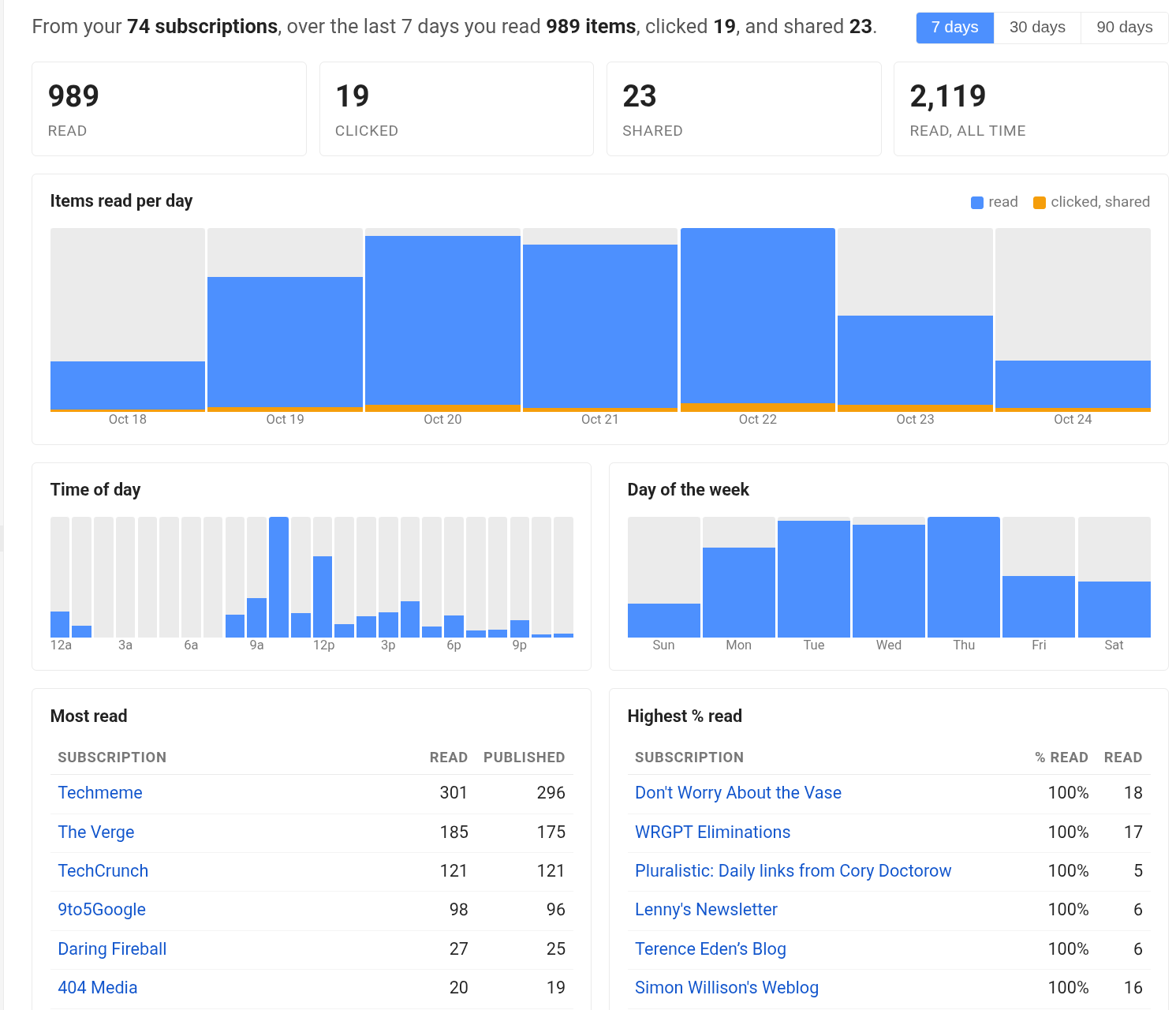
Screenshot_20261024-113228.png
My Webnerd.ai reading stats from the last 7 days

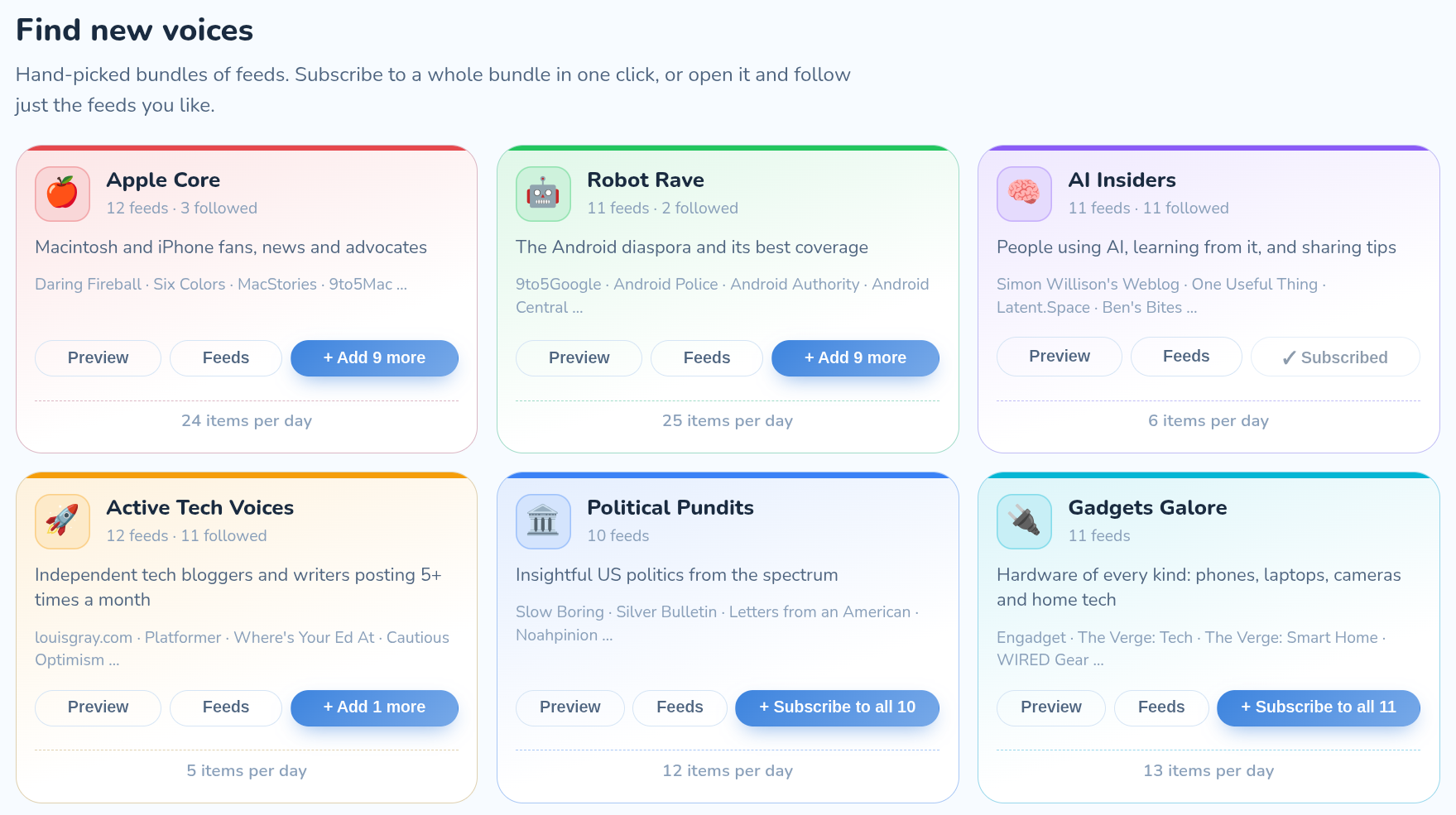
For those of you nerds (like me) who have OPML, bring it and get started. Or just pick from the many curated bundles I've spun up (with Antigravity's help) to start filling your feeds.

Screenshot_20261024-115517.png
Webnerd.ai comes pre-loaded with content. You can preview the feeds and subscribe.

What's in Those Curated Bundles

Every feed in these 12 bundles has been verified for active publishing so you can preview the stream and subscribe with a single click. On day one, here are the 128 voices powering our launch bundles:

To get started, sign in with your Google account at Webnerd.ai, grab a bundle or two, and start reading and sharing. Webnerd.ai works great on desktop, and mobile continues to get better! Android app soon. See you in the feeds, and let me know what you think.

Disclosures, per always: I work at Google and use Gemini and Antigravity tools a lot. I built Webnerd.ai as a fun personal project with Antigravity and Gemini on my Googlebook. Nobody at Google reviews my posts, ever.
January 4, 2018

January 4, 2018 · 7 MIN READ · BY LOUIS GRAY

A Decade of Silos Has Throttled Open Content Distribution

A Decade of Silos Has Throttled Open Content Distribution

The 2018 Social Media Flow is Driven by Content Silos

In the ten-plus years since I started this blog, one of the clearest trends on the Web has been for destination sites to want to control the user session and experience. In parallel, sites focused on aggregating content from external sites or highlighting the best of the web - serving as a filtered pass through, have struggled. Many are gone.

While significant efforts were made during the forging of Web 2.0 to drive open standards and allow for data to flow from one site to another, through RSS, Pubsubhubbub, Atom, XMPP, or whatever your preference, 2018 on the social web is a much more challenging place to write once and publish everywhere.

As I view the publishing space, I often turn to four big challenges that have to be solved for a platform to be a success to both authors and readers:

1. Creation

A platform, be it for photos (Instagram, Flickr, Google Photos, etc.), short updates (Twitter), long form (Medium, Blogger, WordPress, etc.), video (YouTube) or a mishmash of all (Facebook, Google+, etc.), needs to make it easy for the content creator to share what they want, in the form they want, and have the output be what they intended. This is true whether we are talking about desktop or mobile creation.

2. Distribution

Once the content is created, it has to be sent somewhere. If you write a post and hit publish, how do people find it? Is it sent to a third party network where they are hanging out? Is it sent by email? Do they get a notification on their phone? Does it flow down their timeline, as they have new items to consume? Or is it just another flat file, waiting to be indexed by Google and other search engines?


3. Discovery

Readers want to find new content. They seek relevance, freshness, and community. This mirrors the three pillars of social sites I highlighted back in 2009, and echoes that readers want intriguing views that mirror their own preferences. Like I'd predicted in 2006, the Web has become a divided place, where we all flock to our groups of like minded people, and disavow opposing views, but we still are eager to find more who reinforce our position. We still crave new friends and stories and we want to find them quickly.

So how good a job do these apps and sites do of surfacing new people and ideas? Do they have an aggregated site with highlights and popular people or posts? Is there a place to find more obscure viewpoints and new voices?

4. Consumption

Since the smartphone revolution, kicked off by Blackberry and the iPhone and now led by Android, more people are constantly connected and reading news from their mobile devices. In many countries, the mobile device is the only window to the Web. Does the content flow well for mobile consumption and new ways to navigate from screen to screen, update to update? Or is it best suited for a leanback tablet experience or for the desktop?

What typically happens with content platforms is the content fills the available container. Twitter is a clear 140 or 280 characters. Social hubs like Facebook and Google+ favor large photos and a short introduction. Instagram is all about the photo with a small description. Blogger and WordPress and Medium are as long as you want to go. One has to consider if users and screens keep up.

2009's promise of sharing everywhere wasn't meant to be.

We've Come a Long Way from Aggregating Streams and Sharing the Web

As content started to be created in a wide array of social sites, aggregation services like FriendFeed helped bring people's streams together. Bookmark services like Delicious helped people save the highlights from the Web and amplify the world's favorites. Users voted up posts from Digg and passed them along with StumbleUpon. The most voracious consumers lived in Google Reader and didn't miss a single post from the RSS feeds they were subscribed to.

It was too good to last.

The largest social platforms were not content in simply being links to external sites. Facebook focused more on original content shared on the platform, with less priority given to send traffic off site. Google Reader shut down, and while Feedly and others stepped up, the world of RSS never recovered. Delicious died. Digg is a shadow of itself. FriendFeed was obliterated. LinkRiver closed. Socialmedian closed.

In the wake of all these gateways' demise, taking content from the open Web and getting it in front of new viewers is more challenging. While I've always said you need to be where the users are and can't force them to come to you, what could be automated is now requiring manual intervention at practically every step.

Just What Am I Talking About?

The alpha and omega, yin and yang of social outlets (for text, anyway) are Facebook and Twitter. Facebook is much bigger and much more profitable, but don't get distracted. People creating content for the Web also need to make sure that content fares well downstream on Facebook and Twitter. You can write it for the open Web, but you then have to take explicit action to share the content downstream - or set up automation to either site, usually backed by RSS. At that point, whether you get discovered or not is up to each site's algorithm, which has leaned more in favor of implied interest rather than chronology of late - meaning you can see viral content from hours or days ago before you get the newest stuff.

On a mobile phone, notifications are the holy grail of getting someone's attention. (See: Life by Numbers and Notifications from 2014) It's not uncommon to get notified when someone tweets, but it's very uncommon to ask for a notification when a site makes a post.

In parallel, the feedback loop from such networks, as well as Instagram or others, is near instant and acts as an incentive for the author to initiate their content on that silo natively. Post a 20-tweet storm to Twitter, and immediately start seeing those likes and retweets roll in. Post a story to Facebook and wait for the Likes and comments. Post a news story or a blog post, and ... wait. Wait for visitors in Google Analytics? Wait for the post to be shared downstream? Wait for the story to be indexed in Google News and search?

The elimination of Google Reader, FriendFeed, and Digg as amplifiers of Web content, alongside the attention absorption by Facebook and Twitter makes it harder for Web authors to get visibility - and they they aren't dropping their content into the real time stream.

So What Does the New Flow Look Like?


In 2009, it seemed pretty easy to me. Post on the blog. RSS would take it to FriendFeed and Google Reader. FriendFeed would post to Twitter. Twitter would post to Facebook. Then I'd run around and answer comments wherever they were distributed. (More on distributed conversations from 2009)

Now, I can still post on the blog. And the RSS link is the same. I even get the small bump of engagement on Google+ from the blog's page automatically adding my content there. But then, to make sure I cover all my bases, I then make another share of the same content to Medium, for those who love their site, and I've even found good engagement on LinkedIn, by making a third post of the same content on their channel. It's a different audience, but, if on topic, they share and engage.

So that's three posts. Meanwhile, I still have to share the story on Facebook and Twitter separately, hoping that someone will break their consumption flow and engage on my content downstream.

It feels like more work to get less return. And yes, I recognize that some may not miss FriendFeed because they never used it. Maybe others think Digg got replaced outright by Reddit, and gains similar traffic. Others prefer Hacker News. So aggregators do exist, obviously, but hubs aimed at surfacing new content, as opposed to highlight content on the site and keeping readers there, have declined.

To properly make the Web as desirable and viable a platform for publishing, we need to work together to fix the distribution and discovery gaps, make content fantastic on mobile for creation and consumption, and allow for engagement that is as simple as a Like. I applaud (there's the joke) Medium's approach to reward users with claps, for at least they're trying something. We should all be trying.

Disclosures: Yes, I work at Google. Sometimes, I help the Blogger team. I used to work on Google+ and have many friends on those teams still. I miss Google Reader every day. FriendFeed too.

January 6, 2014

January 6, 2014 · 2 MIN READ · BY LOUIS GRAY

Feedshare.net Debuts for OPML, RSS Feed Swapping

Feedshare.net Debuts for OPML, RSS Feed Swapping

Update: The previous version of this post said Brent Simmons, author of NetNewsWire, was also the author of FeedShare.net. Turns out I was very wrong! Arne Holzenburg was inspired by Brent's posts and did the work himself. Sorry about that, Arne and Brent!

While many people now get their news from social channels - making the feed subscription model seem rather quaint in a world surrounded by microupdates, RSS still plays an important role for those of us who never want to miss a single post.

One of the earliest tinkerers in RSS and the main coder behind the application which first got me addicted to feeds (See: RSS A Demanding Mistress), Brent Simmons, pointed to a retro OPML sharing service at Feedshare.net on to the Web, letting you share your news sources and find new sites through those posted from your peers. If you're starting to have flashbacks to 2006's Share Your OPML and 2008's Toluu (which debuted here), then that's because Feedshare.net performs essentially the same functionality - but unlike those other two sites, it actually still works here in 2014.

Share your OPML file on Feedshare.net

Arne Holzenburg, a frequent reader of Brent Simmons, like me, was inspired by Simmons' post Saturday that he lamented the lack of an OPML sharing service. Arne took the weekend and built Feedshare. You can find mine is at the expected URL: http://feedshare.net/louisgray/. You can walk through the list, get a direct link to the subscribed link, or hit Favorite to add it to your RSS reader of choice. Mine is Feedly.

Just the Feeds and Nothing but the Feeds.

To add your own OPML file to Feedshare.net, find your list of feeds in whatever RSS reader you use, and find where to export. Most make it pretty easy, which is one of the best things about supporting standards. Easy export, easy import. Take that OPML file and add it to Feedshare, and then tell people where they can find it. And maybe, if you tell enough people, your list will end up on Feedshare's popular page, which already has ten top participants.

That's it! You know what to do. Check out Feedshare.net, and if you've uploaded your OPML, share the link to your feeds and show me what sites I've been missing.

September 5, 2013

September 5, 2013 · 3 MIN READ · BY LOUIS GRAY

Shared Items Might Be Gone, but the LG Stream is Back

Shared Items Might Be Gone, but the LG Stream is Back

Longtime blog readers and social connections know that for years, one of my most fulfilling actions on the Web has been the ability to act as a human filter, passing through hundreds of feeds a day and sharing the best with you, with Google Reader as my workbench, and my shared items being my finished product. With a simple share, followers within Reader, but also those subscribed on FriendFeed, Google Buzz and Twitter, could see my hand-selected picks.

When Google Reader changed its sharing model back in October 2011, not to mention the general demise of most aggregators, this stream came to something of a stop. Reading feeds became a solitary act, and with Reader now retired, one could easily expect the old way of sharing was gone for good. But with a cobbling together of a few products, and thankfully, the continued support for standards like RSS, I was able to reboot the "LG Stream", as friend +Thomas Power has long referred to it, and you can once again subscribe to follow the posts I pick from my journey on the Web, getting a hand-curated selection from the land of tech blogs and beyond. And again, you can follow the stream in your favorite RSS reader or on Twitter.

In a post Google Reader world, here's how it works, and how you can do the same, should you be interested.

First, I, like many others, moved my RSS feeds (via OPML) to Feedly. I've had a more than five year relationship with Feedly and the team behind it, and have found it quite useful, with the same familiar keyboard shortcuts I liked in Reader, and a fast interface.

Feedly Brings My Feeds Through As They Happen

Second, I created a Pocket account to essentially bookmark the top stories I found as they happened. This can be both through the built-in integration Pocket has with Feedly Pro, which I purchased, or through the Chrome Extension. Given I use ChromeOS all day, I've got Pocket a click away all day.

Pocket Captures All My Select Favorite Items

Third, one benefit of Pocket is that it automatically creates an RSS feed for your account. All I had to do was enable the feed to be a public feed to start treating it like any other stream. (Here's how to do it)

Feeding my LG Stream to Twitter is Twitterfeed.

Fourth, I took that RSS feed, and connected it to Twitterfeed, and told Twitterfeed to regularly poll the feed for updates, and push new items to Twitter at my new account, at @lgstream.

Practically the only downside is the non immediacy of posts being shared with Twitter, as Twitterfeed defaults to updating every thirty minutes. This can mean that it sends updates in batches of 2 or 4 or however many new items I've Pocketed in the last half hour, corresponding, typically, with my last sync-up with Feedly. But as with Google Reader's shared items, the delivery of the human filtered stream is there.


For those who don't know my filtering behavior, my goal's not to push any corporate agenda, and my biases are clear. Compared to popular aggregators, I won't be sharing rumors and spy pics and salacious gossip. I especially don't plan on sharing rumors about Google, and confusing everyone who might thing my share implies endorsement or confirmation. That'd be a bad idea, obviously. But what you will find is the top 1% of items that flow through what I see, and what I find interesting - a mix of tech innovation, news, social best practices, and thought leadership. My bias is intrigue and quality. For years, in the Google Reader days, I heard people say they didn't have the time to read through all their feeds, but they always read those I shared.

So we're back, thanks to Feedly, Pocket, FeedBurner and Twitterfeed. You can subscribe to the new LG Stream on RSS or via Twitter. And for those asking about Google+ integration, the service doesn't support feed imports, so there is not yet an equivalent. 

Usual Boring Disclosures: I work at Google on Developer Relations. That may or may not, and probably doesn't impact, any of my comments related to real or perceived competition or partners for any of our products and services.

July 11, 2013

July 11, 2013 · 4 MIN READ · BY LOUIS GRAY

You Have Your Tech Routine. But It Will End.

You Have Your Tech Routine. But It Will End.

In 1995, as a freshman in college attending Cal, I was rapidly trading emails with my friend from UCLA in a heated conversation, hitting “Check Mail” in Eudora, eventually changing my settings to automatically retrieve email every minute. One of my roommates, annoyed at my behavior, suggested I just pick up the phone and call him instead. But I didn’t. 

Obviously, in the near twenty years since, I have expected my messages to come in practically instantly, and to immediately have my attention - so I’m on top of it. But there might come a day in the future, if you can imagine it, where I send my very last email. For just as we’ve “always” done something one way doesn’t mean we always will. The pace of tech, and one’s changing lifestyle, practically commands adaptation.

Switching to a separate firehose of electronic messaging stimulation, we’re nearly a decade deep into the hyperconnected social media phase. We’re long past the time for education and evangelism, for the most part, on blogging, social networking, tweeting, and YouTube - and you’ve got routines.

While not everyone uses every service, and different people have different approaches, there’s a good chunk of you who can’t imagine doing things a different way, and stopping what you’ve always done. You can’t imagine never tweeting again. You can’t imagine never checking in to the office on Foursquare when you arrive at work, and maybe you can’t even remember the last time you had lunch and didn’t take a photo of it to share on Instagram or Foodspotting.

But it will all end.


I often think of that, especially as I’ve reduced pace here... what would my last blog post say? How will I know that I’m done? What will be the reason I would possibly walk away from thousands of posts in the archives? Could I really close down my Twitter account, or delete my Facebook, or even FriendFeed?

And that goes for offline activity too. In my recent adoption of Fitbit, and regular walks to keep my stepcount high, I think about how long I’ll keep the routine. Will this be the last night I’m walking around the block to get a few thousand steps in, for tomorrow, I’ll be back in front of the television instead, having let my Fitbit power down?

On other occasions, the choice is seemingly made for you. In 2009, I once said I wouldn’t stop using Google Reader every day, even if you paid me $25,000. I guess the joke was on me, of course - for it wasn’t really all that long after I joined Google that yes, Reader was closed, and I’ve turned to Feedly to get all my RSS feeds instead. So outside of my control, one day, my routine of opening Google Reader was no longer there. If Reader had remained, I’d probably be in my same routine, as I always had been, consuming content and sharing it, just like I’ve been doing for about six years.

Meanwhile, the removing of Google Reader, and yes, Google Buzz before that even, meant ranking my social content in my6sense no longer was needed, so I found myself deleting that app from my phone last week, despite our history.

Even when it’s not the company or the service shutting down, it could be a simple measurement of priorities for you against what benefits you’ve seen from the app. For the last few months, I’ve thought about this a lot, as I’ve checked in on Foursquare at places big and small, for the important travels and the mundane.

Am I really a Handmade Hero? No. Last Badge...

While my badges and points racked up, the real world benefits were exceptionally rare. I’d met a few people, and saved a few dollars, but today, I deleted my account. No drama. Just decided I was done. That should save a few power bits on my phone, and a few minutes of each day.

As much fun as it has been to play the role of early adopter and use every service to its fullest, I believe we’re well past the mania time of social networking, services and apps. Being on a platform isn’t the same as using the platform well. And if you can’t find measurable or emotional value to participating in a place, there’s no harm in calling it quits - or continuing to have your eyes open for what’s next, so you don’t find yourself entrenched in the way things have always been, while missing new experiences.

Sometimes that means never joining in the first place, analyzing what you’ve seen and deciding if that makes sense for you. Even though I was an early trial user of Burbn, I never got an Instagram account, and I lived. I never got into GetGlue, and won’t. I never liked Turntable.fm, and I’ve never done a Snapchat. Maybe it’s the graying hairs on my head, or being closer to 40 than 30, but I know time is valuable.

Someday all of this will stop, and when I pick up my head from the computer monitor, will I feel as if I’ve missed something, or will I be happy with the results of what I’ve done?

Disclosures and Disclaimers: Yes, I work for Google, in the Developer Relations team. This post is not intended to represent them or favor their services in place of any of those I just mentioned, obviously.

November 1, 2011

November 1, 2011 · 3 MIN READ · BY LOUIS GRAY

Google Reader Evolves, Gets Tighter With Google+

Google Reader Evolves, Gets Tighter With Google+

This afternoon saw the delivery of updates to Google Reader that brought the product's design in line with Google's simplified look across many properties, and added support for sharing to Google+. With the launch, which I've been participating in since shortly after arriving at Google in late August, the dedicated friending/following network within Reader, and dedicated shared link blogs from Reader, were shut down.
This last bit has gained the majority of feedback as users anticipated the changes in the last week-plus since the preannouncement, and impacts some of the most active users, myself included. But if one unwinds the immediate reaction of being reluctant to change, the product's direction was telegraphed as Google has promised an evolved product experience,  regularly adds features to Google+ and recently announced the planned wind-down of Google Buzz, which was closely tied with Reader's existing commenting model.

In discussing the changes, I walk a fine line of respecting the tremendous hard work that went into Google Reader from the products' founding team and core engineers in the last five years, while also recognizing its role in feeding the product where I am currently focused as an employee. As a user, I have spent more time with and more loyalty to Google Reader than any other product on the web in the last decade, with the only possible notable exception being a web browser, either Safari or Chrome.

In the last month, I've continued to crank through Reader, in the new interface.

At various times, I've said I'd give up my Gmail before Reader. I even wrote a blog post two years ago saying I wouldn't accept $25,000 in cash to give up Reader. This is because Reader has played a central role for me to find all the updates from around the web in a centralized way, and let me share out the best to my downstream network. In years past, as you've seen here, I've rallied for feature adds to Reader, and highlighted the ecosystem of products, from ReadBurner to RSSmeme, Feedly, Toluu, and my6sense.

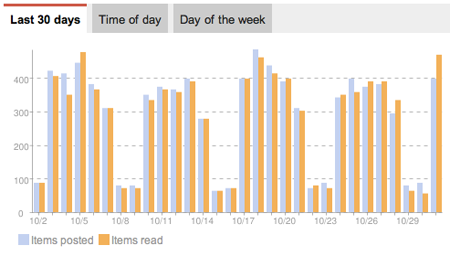
A Day In the Life of My Reader Feeds, Graphed

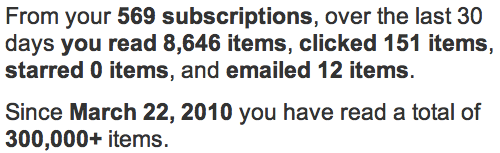
You can't be a bigger fan of information discovery and consumption than me, unless your name is Marshall Kirkpatrick. But one thing to note is that the web has changed quite a bit since I first started drooling over aggregators like FriendFeed and Google Buzz, and the shared items trackers that sparked to life in 2008 are universally dead. Users have voted on the web to share with social networks like Twitter, Facebook, LinkedIn and Google+, and the new additions to Reader make that easier.

Sharing from Google Reader to Google+ Includes Circles and Commentary

I've personally been using the new Reader, or something close to it, for more than a month, and every time I'd log into the existing version, the difference was notable. Change is hard, but like a new haircut or or new home furniture, it grows on you. Now, instead of sharing 10 or so items a day to the anonymous group of people following me in Reader, I selectively share less often, and to more targeted circles in Google+ which I built by hand. And if the item is interesting to an even wider group, I share it to Public. (More tips here on Google+)

Since the launch this afternoon, I am already seeing a lot more items shared to Google+ from others in my circles, and it's interesting to see how they have adapted to the new functionality, even though others are more wary about the changes. As Alan Green outlined in his blog posts this week and last, Google recognizes the changes may not mean the new product is perfect for all users, and the tools are there to let you take your data with you. But I hope people do see the value of leveraging Reader as a smart RSS feed engine and share selectively to Google+ circles. After a few shares, it becomes second nature, and the world could surely benefit from a streamlined social experience. Trust the team is listening to all feedback from all corners. It's a privilege to have an impact on a product that has played so large a role for me for so long.

June 22, 2011

June 22, 2011 · 3 MIN READ · BY LOUIS GRAY

NewsDrink Preps Next Generation Social Web RSS Reader

NewsDrink Preps Next Generation Social Web RSS Reader

While some noisy Web pundits have declared RSS dead, smart developers see expanded social sharing and connections as an opportunity to rethink news consumption, leveraging RSS as a utility and making it the backbone for new services. Amidst the rise of Twitter, Facebook and other networks, we've seen the launch and rapid adoption of products like Pulse, Feedly, Ninua, Flipboard and others who have taken the geeky parts out of RSS and presented new ways to consume news.

A new site you've never seen, which I've been watching since January, has finally cracked open the door with exclusive invites to its own take on RSS with social connections. The name is NewsDrink, which starts on the Web and will soon follow on with dedicated applications for mobile phones and tablets.

(Get in now at http://www.newsdrink.com with the invite code of "louis")

Scanning Recent News on NewsDrink from My Sources


Based in Bangalore, India, NewsDrink, like other RSS readers, can import an OPML file, synchronize with Google Reader, have you add feeds one by one, or select from their extensive topic-driven directory. Content can be viewed by individual source, or sorted for recency, with newest items at the top.

Reading louisgray.com on NewsDrink

Unlike Google Reader, which is biased toward full feeds, and has a wide array of sharing functionality and statistics for your own activity as well as the blog feeds themselves, NewsDrink favors a more minimalist approach, with feed items truncated to give you a glimpse into the story, but push for downstream views if interested. That said, you can make comments or likes directly on items that flow through your view in NewsDrink, and this site activity is collected on your central profile - which also displays feeds you add or delete.

Adding New Feeds, By Category, On NewsDrink

NewsDrink goes beyond Google Reader when it comes to social, reminding me a lot of RSS projects gone by, including AssetBar in 2008 and the follow-on Shyftr, best known for its aggregation of comments on full feeds, which in my view got them in an unfair share of trouble. You can follow friends on NewsDrink, find friends from Twitter and Facebook who are using the service, and see their activity. Find a feed they are reading that you like but don't have? Add it to your NewsDrink. You can also see people they follow and have an opportunity to discover new people with similar interests - much like the promise of Toluu, another 2008 debut that has seen its founder move on to new projects.

My NewsDrink Profile With Recent Activity On Feeds

Does the world need another RSS reader besides Google Reader, or does the world need RSS at a time when it seems that social sharing is king? I still think there is a place, absolutely. One that is built from the start to be social, but also allows you that solitary approach to get in and read your feeds, could be a solid alternative. NewsDrink is a just starting, so if there are some UI bugs that are not your favorite, or missing functionality, be sure to let them know. It's all part of the fun of beta products.

To get into NewsDrink, use the invite code of "louis", without quotes. There should be enough invites for everyone. You can find NewsDrink at http://www.newsdrink.com.

May 19, 2011

May 19, 2011 · 2 MIN READ · BY LOUIS GRAY

Linktamer: Coming Soon to Find Your Best News Links

Linktamer: Coming Soon to Find Your Best News Links

While we're on the topic of personalization and filters... there's a new project called Linktamer currently under construction that looks like it could be a Web-based tool to find the most interesting stories from your feeds based on your interests, relying heavily on your direct feedback to stories, and the tags describing them. While there's been no mention thus far of the service's plans for a public debut, a Twitter account (@linktamer) exists, possibly waiting for the day it's officially unveiled.

Like many other services, including my6sense and others described in last night's post, Linktamer breaks the latest news into two separate streams - that of the most recent content, and that ordered by your own assumed preferences, garnered based on inputs to the system. Every item contains the option to give future similar stories more value, or less, and with more development, it looks like there is future opportunity to sort stories by specific topic and drill down to find the best by subject, although that's not yet enabled.

Recent Items Pouring into Linktamer Without Assigned Scores (Not Logged In)

Much like the prototypical RSS reader, Linktamer streams in items, each providing a publish date, a headline, and a source. Linktamer extracts a lead graphic for those stories that have one, extracts about a dozen tags that describe the article, and delivers a score called "Signal", an analysis of how interesting that story is to the logged in user. Stories with no relevance have a rating of 00, with most relevance increasing presumably to 100.

Top Stories On Linktamer With Signal Scores
(Options to Provide Feedback Illustrated On Right)

To provide feedback for items in the system, there are four actions for each post on Linktamer. One can like an item by clicking the heart symbol, click the X to say you are "not interested" in the post (or others of its type, click the checkmark to indicate it has been read, or the arrow to share it - most likely to external social networks (though this is not yet implemented).

Items Sorted by Time Get Scores, If Logged In As a User

What Linktamer provides now is a raw hint at what could be another interesting alternative to personalized RSS streams - one that doesn't look to rely heavily (if at all) on collaborative filtering or simple popularity as many other services do, and starts with the Web while many others have kept their focus on mobile devices. The project appears to be thee brainchild of Alan Grow, who may emerge to claim it as time to launch approaches. Looking forward to seeing this one develop.

Disclosures: As noted often, I am vice president of marketing at my6sense, focused on personalization of news and social streams, much like Linktamer's future mission could be.

April 7, 2011

April 7, 2011 · 3 MIN READ · BY LOUIS GRAY

Ninua Launches Social News Reader on Android

Ninua Launches Social News Reader on Android

As I've discussed many times, finding the right news from your news streams and social streams is an increasingly difficult challenge - and for most people, traditional RSS readers have proven too difficult for mass adoption, despite my own feverish feed religion. Into the void steps a new reader, launching first on Android, to try and connect readers and writers through social news exploration, tapping into three main news reading pillars to try and deliver a high quality, polished news reader, competing with people like Pulse and Flipboard, but unique in its own right. The new product is called Ninua News Reader, and it's from the team behind NetworkedBlogs, the most popular tool for posting your blog entries to Facebook.

Ninua's approach to the world of news, as demoed at the 500 Startups Demo Day in Mountain View on Wednesday, is centered around three major news reading pillars, including:
  1. Headlines and Mainstream News
  2. Blogs
  3. What Friends Read
Founder and CEO Waleed Abdulla said the company was "trying to do news in the right way", by helping users follow friends who share your interests and learn new sources through their own reading lists. Unlike other news readers, including Flipboard, Ninua does not pull in social stream content from Facebook or Twitter, but it does use that increasingly-important social graph to help provide guidance for your eventual reading list. Abdulla said, "The Facebook stream is social, but it's not news. See what your friends are reading, and if you like it, you can follow them. The app is tailored to you based on the sources you follow and the friends you follow."


Selecting Topics and Sources in Ninua for Android


If it sounds simple, that's because it pretty much is. Upon installing and launching the app on Android, you're asked to select three topics of interests from a pre-selected handful. Dependent on your choices (for example: Technology, Startups and Sports), you are then presented with a list of matching blogs and news sources to follow - all of them prechecked to be added to your reading list. Deselect those you don't want, and then you're asked to connect to Facebook to match the social side of things.


Following Friends and Their Recommendations


Once you've found your friends using the app and what they follow, the app taps its NetworkedBlogs roots and finds other sites your friends may not just be reading, but writing. There's a good chance you'll want to add those to your reading list as well. Now you've got a healthy list of sources based on your interests, and a list of sources based on your friends' interests.


My News Front Page and One Story In Ninua


With this array of sources in tow, complete the setup and you can read the news from those sources you've selected, or you can add new sources. There's no mention of the word RSS, the word Feed, or anything remotely as scary as big words like Pubsubhubbub or acronyms like OPML. The resulting articles are laid out with social signals to show other upvotes, and you can share the articles you like best to other services.

Ninua is a new wrinkle on the social-centric reader, mashed up with your own interests. Unsurprisingly, the app debuts with a strong user experience, and it's calm enough to not make you feel like you're missing something on the next page or next refresh. It's a solid approach to simplifying the news reading process, especially on mobile. You can find it on Android Market here: https://market.android.com/details?id=com.ninua.android

Disclosure: I am vice president of marketing at my6sense, which offers a personalized social and news reader for Android, iOS and the Web. It can be assumed that Flipboard, Pulse and Ninua can be seen alternatively as competitors or potential partners.

January 25, 2011

January 25, 2011 · 2 MIN READ · BY LOUIS GRAY

Feedly for iPhone Hits the iTunes Store for Mobile RSS

Feedly for iPhone Hits the iTunes Store for Mobile RSS

Since launching more than two and a half years ago with a new magazine-like start page built with a foundation of RSS, Feedly has grown a committed user base who has enjoyed the service's unique take on Google Reader and other feeds, including Twitter. After nearly 18 months of development, Feedly can finally be downloaded from the iTunes store, available for iPhone and iPod Touch, for $2.99, while development for Android continues.

Feedly's strengths on the Web have primarily been in the clean UI and simplified navigation of often-busy RSS streams, including easy hierarchies developed through your own Google Reader folders, and tight integration with more advanced Reader functionality, including shares (seen as likes within Feedly) and comments, which flow bidirectionally between the two services. On the iPhone, the approach is quite similar, though modified for a smaller handheld device. (I used the iPad at 2x zoom to use it and make the below screenshots)


Featured Subscriptions and the Feedly Start Menu


The app, modifying its horizontally-oriented appearance for the desktop to a more start menu-like vertical bar on the iPhone, highlights your digest (all articles), latest (newest articles), must reads (featured sources), popular items from the community and your own saved items.


Top Stories on Feedly and Archived Stories


The most recent story from each section is displayed on its own, while archived stories are displayed four to a page, with thumbnails, date of publishing, and how many times they were shared across the Feedly network. (From what I can see, double digit shares are exceptional)

Want to mark all items as read in Feedly on iPhone? Click the checkbox. Want to share a single article? You can tweet it, e-mail it, copy the article link, open it in Safari, or mysteriously "mobilize", which in theory takes non-optimized stories and makes them look good for the handset. Clicking the "thumbs up" sign likes an article on the mobile device, just as it does on Feedly's site.

Feedly founder Edwin Khodabakchian has been developing in public, with a release candidate for iPhone being displayed as long ago as October and the yet to debut Android equivalent shown in November. The service's fans no doubt will still be eager to get Feedly on the go for iOS (and eventually Android), and the $2.99 sticker shouldn't be much of a deterrent.


Liking an Item in Feedly on iOS and Other Options


Despite some other places arguing that RSS is dead, it's obviously not the case - not with innovation from companies like Feedly, Flipboard, Newsblur, Pulse, and yes, my6sense, thinking of new ways to take on RSS feeds and social streams. As an information consumer, I enjoy seeing new approaches and ideas on how to manage the information flow and I appreciate Edwin and his team's steadfast focus on delivering a high quality product, rather than trying to push something out the door quickly.

You can find Feedly on the iTunes store here: Feedly on iTunes.

Disclosures: I am VP of Marketing at my6sense, which could be considered either a competitor or a potential partner to Feedly, Flipboard, Newsblur, Pulse or Google Reader, due to both similarity and complementary features with our API and mobile applications on iOS and Android.

December 16, 2010

December 16, 2010 · 3 MIN READ · BY LOUIS GRAY

Flipboard CEO Mike McCue (@mmccue) Has An Amazing Day

Flipboard CEO Mike McCue (@mmccue) Has An Amazing Day

One would think that being named to the board of directors of one of the hottest private companies on the Web on the same day they announced a raise of a rumored $200 million would be an incredible achievement in itself. But if this announcement was simply the first part of a 1-2 punch, followed by a major update to the company's signature award-winning application, that's quite a day. That's how Wednesday looked for Flipboard CEO Mike McCue, who ends the day as one of the two newest members on Twitter's Board of Directors, as well as the owner of an increasingly fun to use iPad app that pulls in content from your social streams and RSS subscriptions in an extremely appealing way.
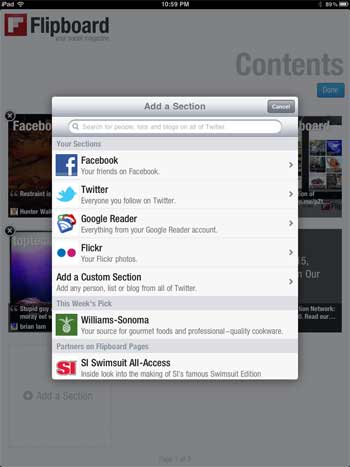
When Flipboard debuted in July of this year, the application brought an immersive magazine-like approach to consuming Facebook and Twitter streams on the iPad. The simplicity and beauty of the app has spawned many competitors to try and bring the look and feel of Flipboard to their apps. New startups emerged calling their products "Flipboard-like" and others were referred to by press as "Flipboard killers". Of course, usually when someone says you're going to be killed, you're actually doing quite well. Such is the case for Flipboard.

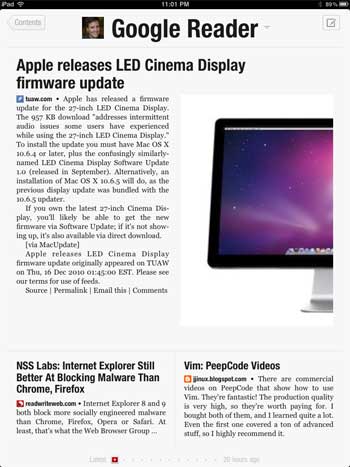
Flipboard Adds Google Reader and Flickr

I had the opportunity to sit in a session beside Mike at the Newsfoo conference in Phoenix two weeks ago, and he clearly explained the casual nature of many of the app's users, who flip pages and enjoy the content served up by their friends. While many apps (including my6sense) are aiming for a "less is more" strategy, he relayed that in fact, for this particular experience, "more is more", as users pushed for the addition of Twitter list support and new services. Tonight's addition saw the pull of new services that should impact adoption even more - including that of Google Reader (my personal favorite) and Flickr.

My Google Reader In Flipboard

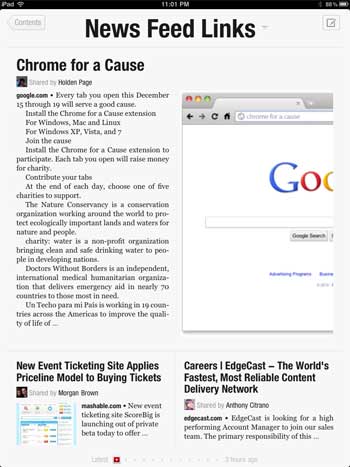
Now, instead of quirky work-arounds (apologies to Rick Klau) to get to one's feeds, you can add Google Reader and Flickr to Flipboard, making the product more of a great-looking aggregator (albeit service by service one at a time). The application also delivered a much-requested feature to share items out to social networks, alongside a custom URL, making it a more compelling experience.

Links from My Facebook News Feed in Flipboard

Robert Scoble, arguably the loudest evangelist for Flipboard since its launch, says tonight's introduction isn't the one he is waiting for, as he continues to look for intelligence in the app, promised from the company's acquisition of Ellerdale. Obviously, I am eager to see that develop also, but for those folks looking to put their feet up and consume their feeds in a nice way, the addition of these new services is welcome.

As for Mike, that's a pretty good Wednesday. Being named to the board of directors for Twitter and launching a new version of the app isn't half bad. It's pretty close to the 1-2 punch I pulled off with announcing the VP of Marketing role at my6sense on August 23rd and Braden being born on August 24th. But I can see how Flipboard is Mike's baby. What's planned for Thursday? (You can download Flipboard from iTunes here)

Disclosure: I am VP of Marketing for my6sense, which theoretically can be seen as competition for some aspects of Flipboard and Ellerdale.

December 2, 2010

December 2, 2010 · 2 MIN READ · BY LOUIS GRAY

RSS Addicts Welcome Google Reader to Android

RSS Addicts Welcome Google Reader to Android

Google Reader has long been the gold standard for feed readers on the desktop. It's been a must-stop destination for me practically every day since 2007. As the world of consumption around the service has changed, with people calling for the death of RSS and mass migration to social services, the product has adapted to more social sharing capabilities, and integration with Buzz, Google's social aggregation service. But until yesterday, Reader was conspicuously absent when it came to the Android Market - pushing RSS addicts (like me) to get their feeds another way, be it through the generic mobile interface Reader offered, through an alternate product, or simply just to wait until getting back to the desktop.

Reader's debut yesterday was absolutely welcome. While many people are saying that Web versions of products should be all you need, consumers have taken strongly to the mobile app mentality best exemplified by the iTunes Store and Android Market. Even if you can get to a site via a mobile client, it's often perceived to be a less fulfilling experience. Reader's new app on Android is the full experience its users were waiting for, and it's a great option for mobile feed consumption - especially if you want to do two things: first, synchronize your read/unread data from mobile to the desktop, and second, share to your Google Reader link blog.

     
My Google Reader Folders and an Item on Android


The app (free, of course) asks you to connect your Google Account, or multiple accounts if you have them, and after a quick synchronization, it pulls in all your unread items. This can be those from feeds you subscribe, or friends' shares that you have added to your list.


Sorting and Sharing in the Google Reader Android App


The Reader app does practically all those things the desktop equivalent does. There's the option to sort by newest, oldest, and by magic. There are also the options to view shares from people you follow, or to explore blogs you might like, based on your other interests. And like the main site, you can star items, like them, add notes, or share them downstream. The app integrates with existing social tools you have on your Android phone, so you can click share out to Seesmic, Gmail, Text Messaging, or whatever you like.


People I Follow and Exploring Google Reader Android


For me, the Reader app icon now occupies a valuable home screen space, next to my6sense and Google Buzz. And if you're curious as to any conflict with Reader and my6sense, just remember that Reader is our only default RSS source in my6sense, and they are a valuable partner, supplying the RSS portion of our aggregation service. The more options people have to get to their information on the mobile is a great thing.

You can find Google Reader in the Android Market, and see their post from yesterday here: The Android Google Reader app is here!

Disclosures: Google Reader is an essential source of content to my6sense, where I am VP of Marketing. In theory, the new app is competitive as well.

November 11, 2010

November 11, 2010 · 1 MIN READ · BY LOUIS GRAY

Lazyscope RSS and Twitter Client Slims Down, Speeds Up

Lazyscope RSS and Twitter Client Slims Down, Speeds Up

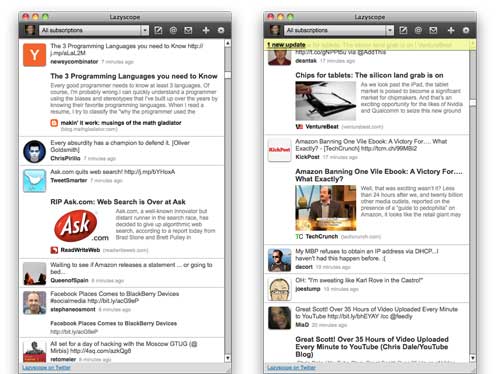
Last week's launch of Lazyscope brought an intriguing new Twitter and RSS client into the world which allowed for full story viewing in a right pane that supported rich media, effectively replicating Twitter's iPad experience on the desktop in a versatile Adobe AIR application. Just over a week later, the application has already seen significant updates that show its potential to become an option for Twitter power users - with the adoption of real-time user streams, a new "mini" single column size and keyboard shortcuts.

Like fellow desktop Twitter client TweetDeck, Lazyscope's support for real-time user streams eliminates the need for a refresh button, as updates flow into the application practically as they are posted to the microblogging network. The more active the users, the more frequent the updates, of course, as they cascade from the top down, simulating the stream in real time.

Lazyscope in Single Column View With User Streams Enabled

The option for a single column view that does not monopolize the screen is also important - as the content viewer (right pane) only opens when an article is selected, and closes when you are click the back arrow to return to the stream. In fact, the single column view is now the default view, giving you your screen real estate back.

Lazyscope in Full Expanded View

In addition to these two updates, Lazyscope, from the makers of Lazyfeed, has turned on keyboard shortcuts, letting you navigate the stream with arrow keys, reposting with the enter key, and my personal favorite, scrolling to the top of the screen with the space bar. As someone who uses keyboard short cuts all day long in Google Reader to go from story to story, doing the same in Lazyscope can make me even more efficient, and as they put it... more lazy.

If you haven't yet tried it, check out Lazyscope at http://www.lazyscope.com.