Silicon Valley Technology Commentary & Archives · Est. 2006 3,045 Posts · 2006–2026
Showing posts with label Feedly (19 posts). Show all posts

January 4, 2018

January 4, 2018 · 7 MIN READ · BY LOUIS GRAY

A Decade of Silos Has Throttled Open Content Distribution

A Decade of Silos Has Throttled Open Content Distribution

The 2018 Social Media Flow is Driven by Content Silos

In the ten-plus years since I started this blog, one of the clearest trends on the Web has been for destination sites to want to control the user session and experience. In parallel, sites focused on aggregating content from external sites or highlighting the best of the web - serving as a filtered pass through, have struggled. Many are gone.

While significant efforts were made during the forging of Web 2.0 to drive open standards and allow for data to flow from one site to another, through RSS, Pubsubhubbub, Atom, XMPP, or whatever your preference, 2018 on the social web is a much more challenging place to write once and publish everywhere.

As I view the publishing space, I often turn to four big challenges that have to be solved for a platform to be a success to both authors and readers:

1. Creation

A platform, be it for photos (Instagram, Flickr, Google Photos, etc.), short updates (Twitter), long form (Medium, Blogger, WordPress, etc.), video (YouTube) or a mishmash of all (Facebook, Google+, etc.), needs to make it easy for the content creator to share what they want, in the form they want, and have the output be what they intended. This is true whether we are talking about desktop or mobile creation.

2. Distribution

Once the content is created, it has to be sent somewhere. If you write a post and hit publish, how do people find it? Is it sent to a third party network where they are hanging out? Is it sent by email? Do they get a notification on their phone? Does it flow down their timeline, as they have new items to consume? Or is it just another flat file, waiting to be indexed by Google and other search engines?


3. Discovery

Readers want to find new content. They seek relevance, freshness, and community. This mirrors the three pillars of social sites I highlighted back in 2009, and echoes that readers want intriguing views that mirror their own preferences. Like I'd predicted in 2006, the Web has become a divided place, where we all flock to our groups of like minded people, and disavow opposing views, but we still are eager to find more who reinforce our position. We still crave new friends and stories and we want to find them quickly.

So how good a job do these apps and sites do of surfacing new people and ideas? Do they have an aggregated site with highlights and popular people or posts? Is there a place to find more obscure viewpoints and new voices?

4. Consumption

Since the smartphone revolution, kicked off by Blackberry and the iPhone and now led by Android, more people are constantly connected and reading news from their mobile devices. In many countries, the mobile device is the only window to the Web. Does the content flow well for mobile consumption and new ways to navigate from screen to screen, update to update? Or is it best suited for a leanback tablet experience or for the desktop?

What typically happens with content platforms is the content fills the available container. Twitter is a clear 140 or 280 characters. Social hubs like Facebook and Google+ favor large photos and a short introduction. Instagram is all about the photo with a small description. Blogger and WordPress and Medium are as long as you want to go. One has to consider if users and screens keep up.

2009's promise of sharing everywhere wasn't meant to be.

We've Come a Long Way from Aggregating Streams and Sharing the Web

As content started to be created in a wide array of social sites, aggregation services like FriendFeed helped bring people's streams together. Bookmark services like Delicious helped people save the highlights from the Web and amplify the world's favorites. Users voted up posts from Digg and passed them along with StumbleUpon. The most voracious consumers lived in Google Reader and didn't miss a single post from the RSS feeds they were subscribed to.

It was too good to last.

The largest social platforms were not content in simply being links to external sites. Facebook focused more on original content shared on the platform, with less priority given to send traffic off site. Google Reader shut down, and while Feedly and others stepped up, the world of RSS never recovered. Delicious died. Digg is a shadow of itself. FriendFeed was obliterated. LinkRiver closed. Socialmedian closed.

In the wake of all these gateways' demise, taking content from the open Web and getting it in front of new viewers is more challenging. While I've always said you need to be where the users are and can't force them to come to you, what could be automated is now requiring manual intervention at practically every step.

Just What Am I Talking About?

The alpha and omega, yin and yang of social outlets (for text, anyway) are Facebook and Twitter. Facebook is much bigger and much more profitable, but don't get distracted. People creating content for the Web also need to make sure that content fares well downstream on Facebook and Twitter. You can write it for the open Web, but you then have to take explicit action to share the content downstream - or set up automation to either site, usually backed by RSS. At that point, whether you get discovered or not is up to each site's algorithm, which has leaned more in favor of implied interest rather than chronology of late - meaning you can see viral content from hours or days ago before you get the newest stuff.

On a mobile phone, notifications are the holy grail of getting someone's attention. (See: Life by Numbers and Notifications from 2014) It's not uncommon to get notified when someone tweets, but it's very uncommon to ask for a notification when a site makes a post.

In parallel, the feedback loop from such networks, as well as Instagram or others, is near instant and acts as an incentive for the author to initiate their content on that silo natively. Post a 20-tweet storm to Twitter, and immediately start seeing those likes and retweets roll in. Post a story to Facebook and wait for the Likes and comments. Post a news story or a blog post, and ... wait. Wait for visitors in Google Analytics? Wait for the post to be shared downstream? Wait for the story to be indexed in Google News and search?

The elimination of Google Reader, FriendFeed, and Digg as amplifiers of Web content, alongside the attention absorption by Facebook and Twitter makes it harder for Web authors to get visibility - and they they aren't dropping their content into the real time stream.

So What Does the New Flow Look Like?


In 2009, it seemed pretty easy to me. Post on the blog. RSS would take it to FriendFeed and Google Reader. FriendFeed would post to Twitter. Twitter would post to Facebook. Then I'd run around and answer comments wherever they were distributed. (More on distributed conversations from 2009)

Now, I can still post on the blog. And the RSS link is the same. I even get the small bump of engagement on Google+ from the blog's page automatically adding my content there. But then, to make sure I cover all my bases, I then make another share of the same content to Medium, for those who love their site, and I've even found good engagement on LinkedIn, by making a third post of the same content on their channel. It's a different audience, but, if on topic, they share and engage.

So that's three posts. Meanwhile, I still have to share the story on Facebook and Twitter separately, hoping that someone will break their consumption flow and engage on my content downstream.

It feels like more work to get less return. And yes, I recognize that some may not miss FriendFeed because they never used it. Maybe others think Digg got replaced outright by Reddit, and gains similar traffic. Others prefer Hacker News. So aggregators do exist, obviously, but hubs aimed at surfacing new content, as opposed to highlight content on the site and keeping readers there, have declined.

To properly make the Web as desirable and viable a platform for publishing, we need to work together to fix the distribution and discovery gaps, make content fantastic on mobile for creation and consumption, and allow for engagement that is as simple as a Like. I applaud (there's the joke) Medium's approach to reward users with claps, for at least they're trying something. We should all be trying.

Disclosures: Yes, I work at Google. Sometimes, I help the Blogger team. I used to work on Google+ and have many friends on those teams still. I miss Google Reader every day. FriendFeed too.

January 6, 2014

January 6, 2014 · 2 MIN READ · BY LOUIS GRAY

Feedshare.net Debuts for OPML, RSS Feed Swapping

Feedshare.net Debuts for OPML, RSS Feed Swapping

Update: The previous version of this post said Brent Simmons, author of NetNewsWire, was also the author of FeedShare.net. Turns out I was very wrong! Arne Holzenburg was inspired by Brent's posts and did the work himself. Sorry about that, Arne and Brent!

While many people now get their news from social channels - making the feed subscription model seem rather quaint in a world surrounded by microupdates, RSS still plays an important role for those of us who never want to miss a single post.

One of the earliest tinkerers in RSS and the main coder behind the application which first got me addicted to feeds (See: RSS A Demanding Mistress), Brent Simmons, pointed to a retro OPML sharing service at Feedshare.net on to the Web, letting you share your news sources and find new sites through those posted from your peers. If you're starting to have flashbacks to 2006's Share Your OPML and 2008's Toluu (which debuted here), then that's because Feedshare.net performs essentially the same functionality - but unlike those other two sites, it actually still works here in 2014.

Share your OPML file on Feedshare.net

Arne Holzenburg, a frequent reader of Brent Simmons, like me, was inspired by Simmons' post Saturday that he lamented the lack of an OPML sharing service. Arne took the weekend and built Feedshare. You can find mine is at the expected URL: http://feedshare.net/louisgray/. You can walk through the list, get a direct link to the subscribed link, or hit Favorite to add it to your RSS reader of choice. Mine is Feedly.

Just the Feeds and Nothing but the Feeds.

To add your own OPML file to Feedshare.net, find your list of feeds in whatever RSS reader you use, and find where to export. Most make it pretty easy, which is one of the best things about supporting standards. Easy export, easy import. Take that OPML file and add it to Feedshare, and then tell people where they can find it. And maybe, if you tell enough people, your list will end up on Feedshare's popular page, which already has ten top participants.

That's it! You know what to do. Check out Feedshare.net, and if you've uploaded your OPML, share the link to your feeds and show me what sites I've been missing.

September 5, 2013

September 5, 2013 · 3 MIN READ · BY LOUIS GRAY

Shared Items Might Be Gone, but the LG Stream is Back

Shared Items Might Be Gone, but the LG Stream is Back

Longtime blog readers and social connections know that for years, one of my most fulfilling actions on the Web has been the ability to act as a human filter, passing through hundreds of feeds a day and sharing the best with you, with Google Reader as my workbench, and my shared items being my finished product. With a simple share, followers within Reader, but also those subscribed on FriendFeed, Google Buzz and Twitter, could see my hand-selected picks.

When Google Reader changed its sharing model back in October 2011, not to mention the general demise of most aggregators, this stream came to something of a stop. Reading feeds became a solitary act, and with Reader now retired, one could easily expect the old way of sharing was gone for good. But with a cobbling together of a few products, and thankfully, the continued support for standards like RSS, I was able to reboot the "LG Stream", as friend +Thomas Power has long referred to it, and you can once again subscribe to follow the posts I pick from my journey on the Web, getting a hand-curated selection from the land of tech blogs and beyond. And again, you can follow the stream in your favorite RSS reader or on Twitter.

In a post Google Reader world, here's how it works, and how you can do the same, should you be interested.

First, I, like many others, moved my RSS feeds (via OPML) to Feedly. I've had a more than five year relationship with Feedly and the team behind it, and have found it quite useful, with the same familiar keyboard shortcuts I liked in Reader, and a fast interface.

Feedly Brings My Feeds Through As They Happen

Second, I created a Pocket account to essentially bookmark the top stories I found as they happened. This can be both through the built-in integration Pocket has with Feedly Pro, which I purchased, or through the Chrome Extension. Given I use ChromeOS all day, I've got Pocket a click away all day.

Pocket Captures All My Select Favorite Items

Third, one benefit of Pocket is that it automatically creates an RSS feed for your account. All I had to do was enable the feed to be a public feed to start treating it like any other stream. (Here's how to do it)

Feeding my LG Stream to Twitter is Twitterfeed.

Fourth, I took that RSS feed, and connected it to Twitterfeed, and told Twitterfeed to regularly poll the feed for updates, and push new items to Twitter at my new account, at @lgstream.

Practically the only downside is the non immediacy of posts being shared with Twitter, as Twitterfeed defaults to updating every thirty minutes. This can mean that it sends updates in batches of 2 or 4 or however many new items I've Pocketed in the last half hour, corresponding, typically, with my last sync-up with Feedly. But as with Google Reader's shared items, the delivery of the human filtered stream is there.


For those who don't know my filtering behavior, my goal's not to push any corporate agenda, and my biases are clear. Compared to popular aggregators, I won't be sharing rumors and spy pics and salacious gossip. I especially don't plan on sharing rumors about Google, and confusing everyone who might thing my share implies endorsement or confirmation. That'd be a bad idea, obviously. But what you will find is the top 1% of items that flow through what I see, and what I find interesting - a mix of tech innovation, news, social best practices, and thought leadership. My bias is intrigue and quality. For years, in the Google Reader days, I heard people say they didn't have the time to read through all their feeds, but they always read those I shared.

So we're back, thanks to Feedly, Pocket, FeedBurner and Twitterfeed. You can subscribe to the new LG Stream on RSS or via Twitter. And for those asking about Google+ integration, the service doesn't support feed imports, so there is not yet an equivalent. 

Usual Boring Disclosures: I work at Google on Developer Relations. That may or may not, and probably doesn't impact, any of my comments related to real or perceived competition or partners for any of our products and services.

July 11, 2013

July 11, 2013 · 4 MIN READ · BY LOUIS GRAY

You Have Your Tech Routine. But It Will End.

You Have Your Tech Routine. But It Will End.

In 1995, as a freshman in college attending Cal, I was rapidly trading emails with my friend from UCLA in a heated conversation, hitting “Check Mail” in Eudora, eventually changing my settings to automatically retrieve email every minute. One of my roommates, annoyed at my behavior, suggested I just pick up the phone and call him instead. But I didn’t. 

Obviously, in the near twenty years since, I have expected my messages to come in practically instantly, and to immediately have my attention - so I’m on top of it. But there might come a day in the future, if you can imagine it, where I send my very last email. For just as we’ve “always” done something one way doesn’t mean we always will. The pace of tech, and one’s changing lifestyle, practically commands adaptation.

Switching to a separate firehose of electronic messaging stimulation, we’re nearly a decade deep into the hyperconnected social media phase. We’re long past the time for education and evangelism, for the most part, on blogging, social networking, tweeting, and YouTube - and you’ve got routines.

While not everyone uses every service, and different people have different approaches, there’s a good chunk of you who can’t imagine doing things a different way, and stopping what you’ve always done. You can’t imagine never tweeting again. You can’t imagine never checking in to the office on Foursquare when you arrive at work, and maybe you can’t even remember the last time you had lunch and didn’t take a photo of it to share on Instagram or Foodspotting.

But it will all end.


I often think of that, especially as I’ve reduced pace here... what would my last blog post say? How will I know that I’m done? What will be the reason I would possibly walk away from thousands of posts in the archives? Could I really close down my Twitter account, or delete my Facebook, or even FriendFeed?

And that goes for offline activity too. In my recent adoption of Fitbit, and regular walks to keep my stepcount high, I think about how long I’ll keep the routine. Will this be the last night I’m walking around the block to get a few thousand steps in, for tomorrow, I’ll be back in front of the television instead, having let my Fitbit power down?

On other occasions, the choice is seemingly made for you. In 2009, I once said I wouldn’t stop using Google Reader every day, even if you paid me $25,000. I guess the joke was on me, of course - for it wasn’t really all that long after I joined Google that yes, Reader was closed, and I’ve turned to Feedly to get all my RSS feeds instead. So outside of my control, one day, my routine of opening Google Reader was no longer there. If Reader had remained, I’d probably be in my same routine, as I always had been, consuming content and sharing it, just like I’ve been doing for about six years.

Meanwhile, the removing of Google Reader, and yes, Google Buzz before that even, meant ranking my social content in my6sense no longer was needed, so I found myself deleting that app from my phone last week, despite our history.

Even when it’s not the company or the service shutting down, it could be a simple measurement of priorities for you against what benefits you’ve seen from the app. For the last few months, I’ve thought about this a lot, as I’ve checked in on Foursquare at places big and small, for the important travels and the mundane.

Am I really a Handmade Hero? No. Last Badge...

While my badges and points racked up, the real world benefits were exceptionally rare. I’d met a few people, and saved a few dollars, but today, I deleted my account. No drama. Just decided I was done. That should save a few power bits on my phone, and a few minutes of each day.

As much fun as it has been to play the role of early adopter and use every service to its fullest, I believe we’re well past the mania time of social networking, services and apps. Being on a platform isn’t the same as using the platform well. And if you can’t find measurable or emotional value to participating in a place, there’s no harm in calling it quits - or continuing to have your eyes open for what’s next, so you don’t find yourself entrenched in the way things have always been, while missing new experiences.

Sometimes that means never joining in the first place, analyzing what you’ve seen and deciding if that makes sense for you. Even though I was an early trial user of Burbn, I never got an Instagram account, and I lived. I never got into GetGlue, and won’t. I never liked Turntable.fm, and I’ve never done a Snapchat. Maybe it’s the graying hairs on my head, or being closer to 40 than 30, but I know time is valuable.

Someday all of this will stop, and when I pick up my head from the computer monitor, will I feel as if I’ve missed something, or will I be happy with the results of what I’ve done?

Disclosures and Disclaimers: Yes, I work for Google, in the Developer Relations team. This post is not intended to represent them or favor their services in place of any of those I just mentioned, obviously.

June 17, 2013

June 17, 2013 · 1 MIN READ · BY LOUIS GRAY

Video: How Startups Can Raise Their Visibility Seed Round

Video: How Startups Can Raise Their Visibility Seed Round

Startup success takes more than sharp vision and smart code. Early adopters of your product, along with excited press, bloggers and engaged social users spreading the word can mean the difference. In late March, I gained the opportunity to present to Devoxx France, in Paris, and talk about how startups can find these early first users, how to gain a relationship with top press and use all channels possible to get your word out.

Many of the examples are familiar to longtime readers of louisgray.com, highlighting companies launched here, from Feedly, TweetDeck and Toluu, to some of my own favorite products, like FriendFeed, BackType and Google Reader. The video just came online today. Hope you find it useful.

March 11, 2013

March 11, 2013 · 1 MIN READ · BY LOUIS GRAY

Video: Getting the Attention of Influencers and Bloggers

Video: Getting the Attention of Influencers and Bloggers


Having been somebody on both sides of the startup and blogger equation, I know how hard it is for new companies, products and ideas to get visbility and break through the noise, grabbing the attention and sustained interest of early adopters, influencers and users. Today on +GDL (Google Developers Live, the program I run at +Google), I sat down with colleague +Don Dodge to share some of my own experiences and talk about this very thing.

In the discussion, about 20 minutes, I talk about working with +Edwin Khodabakchian of +feedly, +Iain Dodsworth of TweetDeck and more, as some examples of sharp people who engaged with me in the many thousands of posts that have found home on +louisgray.com. This event is one in a series we're calling Root Access, targeting startups and developers on Google Developers Live. Find many more events, publishing every workday at https://developers.google.com/live.

November 1, 2011

November 1, 2011 · 3 MIN READ · BY LOUIS GRAY

Google Reader Evolves, Gets Tighter With Google+

Google Reader Evolves, Gets Tighter With Google+

This afternoon saw the delivery of updates to Google Reader that brought the product's design in line with Google's simplified look across many properties, and added support for sharing to Google+. With the launch, which I've been participating in since shortly after arriving at Google in late August, the dedicated friending/following network within Reader, and dedicated shared link blogs from Reader, were shut down.

This last bit has gained the majority of feedback as users anticipated the changes in the last week-plus since the preannouncement, and impacts some of the most active users, myself included. But if one unwinds the immediate reaction of being reluctant to change, the product's direction was telegraphed as Google has promised an evolved product experience,  regularly adds features to Google+ and recently announced the planned wind-down of Google Buzz, which was closely tied with Reader's existing commenting model.

In discussing the changes, I walk a fine line of respecting the tremendous hard work that went into Google Reader from the products' founding team and core engineers in the last five years, while also recognizing its role in feeding the product where I am currently focused as an employee. As a user, I have spent more time with and more loyalty to Google Reader than any other product on the web in the last decade, with the only possible notable exception being a web browser, either Safari or Chrome.

In the last month, I've continued to crank through Reader, in the new interface.

At various times, I've said I'd give up my Gmail before Reader. I even wrote a blog post two years ago saying I wouldn't accept $25,000 in cash to give up Reader. This is because Reader has played a central role for me to find all the updates from around the web in a centralized way, and let me share out the best to my downstream network. In years past, as you've seen here, I've rallied for feature adds to Reader, and highlighted the ecosystem of products, from ReadBurner to RSSmeme, Feedly, Toluu, and my6sense.

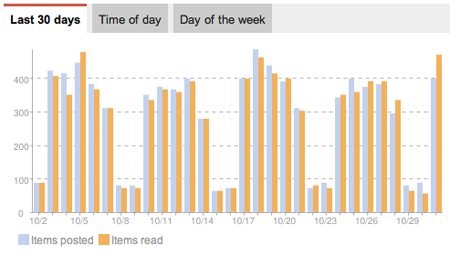
A Day In the Life of My Reader Feeds, Graphed

You can't be a bigger fan of information discovery and consumption than me, unless your name is Marshall Kirkpatrick. But one thing to note is that the web has changed quite a bit since I first started drooling over aggregators like FriendFeed and Google Buzz, and the shared items trackers that sparked to life in 2008 are universally dead. Users have voted on the web to share with social networks like Twitter, Facebook, LinkedIn and Google+, and the new additions to Reader make that easier.

Sharing from Google Reader to Google+ Includes Circles and Commentary

I've personally been using the new Reader, or something close to it, for more than a month, and every time I'd log into the existing version, the difference was notable. Change is hard, but like a new haircut or or new home furniture, it grows on you. Now, instead of sharing 10 or so items a day to the anonymous group of people following me in Reader, I selectively share less often, and to more targeted circles in Google+ which I built by hand. And if the item is interesting to an even wider group, I share it to Public. (More tips here on Google+)

Since the launch this afternoon, I am already seeing a lot more items shared to Google+ from others in my circles, and it's interesting to see how they have adapted to the new functionality, even though others are more wary about the changes. As Alan Green outlined in his blog posts this week and last, Google recognizes the changes may not mean the new product is perfect for all users, and the tools are there to let you take your data with you. But I hope people do see the value of leveraging Reader as a smart RSS feed engine and share selectively to Google+ circles. After a few shares, it becomes second nature, and the world could surely benefit from a streamlined social experience. Trust the team is listening to all feedback from all corners. It's a privilege to have an impact on a product that has played so large a role for me for so long.

June 22, 2011

June 22, 2011 · 3 MIN READ · BY LOUIS GRAY

NewsDrink Preps Next Generation Social Web RSS Reader

NewsDrink Preps Next Generation Social Web RSS Reader

While some noisy Web pundits have declared RSS dead, smart developers see expanded social sharing and connections as an opportunity to rethink news consumption, leveraging RSS as a utility and making it the backbone for new services. Amidst the rise of Twitter, Facebook and other networks, we've seen the launch and rapid adoption of products like Pulse, Feedly, Ninua, Flipboard and others who have taken the geeky parts out of RSS and presented new ways to consume news.

A new site you've never seen, which I've been watching since January, has finally cracked open the door with exclusive invites to its own take on RSS with social connections. The name is NewsDrink, which starts on the Web and will soon follow on with dedicated applications for mobile phones and tablets.

(Get in now at http://www.newsdrink.com with the invite code of "louis")

Scanning Recent News on NewsDrink from My Sources


Based in Bangalore, India, NewsDrink, like other RSS readers, can import an OPML file, synchronize with Google Reader, have you add feeds one by one, or select from their extensive topic-driven directory. Content can be viewed by individual source, or sorted for recency, with newest items at the top.

Reading louisgray.com on NewsDrink

Unlike Google Reader, which is biased toward full feeds, and has a wide array of sharing functionality and statistics for your own activity as well as the blog feeds themselves, NewsDrink favors a more minimalist approach, with feed items truncated to give you a glimpse into the story, but push for downstream views if interested. That said, you can make comments or likes directly on items that flow through your view in NewsDrink, and this site activity is collected on your central profile - which also displays feeds you add or delete.

Adding New Feeds, By Category, On NewsDrink

NewsDrink goes beyond Google Reader when it comes to social, reminding me a lot of RSS projects gone by, including AssetBar in 2008 and the follow-on Shyftr, best known for its aggregation of comments on full feeds, which in my view got them in an unfair share of trouble. You can follow friends on NewsDrink, find friends from Twitter and Facebook who are using the service, and see their activity. Find a feed they are reading that you like but don't have? Add it to your NewsDrink. You can also see people they follow and have an opportunity to discover new people with similar interests - much like the promise of Toluu, another 2008 debut that has seen its founder move on to new projects.

My NewsDrink Profile With Recent Activity On Feeds

Does the world need another RSS reader besides Google Reader, or does the world need RSS at a time when it seems that social sharing is king? I still think there is a place, absolutely. One that is built from the start to be social, but also allows you that solitary approach to get in and read your feeds, could be a solid alternative. NewsDrink is a just starting, so if there are some UI bugs that are not your favorite, or missing functionality, be sure to let them know. It's all part of the fun of beta products.

To get into NewsDrink, use the invite code of "louis", without quotes. There should be enough invites for everyone. You can find NewsDrink at http://www.newsdrink.com.

January 25, 2011

January 25, 2011 · 2 MIN READ · BY LOUIS GRAY

Feedly for iPhone Hits the iTunes Store for Mobile RSS

Feedly for iPhone Hits the iTunes Store for Mobile RSS

Since launching more than two and a half years ago with a new magazine-like start page built with a foundation of RSS, Feedly has grown a committed user base who has enjoyed the service's unique take on Google Reader and other feeds, including Twitter. After nearly 18 months of development, Feedly can finally be downloaded from the iTunes store, available for iPhone and iPod Touch, for $2.99, while development for Android continues.

Feedly's strengths on the Web have primarily been in the clean UI and simplified navigation of often-busy RSS streams, including easy hierarchies developed through your own Google Reader folders, and tight integration with more advanced Reader functionality, including shares (seen as likes within Feedly) and comments, which flow bidirectionally between the two services. On the iPhone, the approach is quite similar, though modified for a smaller handheld device. (I used the iPad at 2x zoom to use it and make the below screenshots)


Featured Subscriptions and the Feedly Start Menu


The app, modifying its horizontally-oriented appearance for the desktop to a more start menu-like vertical bar on the iPhone, highlights your digest (all articles), latest (newest articles), must reads (featured sources), popular items from the community and your own saved items.


Top Stories on Feedly and Archived Stories


The most recent story from each section is displayed on its own, while archived stories are displayed four to a page, with thumbnails, date of publishing, and how many times they were shared across the Feedly network. (From what I can see, double digit shares are exceptional)

Want to mark all items as read in Feedly on iPhone? Click the checkbox. Want to share a single article? You can tweet it, e-mail it, copy the article link, open it in Safari, or mysteriously "mobilize", which in theory takes non-optimized stories and makes them look good for the handset. Clicking the "thumbs up" sign likes an article on the mobile device, just as it does on Feedly's site.

Feedly founder Edwin Khodabakchian has been developing in public, with a release candidate for iPhone being displayed as long ago as October and the yet to debut Android equivalent shown in November. The service's fans no doubt will still be eager to get Feedly on the go for iOS (and eventually Android), and the $2.99 sticker shouldn't be much of a deterrent.


Liking an Item in Feedly on iOS and Other Options


Despite some other places arguing that RSS is dead, it's obviously not the case - not with innovation from companies like Feedly, Flipboard, Newsblur, Pulse, and yes, my6sense, thinking of new ways to take on RSS feeds and social streams. As an information consumer, I enjoy seeing new approaches and ideas on how to manage the information flow and I appreciate Edwin and his team's steadfast focus on delivering a high quality product, rather than trying to push something out the door quickly.

You can find Feedly on the iTunes store here: Feedly on iTunes.

Disclosures: I am VP of Marketing at my6sense, which could be considered either a competitor or a potential partner to Feedly, Flipboard, Newsblur, Pulse or Google Reader, due to both similarity and complementary features with our API and mobile applications on iOS and Android.

September 15, 2010

September 15, 2010 · 5 MIN READ · BY LOUIS GRAY

RSS or RIP, the Results Always Trump the Methods

RSS or RIP, the Results Always Trump the Methods

The last few days in my RSS readers have had me feeling like we are in the middle of blog post reruns - the best of 2009 edition. Within the bolus of hundreds of new items welcoming my every visit to Google Reader, the debate flared up again this week as to whether the very act of consuming content within an RSS reader was a dying one. For the dissenters, the growth of social sites like Twitter and Facebook, and the announced closure of Bloglines is enough to say the tide has turned.

Meanwhile, the application developers and their active users swear any rumored decrease is false, and the RSS reader remains one of the most efficient ways to consume content.

The premise of the entire debate is broken. These are tools, and it is not a zero sum game.

My Own RSS Usage Is Still Insane

In the same time as we have seen a general falling away of activity with Bloglines, once the most heralded competitor to Google Reader, we have also seen considerable innovation in the RSS Reader space. In 2008, we saw the debut of Feedly, a magazine-style Web-based RSS reader - and that service now sees hundreds of thousands of unique visitors per month. In 2009, we saw the addition of Lazyfeed and smart RSS-based filters. In 2010, Pulse debuted on the iPad, iPhone and Android and is selling many licenses to feed-hungry mobile fans. On the Web side, there is also continued development from edge cases including NewsBlur and Punching Soup.

Google Reader Reports Continued Growth

Meanwhile, Google Reader reports usage is growing, and never stopped.

Those who have turned their backs on RSS readers often subscribe to the theory that news will find them no matter what, and to some degree, that is of course true. Twitter's press conference from Tuesday said 90 million tweets are being posted daily, and a full 25 percent of those tweets contain links - so there are more than 20 million links being thrown into the service, at the rate of more than 15,000 per minute. Subscribe to any prolific link sharers or news sources, and you're bound to get the opportunity to get some links thrown your way, and the news will find you.

Twitter's Buzz Has Eclipsed Blogging and Dominates RSS

Twitter has become such a force for news dissemination that the concept of discovering Tweets that "only contain links" and hiding the more mundane status updates is becoming commonplace. Even the new search built into Twitter's updated interface allows the option to search "Tweets With Links". This is a great step forward, making Twitter even more similar to RSS for full content.

The long-held advantages of RSS readers over Twitter are still there. You pick your sources, and you can come to a "full" in box of items at your leisure. Almost all feeds are full feeds, without truncation, something impossible to do in 140 characters. But new apps are not just discovering tweets with links, but some are unpacking the URLs in advance of your clicking, so you can get a full preview of the story to indicate in more detail if it will be of your interest.

The New Twitter Searches Tweets With Links - Cool!

For me, one of the major reasons I can not foresee walking away from an RSS reader in the near future is how closely tied into my own behavior something like Google Reader is for the act of curating a shared items feed (or link blog). My shared items play a key component of my downstream activity on social networks like Google Buzz and FriendFeed, and these shared items also hit Twitter on a dedicated account (@lgstream). If I turned my back on the thousands of people who have connected to this shared feed, I would need to restart it in a new place, and see if I could manipulate Twitter lists to be as strongly organized as my RSS folders. So long as I want to play the role of human curator, this will be a big activity for me, and RSS is the foundation for this activity.

On the iPad, Flipboard is a good solution for extracting news from Twitter and Facebook in a visually appealing way, with each link displaying much of the article underneath (via RSS). On the iPhone or Android, my6sense offers a mixed view, whereby I can see updates from Twitter, Facebook, Google Buzz and RSS all in one place, agnostic to the stream. This is a great equalizer, putting each source on an even playing field, not forcing me to pick a favorite.

Debates over tools, applications and personal consumption preferences are short-lived, and not very useful outside of a small niche of update obsessed infovores. The tools we use today are significantly evolved - and much faster, with upgrades from the world of real-time and impact from our social streams. We are consuming more information from more sources than ever, and we are doing it on more mobile devices.

The important focus is to make sure that we are able to ensure the information finds us wherever we are - at the right time, at the right speed, and from a trusted source. For many people today, RSS is the best tool for the job, one with reduced noise, and personal focus. For others, the process of serendipity, personality and discovery trumps the reader experience and they are moving elsewhere. But the debate is not a debate. It is evolution. One company's closure when more and more are getting in the game doesn't indicate the closure of the market, but instead, a milestone.

Disclosures: I am VP of Marketing at my6sense. Google Reader, Flipboard, Feedly and Pulse are players in the information consumption and sharing space, and may be considered competitors or potential partners now or in the future.

June 10, 2010

June 10, 2010 · 1 MIN READ · BY LOUIS GRAY

Feedly's RSS Start Page Makes It to Safari After Two Years

Feedly's RSS Start Page Makes It to Safari After Two Years

A week away from the service's second birthday, Feedly, the advanced RSS and news reader, displayed in a magazine-like format, finally made its way to my browser of choice, Safari. Having long required Firefox, and later supporting Google Chrome, through a browser extension, Apple's release of Safari 5, with support for browser extensions has brought Feedly to me.

As I've mentioned several times, RSS, and Google Reader specifically, is my go to starting point for news discovery. As Google Reader and Google Buzz have grown in parallel, and in many ways merged, I am turning to Google's RSS-powered engines to bring me the best news from the Web and from my friends' recommendations, where we can engage in discussion around the news or simply say we "like" something.

Most Popular Items in Feedly on Safari

My Feedly Digest On Safari


Feedly, one of the closest-working partners to Google Reader, and a strong user of their API, has innovated alongside the service's developments, adding in each of the new social elements as they debut. But for the most part, I just watched, because I am reticent to ditch Safari, which has all my customization, bookmarks, and history - plus synchronization to iPhone and iPad.

Buzz on Feedly on Safari

With Apple rolling out Safari as part of their fleet of announcements at WWDC this week, Edwin Khodabakchian and his team took a couple days to spin up a Safari extension which provides the full Feedly experience - finally - in Apple's browser. While I am still not a huge fan of browser extensions, I am absolutely willing to sacrifice my ideals for such a long-anticipated, high quality, news discovery experience.

Installing the Safari 5 extension is simple. Just download it - linked from the official Building Feedly blog, double click to install, and you're good to go.

May 16, 2010

May 16, 2010 · 2 MIN READ · BY LOUIS GRAY

Guzzle Revamps Personal Aggregator, Adds iPhone App

Guzzle Revamps Personal Aggregator, Adds iPhone App

The world of news personalization powered by RSS has been very interesting over the last year or so, with innovation coming from companies such as Lazyfeed, my6sense, Feedly and tweaks to Google Reader, including its "Magic" feature. One personalized aggregator, called Guzzle (which I first covered in July of 2009) has gotten less visibility, but the company is hoping to change that with two major updates - including the refresh of its news aggregator, and the introduction of an iPhone app - to let you get news on topics you have selected while on the go.

Guzzle Highlights News By Topic You Select, Displayed As You Wish

How you get news in today's world of streams varies by site. RSS readers primarily ask you to bring your own feeds. Social networks let you follow people. Some sites, like Regator, show you news from select sources by topic. Lazyfeed and Guzzle show you updates by topics you have picked, and the pages are regularly updated. But Lazyfeed doesn't yet have a mobile application, and Guzzle does. True to form, it quickly captured top stories on the topics I'm most interested in, and lets me view them one by one in the browser.

Guzzle's back-end has been completely rewritten from its 2009 launch, and is now powered by PubSubHubbub, thanks to support from Superfeedr. Every time a monitored feed publishes a new article, it is parsed by topic and assigned to the categories you may be viewing. This is similar to the work the late Socialmedian pioneered in 2008, but Guzzle has a portal-like interface to see the updates, reminiscent of My Alltop.


Guzzle's iPhone App Sorts By Topic

Interesting features of the new Guzzle? The product keeps track of every article published, and you can search its archives. You can also display news in an expanded mode, like Feedly, with large images (on the desktop version anyway).


Viewing Stories On Guzzle's iPhone App

While the desktop version of Guzzle is free, the iPhone application is $1.99. (get it here) If you don't mind parting with two bucks, Guzzle on the iPhone is a quick way to get caught up on the topics you're monitoring while mobile - and is an alternative to the personal prioritization of my6sense or the editorial sifting performed by Regator.

Guzzle also is transparent in terms of the sources that power its database. You can see them all here or can suggest new ones that haven't made the list.

Disclosure: my6sense is a client of Paladin Advisors Group, where I am Managing Editor of New Media. My comments on the company's product are always independent, and do not pass their way in advance.