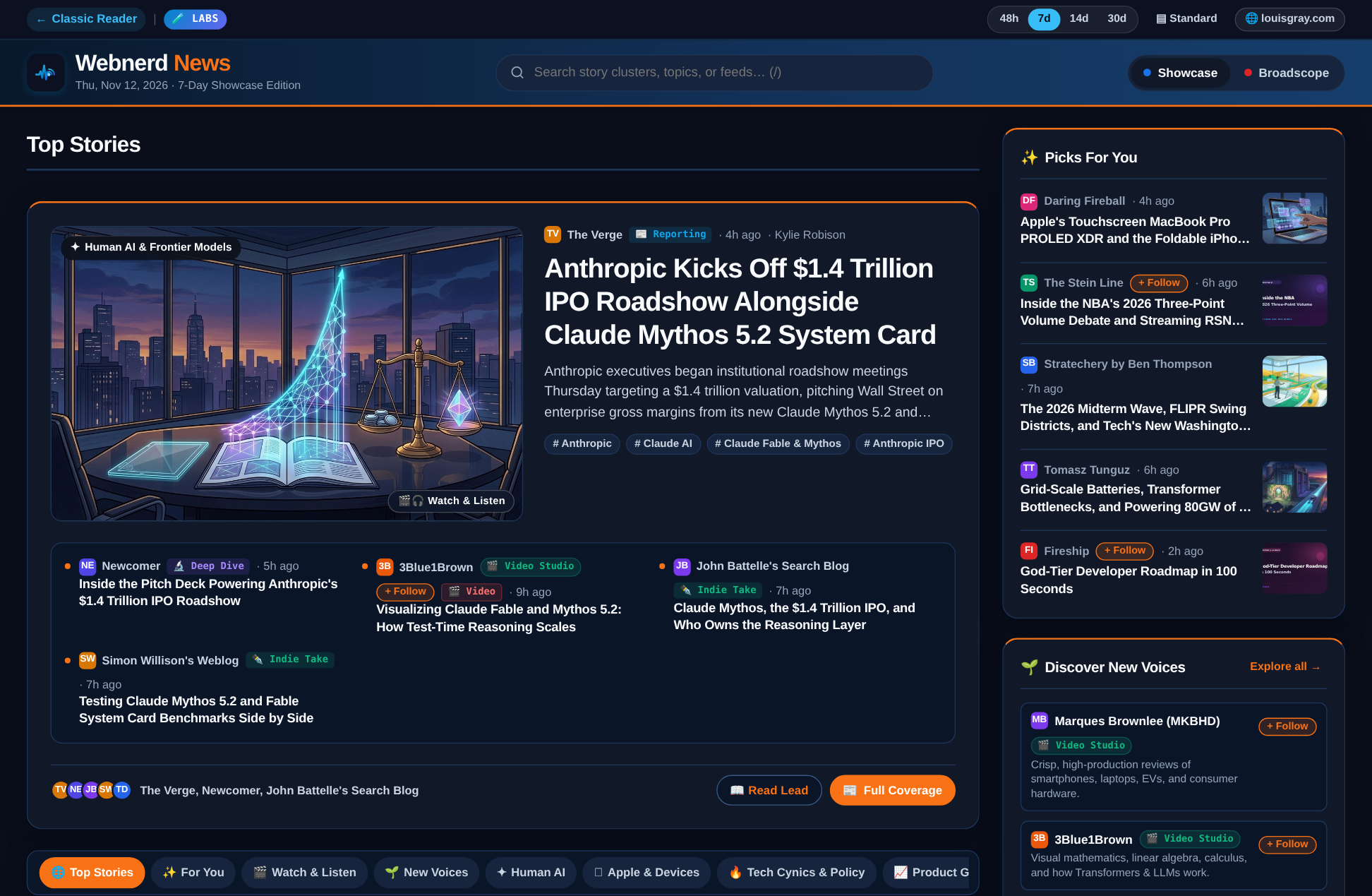
Webnerd News (in Labs) brings visual clustering to top stories and streams.

An algorithm-free stream of updates, sorted chronologically, ensures you never miss a single post. Bringing that classic RSS reader feeling back, including recommended bundles and sharing, has reinvigorated the discovery loop for me after a dark decade dominated by social feeds fueled by ragebait, attempts at viral videos and headlines that left you questioning what stories were all about. But there's also value from automated or hand-selected curation you see from sites like Techmeme and major news hubs like CNN or Google News.
Typically, these sites are fed by their own first party sources or editor curated content. As a viewer, they may slightly adjust based on their incremental levels of personalization, but for the most part, you get the same view everyone else does -- and your headlines or top stories are the ones they see.
What if you could combine the at a glance view of what's most important, including story clustering when many sources cover the same topic, but built on a foundation of the sources you choose to read? That's the idea with a new view in Webnerd.ai -- a fun experiment that combines the feeds you personally subscribe to, augmented by the starter packs I engineered into the site from the first day, ensuring you always have something to read, and constantly have new sources to discover and subscribe to.
Building on the web platform, and offering a direct connection from the publisher to the reader is an important foundation of what makes RSS special. If everything is a feed, you can point that feed and shape it every which way. We remember this from the 2010 era wave that saw Flipboard unveil its social magazine on the iPad alongside Feedly, Plaxo Pulse, Ninua and many others, even as plenty of pundits rushed to declare classic feed readers dead. I pushed back at the time saying RSS or RIP, the Results Always Trump the Methods, arguing that consumption tools aren't a zero-sum game. Sometimes you want the raw river, item by item. Other times you want an editorial front page that groups the noise into a coherent briefing. After watching filtertainment eviscerate our informed monoculture over the past decade, building both modes on top of open feeds feels overdue.
So let's have fun with it.
Clustering Your Subscriptions With 14 Starter Packs
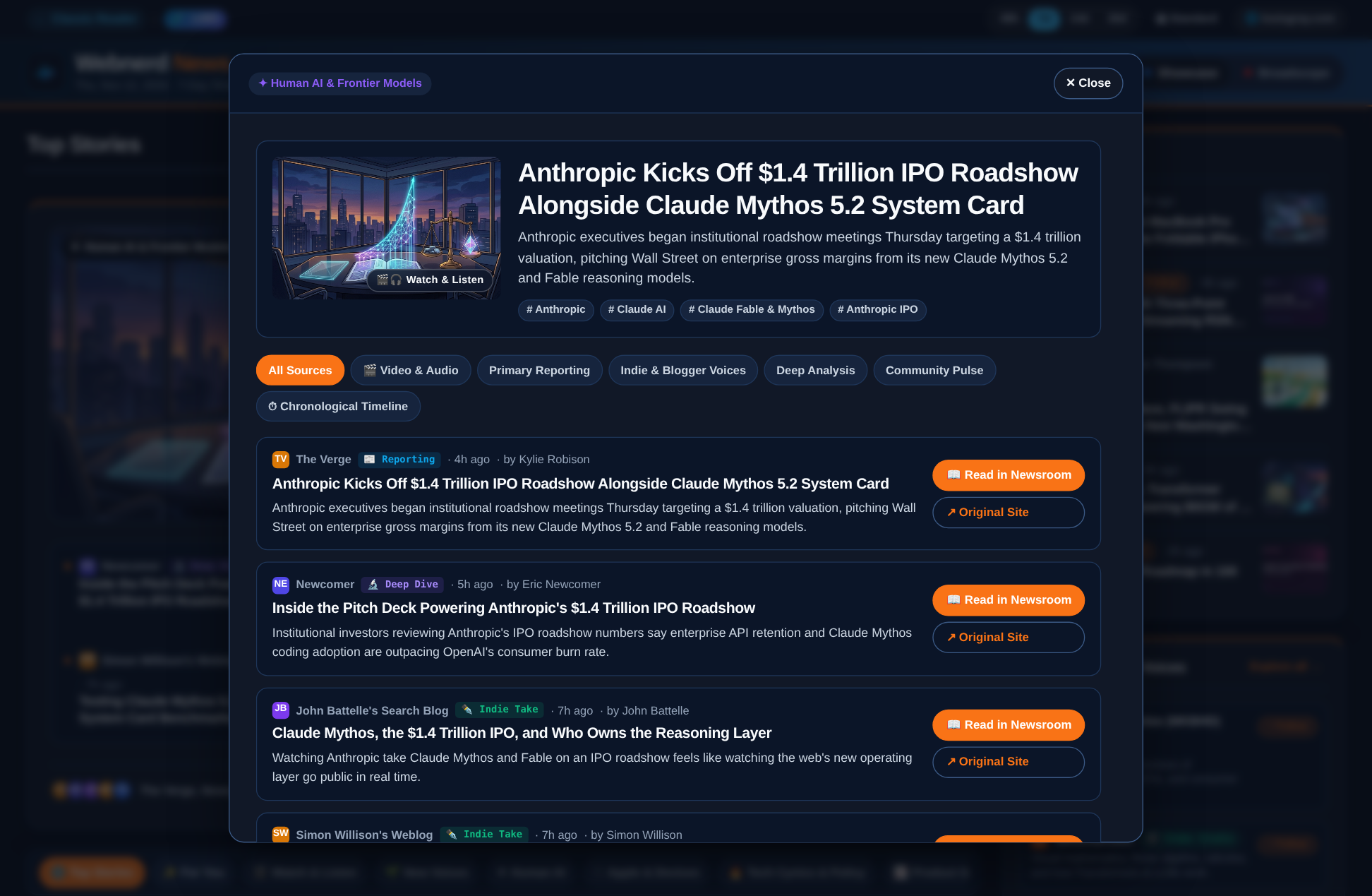
Tapping Full Coverage lines up reporting, deep dives, indie bloggers, video, and podcasts on the same story.
The engine underneath Webnerd News starts with every blog, newsletter, YouTube channel, and podcast you have connected, then blends in active coverage across all 14 Webnerd.ai Starter Packs. Strict source diversity caps keep any single high-volume site from flooding the page, and if you still haven't tried Webnerd.ai yourself, and take a look without logging in, it defaults to an edition generated from my own subscriptions so you can kick the tires right away.
Instead of repeating duplicate headlines, related posts converge into a single story cluster tagged by the role each piece plays, offering:
- Perspective Tags & Full Coverage: Every item carries a clear badge -- Reporting, Deep Dive, Indie Take, Community Pulse, Video, or Podcast. Hit Full Coverage to compare every angle side by side or step through a chronological timeline of how the story unfolded.
- Inline Starter Pack Discovery: When a writer from a Starter Pack you don't folow lands inside a story cluster you're reading, or surfaces in the Discover New Voices rail, you see which pack brought them in alongside a one-click + Follow button that subscribes and files them straight into a matching folder.
- Zero Unread Anxiety: Browsing Webnerd News is strictly read-only against your classic reader queue. Flipping through the magazine never marks articles read behind your back, and stories you already read earlier in the morning still stay on the board for context
This is very much day one of a broader buildout and another fun volley in vibe coding to victory. I plan to keep tuning the clustering weights, tightening how personal folder signals steer the front page, and expanding the Starter Pack catalog beyond tech and media. Take Webnerd News for a spin on your own feeds today and let me know on Bluesky what clicks, or what you'd love to see next.