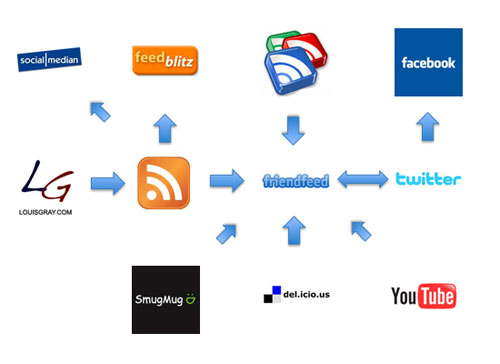
This Is How My Social Media Data Flows. I'll Explain.
If you're anything like me, you are constantly creating social data. From your blog posts and your tweets, your photos and videos, bookmarks and status updates, you are creating new information, big and small. You might do so in spurts, or you might be creating new content throughout the day. But with so many different social networks out there, and friends scattered here, there and everywhere, there's always the potential you're not sending the right data to the right place. But if you start by knowing where your data is flowing now, you can make minor adjustments along the way to get the recipe right.
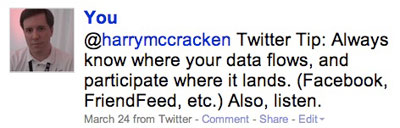
On March 24th, I told Harry McCracken of Technologizer that if I were to provide any Twitter user one piece of advice, it would be: "Always know where your data flows, and participate where it lands."
That simple piece of advice is a major challenge to most people. Whether they don't want to step out of their comfort zone, or they believe they only have time for one social network where they participate, most choose one or two places, while neglecting others. Others simply use services like Ping.fm to send all updates to all places at once, a scattershot process to something that probably deserves fine tuning.
My approach to this problem is to always create content while knowing its impact downstream. Here is what I have chosen to do with my data I am creating.
1. Blog Posts
Blog Posts that I create here at louisgray.com are packaged up by RSS, using FeedBurner, and end up in RSS readers. They also are published in headline form or excerpted, on FriendFeed and Socialmedian. Every day, updates in the last 24 hours are bundled up by e-mail and sent to FeedBlitz.
2. Twitter Activity
My Tweets, when posted, be they notifications of new posts (which I do manually, not automatically) or other content, are posted to Twitter and echoed both to Facebook and to FriendFeed.
3. Native FriendFeed Posts
When I post a new item directly to FriendFeed, it echoes to Twitter, which in turn, updates Facebook. Knowing this, I often author the headline using Twitter language, such as @ signs and hashtags, keeping the headline short. I can then, in FriendFeed, edit the headline to use normal language, optimizing the data for where it is consumed.
4. Delicious Bookmarks
Bookmarks I make on Delicious are shared to FriendFeed, and bounced to Twitter and Facebook. I ensure the headline and the source of the article are displayed, and now truncate that to hit Twitter's character limits.
5. Google Reader shared items
Shares I make in my RSS reader not only stick to the link blog, but they impact FriendFeed, Socialmedian, and the shared item counters, like ReadBurner, RSSmeme and now InFeeds.
6. YouTube Videos and SmugMug Photos
The YouTube and SmugMug activity I do is largely family related, so when it gets imported to FriendFeed, using RSS, it is echoed to Twitter and Facebook (like in #3).
7. FaceBook Status Updates
They stay in Facebook, period, which is why I usually just update it using Twitter.
The reason I list each of these specifically is because each stream of data has a different intent and possibly a different audience. Given much of the content flows through Twitter and FriendFeed now, I make a conscious effort to optimize the data for both services. I also recognize that when I post to both services, I just might receive comments and likes on Facebook, which is happening at an increasing pace.
Thinking about the data flow has an impact on how I behave. It is because of FeedBlitz that I prefer to have more than one post in a 24-hour period. I also know that as I am bookmarking sites that cover articles from this blog that I am getting to reward others who write about the same things I do. I recognize that by tweeting too much I could muddy my Facebook and FriendFeed, and have negative repercussions as a result. I also know that I need to make sure the headlines on my SmugMug photos and YouTube videos make sense once they hit Twitter.
It may seem regimented, but once you think about where your data is flowing, you will find a process that works with you. The good news is that RSS is not dead, despite some beliefs otherwise. In fact, it plays a bigger role than ever in terms of shuttling updates to and from services. I have set up my publishing preferences in this way for me because it matches what I believe to be the right data with its right destinations, and when activity from the community participates, I try to be there as soon as I know it has happened, through close monitoring.
And considering this is essentially my social media creation workflow, you might also be interested in the post I wrote last Spring on my own social media consumption workflow. It hasn't changed much at all since.
17 Comments
Great and very informative post, Louis! Totally agree with you!
Interesting post describing your data flow, Louis. (InFeeds was new to me, btw.)
One more thing to possibly factor into a flow is that some of us do status updates in different languages depending on the intended audience. Keeping them on different services is always an option, but at the moment my FriendFeed-readers have to endure quite a lot of Swedish if they don’t filter out the Identi.ca-updates.
I agree, but I think it is also important to realize that differnt people use different services. Oversharing is very easy to do: I hate people who do, and I am probably not alone. That is way I have turned off integration between Twitter and Facebook.
I tend to use Facebook for friends and relations that I have met face to face. Usually my FB connections are more social than work related.
LinkedIn is for those that fall out of the FB category, and I only accept invitations from those that I have talked to in person.
I find Twitter to be the best place to meet people, and Friendfeed the best place to where I can get to know those that I meet on Twitter. (Both personal and professional)
I would love to get your thoughts on this.
Interesting and helpful info on how to get messages out efficiently. I wonder, however, to what extent I'll have to put extra vigilance toward creating end-user, audience friendly messaging when my team members begin advocating for efficiency over content quality.
I also cringe when I see Twitter updates on Facebook, and have no qualms about unfriending people who do so. Why? While I may truly want to be connected with the person, Twitter messages seems too abrupt and jarring on Facebook. My hope is that social media plans will incorporate both efficiency AND quality (audience oriented) messaging - even when it would be tempting to save time by bundling updates.
Well said!
If you are feeding Twitter to FriendFeed, make sure you exclude Twitter from services FriendFeed sends to Twitter, or you will get the dreaded FriendFeed echo on Twitter. You can still manually opt to send your FriendFeed posts to Twitter.
Also, my friends on Twitter seem to appreciate if I post a shortened URL for links on FriendFeed that go to Twitter (and turn on the FriendFeed setting that sends the original URL instead of the FF URL). I know that many FriendFeeders feel that using the FF URL helps get Tweeps to converse on FF about the post, but I find far more are annoyed by having to click twice to get to what I'm linking to.
Louis Gray: 'master your social media flow' - flow picture is useful for other communities as well!
Thanks for the explanation. I think it is helpful to see how others decide where and what to send.
I am curious about how you decide where to pull your feed in. For instance, which feeds and why for Plaxo
Mary Ann
I would rate this article 6 stars if I could.
Great information, very useful.
In a sense, this only tells half of the story, since it doesn't show the INPUTS to louisgray.com (including some very knowledgeable guest writers). I made a (now grossly outdated) map of how many of my items flow into FriendFeed (and, at the time, MyBlogLog), but also textually noted that many of my posts were inspired by items that I read in Google Reader and other places.
"It may seem regimented, but once you think about where your data is flowing, you will find a process that works with you."
Do you think this "openness" is an opportunity (to be the architect of your own streams) or is this going to generate confusion (e.g. users don't know what something is for anymore) or it doesn't really matter and things will be accessible only through either search or community?
nice post on a topic always on my mind - tracking and interacting with content produced, as well as people
Very informative, especially with the link to last Spring's post. While not generating nearly as much content as you, I have begun to wrestle with some of these workflow and "content management" issues and concerns. Also working to sort out which services and sites to devote any brain cycles to. A potentially endless task it seems at times ;-)
After reading through all of your various activities a question that comes to mind is "How many hours are you devoting to the activities you describe on an average day?" Also, how does that compare to your time usage last Spring. I don't mean to pry, but it would be helpful for putting a "time spent" number to the blogging and social media activity.
Anyways, thanks for the excellent post and sharing your insights. Great stuff and very helpful.
I stopped having my Tweets auto-update Facebook because I felt the conversations came through one-sided and stunted, and reduced the usability of my page.
Thanks for the tips, though - excellent:)
Very useful, especially in helping content producers visualize and manage their flow.
I am really not a fan of Hellotxt and Ping.fm; a few sites that throw out the same msg to all your sites.
1) half the time, your core audience is following you across all platforms.. they don't want to see your msg more than once! (so stop spamming them)
2) the other half of the time, it is irrelevant to your audience. Facebook for instance. If I tweet something with @ and #, my FB audience won't know what I'm talking about and may eventually hide my updates from their stream.
The bad news there is that you are no longer reaching an audience that you eventually want to reach when you ask from for a poll, or review of a service/product, or try to sell them something (like a seminar or a book, or a push to read your latest blog post).
Know your audience across all platforms. Be respectful and thoughtful. Don't be a spammer (you might be and just don't know it).
Thanks for posting, Louis!
@MatthewRay
I'm curious if you're aware of applications besides http://ffscheduler.com which allow the scheduling of FriendFeed posting which would seem to be a very useful means of entering data into your stream, particularly since you're likely embargoing blogposts and then handcoding your related posts to FriendFeed, Facebook, et al.?
I'm particularly fond of the FriendFeed posts for cross-posting into Facebook since the API also allows for pushing photos attached to the FF post into the FB post inline with the story itself which allows for a prettier post.
Hopefully one day (very soon) all of this data and meta-data will all converge to allow the average user an easier means to be the hub of their own social media graph.