Silicon Valley Technology Commentary & Archives · Est. 2006 3,033 Posts · 2006–2026

November 29, 2008

November 29, 2008 · 5 MIN READ · BY LOUIS GRAY

We've Only Just Begun to Syndicate Our Content

We've Only Just Begun to Syndicate Our Content

By Mike Fruchter of MichaelFruchter.com (Twitter/FriendFeed)

It wasn't too long ago that blogging and pull technology, including RSS, first became popular. If you published new Web site content, and wanted the world to know about it in real time, your delivery and distribution options were very limited.

Publishing content updates was pretty much the same as it is today. You would upload your new pages to the server and hope to see some decent search engine traffic. But you relied more on bookmark traffic, and other means of marketing, such as e-mail, to get people to your site. Important as it is to get new traffic, retention is equally as vital. Quality content, useful products, affordable prices and great customer service, are all factors in keeping people coming back to your site.

The early days of the wild, wild, Web.

In the early days, before Google, search engines took days, and often weeks, to crawl and index new content. There were a lot of hoops to jump through to get listed, and you could be waiting weeks to months for a manual review of your site for inclusion. If you didn't have the patience to wait that long, you always had the option of paying a nice fee for an express review, to get your site approved. But the days when Altavista, Lycos,Yahoo, and a few others reigned supreme were also the days the spammers dominated search results.

Therefore, if you were lucky enough to get indexed in a timely fashion, chances are some spam-related bottom feeder had already beaten you out, leaving your pages buried back in the search results. Because spam was so bad and such a problem, a lot of Webmasters adopted the " If you can't beat them join them " mentality. As a result, the search engines almost became rendered useless for a period of time, because they were filled with nothing but spam, mainly in part due to black hat SEO tactics.

E-mail was the name of the game, and it actually worked.

Newsletters are something I, and many other Webmasters, heavily used to inform our user base of new Web site updates/product offerings and so forth. This was as real time as it got back then. Composing daily and weekly e-mails got to be quite a chore, but proved to be very effective. This of course did not last long.Spammers eventually discovered, and killed e-mail marketing for the rest of us. How many of you have received or reported spam e-mail, or even what you perceived to smell like spam to Spamhaus or Spamcop? Even with these most opt-in compliant e-mail lists, you still have frequent headaches with people reporting your legitimate e-mail as spam. The spam reports are also e-mailed to your Web host, and usually to their abuse dept, which causes more unneeded headaches. For non commercial uses such as notifying small or close groups of people, e-mail is still effective and has its place. And nowadays, marketers who use commerce e-mailing must ensure their lists are opt-in/out, and that their compliant with the CAN-SPAM Act of 2003. It also takes a significant amount of more e-mail addresses to click and convert. Besides, people are a lot more reluctant to submit their e-mail addresses today than they once were. Even if they do, the chances of them actually seeing the message diminishes greatly thanks to spam filtering, and disposable e-mail addresses.

We have come a long way in a short period of time.

Today we publish and consume more content faster than ever before. WordPress has become the new FrontPage. Web sites are now blogs. e-mail and newsletters have been replaced by RSS. Micro-blogging applications such as Twitter have filled the void in between. Today when new content is created and published, it's usually done on a blog, and syndicated automatically thanks to RSS and the blogging application used. Today when you publish a blog post, it's distributed and found instantly in RSS readers within minutes of being written. Google and other search engines love blogs, because they are constantly publishing new content. Blogs that update frequently often will have more influence and higher rankings in search. Blogs and traditional Web sites get indexed in search engines, but that's where the similarities end, in terms of real time publishing and real time distribution. Blogs are indexed within minutes, but Web sites often take longer, with a lower probability for achieving higher in the search results.

So just what happens after you click the publish button on a blog post?

When you click publish, your blogging software automatically sends a ping alert to special servers maintained by Google Blog Search, Yahoo, VeriSign and others. The ping lets them know that you have recently published new content. Ping servers then alert aggregators, search engines and others to send out bots to crawl the blog for updates. The ping also alerts data miners and text miners that you have updated. Data miners are in the business of metrics, and this data is often sold to and used by corporations. Text miners are the true bottom scrapers, also commonly referred to as "splogs". Splog is short for "spam blog" and is used to describe an auto updating blog, setup to scrape feeds at regular intervals and post them. They exist for the sole purpose of either displaying ads, such as Google’s Adsense or for the purpose of creating search engine traffic, which in turn is used to promote other splogs. Splogs are automatically generated, and there is not much you can do about them nowadays other than report them to the search engines. The next step in the process, which is set in motion seconds after you press publish, is sending the new blog post to aggregators such as feed readers like Google Reader, and sites that pull RSS feeds, such as alltop.com etc. The human redistribution process (sharing, bookmarking, etc) then takes over and the cycle is started all over again. Compared to the old days, all this happens within minutes.

In Closing

Publishers today do not have to worry or spend as much time with the distribution of their content as they did way back when. Time is now spent focusing on producing quality content. Gone are the days of the wild wild Web. We are now using smarter, and more effective tools and publishing methods to get the word out faster than ever before. What's next on the horizon for content syndication?

Read more by Mike Fruchter at MichaelFruchter.com.

November 29, 2008 · 2 MIN READ · BY LOUIS GRAY

BigTweet Sends Tweets from Any Web Page (Up to 280 Characters)

BigTweet Sends Tweets from Any Web Page (Up to 280 Characters)

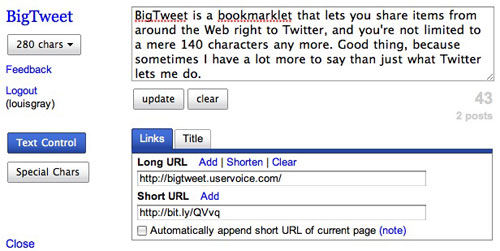
In one of my "couldn't be more wrong" predictions for the world of tech in 2008, I predicted that Twitter would move away from just offering text updates on its microblogging site, and would instead expand to possibly let users add pictures or even video, giving a better answer to "what are you doing?". Instead 2008 has been more about the site's native growth, the acquisiton of Summize, and just keeping the service up. Luckily, third party developers are finding new ways to leverage the site. Among them is a new bookmarklet-based site called BigTweet, that lets you share Web pages you find around the Internet and send them to your Twitter account. BigTweet even tries to double down on Twitter by letting you send upwards of 280 characters, should you want to. (Updates over 140 characters are broken into separate Tweets)
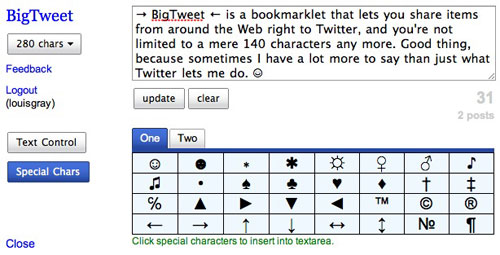

Sending a tweet from BigTweet's bookmarklet, to 280 characters

The concept of a bookmarklet is something that has grown increasingly familiar to users of various social networks. I've got a folder full of them that lets me add items to social networks like socialmedian, Twine and FriendFeed, or other more specific items, like those that let me add bookmarks to Delicious, and RSS feeds to Toluu or Google Reader.


The same tweet, with some symbols added in for emphasis.

BigTweet's bookmarklet enables you to share any Web page you are browsing and send it to your Twitter account. The full URL is truncated with the bit.ly URL shortening service (see their blog for an update), and prepopulates the title of the page with that on the site you are visiting. BigTweet lets you add a description of the URL you are sharing, all the way to 280 characters if you wish, counting down to your limit, and even add special characters, from smiley face emoticons to arrows, and other symbols.


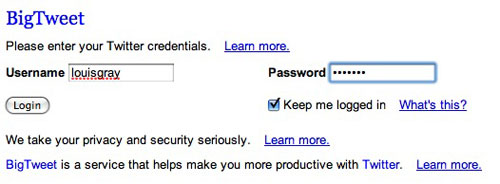
Thanks to Twitter Still Needing OAuth, My User/Password Combo Go Here.

Like many, many other services that leverage the Twitter API, BigTweet requires you to enter your user name and password to get registered. The author, Scott Carter, promises he won't misuse your data, which has largely gone unquestioned by every other Twitter 3rd party service, with the exception of Twitterank a few weeks ago.

Sharing items on Twitter is something many are looking to do, in addition to using the site to post their location (from BrightKite), their new blog posts (from Twitterfeed), or just about anything else these days. BigTweet's bookmarklet means you can do it from anywhere, without leaving that page. The service's added symbols and double the characters are also a plus.

Hardcore FriendFeed users might find the service slightly redundant, as they can use FriendFeed's bookmarklet and have the native FriendFeed item hit Twitter as well. But the FriendFeed bookmarklet, as cool as it is, won't allow for custom symbols and will cut off anything beyond 140 characters, so there's room for another bookmarklet in your browser bar. You can check BigTweet out at http://bigtweet.com/.

November 28, 2008

November 28, 2008 · 2 MIN READ · BY LOUIS GRAY

TiVo's Mobile Interface Gets Things Recording on the Go

TiVo's Mobile Interface Gets Things Recording on the Go

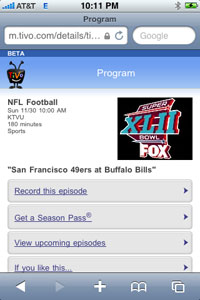
Despite having pioneered the world of set top boxes and time shifting recordings, TiVo hasn't become the dominant business success its many hard-core fans (including me) had hoped it would. While its issues ranged from competing with monopolistic cable companies to rigid payment structures, to being a near zero when it comes to blogs and the social Web, they have eked out the occasional update that has us hoping more is to come. Among them is their new mobile Web site, which launched just last week. (See WebWare and Gizmodo) On the road myself this week, thanks to the Thanksgiving holiday, I can connect with our home TiVo boxes using my iPhone and make sure I don't miss any TV I may have forgotten to tell the units to record before leaving the house.
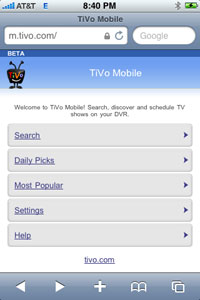
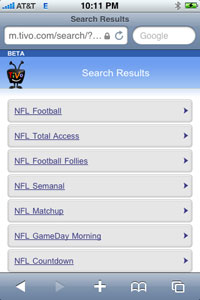
TiVo's mobile application may not be as ground-breaking as their DVR interface is (or once was), but the offering is simple and just works. If you head to m.tivo.com, you gain the equivalent of their Web site, from daily picks and most popular TV shows, to a search option that lets you search for TV show titles, actors, directors and other show-related items.


TiVo Mobile's Simple Interface

Most importantly, by choosing the "Settings" option, you can choose which DVR is linked to your mobile account, after you have logged in, and you can add shows to the scheduled list of recordings. Either select a show from the daily picks and most popular items, or from your own search results.


Searching for NFL Turns Up a 49er Game

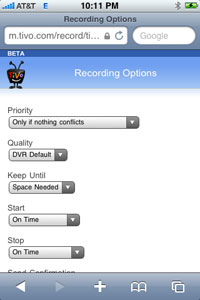
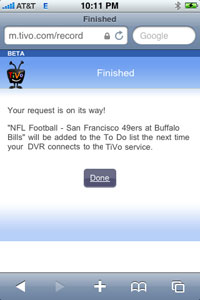
Using the mobile TiVo site via my iPhone, I was able to search on the term "NFL" and find all shows that had the NFL in the title. A few clicks later, and I was able to find the San Francisco 49ers' game at the Buffalo Bills is to be played on Fox this upcoming Sunday at 10 a.m. I could then click to "Record This Episode", determine the recording's priority, quality and whether it would start or stop outside of its scheduled time. Upon completion, I even got an e-mail confirmation to my account to let me know the request had been successful.


Setting the Recording and Getting Confirmation

Some of the characteristics of the mobile site are rather basic, from the links on gray backgrounds to the pull-down menus, but assuming the site is intended for use on a wide variety of mobile phones, and not elite smartphones like the iPhone, that makes sense. Now, if I find myself learning of a new show or one I'd like to record on the go, I can do so just by grabbing the iPhone and heading to m.tivo.com to TiVo's mobile site. Maybe there's hope yet still to keep this tech pioneer alive.
November 28, 2008 · 2 MIN READ · BY LOUIS GRAY

Don't Forget to Say Uno On Your iPhone!

Don't Forget to Say Uno On Your iPhone!

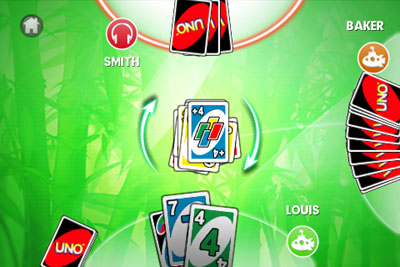
UNO was among the first card games I ever learned to play. I remember being of kindergarten age, playing against my father, and starting out with only three cards per hand, rather than the usual seven, as my own hand was too small to manage a standard game. As I grew older, I was able to master the full deck, and determine strategy between all the Draw Twos and Draw Fours, Skips and Reverses. And now, I can play UNO on my iPhone, as the classic card game has been added to the application store, surprisingly with all the wrinkles the game has to offer.


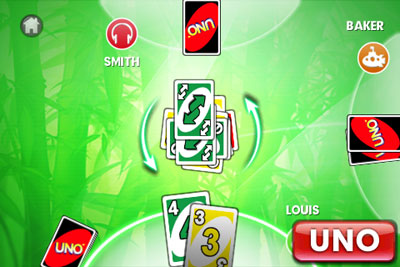
Don't Forget to Tap UNO.

If you're willing to spring for the $7.99 it takes to get the application, you'll find the offering to be impressively developed, with flashy game play and all the nuances of the actual contest - from forcing you to "say UNO" when you're down to one card, to giving players the option to challenge Draw Four cards, if you believe they still have cards in their hand of the color being played.


Uh-Oh... A Draw Four!

Over the last 25 years or so, I've "progressed" from holding three cards in my hand to seven and now just one hand needs to prop up one iPhone, where I can push game play with my finger using Apple's touchscreen-enabled mobile device.


Rules are Rules, On the iPhone Or Anywhere

The standard UNO play can be done from anywhere between 2 and 4 players, and cards are scored just as they were from the original bright red package. Number cards are worth their face value, Draw Two, Reverse and Skip are worth 20 points a piece, and the Wild cards are a plump 50 points if you get stuck holding them in your hand by the time your opponent finishes play.

The game also offers features the original offering didn't - from playing songs on your iTunes library, to online multiplayer gaming, and alternate rules. If you're not above paying eight bucks for a card game, UNO is a great addition to your iPhone app library. You can find it on the App Store here.