Silicon Valley Technology Commentary & Archives · Est. 2006 3,033 Posts · 2006–2026

December 1, 2008

December 1, 2008 · 2 MIN READ · BY LOUIS GRAY

Which Photo Site Will be First to Embrace Facebook Connect?

Which Photo Site Will be First to Embrace Facebook Connect?

By Jesse Stay of Stay N' Alive (Twitter/FriendFeed)

The news of today has been the coming rollout of Facebook's 3rd party platform services, aka Facebook Connect, to sites like Digg and Hulu, and the opening of Facebook Connect to all. Facebook has provided its Facebook Connect services as an extension to the Facebook Platform for developers to now be able to integrate Facebook login, Feed posts, friend information, and more on their own websites. The service has already been integrated on sites such as CBSSports.com, MoveOn.org, and RedBull.com in very simple form.

One noted fact about Facebook is that they currently have the largest photo repository on the internet. I have covered this before on my personal blog, when they reached their 10 billionth photo. The service boasts over 10 billion photos now, with over 2-3 terabytes of storage space used, and near 300,000 images served per second. The social nature of Facebook just asks for social elements such as photo sharing to be very popular.

This begs the question then, now that 3rd party websites are now privy to integrate with the massive 100 million+ member network that Facebook provides, who will be the first 3rd party photo sharing site to integrate with the service? We know that Google and Facebook aren't friendly with each other - I would count on PicasaWeb to do this. However, what about Flickr, or SmugMug?

I am a firm user and fan of SmugMug.com, as is Louis. I love their beautiful interface, and especially the fact that I can automatically upload RAW photos I take and associate them with their .jpg counterparts on the site. The only reason I ever post to Flickr now is because of the social nature it brings. It also has more users. SmugMug's social features are quite simply, lacking.

However, what if SmugMug were to become the first photo sharing site to integrate Facebook Connect? What if SmugMug were to integrate the limitless potential of the Facebook network into its own site? Let's say I could log into SmugMug with my Facebook account, find all my friends on Facebook with SmugMug accounts, and immediately import them as friends into SmugMug. Then, imagine the potential of being able to now share all my SmugMug photos that I upload, directly into my Facebook news feed, for all my friends to see and comment on in Facebook, just like the Facebook Photos app is currently. What if I could also tag those Facebook friends in my SmugMug photos?

There is a huge void in the Photo sharing market right now for those that could be participating in Facebook Connect. I predict a huge boom when this happens, and they have the potential, with more features than Facebook can provide, to even overtake what Facebook's own photos app brings to the table. It's only a matter of time that we begin to see sites like SmugMug and Flickr integrate Facebook Connect. Who will be first?

Read more by Jesse Stay at Stay N' Alive.

December 1, 2008 · 4 MIN READ · BY LOUIS GRAY

Pull Your Blog Into FriendFeed and Increase Exposure

Pull Your Blog Into FriendFeed and Increase Exposure

By Jesse Stay of Stay N' Alive (Twitter/FriendFeed)

I've been following several people on FriendFeed that I'm a big fan of and are fairly active Twitter users. Until recently, I would like their Tweets and share them with my followers regularly. However, I'm realizing a trend amongst new FriendFeed users, including some of these Twitter users I follow, in which they pick one or two services and neglect to share the other places they belong to. Perhaps the most important of those is their own blog. I'd like to suggest this is a mistake - and I think it's mostly a misunderstanding of what FriendFeed can actually do for your blog.

Let's start with a simple diagram. Let's say you're Bob, and you set up FriendFeed to import you blog automatically. You write a blog post, perhaps similar to this one, which in turn gets imported into FriendFeed.

Now, let's assume you're John in the diagram. You're following Bob, so automatically, Bob's blog post immediately goes to the top of your Feed. You notice this, you click on the link, give Bob a little traffic, read the article, then click on the "like" link in FriendFeed. (Note that all posts on FriendFeed force users to click through to read the post - different than an RSS Reader, which keeps the traffic to the Reader)

Now, here's where FriendFeed is powerful. When John clicks "like" in FriendFeed, Bob's article now gets shared with all of John's friends, which sends the article to the top of their feeds as well. They then have the potential to "like" the article, and share with their friends, and it goes on and on. The same goes with any Tweet, Picture, Music, Video, or any other item you share on FriendFeed. The same thing also happens when Bob's friend, Fred, sees the article, and comments on it. Any "like" or comment on FriendFeed sends it immediately back to the top of all their friends' feeds and the post gets shared over and over.

RSS

Now, let's imagine Bob, after writing the article for his blog, does a search on FriendFeed for his article. Let's just imagine it's named "Is Your Blog on FriendFeed?". He puts "who:everyone Is Your Blog on FriendFeed" in the search bar at http://friendfeed.com (the "who:everyone" means he wants results from everyone that mentions it, not just Bob's friends), and the returned data shows every like, share, or comment about Bob's article. Those results are also available as RSS. Bob simply needs to add the returned URL to his RSS Reader (there is an RSS link down at the bottom of the search results page), and now he'll receive every "like", share, or comment about his article in his RSS Reader. Bob can now click on each one of those, and in turn, "like" or comment on those as well, bringing it back up to the top of both the submitters of those shares' feeds, as well as Bob's own friends' feeds. It also lets Bob track every comment on FriendFeed going on about his article.

Let's also add that every person that has subscribed to Bob's blog in Google Reader can now share Bob's blog post with their Google Reader friends. They can import their Google Reader shares into FriendFeed (which you should also do), and now every share in Google Reader gets recorded in FriendFeed, and Bob can like those as well. Bob now has full control over what is being said about his blog on the web, and he can enter each one into the FriendFeed promotional cycle. This is why FriendFeed is so powerful!

FriendFeed Growth

Recent Compete.com statistics show that FriendFeed in the last month has surged while Twitter growth has slowed. While far from Twitter traffic numbers, FriendFeed actually grew more in the last month than Twitter, and FriendFeed is only getting started. FriendFeed provides real-time updates, popular amongst bloggers and media for finding breaking news, along with the ability to thread comments and track all types of content on the web and discuss that content. There's no doubt FriendFeed is a threat to Twitter, and your blog has the potential to see even more traffic than Twitter, even at these low numbers. Now imagine what happens when FriendFeed approaches Twitter-level traffic and you got in early and now have one of the stronger followings on FriendFeed? You are now in a pretty powerful situation with your blog.

If you haven't considered importing your blog into FriendFeed, I hope I have made you reconsider. The ability for your posts to continually get repeated at the top of people's feeds as you write new articles makes it a must for anyone wanting to compete in the blogosphere. Have you imported your blog into FriendFeed?

You can discuss on FriendFeed below! Now, let's try a little experiment. If you read this in Google Reader, go and import your Google Reader shares into FriendFeed. Now, share this article. Then, watch that article and you'll notice that for each person sharing the article I will like your share on FriendFeed. Give it a try!

Read more by Jesse Stay at Stay N' Alive.
December 1, 2008 · 2 MIN READ · BY LOUIS GRAY

Blogosphere on Holiday: Thanksgiving Drops Posting by Half

Blogosphere on Holiday: Thanksgiving Drops Posting by Half

Web site traffic and activity follows a fairly regular flow. Any administrator or stat junkie can tell you that the vast majority of sites see much more activity on the weekday than the weekend, and businesses tend to see Sunday traffic higher than that of Saturday, as people start to gear up for the coming workweek. Times of holiday, whether worldwide or just in the United States, also impact the activity, reducing traffic, and seeing a slowdown across the board when it comes to publishing. This year, Google Reader hints the slowdown is as much as fifty percent.
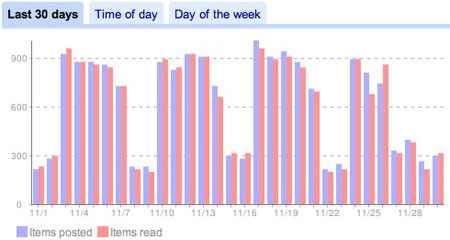

As I've mentioned a number of times previously on the site, Google Reader is my go-to RSS reader. It tracks the 400 feeds I view, when they publish, and how quickly I get to the new items. You can even look at the last 30 days and see just how many items were read versus the number posted.


My last 30 days, according to Google Reader

According to those stats, in a typical seven-day week, I take in about 4,800 new items, ranging from about 700 to more than 900 individual items from Monday through Friday, and between 200 and 300 on the weekend.

In the preceding three Thursday and Friday combinations, Google Reader offered approximately 1,600 items in each two-day set. But in this most recent week, with Thanksgiving coming on Thursday, that number plummeted to under 700 total items, a drop of greater than fifty percent. In fact, you could start to see a slowdown as the week progressed, with Tuesday showing fewer items than Monday, Wednesday fewer than Tuesday, and so on.

In fact, the decrease in posting on the two-day Thanksgiving holiday was so low, it barely eclipsed a standard weekend, eking above that number by about 10 percent, despite the fact the holiday is so US-centric, and we assume that the Web is worldwide. So if you were feeling a bit sluggish after the Thursday feast, and couldn't get out of the tryptophan haze to put a post up, you weren't alone.

And this trend is not new. You can also see a similar note I posted back in May of 2007: Blogosphere On Holiday Drops RSS Feeds by 40%

November 30, 2008

November 30, 2008 · 2 MIN READ · BY LOUIS GRAY

What's On TV? Browse TV Listings from Your iPhone (Free today!)

What's On TV? Browse TV Listings from Your iPhone (Free today!)

In September, we first discussed the debut of i.TV, an iPhone app for local movie and television listings. Since then, new entrants have emerged to further integrate your iPhone with your living room entertainment, with TiVo launching its mobile site, and recently, Joost launching an iPhone application. One competitor, called "What's On TV?" offers a solid app that elegantly helps you browse your TV listings, search for new shows, and see program descriptions. Best of all, it's free on the Apple iTunes store for today only.

What's On TV: Getting Set Up

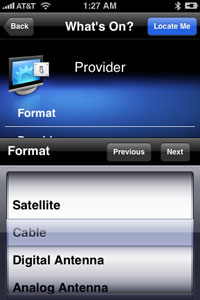
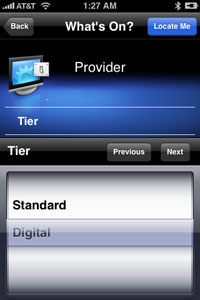
As with i.TV, the first step to getting What's On? up and running is entering your TV package. Start by saying whether you have Satellite, Cable, or an Antenna, which tier of service you might have (e.g. standard vs. digital), and enter your zip code and provider.


What's On TV: Seeing Your TV Listings

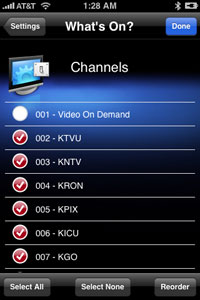
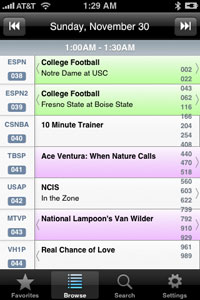
Once your channels have loaded, similar to online TV Guide or portal TV listings, you can uncheck those stations you would prefer not be displayed, and thumb channel by channel through the results to see what's playing. Interestingly, as with Apple's address book or iTunes, you can skip ahead by choosing the group of channels you wish displayed, helpful if you have hundreds to select from.


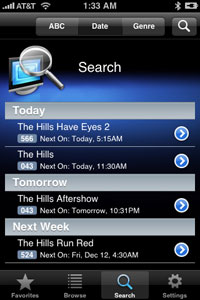
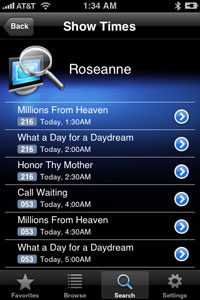
What's On TV: Searching for "The Hills" and Roseanne

Searching through the What's On? listings is relatively simple as well. Hit the search button at the bottom of the application, and you can search for upcoming shows by title, seeing when they display, on which channels, and can click through to get a description of the episode.

The What's On? application doesn't try to be the end-all be-all of entertainment apps, but what it does, it does well, elegantly, with good color cues, such as green for sports, and purple for movies. And after a "free for Black Friday" special turned out to be more successful than anticipated, the developers behind the application have extended the offer through Sunday. You can download the app here.