Silicon Valley Technology Commentary & Archives · Est. 2006 3,045 Posts · 2006–2026
Showing posts from February 2010 (38 posts). Show all posts

February 28, 2010

February 28, 2010 · 4 MIN READ · BY LOUIS GRAY

Should It Be Harder to Unfollow Than to Follow?

Should It Be Harder to Unfollow Than to Follow?

The more we use social services, the more updates we provide, and typically, the more friend connections we make. For the most part, for most people, the number of connections we have on our active networks are steadily increasing.

With time, the sheer volume can be considered noise, and there comes a time to make a trim. But it can be surprisingly difficult to break a connection, or to break multiple connections, on most of these networks.

I thought I would take a look at some of the major networks I use to show who makes it easy, and wonder as to whether they can make it simpler to sever ties.

Facebook


On Facebook, you are increasingly seeing "Add as friend" buttons from suggestions, or running into friends of friends making comments on your connections' news feed.

To add a connection:

1. Click their highlighted name and get redirected to their profile.
2. Click the "Add as a friend" at the top.
3. Click "Send Request".

The request will then be approved or declined.

To unfriend a connection:

1. Click their highlighted name and get redirected to their profile.
2. Scroll to the bottom of the page, and in the bottom left, click the small text: "Remove from Friends"
3. Click the "Remove from Friends" button that pops up.

The number of steps is the same, but unfriending is much less prominent, and "tucked away". As with friending an individual, with the exception of the friends suggestions page, you have to go one by one, profile by profile, and cannot unfriend in bulk.

FriendFeed

On FriendFeed, you can see if another user is a connection or not in a few ways. Comments from friends on items have a blue discussion bubble, and those who are not have a gray one. Also, if you mouse over someone who is not a friend, you have a "Subscribe" option. Friends' boxes just show what lists they may be placed on.


To add a connection:

1. Mouse over their ID.
2. Click subscribe.
3. Choose what friend list to put them in and hit "Subscribe".

To unfollow a connection:

1. Mouse over their ID.
2. Click on their ID name and get redirected to their profile.
3. Click unsubscribe.

It is the same number of steps, but you have to be redirected to their profile, meaning you can't unfollow them directly from your feeds, but only on their own page. You also cannot unfollow people in bulk, but you can follow people in bulk by synchronizing with Twitter or other services, such as GMail.

Following In Google Buzz


Google Buzz

To add a connection:

1. Click the user's ID to get redirected to their profile.
2. Click Follow.

To unfollow a connection:

1. Click the user's ID to redirect to their profile.
2. Where it says "You are following", click Stop.

Google Buzz doesn't directly show you how to unfollow a group at a time, but if you do find you are following many people...

1. Go to your own profile, such as: http://www.google.com/profiles/me.
2. Click "Your name" is following "The number".
3. This page will have "Unfollow" next to all your connections. Click unfollow for any you need, and you can reduce your connections quickly. It's one of the fastest ways I have ever seen to reduce your total count.

I can unfollow Rick with one click.

Google Reader

To add a connection:

1. Find a person in Google Reader.
2. Click "Follow" that person.

To unfollow a connection:

1. Click their name under "People You Follow".
2. Click "Unfollow" that person.

LinkedIn

If somebody invites you to connect on LinkedIn, adding is easy. Just click "Accept" to get connected. Otherwise...

To add a connection:

1. Find the person's profile.
2. Click "Add this person to your network".
3. Explain the connection. (Colleague/Classmate/etc)
4. Send invitation.

Surprisingly, there is NO way to unfollow or disconnect from somebody via their profile.

To unfollow a connection:

1. Go to "My Connections" under "Contacts".
2. Click "Remove Connections"
3. Select Who You Want to Unfollow
4. Click Remove Connections
5. Confirm "Yes, Remove them"

The benefit to this process is that it is relatively simple to disconnect from many at once, but you can't preview a connection if you don't recall the relationship. It is surprising that you can't unfollow via profile.

Twitter

To add a connection:

1. Go to the individual's profile
2. Click "Follow".

To unfollow a connection, there are a few ways.

1. Go to the individual's profile.
2. Select "Unfollow" from the options pull-down.

Alternatively:

1. Click the "Following" button on your own profile.
2. Unfollow one or more people listed by clicking the "Actions" button and choosing "Unfollow" for each you want to disconnect.

In most social networks, the ability to follow anyone is relatively easy. Every profile has a button that asks you to connect. Some, like Facebook, are pushing new people to you all the time. But to reduce the connections and unfollow in bulk can be more difficult, leading to links that have since faded in importance, or can be cluttered. Twitter has done a good job to let you unfollow from multiple places, and Google Buzz makes contact management very simple, from your own profile, but there are clearly ways that most sites can improve the connection experience.

February 28, 2010 · 3 MIN READ · BY LOUIS GRAY

A Month In the Cloud Shows Potential

A Month In the Cloud Shows Potential


At the end of January, I told you how I had recently picked up a MacBook Air to replace my aging MacBook Pro, and as part of that process, I would try to do as much as I could online instead of through desktop applications, leaving much of my rich media on the old laptop, and choosing the Web over hard disk as often as possible. A month in, it seems there is still much room for the cloud to grow, but despite the general trend for massive data growth, I still haven't used more than 30 percent of my spartan 128 GB solid state hard drive - a back of the hand measurement of how little data I am keeping with me and not leaving in the air.

As I mentioned last month, one of the first decisions I made was to keep iTunes and iPhoto data on the old laptop. I recognized I needed to keep Microsoft Office, for pure sanity purposes, but left Adobe's CS suite on the other machine.

Those applications I have downloaded have been rare, letting me tap into the cloud itself - for example, Skype, for audio phone calls and podcast recording, the Sonos controller to power the home stereo system, and Spotify, to access the on demand music network.

The goals are multiple. First, can I do a test run at being operating system agnostic, maintaining the flexibility to move toward a promised Chrome OS when it ships? Second, can I make the actual hardware insignificant, treating the new Air as a "disposable" machine, making migration to a newer device in the future simple? Third, and most important, can I find major weaknesses that continue to exist with an all cloud strategy?

At the end of February, my 128 GB solid state disk hard drive, much smaller than the 200 GB SATA disk it replaced, has 91.36 GB available, or just more than 71% of total capacity. This includes all system files, the pre-installed iLife applications from Apple, and preferences for many of the pre-installed apps. In fact, the one place I expected to consume a lot of data, with client files and PowerPoints, has proven to not be much at all. The folder for Paladin, with all client folders, is actually less than a single gigabyte.

Are there any headaches to going cloud-only (or close to it)? Sure. For somebody who uses PhotoShop a lot, the lack of PhotoShop has me reaching for it often. In the interim, for images for the blog, I've relied on lots of screen captures, and small editing in Preview. Anything stronger pushes me to the media machine. But the problems have been extremely rare. If I had an Office competitor that made it easy enough to edit all my files and save them remotely, I would be happy to give Microsoft Office the boot. But it's not there yet. And in the meantime, I am using GMail more and my Mac e-mail account less. I have been taking Zoli Erdos' advice and moving my Mac e-mail to the cloud, but that process isn't yet completed. I'll keep you posted on that, promise.

My new-ish MacBook Air isn't just lighter in terms of weight. It's massively lighter in terms of data too. It makes sense that in the future, so long as we have one place to put all our rich media, the rest of us really only need thin clients. We're getting there.
February 28, 2010 · 2 MIN READ · BY LOUIS GRAY

Beware the BCC: Copying Can Make Us All Blind

Beware the BCC: Copying Can Make Us All Blind

Assuming E-mail is the original social network, this Web 1.0 tool continues to have a large role in how we communicate and share ideas. With the exception of the clear GMail/Buzz integration or the recent Outlook/LinkedIn tie-up, for the most part, e-mail has not been dramatically revamped to take advantage of today's faster-moving, highly featured social networks. But despite e-mail's longevity, some basic attributes of the form continue to cause trouble between contacts who haven't mastered their core functionality. One of the most troublesome, the infrequently used, but often abused, BCC.

With BCC, the recipient doesn't know all who got the message.

As you no doubt know, BCC stands for "Blind Carbon Copy", providing a way to send e-mails to people without revealing their e-mail addresses. This can be an aid for mass mailings without exposure, but also used to be sure an individual gets a note without the direct recipient's knowledge.

For every blow-up around poorly-trained marketeers who copy their entire customer base, or PR flacks who display all the intended reporters by dumping their contacts database in the TO or CC field, you have quieter mistakes that happen when the intended recipient who thought they were having a private conversation sees a third party jump into the discussion without warning. As the intended public recipient sees the third party elbow their way into the conversation, they may lose trust in the original sender, and wonder what other messages were being shared.

Often, those BCC'd blow the cover of the messages' routing.

Some e-mail clients (such as a BlackBerry) will automatically make it clear to the recipient that they were BCC'd on a conversation, which hints they should not reply all. But not all people are as discerning and recognize their role in the world of BCC to be a silent observer. I know that when I get a BCC message that any reply I provide goes to the originator and not to the others in the thread.

Given my goal to be public about communication, my own use of BCC is extremely infrequent. Due to the potential issues that can arise as trust is perceived to be broken, I tend to follow up a BCC note to the individual saying "You were BCC'd. Make sure not to reply."

If you are someone who tends to BCC individuals as a normal course of business, I have no doubts that you can get caught by this process. Not all recipients watch the To and CC fields closely, and they may expose your willingness to overshare. With so many other ways to have private conversations 1-1, and the ease of which forwarding prior conversations via e-mail can occur, it makes sense to get above board, and preserve the BCC option for simply obscuring mass mailings.

February 26, 2010

February 26, 2010 · 1 MIN READ · BY LOUIS GRAY

Ecademy Chairman Says Limited Networks are "Flawed"

Ecademy Chairman Says Limited Networks are "Flawed"

This week, Ecademy chairman Thomas Power and I presented to a roomful of executives in various influential positions in Silicon Valley companies on leveraging social media and taking advantage of new networks or technologies to find information faster and make the right decisions at the right time. (See the presentation on 'connectedness' here)

Before he flew back to the UK, I took some time to ask him about his approach to social networks and what he thinks about connections.

Thomas, connected to more than 30,000 on LinkedIn, and endorsed by more than 700, more than double the world's second-highest profile on the site, believes strongly that any kind of limits online, from Facebook's limit of 5,000 friends (which he hit long ago) or Twitter's limiting you to 1,000 follows a day, is short-sighted and damaging to potential growth of one's network. Thomas' profile on his own network, started in 1998, without many of the limits of other companies, highlights his own connections to more than 56,000.

My own e-mail in box proves Thomas to be an incredible communicator, who tries to maintain relationships well beyond Dunbar's number. You can hear some of his thoughts below, which I recorded via CinchCast.

Disclosure: I spoke to Ecademy last year in a paid engagement and just completed another engagement with Thomas this week. It's quite possible he and I may work on many more opportunities going forward. Simply put, I like the guy.

February 25, 2010

February 25, 2010 · 3 MIN READ · BY LOUIS GRAY

GMail Ads on Buzzed Reader Items Attract Controversy

GMail Ads on Buzzed Reader Items Attract Controversy

Given the ease of distribution of content from site to site and network to network, with RSS or any other model, it's no surprise that scrapers galore are stocking away our unique copy and then trying to make a quick buck from ads surrounding it. Even though the copyright is not theirs, they are trying to make an end run around the system. As new aggregators and networks have hit the market, those of us creating the content have had to reevaluate what constitutes good practices, and what constitutes bad behavior - whether well intended or otherwise. Google Buzz, which has gained its unfair share of criticism for perceived security holes in the weeks since its launch, has finally gained a more valid critique, from Jesse Stay, who alertly noted, as I had earlier in the week, that the act of putting Buzz in one's GMail meant that content too can flow through Buzz, with Google pocketing cash on ads around your content, without the content originator getting a dime. It's the latest twist in the evolution of content and copyright in a fast-changing Web.

One Shared Item from Me on February 21st in GMail, With Ads

As you know, I don't try to monetize my content here on the blog. I don't run advertising, and I have long said that I don't mind if my content gets shared here and there for more comments. I want my content to be shared, as information, wherever you are comfortable. But yes, scrapers bug me. They mess up search alerts, and negatively impact the perception of this mirage-like image of a personal brand.

I don't believe for a moment that a new network like Google Buzz is an intended scraper, any more than I thought Shyftr was trying to steal comments from your blog when they offered shared comments on full feeds. But, thanks to Buzz living in your GMail, and many people, like me, pulling Google Reader items through Buzz, you can see how one's full content could feature advertising that benefits Google and not me. To some, this is the definition of a scraper.

Another Shared Reader Item from Me In Buzz in GMail With Ads

As a huge Google Reader advocate, and fan of the nascent network, Buzz, I do not mind in any way that my full content is being distributed. I love RSS. It is fantastic. But when I saw the ads in my GMail against others' content this week, it did strike me as odd, because it violated the unspoken rule that it's something you flat-out don't do.

I recognize that "fixing" this perceived flaw is hard. If I am the Buzz team, the act of removing ads against shared Reader items in Buzz while in GMail is probably non-trivial.

But I also can see their potential response. In theory, they cannot prohibit somebody from forwarding your content in full by e-mail, and GMail is an e-mail system. In theory, Google Reader shares are equivalent to e-mail forwards, and thus, the same as any other content being shared in this way.

Jesse asks, "Google, how is this not evil?", calling it copyright infringement. Unlike the overreactions this month, he's a lot closer in this criticism than others. I still hold that Google is not evil and is not trying to be evil, but it's more in the gray area than we would like. I assume if this holds, then we as content creators are going to need more re-education in terms of what the new rules are, and how we should adapt.

UPDATE: Jesse Stay reports the "scraping" issue will be solved early next week.
February 25, 2010 · 2 MIN READ · BY LOUIS GRAY

How To Enable Comments on Google Reader Shares In Buzz

How To Enable Comments on Google Reader Shares In Buzz


With the recent launch of Google Buzz, shared items from Google Reader's RSS platform have become more visible and more important than ever. (TechCrunch said growth increased 35%) Those Buzz users with existing shared Reader feeds had these streams automatically connected to Buzz, enabling Buzz viewers to see your shares, and if enabled, to leave comments, once obscured in your own private network, in a public place. But those following you on Buzz don't automatically have the option to comment on your Reader items, and for some, this can be frustrating. Here's how you can help them join the conversation.

Google Reader enabled conversations back in March of 2009. As somebody who has adapted to a distributed multi-locational world of conversations, I have optimized my activity to embrace the conversations in this platform. In the last year, I have been enabling connections to comment on my Reader shares, and as a result, the conversations grew dramatically.

An Active Google Reader Item in Buzz, With Comments

But the integration, to date anyway, has required some effort on my part. As new followers added my feed to their reading list, I have had to give permissions to these followers to comment on my items, by adding them to a folder, which I called "Friends". This work, a few followers a day, has paid off in a big way, as I have enjoyed fantastic conversations in my Reader, and now, this group can participate with me in Buzz.

Many of you are probably seeing more followers from Buzz into your Google Reader world than you ever had before. Now, it is more critical than ever to move these folks into a folder who can comment on your items, or they will be met with errors, locking them out of your conversation.

So here's how you fix it:

1. Log into Google Reader at http://www.google.com/reader

2. On the left side, click "Sharing settings". (Shortcut here)

3. Where it says "Who can see your shared items?", there is an item which says "Who can comment on your shared items?". Those items that have checkboxes are enabled.

My Sharing Settings and Connected "Friends" to Comment on My Items


4. Click "people are following you", and from there, you can add individuals to folders.

Adding a New Individual To a Group for Commenting

5. Repeat until you're done.

Note How All My Contacts Are In Groups for Commenting

As new followers come in, even if you choose not to follow them back, you should add them to a folder that can comment on your items. With Buzz drawing ever more attention to your Reader shares, and Reader shares being a big part of the content there, it makes sense to extend the conversation there. If this seems complicated, note it is due to a policy of having "private" conversations in Reader from the last year, and adapting this policy to a new public place. Until Google Reader enables fully public conversations on all shared feeds, this will be how you can make your feed an active place.

You can find my Reader shares here: http://www.google.com/reader/shared/louisgray. We can get connected on Buzz here: http://www.google.com/profiles/louisgray.
February 25, 2010 · 1 MIN READ · BY LOUIS GRAY

Advisory Update: BuzzGain Acquired By Meltwater Group

Advisory Update: BuzzGain Acquired By Meltwater Group

Just a quick note to mention that BuzzGain, the "do it yourself PR" service started by Mukund Mohan and others, was recently acquired by Meltwater Group, a media monitoring company I have used at multiple companies. PaidContent covered the story yesterday following a press release from Meltwater announcing the acquisition, and that company's reaching $100 million in bookings.

I covered BuzzGain's launch in early 2009, and since March of 2008, regularly met with Mukund to talk about product development, strategy and networking.

Although I wasn't as closely involved with BuzzGain as I have with other advisory roles, such as my interaction with Jesse Stay's SocialToo, I appreciate Mukund reaching out to me, as BuzzGain was my first advisory opportunity, and now, the first exit. It should be interesting to see how Meltwater brings the social media monitoring prowess of BuzzGain to its lengthy client list.

Disclosure: As an advisor to BuzzGain, I held a small equity stake in the company. I will be marking the change in ownership for BuzzGain in my "About" page and LinkedIn profile.

February 24, 2010

February 24, 2010 · 1 MIN READ · BY LOUIS GRAY

Slideshow: Social Networking In The Connected Decade

Slideshow: Social Networking In The Connected Decade

In the event you noticed things have been a tad quiet of late, I have been preparing for and participating in a two-day social media retreat with Thomas Power of Ecademy and Bob Barker of Alterian in Menlo Park.

Today, as the first part of our workshop, we focused on how businesses and individuals can leverage the best social networks out there - how data is moving quickly from more places than ever with more people and connections in more countries. The hypothesis... the next decade will be about leveraging the full power of your network and all the related tools.

The full deck, admittedly better with demos and in person questions, is below.


You can also see updates on the event at the hashtag #socialmediaretreat.


February 22, 2010

February 22, 2010 · 1 MIN READ · BY LOUIS GRAY

Latest Twitter Hires Pull from Yahoo!, IBM for Search and UI

Latest Twitter Hires Pull from Yahoo!, IBM for Search and UI

Today, Todd Kloots (@toddkloots) joined Twitter after more than seven years at Yahoo! as a front-end engineer focused on the Yahoo! User Interface (YUI) library for interactive Web applications, after previous work on the company's massive Yahoo! Mail product, where he worked on the service's front-end and design. Todd's joining Twitter continues the company's growth, pulling like a massive magnet from Silicon Valley's top companies toward the blue-logoed beacon in San Francisco, following hires from Facebook, Google, and other Valley leaders.


Kloots, who is credited with 10 years of web dev experience, joins Twitter a week or so after Michael Busch (@michibusch), who worked at IBM for the last five years as a software engineer and architect, joined the company as a search engineer. His LinkedIn profile says he was focused on "indexing, search and scale-out" for IBM's eDiscovery Analyzer product. As mentioned frequently here, Twitter's mountain of data badly needs some strong attention toward indexing and scale-out, so his hire looks to bode well for making their search tools more relevant.


Jesse Stay and others highlighted Busch's hiring last week. Also noted last week was Twitter's crossing the 140th employee mark, a milestone for the company obsessed with 140 characters. (In the comments, a fellow Twitter employee says Michael was not #140) Jesse also highlights Busch's background with the open source Lucene search project.

You can see Kloots' presentation of the new YUI 3 at Yahoo! from the fall of 2009 at the Yahoo! Developer Network for an idea of his previous work.

February 19, 2010

February 19, 2010 · 1 MIN READ · BY LOUIS GRAY

Google Buzz Reduces Power Users' Bumpage

Google Buzz Reduces Power Users' Bumpage

Being a top Google Buzz user, or even engaging with one, has come with some assumed disadvantages, as one of the product's built-in features has been to highlight activity on a feed by bumping active items to the top. For users with a few dozen followers, this is fantastic and keeps their feed moving. But for those with a few thousand, it can seem like they are "dominating" the discussion, and I've even seen people say they are unfollowing said "popular" folks for this very reason. As of this evening, that problem is being lessened.

Using the Buzz service as their blog, the official Google Buzz Team account said quickly:
"If you're following someone with a ton of followers, you're probably used to seeing their posts at the top of your stream all the time, since we've been bumping them back up with every new comment. Starting a few hours ago, we made some changes to not bump them up as often."
With about 2,200 connections, and some active participants who have been used to acting on my feeds from Google Reader and FriendFeed, I have seen the consequences of this multiple times, and it's been among the major sources of pain for the young service.

So, if you unfollowed me, it just might be safe to come back. If you were scared to make a comment, for fear your in box would be abused, don't hold back. You can get connected here: http://www.google.com/profiles/louisgray. It's probably also safe to refollow Pete Cashmore, Robert Scoble, Jason Calacanis or Kevin Rose again too, so go nuts.

While not all folks are fans of Buzz, the team has made a lot of visible changes in an action-packed two weeks. To me, that bodes well for their future development, and today's move aids the signal to noise ratio once again.
February 19, 2010 · 2 MIN READ · BY LOUIS GRAY

Blogger and Google Reader Speed Up, Suggestions Improve

Blogger and Google Reader Speed Up, Suggestions Improve


Two of the major outlets where I produce content and consume content, both from Google, took steps forward on Thursday, as Blogger announced new improvements to load slow-performing pages more quickly, and Google Reader unofficially made a big move, with the likely addition of Pubsubhubbub support, which makes the service real-time enabled both incoming and outgoing. Meanwhile, in a separate announcement, Reader promised improved recommendations for you to find new sources to follow - including similar sites per feed.

I've been talking up Pubsubhubbub for months now, because it is the engine that is playing an ever-increasing role in pushing my data faster and faster from site to site. Google Reader shares had already been powered by Pubsubhubbub to flow downstream, but it had been widely assumed Google Reader was not using the same kind of lightning speed to get updates as blog posts were added. Starting today, Jesse Stay and others figured out they had flipped the switch.

An Instant Update from Posting to Reader

As others confirmed, and I saw later also, posts that used to take upwards of half an hour to hit Reader, without manual polling, were there practically instantly, showing 0 minutes to 2 minutes of delay. With FeedBurner also Pubsubhubbub enabled, there should be no latency between when I hit the publish button, and the posts hitting FriendFeed, Buzz Twitter and Reader all at once now.

Google has recently been talking a lot now about making page load times a more important element of how they are ranked in the company's search engine. This leads to the next announcement, from Blogger, who says that traditionally slow-loading pages, including label pages and archive pages, are now going to auto paginate these pages to deliver speedier load times in the browser. They are guessing not only will pages load more quickly, but total page views will go up. Always a good thing.

Reader Puts Me In Good Company

Recommendations from Coding Horror

Reader's move to Pubsubhubbub was likely part of a larger code push from the team, which did announce improved recommendations for new feeds. Now, in addition to tailored recommendations for you, you can click any feed and see what they believe are similar sites. For example, I found that Reader finds me most like Lifehacker, ReadWriteWeb, Engadget, GigaOM and Walt Mossberg. All very cool recommendations. I also found out that Reader finds Loic LeMeur's blog to be most similar to TechCrunch, Seth Godin's blog, Guy Kawasaki and Robert Scoble. I doubt Loic is complaining either.

The amazing thing about this new feature? It was my #1 request way back in March of 2007. It took almost three years, but it's finally here, and I'm going to spend some time finding new sources to follow.

February 18, 2010

February 18, 2010 · 4 MIN READ · BY LOUIS GRAY

Quality Music by Cloud, Managed by iPhone, at Home

Quality Music by Cloud, Managed by iPhone, at Home

The new musical centerpiece in our home doesn't have an LCD display to tell me the music playing. It doesn't have preset stations, or an antenna. It doesn't have a slot for one or more CDs, and it doesn't even have a dock to hold my iPhone. It just looks like a fashionable speaker , and the only buttons it has are small and simple. Volume up and down or Mute. Why? Because this new device, the Sonos S5, pulls all of its music from the Web, and is fully controlled by my iPhone or desktop application, without suffering any of the tinny, lower quality audio I've come to accept through computer speakers and other devices. And if I had a bigger house, I could play the same music throughout the house simply by getting another unit. Someday...


The Sonos S5 Unit Has No Face, But Lots of Good Sound


On Saturday, the doorbell rang with a somewhat surprising delivery package. Sonos' PR team, which contacted me late last year, which I hadn't been thinking about, had sent me the stereo, and a hub to connect to my home network to try. Within 15 minutes, I had the hub connected to my Airport network, the stereo sitting in our living room, and was tapping in to my Last.fm account, Sirius Radio account and could even get local radio stations of all sorts.

The stereo's arrival couldn't have come at a better time for two reasons. The first reason is that the Bose soundsystem with iPhone dock I got a little over a year ago recently stopped working, for who knows what reason, and we have had to take it out of commission for repair. Second, the Sonos extends my continued efforts to be less reliant on local media, and more reliant on data stored elsewhere - best exemplified by my purchase of the MacBook Air and recent avoidance of iTunes, iPhoto, PhotoShop and other "heavy apps".


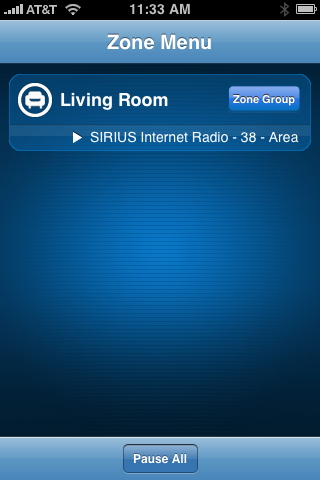
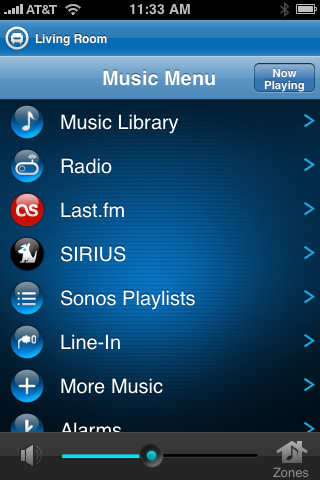
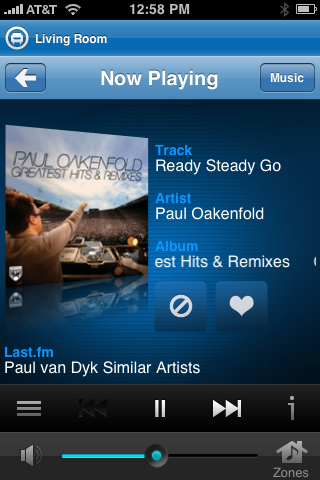
Sonos' iPhone App Controls the Stereo's Music
And Where It Is Played In the House


I am no audiophile, but I do listen to music a ton, and enjoy having good songs on when I am at home - especially as the twins both enjoy dancing to tunes with any kind of rhythm. With the Sonos, I've played with getting one of the kids to be dancing in front of the unit, only to pause it remotely with my iPhone, which stops them in mid-shake, only to look back at me with curiosity and disdain.

Managing the Sonos via iPhone has been a huge plus to a home already covered in a fine layer of remote controls. Instead of yet another remote to chase down when lost, or moved by a toddler, I just use the Sonos Desktop controller or the free iPhone app. From the iPhone app, I can navigate between different music sources, and see which song is currently playing. If I had multiple units, I could see what song is playing on each unit, and possibly even play different songs in different places. The absence of setup is also a solid benefit to the Sonos. The first step was to configure a small hub, to sit atop my Airport Extreme, looking like its younger brother, and the second step was to connect the Sonos to power. It pulls down the music wirelessly from the hub, and no other wires had to be configured - as it should be.


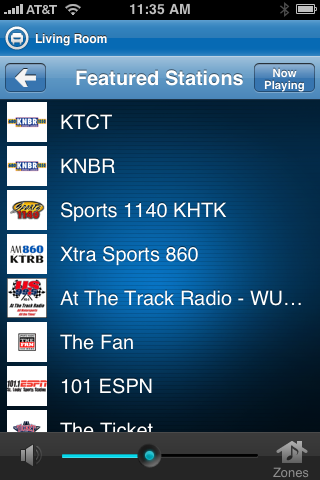
Sonos Shows Local Radio Stations
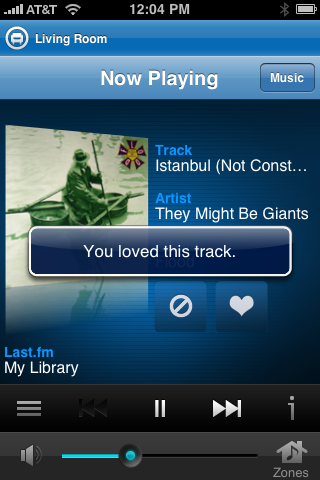
And Lets Me "Love" Last.fm Tracks


If there is anything to complain about with the Sonos, it's that it doesn't feature Spotify support right away. But considering that Spotify is not truly out in the US yet, I can't make too much of a fuss. If the music is available on a hard drive from your network, Sonos can find it, and Sonos also supports Pandora and Rhapsody in addition to Last.fm and Sirius, which I use.


Cranking Tunes from Sirius and Last.fm
Brings Paul van Dyk to the Home Stereo


If you were curious, and in the interest of full disclosure, as always, yes, the device was initially shipped to me free of cost, but in the interest of being fair, and not seeming biased, I have already contacted the Sonos PR rep to make sure I can purchase the unit. As for that old broken Bose, if we ever do get it fixed, maybe we can let it be handed off to someone else in the family who needs one, because it looks like we have a real replacement.

For another review of the Sonos S5, which is making its way around many tech blogs this month, see Rick Klau's extensive writeup. He has been a loyal customer for three years.
February 18, 2010 · 4 MIN READ · BY LOUIS GRAY

Google Lets Fearmongers and Unbelievers Opt Out of Buzz

Google Lets Fearmongers and Unbelievers Opt Out of Buzz

Google's expansion and knowledge of the many things you do online collectively has some corners of the Web distrusting every move the Mountain View giant makes - even when they tell you in advance what they are doing, and how it might effect you. The company's moves toward openness and embracing of standards, though lauded by the tech community, haven't converted the confused masses who often at times seem to be blindly following a Pied Piper of fear, making them think the big G is reading your e-mail, sending updates to the NSA, and really cares whether you look at porn sites or not in your Web history. Take this simmering population, sprinkle on an aggressive push toward converting a private network (GMail) to a public one (Buzz), and the overwrought cries of fear and anguish were as predictable as rain. And now, after ten days of being thrown under the bus by head in the sand privacy-shrieking luddites, Google has had to backtrack again, repeatedly apologizing and now, letting you extract Buzz from your GMail like shrapnel from the field of battle.

Practically without exceptions, the hue and cry around Buzz, beyond those of us who embraced the new social network, was made by people who were not impacted by Buzz' move to "auto follow" in the first place. The examples given, from business partners, or potential headhunters, journalists' sources, psychiatrist clients and other possible unwanted revealings, were conjecture based on a complete lack of reality that ignored the fact that the majority of business e-mail is done through Microsoft Exchange, or if on Google's own products, in Apps, which doesn't yet support Buzz. Professionals leveraging free Web e-mail, which Gmail continues to be today, despite being exponentially better than its other free competitors, are getting what they pay for.

You Can Opt Out of Buzz If You Think You'll Get Stung

In comparison, the real potential problems with Buzz's gaining attraction, including assumed noise, and lacking of perfect integration into all networks on Day One, have been outshouted by the same people who squirm every time Mark Zuckerberg and the Facebook team move more toward public sharing and search discovery, and away from walled gardens. But again, the shrill minority has taken its pound of flesh, as Google's momentum with Buzz has taken body blow after body blow, primarily from an older generation of tech bloggers and business journalists unwilling or undesiring to embrace today's world of active sharing and aggregation.

After mea culpa following mea culpa, the Buzz team has released the option to disable Buzz outright, deleting all your posts, disconnecting your sites and users you are following. You also have the option to hide Buzz from your GMail (which doesn't make it go away, but hides it from you), in the event you suffer from severe distraction and interruption disorder.

You can find the new setting in GMail, where there is a new Buzz tab, letting you also hide those people you are following, either for your own sake, or theirs.

Amidst the din of the pack clustering around the body of Buzz, kicking at it like a group of children at a 6-year-olds' youth soccer match striking at a ball, some folks have seen beyond the tin foil hat nonsense and told people to look forward to something new. Thomas Hawk says to not listen to the naysayers, adding "they're wrong". But as I said Google blinked at the end of 2007, when the Reader team capitulated to the mob, a recalcitrant public is once again getting caught up in a world of old rules and ideals.

Knowing this nonsense would spring up, I asked Google vice president Bradley Horowitz on the option of "public" and automated friending when getting a preview of Buzz the Monday before its launch. His answer is as useful today as it was then:

"One thing that I have learned is that there are people who will always dislike a change you have made, including not making a change," he said. "We don't want to be prescriptive and say everything is public now. Sometimes it is an intimate sharing of an experience with coworkers, family and giving it to the right audience. The world is not going to abandon one form, but we would like people to have the right tools to make decisions for themselves."

Now the decision is truly in your hands. Want out of Buzz? Go to your GMail, click "Settings" and click "Buzz", and you can opt out of what is proving to be a very interesting network. Should you choose to instead embrace innovation, you can find me here: http://www.google.com/profiles/louisgray

February 17, 2010

February 17, 2010 · 1 MIN READ · BY LOUIS GRAY

Slideshow: Finding Signal In the Real-Time Noise

Slideshow: Finding Signal In the Real-Time Noise


With more data being created and shared in more places by more people, each of whom is more active in each network, it is no surprise that many people are being overcome by the sheer noise of social media and RSS. On Tuesday, I had the opportunity to stop by the Bay Area Real-Time Web Meetup in Oakland and talk about some strategies and tools to help cut through the noise and find the signal. From my6sense (who I am advising as part of Paladin Advisors Group) to Lazyfeed, Mozzler, Cadmus, Twazzup, and others, each can help find personalized or socially recommended content that is more relevant than the unfiltered flow.

The full deck is embedded above, via Slideshare. If you want me to participate in your event, or talk to your company, let me know.

February 15, 2010

February 15, 2010 · 1 MIN READ · BY LOUIS GRAY

Blippy Streams Gain Graphics and Video Previews

Blippy Streams Gain Graphics and Video Previews

Even if some may find Blippy's purchase records as exciting as reading old receipts, the site is working to make the platform more interactive and appealing. Just over a week after the service, started by Philip Kaplan, a serial entrepreneur, added popular purchases and lively chatter, Blippy also moved beyond text, to include DVD covers of movies rented from Netflix and iTunes application icons, bringing a little more color to the occasionally sterile feeds.

Blippy still has a way to go before becoming a heated forum for conversation about one's purchases, but the product looks to be naturally evolving in a way that mirrors some of the more popular aggregation services out there, pioneered by FriendFeed, and most recently seen in Google Buzz and Facebook.

iTunes Apps from Blippy Now Show Clickable Icons

When items from Netflix and the iTunes store are added to the Blippy feed, Blippy's army of crawlers tries to spider out relevant imagery. Some Netflix videos even sport related movie previews (and in a couple cases, unrelated YouTube videos).

Blippy Got the Netflix Covers Right, and the Preview Wrong

In other news from the week, Kaplan reported that Blippy will soon be debuting an iPhone application. There is an app on the iTunes store now masquerading as Blippy 1.0, but it is not approved.

To watch my boring purchase history, you can find me on Blippy here: http://blippy.com/louisgray.
February 15, 2010 · 1 MIN READ · BY LOUIS GRAY

Cadmus Launches Personalized Twitter Trending Topics

Cadmus Launches Personalized Twitter Trending Topics


At the end of January, Twitter introduced local trending topics to show what people in your geography are tweeting about. But some have hoped the service would go further, displaying trends only from those you follow. While that may be on the roadmap, Twitter hasn't promised this feature, and other services are filling the gap. One of the first is Cadmus, which I first profiled back in November as a real-time stream filter.

Cadmus' new introductions, described in the company's blog post, highlight not only topics trending in your stream, but also groups conversations with nested replies to popular updates.

Unsurprisingly, for me anyway, my trending topics in the last few days have been "Buzz", "Google Buzz", "Twitter", "Windows Phone" and "Series", in light of Microsoft and Google's latest announcements.

As with Twitter's Web interface, clicking on a trending topic shows tweets that feature this keyword, but Cadmus, again, only shows updates from those who you are following.

Personalized Results for Google Buzz from Cadmus

A Popular Conversation on Twitter from Cadmus

Cadmus' personalization mirrors that of the new Twitter client from Twazzup which we highlighted last month. It too features personalized topics. Cadmus also pulls in content from FriendFeed and RSS.

You can find Cadmus at http://thecadmus.com.
February 15, 2010 · 1 MIN READ · BY LOUIS GRAY

EdgeTheory: Google Buzz: Content Creation or Collection?

EdgeTheory: Google Buzz: Content Creation or Collection?

Google Buzz, only a week old, is gaining a lot of visibility, and is seen as Google’s most direct attack against social upstarts Facebook and Twitter. Some really like it. Others are up in arms about perceived privacy violations. Today, Chris Saad and I talked about whether Buzz’s clear mimicry of FriendFeed and other existing sites missed a new opportunity to innovate – and become a true social network aggregation tool, including aggregation of gestures.

Did Google make a mistake, and not really invent anything new with Buzz, making it immediately an also-ran? You'll find Chris and I don't always agree.

Original Post Here: ET Conversations

Listen in below:

February 13, 2010

February 13, 2010 · 4 MIN READ · BY LOUIS GRAY

Filter, Unfollow Or Get Out of the Way

Filter, Unfollow Or Get Out of the Way

Go Ahead and Filter Me Out of Your In Box.

The recent launch of Google Buzz has once again surfaced an undercurrent in the social Web - where a small number of active accounts can gain the lion's share of activity, either through their own interactions, or those of an active follower base. Whether earned through years of consistent activity on their blogs or parallel networks, or having volume thrust upon them through celebrity or suggested user lists and bundling, there are brand name individuals who command a greater share no matter where they go, and if you choose to follow them, your stream runs the chance of being overwhelmed.

Buzz, evolutionary but not revolutionary, has not yet made it simple to follow very active accounts, such as those from Robert Scoble, Jason Calacanis, Pete Cashmore or me, as updates on our threads bounce to the in box by default - almost as a penalty for anybody who has chosen to engage, or who may have seen their ID added to a thread through the service's @Reply feature.

A Common Complaint. But A Wrong One.

Busy accounts can be a nuisance on practically any network, whether that's Facebook, FriendFeed, Twitter, Buzz or any other. But in services where active feeds are resurfaced or pushed to the top, such as FriendFeed and Buzz, the impact is not actually from the originator of the content, but from their community. Comments on active feeds push the items back to the in box, or back to the top of the feed, and if you are following some of the more prominent accounts, you'll no doubt see the same names at the top.

Engagement is Not the Problem. It's Bad Filtering.

That said, if this is getting in your way, and you are seething with rage at these social media power users, you're not using the tools well. Practically every network gives you tools to solve the problem.

1. On Twitter, you only have to see the updates from those you follow - with the exception of items retweeted by those you follow, from their connections, which you can opt out of on an individual basis. If an individual is too noisy, you can unfollow them at any time. Some innovative applications, including Brizzly, let you even "mute" a user for a short time so you can have them disappear during particularly busy times.

2. On Facebook, you can hide an individual's updates from your News Feed if they are too talkative. You can also hide all updates from specific applications (like Farmville or Mafia Wars) if you never want to see those updates. And yes, de-friending or blocking is available.

3. On FriendFeed, you can hide individual posts, block individual services (like Twitter or Disqus), block specific service updates by user, or, most successfully, you can put noisy people in their own lists, to sequester them from the rest of your feed. If worse comes to worse, again, you can always unfollow them, or block them outright.

4. With Buzz, you don't yet have the option to hide specific service updates or updates by user. But you can mute any thread just my using the "m" key, and as Buzz is integrated with GMail, you can use the same kind of filters available to any other e-mail. For example, I have set up a rule to move all Buzz entries into a mail box I call "social", taking them out of the in box.

Buzz Never Hits My In Box On My Mac

If you want to quiet the impact of busy users, like Tom Foremski did by unfollowing Robert Scoble and me in Buzz, you can use GMail filters to your advantage - taking them to a dedicated folder and out of your in box.

For example, set up a filter where the Subject is "Buzz from Louis Gray", "Skip the Inbox (Archive It)" and "Apply the Label" of "Noisy", or whatever you like.. Then do the same for Robert and Pete and Chris Pirillo, Jason Calacanis, or anybody else who is swamping your Buzz experience.

Should we be blaming the noisy folks?

Like I mentioned last night, in sharing my social media data flow, I know there are people who have chosen to stop seeing my updates because of their frequency. But I don't plan to change my activity because of a new way it is interpreted and displayed by a new social network.

Part of the reason I am among the more active and visible people on Buzz is because over the last few years, I have promoted and cultivated the use of Google Reader and having active conversations there. I took the time to connect to and talk with more than 1,000 people in my shared items, and Buzz has taken advantage of that social network, moving it to a new place. Where others have not optimized for sharing, they are starting with less of a community.

1,300+ People Can Comment On My Shared Reader Items

But because of this, the community is also very comfortable talking on my feeds, as they are with other engaged folks. It is the ensuing conversations that bump them to the top, not the frequency that I share. I have been sharing 20-30 items a day in Google Reader every day for years, and it is filling Buzz the same way it has filled Reader and Facebook and FriendFeed.

If it's too much for you, use the tools that are there. Mute. Filter. Unfollow. Block. But there will always be discrepancies between the average users and those most active. Go ahead and make mine more active.

February 12, 2010

February 12, 2010 · 5 MIN READ · BY LOUIS GRAY

The New 2010 Social Media Data Flow, With Buzz

The New 2010 Social Media Data Flow, With Buzz

I Can Explain... Just Read Below

Two of the more annoying, yet almost inevitable, results of being active on multiple social media services are entry duplication, and repetitiveness for people who may follow you in multiple places. With the introduction of Google's Buzz platform earlier this week, I am seeing even more concerns as people face a challenge of where to put their activity, and how to move data from one service to another. It's something I give a lot of thought to, and continue to refine, to the best of my ability. As many have asked, I thought I would share my current strategy.

First, I wanted to highlight my discussion of this from back in May of 2009, when I said you should Know and Master Your Social Media Data Flow. I even posted a SlideShare presentation on how to optimize this flow for all networks (see it here)

But as things change, networks come and go, with some disappearing (like Socialmedian) and others taking their place (Buzz).

As my comments stated in May, the ease of data creation and distribution can set up conflicts, as one tries to decide how to best send updates from one network to another. Often, people give up trying and resort to services like Ping.fm to send the same thing everywhere. With all deference to that service, now owned by Seesmic, it seems like a copout.

My goal, as it was then, is to create the content once, and have it land once, in the right places, as determined by the potential audience. As I see it, there are two categories of outlets, the content creation sites, and the content collectors. For me, my major content collectors are FriendFeed, Google Buzz, and to a lesser extent, Facebook, which I do not optimize well for, admittedly. For me, the content creation sites can be this blog, my Google Reader shares, Delicious bookmarks, Cinchast recordings, or photos from Smugmug and Flickr. Twitter works both as a creator of content and a distributor of content. Friendfeed also does an amazing job at redistributing content.

Don't Give Up Kevin! You Can Do It!

Content Creation

1. Blog Posts

Blog Posts from LouisGray.com are sent by e-mail, using FeedBlitz, to about 200 readers by e-mail. The posts are also sent, via RSS to a few thousand recipients. FeedBurner tells me there are 21,000 subscribers, but that includes FriendFeed, and is well known for overcounting. In addition, these posts go directly to Google Buzz. This is not an issue unless I share the item in Google Reader and introduce duplicates. When I do this, I almost always delete the duplicate on FriendFeed, for cleanliness sake.

2. Twitter Activity

My Twitter activity populates both Google Buzz and FriendFeed, as well as Twitter itself.

3. Google Reader Shared Items

Shares from Google Reader, almost 30 a day now, go to FriendFeed and Buzz, as well as a new Twitter account for this, called @lgstream. I wouldn't want to overpollute my main Twitter stream.

4. Delicious Bookmarks

I track all blog linkage on Delicious and flow those items through FriendFeed to Twitter. Lately, I have been editing the saved boomarks to include /by or /via language including the person's Twitter handle. (Example: here) These bookmarks also populate @lgstream on Twitter.

5. CinchCast Audio Recordings

Cinch podcasts let me post directly to Twitter and Facebook from the iPhone app, a major win for the product. Often, I choose just to send to Twitter. I also pull in the RSS feed of my CinchCasts to FriendFeed, and have the option, later, to embed recordings here on this blog.

6. Miscellaneous Status Updates

Updates posted natively to FriendFeed go to Facebook, and some go to Twitter, depending on my choice. Updates to Facebook status stay in Facebook. Updates directly on Buzz stay in Buzz, but also populate the @lgstream account.

7. YouTube Videos and Photos

All rich media I make goes to FriendFeed. YouTube and Flickr are registered with Buzz, but I have not used them yet. YouTube updates automatically populate my Twitter account.

What Feeds My Buzz

Content Collectors

1. FriendFeed

FriendFeed's goal has always been to act as an aggregator of all my services. That's why FriendFeed gets more content than any other site. It also works best to repurpose as my stream into Facebook, and as a filter, to send some choice items to Twitter (as many as I would like). I am not sending FriendFeed to Google Buzz, and avoid duplicates this way.

2. Google Buzz

Buzz is largely a platform for my Google Reader shares and blog posts. It gets Twitter as well, but not immediately. As I worked for the last few years to cultivate a strong conversational community in my Google Reader shares, the conversations continue to flow and are very active.

3. Facebook

I am not optimizing much for Facebook today. It has never been a huge generator of conversation or traffic for me, though I could do a better job. I pull in my FriendFeed updates for my tech connections there, and know some friends or family have muted my noisy feed - always a risk when you mix different social circles.

Conclusion

Due to my fairly active stream and engagement in many places, it can seem busy. If people choose to follow more than one of my content collectors (for example, FriendFeed or Buzz), they can see duplication and get discouraged. But I cannot assume that they are the same audience, and I need to make the most content available in each place. What I do not want to do is share multiple instances of the same item, and annoy the crowd who has opted in to see me just once.

When you look at where your data is going, make sure you aren't sending everything to all places and annoying everyone who knows you aren't optimizing. Don't pipe one content collector into another. If you can make a second account that is for content only, as I have, go for it. And as always, if there is activity in your feed downstream, listen to the responses, and act on it.

You can find me on Google Buzz here, or on FriendFeed, Facebook or Twitter.

February 11, 2010

February 11, 2010 · 1 MIN READ · BY LOUIS GRAY

Twitter Hires Web Search Guru Krishna Gade from Bing

Twitter Hires Web Search Guru Krishna Gade from Bing

With more than 1 billion tweets sent out by the company's millions of users in each of the last two months, Twitter is seeing record usage after a year of meteoric growth. But finding those tweets can be hard, as the company's search engine at times has strained under the challenge of tracking the world in real time. To aid in building out the company's search capabilities, Twitter has just added Krishna Gade to the team.

Hailing from Microsoft, Krishna worked on the Redmond giant's Web search engine development team, he was a software development engineer, spending more than 5 years at Microsoft, where he helped build and ship many features of Bing, including index quality measurement, static rank computation infrastrucutre & algorithms, Web spam detection, query suggestions, entity extraction, autosuggest, contextual display ads and realtime/social search, according to his LinkedIn profile.

Previous to Microsoft, Krishna secured his masters in computer science at the University of Minnesota. His thesis was on "Algorithms for Pattern Mining in the Presence of Tough Block Constraints".

Krishna did not return cell phone calls prior to publishing to elaborate on his role at Twitter, but his hiring spells good news for the company's search engine getting even more hands on deck to become a more relevant and useful archive.
February 11, 2010 · 1 MIN READ · BY LOUIS GRAY

How To Bring Your Google Buzz Entries to Twitter

How To Bring Your Google Buzz Entries to Twitter


At launch, Google Buzz is not a Twitter client. As the team explained earlier this week, they have about a thousand things they could do with the product, but haven't yet, and sending updates from Buzz to external sites, like Facebook and Twitter, is absolutely on the list. But while Google's developers work on improvements for the much discussed social aggregation service, the developer of Reader2Twitter, initially designed to post shared items from Google Reader to Twitter, has upgraded his product to share native Buzz items as well.

As I highlighted back in September, I set up a new Twitter account solely for my shares from Reader, and now those items which I post directly to Buzz are included in that stream at http://www.twitter.com/lgstream (or @lgstream).

My initial post directly to Buzz


To share items from Buzz to Twitter:
  1. Go to http://reader2twitter.appspot.com/buzz
  2. Connect it to your Twitter account using OAuth
  3. Add your Google Profile Number ID (find it here at the bottom of the page by clicking "See other options")
  4. Make sure "Sync" is On and hit Submit
Now, native updates you make from Buzz, and not those pulled in by 3rd party services, will be sent in near real-time, powered by Pubsubhubbub, to Twitter. Thus far, the vast majority of activity I have with Buzz is shared from other services, primarily Reader. But the two native posts I made to Buzz, once I synched with Reader2Twitter, made it to the @lgstream account. Example: Buzz item | Twitter item. I have been using Reader2Twitter for about five months now, and it is practically seamless. So long as the hub from Google is working, it's good to go. You can get started here: http://reader2twitter.appspot.com/buzz.

February 9, 2010

February 9, 2010 · 2 MIN READ · BY LOUIS GRAY

Taco Town: Buzz's Code Name Focused on Layers

Taco Town: Buzz's Code Name Focused on Layers

Internal code names for tech projects in Silicon Valley and beyond are a celebrated pastime - ranging from the predictable alphabetically-ordered release numbers to fanciful references to family members, vacation spots, animals or practically anything that doesn't actually describe the product itself. (See Apple code names or Microsoft code names for examples)

The code name for Google's new Buzz product? Taco Town. Not a grandiose reference to composers long since passed on, or beautiful vacation spots around the world, as other companies have done, but instead, an ode to good-tasting greasy food.

While Google obviously thought "Buzz" was a better name for their new aggregation play than Taco Town, despite archrival Yahoo! having used the name first, you can see tacos as part of today's launch, with a delicious-looking taco gracing the "Just the good stuff" description on the main Google Buzz page, and, throughout the many screenshots and demo video, the individual's name read as "Ted Taco".
If It's A Taco, It Must Be Good Stuff

The Notorious Ted Taco from Google Buzz

So where does Taco Town come from? Assuming Google didn't name it after one of the restaurants that dot the US, including establishments in Scottsbluff, Nebraska and Carthage, Missouri, the Taco Town name hearkens back to a satirical commercial from Saturday Night Live, called "Taco Town", where Bill Hader, Jason Sudeikis and Andy Samberg go out for Mexican food, only to find their delicious dish to be a challenge, with layer upon salivating later being added to the entree.

The announcer, introducing the new taco at Taco Town, teases with his description:
"We take a crunchy, all-beef taco, smother it in nacho cheese, lettuce, tomato and our special southwestern sauce. Then we wrap it in a soft, flour tortilla with a layer of refried beans in-between..." adding on... "Then we wrap that in a savory corn tortilla with a middle layer of Monterey Jack cheese..." and later... "And it gets even awesomer, when we take a deep-fried gordita shell, smear on a little of our special "guacamolito" sauce and wrap that around the outside...", "But it gets even bigger! Because we bake it in a corn husk filled with pico de gallo, then then wrap that in an authentic Parisian crepe, filled with egg, gruyere, merguez sausage and Portobello mushroom...." followed by more layers including a Chicago style deep dish meat lovers pizza, rolled in a blueberry pancake, fried golden brown, and served with "spicy vegetarian chili".
As the faux commercial says, " It's 15 great tastes all rolled into one." You can see it embedded below, provided Hulu supports your country.


With one's social graph and social activity fractured asunder all over the Web, you can see why Google would want to roll all these great tastes together into one product, Buzz. The company also likely sees the difficulty in taking our many diverse activities, social graphs, and privacy concerns as different layers that must be combined to deliver a compelling offering.

Regardless of what Yahoo! and Microsoft might think about the new service, or its name, I think we can all agree it looks a lot better than "Google Taco Town".
February 9, 2010 · 2 MIN READ · BY LOUIS GRAY

Google's Open Tools and APIs Make Buzz Hum

Google's Open Tools and APIs Make Buzz Hum

The debut of Google's new social venture, Buzz, came with all the subtlety of a freight train. Like a freight train, you could hear the rumbling of Buzz as its launch approached, fueled by the vast array of open social tools that the company has been championing over the last few years, and a number of key hires that show Mountain View's commitment to making users' data portable and non-siloed, in visible contrast to alternative networks, most notably Facebook, who has made it notoriously difficult to export data in its six year history.

Though clearly a 1.0 version product today, Buzz is primed for significant improvement in the next several months, which will be driven by data measured within Google, gathering users' feedback - as they no doubt will be demanding the ability to share updates to downstream services, the introduction of an enterprise version, limited by domain, and other enhancements. But from the beginning, Buzz is built to be open.

"We are committed to open standards, and we want to build a non-siloed product at every turn," said Bradley Horowitz, vice president of product management at Google on Monday. "You will see us take all these open standards, like Pubsubhubbub, Webfinger, Salmon, and use this as a vehicle to demonstrate to the world what it means to use them."

Buzz also fits in nicely with the Social Graph API being worked on by data portability pusher Brad Fitzpatrick, which also powers your Google Social Circle. While the social circle learns how many direct contacts you have in Google chat, and finds other connections through registered links, Buzz tracks your most frequent connections by e-mail and chat within Gmail, taking a step further and surfacing active "friend of a friend" content, should it be deemed relevant.

"Social media today is a fiefdom of friends," said Vic Gundotra, vice president of engineering at Google on Monday. "We believe your updates will go where you want them to. We are going to work hard to enable that."

Of note, despite the highly visible business development relationship forged by Google with Twitter to power the company's real-time search, Buzz simply taps Twitter's standard API to gain access to users' updates, and it is expected this access will be sufficient.
February 9, 2010 · 2 MIN READ · BY LOUIS GRAY

Google Buzz Mobile Moves Beyond Latitude/Longitude

Google Buzz Mobile Moves Beyond Latitude/Longitude

In addition to the morning's news that Google had launched Buzz as a major social push for Gmail, the company, in parallel, announced a new Web application for mobile devices, supporting both Android and iPhone platforms, that not only brings Buzz to the mobile phone, but also adds Buzz to the company's existing Maps application, showing Buzz from activity in your specific location. Leveraging the years of investments in Google Earth, Google Maps, Google StreetView and other location-based services, Google Buzz immediately ships with an advantage - determining the true identity of a location, beyond simple longitude and latitude coordinates.

As the much-hyped Foursquare and Gowalla applications have shown us over the last year, an individual's location is often as relevant as whatever activity is taking place. Google Buzz for mobile taps into the vast Earth, Maps and Street View database the company has been building over the last half-decade, and lets you post to Buzz with your update attached to the place where you are located, not just with a latitude/longitude coordinate, or even worse, an IP address.

"In the digital world, few have gotten this right," said Vic Gundotra, vice president of engineering at Google on Monday. "We don't want latitude/longitude, we want the colloquial term. We have solved this problem, of a conversation in a world of places, and mobile phones make it possible."

As Gundotra demoed to me at Google headquarters Monday on his Android-powered Google Nexus One handset, speaking into the phone made an automatic transcription, which could be posted to his Buzz, attached to the location he had selected. Tapping into Google's deep archives about places, establishments feature images of the location, details about that location, and relevant data, such as restaurant reviews, if applicable.

By selecting the "Nearby" option in his Buzz-enabled Maps application, Gundotra could also see what people were Buzzing about in the surrounding area.

The move to add geolocation is one trend that is growing for mobile applications and Twitter clients, although not many Twitter users have enabled such data sharing. If they do, and they pull their Tweets into Buzz, the product doesn't yet pull in that information to Mobile Maps, but it soon will, Gundotra promised.
February 9, 2010 · 3 MIN READ · BY LOUIS GRAY

Google's Newest Mission: Organizing the Social Experience

Google's Newest Mission: Organizing the Social Experience

With today's introduction of Google Buzz, you are going to see a lot of reactions and news stories that say Google is trying to "kill" competition, including Twitter and Facebook. Given the company's hit and miss track record on introducing or cultivating products with social elements, it is no surprise that Google's introduction of Buzz can be viewed by some with a level of skepticism, or distrust, as the Mountain View company extends its reach on the Web. But in discussions I had with members of Google's team behind the new venture on Monday, it wasn't the squelching of competition they were looking for by debuting Buzz, but instead, extending the company's core mission: discovering and organizing the world's information - one that now includes social.

As Bradley Horowitz, one of Google's vice presidents of product management, recounted to me Monday, the history of Web search evolved from Yahoo!'s hand-driven approach to algorithmic search, powered by the likes of AltaVista, Lycos, Excite and others, until Google changed the game with a new approach, a "better" experience, helping propel them to the position they are in today, far and away the market share leader in search.


The company, largely on the outside looking in to much of the world's social content creation and sharing over the last few years, seeing smaller startups dominate the spotlight, determined they needed to approach the problem of social in a similar way as they had search, "embracing this new vector and phenomena of people sharing" into search and many of their products. Some of the reasons behind the move mirrored the same reasons that drove Google's inception - including complexity and a lack of tools that help determine relevancy.

"In the same way manual search broke down, social has broken down," Horowitz said. "When I had fifty friends, I could mine the stream, but as I have 500 or 5,000 friends, that breaks down, and the concept of who is a 'friend' has expanded by several orders of magnitude. It's a mishmash of information and it's no longer fun to dip into that. It has become a Google scale problem."

As anybody following a few thousand connections on Twitter or other networks can attest, updates can range from the sublime to the ridiculous, with each update being provided equal weight, and chronology typically being the only measure. To a data-driven company like Google, this "mismash" provides an opportunity to determine relevancy and bring the same clarity the company once brought to search to the world of social.

Buzz is Google's first major step to start ranking relevance, surfacing the data most important to you as an individual. A preview of Buzz's functionality was also teased in Google Reader's "Magic" capability, which debuted in October of last year, as well as the program's recommendations feature, also part of Buzz.

So how can Google determine relevancy with Buzz and start making sense of the social? Starting with GMail gives the company a major headstart, as they already know which contacts you trade e-mail with most often. They know how often you read e-mail from specific people, who you chat with most frequently by using the integrated GTalk feature, and they will often have data from you that provides your location, helping to tap that metric as well.

"A big part of what makes information relevant and useful is viewing the lens through personal relationships," Horowitz added.

You can see the steps Google is taking to start categorizing the social experience, with your personal profiles, your social circles, social search and now Buzz. It might be assumed they are playing catch up, but the company is, as it has in its history, with the additions of images, video, books and many other focuses for search and information, is extending its reach to become even more human, and to better understand just who you know, what you like and what you share.
February 9, 2010 · 3 MIN READ · BY LOUIS GRAY

How Google Buzz Validates but Marginalizes FriendFeed

How Google Buzz Validates but Marginalizes FriendFeed


When FriendFeed debuted on the scene in late 2007, it was one of the simplest ways to aggregate all of my updates from the social outposts I have all over the Web, see friends' updates and have a discussion around their shared items. Now part of Facebook, the product continues to have an extremely loyal, albeit relatively small, community, who embraced the technology and made it a platform for social interaction. The site, which was among the pioneers of real-time streams and the surfacing of popular items, has seen its technology mimicked and imitated by many, but its complexity helped to reduce its total impact, contrasted with single-purpose sites like Twitter. Today's Buzz announcement from Google brings many of the things that made FriendFeed great to a new, more mainstream, audience.

At the beginning of 2009, I wrote a provocative list of things I hoped FriendFeed could do to grow and keep new users. Chief among these hopes was the first point: "FriendFeed Must Have a Lite Version for New Users". While FriendFeed's support of fifty-plus social services was great for a power user like me, the sheer noise on the service, exacerbated by constant updates from likes and comments, could be a serious challenge. At the time, I suggested this "Lite" version should feature "blog postings, Flickr photos, and native FriendFeed entries", with additional services being opt-in, not opt out. It didn't happen.

Fast forward a year, and you see Google launching Buzz, in combination with Gmail and other services, with integrated support for a few services, namely: Flickr, Picasa, Twitter and Google Reader. You can share YouTube videos and direct links as well, but gone is the wide array of one-off services. And the immediacy of sharing in Buzz couldn't be more simple, with integrated high quality photos and video in line. Buzz, in effect, is what I hoped FriendFeed Lite would have been to a large degree, even if it means using that service will require my rebuilding the social network in a new place.

In this new world, as I mentioned when I talked about how aggregation sites are not becoming the traffic leaders, contrasted with single-use social networks, the need for a dedicated aggregation site, like a FriendFeed, Cliqset or Arktan, is largely being eroded by the adoption of similar functionality by companies including Facebook and Google.

While I may have turned to a site like FriendFeed previously to aggregate all my data in one place, and find updates from others, Google Buzz brings the same benefits to a centralized location where people are already engaging - their GMail, on Google.com, and in their mobile handsets.

As I was more than happy to share frequently through this blog and on other networks, FriendFeed made sense to me and continues to be among the most polished and versatile networks on the Web. I have even said I would use the site if I were the last one to do so. But I believe people are looking to consolidate the number of properties in which they engage online with friends, and they may flock to Google Buzz in the same way they have flocked to other sites like Facebook and Twitter.

If FriendFeed were to debut in a world where Google Buzz and Facebook already existed in their current incarnations, there would not have been much hope or need. FriendFeed, alongside other products, helped pioneer many of the features that you see today in Buzz, including the aggregation of content from social sites, and integrated likes and comments. There is no question the Google team had a high level of respect for what FriendFeed was doing, and Google employees, current and former, were among the most visible, active, users. Now, they have brought the best elements of FriendFeed into Google, validating the promise of what FriendFeed was and could be, but further reducing the need for a site like FriendFeed.com.

In April of 2009, MG Siegler of TechCrunch said that you would be using FriendFeed in the future, only it might be called Facebook. Now, in 2010, it again is true. You could be using FriendFeed in the future, but it will be called Buzz.
February 9, 2010 · 4 MIN READ · BY LOUIS GRAY

Google's Buzz Brings Social Sharing, Aggregation to GMail

Google's Buzz Brings Social Sharing, Aggregation to GMail

Google's growth from its roots as a spartan, but highly effective, search engine has been as transformative as the changes the Web itself has seen over the last decade-plus. As the Web has evolved to include more rich media and social connectors, so too has Google evolved, as the company now operates not just the most popular data discovery engine but also some of the Web's most popular data creation and sharing engines, including Gmail and YouTube. But the company, so far, has struggled a bit in connecting its wide array of properties and making them feel personal and social. Today, with the launch of Google Buzz, the company aims to change that, making Gmail, and its sister sites, including Google.com and Google Maps, new places to share information of all types, with your friends.

Google Buzz is more than just another status updater. The world has seen plenty of those already. What Buzz aims to do is help Gmail users share content with connected friends, extending the popular messaging platform further from its roots, to a high quality multi-media social experience. And lest anybody fear that Buzz has Twitter in its sights, Twitter is supported from day one, so your updates can feed into Buzz and be part of the conversation.

Google Buzz Connects You to Friends and Followers


Starting today, all Gmail users can see the Buzz icon just below their Inbox. Clicking the Buzz icon places you in a familiar-looking aggregator, where you are immediately connected to those people you e-mail and chat with the most frequently in Gmail, giving you an instant start to a new social network. Within Buzz, you can share text, or more importantly, videos, photos and links - taking the product beyond Twitter and into FriendFeed territory. (Now also Facebook territory)

Add Social Services to Buzz


For veteran FriendFeeders, the look and feel of Buzz is an extremely familiar one. Every Buzz entry features the option to comment or like it, and shared items can be toggled from public to private, meaning Google can start indexing the shares into its search engine, or ignore them outright.

At launch, Buzz supports a few major services, including Google Reader, Flickr, Picasa and Twitter. Unlike many other aggregators we have covered in the last few years, Buzz isn't looking to pull in all links from dozens of different social sites, but instead, aims to make the act of sharing more commonplace for the mainstream.

Photos Shared On Buzz With Likes, Comments


Some of Buzz's main attributes include the product's attention to detail. Photos shared in Buzz are very high quality and can be viewed quickly. YouTube video shares play in line, and interestingly, links that are shared as status updates give the option to share any images from the page, much like FriendFeed's bookmarklet - only without the need for the user to install any JavaScript code on the browser.

Recommended Content from Buzz From a Friend of a Friend


Additionally, thanks to Buzz being partnered with Gmail, the e-mail in box is hardly the second cousin to the social experience, as it is with many other networks. Rather than simply being a repository for follower notifications and daily summaries, Buzz messages in your in box are live conversations, which are updated in real time with comments from friends as they flow in. You can get notifications to your in box when there are comments on your items, when others comment in conversations where you have been active, and when people send conversations to you through an @Reply feature, which autocompletes in Gmail.

In a conversation I had with the team behind Buzz on Monday at Google's headquarters, the developers said they focused on five major elements of Buzz:

1. Auto following, which prevents you from starting a network by scratch.
2. A rich and fast sharing experience.
3. Public and private sharing to mark individual posts or global settings.
4. Inbox integration.
5. Just the good stuff.

So what is the good stuff? Google wants to avoid the problems that have befallen other networks, which can be overrun with irrelevant, nonsensical updates, often from people you don't know. Buzz looks to surface content from those best connected to you, and will lower the visibility of inactive items. More active items, receiving comments, will bump to the top while others sink.
Embedded YouTube In Google Buzz Plays In Line


At the end of 2009, I aired my thoughts about how aggregation has thus far failed to set the world ablaze, with sites like FriendFeed, Cliqset, Arktan and others yielding comparatively lower user numbers than more simplified offerings. One of the major reasons for this, in my opinion, has been the need for a dedicated, or new, social network to follow. An advantage Buzz has in this case is that many millions of people are already using Gmail for their e-mail and many more use the company's contacts, maps, RSS reader and search software.

Buzz is a first major step in making Google more social, and setting up ways for users to share their external content with friends. It's not looking to kill other services, but to make these services available in a new place.

February 7, 2010

February 7, 2010 · 1 MIN READ · BY LOUIS GRAY

EdgeTheory: The Battle for Real-Time Reporting, Curation

EdgeTheory: The Battle for Real-Time Reporting, Curation

The issue of real-time news reporting and curation is becoming increasingly visible and important as news breaks on blogs, Twitter, Facebook and other social media properties. Tonight, Chris Saad and I talked about how the mainstream media can adapt to involve content curation in addition to their content creation, and how it still makes sense to have some investigative reporting in addition to real-time reactions.

The discussion weaved from curation tools like Cascaad and my6sense to the recent news of Teens In Tech Networks CEO Daniel Brusilovsky leaving TechCrunch, and how the news was interpreted.

Original Post Here: ET Conversations

Listen in below:


Disclosures: my6sense is a client of Paladin Advisors Group, where I am Managing Editor of New Media. In addition, I am an advisor to Teens In Tech Networks.
February 7, 2010 · 2 MIN READ · BY LOUIS GRAY

Cascaad Taps Social Graph for Tailored News

Cascaad Taps Social Graph for Tailored News

In the world of custom news applications that look to provide you personalized content, there are a growing number of contenders using different methods to filter the "best" from the "rest". Some, like Techmeme, utilize editorial directive in picking the top stories to present. Others, such as Tweetmeme and Digg, use popularity as that method. my6sense watches your own activity and customizes it for you. Meehive, Regator and others show content based on topics you have selected. Cascaad, a new entrant, takes a different approach, leveraging your personal social graph, suggesting to you the stories your friends have found valuable. It also shows you news by category, both on your iPhone and on their Web site.

Like many other social applications, Cascaad asks you to connect using Twitter OAuth or Facebook Connect. Cascaad then pulls in recent links shared by friends, and aims to find popular items that are gaining conversation (tracked by Twitter replies, for instance), or groups them by keyword.


One Popular Cascaad Item and Related Conversation


Items flow in from the top, like a cascading waterfall, similar to Lazyfeed's new approach, and leading to Cascaad's name. You can click any item and make a response, or "like" the item with a simple thumbs up. You can also share the messages by e-mail or on Twitter and Facebook.


Cascaad Channels and News In Focus


Cascaad's power, aside from bringing shared links from friends, is in the channels section, coming preinstalled with a number of topical channels, while also letting you create your own. Cascaad bundles channels from top topics like News, Business, Tech, Sports and Entertainment. With the addition of a few keywords, such as "Apple iPad" or "Super Bowl", you can make your own personalized channel that taps your social streams to show you related links, and who originated those links. You can also search the real time stream and show shared links on Cascaad.


Cascaad Custom Channels and Search


Cascaad says you can train the application to improve filters, based on those items you like, much as my6sense's digital intuition creates a tailored stream. Thus far, I haven't seen a dramatic personalization from the product, as I did with my6sense, but it may come with more use. Cascaad's benefits largely lie in the ability to see conversations from Twitter, connecting initial links with nested replies, and in being able to filter the real-time conversations by topic.

You can try Cascaad on the Web at http://cascaad.com/, or on the iPhone by downloading free from the iTunes store. I have also embedded a video from Robert Scoble interviewing Cascaad founder Erik Lumer below:


Disclosures: my6sense is a client of Paladin Advisors Group, where I am Managing Editor of New Media. In addition, I have previously done work for Kosmix.com, creator of MeeHive. My comments on the companies' products are always independent, and do not pass their way in advance.
February 7, 2010 · 2 MIN READ · BY LOUIS GRAY

Twitter Trip-up Triples Tweet Tallies

Twitter Trip-up Triples Tweet Tallies

Over the last ten days, many Twitter users have found the total counts listed by their profile off by as much as three times. While the focus of the popular microblogging service is around the conversations and links, statistics and numbers continue to draw attention, so such a massive change has people asking questions. Meanwhile, the company's help forum shows the bug was initially a low priority issue, anticipated to only impact a few users, since found to be much more widespread.

The team is working on it, and expects it to be resolved "relatively soon", with the latest update posted Friday, February 5th.

Orli Yakuel Was Hit By the Latest Bug

The issue does not impact anyone's ability to send updates or see updates from others. It also does not mean that tweets were previously sent in triplicate, nor does it mean their are ghost tweeters updating on your behalf, so the bug is a minor one, albeit annoying for those who like to keep their data clean.

EMC-er Christopher Kusek Questioned His Proclivity

The known issue, titled as "inflated tweet count" was posted to the help forum on January 25th, and users affected were asked to identify themselves, while showing what the anticipated disparity was between actual usage and reported usage. By February 2nd, Twitter's team said it was "a low priority issue" and said they "did not expect to have this issue fixed in the immediate future for this reason". But by Friday, the tone had changed. An update said, "This problem is now important and have engineers currently working on resolving the improper tweet counts."

Jesse Stay Wondered If The Numbers Were Cache Related

Like the examples I am including here, my own stats have been tripled, from what is likely in the range of 4,300 updates to more than 12,000. Not a big deal to me, but others are asking in public, and I thought it made sense to show Twitter is working on it. Like other occasional stats-related bumps on the service in the past, I would assume this to be reversed relatively quickly. And if it's not, there's always TweetStats.
February 7, 2010 · 2 MIN READ · BY LOUIS GRAY

Blippy Surfacing Popular Purchases to Increase Engagement

Blippy Surfacing Popular Purchases to Increase Engagement

A few weeks ago, when I first started using Blippy, the site that tracks my purchases offline and online, I said it simply proved how boring I am. Aiming to not itself become boring, as exciting as reading old receipts as popular funnyman Stephen Colbert recently called it, the site recently introduced two new features that will highlight user activity and popular purchased items, bringing discussions to the top.

For fellow FriendFeed veterans, Blippy's move is much like increasing the visibility of active discussions on the site through "best of day". It also mirrors the recent move by Facebook to highlight popular entries from you and your friends in the newsfeed.

Lively Chatter in My Blippy Stream Surfaces Active Purchases

While previously, activity on your Blippy stream would move chronologically out of the main view as you made more purchases, active threads can now be found in a section Blippy calls "Lively Chatter". Also, you can check "Popular Purchases" from everyone on the site, leveraging the increasingly popular standard of "likes" and comments.

One Active Discussion on Blippy

The more people you follow on Blippy, the more likely it is that you will see comments and likes in your stream. These are highlighted in "Recent Activities". Clicking on "Lively Chatter" shows items that have gained comments (including comments from yourself), letting you see conversations about the movies and music and apps that you are buying.

Another Active Discussion on Blippy about Siri

For now, Philip Kaplan (aka Pud), creator of the site, is the most frequent commentor in my feed, which comes as no surprise, but this may change as people grow more accustomed to making the site more of a two-way platform, instead of just simply importing.

While some look at Blippy as a perfect example of oversharing or our own willingness to put personal data on the Web, I see it as a logical extension to our recommending and telling people what we "like". Pud, curious about the series "Breaking Bad", which popped up in Mike Arrington's stream, even had the show gifted to him due to his curiousity. I expect to see many more similar actions driven directly from activity on the site.

February 4, 2010

February 4, 2010 · 2 MIN READ · BY LOUIS GRAY

Siri Brings Artificial Intelligence to the iPhone

Siri Brings Artificial Intelligence to the iPhone

For decades, many have dreamed of having a virtual assistant to answer our questions and do our bidding. Through advances in artificial intelligence, speech recognition and a seemingly endless array of search engines and directories, we are getting ever closer to this fantasy becoming a reality. A new application, Siri, billed as a virtual personal assistant, debuts today on the iTunes store, and promises to be a new way to interact with the mobile Web. The application takes queries from natural speaking, and does its best not just to find the right answer, but the right action as well.
Fueled by SRI International and powered by Nuance's voice recognition capability, Siri comes loaded with hooks to dozens of partners to help bring whatever you have in your mind to your phone.


Siri Sets Up Dinner and Gets You A Meal

While many of us have grown accustomed to making voice searches on Google's mobile application with the iPhone, this functionality, so far, has been limited, acting as a regular text search from the Web or any Internet-connected device. Siri doesn't just search on the terms you enter, but looks to find the correct answer, and put you in position to make a decision based on that answer.

Siri's dashboard makes it clear how to get started. It asks "what can I help you with?", and shows options including restaurants, movies, events, local businesses, taxis and weather. But rather than just having a solid directory, whereby you could click through and find options, you can just talk to the phone. Click the "Say It" button, and ask the phone anything.


Siri Presents Answers If You Ask Just Right

For example, if you ask why the sky is blue, or how old president Obama is, Siri will tap into the Web and find the answers, to the best of its ability.

Also, you can ask for a gourmet French restaurant near you, and it will translate what you have asked to words it can use, such as "expensive", and translate near you to restaurants in a nearby geographical area.


Directions and a Taxi to Pick You Up

Ask Siri what movies nearby are showing Avatar, and it will tell you. Tell it to get you a pair of tickets to the 5:30 showing, and it will start that process.

Siri didn't try to reinvent the Web by setting up dedicated services for each of its functions, connecting to a vast network of partners to bring their content to the iPhone. In tests, I could find schedules of events at popular sporting arenas, could call a cab to pick me up at a specific location, or see how far away I was from locations on a Google map.


Movie Tickets and Sporting Events on Siri

Siri works best with fast phones and fast Web connections, as you can guess, given it needs to tap into the cloud to get the data, and present it back to you in natural language. The product is optimized for the iPhone 3GS, and works best over WiFi or 3G. You can get it to work on Edge of course, just expect some latency.

Check it out at http://www.siri.com/ or on the iTunes store.

February 3, 2010

February 3, 2010 · 1 MIN READ · BY LOUIS GRAY

SlideShare Debuts Custom Channels for Business Users

SlideShare Debuts Custom Channels for Business Users


SlideShare, one of the best places on the Web to host your content online and embed it downstream, introduced custom branded microsites this morning, aimed to provide businesses with branded channels that are measurable, showcasing content from presentations, white papers and Web seminars. Combined with the company's AdShare and LeadShare products for targeted promotion and lead capture, and you can see SlideShare setting the stage for serious demand generation from marketers.

New branded channels on SlideShare now can feature customized headers and summaries, presented with the host's logos and appearance, rather than the generic SlideShare interface. You can see this in place on my custom louisgray.com SlideShare channel, or those from other early practitioners, such as ReadWriteWeb or Frost & Sullivan.

Some Recently-Updated SlideShare Channels
In the Company's Directory

A directory of branded channels can be found at http://www.slideshare.net/channels.


February 2, 2010

February 2, 2010 · 3 MIN READ · BY LOUIS GRAY

Think I Won't Pay for Quality Web Content? Think Again.

Think I Won't Pay for Quality Web Content? Think Again.

Yesterday, Dave McClure got the tech blogosphere talking, once again, about the debate between free products, largely built on advertising, and subscription models with consistent recurring revenues. His post, summed up as "Subscriptions are the New Black" frustratingly said an entire decade of Web focus has been on inefficient revenue models, and that the successful exits for "free" services were dwarfed by the deaths and ugliness from many more. While I believe that there are certain parts of the Web that should come for free, without a paywall, I have been happily paying premium dollars for many different services, and would hope that there are many more like me, willing to reward services and developers with real money for a positive experience.

Despite the rage and gnashing of teeth over the New York Times' recent move to put more content for subscribers only, and other news showing that Newsday's revenue from subscribers was practically invisible, for-pay content has thrived online, if the content is differentiated and valuable. For years, I have happily paid for a premium subscription to ESPN.com to get "insider only" access to premium columns and features. For almost a decade, I have paid, on an annual basis, for online access to the Wall Street Journal. Meanwhile, in parallel, I am, of course, paying for content from companies like Netflix, TiVo and Sirius Radio, as well as the many, many purchases I make from Apple through the iTunes store, for both music and video.

I am more than happy to pay for quality at a good price. As I have mentioned many different times on this blog, I am not a fan of untargeted advertising, either as a consumer or as an advisor to companies looking to make revenue dollars. I believe that if you can find a premium version of a product that delivers value, and can be promised a professional experience, then you should pay. I did not blink at the $2.99 price for Tweetie 2 on the iPhone, despite free alternatives, and I have paid for my MobileMe account, forking over $99 a year to Apple, for several years, for the privilege of keeping my Mac.com e-mail address, and access to their other online products.

As my own Blippy.com activity will show you, I pay about $10 a month to have my blog content converted to e-mail distribution and sent out through Feedblitz. I have paid for TypePad access. I even recently paid money to try out RowFeeder, and paid for premium versions of TwitterCounter and UnTweeps, to test out and use those Twitter-related ecosystem products. Every year, I pay TurboTax online to send my taxes to Uncle Sam and the State of California.

I pay because I receive value. Value is why Ecademy has members paying $40 a month for premium membership in its social business network, why SmugMug's members are happy with their annual costs and why many users are paying SocialToo for daily e-mail updates or other premium features. I've paid for higher bit rates on streaming radio stations online. I've paid Slashdot money in the past to remove advertising. I have paid to make donations to sites that might otherwise have gone out of business.

Major sticking points with many parts of the Web in terms of monetization come from differentiation, or the lack thereof. I have paid for many of these services because they offer something that nobody else does. If free alternatives exist, then paying for a full subscription is harder to command. It becomes a challenge to change something to a paid model if it has once been free, and you could rightly anticipate massive screaming if popular sites that are free today, including most social media sites, were to start charging for access we get free today. But if the reason sites are just posting up simple ads in lieu of subscriptions is due to the belief I wouldn't pay, they are wrong. I believe many others like me want to get the opportunity to find high quality products, and they wouldn't shy away from paying a fair price.

Disclosures: I am an advisor to SocialToo and have done premium work with Ecademy.

February 1, 2010

February 1, 2010 · 2 MIN READ · BY LOUIS GRAY

Apple's Chip Team a "Giant Sucking Sound" In the Valley

Apple's Chip Team a "Giant Sucking Sound" In the Valley

The Apple iPad may have been characterized as simply a larger iPod Touch, but at its core was something unique for Apple's product line, the first product from Cupertino to debut with its A4 chip, derived from the company's much-discussed 2008 P.A. Semi acquisition. After years of trying to work with partners that fit, from Motorola to IBM and finally to Intel, Apple, now a $50 billion company, has set off on a path to create its own silicon, starting with this product, and according to a valley industry insider I talked with over the weekend, the company's fast-growing team is not going unnoticed in the chip design community.

As you can see, among the many job postings on Apple's Web site are descriptions for roles including "Senior Chip Design Engineer" and "Sr. ASIC Design Engineer". The first is for the Mobile Silicon group, and the second is described more generically for the design and development of ASICs for Apple products.

As was characterized to me in the discussion, the team has grown significantly since the P.A. Semi acquisition nearly two years ago, and many talented engineers who found themselves on the short end of company reductions or closures through the recent recession are finding their way to Cupertino, with only one other company yielding a significant alternative.

"There are two giant sucking sounds in the Valley chip design space right now," they said. "Apple is one of them, and NVIDIA is the other."

Given Apple's interesting position, why would potential applicants turn away from Cupertino and instead to NVIDIA or other alternatives? As I heard it described, at companies like NVIDIA, chip design is celebrated, and that's the company's focus. At Apple, the chip design, like the A4, is made transparent, with the real focus on user experience instead. As much as we know about the A4, we also have a lot of questions. All Apple wants us to know is that it's fast. It sounds like the chip design team is also growing fast, and we should no doubt see more machines, beyond the iPad that will come with "Apple Inside" as the roadmap progresses.

See Also: NY Times: A Little Chip Designed by Apple Itself
February 1, 2010 · 1 MIN READ · BY LOUIS GRAY

Twitter Expands UI Design Team, Adds Twaud.io Founder

Twitter Expands UI Design Team, Adds Twaud.io Founder

Twitter continues to expand its corporate ranks, and it's become something of a regularity that the company can be seen welcoming a small handful of people virtually every Monday thus far in the new year. This week's hires include Mark Otto, a user experience designer and Dan Webb, the developer behind Twaud.io, billed as "TwitPic for Audio". The pair were added to Twitter's team list this morning, bringing the total accounts associated with the company to 158, which may also include contractors.

Mark Otto (http://www.markdotto.com/) is part of the expanding user interface team at Twitter, having recently worked at ZURB, an interaction design firm based in Campbell, by San Jose. Among the listed clients of ZURB where Mark contributed effort were TinyPic, the free image hosting service, and CC: Betty, the e-mail organizer.


Dan Webb (http://www.danwebb.net/) describes himself as a Web developer from London interested in DOM scripting and Ruby on Rails. He is also the creator of Twaud.io, a lightly used service aimed to bring audio to Twitter via MP3, through direct uploads or simple recording. (See also: @twaudio)

Twitter's Web and mobile interfaces have been relatively spartan to date, when contrasted with more media-rich clients, including Brizzly and Twazzup, which have moved to display video and images in line. I wouldn't make the leap that Webb's hire indicates Twitter would soon start supporting in-line play of audio, but his experience certainly can't hurt.
February 1, 2010 · 2 MIN READ · BY LOUIS GRAY

Are Early Adopters Leading Move from Firefox to Chrome?

Are Early Adopters Leading Move from Firefox to Chrome?

With the first month of 2010 in the books, Web statistics tracker Net Applications made headlines showing Google Chrome's browser market share exceeding five percent usage, taking tenths of a percentage point away from the top two most popular browsers on the Web, Microsoft Internet Explorer and Mozilla's Firefox. But in our little niche, Internet Explorer has never had that huge a market share in terms of visitors to my site. Most of my peers utilize Firefox or Chrome, or if they are Macheads like myself, they trend toward Safari. After crunching the numbers, looking at my Google Analytics data from the last 13 months, to get solid year over year data for the month just completed, the trend is clear: cutting edge Web users are trading in their Firefox browsers and trying Google Chrome.

Over the last year-plus, the top four Web browsers to louisgray.com have been unchanged: Firefox, IE, Safari and Chrome. Yet in four of the last six months, Safari visitors have outpaced Explorer visits. Meanwhile, in October of 2009, Chrome visits passed up IE users, and by December, Chrome visitors had passed up Safari visitors, good enough for the second-highest browser share overall. This ranking repeated in January.

As Chrome Share Has Increased, Firefox Is Fading
(Source: Google Analytics for LouisGray.com)

Just how rapidly has Chrome taken market share in terms of visits to the blog? In January of 2009, Chrome represented 6.53% of all visitors, a mark that held mostly steady through March of 2009. In the month just concluded, Chrome represented 17.46% of all visitors, an increase of 267%, nearly tripling.

At the same time, Firefox use dropped from nearly 51% of all visits to just over 41% of all visits, after peaking in March of last year with almost 55% of all visitors. The 10% of visitors who stopped using Firefox almost exclusively switched to Chrome, for IE visits declined only slightly from 20% to 16.5% of all visits, while Safari has held rather steady, at about 17% of all visits both in January 2009 and January 2010.

At the risk of making mountains out from small sample sizes, the trendlines cover almost a million pageviews over 13 months, and in each of the 3-month blocks following January of 2009, you could see a steady increase in Chrome visitors, from 6% in Spring of 2009, to 8% in the Summer, 10% by Fall and more than 14% by Winter. If the trend lines hold, I would not be surprised to see Chrome eclipse 20% of visits here by summer, and see Firefox fall to 35%, with continued declines in Internet Explorer visits that keep it below 15%. Pivot tables in Google Analytics also show that most of my Internet Explorer visits are from Google searches and other non-direct visits. Most referred visits from social networks, like FriendFeed, Twitter and Facebook, prefer Firefox, Safari and Chrome.
February 1, 2010 · 3 MIN READ · BY LOUIS GRAY

Low Quality Offensive Ads Degrade the Web Experience

Low Quality Offensive Ads Degrade the Web Experience

An ever-increasing percentage of the world's population is creating and consuming content from the Web and social networks. Surrounding much of the content on these networks is advertising, be it banner advertising, keyword advertising, behaviorally targeted ads, CPM ads, CPC ads, interstitials... they're out there, in an effort to bring the host site some revenue.

Despite the fact the Web offers an unprecedented amount of targeting to tailor the right message to the right people, I find we continue to be bombarded by off-topic, low quality garbage that certainly is degrading the reputation of the networks running the ads in the first place. Today's most recent jaw-dropper? An advertisement for car insurance on Facebook that featured the bearded visage of America's least favorite terrorist, Osama Bin Laden.

Now just whose bright idea was it that came up with the idea that Osama Bin Laden's stare was going to get me to change my insurance?

Never mind trying to find out if the advertiser tracked down Osama and found out where he lives in order to send him royalty checks for using his image... one simply needs common sense to know that this ad is offensive, and yet it's pretty much par for the course on the Web. Combined with rump-shaking mortgage advertisers, Obama grins in medical scrubs and the like, and it's hard to believe we've made much progress from the dancing bananas, or punching the monkey, as we did in Web 1.0.

Do you think Obama approved the use of his image here?

Put bluntly, the low-quality advertising directly damages my perception of Facebook and other networks where I see these ads. While the outlets may claim they did not personally approve every ad's content, it is part of the user experience I see when viewing their pages, and they definitely impact my experience.

I have been asking companies like Facebook and others on the Web to leverage my social profile online and present me ads that are interesting. I once got so tired of Facebook's low-quality banners that I went on a rant and marked them all as offensive. But it seems like that hasn't had any effect, or the companies displaying the ads just don't care.

Amusingly, I did a search on Google for the word "Targeted", and the first response, based on my login credentials, was that of a page on Facebook advertising. So what was particularly targeted about the Bin Laden ad? The advertiser said that 32 year-old males can get a specific rate on car insurance. Well, congratulations on figuring out my age and gender. But did I also sign up to be a "Fan of Osama Bin Laden" on Facebook? No. Nor did I put myself as a candidate for male breast reduction surgery over the weekend, or tell Facebook that I wanted to hook up with any hot single ladies looking for an "overnight match".

In November, after hearing Twitter's promises that they would eventually debut an advertising system that we would love, I said I would embrace that approach. I am not anti-ads (despite my occasional complaints), but I am pro-relevancy.

My #1 Result In Google for "Targeted". Right...

Before anybody says that beer commercials on TV and in magazines are offensive, and this type of approach is just making its way to new media, consider the likelihood of Geico or other auto insurance promoters pushing a photo of Bin Laden in a 30-second spot during Jeopardy or the Today show. It wouldn't happen. Why? Because it's wrong, they are professionals, and they know better. So why, when we have more opportunity to better target our ads, and we have customers willing to buy things online, do we get surrounded with such complete dreck? This is not acceptable, and I challenge companies that are enabling this train wreck to shape up.