 Google Reader, the RSS feed engine that has become a major hub in my daily information gathering, pulling in feeds from the hundreds of blogs and Web sites I follow, is taking a step forward in terms of making the service more social, by integrating private conversations between friends. With today's release, every post and every share has an option to add a comment, which will be displayed to your friends who you are connected to.
Google Reader, which started out as a data silo, where you could passively read your news in isolation, has since expanded to include shared link blogs, the addition of notes, and the ability to follow friends and their items within Reader. Items from my shared link blog play a critical role in populating my profile on a variety of social services, including Socialmedian, FriendFeed and Facebook, as well as social news sites including RSSmeme and ReadBurner.
And now, you can make comments and have a conversation with friends, without having to e-mail articles out, and without having your private conversations aired in public on the original blog.
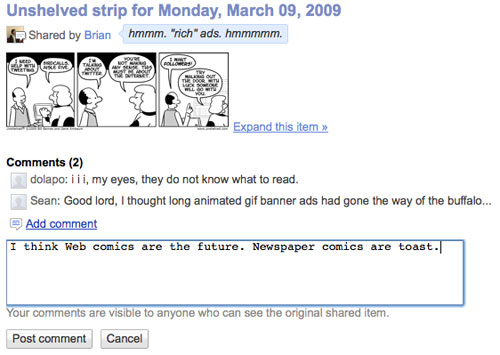
Making a comment on a shared item in Google Reader
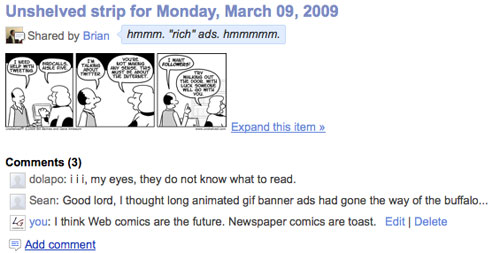
The comment, added to a shared item in Google Reader
Last year, we saw a great deal of controversy around publishers like Shyftr, who, at the time, ran a service that displayed comments along with full feeds. In that case, many blog owners felt that Shyftr was potentially making money (through ads) on their content, and hijacking comments. The Google Reader team, who I met with today at their headquarters in Mountain View, is very keen to do the right thing, and is not confusing public, centralized, comments with the private conversations available in today's release. And, so far, there are still no ads.
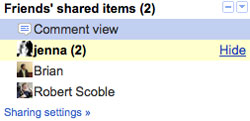 If you are a Google Reader user, you can see a new item called "Comment View" below "Friends Shared Items". If friends have made comments you haven't seen, the item will be in bold. You don't yet have a parenthetical number showing how many comments are left unread, as you do with total available items. (1000+ anyone?), but you can see if conversations are happening, either on your shared items or those of your friends.
As a Google Reader junkie, I was worried that conversations happening in my shared feeds would bump them back into my "unread" items and make me have to see items more than once. But Google Reader is not doing that. Read items stay read, but are available in the "Comment View".
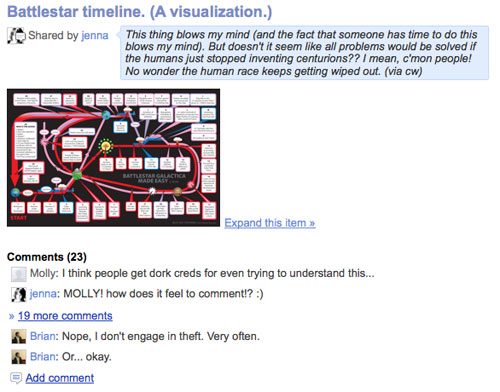
A Popular Comment Thread in Google Reader
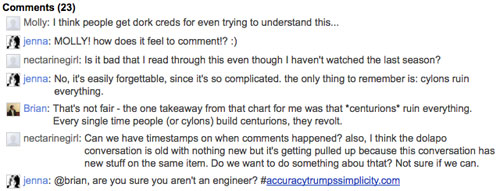
The Expanded Comment Thread in Google Reader
As you make comments within the shared items of Google Reader, those comments are visible to all friends of the original person who shared the item - and you can see comments by other people on those items, even if you are not friends with them yourself, but unlike Notes, they aren't exportable to services like FriendFeed, so they stay internal to the Reader.
You can see which friends are connected to you, as their names will be links to their Google profile, and those who are not friends display only a gray avatar. And today's post by the Reader team clarifies that, at launch, this is English-only, and not yet available in the "All Items" feed. But you can probably expect those to come with time.
The new addition is yet another way that Google Reader is looking to get more social. They've come a long way since my original post two years ago now that asked them to integrate trends, recommendations and more social features. And from today's meeting, it's clear much more is coming to what is now clearly the gold standard for the online RSS experience.
10 Comments
Does this replace the need for FriendFeed for more mainstream users?
For mainstream users, I don't know that Google Reader is dramatically easier than FriendFeed. I clearly like both services, but most mainstream users are still trying to tackle RSS, let alone a reader. I don't see this eliminating the need for a FriendFeed/Facebook type solution.
Agreed Louis, I have tried to introduce my friends/colleagues to the benefits of a reader many times but they don't seem to grasp the benefits and instead trawl multiple sites for news. I have even encouraged my partner to subscribe to the fashion Alltop blogs for University but she prefers to navigate to the sites she is familiar with for news!
I think RSS readers will seem quaint someday. Intelligent user agents will do the feed crunching for you -- content (and how we interact with it) will simply follow most people around. Those of us who wish to data mine will have more powerful tools available than even Google Reader.
But it's interesting that Google is starting to tie things together. This makes me want to expand my Reader network.
The only thing Reader needs now is status updates and Google's up there in competition with Facebook (and FriendFeed).
Totally agreed. It just needs to be tied together better and its on like donkey kong.
<sarcasm> YAY! </sarcasm>
Amazing how things change in just one year. Thanks for the memories :)!
I haven't shared much in the past but have been starting to more. This is a good addition for those connected through RSS.
How do you keep up with all of the content even with an application like Google reader?