Silicon Valley Technology Commentary & Archives · Est. 2006 3,035 Posts · 2006–2026
Showing posts with label Filters (13 posts). Show all posts

May 14, 2015

May 14, 2015 · 4 MIN READ · BY LOUIS GRAY

Preaching to Our Choirs and Setting Up Blinders for All Else

Preaching to Our Choirs and Setting Up Blinders for All Else

Just about four years ago, Eli Pariser raised some very real flags about the "filter bubble", concerned that many of us on the Web were limiting our viewpoints by following those people and companies with whom we were most aligned. Our personal positions on politics, sports, and yes, even technology, have us in a constant state of affirmation seeking, and the desire to be part of a group of like-minded people, to reinforce our position and strengthen our decided upon beliefs, that we just might be right. And should somebody in our streams disagree with us, or launch into an off topic rant, we can easily unfollow them, and "clean up" the channel.

At the time, thanks to tools like my6sense, where I was an advisor, and later VP of marketing, I said the filter bubble was "not bad" as options were always there to see new voices. While my6sense may not have been a massive consumer success, it was amazingly smart tool that solved the problem for me. But in the ensuing time, it's become even more clear that people, through constant following and unfollowing on our many social networks, are growingly subscribed to homogenous streams, and the content creators, be they bloggers, Tweeters, photographers or anything else, are limiting the subjects they discuss, to continue feeding the faithful.

As someone who gained a following talking about tech, new tools and communities, I've staked my position on the Web as an early adopter, a cloud proponent, a measurement advocate, and engaged social media participant. I have a pretty good idea of what topics will resonate with my audiences on the various streams, and what won't. I know that my discussing items outside of my bubble are seen as noise to those who have chosen to follow me, and they vote with their engagement, or lack of it.

More than nine years ago, shockingly, I saw this coming, when I talked about a Web divided, where people who espoused a certain view would flock toward an extreme community and not be interested in the opposite view. But it goes beyond picking a side in a discussion. What's happened is that people set up blinders to avoid discussion of anything else - including the content creators themselves.

There's a lesser-used feature in TweetDeck, which enables you to view a Twitter stream through the eyes of another user, surfacing public tweets from accounts they follow. During the Baltimore riots, while a huge portion of Twitter's audience was living through the accounts through the news media, or sharing their experiences about race and police, the Silicon Valley tech bubble largely stayed silent, as if there were two different worlds that didn't connect. I could log in to TweetDeck and pick any prominent voice in tech and see that, in their streams, there was no talk of Baltimore. Or race. Or Ferguson. While people marched in the streets, and dodged rocks or tear gas, the digerati continued to talk about who was raising money, the quality of pitch decks, or complaints about housing prices in San Francisco.

My tweets about Baltimore arresting police offers or links to why the situation exploded in the first place went unnoticed - while the streams continued to debate the future of wearables or the latest entrant into Unicorn status as a billion dollar startup. It was more than an echo chamber. It was a wind tunnel. And my daily journey into Feedly seemed to be no different than any other time. The same articles were written by the same people, about the same things. The same headlines begging you to click were thrown out there, only to be reshared and retweeted in a rush for page views.

Oh. I see you're tweeting about something that's not tech.

Maybe we've grown fatigued of outrage. Maybe there have been enough dramas and disasters and disappointments that we just don't react publicly. But I think there's more to it. We have been taught, thanks to our constant focus on engagement and numbers, that we have to speak to a niche. VCs talk to VCs. Engineers talk to Engineers. Startups talk about being a startup. We're becoming afraid of expressing a position that may cause a debate. We're refusing to talk about things that are uncomfortable, and we're closing our eyes to people who don't always care about the things we do. And I think that's dangerous. It sets us up to further carve out our cliques and become closed minded.

I mildly apologize for the irregular posts here of late. But part of the reason, beyond being busy, or focused on other things, is I don't want to be more of the same. The world is a vibrant tapestry, not monochrome, and I don't want to be the thirty-second person to talk about the same things everyone else is. We should embrace a world focused on curiosity, not compliance.

October 21, 2010

October 21, 2010 · 6 MIN READ · BY LOUIS GRAY

Information Streams Accelerating the Attention Crisis

Information Streams Accelerating the Attention Crisis

More people are creating more content of more types and sharing it with more connections in more places than ever before - not just text, but photos, audio and video as well. Every second of every day comes with more opportunities to be off task, distracted, and interrupted - with something new fighting for your attention. It might be the arrival of new e-mail, or a new RSS feed, a bombardment of new tweets, a text, or a push notification, but the interruptions are increasing - forcing you to make a choice oh where to put your attention and how to use your time.

A never-ending stream of updates on your favorite social networking sites may be full of interesting links to check out from your friends, with photos of where they are that day, and location updates telling you exactly what they were doing.

You are likely being bombarded with new demands on your time and your attention that weren't there last year, and if you were one of the elite few who had opted in to this interruption firehose a year or so ago, there is no doubt the velocity is stronger than ever, and there is no end in sight - for the tap continues to be opened.

You Are Constantly Optimizing Your Streams for Relevance

As this firehose of information sprays forth, you might think it is simply an increase in noise - that the same amount of information relevant to you today is the same amount that was relevant to you months ago, years ago. But it's not true - because as humans, we are catering all our streams to our own interests. Consciously or subconsciously, we are making deliberate choices to connect to the "right" people, to follow the "right" sites, to opt into the "right" discussions, to engage in the "right" e-mail threads, and to click on links that we believe are relevant for what we want to discover or how we want to be entertained. So this noise, even if it is still noise, is getting honed and massaged - and it is increasing the relevant signal in an ever mounting shriek, like the whistled warning of an oncoming freight train.

This combination - the dramatic increase in consumable content and diversity of sources, along with the human desire to be connected to the "right" people and "right" subject matter - practically ensures that the increase in personally relevant information is growing, if not in an exponential way, a linear way.

Simply put, the total number of personally relevant pieces of content to consume each day is much higher than it was 1 year or 2 years ago, and will likely be 5 to 10 times higher 2 years down the road.

We need to find ways to handle this deluge.

Early Adopters Showing Signs of Early Fatigue?

For those of us who are digitally connected and active, we are feeling this in acute fashion. Despite improved software tools to help us accomplish tasks, practically all of us feel we are busier than we were last year, and the year prior. We feel there are more tasks that need completing, and that we are actually falling further behind. And we are constantly being interrupted - our every task seeing its schedule hole punched like swiss cheese, as one turns to each incoming beep on the smartphone or software alert that indicates there are new messages in front of us that quite possibly could demand our attention - now.

As humans, the way we are dealing with this onslaught of personally relevant information manifests itself in a few visible ways. Some of us feel as if we are suffering from constant short term memory loss. We can't answer questions about shows we have seen or blog posts we may have read. We may scrunch up our face and look quizzically as friends remind us of updates they may have seen on social sites that they swear we saw, but we can't remember.

Social Gestures A Shortcut to Save Time and Move On

For those of us who once may have been active blog commenters across a wide variety of sites, we are commenting less, and when we do, we are usually writing shorter comments. The two big exceptions to total comments, of course, are Facebook and Twitter, the latter of which forces brevity - it's practically the iPod Nano of the writing craft. In exchange for our once lengthy and on-topic discussions, we are taking shortcuts. We might simply be clicking a "like" button to signal we saw the content and approved of it. We might want to toss a bread crumb of a social gesture the author's way - to share it, to retweet it, and move along quickly to the next thing, because there's always something bigger and better to take our attention away around the corner.

The very time we take to consume the media we're handed is like being passed a ticking time bomb. If something is deemed too long, or isn't immediately rewarding, we might just close our window, or decide to TL;DR the whole thing. There's even a Web site for that very purpose now.

There Is No Off Button. Ever.

The attention crisis is with us at all times and in all places. It is clear. No longer can we simply turn off our computer screens and relax with a good book, or a magazine, or see our favorite show, and avoid interruption. For at the same time, our smartphones are in a state of constant connectivity. They beep and chirp to let us know of new e-mail, new text messages, new phone calls, or even chat pings from Google Talk. They practically beg to be held and coddled at every moment, as we practice partial attention - holding the phone or laptop with the TV or radio on the in background. We glance down at our phones at stop lights or in traffic to see the latest Twitter mentions or if any of the newest e-mails require immediate action, because we fear both being out of touch and falling even further behind than we know we already are.

So what is being done? There has to be a breaking point, at which people's unfinished projects and mediocre work products, the result of constant interruptions, distractions, and scraping under the deadline, red eyed and fatigued, take their toll. There will need to be a trade off, either through the recognition that something will be missed, something will not be finished, or that we need to turn to a higher power, to artificial intelligence to help us surface the best and to ignore the rest. We cannot any longer rely solely on our ability to read fast, process fast and decide fast, to blast through the day's content and come out the other side fully intact. And if we are superhuman and still swear that this is possible, the demands will be even more difficult in coming months and years.

Information overload is passé. It's truly not an issue of too much information in general - but moreso an issue of too much relevant information and our inability to filter out the noise automatically to get to the good stuff every single time. Therein lies the opportunity - the opportunity to fight the attention crisis head-on. Whoever gets this right, whoever can help you to eliminate the crisis, to find the best stuff, always, and treat you like an individual, not just a clone of people like you, wins. And if you know it or not, you are already winning, because there is more relevant content than ever. Can you become superhuman and get it all?

One more thing. How many times were you interrupted in reading this post?

April 8, 2010

April 8, 2010 · 2 MIN READ · BY LOUIS GRAY

Google Buzz Team Tweaks Tweet Imports, Hints at Filtering

Google Buzz Team Tweaks Tweet Imports, Hints at Filtering

As Google Buzz users discover their own approach to using the service, and being selective as to which programs they pull into the site, many have been dissatisfied with the way Buzz has handled Twitter. Unlike other aggregation services, including Cliqset and FriendFeed, Buzz's imported tweets are not imported in real-time, and can seem very disjointed - made worse by their being imported in clumps. Today, one Googler explained they were going to solve the clumping issue in what was termed a public experiment, making things "less awful" in the interim before more capabilities are released, including filtering of imports by source - a popular option seen on sites like FriendFeed and Facebook.

Why Buzz does not pull in tweets in real time is extremely curious, given Google's much-publicized relationship with Twitter, their focus of late on recency in search, and of course, Buzz's centering around standards, such as PubSubHubbub, a big player in the real-time world. That Twitter does not support PubSubHubbub is obviously one contributor, but other services have managed to find a way to get Twitter updates with practically zero delay, through leveraging Twitter's APIs. The result is a truly unsatisfactory experience, contributing to many people removing Twitter as a service feeding Buzz.

The way Buzz polls Twitter for updates now can mean older updates get pulled in as new along with more recent items. To date all "new" updates were added concurrently, but now they will be redistributed using the timestamp of the tweet from Twitter, in effect shuffling those updates throughout the network. This will make Buzz's mysterious "unread" counts even less relevant, and should be seen as a band-aid.

Updates from Twitter Now Shuffle In By Their Official Timestamp


Josh Wills, an engineer on the Buzz team, explained:
"Personally, I really like Twitter, and I want better integration between Twitter and Buzz. My hope is that this is a temporary change until we work out a way to play nicely together that is beneficial to everyone."
Josh went on to say that the changes were intended to "make things less awful" while things get "worked out" to make the tweets appear in real-time. Whether that's a business development decision or an engineering one, to make things "play nicely together" was not explained, but he added that he believed "real-time twitter updates don't make sense w/o the highly-anticipated source filtering."

The ability to hide sources, such as Twitter, from one's feed in Buzz will be as important as it has become to hide services in FriendFeed, or to stop seeing Farmville updates in Facebook, should you not be interested. While Buzz has been fairly close-lipped in terms of talking about future features, Josh's comment referring to the filtering shows it's on their radar, and no doubt coming, rather than being speculated about endlessly by hopeful users.

Older Tweets that do enter Buzz can of course be made more prominent if they gain conversation, and therefore, get bumped to the top of your feed - but from what I've seen, most engagement comes on native items on the network.

March 23, 2010

March 23, 2010 · 2 MIN READ · BY LOUIS GRAY

Zite Launches Personal Web Filter, Recommends Content

Zite Launches Personal Web Filter, Recommends Content

Practically everywhere I turn these days, new products are cropping up to help you find content relevant to your interests. In addition to my6sense, who I covered yesterday, we've seen a fair share of Twitter applications, iPhone apps and Web sites looking to find signal in the noise, and each takes a unique approach. The latest to join the scene is a service called Zite, which bills itself as a personalized Web filter, leveraging your social profiles to guess your interests. You can improve the filter by grouping keywords you are interested in, and can dive down by domain to see what different sources are saying about your interests.

Setting Up My Zite

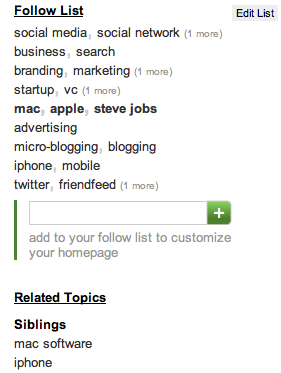
Upon entering Zite (and you can use one of 50 invites with this code: http://zite.com/?code=louisgrayorg), you are prompted to enter your user name for Twitter and Delicious. Zite analyzes the content you share on those sites, and delivers two things: recommended articles and keywords called your "Follow List".

Today's Recommendations from Zite

Older Recommendations from Zite

The recommended articles are split into two: first being today's recommendations, and the second being older items you might like, going from 1 day ago to as much as a month. If you like the articles you see, simple click the star to the left of each article, or you can read it. Zite intends to improved based on your feedback, so the more stars, the more you get to tailor it to your interests.

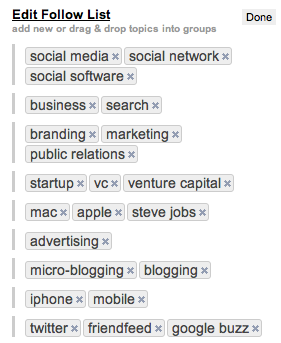
The "Follow List" at first is a quick stab at what Zite thinks you are most interested in. But the power of this list comes from your own edits. You can add new terms to follow, and interestingly, drag and drop topics into groups. This lets you have a set of results for "Startup, VC and Venture Capital", or another group for "Branding, Marketing and Public Relations", for example. You can also set up groupings for multiple domains, for example "louisgray.com and scobleizer.com", if you wanted to.


The Editable Follow List on Zite


Once the follow list is created, you can click on any of the groups and see recommended results on Zite from those terms. Zite tries to guide your exploration further with related topics, called "Parents" which are higher level topics, or "Siblings" which add more terms to those you're currently viewing.

Searching on one domain with a specific term on Zite

The ability to parse through RSS and other news sources by topic is something I like a lot, and you could see that from my feedback on Lazyfeed. Zite lacks the real-time updating element and cool UI that Lazyfeed brings, and doesn't clearly respond to implicit feedback, working on the explicit nature of your own activity. But if you want to see recommended articles from the Web on topics you like, you should check it out. You can get in to Zite's closed beta with one of 50 invites using this code: http://zite.com/?code=louisgrayorg.

Disclosure: My6sense is an assumed competitor to some aspects of Zite, and My6sense is a Paladin Advisors Group client, where I am managing director of new media.

February 13, 2010

February 13, 2010 · 4 MIN READ · BY LOUIS GRAY

Filter, Unfollow Or Get Out of the Way

Filter, Unfollow Or Get Out of the Way

Go Ahead and Filter Me Out of Your In Box.

The recent launch of Google Buzz has once again surfaced an undercurrent in the social Web - where a small number of active accounts can gain the lion's share of activity, either through their own interactions, or those of an active follower base. Whether earned through years of consistent activity on their blogs or parallel networks, or having volume thrust upon them through celebrity or suggested user lists and bundling, there are brand name individuals who command a greater share no matter where they go, and if you choose to follow them, your stream runs the chance of being overwhelmed.

Buzz, evolutionary but not revolutionary, has not yet made it simple to follow very active accounts, such as those from Robert Scoble, Jason Calacanis, Pete Cashmore or me, as updates on our threads bounce to the in box by default - almost as a penalty for anybody who has chosen to engage, or who may have seen their ID added to a thread through the service's @Reply feature.

A Common Complaint. But A Wrong One.

Busy accounts can be a nuisance on practically any network, whether that's Facebook, FriendFeed, Twitter, Buzz or any other. But in services where active feeds are resurfaced or pushed to the top, such as FriendFeed and Buzz, the impact is not actually from the originator of the content, but from their community. Comments on active feeds push the items back to the in box, or back to the top of the feed, and if you are following some of the more prominent accounts, you'll no doubt see the same names at the top.

Engagement is Not the Problem. It's Bad Filtering.

That said, if this is getting in your way, and you are seething with rage at these social media power users, you're not using the tools well. Practically every network gives you tools to solve the problem.

1. On Twitter, you only have to see the updates from those you follow - with the exception of items retweeted by those you follow, from their connections, which you can opt out of on an individual basis. If an individual is too noisy, you can unfollow them at any time. Some innovative applications, including Brizzly, let you even "mute" a user for a short time so you can have them disappear during particularly busy times.

2. On Facebook, you can hide an individual's updates from your News Feed if they are too talkative. You can also hide all updates from specific applications (like Farmville or Mafia Wars) if you never want to see those updates. And yes, de-friending or blocking is available.

3. On FriendFeed, you can hide individual posts, block individual services (like Twitter or Disqus), block specific service updates by user, or, most successfully, you can put noisy people in their own lists, to sequester them from the rest of your feed. If worse comes to worse, again, you can always unfollow them, or block them outright.

4. With Buzz, you don't yet have the option to hide specific service updates or updates by user. But you can mute any thread just my using the "m" key, and as Buzz is integrated with GMail, you can use the same kind of filters available to any other e-mail. For example, I have set up a rule to move all Buzz entries into a mail box I call "social", taking them out of the in box.

Buzz Never Hits My In Box On My Mac

If you want to quiet the impact of busy users, like Tom Foremski did by unfollowing Robert Scoble and me in Buzz, you can use GMail filters to your advantage - taking them to a dedicated folder and out of your in box.

For example, set up a filter where the Subject is "Buzz from Louis Gray", "Skip the Inbox (Archive It)" and "Apply the Label" of "Noisy", or whatever you like.. Then do the same for Robert and Pete and Chris Pirillo, Jason Calacanis, or anybody else who is swamping your Buzz experience.

Should we be blaming the noisy folks?

Like I mentioned last night, in sharing my social media data flow, I know there are people who have chosen to stop seeing my updates because of their frequency. But I don't plan to change my activity because of a new way it is interpreted and displayed by a new social network.

Part of the reason I am among the more active and visible people on Buzz is because over the last few years, I have promoted and cultivated the use of Google Reader and having active conversations there. I took the time to connect to and talk with more than 1,000 people in my shared items, and Buzz has taken advantage of that social network, moving it to a new place. Where others have not optimized for sharing, they are starting with less of a community.

1,300+ People Can Comment On My Shared Reader Items

But because of this, the community is also very comfortable talking on my feeds, as they are with other engaged folks. It is the ensuing conversations that bump them to the top, not the frequency that I share. I have been sharing 20-30 items a day in Google Reader every day for years, and it is filling Buzz the same way it has filled Reader and Facebook and FriendFeed.

If it's too much for you, use the tools that are there. Mute. Filter. Unfollow. Block. But there will always be discrepancies between the average users and those most active. Go ahead and make mine more active.

November 17, 2009

November 17, 2009 · 3 MIN READ · BY LOUIS GRAY

How Facebook's News Feed Failed Me (And My Family)

How Facebook's News Feed Failed Me (And My Family)

As more and more people are turning to social networks to share their information, practically all of us are connecting to an ever-increasing number of people, and for the most part, we are updating more frequently, and sharing content from different sources in multiple places. The resulting increase in velocity, often termed noise, has led to practically all tools to try and assist us to find the "most relevant" data, or the "best" information, based either on activity from others in our social graph, or through our own past activity. Sometimes, this works very well, helping to make signal out of the noise. And on other occasions, it can dramatically miss the stated goal, and actually make things worse. This week, Facebook's latest enhancements appear to have had a serious negative impact on me (and my family).


As you likely already know, Facebook has been working on a slew of changes to its "news feed", the main column on the site that alerts you to friends' activity. The social network implemented "real time" updates to show you when new entries were posted, and very recently divided the feed into two parts - a "Live Feed" for all updates as they occurred, with the newest on top, and a "News Feed", ostensibly from those who I engage with most often, or for "hot" content - presumably measured through interaction. This is a similar approach taken to FriendFeed's "best of day", PostRank's work on RSS feeds, and Google Reader's new feature, "Magic".

This weekend was a busy one for me, one where I was less connected to the computer than usual. As a result, I checked in to Facebook only a handful of times. Glancing at the News Feed on Saturday, nothing particularly stood out. The same held true on Sunday. I was greeted with updates from friends like Jason Goldberg and Chris Saad, both solid tech entrepreneurs. I also saw notes from Robert Scoble and a handful of connections that originated on FriendFeed. Still, nothing amazing to report.


But after 11 p.m. Sunday night, I saw a friend from high school make a mundane update, saying he had a good weekend, one he would cap off with a round of "Anno 1404." Turns out that's a city-building game, like Sim City. No big deal. I clicked through to his wall to see if he hinted at the good weekend. At the top of his wall, I saw something truly interesting. A simple update, his wall said, "Don likes Malinda Gray's photo." Malinda is my 23-year-old sister. Why would he be looking at her photos? And what photo?

I clicked through, and to my surprise found out that my other sister, 28, had given birth to a new baby boy, her first, making me an uncle. Wow! After more investigation, I found that my sister, as well as my mom, and also the mother of the child, had made posts on Facebook throughout the day Sunday on the progress of the labor, and how things had gone. I also found out that my sister had actually gone into labor and started that process around noon on Saturday - the previous day, and that I had absolutely no clue.

How could I have missed it, considering they had been updating Facebook regularly, and amassing a good share of comments and likes with each update? Well, apparently, Facebook didn't figure out that this update stream was relevant to me. It didn't realize and start sending - with alarm bells - that Louis's sister was having a baby. It didn't realize that photos from my sister, both of them, of a new baby, and the hospital just prior, were more important, than a random "OH" via Twitter from Chris.

Facebook's filter failed me. While, yes, I could have clicked on each of my individual family members' profiles at any point over the prior 24 hours, or yes, I should maybe make a Family-only list and make sure to visit it regularly, I've so far trusted the network to do a good job at gauging relevancy. Yes, it's true that I interact more often with Jason Goldberg or Johnny Worthington on Facebook than I do with my own family, but in this case, the News Feed hid the only truly relevant thing that was going on this weekend, and we missed it.

I explain further in the below video:

November 7, 2009

November 7, 2009 · 2 MIN READ · BY LOUIS GRAY

Cadmus Filters Real Time Streams to Reduce Clutter

Cadmus Filters Real Time Streams to Reduce Clutter


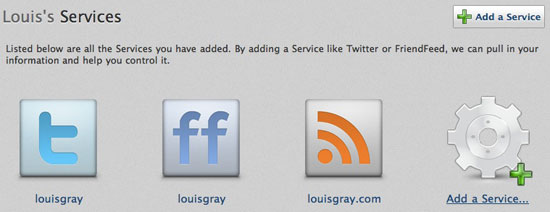
The more people and blogs you follow on social networks and through RSS, the more likely it is that you are going to see duplicate data, be it via retweets, forwards, or through many of your friends sending the latest viral videos or images. A new product under development, called Cadmus, looks to filter your real time streams to group similar posts in your feeds to reduce the noise. The service currently works on your Twitter account, your FriendFeed account, or on any number of blogs you add. You can also add many RSS feeds at once via OPML.


Adding Supported Services to Cadmus

In my testing of Cadmus, I found it correctly detected retweets, replies from others to the original sender, copies of tweets sent to FriendFeed, and other topically-related items, even if they did not share keywords. Cadmus was even able to find similar updates that were hours or days apart.


The Results: A Quieter Feed By About 10 Percent

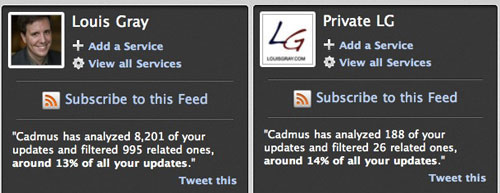
On average, each refresh of Cadmus filtered around 10 percent of my updates. For runs that included 3,000 or so updates, 300 individual items would be grouped or filtered - and testing of a smaller account in the low hundreds also showed a similar 10 percent filter rate. In fact, the more updates I filtered, the higher the percentage filtering would be found. In a run comprising more than 8,000 items, almost 1,000 were "related".


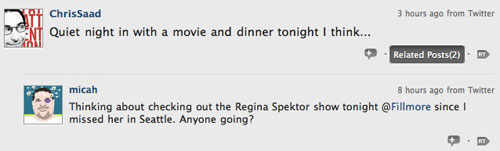
Cadmus Knew Both Micah and Chris Were Watching a Show


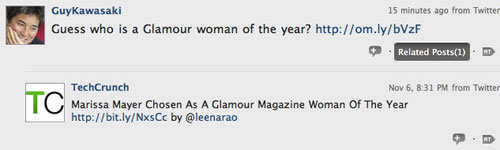
Cadmus Saw Guy Talking About an Article TechCrunch Mentioned


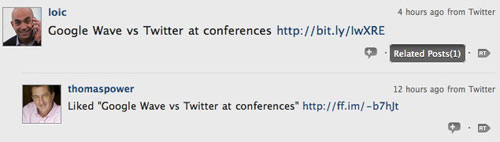
Cadmus Linked Thomas Power's Like of Loic's Share

The authors, Anomaly Innovations, who are chronicling Cadmus' development on their blog, show even higher filtering rates, of almost 30 percent, if you looked at an entire week's worth of updates. And while most of the filtered items only had one or two related posts, you can see an extreme version from the last week here.

To use Cadmus, you need to log in at http://thecadmus.com/, using OAuth, to your Twitter account, and you can add as many supported services as you like to the system. Once you have scanned your stream, click the reload button in the top right to get a newly filtered stream. If you're tired of seeing duplicates, want a stream with less noise, or just want to lump similar items, it is an interesting development - one I expect to get better as they continue to update.

August 25, 2009

August 25, 2009 · 3 MIN READ · BY LOUIS GRAY

Parse.ly Spices Up the News Based On Your Interest Filters

Parse.ly Spices Up the News Based On Your Interest Filters

I am enjoying seeing the growth in Web services tailored to finding the very best news just for me. From My6Sense's attempt to only show me the best news, and hiding the less-important items, to Lazyfeed's topics-based blog search engine, we've recently seen two interesting approaches to cutting through information overload and finding the best data. A new invite-only beta service, called Parse.ly, claims to offer "fresh content" with "minimal garnish", and, leveraging my interests, gives me the highest-ranked stories, derived not just from my leanings, but how strongly I find myself aligned with specific topics. The result is another news source with an outstanding signal to noise ratio.
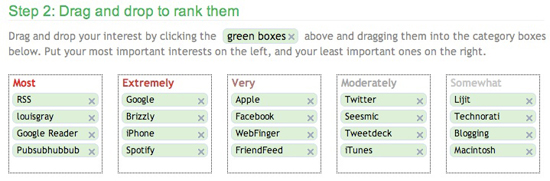
If you are among the lucky few who has thus far obtained access to Philadelphia-based Parse.ly (I am betting the best way is to follow their Twitter account), you start by entering terms you want to find news on, and dragging them to boxes that signify your intensity of interest. The five boxes range from "Most" to "Extremely", "Very", "Moderately" and "Somewhat", in descending order.


Prioritizing My News In Parse.ly

Per my usual approach, I filled the boxes with tech terms, and deigned to see if Parse.ly could find me new, interesting stories about the topics I am most interested in. And it came through - no question.

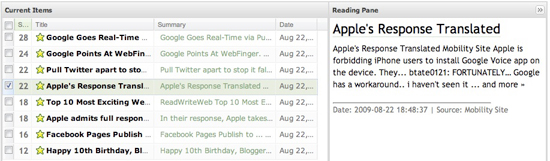
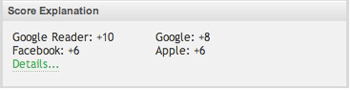
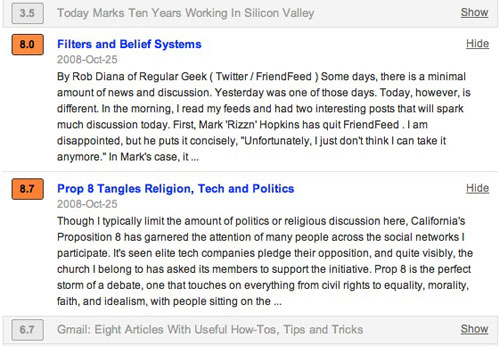
Each of the buckets ("Somewhat" to "Most") gained a numerical score, from 2 to 10. As a result if a blog post had two of my "10 point words" in its title or excerpt, it would have 20 points, and be pushed to the top of the results queue. Higher yet would be a story on Google around Pubsubhubbub and RSS, which weighed in at 28 points, sporting two 10 point words and an 8 pointer. Like traditional feed readers, Parse.ly shows the title of the story and the date, but it also includes a short summary and, yes, the post's numerical score. Sorting by score shows the highest ranking results.


My Starred Items In A Parse.ly Reading Pane


How Stories Got Scored Based On My Preferences

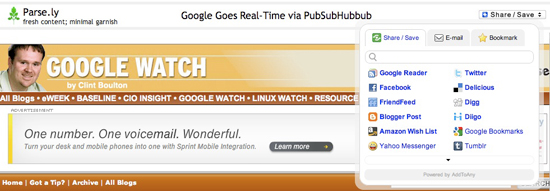
If you click on a story in the standard view, an excerpt is displayed in the reading pane, which also features a "Score Explanation". And if you click on the story itself, a new window will open with a Parse.ly share bar, prompting you to either save the story for later viewing, or share it to a myriad of other social networks.


The Parse.ly Sharebar In Action on eWeek

Parse.ly clearly states that its focus is all about the content and minimal when it comes to garnish (or design). That's absolutely the case. The product is reminiscent of GMail and Google Reader with its simple interface and the ability to star items, or show only read and unread items. You can also archive old items or delete them, just like you would for old e-mails and RSS feeds.

I am eager to see Parse.ly open up and let people get into the product, for while I have plenty of places to get news, Parse.ly has among the best I've ever seen in terms of quality. The company even says it could be a solid alternative to Google Alerts. Not a single spam blog was found, a testament to Parse.ly's selection from 50,000 different sources. The option to share out to other networks will also make it an interesting part of the social ecosystem.

July 24, 2009

July 24, 2009 · 1 MIN READ · BY LOUIS GRAY

Podcast: TheSocialGeeks: Stop Being Lazy, and Filter

Podcast: TheSocialGeeks: Stop Being Lazy, and Filter


In the latest edition of The Social Geeks, Chris Miller, Wayne Sutton, Jeff(isageek) and I talk about new introductions on Lazyfeed, Google Reader, and how to interact with multiple communities on differing social networks. Meanwhile, have we reached the saturation point where we no longer have to look for more sources of news? I say no, but stress that filters can play a big role in getting the best data. You can also find the original copy on Mevio.com.

March 3, 2009

March 3, 2009 · 2 MIN READ · BY LOUIS GRAY

Personalize Your Feeds With Feedweaver

Personalize Your Feeds With Feedweaver

By Corvida Raven of SheGeeks.net (FriendFeed/Twitter)

feedweaverAs RSS makes attempts at going mainstream, pioneering services such as Yahoo! Pipes, Toluu, ReadBurner, and RSSMeme are helping the process of expanding applications' possibilities with RSS. Now, you can add Feedweaver to that list.

One thing I've always looked forward to in the space of RSS is the ability to share personalized groups' feeds. I can't wait to see the day when we all will share groups of personalized feed recommendations with friends and family. The digital age would really be in effect for me if this were to happen. So imagine my delight when I ran across Feedweaver, a web feed aggregator that helps you personalize your feeds.

Simply put, you're able to turn a group of individual feeds into one feed for sharing purposes.

What will immediately catch your eye with Feedweaver is the site's design. This is one gorgeous site to look at. The simplicity of the site's design led me to feel like there wouldn't be a learning curve for using this site, something mainstream users often struggle with.


Creating a feed is simple, but also has the potential to be taxing. Once you give your personalized feed a name, you need to start adding URLs, and this is where you have your work cut out for you. On the Web, there is really no easy or automatic solution to adding feeds unless you have an OPML file. Unfortunately, Feedweaver doesn't offer OPML file support on the site, leaving you the arduous task of typing in every RSS link one by one.

Some of you may subscribe to hundreds of feeds. I do. If you were to create a personalized feed, how many blogs would you probably add? 10? 20? 50? 100?

Leave a comment saying "I definitely don't suffer from ADD," if you're happily willing to find and type in 20 to 40 RSS feed links to create one feed. It would even be easier if you didn't need to type in the exact feed link. Why not make it easier and let users type in site links too and have Feedweaver find the exact RSS feed link for us?

Feedweaver List Box


Feedweaver adds filtering into the mix by allowing the users to create keyword filters for each feed link that you list. When you're done, grab the url given by Feedweaver to share with friends and colleagues. Feedweaver allows you to come back and manage your group feeds without any fuss. If you have a few feeds that you'd like to send company employees or to groups of friends, Feedweaver would be a good service to use. All in all, it's an easy to use aggregator for anyone that's not dealing with information overload.

Read more by Corvida Raven at SheGeeks.net.

January 23, 2009

January 23, 2009 · 4 MIN READ · BY LOUIS GRAY

Feedscrub: Cleanse The Dirt From Your RSS Feeds

Feedscrub: Cleanse The Dirt From Your RSS Feeds

By Mike Fruchter of MichaelFruchter.com (Twitter/FriendFeed)


Last week I touched upon RSS overload and how it's starting to become a problem for a lot of people. That post mainly reflected on how to get the most out of your Google Reader in terms of organization and productivity. The overload part for many, comes down to feed management. In the past I suggested unsubscribing from feeds that bring you little value, or update with too much frequency.

That eliminates the problem, but also poses the risk that you might miss something valuable mixed in with all the clutter. I recently found a better solution, which I have been testing for about 24 hours now, it's call Feedscrub.com.

What is Feedscrub?

Feedscrub is a clever filtering system for your RSS feeds. It acts as a spam filter for your RSS feeds. With this system, you train it based on your content preferences. This application now allows me to still stay subscribed to the feeds I otherwise would have unsubscribed from ages ago. I'm always weary that I will miss something of importance if I abandon the feed completely. For instance, I'm subscribed to quite a few technology blogs, so the first thing I did with Feedscrub was train it to scrub posts that have anything to do with Apple.

The training filter is like an email filter that is based off words. I'm not an Apple consumer and quite frankly I'm overwhelmed with feed after feed pertaining to Steve Job's health or the iPhone. By scrubbing the posts in my feeds that have any mention of Apple, I'm training the system with my dislikes and hopefully I will never have to see another post relating to Apple in my Google Reader.

Getting started:

Getting started with the service is pretty straight forward. You have the ability to enter up to three feeds for scrubbing. Because the service is still in beta, and they are still working out the kinks behind the scenes, three should be suffice to get you going and to take it for a test drive. My advice for you is to test the service out with your feeds that update quite often throughout the day. This will show you the power of the filtering faster compared to feeds with less frequent updates. Don't worry,for power users they offer a PRO account which gives you unlimited feeds plus OPML import & export.


After you input your selected feed for scrubbing, they are displayed and stored under the "Manage Feeds" tab in the control panel. From here, you will also see three feed reader subscribe buttons under each feed. In order to train the system, you must subscribe to the Feedscrub feeds, replacing the original one in your feed reader. Here is what the Feedscrub feed looks like. It basically adds two buttons to the feed, one called "scrub it", the other called "save it". These are what you will use to train the system. If you like the article of content on the feed, you click save it, dislike it, click scrub it. Simple enough.

Training is not limited to the Feedscrub site:

You can train the system a variety of ways. When logged into the control panel you can click the corresponding feed. That will launch a new window with the feed as outlined in the below screen shot. The save it and scrub it buttons are located on the feed. Train away!


Power users will prefer training inside the comfort of Google Reader:

If you are using Google Reader, the feeds that you have selected for scrubbing, appear with the save it, and scrub it buttons. This is how I'm currently training the system. It's handy and convenient, and what better place for them to appear than in your RSS vehicle. This makes it even easier to train the system. Once you have your selected feeds into the Feedscrub system, you will not have to be logged into the control panel often to train and filter your feeds.


That concludes part one of a two-part post:

In order for me to give a fair review of the application, 24 hours was not enough time for me to make a full assessment of the filtering system. Feedscrub was courteous enough to supply me with a PRO account for testing purposes. I unloaded some 600+ feeds into the system last night, so it was a time consuming process. Out of the 600+ feeds, I'm selecting approx 50 of them for scrubbing. One week should be ample time to train the filters, and the data set should be rather interesting. I will share the results of my findings in about a weeks time.

Take the service for a test drive. We have beta invites!

Feedscrub graciously supplied us with 150 beta invites. These will go fast. Don't hesitate to sign up. Use invite code "louisgray" at the sign up process.

Read more by Mike Fruchter at MichaelFruchter.com.

October 28, 2008

October 28, 2008 · 2 MIN READ · BY LOUIS GRAY

AideRSS Rebrands as PostRank, Launches New Features, API

AideRSS Rebrands as PostRank, Launches New Features, API

Since its launch, AideRSS has aimed to leverage social tools to help determine a publisher's most popular content, through analysis of individual posts and their related activity, including Diggs, bookmarks on Delicious, links in Google, and total comments. RSS advocates suffering from information overload have even turned to AideRSS to act as an intelligent filter, providing them the best stream, rather than the default firehose. With today's new announcements, along with a rebranding as PostRank that saw the launch of a new Web site and look, the service has added tags, keyword filtering, and other tools that will get users to the data they are seeking quickly.

(See from December 2007: AideRSS Judges Feed Posts as Good, Great, Best)


PostRank Shows Posts With Audience Engagement Have Higher Score

The first major enhancement to the new PostRank is keyword filtering. As Ilya Grigorik wrote, users have asked for the ability to customize and filter any RSS feed with specific keywords. For example, you could get all posts from The Unofficial Apple Weblog that mention iPhone, or posts from Matt Cutts that mention SEO.


I Tagged TUAW as iPhone and Filtered for Only iPhone News

You can also now tag feeds you import into PostRank, helping to build out what the team calls "custom content channels" based on those tags and keywords. All feeds tagged with BlackBerry would be in the BlackBerry channel, etc.

Most interesting to developers may be the introduction of full API access. According to Grigorik, all operations possible on the new postrank.com site are accessible by API, making it easy to utilize the filtering capabilities seen in their service on other applications.

As a blogger, the new PostRank offers better ways to see if specific posts do better with readers and the social services based on keywords. As a consumer, you can now read fewer feed items and still be sure you don't miss those that are most interesting to you. You can find PostRank at http://www.postrank.com. Of course, going to the old AideRSS.com will push you there as well...