Silicon Valley Technology Commentary & Archives · Est. 2006 3,034 Posts · 2006–2026

June 16, 2008

June 16, 2008 · 3 MIN READ · BY LOUIS GRAY

OneSpot Makes Publishing Personalized Memetrackers Simple

OneSpot Makes Publishing Personalized Memetrackers Simple

News aggregation sites that can help highlight the freshest, most relevant or most popular news from around the Web are essential to separating the signal from the noise. But all too often, these memetrackers are siloed, without readers having all that much input into what's considered most relevant, or determining what content gets in and what does not.

The success of Gabe Rivera's Techmeme has had many thinking how they could create their own personal Techmeme, featuring the best of the Web, but only for those topics they're most interested in, or from those sources they choose. Gabe's product, despite some competition from BlogRunner and Megite, as well as others, has remained the most relevant and accepted leader in the space, but its algorithm has left some people wanting more.

Duncan Riley of The Inquisitr leverages FriendFeed, building what he called QMeme, displaying the most popular content on FriendFeed over the last 24 hours from those he follows. Corvida of SheGeeks once said LinkRiver was her own personal Techmeme. Rafe Needleman of WebWare once called ReadBurner a Techmeme for Google Reader. But none of these solutions, while interesting, offer the individual manageability of a new product that's now come available to the Web at large: OneSpot.

Already in place at the Wall Street Journal and the Washington Post, as well as some more vertically-oriented sites, OneSpot enables anybody to leverage the service's more than 250,000 RSS feeds to design and configure a personal meme, simply by starting with a few "trusted" RSS feeds, and letting OneSpot do the hard work of finding similar feeds on the same topic, and then determining the most popular content.

The result is a highly customizable personal memetracker that can be displayed on a full Web page or as a widget, drawing from the criteria you set, and publishing as frequently as you would like.


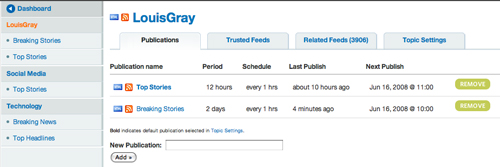
The OneSpot Dashboard Lets Me Choose Topics and Schedules

In the last few weeks, I created three memetrackers using OneSpot. One used my blog as the center of the universe (as most bloggers would like). One focused on technology at large. A third, and so far, the most interesting to me, focuses solely on the creators and participants in social media, link aggregation and lifestreaming.

See:
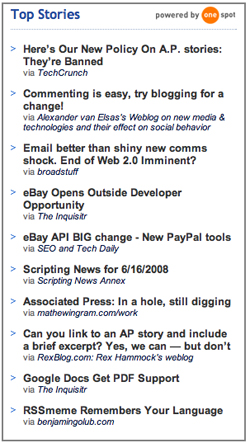
LouisGray.com: Top Stories > OneSpot
LouisGray.com: Social Media Top Stories > OneSpot
LouisGray.com: Technology Top Stories > OneSpot

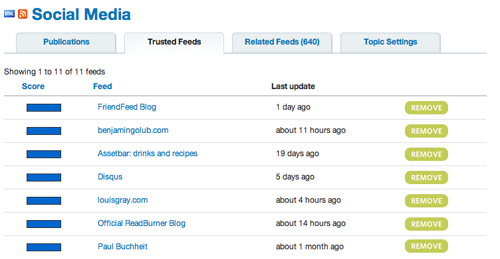
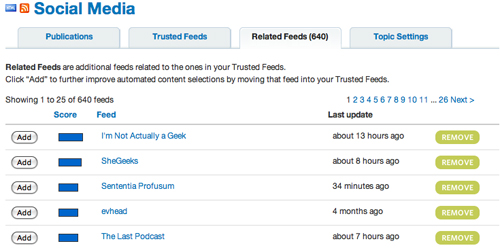
To configure my personal OneSpot publication, I entered a few "Trusted Feeds", and OneSpot then found thousands of "Related Feeds", allowing me to see the name of the feed, when it was last updated, and giving me two choices: to add the feed to my "Trusted" bucket, or to "Remove" it from the list of options.

I found OneSpot's recommendation engine to be very good. If I showed louisgray.com as a Trusted Feed, OneSpot recommended SheGeeks, The Last Podcast, the Official ReadBurner Blog, Benjamin Golub, Webomatica and a few others, no doubt leveraging my own previous linking behavior.


Trusted Feeds I Posted to my Social Media OneSpot


Related Feeds Suggested for my Social Media OneSpot

For the Social Media publication, I had added the main blogs for FriendFeed, ReadBurner, Toluu, Shyftr and others, and OneSpot recommended I also add blogs from Assetbar and Twitter. Very cool.

OneSpot is extremely flexible, letting me schedule updates as frequently as 60 minutes apart, letting me customize the memetracker's look and feel, or even to add up/down voting recommendations or comments. At a time when news organizations like the Associated Press are throwing up roadblocks in how you link to or highlight their content, why not use OneSpot to make your own memetracker using sources you trust?
June 16, 2008 · 6 MIN READ · BY LOUIS GRAY

Feedly Brings New Social Experience to Start Page, Leveraging RSS

Feedly Brings New Social Experience to Start Page, Leveraging RSS

In the last two years, there have been a number of attempts at taking what's been a solitary experience of reading one's RSS feeds in isolation, and adding new social elements, sharing feeds with friends, discovering new feeds, or adding comments and notes.

Following a lengthy incubation period, intended to get the product rock-solid with an army of features and a sharp interface, Feedly hits the Web today with their own take on the social start page - using your Google Reader subscriptions at its core, but layering on intelligence that learns from you, including your reading patterns, to personalize your information waterfall.
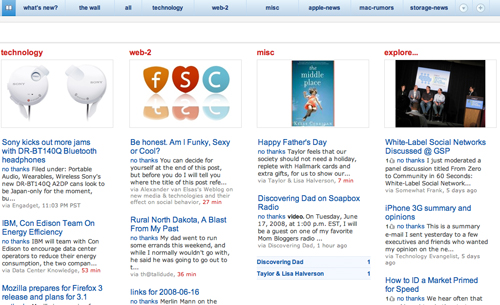

The Feedly Cover Page

Feedly was first known as Feeddo, but recently changed its name to eliminate confusion with other products on the market, and has been in private testing for several months. I first started talking with Edwin Khodabakchian back in mid-February, and even then, the project had been under scrutiny from more than 100 early testers for the better part of three months. The goal? To bring a new, graphical, view of feeds, via Google Reader, and add multiple social layers on top of what's already recognized as the world's most-popular online RSS engine.

Khodabakchian brings a strong resume to the project, once being a Chief Architect at Netscape, and later, the CTO of eCommerce at AOL, following that company's acquisition of Netscape, as well as four years as the co-founder and CEO of Collaxa, later acquired by Oracle. Khodabakchian also considers the team behind Yokway close friends and has been a visible early beta tester of that product.

The months and months of quiet effort appear to have paid off. If you have a FireFox browser, you'll want to see this new approach to taking in the day's news. In my own testing, I kept uncovering new features, and I'm sure I won't get them all here. But here are some of the main elements:

The Magazine Cover

Feedly looks at itself as a start page and magazine hybrid. The main cover page, noted by an icon that looks like a book, shows the latest new items from subscribed feeds, using your own learned reading activity, combined with your sharing history in Google Reader, to bring what's anticipated to be your most interesting stories to the very front. Feedly also, in the bottom right corner of the page, has an "Explore" option, where new stories from similar feeds you may not subscribe to, are available.

Like most feed readers, you can click on any of the articles' headlines, and view the full item. But Feedly isn't intended to be a passive experience. From the article, you can:

1. Save it for later reading.
2. Annotate it (more on this later)
3. Recommend it to friends
4. E-mail it.
5. Send a note about the article using your Twitter acount.
6. Preview it, giving a glimpse of how it looks from the source site.
7. Copy the link to your clipboard.

From that article, I can go back to the cover page, view other articles from that source, or make a new selection from my Feedly toolbar.

What's New

The What's New page combines the latest updates from your subscribed feeds with recommended articles from friends, and again, highlights those feeds and items you are most likely to read, based on your past behavior.
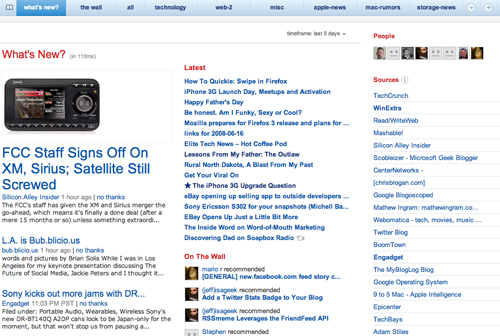
Due to Feedly's tight integration with Google Reader, the items in the What's New page are segmented by topic, gathered from your folders in Google Reader. Mine, for instance, include "Technology", "Web 2", "Apple News", "Mac Rumors" and "Misc" for all other blogs.

While viewing "What's New", I can not only see what the latest feed items are, but on the right, all sources of news are listed, with the number of available items at each source. If there's a new story from one site, it'll be bolded. If I've already read all the stories, they won't be.

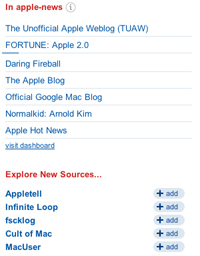
As with the cover page, the lower right corner always offers me new feeds to add, should I find them interesting.

The Wall
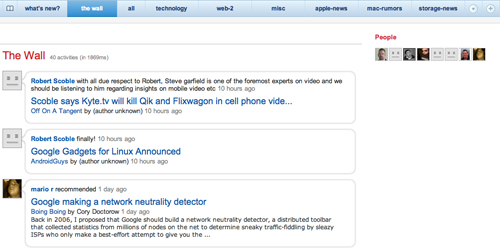

The Wall can act as your social springboard to both shared items in Google Reader and Twitter updates. If you opt in to synching your Twitter account with Feedly, you can use the Feedly interface to get tweets from friends, as well as see items shared by friends within Google Reader.

This can become a two-way conversation as you annotate articles or send posts out to Twitter from Feedly.

Integrated Google Search

While some sites don't think about search until well after launch, Feedly has developed an extensive tie-in with Google Search and Google Reader on day one.

For example, if I search for the term "Caramilk", a word not often used, I not only found an article from Mark Evans called "What's the Caramilk Secret", but also related items, including WinExtra's Would you hammer a nail with a shovel? and Tris Hussey's response, FriendFeed explodes onto the scene, but it is still an information fire hose, both of which referenced Mark's article.
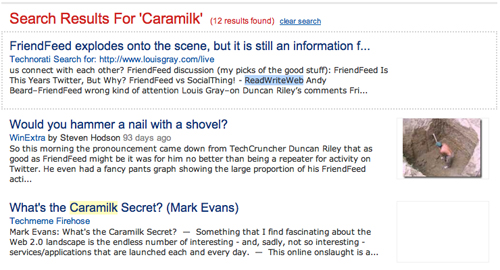

Feedly's Results for "Caramilk"

Searches for more frequent terms, like Apple and Yahoo!, had their expected 1000+ results, in reverse chronological order.

Annotation and Sharing

Similar to Google Reader shared notes, you can make notes on any item within Feedly and share it on "The Wall". But unlike Google Reader, you can highlight the portion you're commenting on, and make notes, as you are more accustomed to seeing in Microsoft Word's Track Changes option.

On any item, you can either click the "annotate" option, or select the desired text, and an option comes up to either "search related articles" or "highlight". If you chose to highlight, the selected text is in fact highlighted, and you can add a comment. As you can see in the below two examples, I was able to add comments next to articles from both Sarah Perez and Steven Hodson, and my own avatar was displayed next to each.
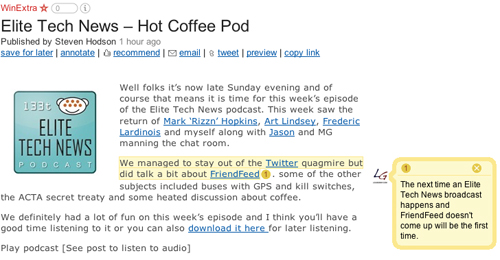

A Note on WinExtra's Item in Feedly
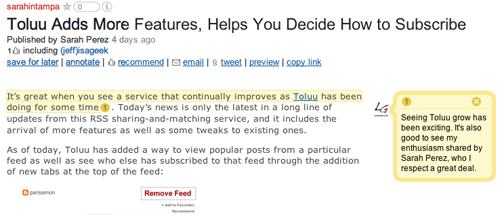

A Note on Sarah Perez' Item in Feedly

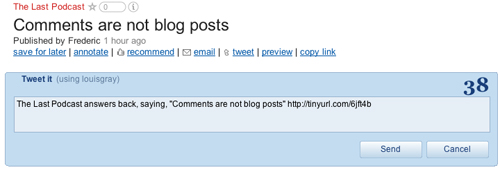
Tweeting an article is similarly easy. If I find an article I like, I just click "tweet" and a new box opens up with the headline, an automatically generated TinyURL, and a note on how many characters I have before running out of Twitter's 140 character limit.

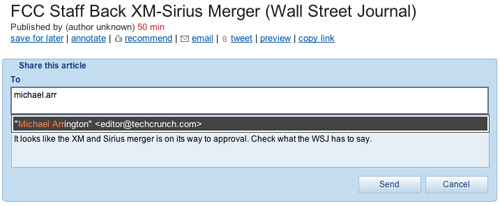
Clicking e-mail opens another box with a simple "To:" field, and a "Note" field. As you start typing, Feedly automatically shows contacts you have in your GMail address book. Select one of those, or enter a new contact, and hit send.

Managing Feeds

Feedly is 100% synchronized with Google Reader. Add a subscription through Feedly, and it will show up in your Google Reader. Read an article in Feedly? It's marked read in Google Reader. Recommend it in Feedly? It's shared in Google Reader. Want to move a blog from one folder to another in Google Reader? You can do that through Feedly. Feedly essentially brings you all the aspects of Google Reader we've grown accustomed to, but displays them in a new, friendly, visual way, while extending the feed universe out to Twitter and e-mail, and adding social elements.
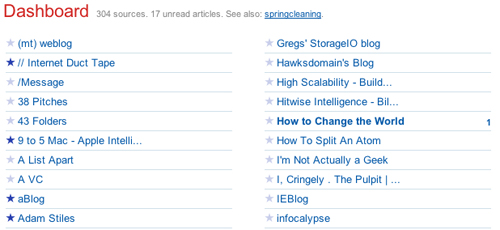
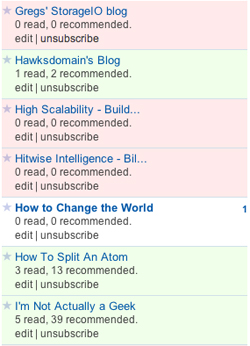

Feedly also takes things a step further, showing all your feeds in a single dashboard view, letting you toggle your favorites, or in a unique twist, offering what's called "Spring Cleaning", where, in theory, should you get bogged down with too many updates, feeds are flagged warm or cool based on your reading behavior and how often you mark them as favorites.

Other services, like Assetbar, got dinged for packing in too many features and not focusing on delivering a clean interface. Feedly has largely avoided this problem through strong segmentation between portions of the service, and through leveraging existing accounts, including your Google profile, existing friends in Google Reader and your GMail account.

If you're the type of RSS power user who wants to read hundreds of items through aggressive keyboard navigation, then Google Reader still can't be beat, but if you want to pick the very best from the many feeds you have, share items with friends and find new sources for news, Feedly is a compelling option. They've clearly done a lot of work to make their solution feature rich, with a flexible, clean, user interface, and options not found anywhere else.

Check out the new offering at www.feedly.com.

June 15, 2008

June 15, 2008 · 4 MIN READ · BY LOUIS GRAY

Why Disqus Is Winning the Web Comment Battles, and What's Next

Why Disqus Is Winning the Web Comment Battles, and What's Next

Tonight, I was lucky enough to have dinner with Daniel Ha, the CEO and co-founder of Disqus. One of the advantages of being in the Silicon Valley is that in many cases, I can actually engage with and meet the people who are moving the industry forward, and while I don't consider myself a big-league hob-nobber, the occasional social visit can be rewarding. I won't jeopardize future meetings by giving away the company store, but I definitely came away from the evening feeling even more committed to Disqus and the company's strategy than I was before.
As you already know, I first added Disqus to my blog with Daniel's help, after finding I was unable to integrate the service into my Blogger template. He went above and beyond the call of duty to get me up and running, doing such an excellent job that the effort was noted by Mashable.

This customers-first attitude shown on the Web was evident off-line as well. Daniel more than once apologized for the brief downtime Disqus suffered last Friday, saying that he had awakened to a swarm of e-mails from frustrated users, not to mention my post, and said that we were right to call them on it, as Disqus comments are now such an integral part of our blogs. He assured me the team knew the issues behind it and was working diligently to make sure another similar outage would never occur. Disqus' popular sidebar widget was to blame, putting a great deal of strain on the service, which has since been lessened.

Also, during the meal, Daniel asked me a question that he says he loves asking users, "How can we make Disqus work even better for you?"

Had I been properly prepared, I could have brought an index card along with responses at the ready. Duncan Riley, for instance, wants trackbacks and FriendFeed integration. I asked for better statistics and analytics, and had questions on how older posts were displayed on my Disqus dashboard. But the truth is that I'm already quite happy with Disqus, and have grown to expect to see it on other blogs, making myself less likely to comment on other sites that don't offer the centralized comments feature.

On a personal note, I was struck by how young Daniel was. At the old age of 31, I'm now reaching the point where just about every Major League Baseball player I like is younger than me. But the CEO of a company I think could have a big impact on the future of the Web being 22, and a UC Davis computer science graduate just this year? That's not fair, and I'm not used to it. Coincidentally, my youngest sister also graduated from Davis on Saturday, sharing Daniel's class year.

Daniel started Disqus in 2007 with friend Jason Yan while in Davis, and this month, doubled the team, adding two new coders, Andrew Badr and Devin Naquin. (See: The New Guy and Hello, world!)

Andrew's already busy letting people know about upcoming features, promising the addition of trackbacks "sometime in the next week.", on the Oracle AppsLab blog. He also answers many people's fears as to the portability of the data, saying, "Better options for import and export are in the works, and will be part of our next major release."

As I wrote at the end of May, Daniel has helped lead Disqus to the forefront of blog comment services in a short time, partly due to his aggressively pursuing relationships with partners. While some companies have targeted Disqus with competitive pot-shots, Daniel said that having others in the field helps to reassure him that it's a good market to pursue. If nobody else was interested in the space, he would undoubtedly be wondering just why.

Disqus is well-known to be funded by Fred Wilson with Union Square Ventures and Paul Graham with Y Combinator, among others, and while some VCs may try to demand immediate revenues or even profits from even the smallest of ventures, Disqus is not yet under such pressure. They've definitely had talks about how to monetize and start bringing in money, but if you thought they were about to start with advertising, you'd be wrong. Disqus will not always be a zero-revenue company, but Daniel says advertising's not in the plans.

For a service that's already got what I believe to the best solution with threaded conversations, a strong GUI and centralized activity, Disqus is continuing to work hard to maintain their lead. Andrew's comments point to near-term release of importing, exporting and trackbacks, and Daniel seems to have an extremely level perspective on what could be a challenging environment for anyone, let alone a 22 year-old entrepreneur. I believe we need a lot more people like Daniel focused on delivering a great customer experience with real benefits, who are less focused on the day to day fights between competitors than they are on getting the service perfected.

June 14, 2008

June 14, 2008 · 3 MIN READ · BY LOUIS GRAY

The Web Offers a Window Into Paradise's Burning

The Web Offers a Window Into Paradise's Burning

Three weeks ago, I told a story about how Northern California fires had once chased my family and me from our home, as evacuation orders had our family of seven packing our belongings and heading to the central valley floor, not knowing what we'd find when we returned. This weekend, the fires came back to Paradise, where I lived from 1994 to 1999, and where my family spent 10 years. But this time they weren't stopped at the town limits, and the fire has consumed more than 70 homes, so far scorching more than 23,000 acres.

Over the last 24 hours, I've turned to the Web to learn all I can about this tragedy, and through the various tools out there on the Web, from newspaper Web sites to user submitted photography, recorded video, and even a streaming broadcast of the county's public safety scanner, to learn what has happened. And the news is not good.


Firefighters Take to the Air to Fight the Blaze

While this blaze, dubbed the "Humboldt Fire", hasn't gained the national attention given the San Diego fires last year, or even the awareness we saw in the Bay Area for the fire last month in the Santa Cruz mountains, the effects are just as devastating. While I haven't called Paradise home for almost a decade, we've gotten word over the last day or so that friends' homes have been wiped clean from the earth, their life's dreams and possessions erased in a flaming fury.

The two main sources of news have been the area newspapers, including the Chico Enterprise Record, where I once wrote as a staff intern back in 1995 and 1996, and the smaller, hometown Paradise Post.


See KCRA Sacramento's Report on the Blaze from Friday

Photos from the Enterprise Record have been circulated through the Associated Press, and show stories of loss, heroic efforts from those fighting the blaze, and agony. The Enterprise Record also asked those effected by the fires to submit their own photos, and both collections feature hundreds of first-party accounts. At one point, nearly 10,000 of the town's 30,000 residents were asked to evacuate, and of the three roads out of town, only one was left open, with none who left being able to return.

A PDF map of those homes burned shows the flames came within a mile of where I spent my 8th grade to 12th grade years. And while the family who now lives in our home appears to have been safe, other friends were not so lucky.

My younger sister, writing on our family blog, posted last night:
"The Rogers and the Sterlings both lost their homes. The Greers are still not able to stay at their home and are in (Yuba City). The Halls are okay, as is Tiger Tail. All of Wayland is supposedly gone."
The Rogers family and The Sterling family were both friends and members of our church. Tiger Tail Lane, which my sister references, is where our home was, luckily escaping the flames again. Tonight, my mother added a new note:
"The Sterlings are apparently devastated -- it took them 20 years to build their home."
The Sterling's youngest son, Rob, is currently serving a two-year mission for the church, and it now becomes a trial for the family to see if they tell him, or when they can tell him, without distracting from what they consider extremely important work.

This kind of personal detail makes what otherwise would be yet another sad story full of statistics on homes burned and acres torched just that much more real. I can check the CDF's report and see that the blaze is now 45% contained, has cost $5 million so far, employing nearly 4,000 fire personnel. I can see stories that say it will be fully contained by Monday, and that the threat to Paradise has decreased, but clearly, for some it is already too late.

I'm watching on the Web, but I can't help but feel powerless.