Silicon Valley Technology Commentary & Archives · Est. 2006 3,032 Posts · 2006–2026

March 9, 2009

March 9, 2009 · 2 MIN READ · BY LOUIS GRAY

File Magic Syncs Files from Desktop to iPhone, Including Wireless

File Magic Syncs Files from Desktop to iPhone, Including Wireless

The more I add applications to the iPhone, I have to ask myself if there is anything this Cupertino-born handset can't do. With the newest introduction of File Magic, from SplashData, I can now leverage available storage space on the iPhone to synchronize any kind of documents, videos, music or graphics, through the power of drag and drop, or even wireless syncing. Even after trying out dozens of different apps, I still find myself getting excited about seeing the iPhone learn new tricks - even if it's the relatively simple task of getting data from my computer to the phone and letting me view it directly.


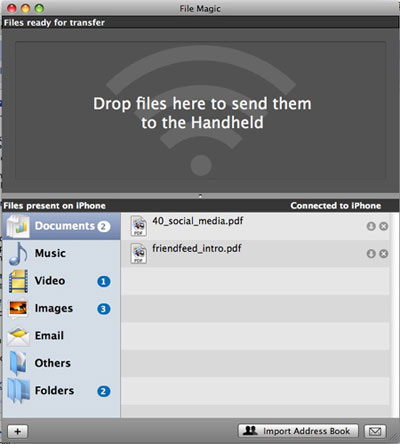
File Magic On the Desktop Syncs With iPhone

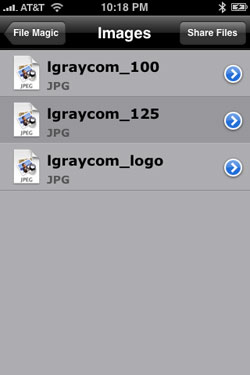
File Magic 2.0 comes in two parts - a free desktop application, and the iPhone app, available on the iTunes Store for $4.99. And the combination lets you escape out of iTunes as the file manager, and add all sorts of Microsoft Office document types, including .doc, .ppt and .xls, as well as .pdf files, impossible through iTunes. These files can even be opened in the iPhone app itself, which makes for a cheap eBook reader, should you want to go that route.


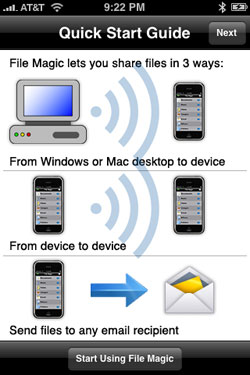
File Magic Connects Your Desktop to Your iPhone

Back when I had a first generation Handspring Visor Deluxe, the "in" thing was to beam your data, your applications or your documents to another user by infrared. Surprisingly, the iPhone hasn't let you do such a thing (even when Microsoft Zune made a big deal out of it... to little success). File Magic not only lets you share files from iPhone to iPhone, but you can e-mail the files to anybody in your address book, and yes, send files wirelessly from your PC or Mac.


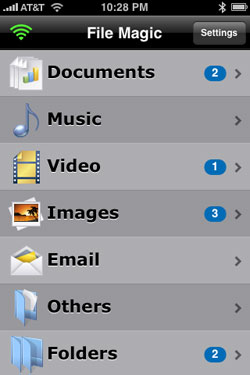
As You Add Documents, You Can Browse Or View Them

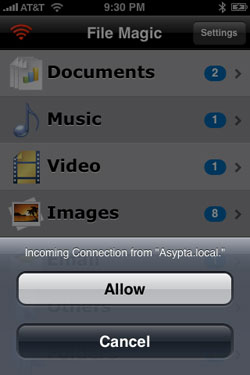
I have gotten so used to my iPhone being connected to my laptop via USB that I was actually surprised to see how fluid it was to drop a new file on the desktop File Magic application, and see my iPhone start to receive it across the room. Given I get e-mail and Web updates on the iPhone wirelessly, that shouldn't have been a shock, but I'd accepted the "you must transfer files by USB" standard of late.

In my testing, I transfered over Microsoft Word documents, PDF documents, graphics files and folders containing images and documents. I transfered over a 32 megabyte .mov movie, and then watched it in perfect clarity on the phone.

It's like having a little desktop to go. My iPhone, so far, has largely been limited to running file data from Apple's iLife suite of apps. Photos, Movies, Music, and E-mail all are standard. But Word, Excel and PDF are now just as available thanks to File Magic, which is pretty darn cool.

You can find out more about File Magic on their site. The product is available for both Mac and Windows for the iPhone and iPod Touch.

March 7, 2009

March 7, 2009 · 2 MIN READ · BY LOUIS GRAY

The Newest Annoyance on Twitter: Follow and Refollow Spam

The Newest Annoyance on Twitter: Follow and Refollow Spam

Unless you've turned off notifications when users follow you on Twitter, you are no doubt used to the e-mail messages you get when somebody has opted into seeing your updates. Follower updates are a staple of social services - and if you are maniacal about keeping e-mail like I am, you can start to see trends on the data, including when people are oddly manipulating the system, in a way that's not normal. And for whatever reason, a small number of Twitter accounts look like they regularly follow me multiple times a day.

I use auto-follow capabilities from SocialToo, letting me automatically opt in to see followers' updates. The way I use Twitter means there is little downside to having new incremental users in my feeds. So, in theory, if the user follows me just once - it's one and done. And I just don't see too much benefit to these new follow and refollow bots, even if I try to get creative.

Take a look at two examples: @PoliticalUpdate and @twtr.us.

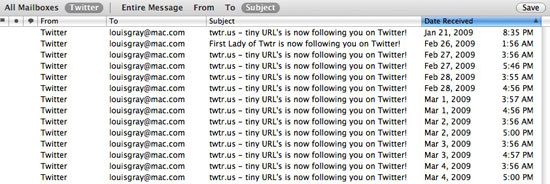
Twice a day, starting on February 27th, I have been followed by @twtr.us, the first time at 3:56 a.m. my time, and a second time, at 5 p.m. that same day. Every day.


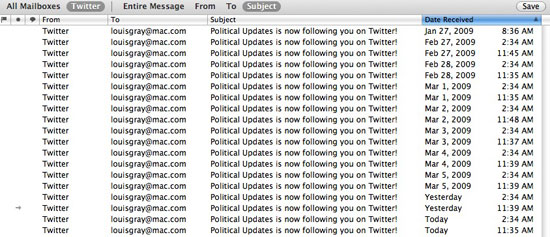
Also starting on February 27th, the account @PoliticalUpdate has been following twice a day - at 2:34 a.m. my time, and a second time after 11:35 a.m. (only nine hours later). Again, every single day.


So what is the benefit of such a clearly robotic practice? Is the idea that the follow notifications are a form of advertising, giving me a chance to see their name more than once, and increasing the times I'll go to check out their Twitter page? Do they also think we're naive enough to not notice?

Whatever product it is that both @PoliticalUpdate and @twtr.us are using does not contribute to the community in any way, and should be turned off. There is some good news, I guess, in that the twtr.us account looks to have been suspended, but my bet is that there are more accounts out there using the same service, and it should be stopped.

Know any other accounts who are using follow and refollow spam? Let me know in the comments. Jesse Stay, who runs SocialToo, and I would absolutely be interested in keeping them out of your in box.

(Also: See an earlier discussion on FriendFeed)
March 7, 2009 · 5 MIN READ · BY LOUIS GRAY

Stand for Something and Become Someone

Stand for Something and Become Someone

On Thursday, I was invited by Brian Solis to attend a dinner briefing in San Francisco with one of his clients. Shortly after arrival, other invitees began to dribble in through the door - a venerable who's who in the tech blogging space, including Jeremiah Owyang, Harry McCracken, Robert Scoble and Loic Le Meur - making me feel very small indeed, not to mention a tad out of place. And while the client had an interesting offering (more on that soon), it was, of course, the side conversations between the attendees that drew the most value. (See the Photos)

Seated between Robert and Loic for dinner, I got the feeling there were Twitter users, bloggers and entrepreneurs who would have paid good money to trade places with me, but I wasn't out to sell anything or pitch anything. In fact, the best conversations I had were with Loic about why we do what we do, the reasons we don't push for ads on the blog, how we try to separate the work life and the blog life, and debate on whether I could be trusted with pre-release info on one product if I already used the competition or knew what they had planned.

To net down what was a great discussion, I primarily told Loic that:
  1. Our reviews of products and services are honest, but primarily positive
  2. We prefer not to write negative pieces, for our benefit and readers as well
  3. That we can be trusted to keep things quiet when asked
  4. We don't seek out or respond to controversy for page views' sake
And to me, all of those boil down to a major headline, which is "Stand for Something". Stand for being trustworthy and try to be remembered for quality, not controversy.

In the last few days, just following the conclusion of the dinner, you saw headlines about how Scoble has concluded his time at Fast Company TV - and speculation has started as to what's next for the visible technology evangelist. And yes, the issue was discussed a bit at the dinner as well. To be fully transparent, I knew about the change earlier in the week, from a phone call I had with Robert. And yes, he told me what's next, as well as some of the reasons for his leaving, which hasn't been discussed. But as a friend and someone I want him to trust, that's where it ends, as I believe the news is his to make and break - and if someone else beats him to the punch, it won't be me.

I could have stomped all over the relationship and posted the information Tuesday or Wednesday, but I thought it better to hold off - because the short-term burst of visibility and traffic would be outweighed by the longer-term negatives of breaking the confidentiality, and changing what you could expect from me on the blog.

At one point during Thursday's conversation, Loic said, "For some reason, I think you're someone I would trust." And this came even as we discussed the fact I helped raise the visibility of TweetDeck, a Thwirl competitor, when Iain first released his product. Would my previous posts on TweetDeck mean I would never give Thwirl the same opportunity? To me, it would not - with good examples being my coverage of Posty and PeopleBrowsr, when those products were launched or updated. Loic, and other entrepreneurs making news, should know that if they pass along confidential or embargoed information, that it won't be posted early, and it won't be sent to their competition. That's a big part of being trusted and standing for something.

For those longer-term readers of the site, you've seen me address the issue of writing negative posts, and another where I talked about what I believe as a blogger. I occasionally write these inwardly-looking posts to explain why I do what I do, and how I want to remain personal and understood.

Even though we don't have the strong traffic and visibility of some sites, the blog has gotten a good share of early access to services and to people. There are probably a dozen interesting products and services that I know are planning things before SXSW which have already gotten my interest. And every time I get an e-mail asking if I will respect a timeline, I write back "the next time I break an embargo will be the first time." As somebody who plays on both sides of the "make news" and "break news" wall, I get what people are trying to do, and the short-term rush of breaking the rules won't make me feel good for very long. And doing so can severely damage my reputation.

After discussing another issue, on how to deal with criticism, and ignoring those who would put you down for the sake of riling you up to get attention, Loic noted that we both try to be positive and avoid controversy, even if it can get you noticed. And that's likely a factor of why he posted a note to Twitter, saying, "You got me think again about quality versus quantity. Quantity matters less."

There's no question I would like to increase the quantity of posts here on louisgray.com. I wish there were a way to cover every single good story I run across with the same level of review and enthusiasm I can give the top stories. That's part of why we've gotten help from additional writers. But we will work very hard to avoid reducing the quality of the posts, even if it means we won't post as many, and we will miss stories as a result. And that's okay. Because I would rather stand for quality and stand for being trustworthy than to be known for throwing articles over the fence that could have been done much better.

As I told Brian yesterday, I greatly appreciated being invited to the dinner. It was at the dinner that I met Jeremiah and Harry for the first time, and it was also the first time where I could speak with Loic for more than five minutes. And as can always happen in a room full of people who really care about technology, we got to thinking again.

They say that everything you put online can eventually be found by Google. In August of 2007, well before most of you had seen this site, I said that your blog is your brand. So when you post things online, make them stand for something, and think about who you are and how you want to be interpreted. I want to stand for quality and trust, and we will refuse to compromise there.

March 6, 2009

March 6, 2009 · 4 MIN READ · BY LOUIS GRAY

You Should Be Using LinkedIn for Demand Generation

You Should Be Using LinkedIn for Demand Generation

LinkedIn can be much more than simply a site to host your online resume, and connect with colleagues. While the site's core mission may be to keep your job history in one place, and to leverage connections you have to find new people, the vast, fast-growing, database can be leveraged for much more. At a time when many companies are cutting back on their marketing and prospecting budgets, LinkedIn presents a significant opportunity to find new targets and stir up business.

In late 2007, I talked about how LinkedIn is an incredible resource for sharp reporters and bloggers. Earlier in the year, I'd also given the company some suggestions to improve, many of which have since been implemented. But there is no question in my mind that most LinkedIn users are not taking advantage of the features that are there now.

Finding Targets By Territory and Vertical

LinkedIn's advanced search offers the ability to search by many different attributes, from the user's location to their title, and industry, not just their current job or school history. If you are a sales account manager, inside sales rep, a researcher, or in marketing, the right set of search combinations can get you a list of people, with titles and companies, giving you a starting point to get calling and e-mailing.

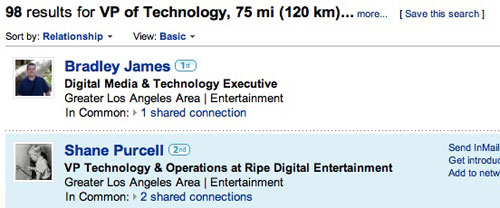
For example, if you own the Los Angeles territory, and want to reach technology VPs in the entertainment industry, enter the Zip Code ("90012"), choose the title of "Vice President of Technology, and the Industry of Entertainment. (See the search here)


The results are sorted by their linkage to you, starting with those you are connected to, and then to those who are connected to your friends. The more connections you have on LinkedIn, the more likely you are to have top matches. And once you have these names and companies, with their titles, it just takes a little Sales 101 to get their phone numbers and e-mail, either through the Web, or by being nice to their office receptionists.

You can see more examples here: (CTOs near Sunnyvale in Computer Hardware or Internet and VPs of Sales near Seattle in Airlines and Aviation)

If you're not sure exactly how targets refer to their industry, do a search first on someone you know, or are connected to, and use them as the template. That person you thought would choose "Entertainment" just might have put themselves in "Motion Pictures and Film" instead.

Finding Contacts by Title and Company

If you already know the company you want to break into, you can do searches on the company and reduce your targets by title. For example, on LinkedIn, you can search for "artist at Pixar" and pitch them the latest animation tool, or "scientist at Sandia" to find out who is keeping watch over our atomic weapons arsenal.

Depending on the query, you can end up with many targets, or you can drill down to the perfect one you need. (Such as the Technorati CEO)

Execute a Friendly Game of Competitive Espionage

Here's one I am particularly fond of. Even in the most cutthroat of environments, you can sometimes make friends with your competitors' staff, be it through trade shows, or other venues where you both need to show up at the same place and play nice. Getting connected to them won't hurt you all that much, especially if you hide your connections from others. But it can especially benefit you if they don't hide their connections, giving you a Rolodex you can walk through, to find both potential partners, and, potentially, naming their entire prospect and customer list by name.

The very best person to link to in this case is your competition's sales territory manager. I've done it. As LinkedIn shows you their latest connections, you can get good insight into which meetings they have held this week, and traded business cards. Or, you can go to their Web site, see listed customer references, and then cross-check those company names against your new friend's LinkedIn list.

It's pure gold. And if the person is high enough up in the chart, you might just want to hit Print on every single one of their LinkedIn connections pages and hand it off to Inside Sales. In fact, connecting to the competition is the primary reason I don't share my connections list. I want access to their business cards, but I don't necessarily want them to have mine.

If you're using LinkedIn in hopes of attracting a new job, or just to keep a PDF copy of your resume handy, that's fine. But if you already have a job, and you want to make it as successful as possible, you should be using the tools right in front of you. Don't be afraid to link up to more people, as it gets you more names as the connections extend and open you new routes of communication and search detail. I've been using LinkedIn for demand generation for years, and if you're in Marketing or Sales, I recommend you do as well.