Silicon Valley Technology Commentary & Archives · Est. 2006 3,032 Posts · 2006–2026

March 20, 2009

March 20, 2009 · 4 MIN READ · BY LOUIS GRAY

Being Transparent is Fine, But Please Use Smart Filtering

Being Transparent is Fine, But Please Use Smart Filtering

The current generation of Web users is sharing more than ever online - in ways my parent's generation would visibly flinch over. They are sharing their locations, their relationships, their personal photos, and their thoughts in real time. They are posting their updates to Facebook, to Twitter, and to MySpace, as they move toward being ever more transparent. On another level, personal brands are being built with transparency as the foundation, as they share personal photos, their music preferences, family news, and a constant stream of comments and observations on the world. And in parallel, companies are being pushed by an army of self-appointed social media experts to become more open and transparent themselves. But as with every new approach, there's a right way and a wrong way to do things.

Steven Hodson of WinExtra tonight questioned, "Just what is all this transparency getting us anyway?" Meanwhile, Silicon Valley gossip rag, Gawker, knocks transparency so often that it has its own tag. (See here)

At the SXSW conference last week, I sat down with Michael Sean Wright of Nice Fish Films for a 30-45 minute interview, streamed live on Ustream. During that interview, Michael commended me for being transparent. To paraphrase his comments, he said that not only was I blogging, but I was frequently sharing pictures of my kids, showing what music I was listening to on Last.fm, and making comments on blogs big and small across the Web.

But here's the thing. While I do intend to be transparent and share with you what I'm thinking, or what factors are in play when I say what I do, or where I might have bias, I am sharing only a subset of everything I do. I have intentionally filtered out information about my personal life and work life which I decided wouldn't add value to you, or wouldn't add value for me to share. For as much as I may be "putting everything out there", you're not seeing much from my hours at the office. You're not getting live tweets from me during church meetings, and you're not getting the minutiae of the day - from what television I'm watching, where I'm driving, or what my wife and I are discussing - even when it's tempting to quote her out of context and send it to Twitter.

The net result is that everything I share with you is intended to add value - either to you where you can learn something for yourself or about me, or to me, where it might further enhance this theoretical term so many people are calling "a personal brand". To say what I share with you is calculated might be overdoing it, but I am very cognizant of how what I am doing or saying is potentially interpreted downstream. I am hyperaware of how when I update something on FriendFeed, that it may also flow to Twitter or Facebook. I know that when I make a comment on Disqus, it is searchable by Google, and by BackType, and copied to FriendFeed. I know when I hit share on Google Reader, that it represents my endorsement of that content or find it interesting, and see the result shared to Socialmedian or other aggregation services.

If you want to be transparent, and build a personal brand you are proud of, you must always be thinking about filtering what gets into your stream, and how it could benefit you and your audience. Even for as much as I share photos of Matthew and Sarah, it's a subset of all those we have, and I try not to overabuse the privilege on the social networks where we participate. Even though I share songs I love listening to on Last.fm, I don't hit that button too frequently. Even though I have made nearly 2,000 updates to Twitter in just over a year's time, I am conscious of not overdoing it, impacting my followers, and confusing them in terms of what I stand for.

Earlier this week, Hutch Carpenter showed us how you can tweet your way out of a job by not thinking about how being transparent can negatively affect you. Similarly, ValleyWag uncovered photos that one tech employee chose to share with the world from his Honeymoon that would make you blush. In each case, the transgressor's transparency had not been filtered in such a way that benefitted them - but stepped well beyond the line of what's intelligent. But it shouldn't take a big mistake that costs you a job or your privacy to make you think about how transparency is possibly hurting you. Choose your filters, and you can mold the way you are interpreted into something you are proud of.

March 20, 2009 · 2 MIN READ · BY LOUIS GRAY

AllTop's Custom Pages Finally Tip Me to Using the Product

AllTop's Custom Pages Finally Tip Me to Using the Product

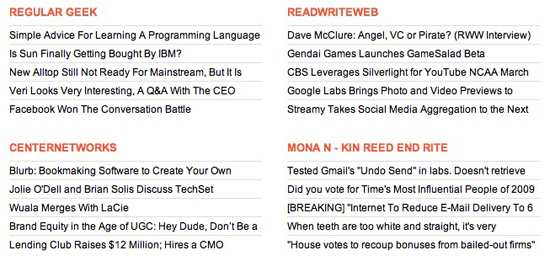
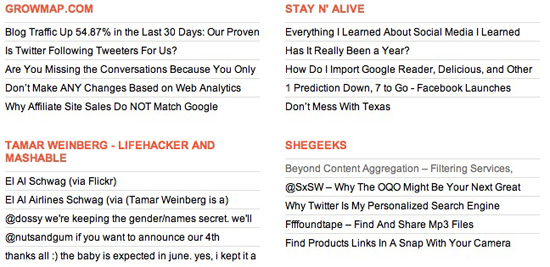
For some time now, Guy Kawasaki's AllTop service has been building out a wide array of pages dedicated to specific topics, highlighting bloggers (and their RSS feeds) who specialize in their market, be it in technology, business, news or sports. And I've largely ignored it, as I get all my news from Google Reader and social networks, like FriendFeed and Socialmedian. But this week's introduction of custom pages had me jumping on the opportunity to build out my own custom AllTop site, which, if I keep it maintained, could be a great "back page" to my site, highlighting the many blogs who bring me the best content each day.

If you're a longer-term reader of the site, then you know I try to highlight five new lesser-known blogs each month, and have done so for a year. The March 2009 edition is coming, I promise. I also have had the privilege of hosting some great co-authors who have strong blogs themselves. While the URL might read louisgray.com, the site is as much about these other sources for news as it is around me or the entrepreneurs and services we highlight.

The new custom AllTop lets me select from the many different AllTop pages throughout the service's network, and add them one by one to my own page, where I can move them higher or lower, left or right, in an attempt to deliver a one-stop page for the extended louisgray.com network.


My custom AllTop, which you can find at http://my.alltop.com/louisgray, shows not only the blogs from my co-authors, including Rob Diana, Jesse Stay, Mona Nomura and others, but also some interesting feeds from around the Web, including GrowMap, Conversation Agent, and Matt Cutts. I can also, thanks to AllTop's flexibility, pull in FriendFeed streams from active people on the site, including myself and Mona.


The end result is a page that mirrors Duncan Riley's work at Inquisitr IQ. I found myself cherry-picking the best of the Web from AllTop pages focused on Google, Twitter, Tech, Macintosh, FriendFeed, Egos and Social Media, for starters.

While AllTop calls them custom pages, there's still a lot of work to be done for them to truly be "custom". I can't customize the look and feel of the page, nor can I import feeds that don't already exist in AllTop. So if they haven't done the legwork to find a blog I would like to highlight, then they won't show up on my page. But it's absolutely a solid start, and one that I intend to build out more over time, and add to my sidebar somewhere, to keep you updated on the sites and people I find most intriguing.
March 20, 2009 · 3 MIN READ · BY LOUIS GRAY

CloudContacts Teleports Your Business Cards to the Virtual World

CloudContacts Teleports Your Business Cards to the Virtual World

Like many of you no doubt, over the last several years, I've amassed a solid collection of business cards, from both work and social engagements. I have business cards in boxes, in piles on my desk, on my dresser and table at home, and in virtually every zipper pocket of my laptop bag. I have business cards from Web companies that haven't launched yet, and I have business cards from companies that have already gone out of business since we shook hands and traded paper. And while I always thought someday I would sit down and input each one by hand into my address book, it never happened. That's why when I heard about CenterNetworks' Allen Stern's new venture, CloudContacts, I was intrigued. When we met up at SXSW last week, I took the plunge, and have to say that not only did the service do exactly as I expected, but i tees up some interesting possibilities through advanced features I hadn't considered.

The first step of starting with CloudContacts is the one of getting your cards into the service. You could physically hand Allen a box, like I did at the event. You could mail CloudContacts your cards. You could scan the cards and e-mail him the results. Or you could even, with a feature announced last month, take a picture of the card(s) with your phone and e-mail it in.

Once CloudContacts has your cards, the real work takes place, and the cards are entered into the system. I gave Allen my cards on Saturday and gained a login by Monday, so turn-around time is very quick. Upon logging in, I was presented with a page that showed the contacts listed by first and last name, company, address, and phone, just like you would expect from online address book services, including the one Apple features in MobileMe.


But CloudContacts' true value comes from mainly two areas. The first is the one you would expect, where you can download all your contacts (in CSV file, VCards or as Yahoo! and GMail contacts), and the second is that when you click on "view" next to any card, you not only see a picture of the scanned business card, but you also get as much data out of the Web as CloudContacts could find, from a picture in Google Maps showing their address, to searches on LinkedIn and Facebook for their accounts, and even their last few tweets, if the card was lucky enough to have a Twitter account listed. You could even play super-geek and scan a code to have your phone call the person, if dialing proves too difficult.
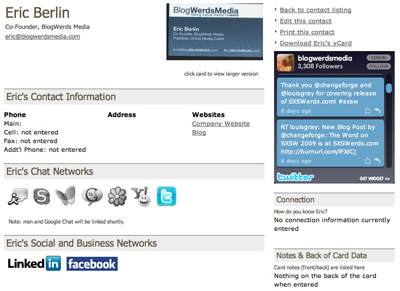

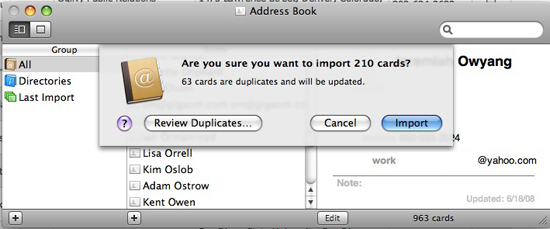
For me, the major test was downloading the 200+ cards I gave to CloudContacts, and then importing them into my Apple Address Book, which syncs up with my iPhone, Mail and most programs. It happened perfectly, recognizing potential duplicates I'd actually entered myself, and adding the rest. Now, all those business cards I was lugging around or running into can be sent to the big recycling bin in the sky.


The question is, now that the hard part is done, can Allen Stern and CloudContacts flip the data on its head and start to make a LinkedIn-like social network out of it? Will I in the future be able to see who else uploaded the same business card? It looks like the foundation is being laid for the service to become more than just a next generation address book. But even if it never does, it's already been a great benefit to me. You can find CloudContacts at http://www.cloudcontacts.com.

March 18, 2009

March 18, 2009 · 5 MIN READ · BY LOUIS GRAY

How to Blog Live Events and Publish With Lightning Speed

How to Blog Live Events and Publish With Lightning Speed

One of the major trends I've been irked by at the last few events I have attended is the general lack of blog posts and reactions to panels and keynote speakers. While in years past, one could expect solid reaction stories from attendees, many are instead choosing to "live tweet" the proceedings, or with the right equipment, are recording it and posting the results as a podcast or YouTube embed. While I was at the SXSW this weekend, I thought I'd practice what I preach, and post, post, post. I ended up writing 14 posts over the four-day period from Friday through Monday, including 6 separate entries on Saturday. And in one case, on Sunday, I had a post up and on the site even before the panel had concluded, posting it at 10:50 for the 10:00 to 11:00 session. I thought I'd tell you how I do it and how you can do it too.
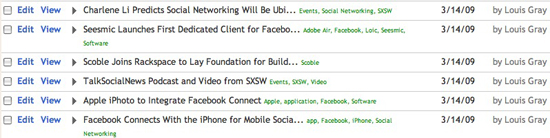

Saturday's Six Posts from SXSW

Pick A Comfortable Note-Taking Application

I both take my notes and write my blog posts in Apple's Mail. Mail leaves my raw text as text, without putting in rich style elements, and without fear of losing my data if the application ever crashes. Mail also is flexible enough that I can open two active "New Message" windows and place them side by side, one to take notes, and the other to write the post.

Find one that works for you, even if it's WordPad.

Start With the Background Details

If you're blogging a panel or a speech, make sure to get the background details right by copying them from the program or title slide, and into your notes - including the name of the speech, and the participants, where they work, and their titles, if provided. From this point, you can, in your notes, reference them by last name, first name, or simply their initials, to shorten your note taking.

Consider The Goal of Your Story

There's a reason you're at the panel or event. Is there something that is most relevant to you or your readers? Are there individuals on the panel who you think are more interesting, or might be more quotable? If so, be predisposed to be more alert and a better note taker when they are speaking, and more likely to skip the comments from others if you need to catch up and have fallen behind.


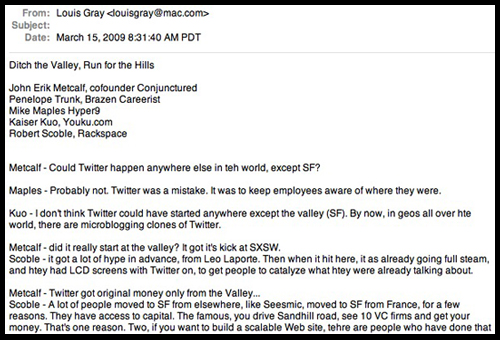
My live notes from the "Run for the Hills" SXSW Panel

Take Down As Much as You Possibly Can

Just like reading quickly helps you power through RSS feeds, typing quickly can get you the best quotes. While some reporters turn to shorthand for live interviews, when typing, you can use abbreviations, word fragments, and ignore misspellings as you type your notes, but be sure to go back and fix the mistakes, especially if you end up using the material.

When I take notes, I tend to write down the last name of who is speaking, and type their every word. If they are a very fast talker, I am constantly filtering what they are saying and trying to determine if the statement they are currently making is "better" than the one I am currently typing. If it is, I'll delete the sentence I've started, hit return and start a new one. But if you have the ability to write down every word of every sentence, that's the very best way, giving you a chance to have a full record.


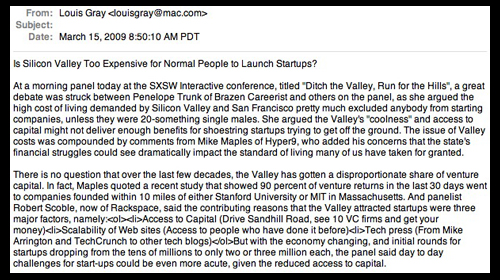
My post draft from the "Run for the Hills" SXSW Panel

Form the Story In Your Mind as It Develops

As the panel or speech unfolds, you should be getting an idea in your head as to your angle. On Sunday, a panel called "Ditch the Valley, Run for the Hills" took an interesting turn when one panelist said the Valley's high cost prevented all except 20-something bachelors from starting companies. That led to my title, "Is Silicon Valley Too Expensive for Normal People to Launch Startups?". Similarly, a panel on recommendation software led to a clash between editorial recommendations and community picks.

If you can see the story unfolding, it's a great time to actually start writing the story, as it happens.

Know the Law of Diminishing Returns

At the "Run for the Hills" presentation, which started at 10, by 10:35, the panelists had moved off the main topic, and were taking questions from the audience. To continue taking notes at that point would have been less useful, so the right move was to start fleshing out the post, while keeping one ear on the proceedings, in case either a more interesting story, or a continuation to the existing story would come up.

Also, have a built-in filter for comments and quotes you know will never make it into the story. Instead of writing down one person's witty banter, you could be taking down the notes from the next commenter instead.

Write While You Still Remember and Have the Quotes

The sooner you write the story, the fresher it will be in your mind, and the less likely you are to find interruptions. Since you remember the discussions, you can scroll through your notes, copy them into the story, and format them to fit your angle. Using the quotes you have separates you from those who are simply recapping the story.

Practice and Then Practice Some More.

I have been taking notes from phone interviews and putting them to press since my college days at the student newspaper. I've done the same when interviewing customers at the office, or simply summarizing comments from company executives, press and analysts for several years. Trying to take notes, verbatim, and chronicling an event can be challenging the first few times you do it, but the more often you do it, you will find your notes and quotes become more thorough, and your time to publishing will get very quick indeed.