 Like many of you no doubt, over the last several years, I've amassed a solid collection of business cards, from both work and social engagements. I have business cards in boxes, in piles on my desk, on my dresser and table at home, and in virtually every zipper pocket of my laptop bag. I have business cards from Web companies that haven't launched yet, and I have business cards from companies that have already gone out of business since we shook hands and traded paper. And while I always thought someday I would sit down and input each one by hand into my address book, it never happened. That's why when I heard about CenterNetworks' Allen Stern's new venture, CloudContacts, I was intrigued. When we met up at SXSW last week, I took the plunge, and have to say that not only did the service do exactly as I expected, but it tees up some interesting possibilities through advanced features I hadn't considered.
The first step of starting with CloudContacts is the one of getting your cards into the service. You could physically hand Allen a box, like I did at the event. You could mail CloudContacts your cards. You could scan the cards and e-mail him the results. Or you could even, with a feature announced last month, take a picture of the card(s) with your phone and e-mail it in.
Once CloudContacts has your cards, the real work takes place, and the cards are entered into the system. I gave Allen my cards on Saturday and gained a login by Monday, so turn-around time is very quick. Upon logging in, I was presented with a page that showed the contacts listed by first and last name, company, address, and phone, just like you would expect from online address book services, including the one Apple features in MobileMe.

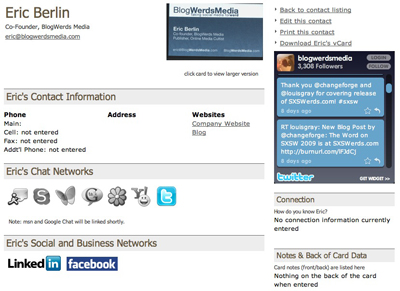
 But CloudContacts' true value comes from mainly two areas. The first is the one you would expect, where you can download all your contacts (in CSV file, VCards or as Yahoo! and GMail contacts), and the second is that when you click on "view" next to any card, you not only see a picture of the scanned business card, but you also get as much data out of the Web as CloudContacts could find, from a picture in Google Maps showing their address, to searches on LinkedIn and Facebook for their accounts, and even their last few tweets, if the card was lucky enough to have a Twitter account listed. You could even play super-geek and scan a code to have your phone call the person, if dialing proves too difficult.
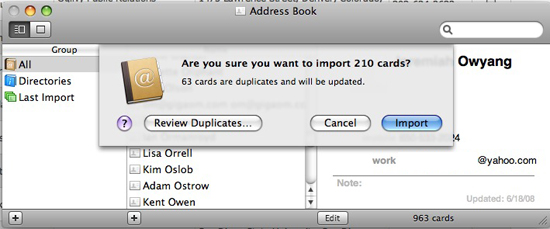
For me, the major test was downloading the 200+ cards I gave to CloudContacts, and then importing them into my Apple Address Book, which syncs up with my iPhone, Mail and most programs. It happened perfectly, recognizing potential duplicates I'd actually entered myself, and adding the rest. Now, all those business cards I was lugging around or running into can be sent to the big recycling bin in the sky.
The question is, now that the hard part is done, can Allen Stern and CloudContacts flip the data on its head and start to make a LinkedIn-like social network out of it? Will I in the future be able to see who else uploaded the same business card? It looks like the foundation is being laid for the service to become more than just a next generation address book. But even if it never does, it's already been a great benefit to me. You can find CloudContacts at http://www.cloudcontacts.com.
7 Comments
This is fascinating.... can you import contacts from various other online sources such as Windows Live Spaces, email accounts or Plaxo???
Is this a paid service or free?
The service scans BUSINESS CARDS.
Looks very interesting - will have to look into more. Great post, Louis!
Woohoo I was looking for something like this for my business cards.
Thanks Louis!
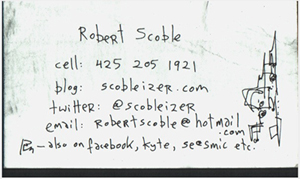
How accurate is the data scanned? In the past I have had variable results with card scanners depending on the layout of the card. Some graphic designers seem to get radical inspiration when designing cards which makes it hard for a scanner to read. For example how did it go with the Scobleizer card?
What percentage accuracy did you get?
Hi Darren - Allen here from CloudContacts - the key is that our data has to be accurate - if not, it's no better than apparently what the scanners provide (so we are told). We process all cards of all types and so far haven't had any cards we couldn't process. Scoble's card is easy compared to ones that we get with tons of handwriting all over them :)
Get your a life time business card in the cloud with Yes.tel
http://static.digitrad.com/...