Silicon Valley Technology Commentary & Archives · Est. 2006 3,045 Posts · 2006–2026
Showing posts with label AllTop (3 posts). Show all posts

July 21, 2009

July 21, 2009 · 1 MIN READ · BY LOUIS GRAY

My AllTop On My iPhone: A New Way to Consume RSS?

My AllTop On My iPhone: A New Way to Consume RSS?

In March, when Guy Kawasaki's AllTop service introduced the ability to customize pages to include personalized feeds, I finally dove in and checked it out after years of ignoring the product. This weekend, Guy followed up and let me know that the team had made "major" changes to the iPhone version of the customized pages, going so far as to say, "I think this is the best way to manage RSS on an iPhone." And while I'm still partial to Google Reader for mobile and desktop, it is indeed a new way.

While my customized AllTop is clearly configured for laptops and desktops, the new iPhone-optimized version does away with the three column layout, returning individual blog feeds in a single column format, with your first ones at the top and so on.


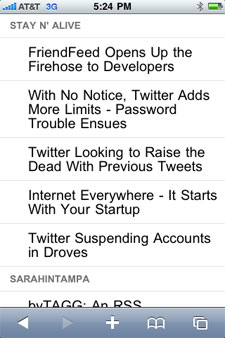
My AllTop on My iPhone

Each feed, like on the personal AllTop, lists the last five stories, and every story is clickable, opening Safari (on the iPhone) to its original source.


Checking Out Additional Feeds

In contrast, Google Reader lists each story in the chronological order it was received in the main Reader pane, not necessarily in the order you decided - just like its big screen counterpart.

The new look and feel for My AllTop on the iPhone is not revolutionary, and won't have me switching, but if you like a handful of feeds and want your favorite or most important to be at the top of your screen always, bookmarking your own customized AllTop on the iPhone could be a good alternative. To get there, just go to the URL you have set up on AllTop using your iPhone.


March 20, 2009

March 20, 2009 · 2 MIN READ · BY LOUIS GRAY

AllTop's Custom Pages Finally Tip Me to Using the Product

AllTop's Custom Pages Finally Tip Me to Using the Product

For some time now, Guy Kawasaki's AllTop service has been building out a wide array of pages dedicated to specific topics, highlighting bloggers (and their RSS feeds) who specialize in their market, be it in technology, business, news or sports. And I've largely ignored it, as I get all my news from Google Reader and social networks, like FriendFeed and Socialmedian. But this week's introduction of custom pages had me jumping on the opportunity to build out my own custom AllTop site, which, if I keep it maintained, could be a great "back page" to my site, highlighting the many blogs who bring me the best content each day.

If you're a longer-term reader of the site, then you know I try to highlight five new lesser-known blogs each month, and have done so for a year. The March 2009 edition is coming, I promise. I also have had the privilege of hosting some great co-authors who have strong blogs themselves. While the URL might read louisgray.com, the site is as much about these other sources for news as it is around me or the entrepreneurs and services we highlight.

The new custom AllTop lets me select from the many different AllTop pages throughout the service's network, and add them one by one to my own page, where I can move them higher or lower, left or right, in an attempt to deliver a one-stop page for the extended louisgray.com network.


My custom AllTop, which you can find at http://my.alltop.com/louisgray, shows not only the blogs from my co-authors, including Rob Diana, Jesse Stay, Mona Nomura and others, but also some interesting feeds from around the Web, including GrowMap, Conversation Agent, and Matt Cutts. I can also, thanks to AllTop's flexibility, pull in FriendFeed streams from active people on the site, including myself and Mona.


The end result is a page that mirrors Duncan Riley's work at Inquisitr IQ. I found myself cherry-picking the best of the Web from AllTop pages focused on Google, Twitter, Tech, Macintosh, FriendFeed, Egos and Social Media, for starters.

While AllTop calls them custom pages, there's still a lot of work to be done for them to truly be "custom". I can't customize the look and feel of the page, nor can I import feeds that don't already exist in AllTop. So if they haven't done the legwork to find a blog I would like to highlight, then they won't show up on my page. But it's absolutely a solid start, and one that I intend to build out more over time, and add to my sidebar somewhere, to keep you updated on the sites and people I find most intriguing.

December 23, 2008

December 23, 2008 · 2 MIN READ · BY LOUIS GRAY

Techfuga: If Techmeme and AllTop Had a Baby

Techfuga: If Techmeme and AllTop Had a Baby

Where do you get all the day's tech news? For many people, including me, it's Google Reader. For others, they look to Techmeme or other sites that aggregate the headlines from around the tech newswires and blogosphere. But as there are a seemingly infinite number of news sources and social news tools, from Digg to Reddit, Hacker News, ReadBurner and others, aggregation sites are getting a second look. A new site, launching this morning, called Techfuga, not only aggregates all the leading blogs, but also those social services as well - including FriendFeed. The result is a very busy site that has hundreds of links to the day's news, from a wide variety of sources.
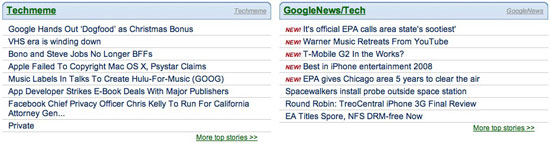
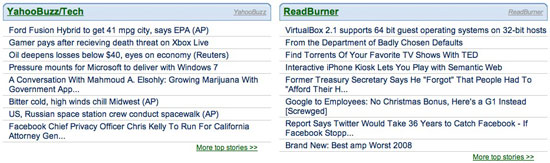
Techfuga's mission, like many others before it is to provide "the ultimate top tech news from around the Web." On launch, the site has aggregated 40 different technology news aggregators. It then separates those aggregators into three types: "Human aggregated based on submission and voting/sharing", including Digg, Reddit, Hacker News, Readburner and FriendFeed; "Solely based on algorithms", including Techmeme and Google News, and "Editorial human-aggregated", including TechCrunch and Ars Technica. As you might guess, the result is pretty busy. The data's there, but like with Guy Kawasaki's AllTop and PopURLs before it, you might spend as much time scrolling down to find the article you want to read as you eventually spend reading.


Like Alltop, Headlines from Across the Web Populate Techfuga.

Beyond the simple headlines, Techfuga groups related stories (as Techmeme does) and attempts to link to the discussion pages of items that are indexed. They also, like Techmeme, say they offer an algorithm that determines "Top Stories".


Techfuga Correctly Found Linkage Between Stories

After midnight on Tuesday, Techfuga correctly found that Mark "Rizzn" Hopkins' article "FriendFeed: Like Most Things, Good in Moderation [Scoble’s Intervention]" was related to a FriendFeed post by Robert Scoble, "Oh, oh, @techcrunch thinks I need a friendfeed intervention!". That in turn, led to related items at TechCrunch and Scoble's blog. So, in theory, the algorithm works. It's not the prettiest I've ever seen, but if you assume that Techfuga is the superset of data, incorporating Techmeme as one of its sources, it does have a ton of data to work with, and as many early versions of sites have shown, cleaning up the GUI can be easier than discovering the content initially.


You Can Search The Full Techfuga Archive for Keywords

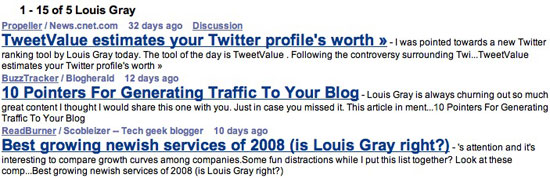
Techfuga's value is also found in its search engine. Searching Techfuga also searches through its many different sources, so when I performed a vanity search to see if I ever came up, responses came through Propeller, BuzzTracker and ReadBurner, and did so quickly. Broader searches, even outside of tech, like one for "Baseball", showed similar diversity.

Techfuga opens its doors this morning, so find it here: http://techfuga.com/.