Silicon Valley Technology Commentary & Archives · Est. 2006 3,032 Posts · 2006–2026

March 24, 2009

March 24, 2009 · 2 MIN READ · BY LOUIS GRAY

Three Twitter Tools That Enhance New Follower Notifications

Three Twitter Tools That Enhance New Follower Notifications

By Corvida Raven of SheGeeks.net (FriendFeed/Twitter)

Twitter's growing pains may have started early, but a lot of "tweeples" that have been on Twitter for some time are starting to feel their own growing pains. As Twitter's presence and exposure to mainstream increases, new follower notification e-mails are beginning to drown our inbox.

Twitter has no native functionality to help simplify the process of deciding who to follow back. As of right now, a lot of Twitter users are following this process:
  1. Receive new follower e-mail
  2. Click link to follower's profile
  3. Review profile on Twitter
  4. Follow back / Ignore
  5. Go back and delete e-mail
This is a five step process that is being simplified by three new Twitter Tools: Topify, Twimailer, and Twittfilter.

Topify

Earlier this month, Louis reviewed the Topify service. So, I won't spend too much time on this. In fact, just head to the review: Topify Enhances Twitter Following Notifications (50 Invites).

To sum up the purpose of Topify:
"The result is a more complete picture of the individual, from within your e-mail, without forcing you to go to the Twitter Web site to learn more."
Twimailer

Twimailer is the enhanced follower notification service I prefer to use. Twimailer follows the same concept as Topify, but presents the information in a different way visually. Each e-mail provides you with the following information:
  • 10 latest tweets
  • Follower/Following count
  • Twitter bio
  • Follow back, Block, & Spam options
Unlike Topify, Twimailer doesn't require an invite to the service in order to use it right now.

Twittfilter

Twittfilter puts a spin on enhanced follower notifications. The approach taken with this service is to filter new followers along with enhancing the notifications. The service allows you pre-define which follower notifications you'd like to receive. Using a star rating of 1-5, Twittfilter will only pass along notifications of new followers that fit into the star rating of your choice. How is this done?
"Twittfilter will look at your friend/follow list, theirs, recent activity on both sites, friend follow ratio (and a few other things) and give you a score from 0 to 5. This can be automated but only by request."
The same algorithm is applied to your new followers. The downside to this (and most recommendation tools) is the possibility of missing out new followers that may have been of interest. Nothing's perfect, but Twittfilter does a decent job of picking accurate matches.

Better Manage Follower Overload

Now you have 3 of the best tools for managing new follower notifications. Each tools is great and gets the job done. The only real difference is the way the information is displayed within the e-mail sent by each service. After signing up for any of these tools your new follower process should be reduced from jumping back and forth between Twitter and your inbox to this:
  • Receive new follower notification
  • Read & Decide
  • Delete e-mail
For those that are already using these tools, tell us your experience with them in the comments section.

Read more by Corvida Raven at SheGeeks.net.

March 22, 2009

March 22, 2009 · 2 MIN READ · BY LOUIS GRAY

Doodle Jump iPhone Game is Simple, Yet Challenging

Doodle Jump iPhone Game is Simple, Yet Challenging

Some iPhone games try and recreate the traditional console experience, reminding us of older NES cartridges, or are simply ports from PC titles. Others, like Lima Sky's array of offerings, leverage the iPhone's accelerometer to the point it becomes the entire focus of the game. Such is the case with Doodle Jump, a platform jumping game that has you working ever higher, trying to jump to safety, all while avoiding falling to your demise, or running into monsters and other bad news.

Doodle Jump, unlike a myriad of other platform jumping games we've all seen, never has you standing still, and there's no running for better position. From the time you hit the start button, you are jumping and on your way. Tilt the iPhone right to jump right, and lean to the left to go left. Along the way, you can find platforms that crumble or disappear underneath your feet, ones that move side to side, or be faced with monsters, who will kill you immediately, should you be unlucky enough to cross their path.


Doodle Jumping From Platform to Platform

The sheer simplicity of the game (tilt left, tilt right and shoot by tapping the iPhone) makes the fact that I fail every single time, somehow, annoying, but always makes me feel like I will do better the next time. I found myself tilting and aiming for the springs on some platforms to vault ever higher, and jumping to wrap around the screen to find platforms on the other side that were within reach. But I always died. Something always got in my way.


Trying to Avoid Monsters and Pitfalls

While the game is easy to start, full of platforms and options, the higher you go, the more challenging it gets. You can see markers on the side of the screen, showing how far other players around the world have gone, and you can see the number of platforms disappear, or be replaced with ones that won't help you all that much, as they break away at the mere touch.


Not Always Quite Getting Away from Danger

If you get far enough, and manage to avoid the monsters, or shoot them out of your way, you run the danger of being abducted by UFOs or sucked in by black holes. Your long-nosed four-legged character might be cute, but he's in serious trouble, and you'll want to lead him to safety. You can find Doodle Jump on the iTunes store for only 99 cents.
March 22, 2009 · 3 MIN READ · BY LOUIS GRAY

How To Cleanly Separate Personal and Work Social Media Personalities

How To Cleanly Separate Personal and Work Social Media Personalities

As social networking and social media sites increasingly become as much about companies and brands as they are about people, you are seeing names like Zappos and JetBlue tweeting alongside you, and Comcast answering complaints. Companies might be making comments on FriendFeed and asking you to join their fan page on Facebook. Many of you, possibly tasked with maintaining the social media presence for your company, might be maintaining multiple accounts on practically every network, and trying to keep your personalities in check, lest you make the mistake of getting the two mixed up. For the last four months, I've been doing the same thing. Here's how.
Put Your Work Life In One Browser, and You In Another

Everybody has multiple browsers these days. Whether you prefer Safari, Internet Explorer, Firefox, Chrome, or something else, you probably have a second one which you use less. Rather than ask you to login and log out over and over, set up one of your browsers with bookmarks to all your work activity and the social media sites with that account, and keep your preferred browser all yours.

For my work account, I use Firefox, and for me, I use Safari.

When I open Firefox, the browser opens five distinct tabs:
  • Gmail
  • Google Reader
  • Twitter Search
  • Twitter
  • FriendFeed
The GMail account tracks new subscribers and DMs. Google Reader populates the link blog. Twitter search watches what is being said online, and Twitter and FriendFeed let the company participate.

Running the browsers in parallel lets me do the work I need to in both, without suffering from multiple personality disorder.

Make A Second Login, Preferences for TweetDeck

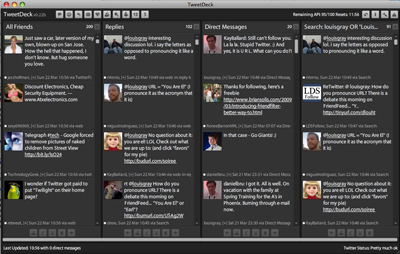
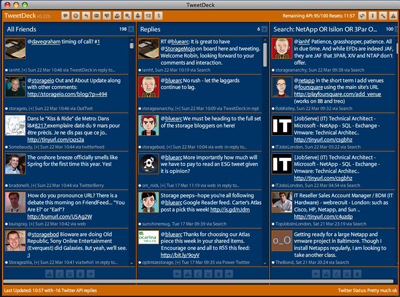
TweetDeck, in my opinion, is still the best way to track groups and saved searches in Twitter. I set up TweetDeck so if I am logged in as me, the application has the standard black look and feel. But when I am logged in with the company ID, TweetDeck is in the company colors of blue and orange. Yes, the combination is somewhat garish, but it serves as a reminder to me that I'm logged in for work, so I won't screw up.


Logged Into TweetDeck as the Company


Logged Into TweetDeck as Me

Beyond the colors, you should leverage TweetDeck's saved search functionality to track your company and product mentions, as well as that of competitors.

Create a Second Disqus Account for Commenting

When commenting on blogs around the Web, as yourself, or for the company, it makes sense to use best practices and identify who you are. But you don't necessarily want to track your work comments to your personal ID. I recommend getting a second Disqus account that ties back to your work e-mail address, and have that registered in the "work" browser. When I make comments on sites as work, it says my first and last name, and then, in parentheses, the company name.

Always Work Methodically When Acting on Behalf of the Company

Tweeting or commenting or blogging or bookmarking as a brand is more risky than when you do it on your own. As with all things on the Web, you should consider how they could be interpreted downstream. But when you are doing something on behalf of a corporate entity that represents products, people, history and finance, you should take an extra breath before acting, and pay extra attention to every word, character or nuance.

Be Replaceable

If you do your job well, it should be easy for you to pass off the reins of the social media strategy at your company to somebody else with very little impact. If you make the company's social media presence all about you, it will follow you where you go next, and could negatively damage the company you are leaving, and distract from the company where you are going. See that you can work on behalf of the company without it being all about you. Try to offer personality without it necessarily being your distinct personality.

You'll note I don't often talk about work here on the blog. It was a conscious decision I made when starting the site at the beginning of 2006. It's not a secret where I work (check my LinkedIn profile) but it's not about where I work. It's all part of keeping things separate. Are you running the social media activity for your company, or looking to get started? I would be interested in the tips you may have as well.

March 21, 2009

March 21, 2009 · 3 MIN READ · BY LOUIS GRAY

Did eTrade Blow It By Making Their Mobile App A BlackBerry Exclusive?

Did eTrade Blow It By Making Their Mobile App A BlackBerry Exclusive?

As Apple's iTunes application store continues to grow, it is becoming an increasing rarity to find needs unmet by the company or its wide array of third party developers. But one clear vacancy is in the real-time stock information and trading department. I've been waiting for eTrade, my broker of choice, to develop an application for the iPhone for quite some time, but the company hasn't publicly made any strides to meet my needs. In fact, after rolling out a specialized application for the BlackBerry platform in June of 2008, we've had nine months of silence, and I'm left to believe the company is sticking with Research In Motion as their partner for the long haul.

The stereotypical image one has of today's Wall Street movers and shakers has evolved beyond the neatly pressed suits and ties, and sharp shoes, to include a hyper-obsessed BlackBerry addict, who can't look up in fear of missing an e-mail. But beyond the trading floor, consumers far from New York and other bustling metropolises are making updates to their portfolios - even in times of recession. And what eTrade has done by partnering up exclusively with BlackBerry on the mobile side is shut out the very real growing population who have selected other platforms, be they the iPhone, Google's Android, or even the Palm Pre.


eTrade Highlights Its Exclusive BlackBerry Deal

Today, using eTrade on the iPhone is barely passable. One simply has to log in through the standard Safari browser and use the non-optimized interface. It's good enough to get a near real-time update for portfolio holdings and balances, but too limiting to do much else. I'm certainly not using the Web site on the iPhone for researching stocks, reading news, making trades or seeing real-time updates.

I'm not saying the iPhone will kill the BlackBerry and render eTrade's move an abject failure, but even with BlackBerry's latest models, they don't seem to have the inside track on growth and innovation. They seem to have lost the swagger that made them a market leader for the last five or so years, while Apple and Google (to a lesser extent) have taken their place.

The iPhone is growing up to the point it's not just a game platform or a music device. I use the Mint.com application to see my up to date financial numbers, aggregated from many accounts. And Apple helpfully offers a basic stock price app. But they're no substitute for real trading.

An eTrade application for the iPhone should include:
  • Real-time stock quotes
  • Porfolio updates including gains and losses or trends
  • Stock trading
  • Company news and information
  • Market overviews
For a company like eTrade, which is so broad in terms of its reach to consumers, to limit itself to a single mobile platform, especially one that seems to be on its way to being eclipsed by more nimble competitors, seems wrong. As an eTrade customer, I know I would use this application, and regardless the cost for it to be developed, eTrade would make up the amount in very little time, from the hordes of iPhone users who could start making trades on the go, from anywhere.

eTrade, your own stock is barely over a buck. I know you have other issues on your mind. But every day that goes by where I don't have an eTrade application on my iPhone means less revenue for you. Call BlackBerry up and tell them you want to see other people.