 As social networking and social media sites increasingly become as much about companies and brands as they are about people, you are seeing names like Zappos and JetBlue tweeting alongside you, and Comcast answering complaints. Companies might be making comments on FriendFeed and asking you to join their fan page on Facebook. Many of you, possibly tasked with maintaining the social media presence for your company, might be maintaining multiple accounts on practically every network, and trying to keep your personalities in check, lest you make the mistake of getting the two mixed up. For the last four months, I've been doing the same thing. Here's how.
Put Your Work Life In One Browser, and You In Another
Everybody has multiple browsers these days. Whether you prefer Safari, Internet Explorer, Firefox, Chrome, or something else, you probably have a second one which you use less. Rather than ask you to login and log out over and over, set up one of your browsers with bookmarks to all your work activity and the social media sites with that account, and keep your preferred browser all yours.
For my work account, I use Firefox, and for me, I use Safari.
When I open Firefox, the browser opens five distinct tabs:
- Gmail
- Google Reader
- Twitter Search
- FriendFeed
Running the browsers in parallel lets me do the work I need to in both, without suffering from multiple personality disorder.
Make A Second Login, Preferences for TweetDeck
TweetDeck, in my opinion, is still the best way to track groups and saved searches in Twitter. I set up TweetDeck so if I am logged in as me, the application has the standard black look and feel. But when I am logged in with the company ID, TweetDeck is in the company colors of blue and orange. Yes, the combination is somewhat garish, but it serves as a reminder to me that I'm logged in for work, so I won't screw up.
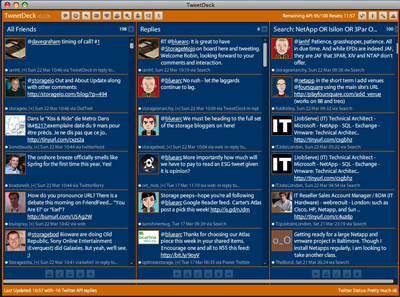
Logged Into TweetDeck as the Company
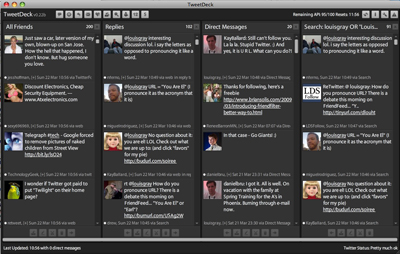
Logged Into TweetDeck as Me
Beyond the colors, you should leverage TweetDeck's saved search functionality to track your company and product mentions, as well as that of competitors.
Create a Second Disqus Account for Commenting
When commenting on blogs around the Web, as yourself, or for the company, it makes sense to use best practices and identify who you are. But you don't necessarily want to track your work comments to your personal ID. I recommend getting a second Disqus account that ties back to your work e-mail address, and have that registered in the "work" browser. When I make comments on sites as work, it says my first and last name, and then, in parentheses, the company name.
Always Work Methodically When Acting on Behalf of the Company
Tweeting or commenting or blogging or bookmarking as a brand is more risky than when you do it on your own. As with all things on the Web, you should consider how they could be interpreted downstream. But when you are doing something on behalf of a corporate entity that represents products, people, history and finance, you should take an extra breath before acting, and pay extra attention to every word, character or nuance.
Be Replaceable
If you do your job well, it should be easy for you to pass off the reins of the social media strategy at your company to somebody else with very little impact. If you make the company's social media presence all about you, it will follow you where you go next, and could negatively damage the company you are leaving, and distract from the company where you are going. See that you can work on behalf of the company without it being all about you. Try to offer personality without it necessarily being your distinct personality.
You'll note I don't often talk about work here on the blog. It was a conscious decision I made when starting the site at the beginning of 2006. It's not a secret where I work (check my LinkedIn profile) but it's not about where I work. It's all part of keeping things separate. Are you running the social media activity for your company, or looking to get started? I would be interested in the tips you may have as well.
44 Comments
Nice article. With tweetdeck, can you open it twice and log on as different ID's? Obviously yes, but I was unaware of that. That is a nice tip. I also like the tip about two different DISQUS accounts as well as opening up Firefox for work and Safari for you. Too bad my work systems are STILL on IE6. Thanks.
Was just about to say all of those things, ahr19! Agreed, very useful post. Thanks!
These are great tips and a nice way for me to start out as I've recently taken a new position where I will be the social media voice of the company. I think the most important part of all of this for me is that each of these things can easily be passed along to the next person to take the position; this is something my new employer has struggled with in the past and I hope to help them remedy. Having totally separate set-ups is a great way to be able to pass along every password and login without feeling as if you're handing over your personal kingdom. Thanks, Louis!
As always, great article!
I appreciate the tip but I am not at that level yet where I find this a problem.
One thing I did find interesting to read was the five tabs that immediately open in Firefox. I find it interesting because I have the same favorite tabs. Thanks for sharing!
This came at a perfect time as I was just asking a coworker the other day if he could help me find a good solution for this. Can't wait to try this out tomorrow
Louis,
good post. Thanks for bringing up this issue. It is one that I think we will see becoming a bigger concern in 2009. Good how to advice. Thoughts on using something like CoTweet so that multiple people can be involved?
Being transparent and having a personality within your company is huge. You've got to give your company a personality and truly relate to people. I prefer companies who tweet some personal stuff and business stuff, but always act on behalf of the company.
We want to know what's going on day to day at the company via twitter--companies are run by employees who serve customers--Twitter is all about the people--so relate to them!
Great tips here... but to be honest, the one I'm still struggling with is Facebook. I have honored most requests from people I don't know (and I mean sometimes I don't even know from Twitter or FriendFeed!) but they've asked to friend me on Facebook. They are generally doing so because they know "of" me from RWW. I keep thinking Facebook will one day implement a public persona aspect to the service that will help me maintain a presence for those folks to follow but will still allow me to have private conversations with friends. But as I blogged earlier, the new Public Profiles fail miserably at this. And I don't like that privacy settings are all or nothing either. I mean, sure, I could turn off having people see my wall, but why? I don't mind them seeing my posts but I do mind that they see posts from my personal friends who may not have wanted to share with 200+ people they don't know. Of course, I suppose we could all just message each other but then why is Facebook better than email? I really wonder if I'm just not getting it or if Facebook can't serve my needs.
Wouldn't it be great to be able to set the Facebook privacy by post or status? I'd use a general open-to-all setting with the ability to set some posts or statuses for close friends or family or whatever list I've created. Ah, the wishing goes on.
Yes!!! I would love that.
Great post, Louis!
Wow! Great info. Thanks for sharing. Gonna share this with several associates that are trying to keep their personal and professional online activities separate. Truly, this was really timely.
Thanks for the great ideas!
I like your new profile picture. I never considered changing the colors of TweetDeck before. It is such a simple solution to a potentially damaging problem. I was wondering if you know if anyone has published alternate color palettes for TweetDeck. It also seems to me that people have the unfortunate tendency to try to make them irreplaceable in order to ensure job security. I’m glad you pointed out that this is not part of doing a job properly. A break in a Social Media campaign is unacceptable and a major Fail!
Good thinking as always - I hear that http://www.peoplebrowsr.com/ has similar capability, but I havent had a chance to try it out as yet. Tweetdeck rules for me!
hi Louis
- this is a very, very simple, pragmatic solution to a tricky problem, because most of the social media aren´t prepared for multiple accounts for one single person - thanx for you tip ! - very useful ! :-)
- have tried to do a work-around myself for this problem by having separate accounts - i.e. a ´FB PrivProfile´ and a ´FB BizProfile´ - but, still ... - you have to do login & logouts all the time
- and, your tip is even so good, that I would like to copy and use your posting on a danish web-site for entrepenurs - I´m among one of the part-time bloggers on this web-site - will that be ok ?
- you can have a look at the web-site at : www.mikronet.dk
enjoy, at max ... !
Dann Sommer
Personal Coaching & Mental Training. Business Coaching
Web 3.0 Marketing, SEO & Web Positioning.
Training, Seminars, Workshops
Hootsuite.com lets you manage multiple Twitter ids. You can pick and choose where to post or post to all at the same time. It also has a tracking mechanism to see how many people have clicked on your links. Great tip on Tweetdeck!
Great information so keep it coming. Let me share what the CEO of Twitter had to say about the outlook of www.twitter.com. See him here >>>>
http://www.ted.com/index.ph...
ams_on_listening_to_twitter_users.html
Will
Love the article. I think the most important thing you touch upon is the idea of being replaceable. Unless your own your business, the company's presence must have the portability to be assumed by what will likely be a number of people assuming you have not yet hired a Social Media person. I always stress that when I work with companies on their social media strategies.
ahr19: as far as I know, you can only have one tweetdeck window going at a time; however, you can open multiple accounts if you use twhirl (which is a far second to tweetdeck as far as desktop twitter apps go IMO).
Louis: great tips, and you've hit on a big issue. I've struggled with many of these, in particular Facebook. FB has privacy controls and you can tweak it to separate your personal and business friends and interests, but as a previous commenter mentioned, it's limited (I wrote about this recently (http://budurl.com/p3x7) and I've had a couple of incidents where the controls didn't work. I'm continuing to explore this area, and after reading your post I'll give Disqus another try. Thanks for sharing.
Louis - great post - everyone is struggling with all of the new technology and the various hats/roles that we all have. It is also great to see the nuts and bolts of what tools you use (I had my own attempt at this earlier in the year http://nohype.tumblr.com/po.... As more people get on Twitter, Facebook and LinkedIn, I think it's harder to draw lines between the various roles for those of us who aren't using social media in an "official" capacity; you covered this in http://www.louisgray.com/li.... Thanks from the "garish" world ;-)
so typical of people with 2 faces, I think you are missing the boat, social media is awesome because you CAN learn more about the people you do business with, if you are not prepared to show your personal face, then you should change your business, so typical of management being placed on a pedestal, WHAT DO YOU HAVE TO HIDE???
this is interesting. agree that when operating ion "company mode" must be spot-on with what you do then again shouldn't that be the same for "personal mode" too? the way this reads is that the person acts in such a ways when in "personal mode" that they wouldn't dream of acting like that in "work mode".
the thing is, it doesn't matter, if someone posts for their company all cool and pleasant and then like a fool in "personal mode" i'll still think of them as the latter.
i have just one rule "be yourself" trying to be more than one will lead to psychological issues and medication ;-)
Sharp post and great ideas Louis. I use Twhirl's multiple accounts feature in a similar way and utilize Firefox and Safari to split the browser duties.
http://TacticalDiversion.com
Great post and comments worth your time too. I added to my own blog on frontendrecruiting.ning.com for those who do this for recruiting. Thanks!
I'll be reading this article closely... good information to pass along to my graduate students!
Thanks for this post. I am not really using social media for work, even more complicated. I am using it to create a personal brand so I can hopefully run my own business. I want to start using tweet deck. What do you know about www.ping.fm? It is supposed to sync all the tweets, posts and updates at the same time...right?
Hi Louis:
This is a great tactical approach to keeping all of your accounts in line. Thanks for the tips. I certainly need them. The real question these days is not only how to manage them, but how to actually keep them separate and distinct -- and if that's even possible. And more importantly is it possible to keep them separate and private. Can a person have Facebook page for their personal life and interests and a work account with LinkedIn - and never the two shall meet?
That's one of the societal issues we'll be grappling with as social media platforms become more ubiquitous. I've tried to explore this concept in relation to Facebook here: http://tinyurl.com/cgq778. You might be interested in it and I'd certainly love to get your perspective on it.
Awesome post, Louis. I find the line between personal and commercial to be very thin at the moment, and liked what you said about being replaceable. It will be interesting to see what kind of ground rules evolve for this dynamic as time marches on.
Louis: Are you using some tool to automatically Like every item generated from your posts or are you walking through them manually?
Ken, either way, I think it's very annoying. See http://friendfeed.com/e/13b...
Yeah, seeing "78 related entries from Jesse Stay, LouCypher and 67 other people" doesn't really help ye olde signal:noise ratio
Louis, I just unsubscribed from your feed. Just so you know. :)
Ken, it was a test. The post was popular, so I wanted to "like" that others shared it. It's a one-off. I was wondering if anybody would notice. And you did!
"so I wanted to "like" that others shared it." ok... weird "test". I would not test in ways that spam my feed... Then maybe I'm one of the few who has FoF turned on.
I used to do this, and I've stopped, because I'm now sending my likes to Twitter. I figure it has to be really worth it now to like it, because my Twitter followers will be forced to read it as well.
Louis: I'm glad to hear it was a one-off. ;-) I noticed because I hit http://ffcheck.com on the post page and saw that every mention had a single like.
That said, this is the first time I've ever seen anyone complain about it.
This is the first time I've seen the FFCheck bookmarklet, Ken. I'll "check" that out. A search string for the article is here: http://friendfeed.com/searc... It had strong distribution and I've seen it on Twitter search constantly since Sunday.
Very useful and well written. Many thanks! P. :)
I thought I was the only one who did the two-browser strategy! In fact, I'm using Safari for personal and Firefox for work, too.... Good work!
Firefox users can use two different profiles (simultaneously), with the extension "ProfileSwitcher". I have done that, and themed the profiles separately in order not to be confused between them.