Silicon Valley Technology Commentary & Archives · Est. 2006 3,032 Posts · 2006–2026

April 11, 2009

April 11, 2009 · 2 MIN READ · BY LOUIS GRAY

Are You Writing Your Headlines for Google or for Twitter?

Are You Writing Your Headlines for Google or for Twitter?

While RSS still plays a very important role for practically all online publications to get their news out to subscribers, and Google plays a critical role for the stories to get picked up by casual visitors, Twitter is playing a middleman role and growing in the minds of many publishers, who see the microblogging service as a significant traffic driver. Now, instead of using the catchy headlines we once saw in print, or keyword-laden headlines that make Google giddy, we're now seeing headlines truncated to less than 140 characters, or even as low as 125 characters as the standard, assuming a short URL follows.

For me, practically the only driver for the length of a headline is whether it easily fits in one deck for somebody using standard fonts in a browser. I don't tend to think about SEO benefits down the road and don't consider if the headline will "play well" on Twitter or other social networks, but do recognize that a good headline can be "make or break" for those seeing the story downstream, be it through RSS, or on aggregation sites, from FriendFeed to Techmeme or even Digg. (See my post from last year on this topic)

Given that practically every blog is publishing to Twitter in parallel with their RSS feed, the drive to keep headlines short is very real. In my short visit to TechCrunch headquarters on Friday, their tech team said they are very much making sure the headlines play well with Twitter. Their Twitter account now not only shows a headline and a bit.ly URL (for stat tracking) but also the author's Twitter handle, similar to how I've called out posts from other writers on this site with their own IDs.

As Twitter's impact on immediate traffic expands, it should be interesting to see how many blogs change their approach to headlines, and to see if they are in any way reducing longer-term traffic benefits from SEO for instant returns.

April 10, 2009

April 10, 2009 · 1 MIN READ · BY LOUIS GRAY

Greasemonkey Script Quiets FriendFeed Beta Discussions

Greasemonkey Script Quiets FriendFeed Beta Discussions

Sometimes, too much of a good thing can simply be too much. For some Webheads, the information firehose that is the new FriendFeed beta can be too much data coming too quickly - a constantly updating roller coaster. In my follow-up post, I suggested one way to help turn off the avalanche would be a simple toggle switch to not display comments and likes, showing only new entries. It's a position Robert Scoble also mentioned when he and I talked about the beta the day before it officially launched.
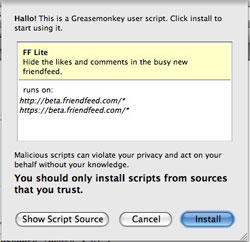
Now, thanks to a Greasemonkey script authored by Matt Shaulis, you can take on the real-time feeds without being constantly updated with a barrage of updates as other FriendFeed users participate with comments and likes on the feed.

So if you're a FireFox user, and a FriendFeed user, and run Greasemonkey, you can make the new beta a little quieter and a little more palatable, if the constant stream isn't quite your thing.

To get started, start FireFox and head to:

http://www.mattshaulis.com/gm/fflite.user.js

Make sure your Greasemonkey is enabled.


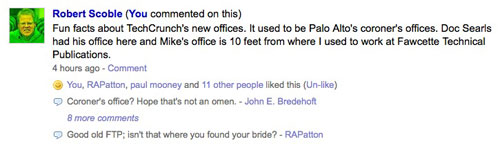
One Typical Entry With Likes and Comments


The Same Entry With the Greasemonkey Script Installed

The next time you start up the FriendFeed beta, you'll see a busy feed has been significantly silenced. And of course, if you ever want to get back the core elements of FriendFeed that make it social, just turn it off.
April 10, 2009 · 1 MIN READ · BY LOUIS GRAY

Super Geek Spotted at TechCrunch HQ On a Segway

Super Geek Spotted at TechCrunch HQ On a Segway

With today being a day off from the office, I had scheduled to meet up with Daniel Brusilovsky of Teens In Tech for a breakfast meeting in Palo Alto. Despite his 16 year tenure on this planet, I'd heard great things about his aggressiveness and entrepreneurial spirit, and was looking forward to finally connecting.

Not knowing if he would recognize me, I donned a self-promotional louisgray.com shirt, putting fashion aside for the moment.

But as fate would have it, while awaiting Daniel's arrival, I bumped into Michael Arrington of TechCrunch in Palo Alto, who was finishing breakfast at the place Daniel and I had scheduled. Arrington kindly offered us both an invite to see the uber-blog's new office, just a few blocks away, which we accepted.

Unbeknownst to us, the casual invite turned into meet and greet mania. In addition to Arrington's team, including Jason Kincaid, Sarah Lacy, Henry Work, Asad Akbar and CEO Heather Harde, both Robert Scoble and Jason Calacanis stopped by - making the room high on geeks, even if low on furniture (they're still building it out).

As the team is low on furniture, there's plenty of open space - perfect for the new Segway, which arrived this morning. After Daniel managed to break its kickstand in about five minutes, Arrington let me take it for a spin. Surprisingly, it was very easy to run - so if you don't mind seeing what a geek looks like while being geeky at a geek haven... there you go.


Oh... and any rumors that I was there on official business are false. But feel free to spread them.

April 9, 2009

April 9, 2009 · 2 MIN READ · BY LOUIS GRAY

Shyftr Introduces Extremely Versatile RSS Filtering Engine

Shyftr Introduces Extremely Versatile RSS Filtering Engine

A year into the service's head to head fight with Google Reader and others to make an advanced RSS reader, the Shyftr team has essentially thrown in the towel on their first plan, changing course to let you filter your own content and receive specific news you want to see, with less of that you don't. Their new RSS filter tool, which debuted today, lets you create any number of filters, by author, by title, or by keywords, from a wide number of preselected blogs, or those you add yourself, and roll your own RSS feeds.
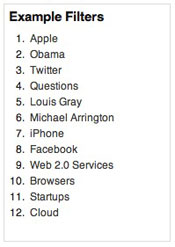
Today, when you subscribe to an RSS feed, it's essentially an all or nothing bet. By subscribing to my site, for instance, you are going to get every article I write about Apple even if you love Windows. You are going to get additional posts by the other writers on the site. And you can't dodge posts on Twitter and FriendFeed, even if you're sick of hearing about them.

Shyftr is looking to help, and even comes loaded with some example filters to get you started, including: LouisGray.com Posts from Louis Gray: http://alpha.shyftr.com/f/sux0ju/

Browsers (Chrome + IE + Safari + Firefox): http://alpha.shyftr.com/f/gycxxn/

TechCrunch Posts from Michael Arrington: http://alpha.shyftr.com/f/4x545a/

iPhone Titled Posts: http://alpha.shyftr.com/i3qzmd

But the fun comes when you start to make your filters, such as:

Posts from Mashable and VentureBeat Without Twitter In the Title: http://alpha.shyftr.com/f/qiroqp/

Posts on LouisGray.com That Were Not By Me: http://alpha.shyftr.com/f/bjzbpo/

Posts that Start with "Porn": http://alpha.shyftr.com/f/al35fd/

Posts by Om Malik on GigaOM: http://alpha.shyftr.com/f/dp2drb/

Posts that mention "Robert Scoble": http://alpha.shyftr.com/f/fq8dgb/


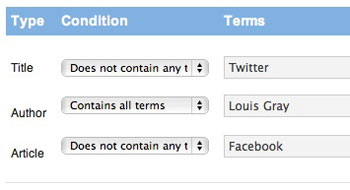
Setting Up a Filter that Avoids Twitter and Facebook

Over the last few months, Shyftr has been making significant changes, ditching the reader, and building a customized newspaper (like MeeHive), powered by your favorite topics and sources. But the new RSS filter takes personalization to a new level. You can find the new approach at http://alpha.shyftr.com and you can find the filter tool here: http://alpha.shyftr.com/filter/


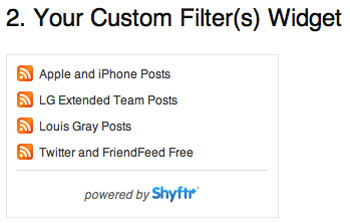
Shyftr-Powered RSS Filters for LouisGray.com

And the fun doesn't stop there. The company has set up new "Publisher" accounts, targeted at multi-author and multi-site blogs, to help authors distribute personalized feeds, by author, by topic and by site. I can see mega-blog sites like Mashable, TechCrunch, ReadWriteWeb and CenterNetworks looking into this option, as I will be, and I've been supplied with a handful of invites from those who are intrigued.

You can check out the new Shyftr at http://alpha.shyftr.com. Start your own filters here: http://alpha.shyftr.com/filter. You can also start with a set of pre-loaded tech blogs here: http://alpha.shyftr.com/filter/popular/