Silicon Valley Technology Commentary & Archives · Est. 2006 3,031 Posts · 2006–2026

August 27, 2009

August 27, 2009 · 2 MIN READ · BY LOUIS GRAY

A Better Retweet Button Is Out There (via @jeresig)

A Better Retweet Button Is Out There (via @jeresig)

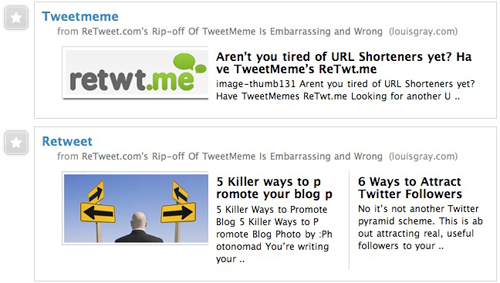
Regardless of what side you are taking in the Retweet.com vs. TweetMeme skirmish I noted on Monday, if you are hosting a button on your blog that encourages readers to send your stuff to Twitter, and count the number of times it has been retweeted, you are probably using one of those two services. Both do a good job, no doubt, but there's an alternative which you can host on your own site, and is powered by bit.ly, the officially "Twitter blessed" URL shortener, which tracks total clicks on your share, not how many individual people have sent it around.
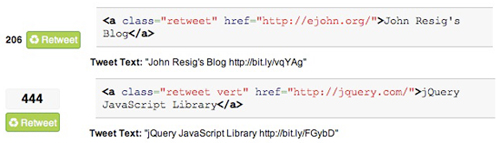

Two Examples of Code And the New Retweet Button

This week, I made the switch, after seeing it shared by Ben Golub of FriendFeed. Now, regardless of which post the button is on, it accurately shows the number of clicks I've gained through Twitter, and I have even configured it to say "(via @louisgray)" when you click the button to share a story.
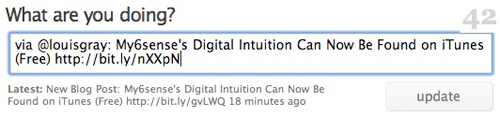

What It Looks Like When You Click to Retweet from LouisGray.com

The script is very easy to edit and can be themed to match your site, says John Resig, the author of the button. He also says, "The number of retweets may be interesting to some but it's a poor indicator of actual traffic. Instead, the number of clicks coming in is shown instead (a much more useful number)." (Article) And I agree. Not all retweeting is created equal, after all, and for those of us not on the Suggested User List that Twitter has built, we don't have a built-in retweeting army.

I am keeping my TweetMeme ticker on the right side, to show total retweets in a given week, but for each new post, I'd rather own the code myself, and John's made a great alternative. You can get started by visiting his site at http://ejohn.org/blog/retweet/, or in case the site is down, as it was earlier today, at the Google Cache.

August 27, 2009 · 2 MIN READ · BY LOUIS GRAY

My6sense's Digital Intuition Can Now Be Found on iTunes (Free)

My6sense's Digital Intuition Can Now Be Found on iTunes (Free)

A month ago, I introduced you to a new iPhone application designed to find the best of your information intake, while hiding the less-important news. My6sense's approach at utilizing what it knows about you in an effort to tackle information overload spurred a discussion around digital intuition, and now sees the company talking about where they can take their technology - including services like Twitter. But while they were working on this, there was some bad news - the product wasn't even available for download on the iTunes Store! This was due to a small issue on their part, which they took responsibility for, but it still took a month to get the revised app back through the queue and into waiting customers' hands. Yesterday, the app showed up in the iTunes store (for free).

As the founder Barak Hamachov promised last month, the application is not posted in the same area as RSS feed readers or social networking sites, but instead in "Productivity" - as he and the company believe if you can find out all the pertinent information to your industry or hobby while spending less time searching and browsing, you will be more productive.


Browsing New or Best Entries In My6sense

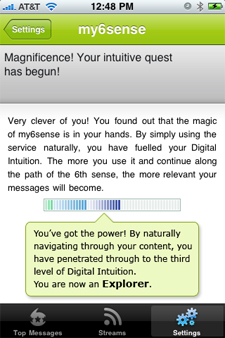
The core elements of My6sense have not changed since my initial review. I have used the application for the better part of six weeks now, and can rely on it to cut through the hundreds of feeds I read each day, finding the few dozen top articles that I won't want to miss. Along with some UI enhancements, the product makes it even easier to share out to Facebook, Twitter, FriendFeed or by e-mail.

While the product's algorithm is not 100% in the open, the application learns from your own behavior, including what sources you are most likely to read, what topics you are most interested in, what topics you tend to skip over, how likely you are to "stream" or "share" a post, and how much time you spend reading a specific story. And as you read more stories, the precision of My6sense improves.


Sharing an Item I Like In My6sense is Simple

While I haven't turned away from sites like Google Reader or Lazyfeed for being my initial source for data, My6sense does a great job of accurately knowing what I like. If I am visiting the product after I've seen Google Reader, often those items I had just shared are atop My6sense. If I am seeing it first, it's a good reminder of what to share when I hit Reader.


I'm Moving Up the My6sense Intuition Chain

If you don't already have My6sense, I advise you go grab it. It could make you a lot more productive.

August 26, 2009

August 26, 2009 · 2 MIN READ · BY LOUIS GRAY

Twitterfall Launches Twitter Reply Search Engine

Twitterfall Launches Twitter Reply Search Engine


As Twitter develops, the service's users are pushing the envelope beyond the company's initial expectations - taking what was supposed to be vanilla status updates to a small group of friends, and extending it to include features that are practically standards at this point - including replies from one account to another, and retweets. But some of the discovery to find related items from one tweet to another can be very hard. Individual users can see mentions, and with some work, Twitter Search can be useful, but for the most part, individual updates are disjointed pieces of conversation.

Twitterfall, a project undertaken by a pair of 19 year old students in the UK, already seen as a potential news discovery engine, has now extended their prowess to include capturing all data around replies - to one individual, or any specific tweet.


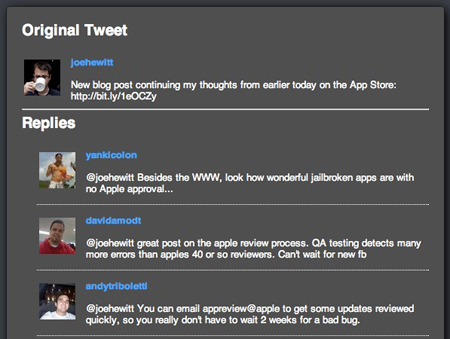
Replies to Facebook Developer Joe Hewitt on Twitterfall

The new Twitterfall Reply Search gives you two ways to find replies.

The first is to enter the ID of the specific tweet. Each tweet has a unique identifier, which is the number at the end of each tweet's specific URL. For example, a tweet with a URL of http://twitter.com/ev/status/3538745942 has the ID of 3538745942. To find replies to that tweet, you would enter "3538745942" in the first box. (Results displayed here)


Replies to President Barack Obama on Twitterfall


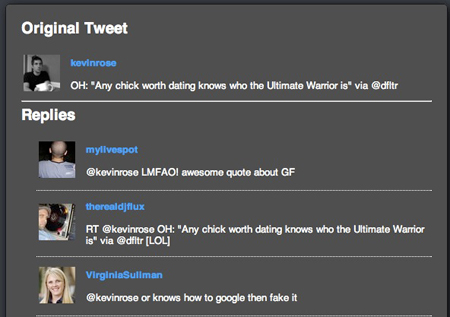
Replies to Digg's Kevin Rose on Twitterfall

The second way is to search for an individual user, which will show you their most recent tweets. Click on any result and you will see any replies in the database for those tweets. Fun ones would include popular accounts, from tech leaders, to yes, celebrities, who have highest engagement on Twitter.


You Can See Replies to All of Oprah's Tweets By Clicking on Twitterfall

The results display the original tweet, and each successive reply, in the order it was delivered. Twitter Search, in contrast, may find you each individual reply by finding the user's @alias, but even then, "show conversation" is hit and miss. Assuming the Twitter API doesn't fail us, TwitterFall's new approach is an interesting research tool for concatenating responses. In parallel, the company also launched their own API to access the replies database.

See also: Twitterfall's posterous: See who's replying - right now.

August 25, 2009

August 25, 2009 · 2 MIN READ · BY LOUIS GRAY

No More Beta Codes: Lazyfeed Is Open for Everyone

No More Beta Codes: Lazyfeed Is Open for Everyone

Almost two months ago, we first introduced Lazyfeed, a real-time blog search and feeds engine, which has grown to be a big part of my information gathering process, following topics which I like, rather than people, or specific RSS feeds. The product's uniqueness is one of the more innovative services I have seen in 2009, which was a big part of why I practically have had a part-time job as a beta code broker, trying to gain people access to the site. As of today, that unpaid gig is done, for Lazyfeed has removed the beta wall, and opened the site to all who want to enter. If you didn't get access to the site, I strongly recommend you go and try it, as you will find the wave of interesting news and blog posts from around the Web addicting.


Topics for Lazy Me from Lazyfeed

As I've mentioned in my previous coverage of Lazyfeed, including a quick how-to video on the service, the site does two major things - first, finding blog posts and news articles relevant to me based on topics I have provided, and second, find related items to those entries I have added to my own social sites, including this blog and my Twitter account. Blog posts that have tags will generate new items, while hashtags on Twitter will do the same. This second portion is what Lazyfeed says gets you the lazy portion of the name, because in "Topics for Lazy Louis", I haven't even had to enter the topics into Lazyfeed - it just happens on my behalf.


The New Lazyfeed Home Page Is Open for Business


Ethan Gahng, CEO of Lazyfeed, uses his own product in a much different way than I do, leveraging the search engine for entertainment, sports, TV and other things, where as I just continue to feed my tech obsession like a bright orange RSS-powered IV drip. But that's what makes a site like Lazyfeed so powerful - it can be whatever you want it to be, and hopefully, without too much work. Stay lazy.