Silicon Valley Technology Commentary & Archives · Est. 2006 3,045 Posts · 2006–2026
Showing posts with label Browser (32 posts). Show all posts

January 5, 2013

January 5, 2013 · 1 MIN READ · BY LOUIS GRAY

Chrome Is Fast. That's Why You Need Chromercise.

Chrome Is Fast. That's Why You Need Chromercise.


If you're a +Google Chrome user like me, you've probably gotten used to incredible speed. As with any other dramatic change to one's lifestyle, one must be adequately prepared. Thank goodness there's Chromercise (http://chromercise.com/). These finger sweatbands mean that I can browse more webpages, read all your posts, and simply get the web faster, without risking nasty finger sweat.

And don't think I'm the only one who has Chromercise fever. See this YouTube video: Everybody Chromercise and the original blog post from April 1, 2011: http://goo.gl/2ICeV

/via My Google+ Profile.

September 2, 2011

September 2, 2011 · 3 MIN READ · BY LOUIS GRAY

Living In the Browser Is No Myth. It's Possible.

Living In the Browser Is No Myth. It's Possible.

Wrapping up my second full week at Google, I'm still very new here - walking a delicate balance of learning from those already here, while also delivering value on my own. There have been few surprises, given how closely I've worked with the company before joining in an official role, but on a technical level, it's interesting to see how truly cloud-centric the company is. Obviously, being a company who believes strongly that you should never bet against the Internet, and whose many Web services help users migrate away from desktop applications, this makes complete sense. But I honestly live in Chrome, all day.

Back in 2009, I wrote a post on how you can clearly separate your work and personal social media personalities, through smart separation of Web browsers and TweetDeck (now part of Twitter). At the time, I told you how I used Safari for personal activity, primarily due to my bookmarks, which also synched with my iPhone, and how I used Firefox for work stuff. Flash forward two years later, and the story is much the same, but I'm using two separate builds of Chrome to do both, and rarely exiting the Web.

For all google.com activity, I use the standard Chrome Web browser, and securely login to my account and those places on the internal network I should have access. In parallel, I run the Canary build of Chrome for Mac OS X, and maintain my personal account there. This means I don't have to get confused about running multiple accounts simultaneously in a single browser, and still see everything I need to. After all, it'd be a mistake to post content intended for a work audience on a publicly facing destination like Google+, and I want to remove the opportunity for such an error.

Aside from separating the two personalities, work and personal, practically everything I need to do is on the Web. Gmail is my launching point for communication with colleagues, including Google Talk for instant chats. Google Calendar tracks others schedules and my own. Google Docs is where all of us collaborate on projects. Think this is a big company secret I'm leaking? Well, it's not. Google uses its own products, and it makes sense.

Early in 2010, I talked about how I could see living in a cloud-centric world when I got my first MacBook Air, dramatically reducing the hard drive space available from my prior model. When I got the option to choose a laptop upon joining here, I again opted for the device with the smaller disk size, instead of a bigger, bulkier, MacBook Pro or its equivalent, as I knew I wouldn't need the bits.

While living in the cloud may not be for everyone yet, the trend toward Web-based applications, faster broadband and expanding WiFi availability, coupled with ever more capable smartphones, makes the opportunity to live in the browser real for more and more folks. It's come to the point where having Microsoft Office applications and Adobe Photoshop available feels like a crutch, or a stopgap as we migrate into the Web. It's the realization, for the most part, of the vision shared by Larry Ellison and Scott McNealy years ago, where the network is the computer, and your profile is portable. Just prove you're you, and get to your data from anywhere.

May 2, 2011

May 2, 2011 · 4 MIN READ · BY LOUIS GRAY

OneTrueFan Shifts Horizontal Network to Horizontal Bar

OneTrueFan Shifts Horizontal Network to Horizontal Bar

I've long extolled the virtues of OneTrueFan, the logical successor to the soon-to-be deceased MyBlogLog, spawned by the latter's founders, racking up one's visits around the Web, duking out top positions like Foursquare mayorships. I eagerly added code to my blog as one of the few active widgets I run to get a better sense of the frequent visitors and encourage community. Meanwhile, as I experiment, the network is growing up a bit and making changes. You can see one of those changes with the house ads running on my site, which you can trust I get no pennies for, and a refocus that takes the activity within the OneTrueFan network and makes it live completely within the bottom bar - an extension to most popular browsers, instead of on the company's Web site.

Unsurprisingly, initial feedback on OneTrueFan made the casual comparisons to Foursquare, along with some questions around security - where one had to trade off a third party watching what sites you visit and how frequently for a few badges and informal competitions with friends and strangers. I enjoy seeing people post they've taken the OneTrueFan badge of one Web site or another to Twitter, and the occasional emails I receive saying someone or another has kicked me off the top spot of one of my former top hangouts. But OneTrueFan isn't toying with being a silly gimmick for a sliver of early adopter Web centrists. It's very possibly creating a horizontal social network across the Web for disparate sites to understand their loyal visitors, and for those visitors to learn what stories people like them find intriguing through share history.

OTF Leaderboards from Across the Web

As you can see from the browser bar below, or if you have the extension installed yourself (and I wish you would), OneTrueFan has provided more transparency in how the service assigns points. The site speaks to wanting to encourage sharing of good content to other social networks, and that absolutely comes into play - meaning a popular Twitter or Facebook user who gets a lot of clicks can pass by a regular, but more reserved, visitor who regularly stops by each day.

The OTF Bar Encourages Sharing and Shows Community

OneTrueFan spells out the point system as follows:
  • Daily Site Visits are 10 points apiece, per domain or subdomain
  • Each page view adds 1 point.
  • Each page share adds 5 points per network.
  • Each clickthrough on a share gets 1 more point.
Simply stated, if I visit a Web site today, share a story and get 10 click throughs, I could get a possible 25 points, good enough to start creeping up the leaderboard. For small sites that don't get much traffic from early adopters, this could be a top position, but for more addicting and popular networks, it could take hundreds to appear in the top visitors chart. For example, one needs 221 points to be atop ESPN.com, and 260 to lead CNN, but the top LinkedIn score has tallied more than 1,100. Good luck being top dog there.

The OTF Bar on Hacker News and Checking Chris Yeh's Share History

I spoke with company cofounder Eric Marcoullier last week about the move to push more content into the bar and away from the destination site, and he said it was a move to encourage publishers to implement the bar themselves, as I have. Rather than push users to their site, the activity remains on the active domain. As the world knows, we have more than enough destination sites masquerading as niche social networks, and OneTrueFan (or OTF as we often call it), is trying to do something different, which brings value to bloggers, publishers and the occasional visitors alike.

The OneTrueFan site Still Shows Player History

Winning the OTF badge from a site doesn't yet create the prestige that racking up badges and mayorships does on everyone's favorite location based services, but it could, especially as more people get comfortable with sharing their browsing behavior. After all, you can easily tell the bar to stop tracking your visits to specific domains, and all known adult sites are automatically hidden. I've taken to putting the OTF bar on all browsers I use on all machines, and it's one of the few extensions I've embraced. In a world where a lot of activity can be siloed, or where we rely on teh sharing buttons that come from the publisher to get the best content downstream, it's nice to take the OTF with me and get credit for sharing the best stuff to my networks. You can get your bar at http://www.onetruefan.com.

February 9, 2011

February 9, 2011 · 4 MIN READ · BY LOUIS GRAY

Why We Brought my6sense to Twitter.com via Chrome

Why We Brought my6sense to Twitter.com via Chrome

This morning, as you might have seen from one of the many places that covered the launch, my6sense took its first step beyond the world of mobile, bringing tweets ordered by personal relevance to Twitter.com, in the form of a Chrome Web browser extension. The idea, of course, is to take on the challenge of finding excellent content in your real-time streams and bringing it to the top. More signal and less noise. Working with a team that is small and has limited resources, we have to be smart about our choices, so it's my pleasure to talk about why this is such a big deal, and why we went this way.

Tens of millions of tweets pour through Twitter every single day, according to the company's cofounders, and even through the most valiant efforts, you're bound to miss something, even after carefully hand-selecting those you follow, skimming fast and having great news sources. The idea is no longer a situation where "the news will find me", but instead that you are sipping from the firehose, and your limited time at the fountain means you are seeing select portions of the stream from the time of day you are looking. Meanwhile, in between the best stuff from all your friends and brands, there are a lot of updates that just might personally not be relevant. So something is needed.

Even Twitter says "Our Challenge Is Relevance". We agree and we're hoping to help.
I joined my6sense to help accelerate the third wave of the Web - personalization of streams from all sources, not just to bring apps to consumers. So it's no secret we've been talking since day one of the right way to come to the Web and bring my6sense to where people already participate. We don't want to build a dedicated Web site to compete with our partners and popular Web services, but instead, to bring the magic of our app to where consumers already are.
my6sense in my Twitter stream

There are two ways to bring the intelligence of my6sense to existing streams - one being through their adoption of the Attention API, which some are pursuing, or through other methods that we can initiate, like a dedicated extension that works by service or domain. Twitter, an incredible company changing the way people communicate, has to be selective in how it works with third party APIs, not choosing favorites, so we knew bringing this intelligence via extension was the right move.

Browser extensions now exist for practically every platform - but are most well known for Firefox and Chrome. With the growth of Chrome's browser share, and the browser's overlap with our technology-savvy user base, launching on Chrome was the right idea. Also, starting with Chrome gives us a clear address on the Chrome Web store. No doubt, Firefox will be coming soon, resources depending.

My settings page on the my6sense Chrome extension

But what about the deployment? We knew we needed to make integration into Twitter.com seamless. From the first day we talked about this project, we wanted it to look and feel like Twitter. So our app simply adds a tab to the Twitter.com experience, and tweets are reranked based on user preferences. No fancy UI, just simple integration. Adding on support for URL expansion to preview articles and shared rich media, and we think we've brought real value to existing users without complicating their experience.

If you understand our focus - to implicitly determine your interests based on those items you read and skip, or act on in the Twitter.com interface (such as favorites, retweets, replies, etc.), you know we are trying to reduce the amount of time you spend culling through updates that aren't of interest to you. When people see the difference between the chronologically ordered timeline and the personally ordered timeline from my6sense, the difference is clear. Sometimes the stream may toss up surprises or items that aren't a clear fit, but no software is perfect. The good news is that we're listening to all the feedback, positive and negative, and hoping to make a real impact on the way we all consume and share content.

I hope you'll try our new extension and see how we can improve your Twitter.com experience by bringing the best updates from your friends and brands to the top. You can find the Chrome extension at http://m6s.com/chromeweb.


Disclosure: I am Vice President of Marketing at my6sense.

November 8, 2010

November 8, 2010 · 3 MIN READ · BY LOUIS GRAY

Crowded Mature Markets Don't Scare Blekko or RockMelt

Crowded Mature Markets Don't Scare Blekko or RockMelt


Two of the most heavily anticipated and visible product debuts in the past month have been Blekko, the slashtag-happy curated search engine powered by humans and fancy algorithms, and RockMelt, the new social-centric Web browser that drags Facebook alongside throughout your page perusing experience. Both took years of development, sport dozens of employees and raised significant capital. Both are intriguing enough to gain curiosity from early adopter tire kickers. And both are raising eyebrows from skeptics who wonder why otherwise smart folks would charge headlong into what are clearly mature markets with many high profile competitors. For every ubergeek checking out the latest toy, there is somebody else wondering if the world needs "yet another" search engine or Web browser.

Short answer: The world always needs new innovation, and there are countless examples of companies entering into crowded markets that needed some shaking up, who found tremendous success - including in these two markets.

Corollary: To consider either Blekko or RockMelt a success does not require either of them to topple the dominant market leader. Blekko is not a Google search replacement in most cases, and Rockmelt won't necessarily have you uninstalling Firefox. If they can get 1%, 5% or 20% of the market, it is significant indeed. (See: Don Dodge from 2007: Why 1% of search market share is worth over $1 Billion)

Google Takes On Crowded Search Market, Firefox Takes On IE

Google's entry into the search market at a time when Alta Vista could be considered the quality leader, with additional players such as Excite.com, Infoseek, HotBot and yes, Yahoo!, may seem like ancient history now, but the company looked at an industry which needed disrupting. It obviously worked. Meanwhile, Firefox emerged, through Mozilla, out of the ashes of Netscape, burned by the overwhelming market leader, Internet Explorer. It's now safely assumed Firefox is the strong #2 to IE, with Google's own Chrome holding the #3 position and Apple's Safari at #4.

One could highlight the opportunity for reinvention of new markets for some time strictly by looking at Apple and Google alone, even though there are many more examples, from big companies and small alike who have looked big brand names in the face and pushed ahead anyway.

Google Reader Emerges to Take On Bloglines

If you read Chris Wetherell's fantastic two part series about the birth of Google Reader, and Mihai Parparita's companion piece about how he joined the team, you can see significant skepticism over whether the world needed yet another feed reader when NetNewsWire and Bloglines did just fine. Reader now is easily the #1 share holder and Bloglines just closed up shop.

Apple Introduces an MP3 Player and a Phone!

In October of 2001, Apple introduced a hard-disk based MP3 music player. The MP3 player, called iPod, launched with competing players like the Creative Nomad Jukebox and Rio's line of digital audio devices already in the space. That they launched an MP3 player seemed like madness. To others, their launch of the iPhone was similarly crazy, even after the iPod's runaway success. Resident curmudgeon John Dvorak warned in 2007 that Apple should pull the plug, adding "It's the loyalists who keep promoting this device as if it is going to be anything other than another phone in a crowded market."

The crowded market had plenty of room for Apple.

One doesn't have to look too far away from this space to find that Google's Android OS took on the successful iPhone, as well as Symbian, Blackberry, Windows Mobile and others, and found opportunity to grow significant market share. Facebook launched into a market occupied by Friendster and MySpace. Gmail was introduced years after Yahoo! Mail and Hotmail had amassed millions of users apiece.

Is it going to be a challenge for Blekko and RockMelt to separate themselves from aggressive competitors? Absolutely. But often, empty markets without participants are empty for a reason - and crowded markets are there because there is potential seen by multiple players. Blekko and RockMelt each now have the opportunity to compete on their merits, and attract their own target users. It's not necessarily a zero sum game, and both seem to competitive enough to bring value, with enough humility to not trip over their own hubris.

February 1, 2010

February 1, 2010 · 2 MIN READ · BY LOUIS GRAY

Are Early Adopters Leading Move from Firefox to Chrome?

Are Early Adopters Leading Move from Firefox to Chrome?

With the first month of 2010 in the books, Web statistics tracker Net Applications made headlines showing Google Chrome's browser market share exceeding five percent usage, taking tenths of a percentage point away from the top two most popular browsers on the Web, Microsoft Internet Explorer and Mozilla's Firefox. But in our little niche, Internet Explorer has never had that huge a market share in terms of visitors to my site. Most of my peers utilize Firefox or Chrome, or if they are Macheads like myself, they trend toward Safari. After crunching the numbers, looking at my Google Analytics data from the last 13 months, to get solid year over year data for the month just completed, the trend is clear: cutting edge Web users are trading in their Firefox browsers and trying Google Chrome.

Over the last year-plus, the top four Web browsers to louisgray.com have been unchanged: Firefox, IE, Safari and Chrome. Yet in four of the last six months, Safari visitors have outpaced Explorer visits. Meanwhile, in October of 2009, Chrome visits passed up IE users, and by December, Chrome visitors had passed up Safari visitors, good enough for the second-highest browser share overall. This ranking repeated in January.

As Chrome Share Has Increased, Firefox Is Fading
(Source: Google Analytics for LouisGray.com)

Just how rapidly has Chrome taken market share in terms of visits to the blog? In January of 2009, Chrome represented 6.53% of all visitors, a mark that held mostly steady through March of 2009. In the month just concluded, Chrome represented 17.46% of all visitors, an increase of 267%, nearly tripling.

At the same time, Firefox use dropped from nearly 51% of all visits to just over 41% of all visits, after peaking in March of last year with almost 55% of all visitors. The 10% of visitors who stopped using Firefox almost exclusively switched to Chrome, for IE visits declined only slightly from 20% to 16.5% of all visits, while Safari has held rather steady, at about 17% of all visits both in January 2009 and January 2010.

At the risk of making mountains out from small sample sizes, the trendlines cover almost a million pageviews over 13 months, and in each of the 3-month blocks following January of 2009, you could see a steady increase in Chrome visitors, from 6% in Spring of 2009, to 8% in the Summer, 10% by Fall and more than 14% by Winter. If the trend lines hold, I would not be surprised to see Chrome eclipse 20% of visits here by summer, and see Firefox fall to 35%, with continued declines in Internet Explorer visits that keep it below 15%. Pivot tables in Google Analytics also show that most of my Internet Explorer visits are from Google searches and other non-direct visits. Most referred visits from social networks, like FriendFeed, Twitter and Facebook, prefer Firefox, Safari and Chrome.

September 25, 2009

September 25, 2009 · 3 MIN READ · BY LOUIS GRAY

Framed: Should Microsoft, and Would Apple... Fight Back vs. Google?

Framed: Should Microsoft, and Would Apple... Fight Back vs. Google?

Wednesday's announcement from Google that they were releasing a Web browser plugin called Chrome Frame for Internet Explorer gave IE users many of the same core elements they would receive by surfing with the native Chrome browser - namely support for HTML 5, and massively improved JavaScript performance. Google's goal has largely been seen as setting the stage for Google Wave, working to get Web surfers off older, outdated browsers, like Internet Explorer 6, and providing them a richer experience. But this process, as noble as it may be, has me wondering if its competition, Microsoft, won't be finding a way to shut it down. After all, I am pretty sure Apple would if given the same choice.

Many across the tech Web are lauding the move as easier for Web consumers to perform than a rip and replace strategy to ditch IE and turn to Chrome, despite its clear benefits. After all, it's said users are comfortable with plugins like Adobe Flash, and Chrome Frame would just be a simple plugin. But isn't this a lot more like what Palm did in faking us all out by pretending its Pre mobile phone was really an iPod, in order to gain access to iTunes?

While Google didn't make any noise about looking to similarly decapitate Safari, and put Chrome in Apple's browser, there are definitely times when I find my preferred browser lagging behind the most-popular surfing options. Even Google's Toolbar, which includes the new SideWiki we discussed on Wednesday, does not have a native version for Safari, but maybe, if Google found a way to push Chrome in Safari, it would.

Matt Mastracci, co-founder of DotSpots and a sharp Web developer, reminded me this evening that Safari "isn't built to be extensible", making Toolbar integration or Chrome Framing a real challenge, but even if they could somehow pull it off, I don't see Steve Jobs and Cupertino sitting idly by. No doubt the next system update, or Safari point release, would knock it out of the sky, the same way they have updated iTunes in the past to stop jailbreaking of iPhones, or the way Microsoft posts Windows Updates to stop malicious code from hitting their user base.

Microsoft is already whining and saying that running Chrome Frame as a plug-in increases the potential for bad code and malicious scripts to hit customers. (See: Microsoft: Google Chrome Frame Makes IE Less Secure) It is not my tendency to jump on Redmond's side, and I certainly don't believe their scare tactics, but they have to be hotly debating their next move. It would not surprise me if the opportunity to disable Chrome Frame was being thought about as part of the next "Critical" Windows Service Pack update, executing a high-stakes game of cat and mouse between Microsoft and Google, and potentially the Justice Department - who didn't ever get its wish of splitting Microsoft up after its monopoly games with Netscape.

Apple's recent ploys to knock Palm Pre out of iTunes, and its controversial blockage of Google Voice make it clear they have every intent to control their users operating system and iPhone experience. In fact, as they have not really been taken to task in the way Microsoft has for anti-competitiveness, I would see Cupertino more likely to be proactive in trying to fight Google here. The only question is, will they ever get the chance to do battle?

February 25, 2009

February 25, 2009 · 3 MIN READ · BY LOUIS GRAY

Safari 4's Introduction A Clear Salvo In the New Chrome Wars

Safari 4's Introduction A Clear Salvo In the New Chrome Wars

In today's Web-centric computing world, there is practically no more important software than that of the Web browser. While an argument could be made that one's e-mail is equally as important, the move to Web-hosted mail services, like GMail and Apple's Mobile Me means that the Web browser itself is where most of today's work gets done. The move from the operating system being the center of our world, and the prism by which we see everything, to that of the Web browser, was central to Netscape's annihilation by Microsoft, and has now practically come true, even as Navigator's time has now come and gone.

Almost 14 years after Netscape as a company went public, a new wave of browser wars is upon us. And while, yes, Internet Explorer, the standard on practically all Windows-based PCs, is still the market share leader, the innovation is not being perceived as coming from Redmond. Instead, it's products like Firefox, Google's Chrome and Apple's Safari which are pushing the envelope and working to enhance our browsing experience. Unfortunately for Microsoft, it's gotten to the point that even if they made a better product with all the possible bells and whistles, nobody outside of Dare Obasanjo would give them credit.

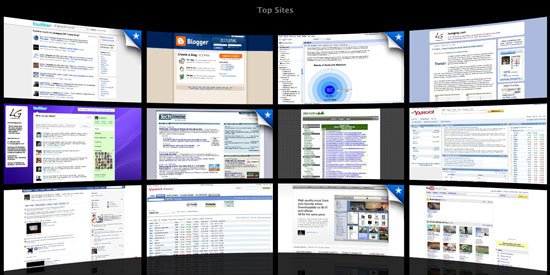
Yesterday, as practically every tech blog on the planet mentioned, Apple introduced a new 4.0 beta version of the Safari browser, including speed enhancements, and most notably, a Top Sites feature that mimics Chrome's most visited sites page. And while other usability enhancements were made, including to the toolbar, expanded browser history and further integration with Google's search bar, it was this addition of "Top Sites" that has everyone thinking about how Apple is taking on Google's Chrome even before the company comes out with its much-awaited official Mac version.


My Top Sites - After Editing Out All Work-Related Sites

And this is exactly the dialog that has long-been needed in the browser space but was lacking when IE finally reached the summit atop Netscape's corpse. Opera and OmniWeb and iCab all had their handful of users, but never gained the kind of mindshare and deployments possible from Firefox, Safari and Chrome. Now, it could be said that Microsoft is being hit from all sides after years of letting Explorer stagnate. (I first called it the Chrome Wars on FriendFeed yesterday)

Being hard wired both as an Apple fanboy and an early adopter, I downloaded Safari 4 beta as soon as I knew it was available. After finally updating the laptop with the latest security updates, we were good to go - and honestly, there will be no turning back. For whatever reason, over the last few weeks, I have had the worst time keeping Safari up and running. Every new tab welcomed a new opportunity to stall and require a force quit. But Safari 4, after a full day's aggressive use, hasn't fallen on its sword even once. And considering I spend practically all my waking hours in front of a browser, that's a good thing.

For me, it's the stability and the speed, and the support for standards, that will make using Safari on a daily basis a success. The Top Sites feature is interesting, a cute way to have 12 pages on hand to click through at all times, but it's not exactly going to save me a ton of time. With RSS, keyboard shortcuts and autocomplete, it's not like I was taking tons of time to enter URLs and go site to site. So yes, we like the new features, but we like it even more that it doesn't crash and will support new Web services that may be using bleeding-edge code.

And while I assume you already know, Safari is more than just a Web browser for Macs. It's also available for Windows, and forms the core browsing experience on the iPhone and iPod Touch. You can get the new Safari 4 beta here: http://www.apple.com/safari/download/.

January 18, 2009

January 18, 2009 · 2 MIN READ · BY LOUIS GRAY

Is Requiring a Firefox Plugin Akin to Designing for IE Only?

Is Requiring a Firefox Plugin Akin to Designing for IE Only?

Internet Explorer doesn't have a monopoly on the browser market like it did nearly a decade ago, as Microsoft systematically suffocated Netscape - speeded by the company's own failings. Today, IE reportedly has just under 70 percent market share, with Firefox owning just over 20 percent and others, including Safari, Google Chrome and Opera, making up the remaining 10 percent. (See: Wikipedia for a stat table)

At Internet Explorer's peak, it claimed more than 90 percent share, as recently as 2004. As it became the de facto standard, it was common for Web designers to optimize their pages for IE, or even require users to run IE to access the site. While the practice is less common these days, there are still a select number of Web applications that push users toward IE, or as many Mac and Linux users find themselves told, to use Windows.

As the Internet mob has repeatedly spoken, designing for IE is wrong. The browser has never quite nailed Web standards the way other browsers do, and to force users to have a certain configuration to get to something that should have universal access flies in the face of one of the major tenets of the Web - that data will be presented in the same way to all current browsers on any platform. But even as this has been agreed to, some cutting-edge applications are pushing Firefox extensions or Greasemonkey scripts to simply work. And unfortunately, even if doing so means the development team can leverage the browser in new, innovative, ways, it dramatically limits their market share, and keeps people who might like the applications, but prefer another browser, out.

As an Apple Safari user, I know there are some places where the browser falls short. For whatever reason, it isn't supported by toolbars, including StumbleUpon or the Google Toolbar. I can begrudgingly accept that developers aren't going to make work-arounds for such small market share, but the practice of purposefully designing solely for Firefox and requiring people to download an extension seems counter-intuitive, if the goal is to have wide adoption. So while I understand that Firefox users are vocal and love their browser's extensibility, the entire practice has me shying away from new services like Clikball, and rarely using Feedly, even if I think they're cool.

But there's no outrage and frustration when developers demand Firefox extensions the way you see the same tumult when a site demands you use IE. It could be because the practice is more rare, or because the Firefox community likes being catered to. But I believe it's time to move away from demanding plugins and extensions to our browsers. There are enough tools out there, and enough tricks you can do with code to make the Web do some great things. If you can build it without making me download yet another program, or switch browsers, it'd be much appreciated.

December 31, 2008

December 31, 2008 · 2 MIN READ · BY LOUIS GRAY

RSS Has Practically Eliminated My Need for Browser Bookmarks

RSS Has Practically Eliminated My Need for Browser Bookmarks

People use Web browser bookmarks in vastly different ways. All of us have no doubt encountered people who bookmark just about everything, and don't organize them into folders, leaving the poor user to scroll through page after page to find the bookmark they are trying to find. Others don't bookmark anything and rely on Google to find the desired page, through the search engine. On the opposite spectrum, others have tidy folders, while a small percentage of them are so focused as to have their bookmarks sorted alphabetically in nested folders.

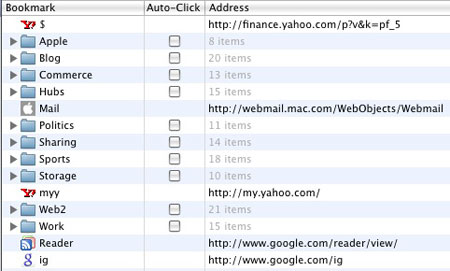
That last example would be me. Not only do I have all of my bookmarks sorted in folders, but each of the folders is alphabetically ordered in my Bookmarks toolbar in Safari. Many of the folders have subfolders, and believe it or not, the bookmarks are alphabetized in each of those folders. If only I were this organized everywhere else!


My Safari Bookmark List Just Got a Lot Smaller...

Best of all, these bookmarks are synchronized to my iPhone, meaning I have them with me on the go, practically anywhere.

But these days, it really doesn't matter how organized I am, because I so rarely encounter my bookmarks - and many have not been clicked in a very long time. In fact, this afternoon, I went and cleaned up my bookmarks for the first time in a while, going on a deletion spree.

Why the change? Because practically all the important sites I used to visit on a regular basis have transitioned to my Google Reader, thanks to RSS. There's no need to have TechCrunch and Scobleizer bookmarked. There's no need to check in on MacRumors and AppleInsider every day. Instead, they come to me. Even the dozens of saved search strings I had for work to scour Google and all the industry trade rags are no longer necessary because each of those can spit off an RSS feed into my reader.

At this point, practically the only bookmarks I need are the portals, such as iGoogle and My Yahoo!, which are themselves RSS-powered, sites where my own action is required to make them useful, from retail sites like Amazon.com, or transactional sites, such as Wells Fargo and eTrade, and the occasional sports-related site that has instant scores, like ESPN.com or Yahoo! Sports.

The old ways of visiting each site one by one, or even to open every bookmark in a folder at once, as Safari lets you do, are no longer necessary. With the inclusion of auto-complete features in practically every browser, the rapid growth of RSS and precision of Google search, browser bookmarks are an archaic breed. There even may come a time when I go back into my bookmarks and start removing entire folders.

What about you? You've likely got a start page. It's no secret mine is FriendFeed, as it has been all year. I am also a regular visitor to Google Reader and Twitter to round out my news gathering, but what next? Are there still sites that are so necessary to visit frequently that they warrant bookmarking?

November 27, 2008

November 27, 2008 · 7 MIN READ · BY LOUIS GRAY

Ten Tech Things I'm Thankful For

Ten Tech Things I'm Thankful For

I don't know about you, but some of the technology we take for granted still seems exciting and mysterious to me. Ever stop in the middle of your laptop and say - wow... I'm seeing streaming video, live, wirelessly in high quality? Ever stop when on a cell phone and realize you're talking to someone thousands of miles away and hearing them respond in real time? It may seem like we take these things for granted, and only speak up when there are problems, but that's far from the truth. On this Thanksgiving holiday, I thought I'd highlight ten things I'm grateful for that impact us in a positive way.

1) I'm Thankful for a Competitive Culture of Curiosity

Without curiosity and aggressive competition, innovation would be at a near stand-still. Experimentation, testing and looking for new markets or way to improve existing markets or products enables new ideas to develop, and new approaches to be found for existing products and activity. In Silicon Valley, entrepreneurialism is encouraged and celebrated, and it's actually okay to fail or work at a failed company multiple times in one's career, so long as you keep trying.

2) I'm Thankful for Expanding Bandwidth and Data Storage

Any of us can look backward at our first computers, and modems, and laugh at how many megabytes of RAM or hard disk space we had, or how we might have tried to get to the Internet at 4-digit baud speeds. Over the decades, you've seen a move on the network side from 10 megabit to 100 megabit, through 10 gigabit on the corporate side, and to high-speed broadband for consumers, not to mention 3G for iPhones and other wireless gadgets. Hard disks have grown from megabytes to gigabytes and now terabytes, enabling higher quality images, video, music and other data exchanges to take place quickly and be stored longer. The growth of bandwidth and data storage has essentially paved the way for the online software repositories, iTunes, YouTube and many other intensive Web apps that are powering today's digital economy.

3) I'm Thankful for The Removal of Geographic Barriers

We may have to get a passport to travel from country to country, but online, I'm talking and engaging with people from around the globe every day. While places like the Silicon Valley still maintain a lead in terms of available networking opportunities, the Web lets me connect with entrepreneurs in Europe, bloggers in Australia, India, and Canada, or around the world. In fact, just a few weeks ago I managed to reach Robert Scoble by cell phone when he was traveling in China, as I'd mistakenly thought he'd already come home. While it would take a day of travel to see him, I could get him live with a few taps on the iPhone. Also, I've befriended people from a wide variety of countries and places around the United States on the myriad of social networks.

4) I'm Thankful for the Ease of Publishing

The Web has dramatically increased the potential to publish in real-time over the last few years. For free, I can register to send short updates to Twitter, or full-length blog posts to Blogger, WordPress or TypePad. There is no application to fill out, or editorial board to approve content. The ease of publishing lets anyone with a voice or something to share get out there quickly to all interested to see.

5) I'm Thankful for the Ease of Discovery

There's a reason Google is thought of as the most successful company of our generation. They focused on the ease of searching and discovery of all the world's information - starting with the World Wide Web at large, and expanding to images, videos, books, news, and trying to ease discovery across different languages with translation tools. Google, and others, expanded to desktop search and discovery to let you find even your own documents. This ease of discovery speeds academia and business, and lets even the most obscure opinions or publications be found, assuming you're on topic and the searcher uses the right keywords.

6) I'm Thankful for the Ease of Data Mobility

Yesterday, I saw a road sign saying "5 1/4 miles" to our destination, and it reminded me of the old 5 1/4" floppy disks, which gave way to 3 1/2" floppy disks, Zip drives, USB keys, and of course, attachments by e-mail, which negated the need for much of the portable physical media. Now, I know that my data is accessible from the Web on essentially any computer or mobile device, no matter where I am. All my e-mail accounts flow to the iPhone. All my bookmarks are synched from my home computer to the iPhone, and I can log into any of my online accounts from any computer to pull down my data or get my personal experience.

7) I'm Thankful for the Ease of Access to People

The combination of the ease of publication and discovery makes it easier than ever to find ways to contact people, by phone, by e-mail, or through social networks where they are active. The old days of the Yellow Pages and White Pages and Blue Pages that you needed to thumb through to find local businesses or your neighborhood directory are gone, replaced by personal address books that stay on your computer and cell phone, and online directories that are searchable. Additionally, those who publish are often easily reachable, even if just through comment pages on their site, giving you a platform for conversation and exchange.

8) I'm Thankful for the Opportunity to Exchange Ideas

Nobody is an expert on everything, but just about everyone is an expert on something. Where I have weaknesses, or limited understanding, it is fairly easy now to find resources or individuals who have strength, and who are open to discussion. Combined with the ease of discovery and publication, rather than posting items here and waiting for people to answer, I can go to these sources and engage with them where they want to engage at their point of comfort - be it on their preferred social network, their blog, their user forum or bulletin board.

9) I'm Thankful for the Acceptance and Promotion of Standards

As technology consumers, we have our idiosyncrasies. I may prefer to use Mac OS X computers, and use the Safari Web browser. You may prefer Windows Vista, and like Internet Explorer or Firefox. But, in theory, our Web experience should be the same. While there was a time when Mac documents and PC documents or Mac formatted disks and PC formatted disks were wildly different and non-transferrable, both platforms have practically unified so documents and applications are largely equivalent on all platforms and an experience can be universal. The acceptance of standards for all things on the Web, from the GIF and JPEG standards to those for HTML, Java, CSS and PHP, ensure that Web sites and applications can increasingly behave appropriately and within guidelines, regardless of the consumer's setup and geography. While I know things could still improve, the community has made incredible strides in pursuing unity.

10) I'm Thankful for Never Accepting the Status Quo as Good Enough

Where much is given, much is expected. As Web bandwidths increase, as disk storage increases, as ease of access increases, and the number of people getting on the Web and using it for all aspects of commerce, friendship, and communication increases, the capability of each site and application gains the potential for improvement. And I've yet to meet a site or an application that simply stops working, saying they have stopped all bugs, and that the experience could not possibly get any better. Google is constantly improving and experimenting with their search index and results. Microsoft and Apple are constantly rolling out new iterations to their operating systems, their applications and their Web browsers. And startups are always coming and going, not just in an effort to make the people working there some money, but because they want to make a real difference through leveraging the cutting edge of technology.

As a consumer and as someone who for more than a decade has worked in Silicon Valley, looking to help develop and distribute differentiated products that aid customers, I know I will never accept what we have as good enough. But I appreciate the opportunity to exchange ideas, to reach new people, to discover new content and to publish where I can. That's part of what's enabled exchanges such as this. What are you thankful for in the world of technology and what do you believe I left out?


September 27, 2008

September 27, 2008 · 2 MIN READ · BY LOUIS GRAY

Will Future Information Consumption Be In Nested GUIs?

Will Future Information Consumption Be In Nested GUIs?

As Web technologies evolve, new, innovative ways to absorb information via the Web browser are being created. Some, like Google Reader, and blogs on SportsBlogs Nation are utilizing keyboard navigation, letting you type letters to jump from one new item to the next, while others let you move between screens by using the arrow keys, instead of clicking the mouse. An enterprising developer, Michael Buchanan, is hoping that nested GUIs, which he calls "Microspaces", will be a new way to approach navigation - letting you view a page within a page, within a page, all without opening a new browser window.
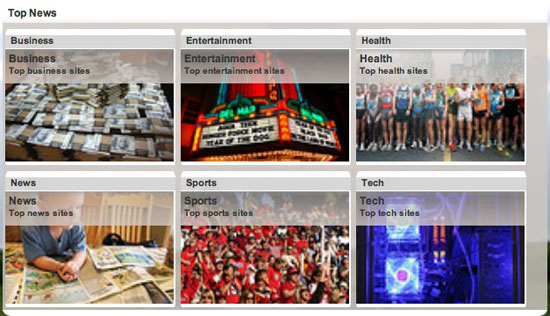
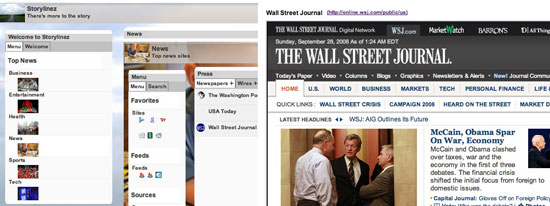
While he's just getting started with Microspaces, an initial trial site, called StoryLinez, has been posted, that brings top news sources for business, entertainment, health, news, sports and tech in one place. While that in itself is not new, the way the site operates is.


StoryLinez.com Wants to be a Hub for News On All Topics

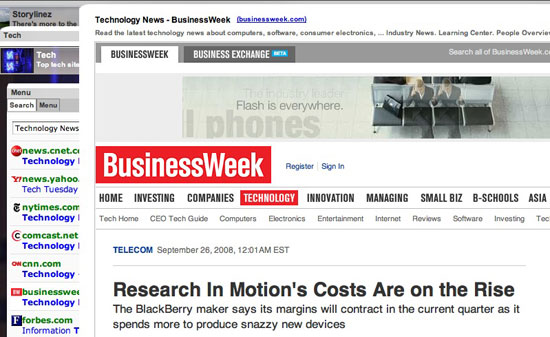
Instead of clicking on an item, and getting a pulldown menu with multiple options, the nested GUI technology is triggered via mouse-over. For example, having your mouse over the "Business" section opens up a smaller window within a window, with sites ranging from CNN to Fox News, Yahoo!, Forbes and BusinessWeek, surfacing.


The Nested GUIs Technology Shows a Site Within a Site

Rather than send links off to a new browser window, as most sites do, putting your mouse over these news sources, and their resulting headlines instead shows the story in a section within your same window. And when you're done reading, move your mouse back to the listed options and get more stories. The goal? As Michael wrote me, "One of the things I wanted to accomplish was the ability to navigate everything without clicking." (See the blog for more)


You Can Click Through to Articles but Not Leave the Site

We've gotten used to flooding our Web browsers with new windows and new tabs. New Web 2.0 technologies are helping us to see the Web as a foundation for applications, which will need new ways to approach data. Could nested GUIs be one of the future ways we'll consume media? The StoryLinez site is fairly raw, but it's an interesting experiment. Could you get your news this way in the future? Michael hopes you will.

(Also See: TechCrunch: Microspaces: Playing With Nested GUIs from August 19th)