Silicon Valley Technology Commentary & Archives · Est. 2006 3,034 Posts · 2006–2026

April 29, 2008

April 29, 2008 · 2 MIN READ · BY LOUIS GRAY

More Noise About Twitter Noise

More Noise About Twitter Noise

My Friday post on trying to determine a way to measure Twitter users, by using available metrics, including total updates and total followers, turned out to be a more visible and conversational than I had anticipated. While some objected to the ratio, and others objected to the analysis, it has been interesting to watch the continued discussion in recent days, as additional metrics for measurement have debuted, with the same objective in mind, essentially trying to find if you're using Twitter in the way your audience wants you to.

Some highlights from around the Web, which I tracked on Del.icio.us:

BroadStuff: Aspects of Ratios - Noises, Signals and Friendliness
"...I'm not sure it measures signal to noise per se as it has no time basis inbuilt, and looks at relatives output rather than the relative input I experience..."

Sweet!: Talking loudly on Twitter
"...I guess I take offense (in a very lightly term) to the statement that there are more “noisy” people who have “… a lot more ‘updates’ than actual ‘followers."

Stowe Boyd: The Twitter Conversational Index And The Twitter Noise Ratio
"Boyd's Twitter Conversational Index = (number of tweets / number of replies made by followers)"

Dave Winer: Twitter Spewage among Dave Winer's contacts
"... these numbers give me new respect for Twitter. Each twit you post has to be delivered in some fashion to everyone who follows you. That's a lot of delivering!"

Stephanie Booth: Twitter Metrics: Let’s Remain Scientific, Please!

DCortesi: Twitter Reputation Statistics
"... people are trying to figure out how best to use Twitter given its recent surge in popularity and accompanying spaminess."

Commetrics: SocioTwitting - developing metrics for Twitter volume vs. Twitter influence
"... what is needed is a set of statistical indicators that give us a better approximation of reality."

Sarah In Tampa: Another Way to Classify Twitter Users
"... this represents a completely different way to categorize users - some of our megaphones become healthy and some of our listeners become twittercasters."

Interestingly enough, as casually as I put together the "Twitter Noise" ratio, many people on Twitter went out and measured their number, even if they felt the methodology was flawed. And amazingly to me, Twitter Portugal, a Twitter-related site for Portuguese users, even embedded both the "Twitter Noise" ratio and Dave Winer's "Spewage" ratio into user profiles, to give potential followers an expectation for what they were getting into. You can see some of those profiles here: BrunoFigueiredo, Publico, and Phantas. I don't know if that's a statistic I would want sitting on my profile, but the site's already jumped ahead and done it.

Also very interesting is a site called Twitter Quotient, which has multiple measurements, with even harsher descriptions than I had intended. Pretty wild. Who knew the landmine I was stepping on Friday?

And in case you were curious, my Twitter Noise ratio dropped from .49 on Friday to .45 today. Sounds like I need to Tweet more!

April 27, 2008

April 27, 2008 · 1 MIN READ · BY LOUIS GRAY

FriendFeedMachine Speeds Up, Cleans Up, and Adds Stream View

FriendFeedMachine Speeds Up, Cleans Up, and Adds Stream View


On Monday, we announced the arrival of Scott Goldie's new FriendFeedMachine, a Web interface to FriendFeed that lets you filter between all contacts and close friends, and offers to strip out the noise that can occur in a site where aggregation from many corners of the Web can be at times overwhelming.

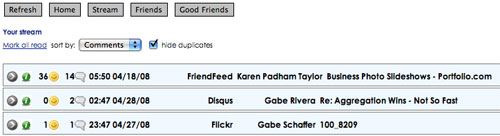
A week into its release, FriendFeedMachine has made a number of improvements throughout the user interface, including dramatically speeding up its use, which could crawl under heavy load (such as looking up all my friends' activities), separating the friends from their activities, and most interestingly, adding a new "Stream" view, which delivers, as Goldie writes in a blog post announcing the update, a "constant stream of entries from your home feed, easily viewable and sortable."


In this example, I'm sorting the stream by most commented, and deduping.

Essentially, FriendFeedMachine has taken a new approach to FriendFeed's content and made it more easily manipulated, like a database, in that while FriendFeed defaults to highlighting most-recent items at the top of the page, including those items most recently "commented" on or "liked", FriendFeedMachine lets you sort your stream, not just by "Newest", but by "Oldest", by user, by service, by the number of comments, by those with the most "Likes", or the least.

Now, FriendFeed can be sorted every which way, like an Excel table.

Also, FriendFeedMachine claims to have solved the infamous "duplicates issue" that at times can have FriendFeed users in a tizzy. By checking "hide duplicates", items otherwise displayed multiple times will be shown only once in your stream.

On top of giving a better way to view FriendFeed, and sorting good friends from casual acquaintances, FriendFeedMachine still offers the ability to like and comment directly within the Web browser. And in trading e-mails with Scott, I know continued updates are coming. But the first week shows strong promise already.
April 27, 2008 · 3 MIN READ · BY LOUIS GRAY

My Social Media Consumption Workflow

My Social Media Consumption Workflow

Amidst watching some talk about how they are reducing time in Google Reader due to information overload, or switching away from one service for another, whether due to its features, the friends, the noise or the content, I've been thinking a bit about how I consume social media, and specifically, the order of how I do it, to be sure I've caught up on everything quickly.
There's no question the amount of information I consume can be daunting. Glancing quickly, as of this morning:

1) I have 270 RSS subscriptions in Google Reader, sending between 500 and 800 items a day.
2) I follow 490 Twitter users.
3) I am subscribed to 269 FriendFeed users.
4) I have 210 Facebook "friends".

On the back of all this information coming this direction, I am pushing out information:

1) Posting one or two items here daily (1,300 so far)
2) Updating people on Twitter (334 updates so far)
3) Comments and Likes on FriendFeed (1,135 and 643 respectively)

In addition, there are a number of ways to engage and act on the data.

1) Adding bookmarks to Del.icio.us (630 so far)
2) Tracking activity via Technorati and Google Blog Search
3) Tracking comments here and elsewhere via Disqus
4) Trading e-mail with readers, entrepreneurs and peers

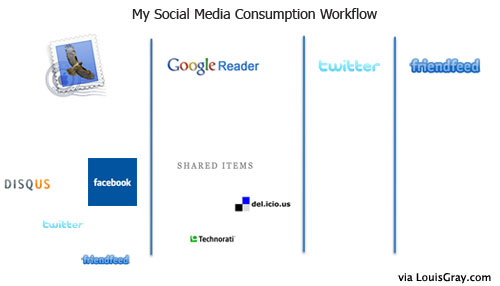
Add the above to a way a typical non-robot views the Web, including viewing news, sports and entertainment, not to mention everything to go with work and family obligations, and it can be hard to know where to start. While there's no question I'll vary from this process from time to time, below is a good idea of how I start the day in social media.


1) It always starts with e-mail. E-mail helps me know what's actionable. From e-mail, I can find out and act on:
a) New Twitter, FriendFeed and Facebook connections
b) Direct Messages from Twitter
c) New comments on the blog via Disqus
d) If Google Blog Search has uncovered references to the blog
e) If there are conversations about upcoming posts or new services to check out.

When e-mail activity is completed, I open the Web browser. While FriendFeed is my home page, I usually leave it on the first visit of the day, and head to Google Reader, to rapidly consume the Web.

2) Reading Google Reader, I can catch up on the night's blog posts, add items to my link blog, or open posts in a new tab to bookmark or comment.

3) I'll open Twitter and do a quick scan of the first few pages of "tweets" from those I'm following to see what the discussions of the day are. I'll also check the replies tab to see if anybody tried to send me a message where action is required.

4) I head to FriendFeed.

Why is FriendFeed last in this order? It's because unlike the first three, which feel like work, where there is an action that needs to take place, or a task that needs clearing, FriendFeed is more like the finish line, where I can finally relax and engage with peers. I don't necessarily want to be rushed when I'm on FriendFeed, but can take time to see what others have done throughout the Web, make comments and respond to others who have commented on my own activity.

Also, visiting FriendFeed last here means that my feed is "properly" filled, with shared items from Google Reader, bookmarked items from Del.icio.us, any updates on Twitter, etc.

5) Additional activity

All other social media activity is optional, and comes when it makes sense. That would include:
a) Submitting items to the Elite News Tech Reddit
b) Digging items from the Upcoming list of Digg's Technology section
c) Visiting Shyftr and posting comments or responding to conversations.
d) Seeing what's popular on LinkRiver, ReadBurner or RSSMeme.
e) Checking trends and news on TechMeme and the TechMeme River.

Everybody has their own route to how they consume and act upon social media. This is how I tend to do it, so I feel I'm on top of things. Am I doing it wrong? How do you go about your social media workday?

April 26, 2008

April 26, 2008 · 2 MIN READ · BY LOUIS GRAY

Disqus' Excellent Customer Service Enables Comments Integration

Disqus' Excellent Customer Service Enables Comments Integration

Disqus is seeing a meteoric rise as the default comments management system for the Web, enabling bloggers to deliver threaded comments, and track their own commenting activity throughout the blogosphere. Recently, Disqus has made a lot of headway through integration with popular social networking tools, including RSSMeme, ReadBurner, Fav.or.it and Plaxo.

But while I had tried earlier this month to get Disqus up and running, the way I use Blogger, with a customized template, along with FTP publishing to louisgray.com, got in my way. But overnight, with some incredible help from Disqus' Daniel Ha, the site now features Disqus comments for all posts, without losing the existing comments from previous conversations.

Disqus is designed to offer bloggers simple installation, be they on Wordpress, Blogger or TypePad. But by default, it assumes a user has upgraded to the newest edition of Blogger, featuring greater widget control, customized layouts and templates. As I have made numerous changes to my template in raw HTML, I haven't made this change, and Blogger hasn't made it easy for me to move to the new service, not making it available for FTP-hosted blogs like mine.

So essentially, I thought I would remain Disqus-free, saying so last night on Twitter. But showing incredible awareness, Daniel Ha of Disqus, said "How can we make it easier for you?"

We traded direct messages and e-mail, and he quickly understood the issue, offering to patch it manually.

Daniel came back with his first solution this morning, but that solution wouldn't have displayed old comments, which would be a showstopper for me, so I balked, asked for him to keep working on it, and again, he said he'd give it a shot. He wrote, "I will take a look into how to display the comments for older articles and let you know ASAP."

Just seven minutes later, he sent me an updated template, which now lets all blog entries, such as this one, use Disqus for comments. And all previous posts will also display Disqus comments, underneath existing conversations. At the moment, this change makes it look like the posts don't have existing comments, but they do, and over time, the Disqus comments will populate the data here, instead of Blogger's comments.

If Daniel hadn't been listening, and willing to give my "corner case" some real effort on a Saturday morning, we wouldn't have been able to get Disqus up and running. This is a great example of next-generation customer service, and engaging. Of course, if you see any oddities related to the new Disqus usage on louisgray.com, please do let me know. I'm listening, and so is Daniel...