Silicon Valley Technology Commentary & Archives · Est. 2006 3,034 Posts · 2006–2026

May 23, 2008

May 23, 2008 · 4 MIN READ · BY LOUIS GRAY

Silicon Valley Is Smoking Right Now

Silicon Valley Is Smoking Right Now

That Northern California has the occasional blaze is not new. But a wildfire in Santa Cruz County has burned more than 3,000 acres, destroying 10 homes (as of this posting), and filled the entire Silicon Valley in a gloomy gray haze. (See Google News or KRON 4's coverage) While my Sunnyvale home is well away from the fire, it is definitely disconcerting to have our condo and all of the outdoors smell like a Memorial Day barbeque gone wrong.

While I'd heard the occasional news update yesterday about the Summit Fire, hearing it was a little over 10% contained by yesterday evening, it wasn't until late night when I started to feel the effects. The son of an asthma sufferer, I was lucky enough to be born with my lungs as an Achilles' Heel, as I dealt with my share of bouts with bronchitis as a kid, and can still wheeze after any good exercise. As my wife and I moved furniture around and cleaned out closets in preparation for the twins' near-term arrival, I found myself gasping for breath and coughing, as if I'd just completed a 5 kilometer run, and gotten winded. After weeks of seeing my wife, now nearly 32 weeks pregnant, put her arms akimbo and gasp for breath, the scene was comical, as we both were near images of each other. Given how out of shape I am, I swear we could even have done a belly bump.

This morning, I left our condo only to find the hallway wreaked of smoke. Taking the elevator down to the first floor, I encountered a woman leaving the front door ajar in hopes the first floor's smoke alarm would stop beeping, alerting us to non-existent danger.

And I wasn't the only one noticing the effects. Patrick Barry reported smoke filling downtown Mountain View, while others similarly said Stanford, Atherton and Los Altos were blanketed in the haze. The situation near work, on the border of San Jose and Milpitas, also smelled like a forest campout, only without marshmallows, S'mores and mosquitos.

This minor inconvenience to us is no doubt tiny compared to those directly impacted or fighting the fire. My younger sister, a police dispatcher for Scotts Valley PD, near Santa Cruz, put in a 7 p.m. to 7 a.m. shift last night, helping direct officers who were engaged in the area. A state of emergency was declared and according to the Governator, the best people are on it.

Looking backward 15 years ago, to my sophomore year in high school in Chico, our family was more directly impacted by area fires. The seven of us (My parents, myself, 2 brothers and 2 sisters) had to pack up and evacuate our home two or three times in the space of week, as fires threatened to scale the nearby canyon walls, and take on the town of Paradise, which despite its name, is ridiculously positioned on a ridge between two fire-prone canyons with not much more than two ways downhill and out of town.

(See: Google News archive: "Arsonists who were "inspired" by the spectacular Old Gulch and Fountain fires in August have set dozens of fires, including 35 in Butte County alone" -- San Jose Mercury News)

With an estimated 25,000 to 50,000 senior citizens who drive just like you would expect, the prospect of getting in some massive conga line downhill was not all that inviting. But that didn't stop a firebug or two gaining inspiration from fires that were already burning, and starting more, one of which was set just outside the town limits, raining big flakes of ash on our home, our yard and our car, with CDF helicopters flying over our home, grabbing water from nearby ponds or lakes and dumping it on the flames in an attempt to save the city.

Already having our perceived valuables in the car from the last time we had evacuated, my mom put the rest of us kids in the station wagon, and we headed down to the Valley, not knowing if we would come back to a house or scorched earth. Luckily, the firefighters had done an amazing job, stopping the fire a mere 100 feet from where homes started, and from which there likely would have been no stopping the flames.

Weeks after the fires had died down, we headed to a point looking over the canyon and saw blackened trees in every direction. At my foot, I plucked a blackened rock from the dirt, seeing it divided in two, the top half, permanently charred by fire, and the lower half, protected underground. More than a souvenir, it served to remind us how close the fires had come. Hopefully, when the smoke clears from this week's blaze, we'll learn more stories of near-misses than of tragedy. It'll make all of us breathe a lot easier.

May 22, 2008

May 22, 2008 · 3 MIN READ · BY LOUIS GRAY

Continuous Parallel Attention: My New Reality

Continuous Parallel Attention: My New Reality

When you really want to concentrate, do you need a quiet room with no distractions, or does playing loud music help you focus? Can you hold a conversation while typing? Can you read blogs and write e-mail while watching TV? I do. And I must. For with all the information available these days, and my personal unwillingness to miss out on conversations or media consumption, I've done more than embrace what many call "continuous partial attention". Instead, I believe I have a goal of achieving "continuous parallel attention", whereby no single task is given primary focus, but instead, multiple tasks gain the same focus.

The common definition of continuous partial attention can be simplified to a person being focused on a single primary task but monitoring background tasks. This can be driving with the radio on, reading a book with a baby sleeping in the next room, or writing a proposal with Twitter on in the background.

Some do this well. Others don't.

Nearly 100% of the time I'm watching TV, I've got my laptop in my lap, with the TV screen's lower half ending just above the top of MacBook Pro screen. In contrast, if I try and talk to my wife when she's writing an e-mail, she probably won't hear me, and once I interrupt, she stops typing.

Last month, I talked about my social media consumption workflow, explaining how I started off my day, working essentially left to right to be sure I processed the information flow in the right way. This issue came up again this morning, when Jeremiah Owyang of Forrester revealed his own morning habits. In the ensuing FriendFeed discussion, I said I too try to knock out much of the activity at the beginning and end of the day, but also keep up what I call "continuous parallel attention" in between.

With continuous parallel attention, essentially multi-tasking, no single activity is getting priority over the other. I am writing e-mails at the same time I am listening to music, at the same time I am getting RSS feeds and seeing Twitter updates or seeing the FriendFeed page reload. Ask me the lyrics of the song, and I can tell you. Ask me what was said on Twitter, and I can probably tell you. Through continuous parallel attention, you're not giving one activity the short shrift due to time or priority, but instead, making sure every activity gets the right focus.

If you drive into the office, but you are thinking about the next blog post, or the next meeting, or even where to go for lunch, that's not mind wandering or being distracted. That's parallel attention. Your radio might be on and you're singing along. If a squirrel darts out in front of your car, you'll still hit the brakes. If a commercial comes on the radio, you still change the station. All in parallel. Your driving doesn't get worse. I'd argue I even drive better with loud music I know, where I'm pounding the steering wheel with every bass drum beat. I work better when I've got multiple things at once, in parallel.

The same is true for engaging with social media. Have you seen Robert Scoble's video from Media Bistro earlier this week? (See: Center Networks: Video: Robert Scoble on the "Worldwide Talk Show")

Robert doesn't linearly go one by one to consume his social media. He is running his RSS feeds, his Twitter feeds, and his video, all in parallel. The human brain is an amazing sponge, ready to take in new information, and if you practice, practice, practice, you can train it, like a muscle, to be ready for exercise. Achieving continuous parallel attention in social media means you don't have to stop one task to pick up the next. You just keep going. Yes, I saw that RSS feed. Yes, I read that e-mail. Yes, I saw your tweet and your FriendFeed post. But I also got all my work done, caught up on our TiVo shows, and picked up the groceries. It's not because I go without sleep (though I need less than most)... it's because of this parallel focus. You should try it.
May 22, 2008 · 3 MIN READ · BY LOUIS GRAY

Take FriendFeed Mobile With FF To Go

Take FriendFeed Mobile With FF To Go

Just about every wish list for FriendFeed contains a request that the company's development team make a customized version for mobile phones. I know mine from December sure did. While FriendFeed plays nicely with the iPhone and iPod Touch's built-in Safari browser and others are turning to MojiPage to get their FriendFeed activity on the go, there hasn't yet been a focused effort to bring a mobile version of FriendFeed to cell phones, until now.

Fresh off his launch of Tweet2Tweet just this last Saturday, Benjamin Golub, also the author of RSSMeme, and formerly, a project called DearLazyWeb, has developed a site aimed to get FriendFeed out of the browser, and into your cell phone, letting you comment and like as you would at home. The site is called "FF to Go" and can be found at www.fftogo.com.


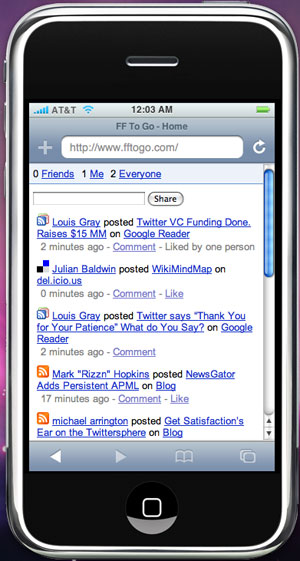
Over the last few days, I've been testing FF To Go, not just on my iPod Touch, but also, my BlackBerry, and at first blush, FF To Go enables all the core functionality offered by FriendFeed's standard interface, including making likes and comments, and importantly, honoring the "hide" options you've already selected over time. You can even post directly to FriendFeed by using the embedded "Share" feature, or undo likes and comments.


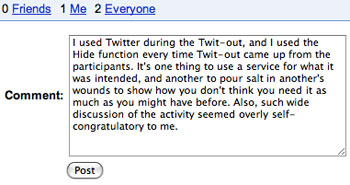
Making a comment in FF To Go

As the FriendFeed interface is spartan, so is FF To Go. But for most mobile phone users, this is expected. FF To Go shows three main tabs upon login, including "Friends", "Me" and "Everyone", and each option mirrors the same tabs on FriendFeed. Users can even navigate between each tabs by hitting 0, 1 or 2 on their cell phone after having logged in.

The FF To Go main screen displays the most recent 10 entries from FriendFeed, and you can take action on any of the items. Commenting on an item takes you to a quick interstitial screen with a comment box, where you make your comment, and then post to the site. It's not as smooth or Ajaxy as the real thing, but it certainly works.

Given the 10 entry limit per mobile phone screen, navigating between pages on FF To Go is also a must, using your phone's keypad. And Benjamin has made this quite simple as well, with 6 going forward a page, and 4 going back a page. Lacking the touch screen capability on the iPhone, keypad navigation is the only option, and in my experience, it works as anticipated.

Rapid development of FF To Go was made possible by the FriendFeed team's API program, enabling developers to harness data from the service to create new and interesting applications. Benjamin also explained the application was written in Django and using the Google App Engine. So why build FF To Go, instead of waiting for movement on FriendFeed's end to develop their own mobile version of the site? Benjamin says there were two major reasons:

1) There wasn't a good, existing solution that enabled active participation for most phones, instead of a static, passive view.
2) Seemingly everyone was begging for it.

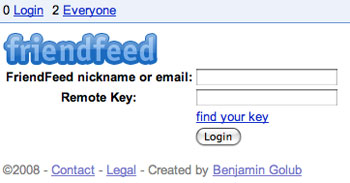
As with other services that require the FriendFeed API, in order to get started, you will need to log in with your FriendFeed user name, and your remote key. Once you've logged in to the service, you've got FriendFeed, in your pocket, to go.

May 21, 2008

May 21, 2008 · 1 MIN READ · BY LOUIS GRAY

Google Reader, Why Dost Thou Taunt Me?

Google Reader, Why Dost Thou Taunt Me?

What if you got into your car and saw the fuel tank registered at full, but you ran out of gas after you exited the driveway? What if your laptop reported full battery, but the screen went black before your e-mail application even opened? What if you bought a dozen donuts, and opened up the box to find only crumbs?
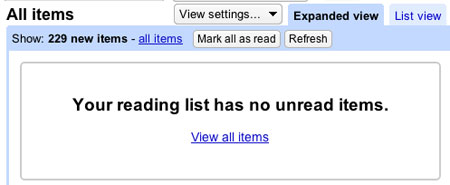
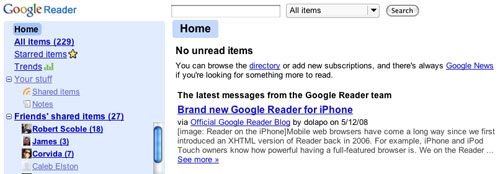
It's this feeling of first hope, and then, emptiness, I'm getting tonight with my Google Reader. While Google Reader, despite significant competition of late, is still the best online feed reader out there, its occasional quirks are almost always worth highlighting - especially as the small team does such a great job the other 99.9% of the time.


So do I have 229 new items, or zero new items? Confusing!

Tonight, after only about 30 minutes away from the computer, I returned to my feeds and found more than 200 new items awaiting - an astounding number, even for the most prolific readers. But after reading a small handful of items, I was done. Amusingly, Google still said I had more than 200 new items, even though it also claimed I had no new items available. Clearly a minor error, but a misleading one, to say the least. As you can see from the two screenshots, it's as if Google Reader cached my "unread items" list at some point earlier in the day, and didn't clear them from my "to do" list, even as I methodically read each post.


Google even knows which feeds I need to get to!

What if this "number inflation" suddenly sweeps through all Google apps? Will I seem more popular on GMail even though nobody e-mails me there? Will miles be added on to every trip where I get directions from Google Maps? Will I see the number of search results dramatically increase, but only have one link per page? The possibilities are mind-boggling.