Silicon Valley Technology Commentary & Archives · Est. 2006 3,034 Posts · 2006–2026

May 26, 2008

May 26, 2008 · 1 MIN READ · BY LOUIS GRAY

FriendFeed and Google Reader Are One. Sort Of.

FriendFeed and Google Reader Are One. Sort Of.

Not too long ago, ReadBurner upgraded, including a new tab that essentially added Google Reader in an iFrame, letting you check your RSS feeds without leaving the site. At the time, I openly speculated that I would love it if FriendFeed would do the same thing.

In my fevered brain, FriendFeed could tie in with Google Reader, and let me see if other friends of mine have already "liked" or shared an item. Imagine seeing a feed from TechCrunch, and a little icon on the right saying 5 friends "liked" the item and 6 had "shared" it and there were 3 comments in FriendFeed. So far, the closest solution to this had been Assetbar, but that data, so far is siloed, and the service didn't gain the traction I had hoped.

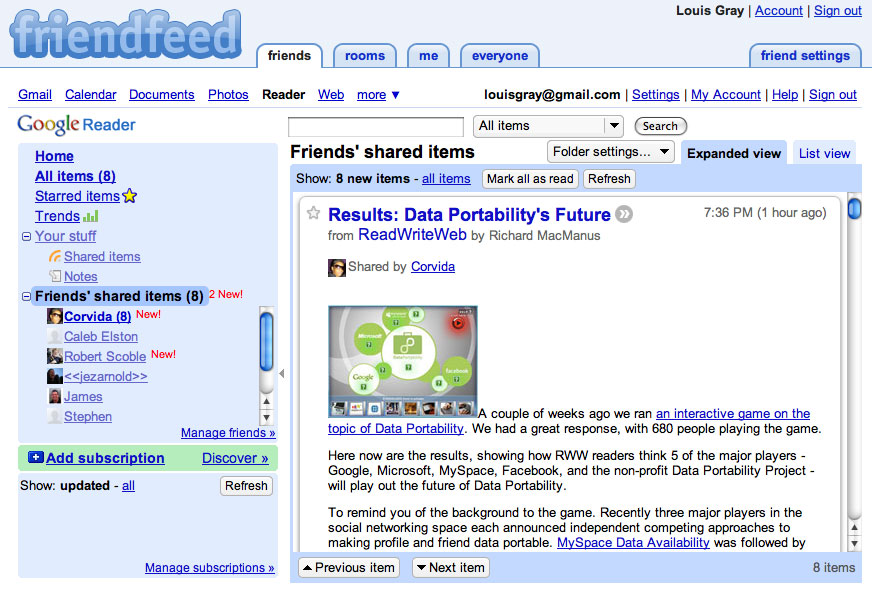
So... to my rescue came Matt Shaulis (FriendFeed page), who you know from his work on one of my favorite Google Reader alternatives, Shyftr. Matt spun up a quick bookmarklet, which, if you add it to your toolbar, lets you log in to Google Reader while logged into FriendFeed, defaulting to your friends' shared items. See the below screenshot:


(Click for the full screenshot)


Use FriendFeed? Use Google Reader? Want to make sure, unlike Loic Le Meur speculates, that both are here to stay? Use the below bookmarklet:

Drag Bookmarklet to Toolbar: FriendFeedReader

May 26, 2008 · 3 MIN READ · BY LOUIS GRAY

Scooped: Who Brought the Story to Techmeme First?

Scooped: Who Brought the Story to Techmeme First?

When Gabe Rivera opened up search on Techmeme recently, the three-year-old site's archives became an extremely interesting playground to see trends, strong sources for news, simple ego-searching, tracking how companies have been viewed over time, and even to see which blogs are the first to bring the news to the big stage. I did some quick searches on a number of company names, products and other terms to see which sites were the first to have the terms included either in the title or summary of the piece.

Techmeme search only searches main items that reached the front page of the tech news aggregator, and does not include the "Discussion" links. Of the terms I searched for, none debuted on Techmeme prior to September of 2005, so if a service was already well established (See: Yahoo!, Google, Digg, etc.), saying who mentioned it first and made Techmeme after the site debuted doesn't add a ton of value. In the terms I looked for, it was interesting to see such a wide variety of original sources.

Also of note: Popular items that had more than 1,000 total results, including iPhone, made it impossible to find out who got on Techmeme first, as results only go to 1,000, similar to Google and Yahoo!'s limitations.

To try out your own terms, head to http://www.techmeme.com/search/, put in your term of choice, and report the results here. This is merely the tip of the iceberg for sure.

Term: Alert Thingy
Source: TechCrunch
Date: April 16, 2008
Link: http://www.techcrunch.com/2008/04/16/look-out-twhirl-alert-thingy-adds-twitter-support/

Term: Apple TV
Source: MacDigest
Date: January 9, 2007
Link: http://techdigest.tv/2007/01/macworld_2007_l.html

(Note: Engadget first covered it when it was called "iTV", on Sept. 12, 2006, here: http://www.engadget.com/2006/09/12/apple-to-release-itv-video-streaming-box-in-2007/)

Term: Assetbar
Source: louisgray.com
Date: February 8, 2008
Link: http://www.louisgray.com/live/2008/02/assetbar-proposes-solution-to-twitter.html

Term: Disqus
Source: VentureBeat
Date: August 8, 2007
Link: http://venturebeat.com/2007/08/08/disqus-to-launch-new-features/

Term: Drobo
Source: Michael Gartenberg
Date: June 5, 2007
Link: http://weblogs.jupiterresearch.com/analysts/gartenberg/archives/2007/06/drobo_changes_t.html

Term: FriendFeed
Source: New York Times
Date: October 1, 2007
Link: http://www.nytimes.com/2007/10/01/technology/01feed.html

Term: Google Reader
Source: Official Google Blog
Date: October 7, 2005
Link: http://googleblog.blogspot.com/2005/10/feed-world.html

Term: Hillary Clinton
Source: CNET News.com
Date: November 1, 2005
Link: http://news.com.com/2100-1025_3-5924424.html

Term: iPhone
Issue: More than 1,000 results

Term: iPod Touch
Source: Engadget
Date: September 5, 2007
Link: http://www.engadget.com/2007/09/05/ipod-touch-gets-official/

Term: Jaiku
Source: Scobleizer
Date: April 8, 2007
Link: http://scobleizer.com/2007/04/06/leo-laporte-leaves-twitter-for-jaiku/

Term: LinkRiver
Source: louisgray.com
Date: Feb. 13, 2008
Link: http://www.louisgray.com/live/2008/02/linkriver-enters-life-streaming-fray.html

Term: Megite
Source: TechCrunch
Date: Feb. 4, 2006
Link: http://www.techcrunch.com/2006/02/04/a-look-at-the-memeorandum-killers/

Term: Newsvine
Source: GigaOm (Formerly Om Malik's Broadband Blog)
Date: November 9, 2005
Link: http://gigaom.com/2005/11/09/introducing-newsvine/

Term: Obama
Source: Valleywag
Date: Dec. 28, 2006
Link: http://www.valleywag.com/tech/tail-wagging-dog/lagging-presidential-candidate-turns-to-robert-scoble-224623.php

Term: Porn
Source: Wired
Date: September 22, 2005
Link: http://www.wired.com/news/culture/0,1284,68934,00.html

Term: Profilactic
Source: Mashable
Date: April 23, 2008
Link: http://mashable.com/2008/04/23/onaswarm-lifestreaming/

Term: PSP
Source: Pro-G.Co.UK
Date: Sept. 16, 2005
Link: http://www.pro-g.co.uk/news/nid/1220/1474/

Term: ReadBurner
Source: louisgray.com
Date: Jan. 8, 2008
Link: http://www.louisgray.com/live/2008/01/readburner-in-stealth-mode-looking-to.html

Term: RSSmeme
Source: louisgray.com
Date: Mar. 17, 2008
Link: http://www.louisgray.com/live/2008/03/did-readburner-acquisition-cause.html

Term: Seesmic
Source: TechCrunch
Date: October 8, 2007
Link: http://www.techcrunch.com/2007/10/08/loic-le-meurs-new-startup-launches-seesmic/

Term: SocialThing
Source: TechCrunch
Date: March 10, 2008
Link: http://www.techcrunch.com/2008/03/10/watch-out-friendfeed-socialthing-is-even-easier-to-use/

Term: Summize
Source: ReadWriteWeb
Date: March 16, 2007
Link: http://www.readwriteweb.com/archives/summize_search_heatmaps.php

(Note: Summize pulled a 180 following this post. The first time they reached Techmeme in their new incarnation was when Paul Stamatiou covered them on May 10, 2008, here: http://paulstamatiou.com/2008/05/09/review-summize-twitter-search)

Term: Techmeme
Source: TechCrunch
Date: May 8, 2006
Link: http://www.techcrunch.com/2006/05/08/techmemeorandum-is-now-techmeme/

Term: Technorati
Source: The Blog Herald
Date: Sept. 14, 2005
Link: http://www.blogherald.com/2005/09/14/google-blog-search-reviewed/

Term: Tesla
Source: Gizmodo
Date: Aug. 26, 2006
Link: http://gizmodo.com/gadgets/clips/lexus-self-parking-car-video-and-review-196551.php

Term: TiVo
Source: PVRblog
Date: Sept. 13, 2005
Link: http://www.pvrblog.com/pvr/2005/09/tivo_72_os_adds.html

Term: Toluu
Source: louisgray.com
Date: Mar. 24, 2008
Link: http://www.louisgray.com/live/2008/03/toluu-offers-gateway-to-friends-rss.html

Term: Twitter
Source: Ben Metcalfe Blog
Date: Oct. 26, 2006
Link: http://benmetcalfe.com/blog/index.php/2006/10/26/ev-williams-buys-back-odeo-and-twitter/

(Note: As Gabe Rivera notes in the comments, Twitter was originally called Twttr, and Biz Stone's announcement in July of 2006 brought the service to Techmeme.)

Term: Wii
Source: MTV.com
Date: Apr. 27, 2006
Link: http://www.mtv.com/news/articles/1529658/20060427/index.jhtml

Term: Yahoo! Buzz
Source: Valleywag
Date: February 15, 2008
Link: http://valleywag.com/357006/screenshots-of-yahoo-buzz-a-digg-competitor

Just a start. But Techmeme search gives a good glimpse into who's breaking the news in Tech, or who's got enough juice to be the first to reach the popular site with a new story. Can you find some more good examples? Does this data teach us anything at all?

May 25, 2008

May 25, 2008 · 3 MIN READ · BY LOUIS GRAY

Making My Blog Search Legit With Lijit

Making My Blog Search Legit With Lijit

Blog widgets are seemingly a dime a dozen these days, but offering a strong search function on your Web site is a must, regardless of how cleanly you've laid out your archive pages, or how well you've implemented tags or labels. A little over a week ago, after seeing Lijit growing its presence on many other blogs I follow, I integrated the service into my site, letting users find older stories I've written on topics they find interesting, and opening up yet another box of stats for me to play with, including most frequently used search terms.


Looking back in my e-mail archives, it looks like I first signed up for Lijit back in June of 2007. If I remember correctly, I think I implemented it, but later, it got pulled in some blog redesign. This time, it's likely here to stay. On May 16, I undoubtedly polluted the Lijit user database, signing up again and getting a second account. Oops.

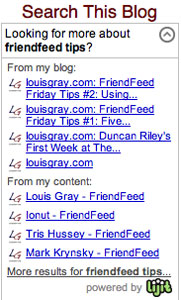
Acting as a front-end for Google Blog Search, Lijit places a simple search box on your blog, letting visitors search your archives, but also, it pre-populates if somebody arrives on your site from having completed a search elsewhere. For example, if I do a Google search for "FriendFeed Tips", and click on FriendFeed Friday Tips #1: Five Ways To Use the Hide Function, Lijit helpfully asks, "Looking for more about friendfeed tips?" and gives what it would provide as the best links in my blog, as well as through content delivered from other services I use around the Web, such as MyBlogLog and Del.ico.us.

Search results from Lijit are displayed as a pop-in window in the Web browser, not asking you to leave the site, but instead, showing you the results, surrounded by Google AdSense. Of interest, Duncan Riley said on FriendFeed yesterday that not sharing the revenue with the bloggers themselves was "not cool", but I hadn't given that much thought before implementing.

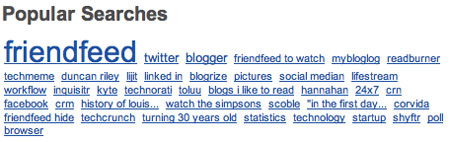
The most visible benefit of using Lijit is showing site visitors what the most popular searches are, either on my blog, or used to find the blog. As of today, the top ten terms are: FriendFeed, Twitter, Blogger, Lijit, Techmeme, BlogRize, MyBlogLog, ReadBurner, FriendFeed to Watch and Duncan Riley.


Also very helpful is the ability to filter what is displayed. I've mentioned before that there's a core element of Web perverts who like some pages in my archives, so I get all sorts of odd traffic from dirty keywords, which I don't want shown, so I can hop into my Lijit page and add these unwanted terms to the filter.


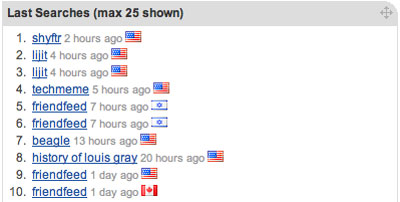
Meanwhile, as Lijit is watching my site traffic for search activity, it's also monitoring standard blog tracking tools, including page views, how many visitors are coming, and where they are coming from. Combining the two facets of the service, from search to statistics, Lijit can tell me which countries search for what most frequently, what is the city that offers me the most visits (Mountain View, CA), and from what country did my most recent search terms originate. I can also see which pages proved most popular after search terms were entered.

So it works. Good stuff. And while I underplayed Lijit's integration with other services like MyBlogLog, Del.ico.us, Flickr, Reddit, StumbleUpon, Disqus, Digg, YouTube, etc., this element may become more important in the future, as site visitors can do more than search just my blog, but they can search all across my network, essentially acting like FriendFeed in reverse, not looking for one site to track my activity, but instead a search point to analyze all my activity around the Web. I'll be watching this to grow over time, and hope to report back and say if site visitors are doing more than searching my blog, but searching my content as well. I've enabled a dozen different sites to pull from, so have at it.

May 23, 2008

May 23, 2008 · 4 MIN READ · BY LOUIS GRAY

FriendFeed Friday Tips #2: Using the Bookmarklet

FriendFeed Friday Tips #2: Using the Bookmarklet

By popular demand, I've been asked by other FriendFeed users to highlight how I use the popular social lifestreaming site. The first topic, covered how to best use the "Hide" function. Today, I wanted to introduce the underutilized, but quite versatile, bookmarklet.

In addition to supporting the import of several dozen services into your feed, FriendFeed lets you post directly to the site in two ways. The first is the straight-forward "Share Something" link at the top of the page, begging for a quick message and corresponding link. The second, and much more fun way, to share something is to use their bookmarklet, which lets you share any page you find interesting on the Web, including photos and even an excerpt, should you choose.

1. Where Can You Find the Bookmarklet?

FriendFeed hasn't yet made finding the Bookmarklet easy. A page describing its use, including a tutorial video, can be found here. The bookmarklet is essentially a smart snippet of JavaScript code that lives as a bookmark in your browser. To get started, drag the phrase "Share on FriendFeed" to your bookmark bar, as shown in the graphic below.
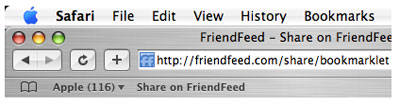

As I use a number of social media services, and several offer the ability to share directly to their site, I've even made a folder in my Safari bookmarks called "Sharing", with "add to FriendFeed" as one option. (See screenshot)

2. How Can You Use the Bookmarklet?

Once the FriendFeed Bookmarklet is saved in your browser, you can use it on just about any page on the Web. If you find an interesting article, click "Share on FriendFeed".
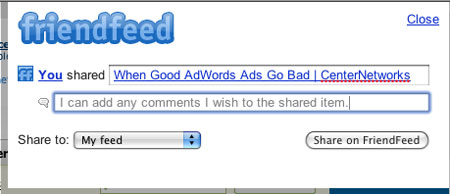

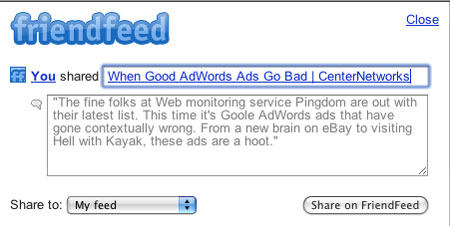
By clicking "Share on FriendFeed", the Bookmarklet will autopopulate with the title of the article, usually also containing the source. In this example, I have shared "When Good AdWords Ads Go Bad" from CenterNetworks.

Next to the "thought bubble", you can add any comments you wish to the article, and they, along with the title, will be added to your feed when you hit the "Share on FriendFeed" button.

The default location is "My feed", but now, with the addition of FriendFeed Rooms, you can even click the pull-down menu next to "Share to" and send it to just one of your rooms and not the main feed.

3. How Can You Quote Text in the Bookmarklet?

A common use of the Bookmarklet is to share a key piece from the story. This can be done by first, highlighting the text to share, and then clicking "Share on FriendFeed". In this case, again you see the title and source are provided, but now, the text you selected populates the comment area.
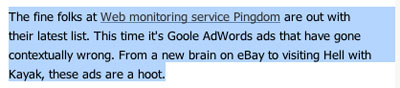

Again, you can send this to your feed by clicking "Share on FriendFeed".

4. What About Pictures?
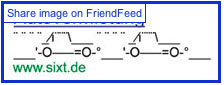
One of the cooler things about the Bookmarklet is the ability to select pictures from the shared story, and add them as well. Once you have hit the "Share on FriendFeed" Bookmarklet, hover your mouse over any image on the page, and you will see a little rectangle pop up, saying "Share image on FriendFeed". Click once to get the picture added to your Bookmarklet in progress. Adding an image, or multiple images, if you choose, does not change the title or the comments being shared.
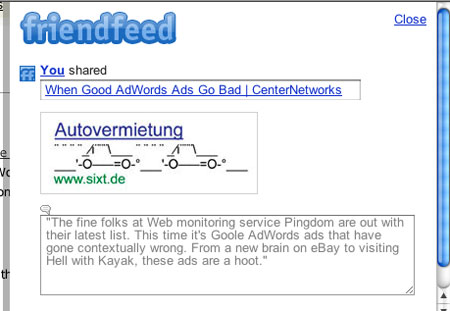

In this example, I picked one of the AdWords graphics Allen Stern of CenterNetworks used in his article.

5. How Do I Know It Worked?
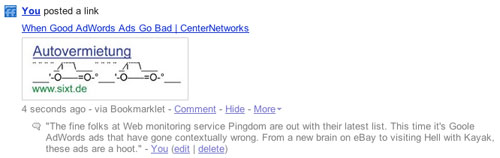

When you've added a link by way of the Bookmarklet, and you're happy with its title, the comment and any graphics, you hit "Share on FriendFeed". To see it in action, just go back to FriendFeed.com and it'll likely be at the top of the feed, as the most recent item. If you don't check right away, just head back to your own personal feed, and you can find it there.
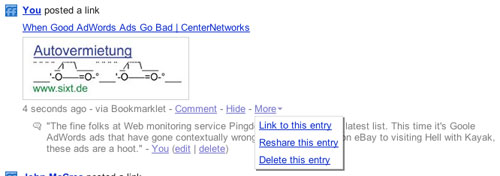

Just like with any other shared item in FriendFeed, you can click the "More" option, to link directly to it, reshare it somewhere else on FriendFeed, or delete it entirely.

6. What Can't I Do With the Bookmarklet?

One thing you can't do with a Bookmarklet is change its title, URL or graphics after something has been posted. You can edit your comment, or delete it, but the title can't be changed, so be sure it's solid before publishing. Also, it is possible to find sites where graphics that look shareable on the Bookmarklet actually aren't, either by being used in a non-standard way by the Web site author, or, in other cases, they are dynamically built and not actual graphics at all. I've also, at times, found that clicking on an image to share it may instead see me off to another site as the image is linked elsewhere. But that's more an issue with the shared site, and not the Bookmarklet itself.

With all the rage of late saying whether FriendFeed can replace Twitter or serve as a substitute, it's worth noting that you can do more than just post text and links to your feed, but graphics as well, and conversations that last more than 140 characters.

To see a long list of items I've shared on FriendFeed using the Bookmarklet, check here:
http://friendfeed.com/louisgray?service=internal. And don't forget to add the Bookmarklet yourself.

Next week's FriendFeed Friday Tip may or may not involve the new Rooms. You let me know what's needed.