
On Monday, FriendFeed
previewed a new user interface, in beta, aimed to make the site easier to read, and also, to help people get updates from their "favorite" friends, through the deployment of lists that show a subset of your friends' updates, or through a new ability to remove individuals' updates from your home feed. The update also included a few new features, including photo posting from the main feed, a new UI that shows rooms and service details on all pages, and the ability to browse
FriendFeed through the eyes of another user by seeing their home feed.
While the updates were welcome, and visible at
beta.friendfeed.com, I feel the team missed an opportunity to make some critical updates which I hope are on the near-term roadmap. Here are some of the big ones.
1. There Are Still No User ProfilesIn December, when I posted
10 Suggestions for FriendFeed, my number one request was for an option to add a small biography or profile to each user's page. While it's true that a person's collective Tweets or blog posts or bookmarks give a good indication to who they are, it would still be good to have more details around a fellow user, as well as the option to search and find new users based on details in their profile, for example, by company, by geography or university.
2. The Issue of Duplicates and Original Items Has Not Been AddressedI might take multiple actions on single item. For example, I could post this blog post, tweet about it, add it to my
Google Reader shared items list, bookmark it on
Delicious, submit it to
Digg and add it to
StumbleUpon. In theory, as FriendFeed knows I did all this, it could show my multiple actions on one item. It would also be good to click on an item and see "Other Conversations Around this Item" or "Find the Original Item" to reduce parallel comment threads and reduce the number of times that a share by a popular user trumps an original piece by a less-known user.
3. There Is No Ability to Message Other UsersAs the service has become a foundation for communication and sharing, it makes sense that you could send notes within FriendFeed to other users. While some have grown tired of DMs (Direct Messages) on
Twitter, they are very useful for short one-to-one notes. On FriendFeed, you either need to publicly message somebody, or dig around their personal blog, assuming they have one, to track down an e-mail address.
4. The Controversial Default Users Are Still ThereOne of the most universally disliked issues with FriendFeed was that new users were guided to follow nine of the most visible users, reinforcing some people's concern that the so-called A-list had transitioned from the blogosphere to FriendFeed as well. Among the most notable critics were Allen Stern of CenterNetworks (See:
FriendFeed Follower Patterns Exposed) and Om Malik of GigaOM (See:
FriendFeed. More Like (Fake)FriendFeed) While co-founder Paul Buchheit called the issue
"a growing misunderstanding", and that the recommendations were made from the "entire set of FriendFeed users", not "hand selected", the fact remained that the popular users were getting more popular.
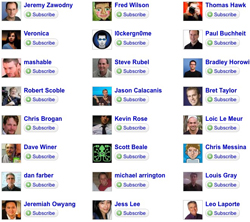
Now, instead of the default nine users who were presented to all new FriendFeed subscribers, the new beta interface instead shows 24 default users in a three by eight grid. I signed up to an account with a new e-mail address and was presented with two dozen users. (Click the left image to see all 24) 22 of those users were men, 22 were white and there were two Asian (one male, one female). Of the 24, almost all are popular faces in the tech blogosphere, reflecting the true lack of diversity in this list. My real FriendFeed friends list has a very healthy mixture of black, white, Asian, male and female, tech and non-tech, which you couldn't gather from these defaults, myself included.
I'd be lying if I didn't say I was flattered to be part of the default list, drawn from popular FriendFeed users, but if it were up to me, I'd have the ability to remove people from this list or refresh to get more options (like Facebook does it), or to enter keywords to show what I'm most interested in, which would give me some suggested friends to start.
5. There Is No Way to Share Items With a Subset of PeopleThrough the addition of rooms with specific topics, and the new addition of lists, you can share items to locations outside your public feed, or see a feed from a subset of users. But what you can't do is make a custom list, and then share an item to only those people, effectively "blocking" all other users for that item, or making part of your feed private. If for instance, I wanted to share pictures of my twins to a subset called "recent parents", but didn't want to share it with the techie crowd, I don't have that option.
6. You Cannot Granularly Use the Power of FriendFeed's DatabaseAs there is a river of noise rushing into FriendFeed, mastering the "hide" option is essential. In addition to hiding all items from a service or a person, you can also display only those items that have comments or likes. But you can't say you only want to see items with multiple comments, and you can't view the site to see all items with five or more likes, or search for items with multiple comments that contain a keyword, for instance.
7. Hiding People from the Main Feed is a Bad IdeaNot everybody is one of the 24 most-followed users. For those people who are new to the service, or those who are less visible, it's not uncommon that they are starving for interaction, in the form of likes and comments. If people are adding friends and tucking them away without having to see their updates, this will further increase the gap between the haves and have nots.
This "fake follow", as it has been termed, also opens the door a bit more for unscrupulous folks who will aggressively follow and hide you from the main feed, and hope to gain followers and attention through social reciprocity. The Friends feed should show all friends, and users should instead rely on the new Lists feature to drill down to a smaller group.
8. The Advanced Search Functionality Still Needs ExceptionsIt's not uncommon for people to search for their own name on popular social networks. On FriendFeed, this practice is essentially useless, as searching for your own name shows all your own activity. You should be able to search FriendFeed for keywords that exclude your own activity, or specific users.
9. Aggressive Hiders of Content Are Short-Changed Per PageThe default number of items on FriendFeed is 30 per page. But if you are an aggressive hider of specific services, of Friend of a Friend, etc., it's not uncommon for more than half of your 30 items to actually be hidden, giving you half the content, with a link at the bottom saying "Show XX hidden entries", with XX being the number of hidden items. For me, this means at times, especially during peak Twittering hours, I may only get 10 items on the front page, and clicking to page 2 is useless, as by the time I've scanned those 10, they would represent items 31-60, and be shown again.
What should happen, in my opinion, is that you should always see 30 items, after the hiding has taken place.
10. The "Share Something" Box Should Add Video, Documents, etc.With the latest update, in beta, FriendFeed added the ability to share photos directly to the site with the "Share Something" box. I believe the direct sharing to FriendFeed of URLs and comments has been an ever-growing section of the site, and it could be taken up quite a bit by allowing the direct sharing of small videos, audio, Word or PDF documents, and even polling. There are many simple HTML based polling solutions out there, and FriendFeed would be a great platform for polling followers easily.
There would no doubt be issues with file size, copyright, etc., as we have seen with YouTube and other content repositories, but the community could be counted on to police itself.
Now, it would be easy and see the above and get the impression I found the update unimpressive, or that I'm souring on the service, but I'm not. As with any power user of a service, I am exposed to common complaints and suggestions that so far, haven't been addressed, and I can find them useful myself. The new UI is an improvement over the old, and I have found some positive ways to use lists to gain smaller feeds, but I hope we can start to hear about some of the above features soon.
 A little over two weeks ago, I reported on Disqus' platform updates, which brought new features, including the ability to show a "comment blog" that displays all your comments on the platform from around the Web. Today, a new service called BackType has opened up to go beyond Disqus, finding my comments (and yours) from many different commenting platforms and assigning them to a single stream. The service also lets you follow other BackType users, and search across the BackType community to find popular topics of discussion, no matter which blog, or which commenting engine, they take place on.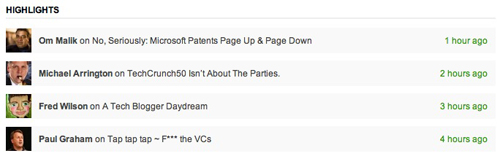
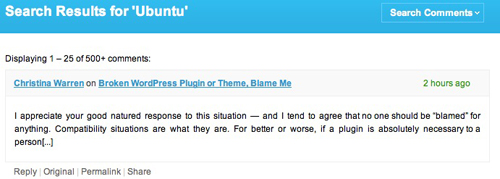
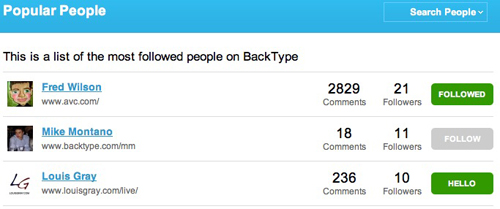
 When you register for BackType, you can add your blog, or your page on popular comment engines, like Disqus. You can also click on the "People" tab to see the most followed users of BackType, see their commenting frequency, and click through to see their activity. A few BackType users of note, at launch, include Andrew Weissman, Chris Brogan and the aforementioned Fred Wilson. On each person's page, you not only see their most recent comments, but you can also click on the blog icons on the right side of the page to see their comments on specific sites.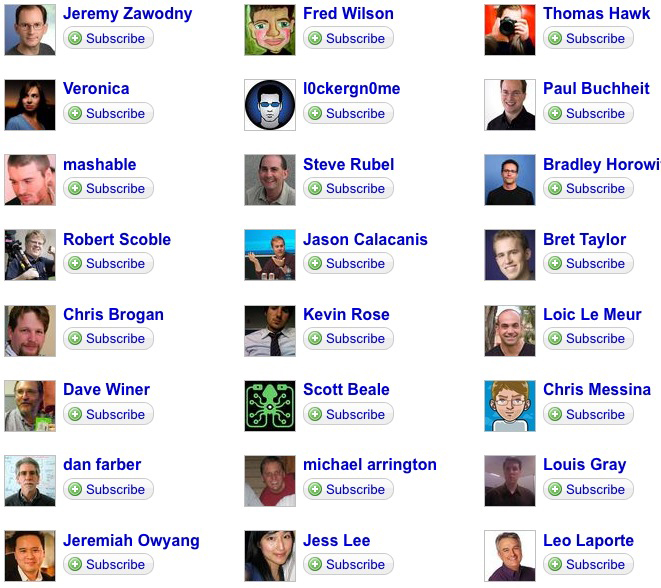
 Despite recent predictions of the
