Silicon Valley Technology Commentary & Archives · Est. 2006 3,033 Posts · 2006–2026

September 1, 2008

September 1, 2008 · 3 MIN READ · BY LOUIS GRAY

Maximum Download Speeds Will Always Vary, Caps or Not

Maximum Download Speeds Will Always Vary, Caps or Not

Over the last week, there was a lot of talk around Comcast instituting a 250 gigabyte cap on your downloads for a 30-day period. The Web's collective opinion has always tended to believe in unmetered, unlimited access to just about anything, without censorship, so the news of restrictions had many up in arms. But the truth is, you'd have to really go out of your way to reach the cap, and be downloading around the clock, all while maintaining consistently high bandwidth. And no matter what you're being sold on commercials, real-world download speeds are typically much less than the maximum advertised.

For me, it doesn't seem all that long ago that downloading a 4 megabyte application, like Netscape Navigator, was an intimidating process which could take hours, and download speeds of 9 to 10 kilobytes a second would border on exciting.

But consumers began to demand more from their Web, including more images, more streaming, higher resolution, more videos, and ever larger downloads, in parallel with ever-increasing network speeds, from the pokey 14.4, 28.8 and 33.6K modems, to broadband, either Cable or DSL, from speeds at 384 Kbps to 1.5 Mbps and 4.5 Mbps. As you would expect, consumers are led to believe they will get those advertised speeds, and, that higher numbers are, of course, better.

I don't typically download extremely large files. Most videos come in through Apple TV, or on the TiVo. If I am buying albums on iTunes, it's usually only one at a time, and my BitTorrent use is incredibly infrequent.

This afternoon, I had the rare opportunity to stress out my network by downloading a 3.8 Gigabyte recording of Saturday's college football game of Cal vs. Michigan State - which I had seen live yesterday, but wanted to revisit parts, not having recorded it on TiVo. When I first launched the file in BitTorrent, the speeds were outstanding - more than a full megabyte a second, and after several minutes of this, it looked like the video would be on my laptop in a little over an hour.
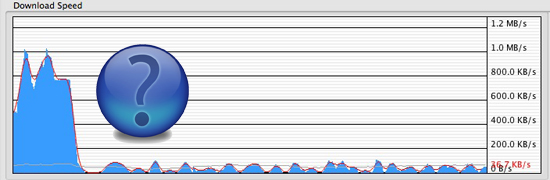

I Was Getting Screaming Download Speeds... And Then?

But just as quickly as I had noticed how fast it was going, the speed was decimated, and hasn't recovered - which smacks of Comcast throttling my throughput. What had been 1 Megabyte per second or more almost immediately dropped down to a more pedestrian range of 100 to 200 Kilobytes per second, and at times, much lower - in the 20 Kilobytes to 50 Kilobytes range, making what at first looked like a short download something that will probably be an all day process, assuming I leave the laptop on overnight.

Regardless of whether I've been intentionally throttled, or capped, or not, truth is that nobody ever really hits their advertised maximum network speed, thanks to issues at the remote servers, caching devices, storage, or due to shared pipes that mean your mileage is impacted by that of your neighbors' activity. And unlike a car, where you actually have a direct impact on whether you will reach the listed top speed, when you're on the Web, you're at the mercy of everyone else.

These issues mean you won't really ever know how long it will take to download something, until it's done, and just because you purchased a broadband connection that's "twice as fast" as the competition, you might not see your actual speeds doubling. With the near-monopolistic broadband providers having the option to throttle down your use at a whim, to cap your total usage at a level they deem appropriate, or with so many other factors impacting network speeds, you'll never see a flat-lined maximum, either on uploads or downloads. But if somebody ever gets that fixed... look out... I'd find all sorts of new ways to abuse that power.

August 30, 2008

August 30, 2008 · 2 MIN READ · BY LOUIS GRAY

Social Median Integrates With Google Reader for News Discovery

Social Median Integrates With Google Reader for News Discovery

Social Median, over the last few months, has taken a growing role in my tech news discovery process, falling in line alongside FriendFeed and Google Reader, offering up news submitted by other Social Median users on topics I've asked to follow, such as Apple, Blogging and Lifestreaming. Starting this last week, Social Median made it even easier for me to share news items with fellow site users, by integrating Google Reader shared links into the site, making me appear more active, and dramatically increasing the available news to followers.

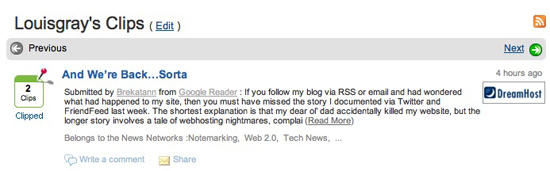
Social Median's news sources have, to date, come through "Snips", which are user generated notes, a lot like Tweets on Twitter, and "Clips", which can be done from any page on the Web, through the bookmarklet, or through submitting news directly on the site. As with other social sites, you can "Clip" other users news items, essentially adding your vote and sharing it to those who follow you, or make comments on the story excerpts. Integrating with Google Reader's shared items reduces the effort needed to add news, and Social Median parses the shared content to determine if it is relevant to specific networks, based on keywords, automatically making the shared news available to those following individual topics.


A recent item shared via Google Reader to Social Median

Unlike sites dedicated to showing the most frequently shared items, including Feedheads, RSSMeme and ReadBurner (See Disclosure), SocialMedian doesn't display a leaderboard for stories, focusing instead on offering personalized news and information on the topics you have selected.

Integrating with Google Reader's shared links removes the need to proactively share news to Social Median, cutting out the middleman, and undoubtedly increasing the volume of stories that are on the site. I expect the move to be good in terms of making the site more of a go-to for topical news, but also that it may result in fewer comments and clips per story.

You can see what I've shared to Social Median here: http://www.socialmedian.com/louisgray. Those from Google Reader are said as "Submitted by louisgray from Google Reader". My Google Reader shared links blog is here.

August 29, 2008

August 29, 2008 · 5 MIN READ · BY LOUIS GRAY

The Even Geekier Approach to Fantasy Football

The Even Geekier Approach to Fantasy Football

You would think with trying to keep the blog regular, working a full-time job, keeping active on all kinds of social networks, and raising two month old twins, I wouldn't need yet another time sink. But, clearly not knowing my own limits, I agreed to return to the world of Fantasy Football after taking a two-year hiatus, re-joining the league where I was active from 2001-2005, even though I haven't been paying attention to the NFL at all, and couldn't tell you the starters on just about any squad. So, why do I think I have a chance taking on a group of couch potatoes who have bye weeks and depth charts memorized? The answer: Because I'll be the biggest nerd in the room.

Here's what I do to keep myself challenging for the league title each year:
(I've won the 12-team league twice in five years and finished second once):

1. I don't pick favorite teams or favorite players.
When I was growing up, the San Francisco 49ers were the team of the decade. They won four Super Bowls, and Joe Montana, Jerry Rice, Ronnie Lott and Roger Craig were superstars. But in the last decade or so, the team might as well have fallen into the Bay, and I don't really care. As a result, I'm not drafting them too highly or unfairly promoting my hatred of their rival.

2. I only bring a laptop to draft day, not a pile of magazines and highlighters.

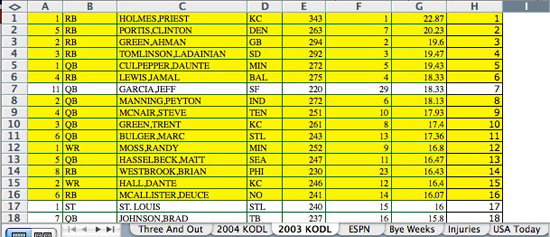
While some guys show up with their dog-eared copies of ESPN the Magazine and Sports Illustrated or Football Weekly, and six colored markers, as well as the year's bye week schedule and an up to the minute injury report, I just bring my laptop and have Microsoft Excel ready to go. While they shuffle papers around and debate how their home mock drafts differ from the real deal, I'm ready to sort and click between tabs to find my data.

3. I believe past performance is the best indicator of future performance.

I don't need to see teams play or practice to believe a quarterback and a wide receiver have "chemistry", or need to see if a guy has had a good off-season regimen. Instead, the most important data is how well they performed relative to their peers at the position in previous years, according to the rules of the league you are playing.


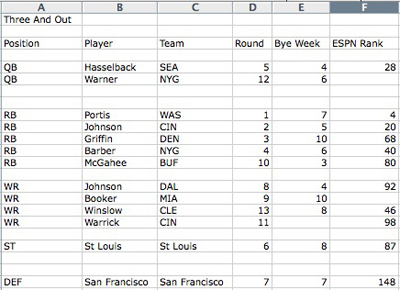
My 2004 Data Set With 2003 Results

That said, I use the tools that are available to get the data I want, and it all goes into Excel, including:
  • A worksheet that shows the previous years' league results, sortable by position, name, team, total points, overall points ranking, and average points per week.
  • A worksheet that shows the bye weeks
  • A worksheet that shows the most recent injury report, by team
  • One or more worksheet with the proposed draft order from ESPN or USA Today
I then create two net new tabs, including:
  • A worksheet that will display the team I have drafted.
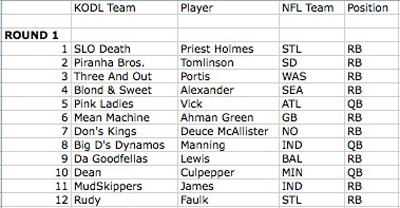
  • A worksheet that tracks the entire league's draft for the season
Once all the data is in there, I'm ready to go to work, as soon as the draft starts. As picks are made by each other team, I quickly highlight those who are off the board in multiple places - on the tab showing last year's statistics, and on the mock draft boards from ESPN and USA Today. At this point, the draft isn't that much different in Excel as it is on paper, but as time progresses, and the all too typical first few rounds get chewed up by running backs, quarterbacks and the occasional wide receiver, my preparedness has an advantage.

If your fantasy football league was online last year, all you usually have to do is go to last season's end of year report, and do a copy/paste into Excel, which will recognize all the columns and set you up for sorting nirvana. If at first you don't succeed... keep trying until you do. Worst case, save the pages as HTML and you can bring them to the draft day on the laptop.


The 2004 Draft, A Down Year for Me

Where others are deciding whether to take a team defense or their third running back, I can go and use Excel's Sort option to its fullest. I can take the highest players available based on their points per game average from the previous season, or do the same to fill a position I need. I can know whether taking a good quarterback will mean all that much relative to the next highly rated option, or if I should keep filling the backfield.


My 2004 Roster, For Example

And the latest rounds are where I make a killing. At this point, especially as most drafts are on Saturday mornings, and guys are joking around about taking players who are injured, or complaining about how the guy just before them snaked Fred Taylor or Torry Holt, I can sneak in and find players that were rated highly last year or by the major sports publications, yet haven't been drafted.

In 2004, my 10th round pick ended up being Willis McGahee of the Bills. In 2005, I got Larry Johnson of the Chiefs in round 12, who ended up being excellent injury protection for Priest Holmes, scoring 17 touchdowns on 1,549 yards rushing. As the rest of the teams use all the allotted time, often accidentally drafting players that have already been taken, my turn comes around every 12th pick, and I look to my Excel sheets for the answer. Yes, they overlooked my secret weapon, and I'll be setting myself up for the win, again.

This year's draft time is 10 a.m. tomorrow morning, and I've made it a little more fun by getting Drew Olanoff of ReadBurner and Strands to be part of the festivities, as well as two friends from work, all of whom are joining the league for the first time. We'll see who wins the battle of Fantasy Football geeks.

August 28, 2008

August 28, 2008 · 2 MIN READ · BY LOUIS GRAY

MacBlips and GadgetBlips Launch to Capture Leading Tech Stories

MacBlips and GadgetBlips Launch to Capture Leading Tech Stories

When I met with Jason and Erin Gurney of Ballhype and Showhype fame earlier this year, I practically sold them on the idea of launching an Apple Macintosh-focused site, which would distill the many Apple related stories from around the Web and provide a centralized site where Mac fans could discuss news, rumors and find a community with other Mac fans. Today, with the launch of MacBlips, they made good on that idea. And as if that weren't enough, in parallel, they launched a site called GadgetBlips, which gathers the top stories from sites like Engadget and Gizmodo, and provides gadget lovers a place to talk up their cell phones, TVs, laptops, or video game consoles, to name a few.


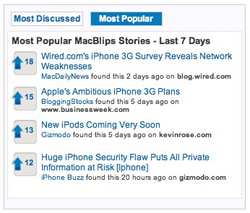
Both sites share a common foundation. MacBlips and GadgetBlips are constantly scouring the blogosphere to find those stories most-frequently referenced in articles, and bringing them to the site's front page, where users can vote them up or down, or make comments, like Digg, and of course, like BallHype and ShowHype.


MacBlips and GadgetBlips users can also submit stories they find from around the Web, and blog owners who write about Mac, Apple and gadgets can register their sites and track activity, to see which of their articles were found the most interesting to the community.
Speaking of community, any user can create or participate in subgroups on either site, focused on specific topics, be it iPods, iPhones, Mac Rumors, the BlackBerry or Nintendo Wii, for example. And as with most social networking sites, you can befriend other users, and be alerted when they have activity on the site.

The idea behind MacBlips and GadgetBlips is essentially to provide a single site that finds the very best Mac news and Gadget news, without forcing you to read all the related RSS feeds, and to help you find other Mac-heads and gadget freaks like yourself who like to debate wireless plans, discuss how to switch from Windows to Mac, or just when Apple might release the iPhone Nano.

As somebody who in the past has scrolled through screen after screen on MacSurfer.com to find the best articles, or gone one by one from MacWorld to AppleInsider, MacRumors and MacInTouch to be on top of the latest Apple news, the arrival of MacBlips is a welcome sight. But with so many other Mac-related sites out there, it should be interesting to see if the new addition will have folks changing where they choose to engage. And given the Gurneys' efforts on BallHype, which included game picks for sporting events and tournaments around March Madness and the NBA playoffs, for example, I'm very interested to see what kind of predictive behaviors they can do for the next MacWorld Expo Keynote.

You can find MacBlips at http://www.macblips.com/
You can find GadgetBlips at http://www.gadgetblips.com/

On both sites, you can find my ID as "louismg". (MacBlips | GadgetBlips)