Silicon Valley Technology Commentary & Archives · Est. 2006 3,033 Posts · 2006–2026

February 26, 2009

February 26, 2009 · 3 MIN READ · BY LOUIS GRAY

Twitter is for Following Topics and Listening, Not for Following People

Twitter is for Following Topics and Listening, Not for Following People

Another slow news week means another opportunity to debate the "right way" to follow or be followed - and per usual, the forum is Twitter. Once described to me as the "backstage" discussion to the blogosphere's concert hall, there can occasionally be fisticuffs, especially when bigger personalities are involved. And tonight, Loic Le Meur and Robert Scoble are publicly debating whether following thousands of people on Twitter makes sense - with particular focus on whether programs that let you auto-follow add value, or instead, give credibility to people who aren't friends at all, but are spammers, or worse.

Even if you are a rabid information junkie, the constant updates from Twitter can be too much for anybody to absorb, even with a few hundred connections. To believe that I am seeing all of a friend's updates with 6,000 connections, or that Scoble can see the updates from ten times that many, is clearly impossible. So while a small population of Twitter is using the service to follow individual's updates, a huge number are instead using it to broadcast updates, monitor keywords, and occasionally, send direct messages to people or reply in public. Twitter is simply too much to handle as conversations are lost, people's updates can be of any type, and the limitations of the service, including the much-discussed 140 character boundary, make it a poor foundation for exchanging ideas in a crowd.

I use a auto-follow program from SocialToo and am an advisor to the company, run by Jesse Stay. I don't auto-follow to necessarily see an individual's updates, and I don't auto-follow to give a stamp of approval to who they are, or their Twitter stream. But I do use it to let me open up the opportunity to send direct messages to them, and they to me, and because on the occasions I do check in on Twitter, I want to at least have the opportunity to see their updates. But it does not mean I see their Tweets on a regular basis in any way.

That's right. I don't read your tweets. Practically the only way I would see your tweets is if I was following you on FriendFeed, if you were in one of my lists I read regularly, and even more likely, if that tweet got comments and likes, pushing it to the top of my visibility. Alternatively, I will have seen your tweets if you mention my user ID, the company I work for, or if you are mentioning a hashtag or a topic I am following.

When I do want to see an individual's tweets, I will go to their user page and scroll down to read, or I will check their FriendFeed. But I am not sitting with the Web interface open, or constantly refreshing TweetDeck, only to hit the API limit.

I use Twitter because I know my updates to Twitter go to both Facebook and FriendFeed, where I do have personal conversations and a real platform for discussion. I use Twitter for the opportunity to send instant messages, publicly, to individuals or groups. And I use Twitter to monitor mentions of me or my company via their search engine. But if I were to "really" follow people the way that some people think they are being followed, I would have to follow the new trend and start a massive unfollow process, eradicating more than 90 percent of those my Twitter account is following today.

Twitter has something special - a real-time search engine that can instantly take the temperature of today's Web users. It has a good platform to say what you are doing right now. But it does not have a good platform to follow people, or a large group of people, and it does not have a good platform for conversation. If you want people and discussion go to Facebook and FriendFeed. If you want to get a litmus test on a topic, go on and use Twitter. Just don't think I'm reading your Tweets. I know you don't see mine.

February 25, 2009

February 25, 2009 · 3 MIN READ · BY LOUIS GRAY

Safari 4's Introduction A Clear Salvo In the New Chrome Wars

Safari 4's Introduction A Clear Salvo In the New Chrome Wars

In today's Web-centric computing world, there is practically no more important software than that of the Web browser. While an argument could be made that one's e-mail is equally as important, the move to Web-hosted mail services, like GMail and Apple's Mobile Me means that the Web browser itself is where most of today's work gets done. The move from the operating system being the center of our world, and the prism by which we see everything, to that of the Web browser, was central to Netscape's annihilation by Microsoft, and has now practically come true, even as Navigator's time has now come and gone.
Almost 14 years after Netscape as a company went public, a new wave of browser wars is upon us. And while, yes, Internet Explorer, the standard on practically all Windows-based PCs, is still the market share leader, the innovation is not being perceived as coming from Redmond. Instead, it's products like Firefox, Google's Chrome and Apple's Safari which are pushing the envelope and working to enhance our browsing experience. Unfortunately for Microsoft, it's gotten to the point that even if they made a better product with all the possible bells and whistles, nobody outside of Dare Obasanjo would give them credit.

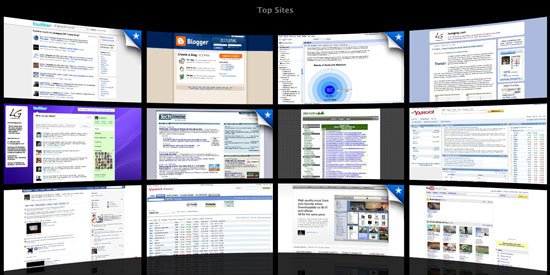
Yesterday, as practically every tech blog on the planet mentioned, Apple introduced a new 4.0 beta version of the Safari browser, including speed enhancements, and most notably, a Top Sites feature that mimics Chrome's most visited sites page. And while other usability enhancements were made, including to the toolbar, expanded browser history and further integration with Google's search bar, it was this addition of "Top Sites" that has everyone thinking about how Apple is taking on Google's Chrome even before the company comes out with its much-awaited official Mac version.


My Top Sites - After Editing Out All Work-Related Sites

And this is exactly the dialog that has long-been needed in the browser space but was lacking when IE finally reached the summit atop Netscape's corpse. Opera and OmniWeb and iCab all had their handful of users, but never gained the kind of mindshare and deployments possible from Firefox, Safari and Chrome. Now, it could be said that Microsoft is being hit from all sides after years of letting Explorer stagnate. (I first called it the Chrome Wars on FriendFeed yesterday)

Being hard wired both as an Apple fanboy and an early adopter, I downloaded Safari 4 beta as soon as I knew it was available. After finally updating the laptop with the latest security updates, we were good to go - and honestly, there will be no turning back. For whatever reason, over the last few weeks, I have had the worst time keeping Safari up and running. Every new tab welcomed a new opportunity to stall and require a force quit. But Safari 4, after a full day's aggressive use, hasn't fallen on its sword even once. And considering I spend practically all my waking hours in front of a browser, that's a good thing.

For me, it's the stability and the speed, and the support for standards, that will make using Safari on a daily basis a success. The Top Sites feature is interesting, a cute way to have 12 pages on hand to click through at all times, but it's not exactly going to save me a ton of time. With RSS, keyboard shortcuts and autocomplete, it's not like I was taking tons of time to enter URLs and go site to site. So yes, we like the new features, but we like it even more that it doesn't crash and will support new Web services that may be using bleeding-edge code.

And while I assume you already know, Safari is more than just a Web browser for Macs. It's also available for Windows, and forms the core browsing experience on the iPhone and iPod Touch. You can get the new Safari 4 beta here: http://www.apple.com/safari/download/.

February 24, 2009

February 24, 2009 · 2 MIN READ · BY LOUIS GRAY

Trendrr - Trend Tracking for Social Media and Data Addicts

Trendrr - Trend Tracking for Social Media and Data Addicts

By Corvida Raven of SheGeeks.net (FriendFeed/Twitter)

Practically everyone watches trends. For some of us, watching trends can be a daily part of our job. For others, it may simply be fun to keep an eye on what's popular on the Web today. Many of you might be using Google Trends, but after reading this you might want to add Trendrr to your list of trend tracking tools.
The basics of any trend-tracking tool applies to Trendrr. You enter one or more keywords and receive data about how each keyword is doing on the Web. However, one of Trendrr's key features is the amount of data presented. Trendrr provides you with graphs pulling data from sites as diverse as Technorati, Flickr, Google services, eBay, Twitter, & YouTube. However, we'd loved to see some data from services like Digg, FriendFeed, Delicious, and Diigo.

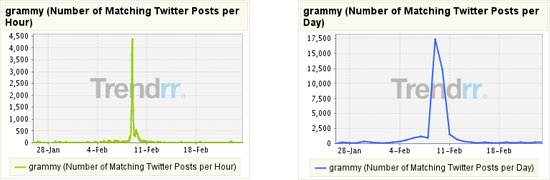
Trendrr also takes the data a step further by breaking down results from Google and Twitter. You can view how well your keyword is doing per hour, or per day, on Twitter. You can also view whether a keyword is getting more search engine hype than news or blog hype from Google Search, News, and Blog Search. Using the keyword "Grammy", I can see that there wasn't all that much hype in the days or hours before and after the Oscars on Twitter, but there were more mentions of "Grammy" than one might have expected during the Oscars:


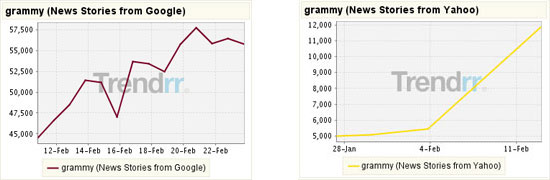
On the other hand, news stories containing "Grammy" were on the up and up as seen in the following Yahoo and Google News graphs:


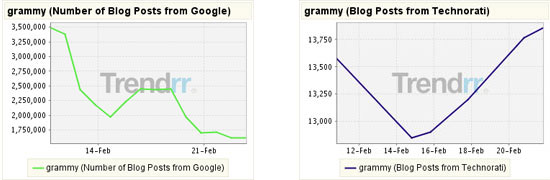
According to Google, blog posts featuring the word "Grammy" dropped significantly, while Technorati's data says otherwise:


So, what else can you do with all this data? You can annotate individual graphs if you sign up for Trendrr, compare and contrast different data sets, grab a graph's feed, and share your data in a variety of formats.

Google Trends & Trendrr

I wanted to compare Google Trends to Trendrr, but that's proven difficult to do. It's almost like comparing apples to oranges because the form of data available is different for both services. Google Trends provides only one graph and is focused on providing data about regions, and cities for keywords. Most of the data given is pulled from Google Search and News. Trendrr on the other hand is more about emphasizing how keywords are trending on social media services. I'd recommend using both tools in conjuction with one another.

All in all, Trendrr is a great trend tracking tool. However, one annoying quirk with the service is that you have to drag graphs to the "Scratchpad" in order to compare keywords unlike Google Trends where this is automatically done for you.

Read more by Corvida Raven at SheGeeks.net.

February 23, 2009

February 23, 2009 · 3 MIN READ · BY LOUIS GRAY

How Can You Teach Intellectual Curiosity?

How Can You Teach Intellectual Curiosity?

For me, a significant amount of time I spend using the Web is not so much about finding friends and peers, but instead about finding information. I want the newest news now. I want to have my finger on the pulse, and will use whatever mechanisms available to me to get the data faster. Whether it be through RSS, e-mail news alerts, pre-defined search strings, or relying on selections by others on news aggregation sites, I have built an array of tools that makes sure I miss very little about those things I am interested in.

Whether it's a desire to act as a knowledgeable information filter, or simply because I am a data sponge, I've made the absorption of news and trivia a big part of my daily activity, and it turns out, if I think about it, that I've been wired this way for a very long time.

For whatever reason, just shortly after I learned to read, I can remember thumbing through the children's dictionary, fascinated by the origins of the letters of the alphabet, as they evolved from the Phoenician to Greek, Egyptian and so on. Later, I was buying the Guinness Book of World Records every year, and stalking the bookstores for the next edition of the World Almanac. My favorite section? The population rankings of the top 200 cities in the United States, as ranked by the census in 1980 and 1990. To this day, I can tell you Worcester, Mass. was #200 overall, and that Baltimore had 939,000 people reported in population in 1980. When the 1990 census rolled out, seeing new cities like San Diego and Dallas, Texas enter the hallowed ranks of million-plus citizen populations, I was excited. Seriously.

And before you cry out, "NERD!", I'll nod my head, quickly agree, and move on. I loved this stuff. Luckily, it branched out to sports as well. My favorite present of all time had to be the massive 2,000+ page encyclopedia, Total Baseball, which, when released in 1989, when I was 12, had hundreds of pages of baseball stories and even more, containing all statistics of all players, ever, in the major leagues. I promise I pored over every single page - and it's made me very popular when it comes to sports trivia conversations (or unpopular if you want to go head to head).

But I have learned you can't force the issue and kindle the same passion in others. Even if I explain to you why I am excited about something, I can't get you the same way half the time. And what boggles my mind at times is when it seems the curiosity is missing altogether - especially when it's about something that could effect your making a more educated decision.

For example, a few years ago, in speaking with a friend in the industry about how the changing world of media was making blogs an increasingly-important venue, they were asked by someone else, "What blogs do you read?" And their answer: "The ones Louis sends me." It seemed they were content getting their news the way they always had, and they weren't even curious enough to want to get the data when it was available. They were comfortable knowing they could be missing out on a source of news on their industry, and turning a blind eye to what I thought was a major development in the way news was being created and disseminated.

To me, it would have been a lot more acceptable if the individual had, acknowledging they hadn't gotten into blogs yet, asked which I thought were the best ones, or if they had remembered some of the recent forwards and posts that caught their eye. But the nonchalant answer defied my expectations of intellectual curiosity, and I was frustrated about it for a long time - wondering why they weren't seeing the missed opportunity. It's the same type of frustrations I am sure parents feel when their kids don't get interested in school, or in studying to improve when you know they have the potential.

There's no question that my consumption level for news, blog posts, RSS feeds, and friends' updates on many networks is above the average. I crave the data, and am always eager to find new ways to get there faster. But I wonder if there are ways to get people to share the same enthusiasm. Is it possible to force intellectual curiosity when others just aren't wired the same way?