 Today my friend, Brian Watkins, who is in charge of Omniture's Social Media strategy, asked on Twitter, "the more employees you get on Twitter, the harder it is to avoid stepping on toes when responding to customer questions. ideas?" Omniture's a big company, with a growing roster of employees on Twitter, ranging from Brian himself, to Ben Gaines, aka @OmnitureCare, to their official @Omniture account, and the many other employees all with a presence on Twitter. I ran into this same problem when I managed Social Media strategy at i.TV - there simply wasn't a very good way to manage all the different Tweets being said about our company, ensure they weren't being covered more than once by employees, and at the same time manage where each response was coming from.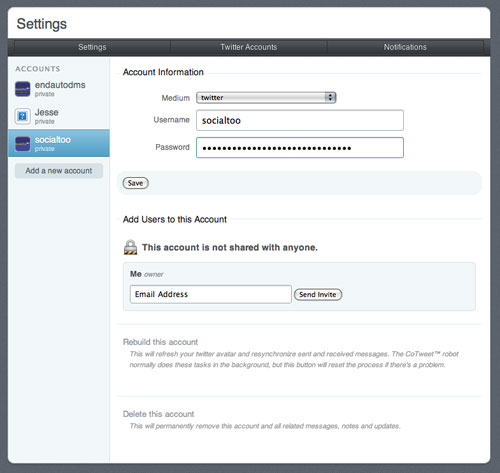
I was following some tweets from Guy Kawasaki one evening, where he was talking about his frustration with various Twitter clients and how not any single client really met his needs as a user. He did come across one though which caught my eye, and he seemed very impressed with it. That particular client is still in closed beta, but I was able to give it a try - it's called CoTweet.
What is CoTweet?
CoTweet is basically a Customer Relationship Management (CRM) Tool built for Twitter. It's a typical Twitter Client, but instead of reading all your friends' updates and focusing on the general day-to-day content, it focuses on the elements a business would be most focused on, such as replies, DMs, and search. It will change the way you do business on Twitter.
CoTweet is designed for businesses and individuals with lots of followers, which perhaps can't follow and pay attention to every single one of those followers. It's also designed for businesses that need to track a lot of information about their brand and have multiple employees/staff to respond and track that information. I've found as I get more followers there is less and less of a way I can track all of their updates. I have resolved this by setting up search groups of important people and various search terms in TweetDeck, as well as being fairly religious about my replies and DMs on Twitter, but even that becomes difficult to track using the typical available Twitter clients.
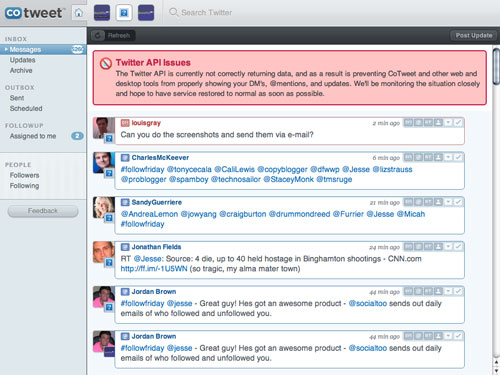
CoTweet fixes this problem by only focusing on the replies and DMs in Twitter. With CoTweet, you can track multiple Twitter accounts under one login, and all replies and DMs for all of your accounts appear in one, continuous stream so you can bring it all into one place. In addition, CoTweet provides CRM-like functions that allow you to, for each reply or DM you receive, apply notes, and even re-assign to other individuals in your organization to handle. Assigned Tweets appear in a separate line item on the left that you can pick up any time later and mark complete when the desired purpose is fulfilled.
Notify Who's Tweeting
In my interview with Britney Spears' Social Media Director, Lauren Kozak, she was openly willing to admit that their team responds on behalf of Britney many times. At the same time, they are careful to be sure you know who is doing the Tweeting, whether Britney herself, or Lauren or a member of Britney's Entourage. Several other businesses and brands are doing this now in order to display full transparency in the spirit of Social Media. Guy Kawasaki, you may have noticed has recently started doing this.
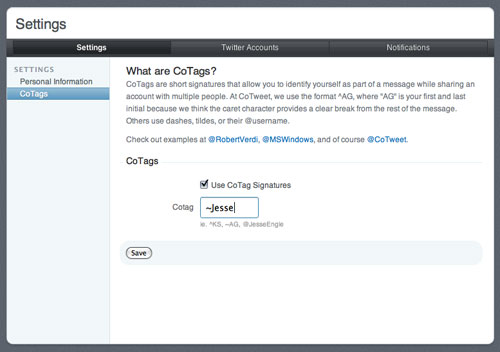
CoTweet makes this process easy, through technology they call "CoTags". In your settings, you can give each user access to your brand's Twitter accounts, and each user can get a "CoTag". When the CoTag is set up for a user, when they respond via CoTweet, all their Tweets under your Twitter accounts will be appended with the CoTag for that user (so, ~Brit, or ~Jesse, or ~Louis, or ~Guy, for instance). Now anyone can know who is actually posting from your branded account.
Search, With a CRM Twist
In addition to replies and DMs, you can search on anything as you would normally be able to do through traditional Twitter search channels. However, what makes CoTweet's search interesting is that with each search result you can also assign the Tweet, add notes, or even e-mail the Tweet to others in your organization. This ensures you don't miss any important Tweet about you or your organization's brand. The only thing that would make this better is if they could allow you to just incorporate specific search results into the stream with your DMs and replies.
Multiple Accounts and Email
CoTweet currently allows management of up to 4 accounts under one single CoTweet user account. All accounts appear under your single stream of replies and DMs, but you can always turn any of the accounts off and choose not to see posts from that account. Each Tweet in your stream from all your accounts you can choose to archive (which sends the message to your "archive" folder), or e-mail to others.
With each account, you can also invite others, via e-mail, within your organization to manage and also send Tweets on behalf of your organization. Such invitation allows your organization to split up the burden to more than one person, without that individual having to know the Twitter username and password of your organization's Twitter account. This should make you feel comfortable without worry of irate employees taking over your Company's Twitter account down the road. Then, for any Tweet in your stream, you can assign to those individuals in your organization.
Each individual can also choose to receive e-mail when they are "on duty" and a DM or reply is received for your Twitter accounts. This enables employees to get a push-notification, either at their desktop or on a cellphone if you don't want your employees sitting around just waiting for new Tweets on their desktop.
Scheduling
One of the most fit pieces for CoTweet is what it offers for posting of new updates to your Company's account. In addition to the CoTags, you can also post to one or multiple company accounts at the same time. What's even more powerful is that you can schedule those posts to go out at a later time. So, for instance, if I have a scheduled update going out later and I want to be sure people are notified I can just schedule it, and it will go out without me having to worry. It's amazing that all this is in one place!
Social CRM
CoTweet is introducing a new concept amongst Twitter client tools. The concept is that of "Social CRM" - the ability to view, manage, and organize an organizations contacts and communications amongst multiple people to ensure none of the communication gets lost. CoTweet has a "medium" drop-down field that currently just has Twitter, but I fully expect other services to be integrated in the future when they are able, so hopefully soon you'll be able to manage your entire Social presence with one tool.
CoTweet is in private beta right now to protect growth, but they've provided me with 12 beta invite codes. Since I can't give one out to all of you, if you, on your honor, subscribe to both the LouisGray.com blog, and my personal blog, StayNAlive.com, then in the comments (I trust you!), say you subscribed to both and want an invite, at the end of today I'll randomly pick users to get invites. As I get more I'll randomly pick more. Today I'll be giving away 6 on this blog, and 6 on my personal blog shortly. I'll announce the winners in the comments of both blogs.
It's tools like CoTweet that make me really think Twitter is here to stay - let us know what you think!
Read more by Jesse Stay at Stay N' Alive.
 I don't like anything to take too much longer than it has to. I tend to write blog posts from beginning to end in one sitting. I don't like to stop TV shows and watch the second half later. And I really don't want to have to make doing my taxes an ordeal. That's why for the last several years, I've jumped onto
 As the month of March fades with only a few hours remaining, there's still time to highlight five blogs that have recently entered my Google Reader and become regular visits for me. This feature, one I look forward to each month, almost escaped me, but don't think it's not a priority! For last month's collection,
  Have you noticed the recent changes to