Silicon Valley Technology Commentary & Archives · Est. 2006 3,032 Posts · 2006–2026

April 19, 2009

April 19, 2009 · 1 MIN READ · BY LOUIS GRAY

This Week's Destination: Las Vegas, Nevada

This Week's Destination: Las Vegas, Nevada


Another week, another trip. The Spring event season has us racking up frequent flier miles again, as following recent trips to Austin, Texas, Phoenix, Arizona and Orlando, Florida, we're away from home once more - this time for a full five days in Las Vegas, Nevada. As I told folks following the Orlando trip, "it sounds more fun than it really is". We're going to be attending and participating in the National Association of Broadcasters' Conference for the full week, with my work hat on.

The trip marks my third jaunt to Vegas in the last 7 months, following BlogWorld Expo last Fall, and company sales kickoff in February.

If you're a Las Vegas native, or your schedule and location just so happen to match mine, you know how to reach me. I'm powering up the iPhone now.

April 18, 2009

April 18, 2009 · 2 MIN READ · BY LOUIS GRAY

How to Send Direct Messages to Multiple People, With Photos

How to Send Direct Messages to Multiple People, With Photos

For as much hype and press Twitter got all this week with the games celebrities play, you would think the service had single-handedly solved the economic recession and cured malaria besides. But even as the microblogging service managed to not fail under what had to have been a heavy load, it's remarkable how Twitter continues to be defined by its limitations, and how the core aspects of the service have changed very little over the last two years.

If you use the product, you know the limits I'm talking about. 140 characters only. No pictures. No video. Direct messages can only be sent to a single person. No grouping. No lists. I could go on.


Sending a Direct Message In Twitter


Previously Sent Direct Messages In Twitter

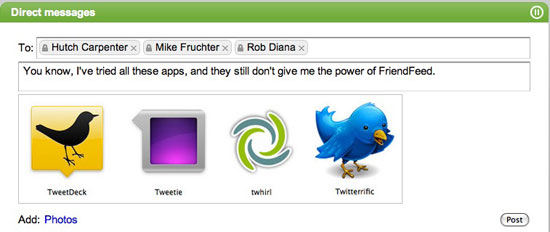
But after taking a look at a ton of different third-party applications out there, I finally found a solution that lets you send direct messages to multiple people at once, attach photos, and even collect all the comments from the recipients in one place.

It's called FriendFeed.

The new FriendFeed beta lets you send direct messages to as many people you like who are friends with you, and you can add up to four photos per message. Like with Twitter, if they respond to your DM, you can get notified within the service, and just recently, you also gained the ability to get notifications by e-mail.


Sending a Direct Message In FriendFeed With a Photo


A Conversation On a DM With Multiple People In FriendFeed

While Twitter may have all the daytime television viewers reaching for their mobile phones and Windows XP Home powered PCs (just after they log on using AOL), FriendFeed keeps its head down and is innovating. So while they're still figuring out how to send a limited number of characters to a single person using only text, I'll be sending photos and links and long messages to as many people as I like on FriendFeed.

You can join us here: http://beta.friendfeed.com/louisgray.
April 18, 2009 · 2 MIN READ · BY LOUIS GRAY

Tweetie Desktop for Mac Is Clean, Simple and Robust

Tweetie Desktop for Mac Is Clean, Simple and Robust

Sending messages to and monitoring Twitter on your Mac usually requires running a RAM-intensive Adobe AIR application or dropping into Twitter's standard Web interface. And with Twitter continuing its skyrocketing usage trajectory, more and more utilities are being developed to handle the load - from TweetDeck to Seesmic Desktop, PeopleBrowsr and Tweetie, which on Monday, will debut to the masses its desktop application for the Mac, following on the success of its popular iPhone application, which I've used as my default for the last month or so.

Written in Cocoa for Mac OS X rather than Adobe's AIR platform, Tweetie looks and feels like a Mac OS X application. And like its iPhone cousin, it lets you use all of Twitter's main features, from sending updates to monitoring replies (now mentions) and direct messages. Tweetie, unlike other desktop apps, even lets you log in with multiple accounts concurrently, enabling you to toggle back and forth should you choose to.


Logging in to Tweetie Desktop

Unlike TweetDeck, arguably the most popular Twitter desktop application out there, Tweetie doesn't look like it wants to take over your entire screen. Instead, activity occurs in a single column. To gain access to replies, direct messages, and integrated search, just click on the corresponding icons in the application's left margin.
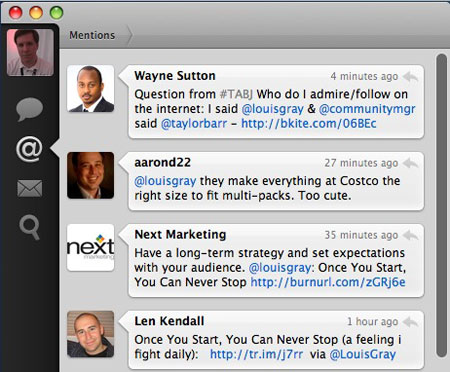

Checking Twitter Mentions In Tweetie
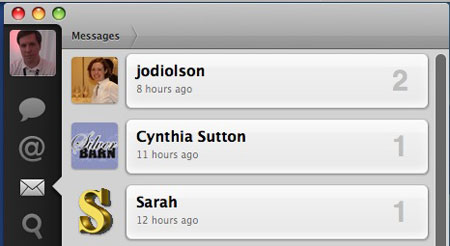


Seeing Who I DM Using Tweetie
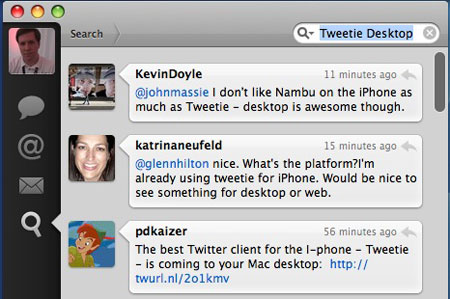


Leveraging Twitter Search In Tweetie

Like any good Mac app, Tweetie even follows Apple's typical keyboard shortcuts. Command-N makes a new Tweet. Command-R refreshes your window and gets you the latest updates. And like with Safari, you can hit Command 1, 2, 3 or 4 to toggle through the available windows. (In this case, the Twitter timeline, mentions, messages and search)
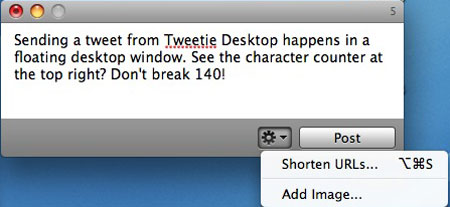

Sending a New Tweet From Tweetie

I switched from TwitterFon to Tweetie on my iPhone thanks to multiple account support, and it's great to see Tweetie hasn't neglected that when looking at working on my desktop as well.

Atebits, the company behind Tweetie Desktop for Mac, has provided a video to show more about the new product, which should hold you over the weekend. Of course, they can be found on Twitter at @atebits and @tweetie.

April 18, 2009 · 2 MIN READ · BY LOUIS GRAY

Once You Start, You Can Never Stop

Once You Start, You Can Never Stop

Ever run into friends who tell you they want to start a blog, or are thinking of signing up for LinkedIn, Twitter, Facebook or some other network, and you just know it's doomed to failure, because they won't commit to it? Starting is easy, but maintaining a pace can be hard. Whether for business or for pleasure, the number one thing I tell people about blogging is that once you start, you can never stop. Blogging is not something you do on a whim, or start and then abandon for the search engines of tomorrow. You must find a pace and always keep going - so if you start, be sure you've got a topic or ideas that are sustainable.

This week, thanks to work, family and other items hitting my schedule, I went a little light, not just here on the blog but on most of the networks - after a strong Monday. And while previously, I've told bloggers to "relax" as "nobody is keeping score", once you have established a pace, absence gets noticed. Today, while still at the office, I got a call from Robert Scoble, just checking in to see if all was well. And yes, it is. Just working and making sure everything is done before being out of the area all next week thanks to an upcoming tradeshow.

That Robert noticed shows how in tune he is on all the networks. I hadn't gone completely silent, but I did slow down my pace for a few days, and he caught me.

But while this was a mere blip in my usually regular posting schedule, it's one that happened well into my fourth year of blogging on this site, after nearly 2,000 posts, added on to tens of thousands of actions on FriendFeed, Twitter, Facebook and everywhere else. I'm not stopping. I'm not anywhere near done. But if you know folks who you think would walk away, see if you can stop them before they start, especially if how they present themselves has a chance to impact how your company or your project are perceived.