 Sending messages to and monitoring Twitter on your Mac usually requires running a RAM-intensive Adobe AIR application or dropping into Twitter's standard Web interface. And with Twitter continuing its skyrocketing usage trajectory, more and more utilities are being developed to handle the load - from TweetDeck to Seesmic Desktop, PeopleBrowsr and Tweetie, which on Monday, will debut to the masses its desktop application for the Mac, following on the success of its popular iPhone application, which I've used as my default for the last month or so.
Written in Cocoa for Mac OS X rather than Adobe's AIR platform, Tweetie looks and feels like a Mac OS X application. And like its iPhone cousin, it lets you use all of Twitter's main features, from sending updates to monitoring replies (now mentions) and direct messages. Tweetie, unlike other desktop apps, even lets you log in with multiple accounts concurrently, enabling you to toggle back and forth should you choose to.
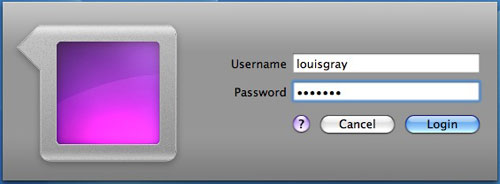
Logging in to Tweetie Desktop
Unlike TweetDeck, arguably the most popular Twitter desktop application out there, Tweetie doesn't look like it wants to take over your entire screen. Instead, activity occurs in a single column. To gain access to replies, direct messages, and integrated search, just click on the corresponding icons in the application's left margin.
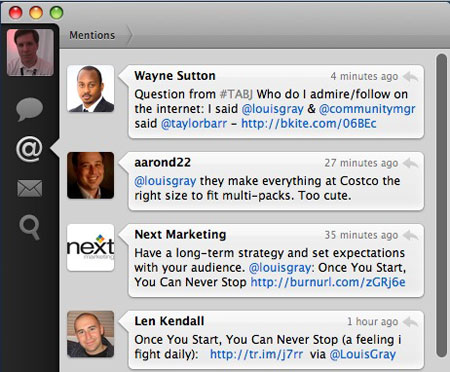
Checking Twitter Mentions In Tweetie
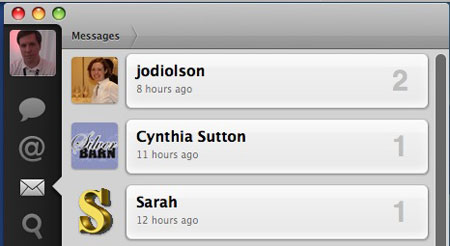
Seeing Who I DM Using Tweetie
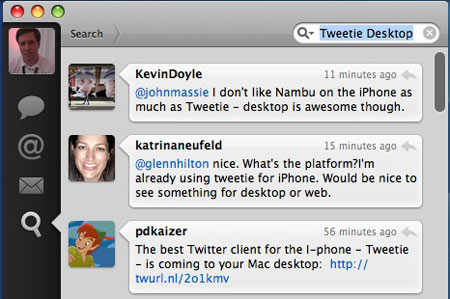
Leveraging Twitter Search In Tweetie
Like any good Mac app, Tweetie even follows Apple's typical keyboard shortcuts. Command-N makes a new Tweet. Command-R refreshes your window and gets you the latest updates. And like with Safari, you can hit Command 1, 2, 3 or 4 to toggle through the available windows. (In this case, the Twitter timeline, mentions, messages and search)
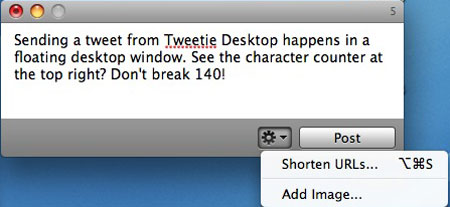
Sending a New Tweet From Tweetie
I switched from TwitterFon to Tweetie on my iPhone thanks to multiple account support, and it's great to see Tweetie hasn't neglected that when looking at working on my desktop as well.
Atebits, the company behind Tweetie Desktop for Mac, has provided a video to show more about the new product, which should hold you over the weekend. Of course, they can be found on Twitter at @atebits and @tweetie.
32 Comments
I am super excited for this. If the price is right, I think I might have found the full time desktop Twitter client I've been searching for.
Prediction: Twitter will buy Tweetie.
Seriously doubt it. I can't imagine twitter really buying any client. It just doesn't make sense in my opinion. Not to mention, they would ONLY do it if there was a windows version.
That's like saying email will buy outlook.
If Twitter bought any Twitter client, they would buy TweetDeck. One of Twitters original investors was Betaworks, and Betworks also invested in TweetDeck. Betaworks seems to always cross promote the different apps that they own, they also have a history of their portfolio companies buying their other portfolio companies.
StockTwits, bit.ly both included as defaults in TweetDeck, both backed by Betaworks. Summize, bought by Twitter; Summize, also backed by Betaworks.
hey friends thanks 4 sharing
Looks nice. Much better than what I have last seen from Twitterific.
Okay I'll admit, I'm looking forward to this. Tweetdeck was just way too much for me, but Twitterific is getting a bit long in the tooth.
I also think people will like to have the same (or similar) UI on iphone and mac.
I am torn between the multi-column Nambu (which has translate feature) and the more minimalist (but with plenty features under the covers) Tweetie. Am sticking with Tweetie for a few days to give it a chance, since Nambu has been a big favourite for a while.
Bob: I like the "take over your screen" approach of TweetDeck better. Why? I have a whole computer dedicated to running it. Nambu is interesting, but I got used to TweetDeck and didn't see much of a reason to switch.
I'm really enjoying Nambu. I didn't really get into TweetDeck too much. I think it was something about the UI (not to mention the slowness).
I like Tweetie but no groups is a big problem. I was hoping the iPhone Tweetie would get groups at some point as well. Maybe they'll both get it at the same time.
Mike: Don't think Twitter will ever buy a client. Especially one without a Windows component. Robert: I really like Nambu so far. I've never really gotten into Tweetdeck, something about the UI is weird. Tweetie looks pretty cool but the lack of groups is a huge problem for me.
So now I have to buy a Mac?? I love Tweetie on my iphone. Hopefully it will recieve some PC-ification. I def. agree that Tweetdeck taking over your whole screen is annoying.
Len "I'm Still a PC for now" Kendall
I prefer desktop applications for almost everything, but I thought I was in the minority on that. Everyone seems more interested in web-based mail/IM, but dedicated applications for Twitter are so often trumpeted. I'm not sure what to think about that, but I know I'd like to see a really nice application for XMPP(does Twitter still support this?) and SIP that is extensible. AIR is a memory hog, so Tweetdeck et al. are not acceptable.
I have never liked Tweetdeck, which took up both real estate and resources. But I will have a problem with Tweetie, too, unless it supports FF and identi.ca, as Seesmic desktop does. Ultimately, I want a one-stop shop. But I guess I'm not the market.
What about setting up groups (re:Tweetdeck) so you can organize your twitter feed? That seems like that is the one thing that is missing.
How is it that NONE of these clients are using OAuth??!?!? Seriously, people need to get with the program already.
Leather, OAuth is still *very* beta. I have a hard enough time with the stuff Twitter has that's not in beta, but until we can expect not to have the code changed every week it doesn't make sense to implement OAuth. It's still very buggy.
Stay: Say what you will, but my understanding is that Twitter's OAuth is 'textbook' with respect to the spec. Not sure past experience is relevant in this context.
If OAuth is still so "beta/alpha", why is it that FF's implementation seems to work just fine?
he means Twitter OAuth not OAuth in general..
Regarding the lack of groups. From what I've seen @atebits holds values in certain things (e.g. defaulting to via: rather than RT). However he did make RT an option in the end, so perhaps he'll do the same for groups? Anyway. I'm looking forward to this - anything to get away from AIR apps, though I use Twitterfall most of the time anyway.
Looks awesome, but no grouping?
Grouping is the feature which makes twitter usable from a reader perspective.
Don't hold your breath for group support in Tweetie - the Tweetie author spells this out in a recent blog post http://blog.atebits.com/200...
He also talks about the OAuth issue in a separate blog post:
http://blog.atebits.com/200...
If you are in to groups on a Mac client, and you don't like using Air, try Nambu. I don't know about a non-Air client on the PC that supports groups.
Thanks for this post. I'm a huge Tweetie fan on the iPhone, have seen the atebits video, and am very much looking forward to seeing this on Monday. I'm glad to hear you like what you've seen. I hope this is priced reasonably ...
Robert: I have a big thing against Air (and other such "bloat tools"), so would always choose a native app like Nambu or Tweetie. If you opt for the multi-column mode of Nambue (and you can choose a more "Tweetie-fied" look if you prefer) then you get something that looks (to me) a lot like Tweetdeck and certainly fills your monitor
I'm looking forward to this app. I like Nambu but I'm always looking for something new.
I, like many others, love Nambu. Since Nambu is already thinking ahead and planning for future FriendFeed support, I think I'll keep using it. :)
This could be the one thing that might lure me away from Nambu. Looks amazing. I'll be trying it out tomorrow.
I'm getting addicted to Nambu using the "middle" view option. (It has three UI options that you get to by clicking icons up in the top left corner. The "middle" icon takes you to a UI that looks just like an RSS news reader.)
I really like using Tweetdeck and how they continue to develop it. This sounds like a good program but not sure if it's worth changing for.