 Given Twitter's prominence, it comes as no surprise that there are many different clients out there. Some are designed to give you a single place to update multiple social networks at once. Others are designed to give you easy access to multiple accounts you may have. A few are optimized for your own personal groups or subsets of followers. And depending on which client you have selected, they may display images or rich media in line, may support retweeting (or not), or they could provide advanced functionality for direct messages. But good luck finding a single application that does everything best - one you can use on your desktop, through the Web browser, and on your iPhone too, because, guess what? It doesn't exist.
The flexibility of the Twitter platform and the wide variation, even among the most popular Twitter clients, has led to most users choosing a favorite, but still having multiple clients installed. It's rare for a single user's Tweet stream to go a few days without showing more than one client used - thanks to some clients being best at one utility or another.
This week has seen a great deal of interest in version 2 of Tweetie's iPhone application. Rebooted and reloaded with a boatload of new features and enhancements, Loren Brichter's offering is being lauded as the best on the iPhone, period. But even as I may agree that it's great, the discussion has actually led me to revisit the Mac desktop client of Tweetie, and I have been using it almost exclusively (with the exception of posts that flow from FriendFeed) for the last few weeks.
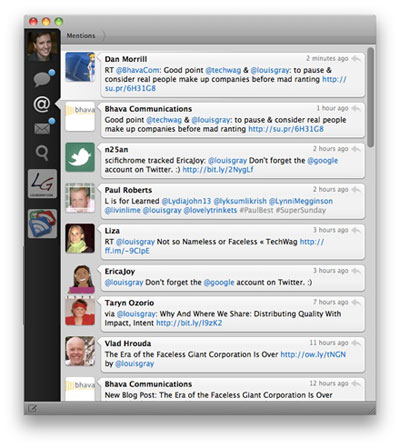
My Tweetie Desktop In Action (Showing the @Mentions Window)
On September 25th, I posted a note illustrating my then-current view of the Twitter client race, saying: "TweetDeck: Best at Groups. Tweetie: Best on iPhone. Seesmic: Best at DMs. Brizzly: Best at Retweets and Images."
I stand by that comment, because I believe that each of the different applications has forged a space for itself to be best at something. TweetDeck introduced the concept of groups to Twitter (See Review), and while others, like Seesmic, have adopted it, it has maintained a usability lead. Tweetie's latest iteration on the iPhone has extended their lead over the stale Twitterrific and the very busy TweetDeck. For direct messages, I have long found Seesmic's Web app to offer the best option for grouping conversations and seeing previous messages between accounts (See Review), and Brizzly makes retweeting a lot easier than Twitter's native client has.
But one major piece I left out from that comment was the use of multiple accounts. And when you think about multiple accounts, it's my opinion that two products support this capability extremely well. The first is Brizzly, which lets you operate under either account by clicking on the avatar, correctly moving over saved searches and all other relevant data. The second is Tweetie, for both the desktop (on the Mac) and the iPhone.
As I've now inherited multiple Twitter accounts for clients, and have also added my @lgshareditems account, as well as a new @privatelg account that I am using primarily for a quieter Twitter experience, a better multiple accounts client was sorely needed, and this is what has pushed Tweetie over the top for me, not just on the iPhone, where everybody is talking about it, but on the Mac too.
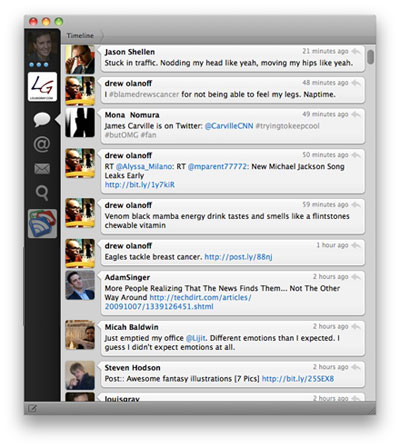
Browsing Updates In Tweetie on My @privatelg Account
In April, when Tweetie for Mac debuted, I called it "Clean, Simple and Robust". That's all still true, but now that I am actively managing multiple accounts, and using the product's built in capacity for retweeting, while enjoying the threaded direct message conversations I used to only enjoy in Seesmic Web, it has practically taken over my Twitter stream. I remain quite fond of Brizzly and Seesmic Web through the browser, but don't mind running Tweetie in the background, not feeling the RAM glut that some other AIR-based clients have on my computing power.
At the end of last month, Lifehacker posted a list of what it called its "Five Best Twitter Clients", including TweetDeck, Brizzly, Seesmic, Tweetie and DestroyTwitter. I haven't used DestroyTwitter and don't use Echofon or others, but know that there are some good quality products in addition to the five I chose to focus on (including the first four and the native Twitter Web interface).
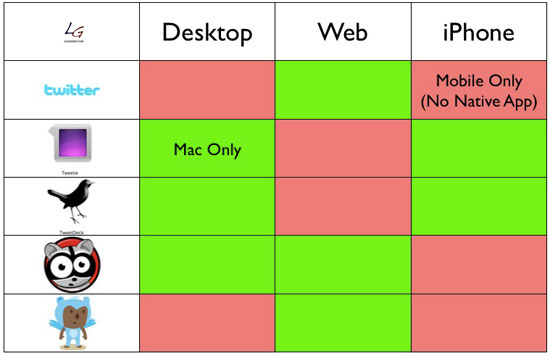
No Leading Twitter App Is On Every Platform
Of the five, no single client supports the desktop, the Web and the iPhone. None! TweetDeck and Tweetie lack Web versions, while Brizzly is Web-only, Seesmic doesn't yet have an iPhone app, and Twitter has no official desktop or iPhone application. So there's clear background for the splintering.
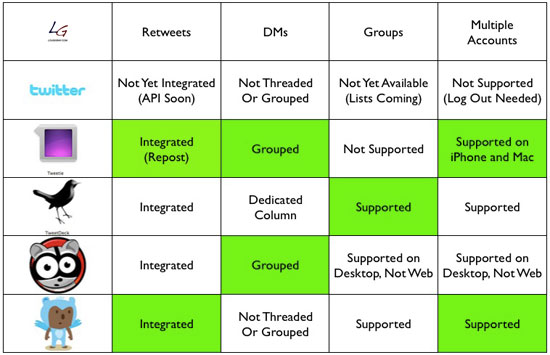
I Believe Each Twitter App Excels Somewhere
While each application has its bells and whistles, there are really four major elements I considered when looking at the top clients: Retweets, Direct Messages, Groups and Multi-User Support.
Retweets: Brizzly (reviewed here) has a handy "retweet" option next to every single tweet. Click "retweet" and it sets up a new message from you prefaced by RT. Couldn't be simpler. Tweetie lets you "Repost" a message as well, with the same functionality. TweetDeck and Seesmic also support retweeting, but I don't perceive them as leading in this functionality.
Direct Messages: Seesmic Web does a great job of sorting conversations by author, including how many messages, in a dedicated pane. If I am on the Web and want to respond to a DM, I will do so through Seesmic. But Tweetie's grouped direct messages are visually pleasing and are easily accessible. TweetDeck lumps all direct messages in an "In box" type of column, as does Twitter's native client and Brizzly, although Brizzly can show conversations in line if the activity is live.
Groups: Twitter promises that lists are coming soon, but TweetDeck has made a name for itself with groups, so much so that people wish you could export predefined groups for importing into other services. Brizzly and Seesmic also support groups, and Brizzly promises to integrate with Twitter's Lists option when it shows up. So far, Tweetie isn't doing any groups of any kind that I know of.
Multiple Accounts: As mentioned earlier, Tweetie and Brizzly make multiple account support simple. Seesmic Desktop's multiple account support is very good, but it hasn't yet migrated to the Web equivalent. TweetDeck's support of multiple accounts is functional, but I have seen many a slipup from people using TweetDeck who have posted to the wrong account, so it could be much more intuitive. Twitter's Web client would just ask you to log out and log in again.
Ignoring extraneous functions like the rich media and real-time definitions of trending topics (where Brizzly excels), the biggest missing aspect to Tweetie, in my opinion, is access to saved searches in the desktop app. They are already highlighted in the iPhone app, so bringing them into the Mac client would be a big benefit indeed.
Selecting your favorite Twitter client is a personal issue at this point. To each their own. There is clearly room for many players given the different permutations of each app. But Tweetie is making things real tough for anybody on the iPhone, and for those who don't need access to groups, it should have the Mac desktop space to itself. This doesn't mean I like Brizzly or Seesmic Web or even TweetDeck any less than any other time I talked about those apps, but today, my stream is full of "from Tweetie" and for good reason.
17 Comments
Tweetie desktop allows for saved searches, it's just not easy to figure out. Once you search for something, click the star icon (grayed out) and it will then appear in your searches (and will light up like the other areas when there are new results).
Also, I understand Tweetie 2 Desktop will support Twitters group/list funcitons as well FWIW.
Justyn, thanks for the notes. In this case, I am referring to Saved Searches you already have set up in Twitter. Brizzly recognizes them right away, as does Tweetie on the iPhone. I assume when Loren looks to update the desktop client, this can be added.
Ah, that makes sense. I started using Tweetie right away, so I never played with saved searches on Twitter.
In any case, I agree - Tweetie is close. They need Groups and PC client and I think they could capture a lot of the market. Not sure if some of the elegance though isn't because it started it's life on a Mac.
Louis, what do you think of twitscoop for the trends aspect?
It's interesting that even those clients that do have versions on multiple platforms, have different features on the different platforms. Seesmic for instance is very different on the web and desktop. I've taken the view with FriendBinder is that you should never be unable to access an interface to it, so we support the web (modern browsers + IE6) and the mobile web (anything half decent, the iPhone, Nokia, Sony, Android etc.) and that the features should be the same, so we use the same code base.
Also I wonder why none of these clients seem to support showing of threaded replies on Twitter, I've found it very useful since we implemented it on FriendBinder:
http://blog.friendbinder.co...
I notice that Tweetdeck and Seesmic already support Facebook. Brizzly sounds like it's going that way too, so I wonder if Tweetie will too.
Fantastic post. Great summary and analysis.
I dig Echofon on Firefox, and they have an iPhone and Mac application. From what I've seen, Tweetie is probably a better combo for the Mac/iPhone but I use windows. I've not seen any dedicated Twitter client I enjoy more than Echofon on Firefox. I use it on my iPod touch, too, and it's serviceable (with Read it Later integration!). But I've so far been unwilling to pay $4.99 for the pro version so that I can sync my Firefox and iPod accounts.
Louis, great post!
Ever since it was released, Tweetie has been my primary desktop client. It is really close to an ideal client for me, with a few exceptions:
- Groups, like everyone else...
- DM - I like the conversation view, but I would really like to be able to see DMs segregated into incoming and outgoing, so it would be quick and easy to see if someone is trying to start a DM conversation, or if another tweet is added to an ongoing conversation.
- Tweetshrink - I use Tweetshrink quite frequently and a few clients provide the ability to click a button to shrink the tweet currently in the composition box.
I'll continue to skip around trying new and updated clients, but for the foreseeable future, I'll spend most of my desktop Twitter time using Tweetie.
Seth
I'd been using free clients (twitterriffic, TweetDeck, Hahlo) and resisting the call of premium for months now. The Tweetie hype last week led me to check out the sweet online help and I was sold.
Every time I use it I'm amazed at how it's the most responsive, comfortable, no-frills client out there. It's far more comfortable to browse Twitter via Tweetie than via any desktop client or web site I've seen thus far. If I were an Apple fan (oh crap!) I might say that Tweetie has given Twitter the Apple treatment in terms of slick UI and ease of use.
Oh jeez, don't let my Dad the MS fan read this.
The fact is Tweetie gets the "let's pick up where we left off, seamlessly queue up the next page of Tweets without making me click through every twenty messages, and tap the top of the screen if you want to jump to [now] stream-browsing interface JUST PERFECT. Thanks, whoever wrote Tweetie. You earned my $3 and more.
I have also used a number of clients and web portals to Twitter. Although I rarely use multiple accounts. I'm a single soapbox sorta guy, and filtering + groups should help replicate the intimacy of private or smaller accounts (it's an implementation detail in my mind).
For the iPhone tweetie outscores halho (web interface) and tweetdeck for my usage. It's fast, easy to use, and doesn't hamper my communication experience.
Desktop wise I'm a tweetdeck user. The groups and easy to control interface are a powerful way for me to receive and send (in that priority order) messages.
I used briefly but wasn't won over by Brizzly, or a fairly solid web client I can't remember at the moment.
Friendfeed is sometimes my super Twitter client as well, but has lost some of my confidence due to the purchase.
I would also keep an eye on the new version of Nambu (www.nambu.com). It brought a lot to the Mac client fray early on, but was stymied by memory leaks and other issues. The newest version looks a lot like Tweetie and multiple colums are set to return in later betas (groups are supported). The app launches very fast and supports multiple accounts ... I think there is huge potential for it.
hootsuite for the win!
Hi folks! I just released the first public preview version of SharedMinds Desktop.
It is a native Windows Twitter client with some unique features like a powerful view engine, an integrated web viewer and flexible sorting and filtering. It supports twitter search, multiple accounts, retweeting, a single inbox and cross account tweeting. It features the popular MS Office Look & Feel and supports many different visual styles. More features like groups and media sharing are planned for future version.
A free download is available at http://bSix12.com/smd/ Feedback welcome!
I appreciate your thoughtful and firsthand comparison of Twitter clients, and share your need for multiple account support. So far, I'm impressed with how little Tweetie drags on my CPU, even after I load a large number of accounts.
Tweetie displays a modest to moderate number of Twitter accounts in a compact window, with a tidy interface. Unfortunately -- depending on your window size, and limited by your display height -- a longer list of accounts will disappear below the bottom of it's Main Window, botching it's interface.
You completely ignored Yoono desktop version (http://www.yoono.com/). It does a great job for twitter, myspace and facebook, and also gmail and other. For chat, I think trillian is still the best (also myspace, twitter, facebook, and other)
love brizzly and web version of twitter, thorough analysis, thanks Louis...
Louis, from your post it sounds like you had not use the iPhone Twitter client SimplyTweet.
I too had used many Twitter clients over the years. At the moment my Twitter client of choice on the Mac is TweetDeck. Except when I have to manage multiple Twitter accounts and/or schedule tweets, I will use CoTweet.
On the iPhone I was using EchoFon (formerly TwitterFon) until TweetDeck released its iPhone client, that was until I came across SimplyTweet.
SimplyTweet has all the functions of Tweetie 2 an more. That was when Tweetie was still at version 1.xx.
You can see my review of SimplyTweet in my blog.
http://blog.vinko.com/2009/09/29/review-simplyt...