Silicon Valley Technology Commentary & Archives · Est. 2006 3,031 Posts · 2006–2026

August 19, 2009

August 19, 2009 · 1 MIN READ · BY LOUIS GRAY

Lazyfeed Adds Sharing Options to Real-time Blog Discovery Engine

Lazyfeed Adds Sharing Options to Real-time Blog Discovery Engine

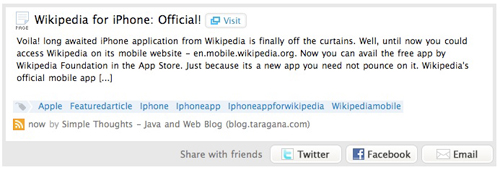
As Lazyfeed inches closer to being open to the public, the real-time topic-based blog discovery engine has been listening to feedback from its beta users - many of whom had hoped there were more social elements from the potential feed reader replacement. This morning, Lazyfeed will incorporate the ability to share found items to Facebook, Twitter or by e-mail, alerting your followers to interesting news you may find through the product.

Now, every item that you see flow through Lazyfeed can be shared, levering a bottom bar that says simply "Share with friends". The service leverages both Twitter OAuth and Facebook Connect to simplify the process, letting you post a link to your Facebook Profile, or on Twitter. Both actions highlight the discovery took place on Lazyfeed.


This Item About Wikipedia On the iPhone Can Be Shared


Here Is the Item Posted to My Facebook Profile


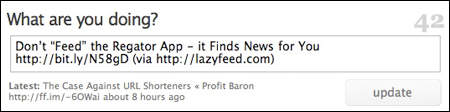
Sharing An Item From Lazyfeed to Twitter

In addition to this feature enhancement, Lazyfeed CEO Ethan Gahng has cooked up a not-so-lazy YouTube video introducing the service, backing up my short screencast I posted last month.


Most interesting to me in the video is how Ethan uses Lazyfeed to find music, entertainment, and TV shows, branching out from my own tech news obsession. It just shows how versatile the product can be. Check out the new options at http://www.lazyfeed.com.

August 18, 2009

August 18, 2009 · 3 MIN READ · BY LOUIS GRAY

Regator's New iPhone App Offers News On the Go With Bite

Regator's New iPhone App Offers News On the Go With Bite

For as much content as I might be creating, with new blog posts, and social media updates scattered across a myriad of networks, I am still far from satiated when it comes to data flowing the other way. My days are spent embedded in Google Reader and FriendFeed, with TweetBeep, LazyFeed and BackType filling in the gaps I may miss. But when away from the laptop, it's my iPhone that keeps me connected to the world wide publishing machine. With the introduction of a new application from Regator (www.regator.com), I now have three solid options for finding relevant data when I am praying to the duopoly of Apple and AT&T. Added on to MeeHive (review) and My6Sense (review), I am getting dangerously close to knowing I won't miss anything, even when I clip my laptop leash.

The three applications (My6Sense, MeeHive and Regator) have slightly different goals. My6Sense looks at data you have imported and tries to learn from your behavior what is most relevant to you as an individual. MeeHive not only offers general news, but also, personalized data based on its knowing what I like, thanks to my answering a series of survey questions. Regator plays more of an editorial role, having hand-selected the best of the blogosphere (in their mind) and offering it to you in easy to navigate sections.


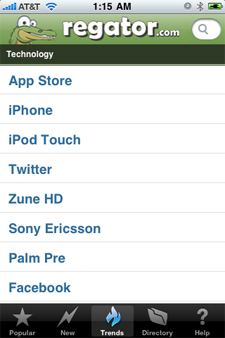
The Main Regator iPhone Page (and Technology Trends)

Upon opening Regator, you get a popular news overview from the Web, which, depending when you look, could offer you a mix of technology, celebrity news, politics, healthcare or sports. To find the newest updates, click the New button at the bottom, or, more interestingly, you can click Trends to find what topics are gaining momentum in the blogosphere. (For example, top trends today include Robert Novak, Brett Favre, and the iPhone)


Regator's Technology Section and My Blog Archive

But more specialization takes place when you look at the bar below "All Topics" at the top of the Regator app. You can find subsections from Poltiics, Religion, Sports, Local Interest and others. Of course, being a techno-focused media consumer, that's where I expect to spend the most time. Regator lets you "swipe" through the lists left to right and right to left to drill down on your topic, and you might be surprised as to how deep their data goes. If you click too many times in the wrong place, you just might find yourself in Architecture under Construction under Occupations, for example. Regator has all the data, and is just waiting for you to find it. And yes, should you get lost, just click home to go back.

Of the three applications, Regator has the smoothest, most colorful, interface. It has its smiling gator atop each page, features thumbnail graphics and large colorful buttons. Just about the only thing it doesn't do which I wish it did is clearly offer full-text of the stories (now, you have to click a second time following the excerpt). On My6Sense, I can read a full story and go back to my list, as it pulls from the full RSS feed. On Regator, I initially only see the headline, a thumbnail and an excerpt. Meanwhile, Meehive just clicks through to the original story as if I had opened a new browser window.


Regator: Searching for iPhone and Vanity Search Results

Regator also offers the option to search by keyword, or to browse the product's very-deep directories. Should you find an individual blog that you like, you can choose it, and scroll down to see more entries, going back for several months at least. It aims to offer what it calls the Web's Best Blogs, and it does a great job finding high-quality content from a wide variety of sources. The new app is available for free on the iTunes store. Don't be thrown by its 17+ rating. That's just Apple being confused.


Disclosure: Kosmix.com, author of MeeHive, is a client of Paladin Advisors Group, where I am General Manager of New Media. I have no relationships with other companies or services mentioned in this article.

August 17, 2009

August 17, 2009 · 2 MIN READ · BY LOUIS GRAY

Progress Being Made On Twitter's Network After 10 Days of Attacks

Progress Being Made On Twitter's Network After 10 Days of Attacks

After an initial wave of attacks brought the popular micromessaging service to a standstill, as well as a host of other social networking sites, on August 7th, the Twitter team has been fighting to turn the tide and restore access for the service's customers and developers to near-normalcy. Ten days into the attacks, they have not disappeared, according to postings from Twitter, but it looks like the company may have turned a corner in dealing with the additional stress from the distributed denial of service.

In a post to the company's Twitter Development Talk forum titled "Platform Status Update" entered at 4:30 this afternoon, Twitter's Ryan Sarver said:
"Over the past ten days we have been dealing with a lot of stress on our network and that has caused a number of our partners to be knocked offline for extended periods of time. This is obviously not something we want to happen and the platform and ops teams have been working hard throughout that time to address the needs of our ecosystem while protecting the system as a whole. We have made some great progress today in tuning the system to a point that should allow our partners to operate as they were before the recent issue began."
He added "the system is still under stress", and asked developers who might be continuing to have issues to work with them and provide information around what IP addresses their machines use to access the Twitter API, the method they are using to make requests, and any other information - including data as granular as their host operating system, browser, cookies and network connection.

Ryan's comments followed a note from earlier in the afternoon by Alex Payne, the company's platorm lead, where he also said the company continues to "fend off" the attack, saying that without specifics from developers (like those listed by Ryan), they could not adequately troubleshoot any issues.

While the majority of Twitter users are not experiencing the widespread outages that we saw a week and a half ago, it is still not uncommon for applications utilizing the Twitter API, and specifically OAuth, to see failures. There's also no doubt the ongoing attacks have led to a fair share of fail whale sightings. (I've encountered a few myself) Twitter posted a note to the company's status blog Sunday acknowledging the problems, and said they are "working to resolve it".

It has been tempting at times to poke at Twitter for its struggles during this period, but as I mentioned on August 7th, when the troubles first arose, the company is being much more visible and fast to respond to developers and to provide status, as they show signs of maturing. Their operations teams look to have been busy around the clock for the last two weeks, and they will need to keep fighting - as it looks like this battle may go on for some time.

August 16, 2009

August 16, 2009 · 2 MIN READ · BY LOUIS GRAY

Google Engineer Tests WebFinger Client for E-mail Identity Lookup

Google Engineer Tests WebFinger Client for E-mail Identity Lookup


More than a decade ago, I could open up a simple program that tapped into the Finger protocol, and see individual's information, or their status, such as the last time somebody had logged into their e-mail account, or if they had new messages. Whether it bordered on stalking or was simply informational, it was a good way for me to figure out why people hadn't responded to e-mails I had sent - deducing whether they were just ignoring the account, or if it was, in fact, me, they were ignoring. But over time, as people became more connected, and less comfortable with this, the protocol fell away.

Last week, some enterprising engineers at Google, including those behind the very cool Pubsubhubbub protocol, announced they were looking to bring back the Finger protocol - but in a modernized way. First, the new protocol would leverage HTTP instead of TCP, and second, the goal would be to provide user-defined identifiable information based on public profile data. The project's name: WebFinger.

A scant two days later, we already have the first test client, authored by DeWitt Clinton, which shows how WebFinger could work. (Update: He followed up on Twitter to clarify that this is "WebFinger-like", not an implementation of the official protocol itself.)


While DeWitt says "Your email address probably won't work" yet, it does work for GMail accounts, most likely those where you have enabled a Public Profile. For example, here are the results when you search for me.


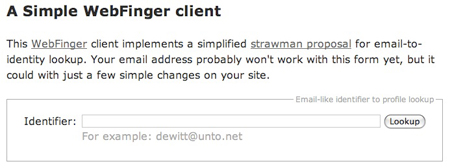
DeWitt's First WebFinger Client Search Box


WebFinger Results On My E-Mail, Using DeWitt's Testbed

The results in today's WebFinger-like client vary quite a bit from what we used to see in Finger back in the last decade. In one e-mail I sent a friend in February of 1997, I wrote: "The last time you logged into your e-mail here was at 5:40 pm Sunday. Right? You got mail at 7:07 from somebody else. Check the time." Not too unsurprisingly, I got this response the next day: "I've never felt the need to protect myself....and you're making me doubt my security." Twelve years later, WebFinger is supposed to help find less about data you don't want people to see, and more about helping your e-mail become your true identity, shaping just what they would find.

DeWitt's implementation is just a first step in what we can expect to see from WebFinger. Dewitt also spells out in a post on the site's Google Group that he wants to make sure the project is not overcome with complexity - outlining what he called an even simpler proposal for discovery and response formats. He notes both @gmail.com and @friendfeed.com e-mail addresses work with his trial, but more may soon. I won't even pretend to say I get the rest. That's why he does what he does and I do what I do.

So the project is in its earliest stages - just getting under way. To check it out, go to http://webfingerclient-dclinton.appspot.com/.