Silicon Valley Technology Commentary & Archives · Est. 2006 3,031 Posts · 2006–2026

September 14, 2009

September 14, 2009 · 3 MIN READ · BY LOUIS GRAY

Ecademy Revamp Brings Real-Time to Social Network, Blog Platform

Ecademy Revamp Brings Real-Time to Social Network, Blog Platform

On Friday, Ecademy, the business-oriented social network whose roots span back to 1998, revamped its Web site, highlighting members updates in real-time, much like its much younger cousins, Facebook and FriendFeed. The new revisions serve to better highlight updates from around the Web, activity on the site from logged in members, and the newest blogs - which can be hosted within the site instead of requiring a third party network. Ecademy, which preceded Web 2.0 when it debuted in the late 1990s (see Web Archive from early 2000) hasn't been on the tip of everyone's lips, like many of the newcomers have, but the site has a wide array of features - not to mention leadership that takes a different look at the value of connections than most based here in Silicon Valley do.
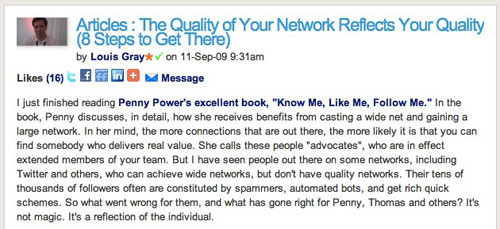

A Recent Blog Post I Added to Ecademy
Ecademy, like many other social networks, enables users to connect to one another to send direct messages, and highlights updates made natively or from Twitter. But the network, unlike FriendFeed, Twitter, Socialmedian and other sites, also enables users to post native blog entries directly to the site, including "likes" and comments. In fact, the site probably has more raw features than just about any other network - ranging from personal profiles that show the basic biographical data, contacts and external sites to search engine optimization, testimonials on users' behalf, a marketplace, groups, and a personality profile that suggests how you can best be approached, following your taking a short survey. (My profile can be found here and my blog posts are here)
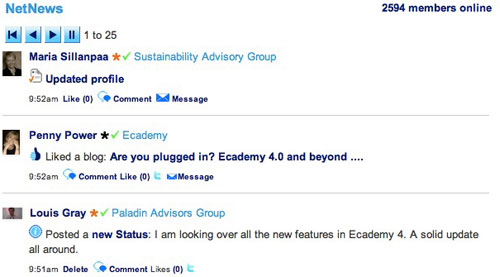

Ecademy's NetNews Updating In Real-Time

In the wake of Facebook's acquiring FriendFeed, there are open questions as to the future of that network, which was among the first to bring real-time to its core. In the meantime, Ecademy's newest introduction provides a constant flow of updates through what it calls "NetNews" which shows all activity from all contacts, and a running count of how many members are actively using the site. (2,594 as I type this - and you can expect that to rise and fall with the sun over the British Isles) And everywhere I turn in the site, I find that it is as connected to other networks as any I have seen.
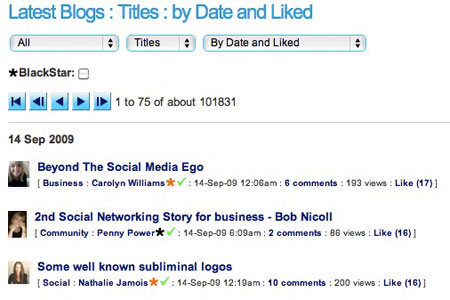

The Latest Blog Posts On Ecademy

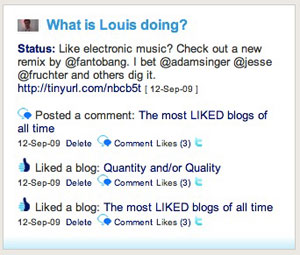
For one thing, every blog post lets you share to other networks, but also, if you have connected your account, the sheer act of liking a post preps a box, complete with TinyURL, to post a link to your followers on Twitter. Each profile shows my most recent activity, both on Ecademy and other networks, not to mention displaying the most recent members to "like" me or my activity, or those who have viewed my profile.
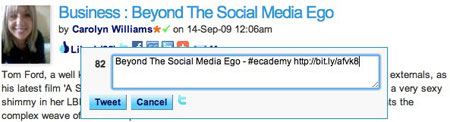

If I Like a Blog On Ecademy, I Can Tweet It

The Ecademy community is also very different than other communities where I have spent a lot of time. FriendFeed for me has been about communicating with fellow geeks, but also finding personal relationships which can have a wide range of topics. Facebook has been as much about connecting to friends and family as it has been for connecting to online peers. LinkedIn has typically been about real-world business relationships, colleagues and partners. Ecademy, so far, is about driving business and experimenting with social media. The community is vibrant, and as I read in Penny Power's book "Know Me. Like Me. Follow Me.", the majority of Ecademy users own their own business. Premium accounts, which gain more access to members and meetings, called "BlackStar", even pay $140 a month for the privilege, making Ecademy a serious revenue generator.

I have gotten to know Ecademy mainly through the efforts of its co-founder Thomas Power, who is active on practically every network, and has become a good friend online. It is through knowing him that I will be meeting with a small group from Ecademy this week in London for a full day's presentation on the hot topic of social media for business. That Ecademy revamped the site the week before I ventured to London is sheer coincidence, but a great opportunity to see how the product is improving.

September 14, 2009 · 3 MIN READ · BY LOUIS GRAY

Automated Tweets Don't Always Mean Less Genuine Tweets

Automated Tweets Don't Always Mean Less Genuine Tweets

With the introduction of an updated terms of service last week, Twitter once again had people buzzing about what was accepted behavior on the fast-growing microblogging site, and what crossed the line. In one of the site's frequent list-based articles dedicated to the San Francisco company, Mashable claimed one of the targets of the update was what they termed "bots", which were updated by RSS feeds moreso than by humans. In the post, Jennifer Van Grove specifically used the popular IMDB account as an example of one that should "live in fear of death". But all drama aside, I don't think that's Twitter's intent, nor do I believe that the sole delineation of whether an account is pulled by RSS instead of through text, for example, calls for the label of "Spam".

The truth is that a significant number of news-based accounts are clearly automated, very often by the use of RSS, because Twitter has become more than just a place to send updates. It's infrastructure. And even if these accounts aren't automated through RSS, practically all of the top accounts are full of a stream containing only headlines and links, with Mashable being no exception. (See also: TechCrunch, Techmeme Firehose and ReadWriteWeb for example)

It's clear that while "The Twitter Rules" say that "If your updates consist mainly of links, and not personal updates" is one criteria for being labeled spam, it cannot be the only criteria. We must believe, and I do, that Twitter would know how to separate the good from the bad in this type of a case.

The truth is, and I have said this many times, that you should participate and make your data available where your audience may be. And often, even if you are initiating content in one place, the audience may be somewhere else - like Twitter. As a result, it makes sense to move that content to Twitter to give them access.


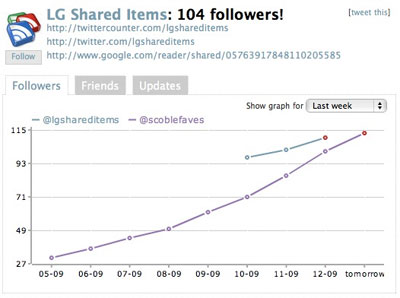
TwitterCounter Shows Growth for @lgshareditems and @scoblefaves

A recent experiment I kicked off on Wednesday was creating a dedicated Twitter account for my Google Reader shares and Delicious bookmarks at @lgshareditems. This combination has always been available on FriendFeed (and Facebook), but not Twitter. In parallel, Robert Scoble, also a guy well known for trying new things with social networks and data, has been tracking favorite tweets from those he follows with a dedicated account called @scoblefaves.

I have watched both accounts creep past the 100+ follower stage, even though both accounts are new, and both are exclusively feed-based. Each is a new way to try and utilize human filters and pass the results to Twitter, with the difference being that I am betting on content from outside of Twitter, and Robert is betting on other Tweeters. I bet both have strong value to separate audiences looking for news and tech updates - even though our data sets are different.

My shares to @lgshareditems are equally as genuine as my posts to @louisgray. While I may have more personal updates at the @louisgray feed, I do also post my new blog updates there, as well as my Delicious bookmarks, to give those authors additional exposure. And as noted above, practically every self-respecting blog and news source can see their Twitter feed to be extremely link heavy. So I expect it will take a lot more than you seeing a lot of blue underlines in my feed to be in danger of getting the big boot from Twitter, no matter what their TOS says.

September 13, 2009

September 13, 2009 · 3 MIN READ · BY LOUIS GRAY

Hit a Home Run With Your iPhone and Challenge Friends

Hit a Home Run With Your iPhone and Challenge Friends


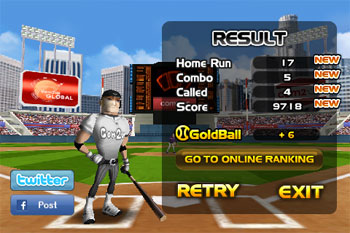
My Batter Poses After A Strong Showing

I knew I was in trouble when I looked at the Apple Web site after their latest iPhone OS update and saw a screenshot featuring Com2uS's Homerun Battle 3D application. Combining two of my obsessions (baseball and the iPhone), it wasn't too long before I had opened up the iTunes Store and downloaded the game, for $4.99. What I found was more than just a simple game that let me swing for the fences, but a high quality video game with built-in social functions, letting me challenge people wirelessly from around the world, and the option to send my scores to Facebook and Twitter.


Hitting A Home Run in the Left Field Seats

The concept behind Homerun Battle 3D is a fairly simple one. In the classic version of the game, the pitcher throws the ball, and you tap the iPhone at just the right time to send the ball on a trajectory that may lead out of the ballpark. If it goes over the fence, you get a point. If it doesn't, you get an out - just like in the real home run derby you can see during every All-Star Break.


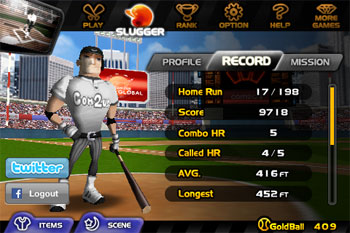
Checking My Home Run Records


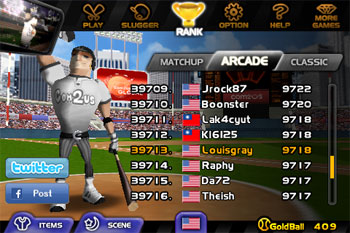
Seeing How I Stack Up Against Other Players

Homerun Battle 3D is a lot more fun than "see ball hit ball". Depending on the pitch's speed and type (from fastballs to sliders and curves), you need to tilt the iPhone up or down to match the bat head to the ball and then swing away as the ball dives into the strike zone - which can be challenging. And it becomes even more involved when you discover additional options, such as an "Arcade" version that features contests in terms of hitting the ball to all fields, getting double the points on a single swing, or taking away an out if you find a ball with angel wings.


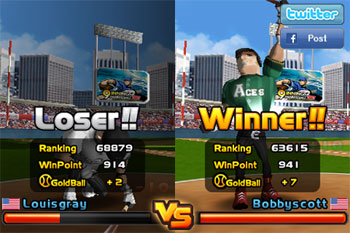
Going Down to Defeat After One Battle

The social elements in Homerun Battle 3D are reminiscent of those on some Nintendo Wii games. You can choose to challenge anybody from around the world who wants to do battle. If somebody of your rank is up for it, you and the opponent will both be swinging for the fences at the same time. If you hit more home runs or get more home runs in a row than they do, then you are the winner, and they are the loser. So far, I've only won once, but assume I may get better with practice. If you win, your ranking goes up, and if you lose, yes, it goes down.


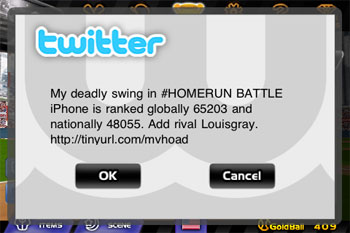
I Can Send My Records to Social Networks

Should you be so inclined, you can send your current rankings on Homerun Battle 3D to Facebook or Twitter, and request that your friends add you as a rival, letting you take on your friends, rather than strangers, and yes, spreading the word about what is a very cool game for the sports junkie in each of us.

At Apple's recent event, Steve Jobs and Phil Schiller highlighted the iPod/iPhone platform's growth as a game device. While I still make plenty of calls and browse the Web from my iPhone, I'm also growing an impressive number of games in my application library. If you want to add Homerun Battle 3D to yours, you can find it on the iTunes Store here.

September 9, 2009

September 9, 2009 · 2 MIN READ · BY LOUIS GRAY

Real-time Google Reader Shares to Twitter - There's An App for That.

Real-time Google Reader Shares to Twitter - There's An App for That.

For many people, Twitter is as much about the links you share as it is about the discussions that ensue in the microblogging community. For that reason, tools that automate posts to Twitter via RSS are among the most popular Twitter clients in use. While many people, including me, post their new blog entries to Twitter by hand, a good portion of Twitter activity is machine-based. For example, I share bookmarks I make on Delicious, as well as my native FriendFeed entries or YouTube videos, to Twitter. This evening, a new tool called "Reader2Twitter" debuted, letting you post your Google Reader shares to Twitter, without using a middleman, such as FriendFeed.


Since I am an avid Google Reader sharer, I have thus far chosen not to post my shares to Twitter. I'm sensitive to the noise factor, and don't want to drown those who just wanted to get connected (while those in FriendFeed and Facebook can hide the updates). But with the "Reader2Twitter" tool here, I opted to create a new account, just for this feed, meaning people who choose Twitter as their discovery engine won't necessarily be left behind.


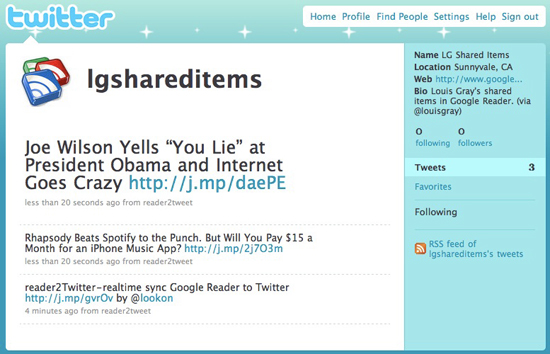
You can find this new account at http://twitter.com/lgshareditems.


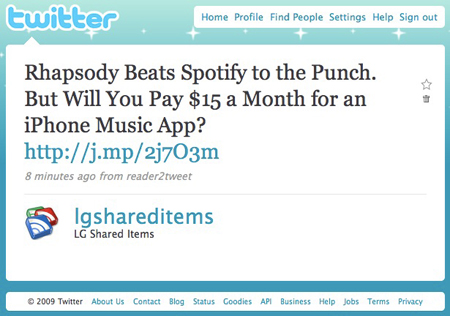
As you can see, each of my shared items in Google Reader is passed to Twitter in near real-time, displaying the headline and a shortened URL, powered by Reader2Tweet.

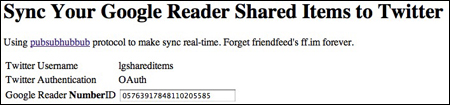
To get started, go to http://reader2twitter.appspot.com/, enter your Google Reader Number ID, and connect to Twitter using OAuth. Following this, share in Google Reader like you always have, and Reader2Twitter will do the rest.

A very cool tool, and yet another proof point for the benefits of Pubsubhubbub.


Note: Since this article, I've been notified that signing up will post a Tweet on your behalf, saying: "RT @gr2t: Reader2Twitter is an app that real-time sync your Google Reader Shared Items to your twitter. The app url is http://j.mp/gvrOv". If you do not want this message, you should not test the application. (Until the developer makes this optional)