Silicon Valley Technology Commentary & Archives · Est. 2006 3,045 Posts · 2006–2026

July 18, 2010

July 18, 2010 · 2 MIN READ · BY LOUIS GRAY

KickPost Predicts Popular Posts for Top Tech News

KickPost Predicts Popular Posts for Top Tech News

As technology news sites have proliferated in the last few years, so too have technology news aggregators looking to find the best of the Web and surface it quickly - either through social voting mechanisms, insightful editorial picks, or complicated algorithms. In addition to the Diggs and Slashdots of the world, one finds Hacker News and Techmeme as the gold standards offering the front page of today's tech news. Now, there is a new site that has entered the fray - though minimalist for now - armed with what the founder calls a predictive algorithm which just might find top stories faster than anybody else.

The site is called KickPost (http://www.kickpost.com) and it comes from the hand of Caleb Elston @calebelston, the vice president of products at Justin.TV, who is also known to frequent blog readers here as the man behind Toluu, the RSS discovery site, and the gift recommendation site, Kallow.

One Item from KickPost Shows The Time of Post, Source and an Excerpt

In a discussion on Hacker News about the launch of KickPost, Elston describes the site as a "new tech news aggregator that uses a predictive algorithm based on historically popular stories to predict which stories will be popular in realtime." He adds, "We are about 20min faster at predicting hot stories than Techmeme."

Another Top Story on KickPost

The site displays the headlines of predicted top stories, as well as a short excerpt, the author's name and the post source - with the headline linking to the original story and the source to the blog's main page. Stories are ordered chronologically, with the most recent at the top, and older ones below, with a time stamp showing how recently the posts entered KickPost's index, and the page automatically refreshes when new stories enter the index.

From a quick perusal of the site, it's clear that top tech stories are making it into the index - and they are being found fast. But the site sources are very common to so-called A-List blogs that dominate many other sites, including VentureBeat, Gizmodo, TechCrunch, and Lifehacker. Where more editorially-driven sites, including Techmeme, have an advantage is through manual discovery - something a purely algorithm-driven site like KickPost can't catch. The one-off top stories from new sources will have a tough time making the index, from what I can tell, even after scrolling back 2 days into past KickPost content.

Given Caleb's history for parsing RSS feeds and finding how your own likes intersect with those from the community, I would anticipate where KickPost would really gain value over the competition is through personalization and building the top stories in near real-time based on individual's preferences, not just through beating Techmeme and others by a handful of minutes with headlines from top blogs. But it's a site we'll be watching.

Find KickPost at http://www.kickpost.com/ and on Twitter at @kickpost.

July 18, 2010 · 3 MIN READ · BY LOUIS GRAY

Could You Replace Facebook.com With a Desktop Client?

Could You Replace Facebook.com With a Desktop Client?

Even as many desktop applications are migrating to the Web in the form of Web services and Web apps, some popular Web services are going the opposite way, as desktop clients are created for popular social networks, or to bring alerts to changes on the Web outside of your browser. From the seemingly-ancient desktop RSS readers to the more mainstream Twitter clients, we have seen the migration is bidirectional. But what about Facebook? The site considered to be the second-largest by some measures and the largest overall by others on the entire Web, jousting with Google, doesn't seem to have the groundswell of development focused on bringing updates from the site to the PC as Twitter does, but there are options.

The easiest route to getting Facebook to the desktop for the most connected social media users is through existing Twitter clients which also support Facebook. TweetDeck and Seesmic let you add your Facebook account as a supported account, as does Brizzly for the Web. In the cases of Seesmic and TweetDeck, Facebook updates scroll down in a single column alongside other services you have connected - from Twitter, of course, to recent adds, including Foursquare, Google Buzz or LinkedIn.

But in addition to these Twitter clients who give Facebook a passing nod, there are a few dedicated Facebook desktop apps that leverage Adobe AIR, bringing the network to you.

Facebook for Adobe AIR In Action

Similar to the Twitter clients, the simply titled "Facebook for Adobe AIR" shows all news feed activity in a single column stream, and lets you comment or like from within the app, while any links take you the Web browser. It's basic, but does what you would expect. As you have to visit the app to see updates, the benefit to running the client on its own is minimal over the Web experience, unless you just don't want your browser to be on constantly.

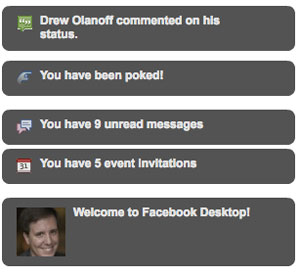
Facebook Desktop's Startup Experience

In contrast, a much newer app, called "Facebook Desktop", which has the somewhat enviable URL of www.facebookdesktop.com, eschews the column and stream format, simply showing you alerts, which if they gain your attention, are a click away. This is much like the FriendFeed Desktop Notifier, introduced before SXSW back in 2009. While it is an AIR app, like the others, it doesn't have that heavy feel on your laptop, and doesn't demand any screen real estate.

A Sample Update on Facebook Desktop

Once you open Facebook Desktop, you get instant updates to messages you have waiting, whether you have events pending, or even if you have been poked. As new entries on your friends' feeds are added, they pop up to the foreground and melt away if they don't draw your interest. You might find yourself looking around for the app window, but the minimalist approach doesn't have a central node at all. As ephemeral as some social updates can be, this isn't necessarily a bad thing. So you can be working on whatever other app you want on your desktop and still have Facebook notifications float to you.

Clients for Twitter have often been at the foreground of innovation for the service's platform. In this case, that fact has not been true for Facebook. Maybe their Web site is good enough. But if you want something else, there are alternatives.

July 15, 2010

July 15, 2010 · 2 MIN READ · BY LOUIS GRAY

Ecademy Co-Brands my6sense App for Business Network

Ecademy Co-Brands my6sense App for Business Network


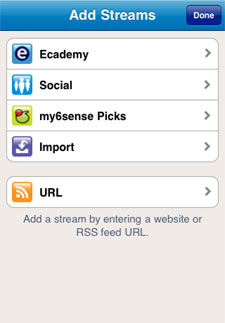
my6sense, the company focused on digital intuition and hyperpersonalization of streams, including RSS and social streams such as Facebook and Twitter, has added a new partner in Ecademy, the UK-based social business network. Today, leveraging the company's API for content relevance and filtering, the two companies introduced a co-branded application in Apple's iTunes store that prompts Ecademy users to connect the network as an addition stream, bringing the individual personalization and relevancy filters my6sense is known for to a new community - much like they did when first tackling Twitter and Facebook after starting with RSS feeds at its core.


My New My6sense Stream With the Addition of Ecademy


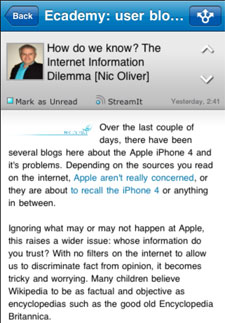
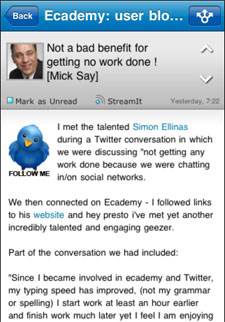
The co-branded application behaves and looks much like the standard my6sense application, highlighting the feeds you pull into the program, and sorting them in order of assumed priority based on your own implicit activity. Over time, thanks to what articles you read or skip, among many other factors, the program continues to modify its algorithms to match you, bringing the assumed "most important" and most relevant content to the top - no matter their source. The Ecademy my6sense application, available here on the iTunes store for free, adds blogs from other Ecademy users to the mix, giving them an equal shot at your attention to streams from any other source.


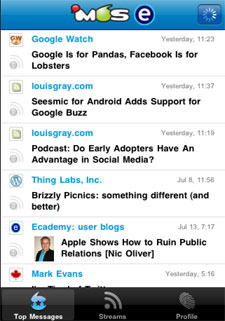
Top Blogs Float to the Top of the Ecademy-My6sense App


In my testing of the new product, my6sense recognized my personalized profile from their database, and once linked to Ecademy, it was clear that the same process which has cleaned up my feed reading on the mobile phone works on this new source. Intriguing blog posts on technology companies I follow closely, like Google, Apple and social networks, rose to the top, and those that were less targeted were well below the fold.

The co-branded application is a good test case for my6sense's promise of filtering any streams on the Web that can be sorted by relevancy based on user behavior. Ecademy's broad base of users with wildly varying interests will probably find the product a welcome introduction that brings relevant posts their way, while reducing the visibility of the rest.

Disclosures: my6sense is a client of Paladin Advisors Group, where I am managing director of new media. I have done previous speaking work and other paid activity with Ecademy, including a social media retreat in February. I did not gain early access to this product, nor did representatives from either company see copy prior to posting.

July 14, 2010

July 14, 2010 · 1 MIN READ · BY LOUIS GRAY

Seesmic for Android Adds Support for Google Buzz

Seesmic for Android Adds Support for Google Buzz

My personal switch from iPhone to Android (much more visible than I ever had anticipated) was made easy due to the existence of high quality applications I already was familiar with from the iPhone platform, enabling me to simply migrate and not lose a step. Among the best applications, one I rely on daily, is Seesmic, which, in contrast to the native Twitter application for Android, comes with multiple account support, and the goal of supporting multiple networks.

Today, the great news comes that Seesmic is adding integration of another one of my most-frequent destinations on the Web - Google Buzz.

Signing In With Multiple Accounts, Including Google Buzz

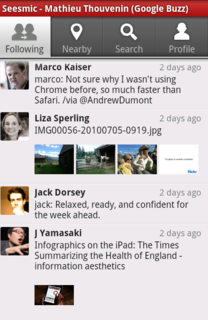
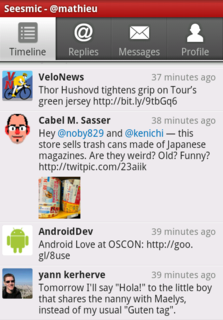
The new Seesmic, available on the Android Market, adds Google Buzz support, inline preview of images and links for Buzz and photos for Twitter, and also adds OAuth support - the login standard for Twitter.


The Google Buzz Timeline In Seesmic for Android


The launch of Google Buzz's API resulted in multiple applications tapping into the growing network, and making Google's current social offering as easy to access as Twitter, Facebook, LinkedIn and other top communities. We saw the debut of Buzz support in TweetDeck and Seesmic Desktop, and Seesmic is the first major Twitter client to bring Buzz support to mobile Android platform - a perfect fit for geeks who are leveraging the Google platform as much as I am.

To aid the onboarding of its newest customers, it makes sense for Twitter to keep its core applications to be single-network centric, but for the rest of us who participate in multiple places, the option to do so in one app, like Seesmic, is welcome.

As for Google Buzz, you know you can find me here: http://www.google.com/profiles/louisgray.