Silicon Valley Technology Commentary & Archives · Est. 2006 3,045 Posts · 2006–2026

November 13, 2010

November 13, 2010 · 2 MIN READ · BY LOUIS GRAY

Under #NewTwitter, Blocked Users Can't See Your Timeline

Under #NewTwitter, Blocked Users Can't See Your Timeline

Being blocked on Twitter is a funny thing. The practice, used infrequently by most people, and more frequently by more a small segment of the population who likes to wield it as a weapon or a punitive measure following temporary flare-ups or permanent dislike, doesn't really do a whole lot. Effectlively, blocking a person means they cannot follow your account directly, and that their tweets won't appear in your own timeline, but not much else. Under the old Twitter, those people you had blocked were unable to click on individual Tweets, but still could see all your tweets, in your timeline, and yes, if you sign out or use a second account, you can still see all the tweets in their original glory.

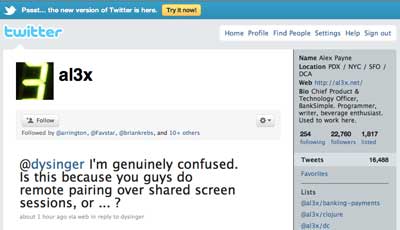
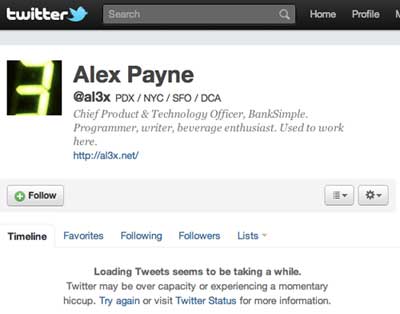
Quietly updated with the ongoing rollout of #NewTwitter, it now looks like trying to view the timeline of someone who has blocked you no longer works. Instead of a list of their tweets, you see a white lie from Twitter that says "Loading Tweets seems to be taking a while". In actuality, this means those tweets are not going to be showing up for you ever - at least until the other person unblocks you or you use a second account.

An Account Blocking Me on the Old Twitter Shows Tweets

An Account Blocking Me on the New Twitter Hides Tweets

According to Twitter's Help Center, blocked users can't:
  1. Add your account to Twitter lists
  2. Have their @mentions of you show in your @mentions area
  3. Follow your account
  4. See your avatar on their page or timeline
Even with all this, blocking remains an entirely ineffective way to hide your updates from an individual. Until there are ways to block by IP address or block a person's cookie and note they use another account which is blocked (just an example), it simply doesn't work. The new update just makes getting to those artificially hidden accounts one more step away. But if it is critical, and there is really someone you don't want seeing your updates, you could always go "private". That way, you are essentially turning blocking on its head. Instead of blocking a few people, you block everyone and bring in a select few.

As for my good friend Alex Payne (@al3x) who blocked me more than 18 months ago, I don't remember exactly why, but his account is always reliable for me to test against and see how this blocking process has changed.

November 11, 2010

November 11, 2010 · 1 MIN READ · BY LOUIS GRAY

Lazyscope RSS and Twitter Client Slims Down, Speeds Up

Lazyscope RSS and Twitter Client Slims Down, Speeds Up

Last week's launch of Lazyscope brought an intriguing new Twitter and RSS client into the world which allowed for full story viewing in a right pane that supported rich media, effectively replicating Twitter's iPad experience on the desktop in a versatile Adobe AIR application. Just over a week later, the application has already seen significant updates that show its potential to become an option for Twitter power users - with the adoption of real-time user streams, a new "mini" single column size and keyboard shortcuts.

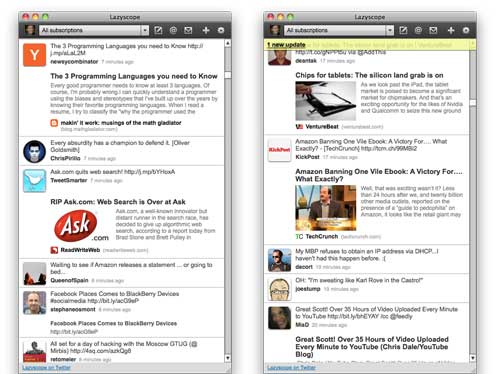
Like fellow desktop Twitter client TweetDeck, Lazyscope's support for real-time user streams eliminates the need for a refresh button, as updates flow into the application practically as they are posted to the microblogging network. The more active the users, the more frequent the updates, of course, as they cascade from the top down, simulating the stream in real time.

Lazyscope in Single Column View With User Streams Enabled

The option for a single column view that does not monopolize the screen is also important - as the content viewer (right pane) only opens when an article is selected, and closes when you are click the back arrow to return to the stream. In fact, the single column view is now the default view, giving you your screen real estate back.

Lazyscope in Full Expanded View

In addition to these two updates, Lazyscope, from the makers of Lazyfeed, has turned on keyboard shortcuts, letting you navigate the stream with arrow keys, reposting with the enter key, and my personal favorite, scrolling to the top of the screen with the space bar. As someone who uses keyboard short cuts all day long in Google Reader to go from story to story, doing the same in Lazyscope can make me even more efficient, and as they put it... more lazy.

If you haven't yet tried it, check out Lazyscope at http://www.lazyscope.com.
November 11, 2010 · 3 MIN READ · BY LOUIS GRAY

Leak Corporate Data, Get Caught, Get Fired.

Leak Corporate Data, Get Caught, Get Fired.

After an "anonymous loyal reader" tipped Business Insider on Tuesday to an internal memo from Google saying the company was rewarding employees with both a cash bonus and a raise, news broke Wednesday that the leaker, a Google employee, had been tracked down within hours, and fired. With all proper sympathies to somebody who just lost their job, there can be little flexibility in this regard - for if the person cannot be trusted with information deemed confidential and secret, they shouldn't have a home in a place where strategy and secrets are required. This becomes especially true at a public company like Google, a company that works on many future projects at once in a competitive market.

While the impetus to the reported pay increases is being debated, you can see Google (and other companies that face the same issue) really has little choice.

Unlike Yahoo!, which is leaking like a sieve to smart journalists like Kara Swisher, who seems to have every internal memo that leaves Carol Bartz' desk, Google traditionally has been very good about keeping most of its internal news under wraps, with few exceptions. Their launch of the Google Chrome Web browser caught practically everyone by surprise two years ago, as did their introduction of robot cars just last month. Other projects, like their next iteration of social, and the Nexus One, are discovered, but usually, details are few and far between. So the full-on e-mailing of an internal memo to a blog was a big breach indeed.

The practice of sniffing out rumors around Apple's future announcements has practically spawned an industry. Just prior to Steve Jobs' arrival, leaks were so common that the actual news was boring and anticlimactic. Since Jobs' return, official leaks have practically been extinguished, and violating blogs and anonymous commenters have been sued. The absence of leaks adds to the showmanship and impact the official unveiling of new products and strategy can have, and can help companies avoid the Osborne Effect, which can happen if new products are discussed before the old ones are done shipping.

As a veteran of corporate communications and PR teams at tech companies in the Valley, the usual process for speaking to press is handled by a select few people who know their roles and range. Those found speaking out of turn are challenged and, if necessary, removed, if they cannot be reigned in. During dark days at one startup where I worked, we were under siege from anonymous commenters who trolled industry Web sites saying we were days or weeks away from going out of business. Rumors of layoffs were mentioned, with little merit. But amidst the negative BS, there were elements of truth, with clear insider knowledge that had to be coming from people inside the company - directly or otherwise. At an all-hands meeting, our CEO addressed the anonymous attacks and warned that if anyone were in the room participating in the practice, they would be asked to leave. Eventually, the posts stopped.

As someone who also covers tech companies, I can understand the intrigue of happening on a big story, or an "exclusive" that can raise headlines, have people discussing your scoop, and rave about your access. Access to key people is a major reason why some blogs get traction and others don't. Access to information that is made available without permission can be fun too, if you know where to look. But forwarded internal memos from public companies are cheap - and the people sending them out to the press have a misguided perception of their own importance ahead of loyalty for the company. Leaking internal salary bumps endangered the company in terms of possible disclosures to the SEC, and immediately alerted competitive companies in the Valley that they too may need to adjust their hiring approach to job seekers. This lost element of surprise negates much of the benefit and simply can't be tolerated.

The good news is that the person who made this clear mistake has not yet been outed. For their sake, I hope they stay anonymous, learn from the error and find a new place quick where they don't find the need to play the part of press quite so inviting.

November 10, 2010

November 10, 2010 · 2 MIN READ · BY LOUIS GRAY

Blippy Pumps Profiles With Personality, Adds Product Q&A

Blippy Pumps Profiles With Personality, Adds Product Q&A

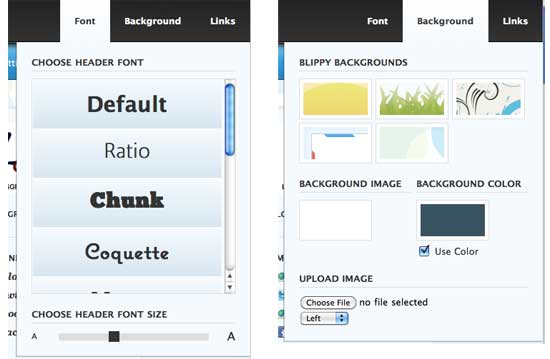
Blippy is going well beyond purchase records, and becoming an ecosystem of brands, products and consumers, essentially replicating a "product graph" much like Facebook's much-vaunted "social graph". This week, the company introduced the capability to ask public questions of product buyers, initiating discussion, and also added fun profile pages that users can customize to make especially personal - from new fonts to layout and links to external sites. While the site is becoming more immersive in terms of offering a more rich product-oriented experience, it is quietly and quickly becoming one of the more engaging and well designed communities on the Web. It's much more than double rainbow 404 pages and spaceships on the login page, so don't get distracted by omgwtf nail clipper giveaways, for there's real meat underneath the shiny package.

Like other good social stream sites, Blippy started with a clean and simple flow of updates, later adding on comments and reactions. Later, came product pages and the ability to write detailed reviews of your every purchase, all collected next to similar responses from other buyers on the network. The addition of the option to start discussions on brands and products in Blippy is a natural extension, one that seems more comfortable than forced Question and Answer sites dedicated for this purpose.

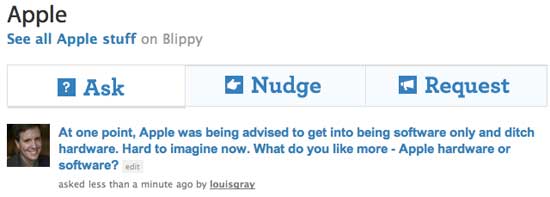
New to Blippy: "Ask" about products or brands to all customers.

Take, for example, my own simple question to Apple customers about whether they were fans of the brand primarily for the company's software or hardware. A someone who distinctly remembers the company near extinction, when it was said they should exit the hardware game, I wanted to see where people's loyalties lie. Unsurprisingly, my quick question, in a matter of minutes, had people praising their software, or saying the marriage of the two was what made them fans.

Customization of Blippy Profiles

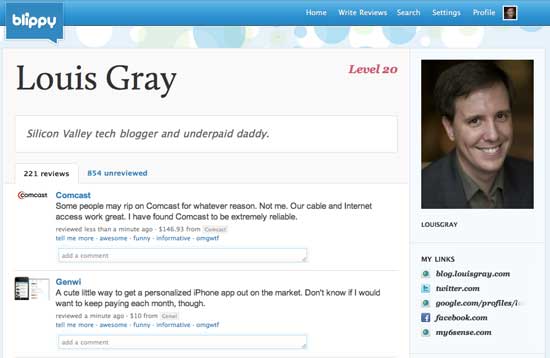
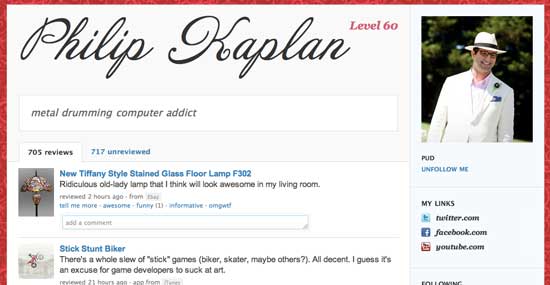
On the profile side, while most profiles are remarkably inflexible, such as those on Facebook and Twitter (which at least lets you update the background), Blippy's new profiles allow significant customization. From the country club pimp look of Philip Kaplan to the friendly MizzBlaze or my more traditional approach, you can now change the background, add a profile picture, give your name a fancy font, and add links to your other landing places on the Web. It's pretty sharp. They call it "Fancy".

My Customized Blippy Profile

Pud's Customized Blippy Profile

Blippy is a lot more than boring paper receipts now. It's a lively community with a growing pool of reviews and the ability to launch questions should lead to interesting debate. Get your questions in and update your profile to be snazzy.