Silicon Valley Technology Commentary & Archives · Est. 2006 3,045 Posts · 2006–2026
Showing posts with label Tablet (18 posts). Show all posts

February 23, 2015

February 23, 2015 · 3 MIN READ · BY LOUIS GRAY

YouTube Kids: Smart, Mobile First, and Child Sized.

YouTube Kids: Smart, Mobile First, and Child Sized.


In December, I wrote about viewing technology through the eyes of a child. As much as I think of myself as an early adopter and 'with it' net citizen, I'm equally amused and amazed at the activities my own kids rapidly learn and partake in when it comes to technology and the Web, how things and concepts once considered the future are commonplace. And their eyes, unvarnished by the way things have always been, highlight shortcomings in our software and websites that historically have been designed for fully literate adults on the desktop.

I've been particularly excited to watch (and trial) YouTube Kids as it has been developed, and have been eager to see it launch today, the collective effort of sharp colleagues like +Shimrit Ben-Yair, +Pavni Diwanji, +Jonathan Terleski and many more. As they wrote in today's blog post, the new YouTube Kids is "the first Google product built from the ground up with little ones in mind." As a dad of three kids six and under, two of whom who read fairly well and a third just trying to keep up, it's exciting to see them become the focal point for an entirely new interface.

The YouTube Kids Music channel.

My children, from a young age, have been surrounded by touch-enabled tablets. They expect my laptop (and in the case of my Chromebook Pixel, accurately) to be touch-enabled. They use voice search constantly to find what they're looking for, and they essentially expect the world's content to be immediately available. But they tire quickly when apps and sites don't do what they want. That can result in complaints to me, or even a thrown tablet or two from a tantrum.

Without sounding too much like PR-speak, from my own experience, I've seen the YouTube Kids app to reduce any surprises from me in terms of what my kids are watching, they more easily navigate the app, find channels and shows they want, and generally are pleased to have something made just for them.

Browsing shows on YouTube Kids

If you haven't yet tried it out (download on Google Play or iTunes), the app features curated channels, a music area, a learning section, exploration, and the always handy search button. So the colors are bright, the buttons are bigger, and there's no noise in the way.

Browsing the PBS KIDS channel on YouTube Kids

The true measure of whether an app for kids is working is whether the kids ask for it by name, or keep using it instead of getting bored and trying something else. My four year old boy is quick to use the app on my Nexus 9 or Nexus 6, and the twin six year olds are quickly getting used to the new app after lots of their own experience on the standard YouTube app we've all used.

Searching for Minecraft on YouTube Kids

Lucky for us parents who do our best to stay on top of their digital explorations without trying to be overbearing, YouTube Kids makes searching less of a risk. My kids won't go from a G rated topic to an R rated one in a few clicks. Searching for Minecraft (which happens in my house) turns up solid results. And I can even set up the app to run for a certain amount of time before closing, to be used for incentives, or a late evening treat before bed.

Setting YouTube for Kids' timer for 30 minutes

At the risk of my once more vibrant blog to be turned into a daddy blog, the quick summary is that this app is a welcome addition to our tablets and phones. Netflix's Kids only channel is smart. YouTube Kids is smart. The next generation is growing up with smart devices everywhere. What they do with them is largely prodded by what we make possible. Thanks YouTube!

Disclosures: I work for Google, and YouTube is a Google subsidiary.

December 17, 2014

December 17, 2014 · 5 MIN READ · BY LOUIS GRAY

Tablets, Touch and Talk: Technology Through the Eyes of a Child

Tablets, Touch and Talk: Technology Through the Eyes of a Child

Braden With my Nexus 5, Watching the MLB At Bat app.

My children have never known a world without high speed Internet, streaming movies on demand, and a seemingly all-knowing personal assistant, available to answer their every question when asked. They've grown accustomed to concepts which once seemed fanciful, like the ability to order all sorts of items on your tablet and have them delivered in the same day, having every photo you've ever taken available to you from any device, or having video chats with just about anyone instantly. For them, there is no such thing as technology. There's just the real world, which is directly impacted by pervasive Internet.

As the major enabler of this, and someone who largely has converted from analog to digital at every opportunity, I've been especially excited to see how this impacts the way they interact with each other, what they choose to learn, and how quickly they grasp ideas - even when, to them, there is no user manual. I'm naturally curious to see what they choose to do and choose not to do, and what simply proves too hard.

My twins are now six years old, and Braden (pictured) is four. The twins are in first grade, and Braden is in preschool. The older two can read well, and do some writing, but while Braden recognizes letters, it's not as if he's sitting down with a good book yet. Despite the mild illiteracy, all three can breeze through tablet usage - from memorizing a pin or lockscreen, to finding applications, launching apps, moving them to folders, and even downloading new ones from the Google Play store. And it's not far-fetched to say Braden is actively learning to read from applications you'd never expect, like Major League Baseball's At Bat, where he's working hard to memorize stats and names of players I've never even heard of. (See also: Wired: How Videogames Like Minecraft Actually Help Kids Learn to Read)

Braden Seeing Baseball Highlights from the Majors on my Nexus 7

Given my kids' capabilities, it should come as no surprise that their primary interaction with the Web is through touch on tablet or phones. They were exposed to iPads and Android tablets early on, and have grown familiar with the practice of touching an icon to launch and app and how to navigate the apps - including the always important ability to hit the small X in a corner to close ads. And when the app isn't what they are looking for, they just ask Google. Depending on how well they ask, Google should find them what they want, whether they are looking for "videos of cupcakes", "pictures of beagles" or whatever strikes their fancy that day.

It'd be easy to say kids, like us, use technology to be entertained. They each have favorite games, and frequently open Netflix or YouTube to watch videos - or, as Braden does, the MLB At Bat app, to see highlights from all of the previous days' games. But they also use applications to draw, or for education, whether they are matching games, flashcards, or adventures that teach them language or math. And on more than one occasion, I've found my Google Express shopping cart full, with hundreds of dollars of items, from everything to do with Disney's Frozen or Minecraft, to books, toys and food. Luckily, they haven't yet figured out the last steps of the purchase, so I've always been able to clear the cart before having to explain away crazy charges.

Sarah posts to YouTube, complete with titles and emoji.

They've each also figured out the tablets and phones are capable of creative work as well. I was recently surprised with an email notifying me that I'd successfully uploaded three new videos to YouTube. After momentarily thinking I'd been hacked, I realized my daughter had not only filmed three new videos, but correctly titled them and uploaded them to my account. Meanwhile, the automatic backup capabilities of Google+ come in handy when we want to see pictures the kids have taken with our devices, from their perspective. Sarah has also been known to tell me to take a photo of something she's proud of, with the intent of my sharing it on Google+ or Facebook, saying "Daddy, take my picture and put it on the Internet."

"My" invite to Brian to join Ingress, sent by Braden.

Last week, just before I wrote my post about Ingress, I got a note from my friend Brian Fitzpatrick, thanking me for inviting him to the game. But I hadn't. Braden did. While I was at the office, Braden had opened up Ingress, sent off a dozen or so invitations to people in my address book, and unhelpfully, dropped some of my equipment into the front yard, for me to reacquire when I got home. That was amusing, and luckily for me, he didn't mess up my account any further. And this Sunday, Braden jacked up our thermostat to 82 degrees, using the Nest app, before I realized things were more than a bit toasty.

On Sunday, we were a comfortable 80 degrees in our house. Thanks, Braden.

Just as important as seeing what they're doing with my devices is seeing what they aren't doing. Aside from the Ingress invites, I've never seen the kids interested in opening up Gmail, or posting to any of my social networks. No fun tweets or posts to delete. No mass apologies to coworkers for toddler missives to internal mailing lists, and no inadvertent likes of odd posts in the stream. They're not interested in Google Drive or browsing the Web, and they've only fired up Sonos to blast music in our house a couple times. For them, the tablets are purpose driven. They have a short time to delivery of the content they're looking for, and if they can't find it, they'll ask Google in a different way, or go back to what they know works.

Just like many of us find we struggle with handwriting after years of regular typing, I'm interested to see how my kids are going to operate with analog assignments that may require pencil and paper, or if textbooks might be the rule, instead of downloadable equivalents. I'm curious to see if they'll master speed typing at a faster age than I did, thanks to the availability of computers, or if touch and voice will rule the day so they might not have to make it a priority. But for now, they're especially handy on the tablet - be it a 5 inch phone, or my Nexus 9, which Braden calls my "big tablet", as opposed to my "medium tablet" Nexus 7. And as Google Now improves, time between what they want and what they find should even further decrease. It's a lot of fun to watch.

Disclosures: I work at Google and enjoy products of ours I mentioned in the post, from Android to YouTube, Gooogle Drive, Gmail and Ingress. So do my kids.

May 23, 2011

May 23, 2011 · 5 MIN READ · BY LOUIS GRAY

Honeycomb Plays Well on Samsung's 10 Inch Galaxy Tablet

Honeycomb Plays Well on Samsung's 10 Inch Galaxy Tablet

My Honeycomb Home Screen Littered With Icons, Widgets

A 2010 convert to Samsung's 7" Galaxy Tab, I've long grown accustomed to Android on my tablets, and slowly watched my kids take over the use of our first generation WiFi iPads. While Google pushed manufacturers (and consumers) late last year to wait for the release of Android 3.0 (Honeycomb) for tablets, I got used to the build more appropriate for phones, in Froyo 2.2 on my Tab, and haven't had complaints, taking the 3G-enabled device with me practically everywhere, even in my suit pocket at church on Sundays. But when Honeycomb hit stores on the Motorola Xoom, I had to check it out, and I didn't fall in love, although I certainly tried. Despite three separate trips, to a Verizon store, to Best Buy and Staples, I had a hard time with the clunky hardware and what at the time was a nonintuitive interface.

My Apps on Honeycomb

In the ensuing months, Apple introduced the iPad 2, improving the product's hardware, and more manufacturers (including Samsung, LG, Acer and more) have delivered on their promise to build Android tablets on Honeycomb. Google I/O attendees were treated to free 10 inch Galaxy Tabs from Samsung, and this device is the one it seems Honeycomb was waiting for - even if it still doesn't fit in my jacket pocket. The device is extremely light, and Honeycomb has grown on me - with new features that make it fit even better between the world of mobile phones and the world of laptops.

The Gallery App on Honeycomb With a 10 Inch Screen

As with the standard Android interface I've been using for about a year, Honeycomb features not just the option to litter your screen with application shortcut icons but also, widgets, customizable by the app developer, with varying levels of interactivity, be it to change tracks on Google Music or Spotify, view new messages in your Gmail or other POP3 email accounts, or to track social media updates with your favorite client. Honeycomb assumes more real estate, and hopes you'll use it. The Galaxy Tab 10.1 features up to five home screens and widgets for practically every core app - from bookmarks to your calendar, the Android Market, and YouTube. YouTube and Market use a new three by two widget that rotates content to bring interesting items to the front. Beyond widgets and shortcuts, you can also post shortcuts to bookmarks, contacts, directions, email accounts, Gmail labels and other items on your home screen, keeping the display flexible.

Android Market for the Honeycomb Tablet and Featured Apps

The Honeycomb hardware to date has done away with hardware shortcut keys, putting software keys on the device for the home screen, back button and a new button that shows your last five active apps. This wouldn't make too much sense on a phone, but on the tablet, it leverages Android's fast switching and multitasking capabilities to bring you in and out of applications rapidly. Much like Command-Tab or Alt-Tab on Mac or Windows, this minor piece becomes used a lot.

Google Music Beta on Honeycomb on the Tablet

Android also continues to excel on bringing important notifications to the front without interrupting users. New email messages, Foursquare checkins and Twitter replies all cycle their way to the top, in the lower right hand corner of the device, instead of a top-down menu as Froyo and other 2.x based phones have offered. If one catches my eye, I just tap the alert and find myself in the appropriate app, with the option to return to my previous task quickly.

9 Innings from Com2US on the 10 Inch Honeycomb Tablet

To date, most of the criticism for Honeycomb has focused on the number of applications for the device. The good news is that practically all applications built for Froyo and the entire 2.x line work on Honeycomb, even if their rendering is not ideal. But this is like saying the iPhone apps all scale well to look good on the iPad, when of course, they don't. Most applications scale up and stretch out, but others that hardcode their apps for a 4 inch screen look pretty bad, filling the rest of the space with black pixels. This is true with the Mint.com app and a Texas Hold 'Em Poker game that worked great on the 7 inch Galaxy Tab, but are less great on the 10 inch tablet.

Reading a Book from NOOK on the 10 inch Galaxy Tab

Meanwhile, as I'm waiting for developers to build for Honeycomb and bring their apps, I was surprised that not all of my apps made the upgrade. For example, MLB At Bat is on my phone and my Galaxy Tab 7, but is marked as incompatible on the Galaxy Tab 10.1, so I can't get the app from here to there. Even if the experience is not perfect, it's not clear why it's blocked from installation. 

Duck Hunt is back and on the Honeycomb Tablet

That said, all the standard Google-centric apps look great on Honeycomb, from a tablet design for Gmail to Google Calendar, the included browser app and Maps. I've read entire books using the NOOK app from Barnes and Noble on the 10 inch tablet, and already wasted too many hours swinging at bad pitches with the 9 Innings baseball app from Com2Us. If sports isn't your thing, there's always the 8-bit NES throwback, Duck Hunt, which only asks you to shoot with your finger, leaving your trusted Nintendo Zapper behind.

My Gmail on the Honeycomb-based 10 inch Galaxy Tab

Clearly, I am living in an embarrassment of riches with my 10 inch iPads and Galaxy Tab strewn about next to the 7 inch Galaxy Tab and 7 inch NOOKColor in our home alongside our unfair share of laptops and phones, but despite this luxury, there is a growing use case for each device - as I take one for one use and put it down for another.

The 10 inch Galaxy Tab, running Honeycomb is, like the iPad before it, a great media device, for books, photos, video and music, with instant connectivity to cloud apps. It doesn't fit in my pocket, so I won't be taking it everywhere I go, and it didn't come with 3G attached, making me somewhat tethered to WiFi. But the stutters and frustrations I felt with the Xoom in my testing, plus its bulky form factor, are solved with Samsung's device. Honeycomb has some continued opportunities for improvement in simplicity, and developers are going to need to get their act together for the new form factor, but the device is quite nice - raising the bar for what tablets that don't bear the Apple brand are expected to deliver.

Disclosure: As previously noted, the Galaxy Tab 10 inch was distributed freely to Google I/O attendees, myself included. All other devices mentioned, including my Android phone, the NOOKColors, iPads and Galaxy Tab 7, were purchased on my dime. 

May 17, 2011

May 17, 2011 · 5 MIN READ · BY LOUIS GRAY

Review: Google Music Beta On Android and the Web

Review: Google Music Beta On Android and the Web

While Apple's iTunes player and associated family of digital devices (namely iPods) is the ten ton gorilla in the digital music space today, competitors are setting up to poke holes in Cupertino's current position, with the on demand socially-oriented music streamers like Spotify and Rdio on one side, and the music lockers like Amazon and Google Music on the other, while Apple is largely expected to counter with its own cloud-based offering in the not too distant future. The music industry being what it is, a near monopoly run by people a little tired of having their businesses eviscerated by smart geeks with software for the last decade plus, no one service has been able to get everything it wants all at once. Spotify's US entrance has been slowed repeatedly, while Google and Amazon stopped short of signing all the labels, launching their service as solo silos, with later deals expected to fill holes. It's a crowded field with much riding on who gets access to what music and in what form.

On that backdrop, Google Music opened up in beta as part of Google I/O last week, not delivering the seemingly infinite music library I've enjoyed from Spotify over the last 18 months or so, but instead, giving a music player in the cloud on any modern browser - pushing me to find my non-DRM music files and transfer them into the cloud for later playing. Not limited just to Chrome, the service plays well with Safari and Firefox on the Mac, and an accompanying Android app accesses the same library - providing you access to your tunes from just about anywhere - convenient once you've achieved the task, but still feeling like homework when you first get started.

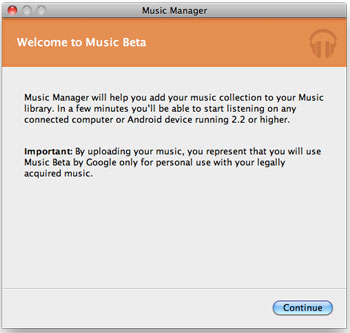
Music Manager Gets Me Started with Google Music

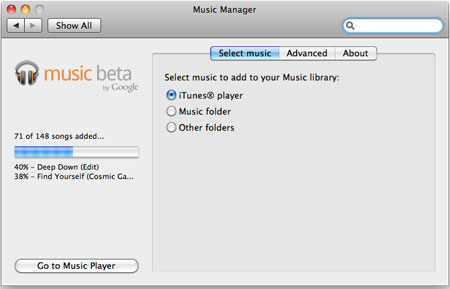
As noted Sunday, my main media Mac (an older generation MacBook Pro) has the lion's share of my music, with the MacBook Air having a few hundred songs only - all my activity having leaned to Spotify for the last two years. Nonetheless, I downloaded the Music Manager from Google, told it where to find my music, and for several hours this evening, the application uploaded my MP3 files to my Google Music locker, leveraging my iTunes metadata to correctly assign song details, including artist, genre, and even how many times the songs were played.

The Music Manager Uploads My Tracks to the Cloud

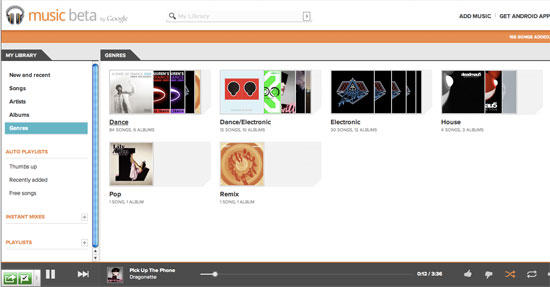
The Result Is All My Artists and Albums On the Web

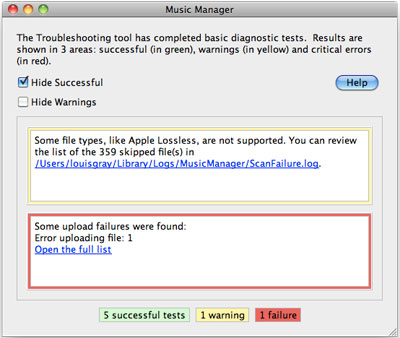
As Google Music can only post non-DRM tunes, of the 500 or so songs I have, just under 150 were found to be available without Apple's lossless formatting. Music Manager installed itself as a control panel on my Mac and uploaded tracks two at a time to the cloud in the background. I have to imagine that with larger libraries numbering thousands or tens of thousands of songs, this process will no doubt take days or weeks, so if you can use a non-production computer, or can set the job to take place overnight, you're probably better off.

If the Songs Have DRM, They're Not Going Anywhere

You Can Sort Songs By Genre, Artist, Name or Album

In this regards, for traditional iTunes users, Apple may have a leg up in its proposed cloud strategy, pointing to your previous iTunes purchases as being "owned" by you, while you're responsible for uploading or flagging the others from your own collection. The process of uploading seems cumbersome, but should only have to be done a single time. Alternatively, it'd have been great to check my own database of music against a central database owned by Google, who could simply "unlock" tracks or albums for me, skipping the actual data transfer process. But with no deals done, the music locker is simply an empty bin for me to fill, even if the metadata assigned to some of my songs is incorrect.

My Albums On the Galaxy Tab 10 Android App

As my songs started to populate Google Music online, the same familiar user interface most of us know from programs like iTunes, WinAmp and others is displayed, listing the song names, times, artist, albums and play count. Instead of a five star Apple-like rating, you can thumbs up or down individual tracks, but other attributes are the same - including the ubiquitous shuffle feature, and "Instant Mixes" which parallel Apple's "Smart Playlists" feature.

Seeing My Deadmau5 Songs On the Android Google Music App

Playing songs is straight forward in the browser or on the Android app. Click the track you like, and as with iTunes, you can use your keyboard to control most playback - using arrow keys to go forward or back, and hitting the spacebar to pause the song. Other aspects of the service are also similar, including editing track data, although you can't batch edit songs, and as the service is from Google, an Instant Search-like field is available at all times, so if you want to find an artist, song or album, start typing and that from your library will surface.

Searching on the Google Music App In Android

On the Android side, I tested the Google Music app on the new Honeycomb-enabled Samsung Galaxy Tab 10.1 that all Google IO attendees (press included) received last week. As the system recognized my account was tied to my own library, all songs posted to Google Music in the cloud were available on the device - with no downloads needed. On both Web and tablet, the music quality is very good, and i wouldn't expect otherwise.

Playing a Track On Android On the Galaxy Tab in Google Music

After nearly two years' experience on Spotify, the sheer nature of the cloud music is not dramatic, but getting the opportunity to convert my iTunes library from something that is currently locked down to spinning disk on a single computer and a few iPods to something I can access anywhere is no doubt going to be liberating - just like it will be when Apple finally brings their own cloud option, or when I tag my own library within Spotify to auto-add the songs I've purchased elsewhere.

From my talks with people close to the cloud music wars, the dollars and aggression being tossed about between players is intense, in a powerful cascade of one-upmanship from one player to another. Right now, it doesn't appear that Google has paid the top dollar needed to put all the labels in their court and out of Apple's hand, and Spotify is the little guy compared to a major league tug of war between Google, Apple and Amazon. Until this all gets sorted, Spotify remains the best option for me to get music I don't already own, and Google Music is an increasingly convenient option for the music I already do. For my Android-centric world that hasn't messed with iTunes much lately, it's good to know I can welcome back my old albums in my life again.

Google Music can be found in beta at http://music.google.com and the accompanying app can be found on the Android Market here.

May 9, 2011

May 9, 2011 · 8 MIN READ · BY LOUIS GRAY

Revisiting Android A Year Into My Smartphone OS Migration

Revisiting Android A Year Into My Smartphone OS Migration

Tomorrow's Google IO approximately marks the one year anniversary of a shift in my digital lifestyle, when I began to use Android instead of my trustworthy iPhone, which had been my go-to device for a number of years. While any post I make regarding Android runs the risk of being assigned the 'fanboy' label, it's worth reviewing what has changed in the market over the year since I left the Moscone Center with a new HTC Evo - an intriguing year that's seen major announcements by players in and out of the ecosystem, with consumers reaping the benefits of an innovation race, assuming the courtroom battles between Apple and many other players don't throw a monkey wrench into the whole thing.

Mobile OS Software

When I left the Moscone Center with my new Evo (provided courtesy of Google and since replaced by a device I paid for out of my own pocket), the device came with stock Android 2.1, code named Eclair - with 2.2 Froyo having been demonstrated at the event and expected to arrive soon. At the time, my iPhone was on version 3.1.3 and the iPads were on iOS 3.2.

Not too long afterward, the Evo was gifted with 2.2 Froyo in an over the air (OTA) update, keeping it relatively on track with Google's calendar.

In late June of 2010, the iPhone was upgraded to iOS 4.0, bringing with it multitasking, folders and universal in boxes, to name a few things. The iPads reached 4.2 in late November, adding AirPlay and other items.

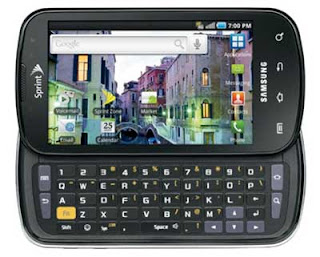
By the end of 2010, Google had moved beyond Froyo and was talking up Gingerbread, the 2.3 release. This release hasn't yet made it to the HTC Evo, which my wife now uses, nor to my Samsung Epic 4G, which I switched to in November of 2010. In fact, the Epic's meandering move from 2.1 to 2.2 was a big pain, but it was very much a laggard relative to its compatriots, and once it arrived, I had no complaints.

On the Android Tablet side, while Honeycomb (3.0) was said to be the go-to OS for Google-approved tablets, I've been quite happy with the Samsung Galaxy Tab, which came with 2.2 when I bought near the end of 2010. There hasn't been a clear roadmap from Samsung as to the Galaxy Tab getting to 2.3, let alone 3.0, but newer models of the Tab are centered around Honeycomb. So far, from my experience testing the Motorola Xoom, I haven't yet been tempted. The iPad 2's introduction in early 2011 was primarily a hardware bump for Apple, without new software features.

Mobile OS Hardware

As my conversion process to Android was ongoing, Apple started selling the iPhone 4 in June of 2010. Despite multiple visits to Apple Stores to try the device myself and reconsider if I had made the right choice, the hardware and software combo didn't persuade me to reverse course. Despite multiple rumors one way or another, Apple has not yet made any updates to the iPhone 4 in the past year, with the exception being adding a second carrier in the US (Verizon).

While Apple's been holding steady with iPhone 4, scads of Android phones from different carriers with different features have been released - some fantastic, some good and some not great at all. The Evo, despite many things I liked about it, was heavy and a power hog, and I felt odd writing a disclaimer each time I mentioned Android on the blog, so those things, combined with a simple upgrade to the Epic 4G, which gained me a hardware keyboard to boot, got me to switch. Besides phones with real keyboards (which Apple's not interested in), there are also dual screen Android phones, Android phones that offer laptop cradles and low-end Android phones that get below $99 at retail.

Where people have gained annoyance with Android is the tight leash carriers have over the software on the devices. It's perceived, even if not backed by great evidence, that the carriers are not incentivized to keep users on older hardware current, preferring instead to push them to new models. After starting and stopping its Nexus One program, Google introduced its Nexus S offering which, in addition to being a cool-looking phone, promises none of the carrier nonsense on the phone, as well as fastest access to Google code releases. While it's not a major win to say the attributes of the phone are simply avoiding negatives from carriers, it's valuable to have an unblemished alternative.

I Could Switch to Nexus S on Sprint If I Wanted

As a user, assuming money is available, the option is there to upgrade to an even newer and better phone on the Android platform, keeping the carrier you like (in my case, Sprint), every few months. If I found it made sense, or if they somehow give away Nexus S phones at Google I/O this year, I can switch phones again with almost no headache. Meanwhile, if I were still on Apple's side with the iPhone 4, I could stick with the iPhone 4 or stick with the iPhone 4. What most folks get confused about is the word "open", while I prefer to see it as "options". I can change if I want to something that works for me.

The 7-inch Galaxy Tab: Still the Gold Standard on Tablets

Speaking of "options", both the Samsung Galaxy Tab and the Android-powered Barnes and Noble NOOKColor come in 7 inch handheld sizes, which Apple thus far has avoided, sticking with their 10 inch model. While preferences are preferences, I do have the option on Android to go small, medium (8.9 inch) or large (10.1) if I want, while Apple is sticking with the one size fits all approach - one I expect they will change as the product matures. After all, they do have small/medium/large in laptops, iMacs and monitors, so it befits their history. I strongly prefer the 7 inch size over the 10 inch, and once you've used one for a good amount of time, a larger tablet just seems too big.

Applications

For those who prefer Apple and the iOS, aside from a unified experience, the second most attributed reason for keeping the iPhone candle lit is typically applications - either in number or quality. I hypothesized a year ago that Android's market share numbers and array of carriers, phones and users would lead to more developers, more applications and eventually better applications. I believe for the most part, this has come true. There are a select number of developers who continue to be iOS-only, but they are rapidly joined by those developing for both platforms, and increasingly, by those who are developing for Android first, iPhone and iPad second, like I said they would. Robert Scoble, well known tech blogger and Apple fan, cited this trend in his recent post this morning, when he said "the most interesting set of companies is being built around smartphones and here, for the first time, Apple’s iOS doesn’t have the coolest apps."

As a long-time Mac user (typing this on my MacBook Air now), I understand the defensiveness of quality over quantity and believing that you've got the best stuff. But I do believe that developers are bringing the best stuff over to Android as well and users are not going without apps they would have available on the other side.

There's no question there is tremendous work to be done to clarify payments to and rewards for developers on the Android platform, relative to the iOS platform, and there is work to be done on the Android Market to add discoverability versus iTunes, but again, having tried both, to say one is great and the other is lame is a dramatic oversimplification. There's something very cool about managing one's phones via the Web and installing applications to different devices from the browser with a few clicks - something I still can't do on iTunes.

What Does This All Mean?

It makes sense to try and keep an open mind when it comes to technology progress in a world that's changing fast. I've enjoyed iOS in the past, and am glad it's so simple that my kids don't waste much time on the iPads fighting technology. I've had my occasional bumps with Android, outweighed greatly by the benefits of multitasking, built in hotspotting, voice search, and flexibility of the platform. I actually tried and enjoyed the Windows Phone 7 experience, and hope to some day get a chance to try out HP's Web OS and Kinoma on any phone once that ships. To pick a side and stick to it while being blind to the many options out there in the market is silly, but in looking back on my switch, I am glad I didn't get stubborn and ignore the market trends. While Android has provided more options from different carriers with an array of devices and improvements in the user experience and applications, iOS has not done much in the same time, aside from make a ton of new customers and a ton of money. That's fantastic for Apple and for the tech world in general, but not much money has gone toward Apple from our home in the last year.

Google and the carriers have a lot of work to do to solve fragmentation and the perception of fragmentation. They have to do a much better job of explaining why their experience is better than that of the competition (if that's the case). They need to make Honeycomb dramatically more simple, and more attractive to developers. They need to make troubleshooting the devices, when things go wonky, solvable by humans without Linux backgrounds.

That said, I like that Android has given us choice in tablets, in smartphones and carriers. I like that I can use a platform that doesn't fill me with fear when I upgrade from one phone or another, or know that because my wife broke her Evo, that a new one which arrives tomorrow will take only minutes to configure, synched with her Google account. There's no telling what the next year brings in terms of new devices and new places we'll see Android, but I'm betting it will be another year filled with new functionality, new apps and new experiences I would have missed if I didn't jump from one side of the aisle to the other. No doubt tomorrow at Google I/O we'll start to get a few hints.

April 28, 2011

April 28, 2011 · 3 MIN READ · BY LOUIS GRAY

With Apps, The NOOK Color Is Now A Smart Hybrid

With Apps, The NOOK Color Is Now A Smart Hybrid

Monday's announcement that the Barnes & Noble NOOK Color had launched its application gallery was much anticipated, with leaks and rumors galore over the last few months, as industry watchers have been curious how the eReader would adapt to a world in between the single mindedness of a Kindle and the do-anything catch all of a full-fledged tablet device. Full disclosures up front, due to my role at my6sense, I've known the Barnes & Noble app plans for several months, and our app was included as one of the first to be included on launch day. But as a user who already owns an Android tablet in the Samsung Galaxy Tab and a pair of iPads besides, I was independently eager to get my hands on these apps, and I believe what has been delivered is a smartly curated, less intimidating way to bring the best features of Android to users who don't want to lose the comfort or familiarity of a device centered around reading.


My NOOK home screen with apps and the apps gallery


As was much covered by the mainstream technology press, the NOOK Color app gallery features more than 100 select applications across a broad reach of categories, with an emphasis on those that would be in high demand by the most active readers. For us, it made sense that those reading books might also want to read and engage with their social and news streams. For others, the option to bring to-do lists, email, comic book apps and more make sense in the intuitive seven-inch form factor. And yes, everybody loves games, and if a device has a screen these days, you know Angry Birds is there.

NOOK Color Apps for Sale

Much like Apple's iTunes store, the app store on the NOOK Color adds applications to a marketplace already designed for more traditional entertainment goods. Instead of music and video titles, magazines, newspapers and books are the headliner, with apps likely to play an increasing role over time. Without a full-fledged Android Market, with hundreds of thousands of apps, every app on the NOOK has a chance to be found, and its not amateur hour. Each app was planned for inclusion well in advance and carries the implied support of the NOOK team.

For Android users, the visibility of apps like Pulse, Epicurious and QuickOffice is comfortably familiar. Other titles have never crossed my radar. The addition of a standard email client that supports multiple accounts is also very welcome, eliminating yet another need for multiple devices when I can just close the page on a book (or close an app) and pull up email to both read and send messages, synced with your cloud server. With little fanfare, the NOOK has always also had the option to support your own media, including music files and photos as well, for a light multimedia experience.


Composing and Reading Email on the NOOK Color


Those calling for the NOOK to become even more of a full-fledged tablet are trying to make it something it's not really aimed to be - no more than the iPod is trying to be an iPad. The single homescreen button and lacking hard-wired buttons for "Back" and "Menu", common on Android smartphones, takes some getting used to, but functionality to navigate one's library, content and the store is very easy to pick up. The apps each are intuitive, and if they assume back and menu buttons, as ours has, you can emulate that in software.

I see the NOOK as a serious hybrid. It's both an eReader and a tablet, but like the Prius, it's not going to beat a Porsche in a speed test for going 0-60. It just quietly does its job, has an amazing battery life, and brings the features you would expect. While the app store is only a few days old, I've already seen my interaction with the device change, transforming from one of passivity, mostly consuming content, to a more engaged role, creating emails, and interacting with new apps.

Disclosures: As noted above, my6sense, where I am VP of Marketing, is a launch partner with Barnes & Noble for their app store.

March 5, 2011

March 5, 2011 · 4 MIN READ · BY LOUIS GRAY

The iPad 2 Dilemma: Nice Upgrade But Without Risk

The iPad 2 Dilemma: Nice Upgrade But Without Risk

Apple is at its best when it takes giant leaps forward and risks its reputation on a new product or idea that could change the industry. Arguably its biggest successes in the last decade have been of this variety - from the original iPod and iPhone to the iTunes Music Store, the iPad and the MacBook Air, each of which is iconic, and unquestionably a success. At a time when competition is moving faster and more intelligently than ever before, we've all collectively come to expect the amazing from Apple from every announcement, and simple upgrades with anticipated features don't change the game. The iPad 2 delivered what we expected - faster processors, dual cameras, and a thinner body, great upgrades, but not really much of a stretch. Now we're in a waiting game again, about 9 months to a year from their next announcement (maybe), giving the competition a new target.

When the iPad was introduced in January of 2010, I said no other company could pull off what Apple had, adding "they are going to sell a ton of these machines, and you'll see them in places you never expected." Apple's sales numbers prove that to be true. They've sold excellently, and we've got a pair of them in our home (the original WiFi only version, purchased on day one). The company's focus on interesting markets, such as health care, and gaming, at the iPad 2 unveiling backed up the belief that the iPad would be in a new place for Apple, and the wide range of apps are extending this even further. So as Mac people, Apple people, we get spoiled.

Leaving aside personal preference for one OS or another right now, I've grown somewhat fatigued about iOS in general. Between my iPod Touch and two iPads, the design doesn't seem to have been dramatically upgraded since launch. A little faster here, a little multitasking there, some folders in another area, and the product incrementally proceeds. So too feels the upgrade from iPad (the original) to iPad 2. For existing iPad owners, like myself, the push to upgrade from version one to two is not a big one - unless you can get a sucker to buy the previous rev for a good price on eBay.

What we've come to expect Apple to do - not just the first time, but every time - is to take a big leap, and put themselves on the line for all mankind, with Steve Jobs, the immortal one (we would hope), playing the role of superhero. The floppy disk? Consider it slain. Proprietary networking? Dead. The optical drive? Rolling in the grave. Maybe the next step is to walk away from boxed software altogether? Maybe it's to do away with all wires? What I wouldn't give for a real device with true wireless power...

In the iPad 2, Apple didn't take any risks with the size of the product. No 7-inch model. No small/medium/large, with the exception being the amount of Flash memory and 3G option. And if you were blown away by SmartCovers, then I believe as an industry we're focused on the wrong things. As a long-time Mac viewer, I remember Steve Jobs introducing the Flower Power and Dalmation-colored iMacs, and the iPod Socks (for real) that could protect your iPod while simultaneously confirming you as a doofus.

As Apple pushes forward with the iPad 2, which we can safely say now will be both the volume leader and revenue leader in tablets for the foreseeable future, competitors from all corners, from HP to Blackberry to LG to Samsung to Motorola are preparing alternatives with platforms that quite possibly are more innovative than iOS today. The HP WebOS is worth peeking at. Honeycomb (Android 3.0) is compelling. The PlayBook remains to be seen, but maybe there's a niche out there for it.

I'm all for buying the latest and greatest stuff. It's fun and it's got serious geek bragging rights. If I didn't already have iPads, I would take a serious look at the iPad 2. But I believe I already have the very best product from Apple that is on the market today - the MacBook Air. The Air is a major reason I haven't fallen in love with the iPad. The light portability and thinness of the Air, plus a real keyboard and a real non-mobile OS. While Apple held serve with the iPad 2, it didn't take the risks that we love from Cupertino. It may have the app numbers now, but I can get practically all the apps I want on Android, and the aspects of that OS seem more comfortable and more designed for a cloud-centric era. If this is the Post-PC era, the OS has to be there too, not just the hardware. So Apple, great job, nice work, but I want more. Take a risk with us, so we can do the same with you.

February 18, 2011

February 18, 2011 · 3 MIN READ · BY LOUIS GRAY

The Curious Myth of the Tablet Operating System

The Curious Myth of the Tablet Operating System

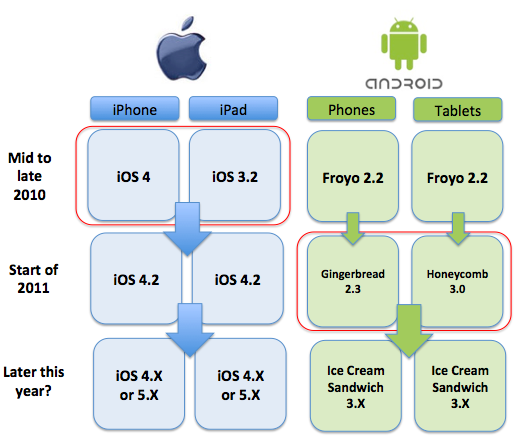
iOS Unifies for Tablets and Phones, While Android Splits and Regroups

Now that Honeycomb (Android 3.0) has been unveiled, native on the Motorola XOOM, and recently announced new Samsung Galaxy Tab 10.1, Android users are at a proverbial fork in the road - with Froyo and Gingerbread (2.2 and 2.3 respectively) being the shipping mobile OS for handsets and Honeycomb the approved OS for tablets. It's a fork in the development plan that looks like it's temporary, with rumors already out there that the next version of Android, said to be called Ice Cream Sandwich, will unify the two versions, once again giving users a single OS build to choose from. Confused yet? Well, you wouldn't need to be if Google hadn't unfortunately called its 2.2 offering, Froyo, unready and not optimized for the tablet market. In doing so, it set expectations for users and developers of a split in the OS, and gave undue ammunition to rival Apple, who frolicked in the gap when reporting sky-high iPad sales.

Despite Google's warnings that Froyo was not designed with tablets in mind, Samsung sold millions of 7-inch Galaxy Tabs to consumers, while Barnes and Noble set sales records for its NOOKColor, similarly built on the 2.x OS line, and other manufacturers tried their hand at the growing Android tablet market. As a user, I've been very pleased with both the Galaxy Tab and NOOKColor, which feel as natural as a large Android phone, and have significant parallels to the way the iPad felt after years with iPod Touch and iPhone.

From the demos and reports of Honeycomb's new UI, the upgrade looks very impressive. But if major steps were taken with Android to make it a superior tablet experience, then why the plan to unify the tablet and phone experience again - a la iOS?


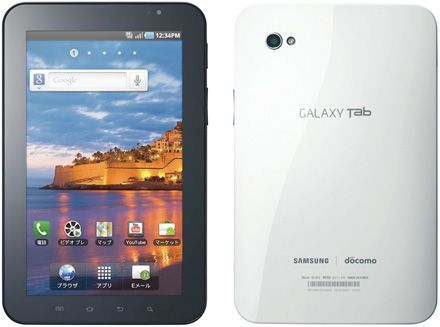
The Original Galaxy Tab, Running Froyo 2.2


Curiouser still, at least to me, was how Apple was so successful in framing Google's comment on Froyo and tablets at the same time when iOS itself was not necessarily optimized for tablets. At the same time when Froyo 2.2 was the only answer for both phones and tablets, iOS 4.2 was the only answer for both iPhones and iPads. Yet, one strategy was seen as right and the other wrong. Meanwhile, previous to this, iPhones and iPod Touch gained access to iOS 4 while iPad was still on iOS 3.2 - so yes, there was a time when Apple had a phone OS and a tablet OS, which was seen as okay, a temporary issue, and now that they have a universal OS, where the phone looks like the tablet, this too is accepted. Win, win!

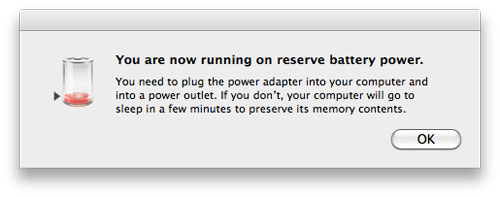
As a Galaxy Tab user, running 2.2 on a 7-inch tablet, it's clear there are a few steps Google could have taken to make it more ready for tablets. Amusingly, there are even error messages that refer to it as a phone when you need to charge its battery, as Froyo assumes a phone. But it's a great device, and in my opinion, comparable to the pair of iPads we have in our home, just in a more portable device.

Which leads us to the next discussion... where do phones leave off and tablets begin? Our 32 Gig iPod Touch looks like a tablet. Go a little higher to the Samsung Epic 4G and HTC EVO and we're at a 4-inch screen. The Galaxy is 7 inch, the iPad 9.7 inches... and so on. If it's a flat screen device with a touch interface, is it not a tablet? And should one OS rule both? Seems to me that Android and iOS both do fine at any size, and 2.2 is a great option, even if 3.0 is even better.

Google may have a head of steam behind it now, one that will accelerate when Honeycomb-based tablets are more easily available at lower prices, but I think they could have saved themselves some serious PR headaches if they'd just played the Apple card of what was shipping was good enough.

January 31, 2011

January 31, 2011 · 4 MIN READ · BY LOUIS GRAY

Tablets Have Great Battery Life. Everyone Else? Not Really.

Tablets Have Great Battery Life. Everyone Else? Not Really.


Despite my consistent begging for true wireless power (since 2007, at least), as ubiquitous as WiFi, only baby steps have been taken in the last few years to divorce us from our dependence on power cords to satiate our hungry electronic devices. As our devices become more capable, and we are seemingly constantly connected, incremental improvements in battery capabilities seem to be offset by parallel technology advancements, including faster, hotter, CPUs and features like multitasking, push notifications and real-time updates that drain the batteries of even my most advanced devices like a thousand pin-pricks to a taut water balloon.

There has become a dichotomy in my home between the power haves and the power have nots. Try as I may, my every trip requires careful planning of packing of power cords, overnight charging of some devices, and continuous charging of others, via adapters in my car's cigarette lighters or fruitful discovery of power outlets in restaurants, cafes, airport terminals and practically anywhere I can find them. To illustrate how obvious my issues are, one highlight of Christmas 2010 for me was my wife's purchase of a dual USB charger for the car, so I could charge both my phone and a tablet at the same time. Yes, it's that bad.

(Also on this topic: Charge Me Up: No Batteries Are Good Enough from June 2010 and line of site: Next Gen Batteries, where art thou?)

On the good side of power consumption, one finds obvious winners. The iPads go days without needing to be charged, assuming only infrequent use. The Barnes and Noble NOOKColor holds its charge for more than a week's time, if you are not reading every day. I've been absolutely comfortable taking Google's Chrome CR-48 notebook with me without packing my power cord, and can see eight hours of continual use before searching for a solution, and the Samsung Galaxy Tab, so long as its brightness is not at the highest position, simply needs to be charged each night, after a full day's work.

In contrast, I need only look up every few minutes at my MacBook Air's battery percentage to see the numbers slowly decrease. After a good two hours' effort, even without streaming music or Flash games, I'm well under fifty percent. And the pain in terms of battery life for my Android phone (the Epic 4G) is as bad, if not worse, than my experience with the HTC Evo, and before it, my iPhone 3G. Even with all sorts of work to turn off WiFi or GPS when unneeded, and using BlueTooth only in the car, the phone seems to live a mere four hours, whether I use it or not - and I'm not even getting close to mentioning talk time. At CES, I even bought an external battery extender, that supposedly gives a charge and a half, but it too seems to serve only to make my phone hot to the touch before both die.

The issues with keeping my phone up and running have become something of a laughingstock with friends who see the issues firsthand. Barak Hachamov, my partner at my6sense, sees my dance with electricity as we go meeting to meeting, and my wife knows I leave my phone plugged in at all times when I am not using it. There's no doubt I would probably make more phone calls on the device, if I wasn't constantly glaring at it sideways, or wondering why the battery seemed possessed. Trust me, I've been happy with Android from day one, and love it on my Galaxy Tab, but the Epic's great keyboard hasn't been enough to outweigh the battery problems and iffy GPS. It's enough to have me asking every Googler and non-Googler I know how well their own Nexus S devices are working, to see if I should stomach an early termination fee (ETF) and switch again.

(If you prefer iOS, note the same issues on iPhone from July 2009)

The gulf between what I see as fantastic power managers like the CR-48 and the tablets versus my other laptop and my mobile phone experience is mind-boggling. On one hand, you see things that seem to run forever, while on the other, things are feeling like they are going backward, teasing me into thinking I should just marry up a simple feature phone for calls with a plan-free Android device that lives on WiFi. But that's crazy talk.

At a panel in the first half of 2010, I was asked about what I thought would be hot markets to invest in, and I quickly mentioned two places - the first being teleportation, and the second being true wireless power. I stand by those demands. If Google can build self-driving robot cars, surely there's a department in the back finding a way to solve power consumption issues on Android phones, or finding unique ways to tap into static electricity, solar energy or something. Maybe I'd even accept a nuclear-powered laptop in exchange for going sterile. After all, with 3 kids under 3 already, I'm not exactly hurting for a full house.

Power cords are a menace to convenience. Crappy batteries are significant hindrances to us getting the full capabilities out of our laptops, tablets and mobile phones. From my experience, the tablet manufacturers are doing a great job, and the CR-48 is a fantastic first volley into the less-demanding laptop sector. But if there's any revolution I want to see in tech, it's this one. No more widgets and doodads until you solve this very basic thing for me - for all of us. Please.

January 27, 2011

January 27, 2011 · 2 MIN READ · BY LOUIS GRAY

Samsung Launches Developer Portal for Android, Bada Apps

Samsung Launches Developer Portal for Android, Bada Apps

With the blistering rise in customer and partner interest and development of new applications for the Android operating system, companies like HTC, Motorola and Samsung have emerged as the go-to device manufacturers for a wide array of compatible handsets and tablets. Without a single provider offering both the hardware and software, like with Apple and the iOS, the companies have gained greater visibility with consumers, and some have even branched out to offer branded application stores to improve their standing in the expanding ecosystem. Today, Samsung launched a new online hub for 'Samsung Developers' at http://developer.samsung.com, aimed to spur tighter integration with their products and make their devices smarter.

Looking around my home, Samsung is rapidly vying with Apple for top brand representation. In addition to my Samsung Epic 4G phone (on Sprint), I have the Samsung Galaxy Tab, and even the TV in my office bears the Samsung logo. Samsung had a huge presence at CES earlier this month, and is expected to make a solid impact at the upcoming Mobile World Congress (MWC). Samsung's Galaxy S line of smartphones is tangling with iPhone for the top position in Japan and in other countries worldwide, and the Galaxy Tab has set the standard for Android Tablets taking on the iPad.

Samsung Apps Featured on the Developer Portal

But Samsung does more than Android, also promoting Windows Mobile devices and its Bada platform for lower-end devices, selling millions of handsets outside the US. The combination of its Bada offerings with Android and Windows Phone esentially means Samsung's brand is found from the most feature-rich smartphones to basic mobile devices. Added to the tablets and Web-connected TVs, and you can see how Samsung has lumped its offerings into a bigger pool called "connected devices". The new developer portal courts application authors to target these connected devices to reach "an audience of millions".

The new Samsung Developers portal takes much of the guesswork out of creating an app for the Samsung platform, with included "how to" and "getting started" guides to build applications that can run on multiple platforms and devices, and specific primers for such varied topics as bluetooth, theme design, security, widgets and how to leverage the Galaxy Tab's screen real estate. It also introduces the concept of Samsung Apps (http://www.samsungapps.com), optimized for the platform, including featured apps, both free and paid.

If you are an app developer looking to break out of the crowded Android market, teaming up with Samsung could be a great way to get visible on some of the best and most popular hardware in the smartphone and tablet market. The developer portal should help give a solid boost. Find it at http://developer.samsung.com.

January 8, 2011

January 8, 2011 · 3 MIN READ · BY LOUIS GRAY

Verizon's Big Year Is Much More than Just iPhone

Verizon's Big Year Is Much More than Just iPhone

After years of living in the barren AT&T wilderness, iPhone fans and desperate would-be switchers are eagerly awaiting the widelyreported planned announcement that Verizon will finally make it to the iPhone 4. Depending on who you read, it's thought the availability of iPhone in CDMA wearing a new carrier's clothes could boost Apple by another 10 million units. A good number of those will no doubt come from existing iPhone users switching to AT&T, while many more could be net new - a patient bunch who kept their loyalty to Verizon, and avoided AT&T, no matter their curiosity into the iOS. Part of me wants to be skeptical that this will goose sales as much as anticipated, but I've long learned to always pick the "over" when it comes to Apple.

That said, the iPhone is just one bit of good news for Verizon, which is becoming a go-to partner for some of the more intriguing devices elsewhere in the early adopter tech geek ecosystem. The ChromeOS-based CR-48 notebooks from Google come with a bundled Verizon 3G card, which offers freeloaders like myself 100 MB of bandwidth a month before even paying a dime. More costs extra, of course. Additionally, Verizon is going to be the go-to-market partner for Motorola's new Xoom tablet, which I saw demoed at CES this morning, and was awarded best in show.

CES was draped in banners from Sprint touting their 4G experience. It's what I use on the Samsung Galaxy Tab and the Samsung Epic 4G as well. Sprint has done well for my family, after we switched from AT&T and iPhone simultaneously this summer. But Verizon looks like the much-desired partner for the elite products, and when exclusives come up, Verizon is there.

Following up on my introductory post last week to the CR-48, I gave the notebook a run as being my primary device all of CES. I turned on the 3G access from Verizon yesterday morning, and took the laptop everywhere, avoiding power plugs, to test the battery, and disabling WiFi. Unsurprisingly, the laptop gave at least 8 hours of use without a charge, and the 3G speed from Verizon has been plenty fast, from the hotel, from the otherwise-congested CES event, and now at the Las Vegas airport.

Obviously, the CR-48 trial units are early days for the device. One would assume that if Google wanted to provide a strong experience for users, they chose partners carefully - as did Motorola. Verizon will also be there with the new Droid Bionic, which is expected to ship after the iPhone hits stores, possibly as soon as the end of the month.

My experience with Verizon on the CR-48 has been nice. While I haven't tested out a wide variety of geographies, I've never suffered for coverage, and the CR-48 is smart enough to tell me just how much data I have left on the free plan before I'd be asked to pay up. I've managed to crank out 75 MB of use in two days, so I have 25 left. If I were to turn off WiFi permanently, and just use the device over 3G, obviously, I would need a bigger plan and would be sending some dollars Verizon's way. The convenience of anywhere high-speed Internet can't be understated, of course. Behind Diet Coke, it's probably my #1 addiction.

We've learned to live in multi-vendor homes with tablets and phones and laptops everywhere. But for the most part, I think folks are sticking with a single carrier. Is it common to be paying out to T-Mobile, Sprint, AT&T and Verizon each month? Probably not. If Verizon manages to continue as the go-to partner for Android, and can add on its share of tablets and notebooks, as well as the iPhone (finally), you could be seeing the kind of subscriber and revenue growth for them that AT&T has been getting the past few years thanks to Apple's exclusivity.

As for me? I've still got 24 MB on this free plan, and once I hit zero, it's either WiFi, or I add Verizon to my list of monthly bills. My wife will love that.

December 31, 2010

December 31, 2010 · 3 MIN READ · BY LOUIS GRAY

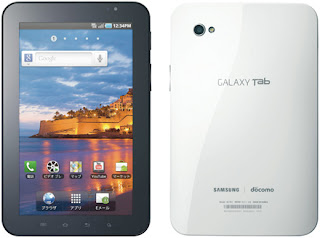
In a Year of Tablets, I'm Hooked on the Samsung Galaxy Tab

In a Year of Tablets, I'm Hooked on the Samsung Galaxy Tab


This morning, I looked around the room and see three tablets in three corners. My wife's iPad was charging on one side of the room, while her Barnes and Noble NOOKColor was on the nightstand. By me was the Samsung Galaxy Tab. Three tablets, three manufacturers, all with different uses.

It struck me very clearly how 2010 was the year that tablets finally came to be useful household items, accelerated by Apple of course (after years of rumors), but in the end, the one I've been using the most has been the Samsung Galaxy Tab. I have found the 7 inch form factor extremely inviting, and it's going with me practically everywhere, thanks to built in 3G support.

Tablets? The iPod Touch, Samsung Epic, NOOKColor, Galaxy Tab and iPad.

At risk of falling into "most recent gadget acquired" syndrome, the Galaxy Tab is absolutely my favorite and most-enjoyed electronic gizmo of the moment. It takes what I've already enjoyed about Android, including significant customization, flexibility and integration with all my Google Services, and brought it to a bigger, high quality screen, and a very fast processor that runs every app I throw at it.

The Galaxy Tab vs the iPad In Size

Sitting in between my Samsung Epic phone and the MacBook Air, in terms of size, the Galaxy Tab is big enough to present full-colored demos to potential business partners, while also being small enough to put in an inside jacket pocket or jeans back pocket. The device is lightweight and easy to maneuver one handed, which has come increasingly handy when reading books, RSS feeds, Twitter or anything else when balancing a 4 month old baby. In contrast, the iPad's weight and bulk, not to mention heavy metal exterior, fails in this regard. The Galaxy Tab has a smooth plastic exterior that easily grips to your hand, but isn't so harsh as to be uncomfortable if rested on the chest or lap (real-world use case, people!).

My Galaxy Tab Home Screen

Many people have remarked that the Galaxy Tab is essentially a larger Android phone. That is true. In fact, to my surprise, when purchasing the Tab, Sprint assigned a phone number to the device, even though it is not configured to make phone calls. It seems the exact same hardware went into the device, plus a bigger screen, battery and CPU. So if you're already an Android user, you'll be pleased to find it running Android 2.2 and doing just as you would expect. This is very similar to Apple's unified OS strategy between their tablet and iPhone.

The Galaxy Tab's screen is the best I've tried. It is extremely clear and has high quality icons for apps and all services. The larger screen also allows for 5 icons to be stacked horizontally, unlike the standard 4 for most Android phones, which doesn't sound like a big deal until Android widgets built for the "four icons across" size show room remaining.

Like the iPad and the Barnes and Noble NOOKColor, the Galaxy Tab's battery is very good. While practically every smartphone I have used has been fragile to venture far from a power source, all the tablets have had significant lifespan and can go days without a charge. I've taken the Tab with me on car trips and used the 3G network (from the passenger seat mind you), to use Google Talk and answer e-mail, or catch up on the various social networks. I've even used the Galaxy Tab to take Christmas photos and video tape the twins running at the park - although holding the Tab in front of me to record them no doubt looks very silly compared to today's compact cameras.

With CES looming around the corner, and Motorola promising to launch a new tablet with a new version of Android, it's possible the Galaxy Tab's position at the top of Android tablets could be short lived. But it's clearly a real contender to the crown. It's fast, it's flexible, and the 7 inch form factor is extremely compelling. If you are looking for something smaller than the iPad or simply prefer Android, you'd do yourself a service to try out the Tab and add it to your arsenal.