Silicon Valley Technology Commentary & Archives · Est. 2006 3,045 Posts · 2006–2026
Showing posts with label OS X (15 posts). Show all posts

October 1, 2013

October 1, 2013 · 5 MIN READ · BY LOUIS GRAY

Developing for the Web or for Classic Mode

Developing for the Web or for Classic Mode

Apple's transition away from Mac OS 9 to Mac OS X is more than a decade old at this point, which means an entire generation of computer users may never have been exposed to the "Classic" Mac OS, which launched in 1984 and evolved for the next few decades before being put out to pasture.

I remember, as if it were yesterday, my own delight at hearing the deliveryman knock on the door and leaving behind a package which contained a retail box with Mac OS X 1.0 on compact disc, which promised to completely change the way I interacted with my computer, bringing with it a new and modern look, a new kernel and more.

It Looks Great, But What About Printing?

Living on the bleeding edge by installing this first version of Mac OS X meant it had some obvious holes. For one, I couldn't print. For another, I couldn't play any DVDs. So while some of the features were exciting, it was clearly limited. These limitations, and general skittishness over new technology, led many people not to dive into Mac OS X right away - and some software developers, most notably Quark and Adobe, dragged their feet on committing to the new OS, waiting for the market to demand it. In the meantime, we users had to live in a "one foot in, one foot out" experience, with "Classic" applications launching inside of Mac OS X, displaying the traditional Apple menu bar, the traditional Finder and all other bits one would expect from an older Mac.

This awkward time had developers forced to make a choice. Would they create applications solely for OS X, continue on a path of developing for OS 9, or ship both and risk a gap in features? It's, pardon the pun, a classic dilemma of developing for a known and existing market, or preparing something for a future market. In time, Classic faded away, with Steve Jobs famously holding a burial for it at the WorldWide Developers Conference in 2002. All the big vendors, from Adobe to Microsoft, shipped for Mac OS X. Printer drivers eventually came along, as did the ability to run DVDs and do everything Mac OS 9 could.

The Desktop is the New Classic. The Web is the New OS X.

I feel we're at a similar crossroads now in development, at least on the desktop. As a fulltime ChromeOS user, I don't ever install proprietary software outside of my browser - but I also don't feel limited in what it is I can do. I can print, using Google Cloud Print to my Canon printer at home. I can play all my videos on Netflix or Google Play and my music through Spotify or Google Music. I can run all my productivity apps on Google Drive, edit photos in Pixlr and so on. Even at a time when traditional operating systems are the significant market share leader, I think we've reached a point where developers looking to reach the widest numbers of potential users are better off making a product for the Web than they are by picking a desktop platform - and in those very rare cases where I find out an application needs to be downloaded to even run, I'm surprised.

When you fight against the momentum of the Web, you lose. And while this doesn't mean every part of the Earth has ubiquitous high speed broadband - far from it - I do believe we are at an inflection point, like all those Mac developers were 10+ years ago, where one would need to choose between building for the platform that's known or to the platform that's unknown. And just like in the Mac OS X scenario, the Web as a platform may have a few holes, but the Web's modern browsers are becoming stronger and more robust at a pace I'd argue is outstripping improvements in our traditional desktops.
The Pixel is My Machine of Choice and It's All Web.

My Data Follows Me On Every Device.

In 2011, just after I joined Google, I talked about how I used Chrome all day long, and used multiple browsers to separate my business profile and my consumer ID. Since then, I've moved completely to ChromeOS and Chrome has debuted on both Android and iOS, so you can sync your data to practically any smartphone and never miss a step. Working closely with the Chrome Developer Relations team here at Google, I get to see the browser get faster, and become an even more robust platform for creating rich applications, with exceptional video and sound.

By living completely on the Web, as I mentioned last year in my post on the future of storage being none at all, any computer that has Web access is my computer. Hardware is simply a conduit for my access to my data and my preferences. Once I log in to my accounts through the browser, I should be able to pick up right where I left off, and I shouldn't be limited based on whatever client software or plugins may or may not be installed on this machine.

Pick the Platform for the Future.

Hindsight is 20/20, of course, and we have the benefit of history to fall back on, which clearly shows developers were right to present a fast track for migration away from the creaky OS 9 and start coding for OS X. While Apple's incredible success over the last six-plus years especially has been due to the company's work on iPhones and iPads, had Mac OS X never delivered on its promise, the company would certainly be a shadow of itself. The direction to a more modern OS proved to be the right one.

Now, again, we have a choice - to a more modern platform with more opportunity for a rapidly-evolving set of users for whom the Web and anytime access are a given, and for whom nearly all their time is spent in the browser. Making the leap as a developer to a lesser-known path may involve some risk, but unlike that time at the beginning of the last decade, you don't need the overwhelming majority of a small market base to upgrade and get to your product. Most of those online are already there - and they want your app.

Usual Disclosures: Yes, I work for Google. I work in Developer Relations and think about this stuff a lot. It doesn't mean I have any bias for or against any of our real or assumed competitors.

July 21, 2011

July 21, 2011 · 4 MIN READ · BY LOUIS GRAY

Lion's Big Bite Took the Air Out of My Sails

Lion's Big Bite Took the Air Out of My Sails

Like a good number of fast-moving Apple fans yesterday, one of the first things I did with my day was install Mac OS X 10.7 (Lion). The update, weighing in at just over three gigabytes, downloadable from the Mac app store, delivered a crisp new UI, some nice new features including Mission Control and an iOS-like approach to finding all available apps and files, a new take on scrolling, and unfortunately for me, at least in my case, a ton of slowness. From what it looks like, my poor refurbished 2009-era MacBook Air simply wasn't macho enough to run Lion - even after I weighed my options and ran Disk Utility for the better part of two hours to ensure nothing nefarious was keeping the poor laptop down.

While my MacBook Air has become increasingly slow of late, and had already been sending me increasingly to my Chromebook as an alternative, Lion pushed it over the top. Warnings about Lion probably needing at least 4 gigabytes of RAM, while my Air has a pesky 2, look to have been founded, as the system often became unresponsive and bugs appeared in a number of the apps I tried, including the venerable Microsoft Office suite.


Needing to prepare a presentation for a new client this afternoon, I was working late last evening on the MacBook Air, with only PowerPoint running. All other applications were closed (to conserve memory) and even that wasn't enough. Seeing I was getting nowhere, I bit the bullet, and uploaded the PowerPoint to Google Docs. I closed the Air and then opened up the Chromebook to work from there. Despite my high use of Google's products, I've never used Docs for presentations, and the move wasn't taken lightly. You know I'm not a heavy Docs user, or I'd probably have already told you that some time. After years and years of PowerPoint training, I'm surely much more creative with Redmond's software, even if it's not my favorite.

I haven't opened the Air since. No doubt I will, once I man up and stop being frustrated with the machine, but it's a little maddening to be obsoleted in just under two years, feeling like what I really ought to do is give Apple just over $1,500 and upgrade again to the latest and greatest Air, with an even faster CPU, more RAM, and a greater capacity Solid State Disk (SSD).

I initially got the Air in January of last year, knowing that it would be a bridge to a more cloud-centric device, especially as the hard disk came with about 100 gigabytes less capacity than my previous model. Initially, I made all sorts of attempts to avoid putting native applications on the Air, but a Microsoft Office here, an Adobe Creative Suite there, and that plan was done for in due time. At last count, the device was about two-thirds full yesterday afternoon - not in bad shape, mind you, but a dozen or two gigs beyond what I had hoped.

When I got the CR-48 from Google as part of their field trial last December, the device seemed initially handcuffing, as I felt trapped in the browser. As the hardware improved with Google supplying new drivers, and Chrome got faster, I started taking the device everywhere outside the house, and have probably been using it the majority of the time inside the house of late, especially as the Air has slowed. Almost too conveniently, on the same day as my Air was being deflated with Lion, the Samsung Chromebook from Google I/O arrived on my doorstep, giving me a sleek alternative to the air with real hardware polish. Within minutes, I'd moved my Google profile onto the new Chromebook and passed the CR-48 to my wife.

It was this new Chromebook on which I gave today's presentation - the same one that I haven't had to plug in since I first turned on the device this morning, and promises more than two hours' battery life remaining with about 33% capacity. I honestly couldn't tell you how much RAM it has, and I know internal storage is dinky, but the near-immediate bringup, followed by a successful preso this afternoon, has me seeing that as beautiful as Lion is, the makeup may be caked on thicker than Tammy Faye Baker. Part of my Apple fanboy inside is crying out in pain as I hope in vain that the Air can get restored to its former vibrant self, but I have to think this particular system upgrade was too much for it. It's fantastic to have an alternative arrive on the doorstep that very day. Obviously, the price (free) isn't bad either, but I wouldn't have even touched it, let alone stayed on all day, if it didn't deliver when I needed it to. My Macbook Air and I, on the other hand, are going to have a nice long talk about the future - even if it means a clean install or a data wipe, which doesn't sound very Mac-like.

Obvious Disclosures: The CR-48 was part of a free pilot program. The Samsung Chromebook was delivered free to Google I/O attendees. The Macbook Air I paid for (and got reimbursed from Paladin).

July 11, 2011

July 11, 2011 · 4 MIN READ · BY LOUIS GRAY

When Life Hands You Fragmentation, Make Fragmentade

When Life Hands You Fragmentation, Make Fragmentade

On Friday night, my 7 inch Samsung Galaxy Tab alerted me a software update was available. But not just any old software update - the much-awaited Gingerbread update, which would move the device from Froyo (Android 2.2) to its younger, hipper, brother, version 2.3. Having learned from previous experience not to dabble with unsupported Web builds, this was my first chance at Gingerbread, and the update has been without flaws. That said, it delivered a milestone of sorts, for now, officially, practically every device I have is running its own variance of an OS.

With the Android version number bump, the Galaxy Tab 7 is now on 2.3, while my Samsung Epic 4G is on Froyo 2.2. The Galaxy Tab 10 inch that came courtesy of Google IO is on Honeycomb 3.1, my Mac is on 10.6.8 (awaiting 10.7 Lion), the HP laptop is on Windows 7, the CR-48 is running ChromeOS, the iPod Touch is on iOS 4 somewhere and the iPads are somewhere in my kids' rooms, waiting to get charged. No devices I come in contact with are perfectly aligned.

With the obfuscation from handset vendors like Samsung and HTC providing their own custom skins to the Android development landscape and adding delays, the months following the first release of a build means I've practically forgotten whatever benefits I was supposed to look for in the first place. In older, more simple times, one could easily describe the benefits between version number upgrades on phones and computers, but not so much any more, lacking retail cardboard boxes and a unified release date, whereby recipients all get excited for simultaneous mass downloads and share their impressions, instead, waiting for the build to hit their phone, and even then, hope they are first in line for the serial Over the Air update crawl.

My "Laggard" Epic 4G is Chilling on Froyo 2.2.

Back when I was 'stuck' on 2.1 on the Epic seemingly forever, I couldn't wait to get my hands on Froyo 2.2, the main attraction being the option to download all my updates on Android Market simultaneously (or so I remember). But trying to preempt Samsung's release of Froyo turned out to be an "Epic" mistake - yes, pun intended. I had managed to get my hands on a build that was a dead end, one that wasn't supposed to be public, and one that couldn't go up, only down. I ended up eating my pride and going to Sprint to have the damage undone, reverting back to 2.1, and back up through official channels. So I didn't do the same for Gingerbread, having learned my lesson.

In addition to learning I should pretty much just play by the rules, the point by point upgrade system on Android has mirrored that of the Mac in recent years, whereby incremental upgrades are not much to write home about. I could barely tell you the difference between 10.5 and 10.6 as Apple patted itself on the back for "No new features" in Snow Leopard from Leopard, if you remember, so the sub-releases like 10.6.1 through 10.6.8 are scarcely worth mentioning.

Honeycomb, when it works well, is obviously a much better story. The 3.0 line of Android for tablets strongly deviated from the 2.0 line for phones, although, again, the bump from 3.0 to 3.1 was largely uneventful.

Looking back on some of the initial coverage around Froyo last year, it seemed the most anticipated capability was Flash in the browser - something I barely hit on my phone. Gingerbread 2.3.4 (what my Galaxy Tab 7 is running) is highlighted as having video chat in Google Talk, a cool feature I've already used, but oddly, something I'd expect through an application upgrade, not an OS upgrade. 2.3 also came with UI enhancements, a new keyboard, NFC support and some mysterious improvements on power management and app management. I'll take the upgrades of course, but if the improvements are so minor as to have to be researched, why then have we gotten so up in arms over the idea of fragmentation anyway? Either the product does what you expected it to and runs the apps you want, or it doesn't.

I absolutely agree, as does Google, considering their announcements at Google IO this year, that leading phone manufacturers should ship with the newest versions of software as fast as they can without mucking things up. The media and developer attention to fragmentation has definitely impacted their message and way of thinking. But as someone running different OS's on every device at this point, life's a lot less confusing than I thought it'd be.

May 15, 2011

May 15, 2011 · 4 MIN READ · BY LOUIS GRAY

Tackling My Biggest Impediments to Cloud-centricity

Tackling My Biggest Impediments to Cloud-centricity


More and more of my activity, both in desktop and mobile computing, is cloud-based. More Web services are replacing desktop applications, while activities that used to be the focus of local storage (including photos, music, video and email) are being delivered from the Web instead. But I'm not totally converted yet, and I can see how even the most forward looking of early adopters could still have some hangups in being fully cloud-enabled. To get to a cloud utopia, work has to be done not just on the operating system side, but on native apps, and peace of mind has to be delivered for users that they will lose no data or functionality in that transition.

In January of last year, anticipating a more cloud-centric future, I moved to a MacBook Air, one that had about half the storage space as my previous laptop, reversing the trend of larger and larger trays of spinning disk. Using the same device 16 months later, I haven't gotten close to using up the 128 gigabytes, although I have to admit I ended up installing a lot more programs on it than I had originally hoped.


Even with this admission, I kept the older MacBook Pro around under the guise of it acting as my "media machine", the master data set of all my music, photos and video. While I walked away from iTunes for music, every few months I'd transfer the latest home photos and videos via USB from the AIr to the Pro. Some got posted online and others not. With Google Music and Picasa offering options to upload all this content to the cloud, I know I'm just a few painful uploads away from finally migrating (once I get a new battery and charge the sucker).

Google's pitch for everything being on the Web is smart and future-looking, but it neglects, for consumers anyway, the story of migration, from one OS to another and also from one frame of mind to another. As Gmail once did with its offering a gigabyte of storage space at a time when competitors offered tens of megabytes, I have to think that letting people copy their important files to the cloud in a personal storage locker would be quite compelling. Steven Levy's "In the Plex" recounts the demise of a Google project "GDrive" thanks to its file centricity, but real consumers have real files and want to know they will never lose them in the future.

For me to truly get to the cloud one hundred percent of the time, I still need to:
  1. Convert my DRM-laden Apple iTunes songs to DRM-free MP3 files
  2. Synchronize those songs with Google Music and Spotify
  3. Upload all my photos from iPhoto to Picasa and/or SmugMug
  4. Migrate all my .Mac email archives to GMail
  5. Migrate old Word documents and PowerPoints to Google equivalents
#4 and #5 are supposedly easy. Find the right file types and point them to the right place, while making them private. But in practice, these migrations take time. I've had my unfair share of IMAP migrations to and from Mac to Gmail and probably have multiple email copies all over the place at this point, but the deepest archive is in local storage.

#3 touches on emotion as much as data. There's comfort for some in burning old photos to DVD, even if DVD (and CD-Roms and floppies before that) are holdovers to a doomed era in physical media. And songs are songs. I love my Spotify, but I bumped into an old Underworld album I own on iTunes that I hadn't seen in years and was reinvigorated to reclaim all that stuff I've purchased, so I wasn't walking away from thousands of dollars in investment, but also favorite tunes I might not remember later.

I have been using the CR-48 Chromebook more and more lately, using it exclusively at the Google I/O, SXSW and CES events, thanks to its great battery life and ease of access to 3G and WiFi connectivity. I am using the Chromebook more and more at home too, when I don't need to use Photoshop or take partial screenshots - something the Mac still does better than anything else I've seen.

I see the current state of Chrome OS as that of Mac OS X 10.0 upon Apple's launch of that operating system back in 2001. It didn't initially support DVD playing, and scads of programs were missing, forced to boot in Classic mode, including the aforementioned Adobe Photoshop and notably, Quark Express, key for the Mac's design culture. But eventually those holes were filled, and Mac OS X hasn't looked back in a decade.

Can Web apps replace Photoshop and other intense programs outright? Probably not on day one and maybe not even before the end of 2012. Google promised close tie-in with Citrix and VMware, telling the story of virtually connecting to apps outside of the cloud, and using them there. That's a really geeky solution to what would be a standard use case on a more traditional platform. I have to imagine that if Chrome and other cloud-centric options grow, traditional software makers (as Microsoft did with its Web office in response to Google Docs) have to start thinking about getting their apps into users hands on these new platforms, while the earliest users are going to have blood on their hands thanks to being on the cutting edge.

We're in the early days of a true cloud OS, and I've got a lot more room myself to go before I close the lid on my last MacBook. Agreeing in principle that I need to get my important data of rusty spinning disk, I have some work to do, and will keep up this effort. But more messaging has to address the issues of migration, storage space, compatibility and success in places where connectivity isn't pervasive.

January 16, 2011

January 16, 2011 · 4 MIN READ · BY LOUIS GRAY

A Cloud-Centric Web Makes Device & OS Switching Easier

A Cloud-Centric Web Makes Device & OS Switching Easier


There is a tug of war going on in your mobile devices and your desktop OS - between the world of apps and that of cloud-based Web services. The applications, usually designed and optimized for your particular environment, serve as familiar tools for you, and improve your productivity, bring you news, enabling you to do new things or they may simply entertain you. Not all those applications are on every platform, and the more you choose to purchase on one device, the more it is assumed you have some share of "switching costs" or, in a more antiquated word, "lock-in" to your selected OS.

In parallel, one sees a rise in Web services and apps that tap into cloud-hosted data, without demanding the data be stored on your local device. As applications become increasingly cross-platform and feature equal, this, in combination with the mass migration of data to the cloud, is reducing vendor lock-in and making it easier for consumers to make radical switches in their desktop or mobile environments - be it by operating system or the device itself.

If money were no object, I would be delighted to have desktops with the latest Windows, Mac or Chrome OS installs at my disposal, surrounded by mobile phones and tablets bearing logos not just of Android and Apple, but BlackBerry and Windows Phone 7. The rise in importance and prevalence of cloud data, and access to the true Web on all these devices (for the most part) makes their core differences less dramatic than in years past. Meanwhile, most application developers are executing in tandem for the top operating systems in desktop and mobile, meaning you can find your apps in a new place, should you choose to switch.

(See also: BetaNews: Laplink Switch & Sync -- posted tonight)

In 2010, I first switched mobile operating systems, and then switched phones on that OS. The first move took some effort and app discovery, but most my data was in the cloud, especially including all my email services, contacts and browser bookmarks. Switching between phones was even easier, as on Android, I was able to redownload all my paid apps from the Android market, free of charge. By the end of the year, I also had my hands on the ChromeOS-based CR-48 notebook, the most radical change yet, foregoing local apps for cloud-based ones, and making the Web browser the center of the universe. And yet, I've survived, going back to the MacBook Air for archived email and heavy-duty apps for Office and photos, but keeping pace on the Web.

A year ago, I called for OS and App neutral data, which removes the ownership of my content from the service providers themselves and gives it back to me. Recognizing mobile providers' core offerings, I started my migration to the cloud in earnest when I first picked up the MacBook Air. I've failed somewhat in keeping apps off the device, out of necessity, but most rich media gets moved off to the local Time Capsule, and from a 128 GB hard drive, smaller than my last laptop, above 50 GB are left. Clearly, I have more cutting to do.

The move to the cloud means I am no longer a Mac person or a Blackberry person or a Google person, but instead a Web person. So long as I can configure the device to find my information elsewhere, it is less necessary to be concerned about the hops needed to try and switch or test out a Windows Phone 7 handset, or what would happen if the Blackberry Playbook entered my life. Similarly, migrating from the Samsung Galaxy Tab to a Motorola Xoom would be extremely simple - just like my move from EVO to Epic in the fall.

Asymco says for every iOS device, be they iPhones, iPads, or iPods, users have downloaded more than 60 apps on average. No doubt have we exceeded this number ourselves, but also on the Android platform - some of which are duplicates of the other. I purchased MLB At Bat for iPhone, iPad and Android, and would probably get it for the Mac App Store if it was there too. But the availability of the top apps on most of the top platforms makes my loyalty to any one particular device or OS a temporary one. If I've put $200 or $300 of my money into apps on iOS, and about $200 on apps on Android, it's a one-time allotment of sunk costs, no greater than a prepayment penalty on one's mobile phone contract. But the technical hassles between devices are going away as the cloud becomes the center of all we do.

October 31, 2010

October 31, 2010 · 2 MIN READ · BY LOUIS GRAY

20 Halloween Scares to Put Fear Into Every Apple Fan

20 Halloween Scares to Put Fear Into Every Apple Fan

20. Wowed by IE 9 for Windows, and to tick off shared rival Google, Apple abandons Safari in exchange for promised browser development by Microsoft.

19. Apple products deemed security risk to carry on planes by TSA, must be placed with checked baggage for all flights.

18. Apple abandons USB and 802.11 and forges their own standards body, reporting to themselves.

17. Apple actually acquires Facebook for $40 billion. Mark Zuckerberg said to ascend to CEO position by 2012.

16. John Gruber of Daring Fireball is to be added to the company's board of directors.

15. MobileMe to be replaced by a new messaging system built on Apple's social network, Ping, accessible only through iTunes.

14. Riding a wave of over-confidence, thanks to the recent string of successes, Steve Jobs reintroduces the G4 Cube, the Dalmatian and Tutti Frutti iMacs, and yes, the hockey puck mouse.

13. During a company board meeting, Al Gore asserts that he did, indeed, invent the Internet. The other board members, swayed by his amazing charisma, agree Apple will backpay Gore royalties for each machine, dating back to the early 1990s, which had Web connectivity.

12. International trade strife between China and the United States flares up, and Apple's subcontractors discontinue making new iPhones, Macs, iPads, and more. Suicides actually increase.

11. After so many MacBook Air owners realize their hinges break shortly after their warranty expires, a class-action suit bankrupts the company.

10. HP bundles next generation Palm devices with every desktop, laptop and server sold. Palm becomes new mobile standard.

9. Windows Phone 7 is Really Really Really Good. No wait, Really.

8. Apple retail store insulation found to contain asbestos. Even worse, Steve Jobs demanded it be included.

7. Adobe copyrights the word Flash and extends the word to contain all Flash drives. A settlement mandates all flash drives come preinstalled with Flash.

6. With the introduction of Microsoft Office 2011 for Mac, Outlook becomes the standard Mac client and Apple Mail is retired.

5. Entertainment industry colludes to deny Apple access to music and films on iTunes store. Only Disney/Pixar and indy offerings left.

4. Tim Cook leaves Apple to take the CEO position at Dell.

3. SCO rolls back to life, and somehow obtains an injunction against Apple's Mac OS X, due to its UNIX underpinnings, stopping all Mac sales.

2. AT&T announces contract to extend iPhone network exclusivity through the end of the decade.

1. News breaks that Steve Jobs actually perished during liver surgery in Tennessee in 2009. What you have seen in the last year-plus has been a zombie.

May 17, 2010

May 17, 2010 · 3 MIN READ · BY LOUIS GRAY

iPhone Apps on iPad Smack of Mac OS 9 on OS X

iPhone Apps on iPad Smack of Mac OS 9 on OS X

Although it was almost a decade ago, the slow and painful migration from Apple's "Classic" Mac OS 9 to the sleeker Mac OS X sure feels more recent. To take the plunge and buy Mac OS X in its earliest days (and yes, I was running its Public Beta for $29) was to take a leap of faith - one embedded in promise more than immediate benefits. You couldn't play DVDs or Print in practically all cases. Most applications were missing - and to get to your old environment, you had to boot up your now antiquated desktop in emulation mode, or "Classic".

The feeling of running these old apps, and holdovers like PhotoShop and Quark Express, was gritty, slow, and subject to the occasional bomb error. Over time, one booted into Mac OS 9's Classic mode less and less and then one day, never again, as it faded to black. If you're an iPad user, and you've booted up some of your old iPhone apps that haven't been remastered for the larger screen and swifter graphics and processor, you're likely feeling some of the same emotions as we did a decade ago.

While the iPad's support of previously-compiled iPhone apps made amazing sense, to populate the device with hundreds of thousands of applications on day one of its launch, I am finding myself avoiding or deleting as many iPhone apps from the iPad as I can, if they are not necessary - and no, we ca't print on the iPad now any more than we could run DVD's in the first runs of Mac OS X. In comparison to applications built with the iPad in mind, the "supersized" iPhone apps, for the most part, suffer in look and feel and bring back that same understanding that emulation is never as good as the real thing.

It may seem ever more complicated as a developer to rebuild and rewrite code for the newest of Apple's devices, in addition to the myriad of alternatives, including Google's Android platform, the various flavors of Windows, and Mac OS X itself, but with a swelling population of iPad users who appear willing to pay standard to premium prices for dedicated applications, one can safely assume that if one developer doesn't meet customer's needs, they will seek out and install an alternative. And those who are slow to the iPad, resting on the laurels of their iPhone apps' prowess, will no doubt be the losers.

This isn't to say that all iPad-targeted applications are amazing. Some of the earliest are just repackaging of content from Web sites (see eTrade and ESPN), but the best (like MLB's At Bat application and Apple's iBooks) are comparable to full desktop environments and fit perfectly in the iPad's hardware frame. But that's no doubt because we are in the early days of iPad development. While some are saying you have to wait and see what the breakout application will be for this new platform, the opportunity awaits those who get the environment right.

In addition to deleting iPhone-optimized apps I probably wasn't using much anyway, I find myself cruising the Apple iTunes Store, waiting for amazing iPad Apps to debut which I can download in their place. For the most part, I'm not yet finding them. I've been amused by the Doodle Buddy application, which lets my kids finger paint on the device. I have enjoyed using the iPad as a racing car, and think Apple's native apps are pretty solid. But we are clearly in a transition time where the current offerings are light, as we wait for the library of apps for iPad to grow, and possibly, those that only are compiled for iPhone may decrease.

Given my array of choices in terms of how I can get my data and my apps, from the laptop to the iPad and the iPhone, I am not planning to suffer emulation and go-betweens and longer than I have to. In the same vein as Apple refusing ported Flash apps on their platform, I too want to enjoy applications designed for the device I am taking in, and not somebody's quick and dirty recompile. We went through the strain of Mac OS 9 to Mac OS X, and I hope Apple has proven themselves enough by this time that the call to arms for more native apps will occur much more quickly.

April 8, 2010

April 8, 2010 · 8 MIN READ · BY LOUIS GRAY

Phones, 'Pads and Platform Plethora Pain

Phones, 'Pads and Platform Plethora Pain


Fifteen years ago, James Gosling and others at Sun helped promote a new programming language, Java, which aggressively promised to allow developers to "write once" and have their programs "run anywhere." At the time, Java aimed to solve the problem of programs being available for one operating system, but not others - most commonly seen with deployment on Microsoft Windows, the gorilla in the market, but not for less-popular platforms, including Apple's Macintosh, Linux, and yes, to a lesser extent, Solaris. More than a decade later, despite incredible progress in the world of standards, and the accompanying growth of the World Wide Web, intended to be computer agnostic, the world of platforms has gotten even more confusing, not less so, forcing customers and developers alike to make irrevocable choices to align themselves with potential winners. Additionally, thanks to splintering of application platforms and sources, customers are being asked to purchase identical products from single manufacturers for different devices, and the more powerful our mobile devices, phones and tablets get, the more this problem looks to only get worse.

Desktop Operating Systems Stable as Chrome OS Looms

For the most part, desktop operating systems have not changed much in the last 10 years. Mac OS X was made available from Apple in 2001, and became the standard since 2002, replacing Mac OS 9. In parallel, Microsoft Windows has seen regular upgrades, as has Linux (and all its flavors). No major competitor has emerged to unseat the big three - although Google's Chrome OS might make things interesting soon.

But Gadgets, App Stores and Platforms Are Proliferating

Where innovation has remarkably changed the world of development lies in two areas - first, mobile and gadgets, and second, the rise of the Web and communities as platforms themselves. While in the early 2000s, we would talk about deploying applications for Macintosh, Windows, or Linux, you now have to also consider writing applications for iPhone, Android, BlackBerry, Windows Mobile, Palm Pre, the iPad, or even if you are coding for Facebook or Twitter. While some code may be reused from platform to platform, development and deployment can be siloed, with different feature sets based on one's computer choice, or different launch dates. And in competitive markets, you can often see one application gain traction for two platforms and its main competition take the others, in an unofficial divide and conquer strategy.

For those of us who remember the huge struggles in the Apple platform in the mid-90s, at times it seemed like we should be thanking our lucky stars for gaining the privilege of installing some second-rate port of a Windows application on our systems. That they even thought enough of us to throw us a bone was to be lauded. In other cases, the Macintosh version would ship months or years later, or we would get one version, only to see three issued consecutively for Windows while we held on to our creaky software.

While things have improved for us Mac folks, just imagine the incredible challenge facing a third-rate bit player on the mobile platform, like Palm's Web OS, trying to get traction and ask developers for their attention - which will likely come only after everything else is solved on all the bigger venues. And the issue of choosing where to code and deploy is only going to get more difficult with Google's Chrome OS looming in the wings.

For the most part, customers are choosing a single operating system and a single mobile platform for their use. They might be Windows people and iPhone users. They might be Mac people who like Palm Pres. They might love Linux and the Google Nexus One. And once users choose a platform of choice, they are almost certainly locking themselves into what's available for them on that specific platform, as titles appear on other devices but don't cross the border.

Buy Into an App Store Ecosystem and You Own That Choice

The reason that Apple trots out the vast number of applications available for iPhone in the iTunes App Store is obvious - showing their momentum, and also giving customers more and more reasons to choose them ahead of lagging platforms. Google's Android platform, which gained nearly 10,000 applications last month alone, is also trying to be relevant through its array of apps. The Motorola Droid radio commercial I heard on my drive home tonight speaks repeatedly about multi-tasking, but also about how many of its apps don't run on those other "so-called smart phones", a not so subtle dig at Apple. If there is a killer app on Android, iPhone users can't get to it, and there are many apps on the iPhone platform that don't run on the Droid. God forbid a customer change their mind and port their number to a new platform - as they would be throwing away not just their call history, but their application library, and would need to start again.

The iPad's arrival into the hands of consumers on Saturday has further exacerbated this issue. While many developers are no doubt excited about a new machine with a robust feature set and near-guaranteed commercial success, they are being asked to develop again for a new platform, update it, and cultivate a relationship with the community there. The race is on for the earliest applications, who think they can pick up a $5 or $10 price point after seeing 99 cents rule the world on the iPhone.

Buy It for the iPhone and iPad? No Discount for You!

And while the iPad's new applications are admittedly nice, don't think you get any kind of shortcut for being an existing iPhone owner. If you've already bought in to Apple's ecosystem approach, and downloaded your fair share of applications, you get the opportunity to do so again, and not with any kind of discount. For example, I purchased the MLB.com At Bat 2010 application for $14.99 for iPhone. Now that I have the iPad, MLB has a dedicated application for that platform, and yes, it's another $14.99. It didn't ask if I had an existing license, and it didn't offer a discount. Meanwhile, even with free applications, we see confusion. The new TweetDeck iPad application, if downloaded, sits alongside the TweetDeck iPhone application, giving you two TweetDecks on your iPad, one big and one small.

TweetDeck's example is an interesting one as well. Having launched with a cross-platform AIR application, TweetDeck worked with Macintosh and Windows on day one. In the ensuing 18 months, Iain and his team have developed dedicated applications for iPhone and iPad. Meanwhile, Seesmic developed a desktop version of their client for Mac and Windows, as well as a dedicated Web site, an Android version, and a dedicated Windows client, called Look. But Seesmic still hasn't publicly made it to the iPhone, let alone the iPad. Even if the pair are not dividing up the market, their inability to easily be on every platform with high quality shows the risks and stress of operating in today's environment.

iPhone Apps in iPad = Classic Under OS X, and Web Site Tweaking Is Nuts

As for those iPhone apps that so seamlessly transitioned their way to your iPad? Yes, they work, and yes, it's cool to zoom in at 2x the effect, but their cruddy resolution makes me feel like I'm booting up OS 9 in Classic mode under Mac OS X again. Running iPhone apps on the iPad is a mixed experience indeed.

Meanwhile, this whole tumult around Apple's iPad not supporting Flash, and Apple launching an array of "iPad Ready" Web sites that look great on their tablet is completely insane. Steve Jobs was once famously quoted (I believe it was in Fortune around the time of the first-gen iPod) that mobile Web site users didn't want a watered-down Web experience, but instead, a full Web experience. He was right. I've already lamented the fact that my iPad's Safari User Agent is interpreted as a mobile device and not a full-fledged computer. I appreciate sites like Brizzly and Gmail that have adapted to make their sites look great on iPad, but they are solving a problem that simply should not exist. If you have to change your Web site to fit a new device, maybe it's the device and the platform who has the problem, and not you. Just like we shouldn't celebrate a site for making a version that works only with Microsoft's Internet Explorer browser, we shouldn't do the same to laud the extra work required to make domains look great on iPad.

As users, we are in a very interesting turning point in the evolution of operating systems and platforms. The Web's ubiquity and the growth of mobile devices as robust computers in their own right means tremendous potential for new application development. We now can get high quality Web and software experiences on our mobile phones, tablets, laptops and desktops - and the success stories of some developers who have struck it rich developing for the iTunes Store and others is giving code jockeys even more reason to compete for our attention. But even as we get more and more choices of vendors, mobile phones, and application stores, it seems we are actually losing control in terms of getting a unified experience and application access across all. The world of platforms as we know it is splintering, and we are funding it. We are choosing to buy not just more devices, but also paying for the applications in new places.

I may not be a Web developer, but I swear some of the best must lament the time when the hardest decision when deploying was whether or not to test your site and Web apps in Netscape Navigator Gold or not - as they now need to choose to code for the desktop, the Web or the mobile platforms, and then choose their favorites on each, and an order in which to release. It's getting crazy out there. Better in terms of quality and reach, of course, but crazy nonetheless.
April 2, 2010

April 2, 2010 · 4 MIN READ · BY LOUIS GRAY

Web Services or Apps? The Desktop Metaphor Is Collapsing.

Web Services or Apps? The Desktop Metaphor Is Collapsing.


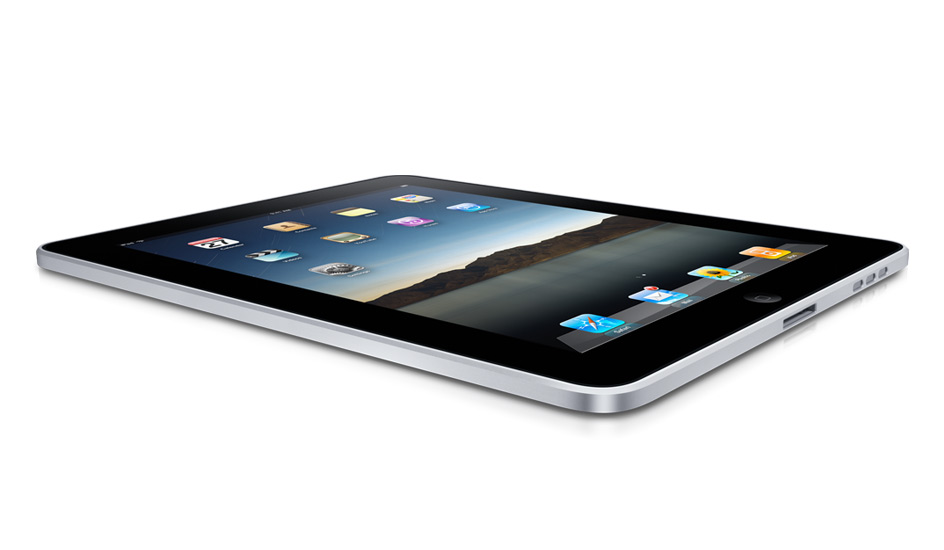
You can't click a link these days without bumping into news on Apple's new iPad. Some lunatics are already in line at Apple Stores across the country, waiting overnight to be among the first to buy the new device. My e-mail in box is swelling with new announcements of applications that are debuting for the iPad, and Apple released a list of Web sites yesterday that leverage HTML 5 (instead of Flash), making them "iPad Ready". Practically all forecasts expect the iPad to a big success on par with the iPhone and iPod, not a dud, like the ill-fated G4 Cube.

After years of tablet rumors, which initiated well before the iPhone, Apple opted to deliver an iPad that didn't run a slimmed down version of Mac OS X (i.e. Mac OS X Lite) as many had anticipated, but instead, opted to go the route of the iPhone, without a Finder/Desktop mentality, led by Apps accessible from the iTunes Store, with an integrated Web browser, Safari. While we have grown used to mobile devices that download and deploy apps - be they from Apple, the Android Marketplace or for Palm's WebOS, these apps were not designed for a full-size computer, and Apple effectively turned its back on a 25 year history of nested folders.

The debut of the iPad comes at a time when Apple's most notable assumed competition may not be Microsoft, who is by far the market leader in folder and desktop-based systems (and the core software to run atop said machines), but instead, Google. Google in the last few years has emerged to not just be a dominant player in its search engine market, but has risen to be a major player in the mobile phone industry - taking Apple's iPhone head-on - but also the operating system world. Its announcements for a Chrome OS, with the Chrome Web browser at its core, make it a very serious alternative, one that is designed not for a world of apps, but instead, one of Web services and data in the cloud.

The strain between the two companies, now well documented, is seeping into the way the company's employees perceive one another (and their products).

For example, upon reading the news that Boing Boing's Cory Doctorow recommended against buying an iPad, Google's Adam Lasnik shared the piece on Google Reader, adding: "the future is Open, and thank goodness for that". The inference, of course, is that Apple's closed ecosystem, contrasted with Google's belief that they are promoting open standards, is not where the world is headed.

One Googler's Opinion on the Future

In November of last year, I said Google's Chrome OS was not about deploying today, but preparing for a future with Web-centric world, where Web sites trumped applications, and standards like those promoted from the Buzz team allowed for a rich experience free of client software. Google's Chrome OS, unlike the operating systems of today, from Windows, Macintosh, Linux and others, lacks a desktop, or its equivalent. You can't exit out of the browser to see the hard drive, and it's like being at a permanent Web terminal. Applications run in the browser and crash in the browser - without any need to know if that's on Drive C or Drive D, in My Documents, My Settings or My Photos.

Meanwhile, in Redmond, Windows 7 has come and nullified many of the bad feelings about Vista. It's a pretty good operating system, all things considered. But it's not moving the ball forward in the way that the iPad/iPhone/iApps approach is, or in the way that Google's Chrome OS hopes to do. Apple and Google are betting, in no small part, that users will adapt to a new construct of how they interact with appliances. Apple's move seems to be more about manual input and self-contained applications, while Google is maintaining the keyboard approach, but doing away with the decades-old desktop and file folder structure.

Regardless of the over the top headlines asking if Microsoft can "survive in an iPad world", change takes time. While Apple was once seen as an outsider to a big market when they first launched the iPhone, and Google doesn't yet have penetration with Chrome OS, Apple now has significant mindshare and is seen as the one to beat in the innovation scale, but they haven't snuffed out Windows. Meanwhile, we haven't heard what Apple has in mind for Mac OS X Eleven. Will it merge the iPhone OS with Mac OS X, or will the dual operating systems evolve in parallel? I wouldn't be too surprised if Apple found a way to move us forward with the iPad and apps-based computing being the direction, with desktops falling away to the annals of history, but if they went this route, it is going to be a long haul indeed.

August 31, 2009

August 31, 2009 · 3 MIN READ · BY LOUIS GRAY

Fry's Electronics: A Silicon Valley Legend With Legendary Flaws

Fry's Electronics: A Silicon Valley Legend With Legendary Flaws

Despite the fact both retail outlets sell computer equipment, including hardware and software, Fry's Electronics superstores and Apple's retail stores could not be more different. One offers a specialized set of products, and packs its stores to the gills with helpful employees, while giving customers free reign to use their products, and can approve customer purchases through the use of a handheld scanner device. The second offers a dizzying array of products, from vacuums and office chairs to iPod headphones and copper wiring, and its employees haven't won any awards for their product knowledge - while checking out items requires an usher, while your bags are rudely inspected - as if you had the forethought to take on the role of a shoplifter. It's clear which one is which, if you have ever stepped foot in either one - which makes me wonder sometimes why I keep revisiting Fry's, hoping each next experience will trump the last.
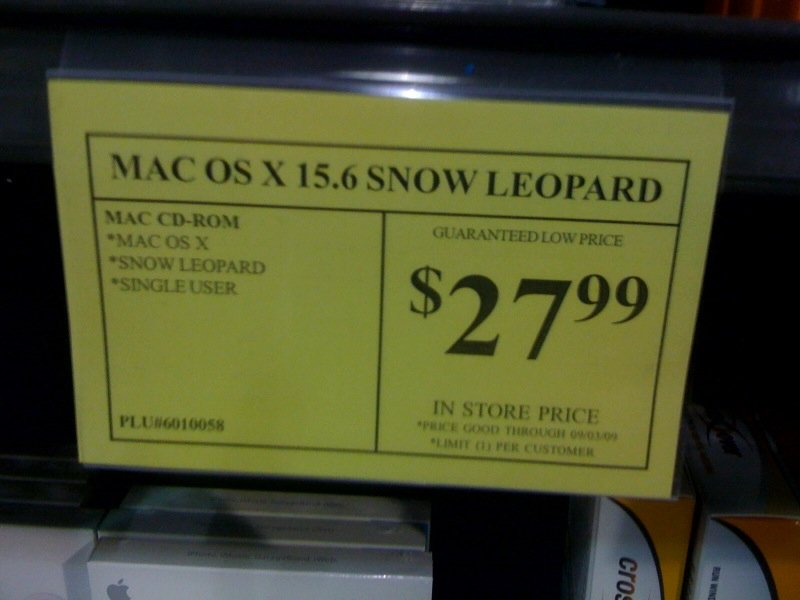
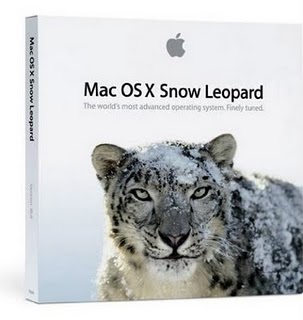
Fry's failings are at times comical - including my most recent trip this Saturday. I stopped into the store that afternoon for a simple task, finding Apple's Mac OS X 10.6 (Snow Leopard), which had released the day before. I was unsure whether Fry's in Sunnyvale would have it, but if they did, it would be a longer trip down to the Apple Store at the Valley Fair Mall in San Jose.

Upon entering this geek warehouse, I made a beeline for the Mac area, where Apple products are isolated in a special setting that makes the computers seem more like they belong in a zoo than in the jungle of PC parts and widgets just outside the enclosing aisles.


Mac OS X 15.6. From the Future!

To my surprise, there was no banner, or even a sign, announcing Snow Leopard had arrived. I looked to and fro, and didn't see Apple's famous boxes. I asked one employee, who was in the Mac section, for help and she pointed me to a manager, behind a nearby podium. I asked the manager, and she said that she didn't know where Mac OS X 10.6 would be, and maybe her boss would.

After flagging him down, and explaining, he pointed back to his subordinate, saying Mac OS was her department. She said, "Oh! I thought you meant Mapquest!"

Right. Why would I buy software from Mapquest at Fry's?

With renewed vigor around her newly-reminded knowledge, we turned back to the Mac section, and found Snow Leopard cases quietly hiding on the shelf. Below the DVD cases was a simple descriptor: "Mac OS X 15.6 Snow Leopard", for only $27.99. Of course, that would mean the operating system software was five generations into the future, which is outstanding. Or it was a typo. You decide. And that doesn't even go into the label failing to mention it is a DVD install, not a CD-Rom install.

Did Fry's have what I was looking for? Yes. Did it have it at a cheap price? Yes. Was it nearby? Yes. And that's about all I can say in favor of why I continue to return to this geek mecca of annoyance. I know that if I took the time to drive down to the Valley Fair mall, not only would they be posting banners of Mac OS X 10.6's imminent arrival, I would have gotten somebody to help in minutes, scanning me out right away - without trying to upsell me on a warranty, or walking me through an impulse buy section stock full of electric razors and bulk candy.

Fry's is no doubt a mecca for the do it yourself gadget geek. But the contrast between the warehouse mentality shown at Fry's, versus the personal touch felt in Apple Stores has me wondering if next time I'll just make the extra drive and reward their effort.

As for Mac OS X 15.6, I came home disappointed with merely owning Mac OS X 10.6, so I don't get any early adopter cred.

August 1, 2009

August 1, 2009 · 4 MIN READ · BY LOUIS GRAY

Will The Mac OS X Dial Go All the Way to Eleven?

Will The Mac OS X Dial Go All the Way to Eleven?

Apple's Mac OS X operating system is almost a decade old. After having gained access to the Mac OS X Public Beta for a cool $29.95 way back in 2001, and followed Apple through all the point builds in the ensuing eight years, from Cheetah (10.0) to Puma (10.1), Jaguar (10.2), Panther (10.3), Tiger (10.4) and now Leopard (10.5), with Snow Leopard (10.6) on the horizon, I've seen Apple meticulously add features, improve functionality, introduce new applications, and redraw the user interface more than a few times. But I am honestly wondering what Cupertino has in their mind for what's next. Why is nobody talking about how the company could follow up with an encore, Mac OS XI (or Eleven), that could change the game again?

An Already-Long Life for Mac OS X

That Mac OS X has survived as long as it has is remarkable already. Mac OS 9, its predecessor, debuted in October of 1999, and its last bug fix release (9.2.2), was issued in December of 2001. Similarly, Mac OS 8 debuted in July of 1997 and got its last update, to OS 8.6, in May of 1999, another two-year stint. Only Mac OS 7's six year run comes close.

Now, while it's true that the long tenure of Mac OS X could be as much related to a new approach to version numbering on Apple's part as anything else (for example 10.5 could have been renamed 11...), part of me thinks the OS is getting a little long in the tooth. Nothing in Snow Leopard excites me, though I no doubt will upgrade to that as well, just to stay current (and some apps may require it). And some of the same major market forces that made the iMac a success are the same ones that are changing the game for what we will expect in an operating system just a few years from now, no doubt.

Somewhere deep in Cupertino's R&D labs, I hope there are some extremely talented engineers thinking long and hard about what's next, and what kind of aggressive changes Apple can take to leverage technologies that simply were not around in 2001, the last time they had to tear down the old and build up the new.

The Desktop Is Giving Way to the Browser and Cloud

Google's Chrome OS and the rumors around Crunchpad's browser-only interface (with no hard disk space) are two volleys into the abyss of what's next. Apple was smart to grasp onto making the iMac one of the easiest ways to get onto the Internet. Apple was a fast follower, debuting the iTunes store as a massive Internet-powered e-commerce site for digital media. But Apple and Mac OS X is still very much driven by the same framework that has existed for decades - utilizing the desktop metaphor, with a Finder, and applications, which run independent of the browser or "the cloud". And the very media we are buying from the iTunes store, be it music, video or applications (for the iPhone) is stored locally on hard drives.

Mac OS X Eleven (or Mac OS XI, whatever they call it) is going to need to compete in a new world that will likely have a grown-up version of Google's Chrome OS, a successor to the already-respected Windows 7, and all matter of other operating systems from netbooks and mobile alike. And while the world does not yet have the ubiquitous high speed broadband needed for always-on mobile cloud computing, more people will, and more companies are working to make that a reality.

What Will the Future of the OS Be?

In the early 1990s, we saw plenty of hype from companies like AT&T who rallied around the idea of a virtual assistant, who would monitor your data and your appointments - someone with whom you could ask, using natural language, a question, and expect a familiar reply. A fun fantasy, people haven't yet realized this dream, and it's not clear that's the way we want to interact with our computers. In addition, Apple's approach to search has not always been the best. Sherlock is long-forgotten, and the company has turned to Google for search on the desktop and iPhone browsers.

The next operating system, from Apple or anybody else, will not be about even fancier, cooler, graphics, or wearing virtual reality glasses, or seeing your file folder structure in 3D. But it will have to see the same kind of metamorphosis and dramatic step changes that the Internet has seen over the last decade. While the Web has grown up, from flat gray backgrounds and purple text links, to full streaming live video and interactive multi-lingual conversations, the desktop is waddling alongside - Steve Jobs' baby who nobody has the heart to tell him has gotten ugly.

I've ridden this ride on Mac OS X to 10.5.7 where we stand today. 10.6 is coming. But I want to start hearing about the future. I want to hear about leadership and authority. And I am very curious if Apple can lead the way in a world where Google is king.

July 7, 2009

July 7, 2009 · 2 MIN READ · BY LOUIS GRAY

Google Says Yes to Launching An OS (Based on Chrome)

Google Says Yes to Launching An OS (Based on Chrome)

That sound you just heard was the very big "other shoe" of Google being dropped. Late Tuesday night, the company announced on its official blog that it is going to soon be releasing what it calls the Google Chrome OS, a lightweight operating system, initially targeted at netbooks, but aggressively said to be their "attempt to re-think what operating systems should be."

This highly anticipated move is an extension to the company's Web browser initiative, launched just a short nine months ago, and puts Google in direct competition, once again, with tech titans Microsoft and Apple.

Though the blog post does not feature all the eye candy one typically looks for in a new operating system announcement, the author does spell out a few things. First, it will run on both x86 and ARM chips, and is considered a different project than that of Android - which many others had speculated would be Google's first foray into the world of operating systems. The post differentiates between the two by saying, "Android was designed from the beginning to work across a variety of devices from phones to set-top boxes to netbooks. Google Chrome OS is being created for people who spend most of their time on the web."

The focus on those people who spend most of their time on the Web sounds like it would be in very close proximity with the CrunchPad I covered over the weekend, but funded by a company with thousands of employees, not a few dozen.

The new push from Google also will no doubt further complicate the relationship the company's CEO, Eric Schmidt, has as a board member at Apple. Already forced to recuse himself during discussions of the iPhone, thanks to the Android platform, Schmidt may find himself recused from discussions of Apple's OS, and any future tablet or tablet OS. With this kind of momentum, just maybe he won't play an official role on the board at all?

I wouldn't anticipate seeing builds of the new operating system any time soon. Google says they have a lot of work to do, and will be relying heavily on the open source community to push the project forward. They hint to stay tuned for more updates this fall. No doubt, many will be on the edge of their seat.