

I've seen a lot of social media tools and aggregators. A good number of them are designed very well, and could be great tools, provided a swarm of early adopters, and then later, late adopters, showed up. Some of them trumpet just how many different services are supported, and use that as a rallying cry for why one site should be ditched for another. But it's the wrong approach. For while they may have been working on making fancier widgets and supporting yet another niche service, others have been building a foundation for community, making them the clear winners.
Examples of this are everywhere, but the most blatant examples that come to my mind are those of Twitter and FriendFeed. I could also make examples for LinkedIn and Facebook, but that's another post at another time.
Twitter has been roundly scorned for its occasional inaccessibility, costing users about 1 percent downtime over the last four months, according to Pingdom. While serviceable alternatives exist, in Pownce and Jaiku, for starters, those who have invested time in building up their Twitter community, including followers, those they follow, and an archive of "tweets" aren't going to leave, even if Jaiku and Pownce deliver 100% uptime, and manage to add features that Twitter simply doesn't match. Twitter has become more than a microblogging mechanism, but a serious community.
This was very clearly illustrated by Michael Arrington's piece on TechCrunch: "Twitter May Not Have To Care About Uptime Any Longer" last month, when he said, "after a three day weekend outage I realized that in the last two months a subtle shift occured: I now need Twitter more than Twitter needs me."
The same could be said for the lifestreaming and aggregation space.
On the Elite Tech News podcast this last week, the conversation turned to FriendFeed, and whether or not it had a GUI that would be welcomed by non early adopters. After suggesting Kevin Fox had big plans to upgrade the service, I also said it would take a lot more than a shiny new interface on another aggregator to get me to move. And it would take a lot more than bells and whistles, because in the last seven months of FriendFeed being in service, the site has developed many different sub-communities which make engaging and participating both fun and informative.
In order for me to leave FriendFeed for another service, be it Profilactic, SocialThing, Iminta or Plaxo, it would take the entire community shifting at once.
But that doesn't stop some social media sites from arguing it's all about the features. Take a blog post from Profilactic that compares its service with that of FriendFeed. The author writes, "FriendFeed supports 28 social sites. Profilactic supports 155. Not much else to say there."
And while time has passed, and both services have added more supported external sites, the author's summary, reading, "Profilactic supports 127 more sites than FriendFeed. We allow you to filter out your friends' feeds that you don't want to see. We give you features that FriendFeed doesn't offer like Clippings. And we allow you to take it all with you with badges," just doesn't give enough of a compelling argument, especially when it pertains to communities.
The gap between FriendFeed and Twitter and other sites who haven't yet gotten off the ground is going to make it incredibly difficult for alternatives to make headway, even if they do end up having more features, a prettier UI, or greater uptime. This is in part why I first highlighted the many tech bloggers flocking to FriendFeed, and why FriendFeed co-founder Paul Buchheit has on separate occasions said, “Great products are more than just a pile of features” and that “FriendFeed has personal communities”. FriendFeed gets that the site isn't about a pile of features, but it's about the users. Once a community is built, they will rally around a service, and become extremely loyal, even if another option is shinier or louder.

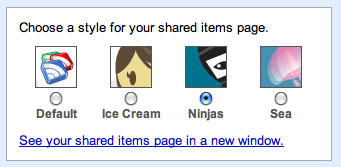 Alongside the so far much-criticized announcement that you can append notes to Google Reader shared items, you can also choose from four artistic styles on the shared items page, including the Default, as boring as it sounds, Ice Cream, Sea, and ... Ninjas.
 With RSS becoming ubiquitous now, it is not uncommon for Web power users to have hundreds or even thousands of individual RSS feed subcriptions, covering anything from sports to technology, news and blogs of friends and family. But adding these feeds one by one to a new feed reader is simply out of the question. It takes too long. That's why the majority of RSS feed readers, both online and off, have moved to support OPML, enabling the portability of both your feeds and your folders.
 Shyftr first caught my attention earlier this year, when I highlighted their integrated comments system and blog rankings. (See: