Silicon Valley Technology Commentary & Archives · Est. 2006 3,033 Posts · 2006–2026

July 12, 2008

July 12, 2008 · 3 MIN READ · BY LOUIS GRAY

After Slow Start, My iPod Touch Is a Happy 2.0 Camper

After Slow Start, My iPod Touch Is a Happy 2.0 Camper

As far as dedicated Apple fans go, I think I've had to turn in my "First Class" ID in exchange for a "Second Class" ID ever since the iPhone came out. The reason? I still don't have one, and no matter how many days in a row I wear my Apple logo watch or my Apple logo shirts, it won't make up for the fact the rest of the digerati have moved forward, and yet, I hold on to my two or three-generations old Blackberry.

But my so far steering clear of the iPhone doesn't mean I didn't get the chance to benefit from Apple's releases on Friday. While the reports from Apple Stores across the country poured in about long waits, activation delays and software bugs, I was at home trying to find some way to get my iPod Touch software updated, to benefit from the newly introduced iTunes Application Store. I had jumped the gun on Thursday, purchasing several of the apps, and yet, the 2.0 software package was playing hard to get.

Virtually all of Friday, the 2.0 upgrade for the iPod Touch was out of reach. Apple's Web site said it was a click away, but iTunes would continually fail, saying the upgrade was unavailable, putting me in a seeming infinite loop of futility. iTunes said I had an OS upgrade available, but it wouldn't even take me to the page where I could pay my nominal $9.95 and take my iPod Touch from trailing edge to leading edge.
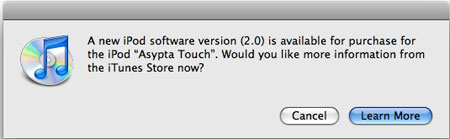

Alright, I can Upgrade!


But Wait, This is Taking Too Long!
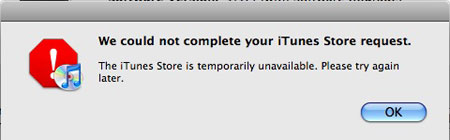

Ack! Failure Again!

But finally, after midnight last night, the trains started to run on time. I downloaded the more than 200 megabytes needed, over a half hour's time, and let my laptop and the iPod Touch spend some quality alone time, while data and settings were backed up and synchronized.

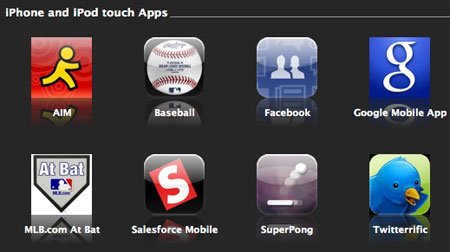
When all was completed, I not only had the 2.0 software, but several new applications for the iPod Touch, both free and premium, including:
  • AOL Instant Messenger
  • Baseball
  • Facebook
  • Google Mobile App
  • MLB.com At Bat
  • Salesforce Mobile
  • Twitteriffic
  • WeatherBug
I also added a handful of games, of course, from the basic SuperPong to Air Hockey, BlackJack, ZEN Pinball, and 300 Bowl.


The upgrade, despite the first day snafu, is absolutely a gem. Having push e-mail to the iPod Touch, and the addition of Twitterrific already has the iPod Touch playing a much more significant role as a communications device, and I'll be setting it up for full Exchange synchronization later today for sure. I'm also looking forward to working with the Salesforce.com tool, as Salesforce.com is one site I use constantly at the office to track leads, opportunities, reports and revenue.

And I can't overstate the geeky fun of the Baseball application. I was checking it out late last night, and what it delivers for any true sports nut is every statistic - ever - from the beginning of professional baseball through the 2007 season. You can browse by team, by year and by player to get all the data you'd need to win trivia games, or just to annoy your neighbors at the ballpark. Used in tandem with the MLB.com At Bat service, which lets you see game highlights on video throughout the contest, and after its completed, and you've got the potential to be a real seamhead as well as being a geek.

As for eventually crossing the chasm and finally getting that elusive iPhone? Trust me, it's tempting. The iPod Touch does a lot for me, but I would love to get it down to one device. But if your work paid for the BlackBerry service on Verizon, wouldn't you stick with that, instead of moving to AT&T and paying out of your own pocket?

July 12, 2008 · 2 MIN READ · BY LOUIS GRAY

Staying Loose Can Help Keep Your Ego In Check

Staying Loose Can Help Keep Your Ego In Check

A common complaint I run into in our little bubble of the tech blogosphere is that the most widely known bloggers are ego-driven, and will pull any shenanigan to keep themselves on top. Sometimes, they are accused of making themselves part of the story, if not the story itself, eschewing traditional journalism rules that separate the subject from its author.

While I have personal high expectations, I hope not to convey the same type of "it's about me" nonsense people have seen elsewhere. That's been helped of late by some very silly peers who took the time to mock my seeming omnipresence online with a pair of interesting endeavors - first, a parody site, and second, a room on FriendFeed that parallels the Internet meme of "Chuck Norris Facts".

Unlike other recent skirmishes online that have taken place around parody and satire, these haven't sprung up with ill intent, and I don't have any plans to stop either one, although I think it's best if I leave them be without being all that involved. After all, it's much more fun to watch the nonsense from the sidelines.

LoisGray.com: A Blog for Late Adopters

The satire site, started on Thursday, is called www.loisgray.com, featuring my inverse logo, and billing itself as a "Tennessee Valley Blog for late adopters, technophobes, RSS oblivious, and apple growers. (May also occasionally contain some TV, news, recipes, and politics...)"

Early posts on loisgray.com (which were quite funny) explained the difficult issues of getting online without AOL and using Google to search the Web. But as the article warns, "never click on the 'I'm Feeling Lucky' button because that takes you to the internet porn that you hear so much about." Good advice.

Louis Gray Facts (A FriendFeed Room)

Developed out of a silly conversation with Charlie Anzman of SEO and Tech Daily, some enterprising FriendFeeders made a room dedicated to what they called "Real, true, verifiable facts about Louis Gray", promising the ability to surpass the commonplace.

Some of my favorites from "Louis Gray Facts"
  • "Louis Gray doesn't have a Backspace button on his keyboard. It's humanly impossible for him to make a typo."
  • “There's a reason Louis Gray isn't on TechMeme more often: it very rarely meets Louis Gray's strict standards.”
  • “Louis Gray only uses Excel for the pretty charts, Louis Gray crunches all the stats in his head.”
The second I start believing this stuff, I'm in trouble. I'm clearly getting mocked. But I appreciate some good-natured amusement, and it certainly isn't expanding my ego any. That people care enough to take time to pull my chain is fun, but I know where I stand, and it's not at the top. Now go pressure LoisGray.com to post some more. (As if I didn't hear that Lois and Clark nonsense all through elementary school)

July 11, 2008

July 11, 2008 · 1 MIN READ · BY LOUIS GRAY

I Woke Up to My First Disqus Comment Spam Attack

I Woke Up to My First Disqus Comment Spam Attack

In the two and a half years I've written on this blog, comment spam has been an occasional problem, but nothing alarming. When I was using Blogger comments with Haloscan, I could moderate and delete when needed. When I used Blogger's native comments, I had the occasional piece of spam, but it was unusual. Now that I'm using Disqus, it's still very rare. But this morning, when I checked my e-mail, and found 94 new messages, I knew something was wrong. I'm simply not that popular.
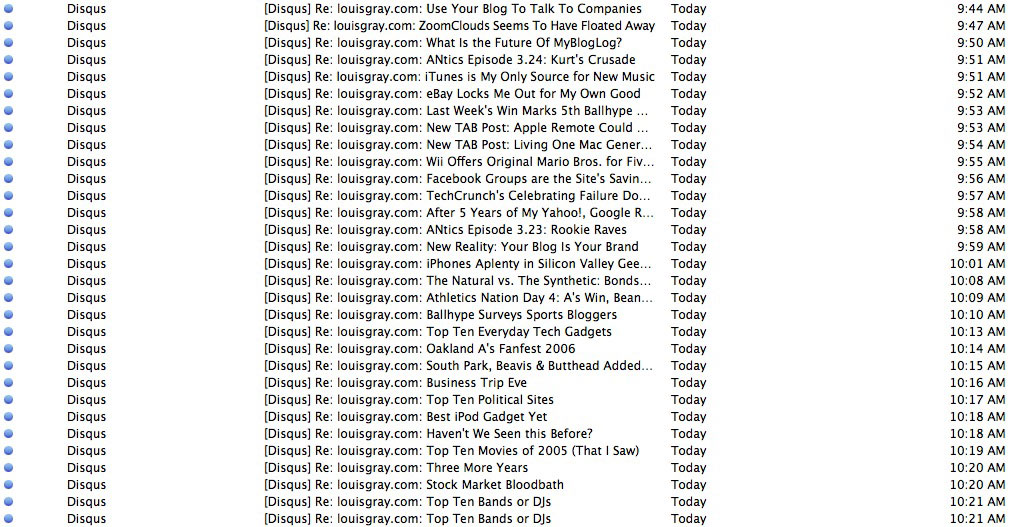
Sure enough, somebody had broken through.

In less than an hour's time, the poster had added more than 30 comments to Disqus, all on different blog posts, all very old -- a clear example of a blog comment spammer on autopilot.


My In Box this Morning (Click to Enlarge)

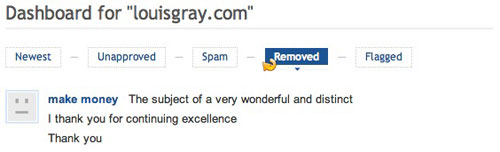
And like any good spam these days, its message made very little sense, with a note to "make money" and dozens of lines in Farsi (or Arabic, I'm not an expert).

The good news is that Disqus gives me a way to delete the garbage. Usually, the service will alert me that a comment is flagged as spam, giving me the option to e-mail my desire to "delete" or "approve" the note, but this gibberish made it through the filter entirely. So I had to go to my Disqus dashboard, and delete each entry one by one. There was no way to delete the whole group or delete all by a specific author, as far as I am aware.


I know Wordpress bloggers swear by Aksimet and other solutions. Some even eagerly trumpet the thousands of spam messages blocked. So far, I've never had the need. Are you seeing spam commenting pick up, and if you're using Disqus, how do you handle it?
July 11, 2008 · 4 MIN READ · BY LOUIS GRAY

FriendFeed Friday Tips #6: How To Determine Authorship

FriendFeed Friday Tips #6: How To Determine Authorship

By popular demand, I've been asked by other FriendFeed users to highlight how I use the popular social lifestreaming site. So far the series has covered the "Hide" function, the bookmarklet, advanced search, how to integrate with Google Talk, and how you can bring comments from FriendFeed to your blog. Today, a new wrinkle: determining an item's original source.

At its foundation, FriendFeed is an aggregator of Web activity, from you, and from your friends or peers. Activity on the Web that you aggregate can be of two types: data that you create yourself (blog posts, Tweets, Flickr photos, etc.) and data that you like which others have created (Google Reader shares, YouTube favorites, etc.). Typically, it's fairly easy to distinguish between those pieces you're sharing and those pieces you're creating, but in the last few weeks, there have been some notable errors made, so with more people flocking to the popular service, it's time we had some clarification.

Your FriendFeed stream typically consists of service icons, an active verb, and the service itself. The verbs themselves give away whether you were the author or simply, a fan.

Services Where I am the Content CreatorServices Where I am a Fan of the Content
    1. Louis Gray "shared" an item on Google Reader.
    2. Louis Gray "bookmarked" a page on Del.icio.us.
    3. Louis Gray "dugg" a story on Digg.
    4. Louis Gray "stumbled upon" a site on StumbleUpon.
    5. Louis Gray "favorited" a video on YouTube.
    6. Louis Gray "liked" a story on Reddit.
    7. Louis Gray "loved" a song on Last.fm.
It seems pretty straight forward. In the first group, I'm posting, commenting, publishing and updating. In the second group, I'm bookmarking, sharing, liking, loving and favoriting. But in the last few weeks, there have been some notable incidents where the groups got confused.

1. Mark Hopkins Reports Sarah Perez Leaving ReadWriteWeb

On Wednesday night, Mashable's Mark Hopkins reported, on his personal blog, that the popular, prolific, Sarah Perez would be leaving blogging monolith ReadWriteWeb for SitePoint. (See the FriendFeed discussion here)


But it wasn't true. In fact, Sarah's former colleague Josh Catone was the one announcing the move to SitePoint. How did Mark get confused? It turned out that Sarah had subscribed to Josh's blog in Google Reader, and shared the item (see that share here on FriendFeed).

Clicking through to the shared item was arguably confusing. The post said it was time to announce where the author would be blogging after ReadWriteWeb, and the sparse Tumblr interface didn't have anyone's name on it. Mark, thinking he was onto a scoop, ran with it. Of course, he could have seen an earlier post where Josh linked to his farewell on RWW, but it didn't happen.


How could this have been avoided? First, it's unlikely Sarah would be sharing an item from her personal blog that wasn't registered with FriendFeed. The item clearly said "shared" not "posted", as outlined above. While many people, including me, will share items from their own blog to Google Reader, for it to show up first as shared before the actual blog item came through is unlikely.

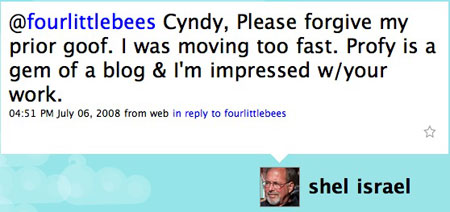
2. Shel Israel Credits Me With Two Posts I Didn't Make

Shel Israel has weathered enough nonsense from the blogosphere over the last year, so this isn't any personal slight at all to bring this up. He's been very nice to me, saying in June that I was "consistently thoughtful, original and accurate". But of late, he's given me too much credit, where it's not due.

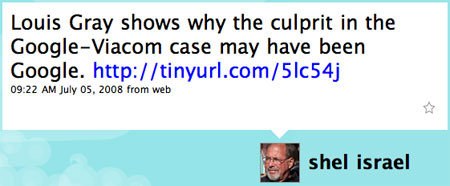
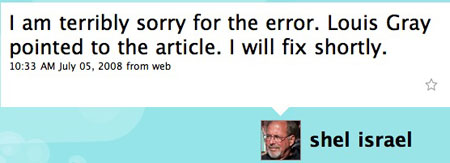
On July 5th, he wrote a post on the Google/Viacom decision, and drew largely from a post on Profy from Cyndy Aleo-Carreira. Throughout the first version of the post, he said "Louis went and read the decision several times...", and "thanks to Louis Gray, who took the time to do some digging." While the post has since been updated, it had given me all the credit.


His Tweet on July 5th remains up, as does his amendment.


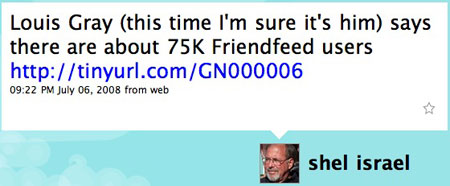
But the very next day, it happened again.


Shel sent a tweet, saying: "Louis Gray (this time I'm sure it's him) says there are about 75K Friendfeed users http://tinyurl.com/GN000006."

But it wasn't me. Again, I had shared a link in Google Reader to a third-party blog, this time, from User21, written by Yuval Atzmon.

With many blog authors already worried about RSS scraping or not getting attribution for breaking posts, or losing comments to one service or another, it's important to be sure we give credit to where its due. I am not going to stop sharing RSS items to my Google Reader link blog, and I don't think Sarah Perez or the many of us who use these services will. I'm not going to stop favoriting items on YouTube, loving songs on Last.fm, bookmarking blog posts or Digging items. But I do hope the differences are clear. As much fun as it is to be recognized, I don't want to take credit for other people's work, and I'm sure Sarah doesn't want to take any more phone calls from interested blogs looking to hire her. So before you look to FriendFeed to determine who is the original source, look at the active verb, and then, if still not sure, click through to the item and see its origin. It shouldn't be too confusing.