Silicon Valley Technology Commentary & Archives · Est. 2006 3,033 Posts · 2006–2026

October 20, 2008

October 20, 2008 · 1 MIN READ · BY LOUIS GRAY

Making Your Blogging Much More than Just "You"

Making Your Blogging Much More than Just "You"

On Sunday, Chris Brogan asked an important question: "How Often Do You Promote Others?", asking how often many of us are highlighting lesser-known people, sharing their items, or promoting their work, to expand awareness. One of the people Chris gave credit to was Robert Scoble, who Chris said "points me to new stuff all the time".

It's no secret a lot of my own online activity is the result of having watched watching Scoble's efforts. It was his pushing toward Google Reader, creating a link blog, and linking out to people big and small that has guided some of my own behavior. So, as I mentioned on Chris' stream in FriendFeed, here's what I'm trying to do:
  1. Highlight new services when they debut, to help give entrepreneurs a running start.
  2. Highlighting five new bloggers each month who I believe are undervalued.
  3. Adding new guest posts to the blog to showcase talent.
  4. Sharing dozens of sites on Google Reader each day.
  5. Interacting with many new people on Social Median and FriendFeed.
It's true I could always do more. I know I haven't been doing my part to make as many comments on other people's blogs as I used to. I'm not adding as many new voices to my FriendFeed as I used to, or as many new RSS feeds to Google Reader and Toluu as I once did. And I wish I had more time to test some of the brand-new services that flow into my e-mail. But we are absolutely not going to forget that despite "the blog being your brand", that it doesn't begin and end with me. I hope you can take the time to check out Chris' comments and see what you can do to promote others.

His Post: How Often Do You Promote Others

October 19, 2008

October 19, 2008 · 5 MIN READ · BY LOUIS GRAY

5 iPhone Apps Your Family Will Enjoy

5 iPhone Apps Your Family Will Enjoy

By Jesse Stay of Stay N' Alive (Twitter/FriendFeed)

As a father of four, gadgets I buy must be something my entire family can enjoy.

When I got an iPhone, I also got my wife an iPhone, and we're seriously considering iPod Touches for the kids this Christmas (Promise not to tell them, okay?).

The iPhone is not only a tool Mom or Dad can enjoy and use to become more productive, but it can serve as an excellent learning and entertainment tool for your children. There are many apps that are great for both young and old, which are essential for a Dad like me. These five applications in the iTunes App store are some of my favorites, which the entire family can enjoy. And only Koi Pond ($.99) isn't free.

iDoodle2 lite

My sons, 6 and 4, love this one. It's simply a basic drawing program, which lets you select colors, pen size, shape, and background color, and create different pictures by drawing on the screen. You select the background color, then you have the option to select if you want to draw freeform with a pen, draw lines, circles, squares, or blobs, and you can doodle all you want. There is also a pay version that offers ability to enter text on your graphic, and have an image as your background that you can draw on. It's great for the kids when you don't have a pen or paper nearby to keep them busy. It's my 4 year old's favorite app.

Pros: Simple idea, hard for kids to get into trouble. The pay version only adds to that experience.

Cons: Not easy enough to use, at least for kids. For kids that can't read, it's hard for them to know to click on "New Doodle" to erase their image and start over.

Crazy Pumpkin


I saw this one enter the App store, and predicted immediately (check my Google Shared items) that this would be top 5, and sure enough, it got up to number 2 before going down again. The idea is simple. It's a Jack O' Lantern. You can change the face of the Jack O' Lantern by sliding the eyes, nose, or mouth over to make different faces. You can also make spooky sounds by shaking the phone or iPod Touch. It's nice and easy, great for younger kids, and catchy enough even adults can have fun with it.

Pros: Extremely simple, great for younger kids and even toddlers (my 6 month old loves my iPhone!).

Cons: I'd love the option of more faces, and maybe a few more sounds, or additional functionality. However, the idea is meant to be very simple.

Koi Pond

This is a classic. I know few iPhone owners that haven't tried this one. Koi pond is simply a pond with Koi fish and lilly pads in it, which you can slide your finger around and make rippling sounds and motions in the water. It's perhaps one of the most relaxing applications on the iPhone - nothing is more relaxing than the sound of rippling water and birds chirping in the background. Better yet, you can shake the phone, and fish food is sprinkled in the pond and the Fish come and eat the food. Be careful though, if you disturb the water, the fish avoid coming near the area you disturbed.

The part I love most about this is that due to the simplicity, it works great for keeping kids busy, especially infants and toddlers who can't read and have limited hand-eye coordination. My 6 month old loves touching the screen and hearing the resulting sounds rewarding him for his actions. He loves looking at it and seeing the cool colors and hearing the sounds that come from the app. I would say this is my 6 month old's favorite App.

Pros: It's so relaxing! It's my new "stress ball". Nice and simple.

Cons: I can't think of any cons to tell you the truth, unless you don't like Fish.

Memory Match by Jirbo

I had a lot of fun with this one. It's a play on the classic, "Memory" game, giving you 30 cards, all turned over, that you must sequentially turn over and see if you can remember where the matched images are. It's a one player game, but something you or your kids can play over and over and challenge each other on the score it gives you. You can also upload your scores to Jirbo.com, and share your score with others using the app.

Pros: Easy to use, fun to play. Who can turn down a game of Memory? Great for kids, young and old, and helps refine their memory skills.

Cons: No 2-player mode, even on the same device. It's single player only. It would be nice to play with someone else like the real card game, or even over WiFi with someone on another device nearby.

FourFree

This is quickly becoming one of my favorites. It's based on the classic, "Connect 4" game, where you and another player can play to see who can be the first to get 4 of your color in a row horizontally, vertical, or diagonal. You can choose to play by yourself against the computer and track your score, or play against another player on the same device.

As a family we usually take a travel version of the real Connect 4 board game with us on road trips to keep the kids busy. Now we can simply bring our iPhones, and our kids can have multiple options given to them, with no lost pieces, and no mess!

Pros: A classic favorite! Gives easy, normal, and hard levels for all ages. Fun for the child and adult.

Cons: I'd love to be able to play with other nearby phones instead of having to pass the phone back and forth. It may be a little too hard for age 4 and under.


Know any other family-friendly iPhone apps that the kids can enjoy? We're always looking for more. Leave your suggestions in the comments.
Read more by Jesse Stay at Stay N' Alive.

October 19, 2008 · 3 MIN READ · BY LOUIS GRAY

The World. The Web. Just That Much Smaller.

The World. The Web. Just That Much Smaller.

By Ken Stewart of ChangeForge.com (Twitter/FriendFeed)

In July of this year, Google announced on its blog the Web was a big place. That's probably not much of surprise to anyone reading this.
  • In 1998, Google's index contained 26 million pages.
  • By 2000, the index reached 1 billion pages.
  • This year, Google announced its engines have discovered over 1 trillion unique URLs.
As if you needed more evidence, U.S. companies produced over 4.3 trillion pages from document output devices last year alone. Information is being produced and consumed at staggering rates.

Recently, one speaker I heard commented on the last century's rapidly spiraling rate of information growth.

He stated the amount of information up until 1900 could be measured as a 1 inch bar on a graph. He went on to say the information gathered from 1900 to 1950 could be measured as a 2 inch bar on the same graph, while the information presently available would measure as high as the Washington Monument. That would be 6,665.5 inches, or 555 feet, 5.5 inches tall.

Connecting the Dots:

I have discussed some of these trends in the technology and business worlds – and specifically how the ever-increasing amount of information has become hard to digest:

The true winners will be those who are able to connect the dots and fund innovations geared to lessen the visible complexity, enhance efficiencies, and/or create real-dollar cost savings.

In fact, IBM would say most of their customers are concerned with consumability: the abstraction of complex technology to the end-user, while surfacing only enough of the interface necessary to help the end-user achieve their objectives.

Perhaps you have heard the phrase, "I don't care how the car starts, I just want to stick the key in and be able to go get my latte."

What You Were Looking For:

How do you find what it is you need on the web?

Of course I started this article with one of the most prevalent ways in which people search for information, Google. Google has brought such an impact to our world in the last decade, the company's name has become a verb – synonymous with search.

While there are perhaps many examples of how complex technology is helping you, one recently caught my attention - that of social media.

While Google found an unserved opportunity in search, the long tail of software has evolved from dozens of markets with millions of users to that of millions of markets with dozens of users (source, IBM GTO, 2008).

Social media is the logical conclusion of all of the voices attempting to be heard, to be found, and ultimately seeking resonance.

And so conversations continue across media outlets, blogs and the Web-space in general - proliferating with exponential frequency. Content is being created, being expanded upon, and being echoed back.

Turn Down the Volume:

Simply searching through Google, or the like, just wasn't enough. Even early adopters would even have trouble scouring such a wide swath of content in search of meaning and connection.

With such a volume of information, more refined mechanisms of search had to be created; more meaningful conversations could only be had when people were connected to one another, and those involved would need to be able to dial-up or dial-down the amount of information being consumed – based upon individual need or desire.

What I have witnessed is one writer beginning a thought while another finishes it – without even knowing the other had started the conversation in the first place. In another instance, you might see a small community of bloggers holding almost identical conversations to one another without knowledge or thought of the other.

The Connection:

All it takes is a connection – something or someone to draw a line between the dissonant parties. Thus the power of the web, and social media specifically, are realized in small but meaningful chunks.

With the advent of services such as Twitter and FriendFeed the momentum of discovery has accelerated, and even new bloggers like me are able to gain access to meaningful connections after only a relatively short time.

There remains much work to be done before these services can satisfy the needs of the masses, but the foundations have been laid. After all, the Web is a big place; but with your help, your voice, your connection it can become just that much smaller.

Ken Stewart's blog, ChangeForge.com, focuses on the collision between the constantly changing worlds of business and technology. Ken is also the Director of Technology at Kearns Business Solutions.

October 18, 2008

October 18, 2008 · 1 MIN READ · BY LOUIS GRAY

Stay On Top of the College Gridiron Using Only Your iPhone

Stay On Top of the College Gridiron Using Only Your iPhone

Last month, I highlighted an iPhone application that let you see near real-time scores of NFL games in progress, see current game situations, statistics, news, or even exchange "smack talk" with other fans. (See: Is Your iPhone Ready for Some Football?) But football isn't just played on Sunday. Today, like every other Saturday in the fall months here in the States, dozens of college teams faced off around the country, some fighting for a position in the BCS series, others jockeying for a position in the Associated Press' Top 25, and even more, fighting just for pride. And Plusmo, the same company that provided Pro Football Live has made an app for fans of those teams, similarly called College Football Live. It's just as good and just as free.

College Football Live, like its big brother, lets you view the scores of games in progress, select favorite teams, see recent news and talk smack with other fans.


Not Watching the Game? You Can Get Caught Up Quickly.

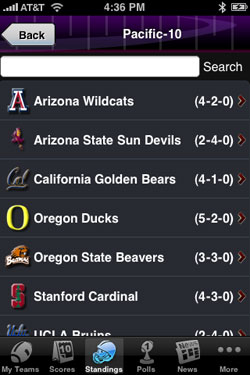
But given the differences between the pro game and the college game, College Football Live also tracks the Top 25 polls, and standings by conference.


The Week's Polls and Conference Standings are a Tap Away

Within each game, you can dive down into seeing most recent statistics, quarterly play by play, and previous scoring drives. And as with Pro Football Live, you can give a thumbs up or down to each team and see just how many other fans have the same preferences you do.

This Saturday evening, my California Golden Bears are leading the Arizona Wildcats 24-14 at the half, in game they are expected to win. But with the American League playoffs on TV, as well as many other Top 25 college games, the Bears haven't found their way to my TV set. Luckily, I have College Football Live on my iPhone to fill the gap.