Silicon Valley Technology Commentary & Archives · Est. 2006 3,033 Posts · 2006–2026

October 23, 2008

October 23, 2008 · 6 MIN READ · BY LOUIS GRAY

Social Media Workflow on the iPhone

Social Media Workflow on the iPhone

By Phil Glockner of Scribkin (FriendFeed/Twitter)

I wanted to write a slightly different type of iPhone app review today. Instead of focusing specifically on one or two apps, I wanted to bring you with me as I walk through the tools I rely on daily as I check out the social media ‘scene.' Also, I'd like to prefix by stating that the iPhone has been an amazingly capable and flexible platform for web-based activities such as this. Not only does it work better for me than any mobile smartphone I've used in the past, but has completely replaced my trusty Nokia 770 internet tablet.

E-mail

When I pick up my iPhone in the morning, the first thing I check is new e-mail. Not very exotic, but this is something that needs to be done well on any smartphone. I'll disclose here that I've never used a Blackberry for any length of time, so I won't argue that it's the best mobile e-mail platform. However, the iPhone has a very strong, capable e-mail client. In fact, it has really come a long way from the 1.0 release on the original iPhone. Good attachment handling including PDF and Office documents, support for multiple POP/IMAP accounts, and good integration with other iPhone apps and even many 3rd party apps. Plus, Apple has their own tightly-integrated service called MobileMe.

One small issue I have with the e-mail client is the steps involved with switching between e-mail accounts. In essence, if you are looking at a particular e-mail, you have to hit the ‘back' button 3 times to get out to the account list. Why isn't there a shortcut to straight to the account list, or better, switch directly to a different account? Every other mobile e-mail client I have used has this simple feature.

FriendFeed

Personally, I check FriendFeed all the time to get a feel for the topics of the day, and to see if any ongoing discussions are happening that I can contribute to. FriendFeed has an excellent iPhone web client that is more than adequate for this job. I usually keep a browser session open specifically for FriendFeed so I can check it at different points in the day.

friendfeedhahlo2

Twitter

There are so many resources for accessing Twitter on the iPhone that I can't cover them all here. Twitter itself has a nice, clean mobile site if you point your mobile browser to m.twitter.com. However, I use an iPhone-optimized free service called Hahlo, it is really leagues better than any other web site in the same class, and even better than most Twitter iPhone apps! It supports everything you can do on the main Twitter site, plus integrates Twitter Search (formerly Summize).

If for some reason you don't love Hahlo, here are just a few of the other apps and sites you can check out: Twitteriffic, Twinkle, Twittelator, TwitterFon, Twittervision, Twitfire, and LaTwit. Also, Summizer is a mobile version of Twitter Search and Fring is just all-around amazing.

Google Reader and RSS

I am a huge fan of the Google Reader feed reader utility. It has social features as well as an intuitive keyboard-accelerated, web-based interface. In fact, I would argue that most of my real absorption of the social media space comes from the feed subscriptions I follow in Google Reader. Their team has also provided an excellent iPhone-optimized web site. As long as I have some network connectivity via wireless or cellular, this is my preferred way to catch up on my feed reading.

However, there are times when I know that I'll be out of all network access and I may still want to read some articles. Up until recently, there wasn't a good way to do this. However, a great iPhone app called Byline that was created specifically to sync with Google Reader and allow perusal of articles at leisure. Any annotations that are made, like ‘share with note' or ‘starred,' are synched back up when reconnected to the internet. Plus, Byline just got a big 2.0 interface makeover and is a pleasure to use. I recommend it if you prefer to use an app over a web site.

If you aren't a fan on Google Reader, there are a lot of other RSS readers for the iPhone (this is by far not a complete list, and App Store links all): NetNewsWire, SyncRSS, Web Feeds, Free RSS Reader, The Black RSS Reader, Daisy Feed, and NewsStand.

google_readerlinkedin

LinkedIn and Facebook

I tend to check both of these sites regularly to see if there are updates from my friends or colleagues. Both of Facebook and LinkedIn have superb iPhone apps developed by the respective companies running those sites. However, both companies also have really nice iPhone-enabled web sites! So you have a choice if you want to go for the ‘heavy' app interface (LinkedIn, Facebook) or the lighter web interface (LinkedIn, Facebook).

Other Sites

brightkite I am signed up for a lot of ‘microblogging' and other social sites, but I don't check them nearly as often as FriendFeed and Twitter. Luckily, they all have some sort of footprint on the iPhone, either via app, optimized web site, or mobile site. See the list below:

Video?

Although there are many applications and web sites (like seesmic) that will let you watch video on the iPhone, there is no direct support for video recording.. yet. There is hope though. Recently, Qik has been working on their iPhone client intensely and it should be in the iTunes App Store any time now! According to Kevin Rose and Chris Pirillo, it's looking like a winner.

Wrap-Up

So as you can see, there is a huge amount of support for the iPhone when it comes to social media. And I haven't even touched (no pun intended) on the plethora of iPhone-specific social networking applications out there that are GPS-enabled. There are so many, in fact, that they have their own iTunes App Store category.

If you are looking for a way to take your online presence on the road, this device is a one-stop shop. Due to the lack of video recording capability and not-quite-business-class e-mail support, you may end up going for a different phone. But no other phone gives you the breadth and diversity of activities that are available with the iPhone.

As a final note, I just wanted to include a link to a fantastic free WordPress plugin that gives you an instant, gorgeous iPhone optimized theme for your site. It's called WPtouch and it I recommend it highly.

Read more by Phil Glockner at Scribkin.com.
October 21, 2008

October 21, 2008 · 2 MIN READ · BY LOUIS GRAY

iTranslate: Language Translation App for the iPhone

iTranslate: Language Translation App for the iPhone

Between Yahoo! Babel Fish and Google Language Tools, Web surfers have grown accustomed to having easily accessible solutions for text translation between many languages, for individual words, phrases, or even entire Web pages. But on the iPhone, Google's own application doesn't include Language Tools, opening the door for iTranslate, a simple application aimed to bringing the same capabilities to Apple's increasingly popular microcomputer masquerading as a cell phone.

The application, free on the iTunes Store, is the first one released by Outer Space Apps, an independent iPhone developer team based in Austria, which includes Alexander Marktl, the founder and original developer of ReadBurner. Additional applications are planned by Outer Space Apps, including two currently in stealth mode for social networks both in the United States and Europe.


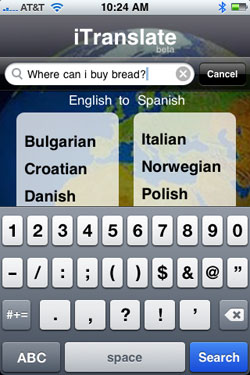
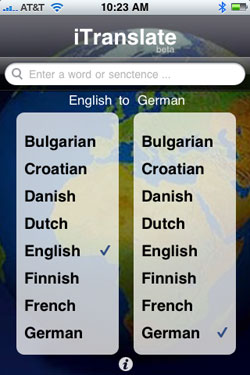
The iTranslate Interface In Action.

iTranslate, leveraging the Google Translation API, offers two-way translation between sixteen different languages, including Bulgarian, Croatian, Danish, Dutch, English, Finnish, French, German, Italian, Norweigian, Polish, Portuguese, Romanian, Russian, Spanish and Swedish.

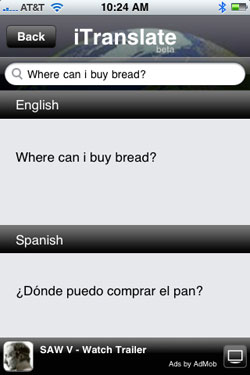
To translate a word or phrase, select the language you want to translate from on the left, and the language you want to translate to on the right. iTranslate will display the current setting, for example saying "English to Spanish", "Spanish to Italian", etc. Then tap the entry field at the top of the app, use iPhone's on-screen keyboard to put in the term, and hit Search. The application also saves your most recent query, as you can see in my example of translating "Where can I buy bread?" into Spanish and Italian.


iTranslate Results In Two Different Languages

The results then show the before and after on top of each other in the same screen, helping you to not only find the answer, but possibly learn the phrase yourself. While the application is free, it does leverage AdMob, as many iPhone applications are these days, to help monetize it and deliver some revenue.

To get started with iTranslate yourself, you can download it from the iTunes Store here.
October 21, 2008 · 2 MIN READ · BY LOUIS GRAY

Two Features Every Gmail User Must Utilize

Two Features Every Gmail User Must Utilize

By Mona Nomura of Pixel Bits (FriendFeed/Twitter)


Reading Search Engine Journal Loren Baker's Gmail horror story brought back my Gmail nightmare.

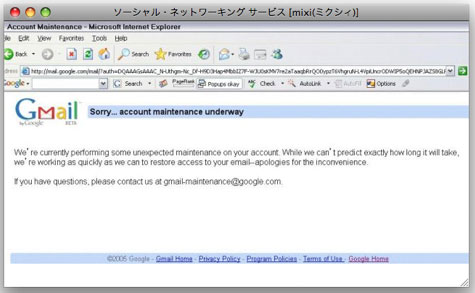
Way back in 2005, I tried logging into Gmail as usual. But Gmail kept redirecting me to this odd error screen with the message: "Sorry... account maintenance underway" and would not let me sign in. (Above image taken from my 2005 Japanese blog.)

After trying (and failing to log in) for two full days, I contacted [email protected], and even posted in Google Groups, but did not receive a resolution or even a response. I tried logging in twice a day, everyday, for four months, and finally my persistence paid off. Out of the blue my access had been restored and I haven't had problems since. But to this day, I still have no idea how or why my account was under maintenance -- for four months.
  • Yes, I know GMail is free.
  • Yes, I know GMail is still in beta.
  • Yes, I am aware I should not be complaining... but it's... Google.
Even if it's free and in beta, Google isn't supposed to... break. As embarrassed as I am to admit this, I quickly got over the trauma, and continue to use Gmail. But when Google nightmare stories catch my eye, it brings me back to 2005, and the panic of when I couldn't access my e-mail, compelling me to go out of my way and remind my friends the same thing could happen to them.

Fortunately, Gmail has two great backup features that takes only a few seconds to set-up. My peers were extremely thankful I shared, so hopefully they'll help you too. :)

Two Features Every Gmail user should have enabled:

E-mail forwarding.

I created a backup e-mail account for my main e-mail, and have a copy of everything sent to my inbox to my backup. To set this up:
  1. Create a back up e-mail (ie: [email protected]).
  2. Settings
  3. Forwarding and POP/IMAP -> Forwarding -> Foward a copy of incoming mail to "[email protected]" -- or whatever your backup e-mail address is.
Gmail's "Send mail as:"

Gmail enables adding custom 'From' addresses for free. learn more here.
So in case my main e-mail is disabled for one reason or another, I can always send e-mail as my e-mail address from my backup. For free. Pretty neat.

With the above, I have some peace of mind, though I truly hope I will never ever get locked out of my account again. Bonus: check out techradar.com's "40 Brilliant Gmail hints, hacks, and secrets" it may have some more useful tips.

Have any of the nightmare Gmail stories happened to you? Is Gmail your primary e-mail address? Do you have any preventative tips or tricks I don't know?

Read more by Mona Nomura at Pixel Bits

October 20, 2008

October 20, 2008 · 3 MIN READ · BY LOUIS GRAY

BackType Adds Comment Keyword Trends to Its Arsenal

BackType Adds Comment Keyword Trends to Its Arsenal

In late August, BackType launched to track comments across thousands of blogs, and seemingly nearly as many disparate platforms. The service effectively turned blogging on its head, providing a place where comments were king, and the posts themselves, secondary. With BackType, you can see a single individual's comments from around the Web, and follow multiple people, helping to discover new sites. (My ID can be found here) Today, BackType debuted a new trends application, at http://trends.backtype.com/, based on their API, which shows trends within those comments, including how frequently keywords were mentioned, who said them the most often, and on which blogs those topics came up.


BackType Trends Lets You Search Millions of Comments

The effort to harness large groups of comments and make sense of the noise is not new. Fav.or.it pulled in more than 13,000 comments per day as recently as August, forming the basis for its report on the blogosphere's commenting statistics in aggregate. (See: Fav.or.it Comments On Commenting Statistics) But despite that one-time blip, most comprehensive reports on the state of the Web (yes, Technorati, we mean you) walk right past comments and act as they don't exist. Now that BackType has been pulling in comments for a few months, they're ready to position themselves as the authority on comments, and will be writing about these statistics in upcoming pieces, said Christopher Golda, founder of BackType.


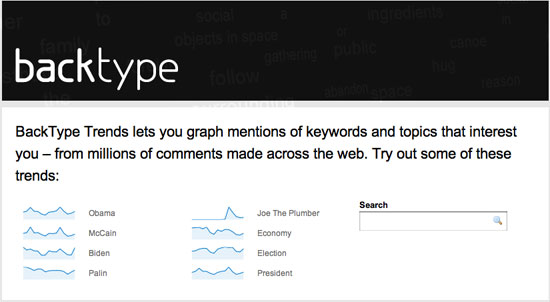
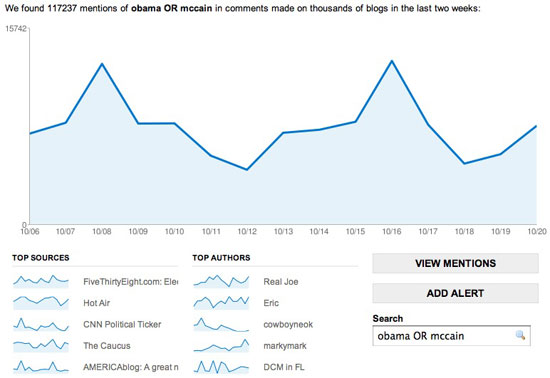
The Presidential Election Has Been a Big Topic of Late

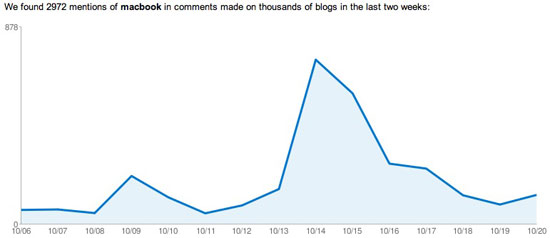
The new trends site, found at http://trends.backtype.com/ lets you graph mentions of keywords or phrases from the millions of comments BackType has pulled from around the Web. The tool can be used to gauge a topic's popularity, based on the total raw number of results, or to see spikes in activity, like with "Joe the Plumber", or the word "Macbook", which, as you can guess, spiked upward around Apple's recent announcement, and then quickly fell.


MacBook Mentions Spiked With Apple's New Introductions

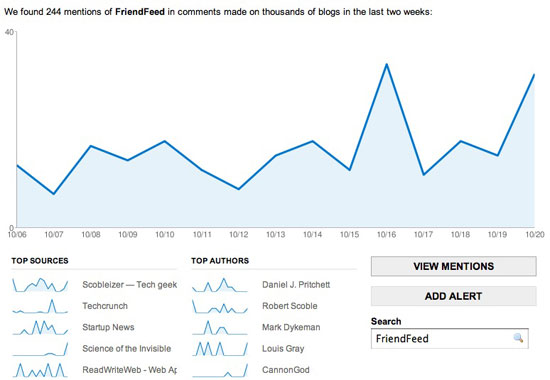
The Trends tool shows results over the last two weeks, graphing the total counts by date, and displaying the top five blogs where the keyword is mentioned, as well as the top five authors of that keyword.

The combination lets you know, for example, that Daniel Pritchett, Robert Scoble and Mark Dykeman are the three most frequent users of the word FriendFeed, and that you're most likely to see FriendFeed discussed on Scobleizer, TechCrunch or Startup News (Y! Combinator).


Who Mentions FriendFeed Most Frequently, and Where? BackType Knows.

Similarly, using the same query, you can find that Twitter is most frequently discussed on ProBlogger, TechCrunch and Mashable.

So what has garnered commenters' interests in the last two weeks? Unsurprisingly, a lot more than just tech, but also, politics and finance. "Obama" clocks in with 80,851 separate comments. McCain tries to match with 69,414 mentions and his running mate, Sarah "Palin" counters with 33,593. On the financial side, you see 7,765 mentions of "crisis", 2,344 mentions of "recession", and 2,681 for "depression".

You can even combine searches using boolean expressions. Searching for "depression OR recession" garners 4,666 responses, but "depression AND recession" only returns 359. Good thing, because searching for these negative keywords has me heading to the medicine cabinet...

What I'd like to be able to do in the future with BackType Trends is compare one term versus another over time, or extend the search over a greater period, or on specific blogs, for example, seeing if Twitter mentions are going up or down at ReadWriteWeb or Mashable. It's also not the most robust, beautiful presentation I've ever seen, but the data is more important than its shell. We're seeing the foundation of what could be a very interesting repository of data, one I'll be tapping into time and again.

Follow me on BackType here: http://www.backtype.com/louisgray.