Silicon Valley Technology Commentary & Archives · Est. 2006 3,033 Posts · 2006–2026

November 5, 2008

November 5, 2008 · 2 MIN READ · BY LOUIS GRAY

Online Facebook Efforts Prove Successful for the Obama Campaign

Online Facebook Efforts Prove Successful for the Obama Campaign

By Jesse Stay of Stay N' Alive (Twitter/FriendFeed)

There's no question that Barack Obama won this election, and in a big way. With 7.3 million more votes than the McCain/Palin ticket, and almost twice the number of electoral votes as McCain/Palin, he obviously did something right. Today, Facebook released some statistics in a blog post, which reveal some of the reasons Obama and his campaign were so successful this campaign. (See: The Facebook Blog: The Spirit of Democracy)

According to Facebook, more than 5.4 million people clicked the "I voted" button on their network yesterday. Based on the McCain and Obama fan Pages, McCain garnered only 625,000 supporters while Obama built up an audience of four times that, with 2.5 million supporters, also making his the most popular page on Facebook, just above Michael Phelps, who has 1.6 million supporters.

In the days prior to the election, Obama garnered the largest growth in Facebook history, with 18,000 Sunday night, 25,000 Monday night, and an entire 40,000 new fans on election day. In contrast, McCain lost 300 fans/supporters on election day. Also on election day, Facebook tracked 1.1 million wall posts talking about Obama, and only 280,000 wall posts talking about McCain.

So far, 1 million people registered their status to get people out to vote via the causes application, and over 4 million status messages were sent out on or around election day. Facebook also partnered with RockYou to get out the vote and registered more than 50,000 voters. With over 5 million people on Facebook stating they voted, and the largest group on Facebook being those under 25, there's no doubt Facebook is a tool every candidate should pay careful attention to in the next election. With 1/6th of its North American users willing to say they voted, I'd say McCain made a big mistake this time distracting his focus from tools like Facebook and other Media outlets.

Do you think McCain's loss could have been due to lack of Social Media efforts?

Read more by Jesse Stay at Stay N' Alive.

November 5, 2008 · 3 MIN READ · BY LOUIS GRAY

Combine Friends and Google Reader for Best News Filtering

Combine Friends and Google Reader for Best News Filtering

By Chris Miller of TheSocialNetworker (Twitter/FriendFeed)

For those of you that truly digest RSS, it has become more than a super-sized meal. You are gorging yourself to keep up. Each day you find yourself discovering new feeds through links and sites like Toluu. I slowly dug through hundreds of feeds a day, mastering the Google Reader keyboard shortcuts as I utilized it more. I found myself making folders, sorting feeds, importing more OPML and watching the unread count grow larger every morning. And you could forget about trying to catch up after a long weekend!

So this is where I began to change my mindset and workflow. I surrounded myself with trusted friends that have the same indulgences and interests as myself. I began building a wide array of people and started adding them to my Google chat client so they would also show in my reader. I then sat back and watched as the shared links came in. Not too surprisingly, many of the exact articles I found interesting, they did also. That is why they are my friends in the first place. As the shared items grew, my need to visit my own folders lessened.

Let me explain more in detail. I had about 14 folders for sorting purposes and a general bucket. The general bucket got looked in on at an ever increasing gap in time. I found myself scanning the first few then marking all read. This means those feeds could possibly be removed, but it was nt like I was wasting space or anything, so of course they stay. I would find a good story here and there, but the most part I had added them for one good story and found nothing else really came out. The effort to weed through is now larger than the effort to ignore them.

The remainder of the folders were sorted by my own mental process and it works great. Each folder gets attention at least twice weekly, some daily. When I am working on a project or article, well maybe more than once a day. What happens to the rest? They either sit a few days until I change back to that folder or I mark them as read and declare feed bankruptcy on a semi regular basis.

Here comes the change. Once I started noticing that my freinds were sharing the same feeds I found interesting, I took a chance and started working from those folders more often. I grew my friend base and even solicited more of my Twitter followers and other networks to link up. My library grew as well as my enormous filter.

I have basically outsourced my feed reading. I rely on a large amount (always taking more) of workers, that I hire for free, to sort through my news, announcements, stories and excellent blog postings. They then provide filtering and share to me what should be focused on immediately. I choose to look at the others when I have a moment. Like sitting in the car waiting on yet another child to finish yet another activity. Bless the Google Reader for Blackberry.

I then, in return, become a worker for my friends by sharing an filtering feeds to a finer granularity that many of them use as a feed. Mainly the staff that works for me. They have now gotten a cleansed feed that has been through many filters and then the final siphon. All built around being a friend, sharing with a click and then doing the same in return. I thank all my filters and would like to expand my empire. So add me as a friend and lets get to filtering. [email protected] for google chat (not e-mail, Twitter me otherwise).


Chris Miller, for starters, is the author of TheSocialNetworker and the podcast TheSocialGeeks. He is an avid social media consumer, tester and early adopter, which leads to his apparent enthusiasm to write and podcast site reviews. He even sneaks in his own opinions. You can find Chris on all the social networks (yes, really almost every one of them) as IdoNotes, including Twitter.

November 5, 2008 · 1 MIN READ · BY LOUIS GRAY

Event Calendar: Panel on Emerging Media (November 11th)

Event Calendar: Panel on Emerging Media (November 11th)

For those of you located in the San Francisco Bay Area, you may want to check out an interactive discussion coming this next week, presented by PR Newswire, titled "Focus on Emerging Media - Where Are We Now, Where Are We Going".

Chris Heuer, Social Media Strategist at Social Media LLC, Tom Foremski, Editor of SiliconValleyWatcher.com and I will be participating on a panel, and it would be great to have you in attendance, so long as you sign up by Friday, November 7th.

Date:
Tuesday, November 11, 2008
Breakfast and Registration: 8:00 AM - 8:30 AM
Presentation: 8:30 AM - 10:00 AM

Location:
Hyatt Regency Santa Clara
Bayshore Room
5101 Great America Pkwy
Santa Clara, CA 95054


Description:
Communications professionals have more opportunities than ever before to reach target audiences in the communities in which they congregate, but the trick is knowing what tools will help you reach these audiences and how to engage them once you've made contact. This interactive discussion, led by PR Newswire's Director of Emerging Media Michael Pranikoff, will explore the new tools and technologies, and how to best utilize them to communicate an organization's message to its intended audiences.

Want to Attend?
Sign up before November 7th here.

See you there!
November 5, 2008 · 3 MIN READ · BY LOUIS GRAY

FriendFeed and Enjit: Open Up the Firehose to the Entire Social Web

FriendFeed and Enjit: Open Up the Firehose to the Entire Social Web

By Jesse Stay of Stay N' Alive (Twitter/FriendFeed)

FriendFeed just hit a huge milestone recently as developers have finally tapped into its real-time feed of updates, and provided a Google Chat or Jabber interface on top of it all, enabling both users and developers to gain real-time data about the entire Social Web. Two Developers very prominent in the Laconi.ca world, Dustin Sallings and Ken Sheppardson, have headed up the effort and provided an easy way for you and I to receive your FriendFeed updates, real-time, over simple instant messaging. The service is called Enjit.
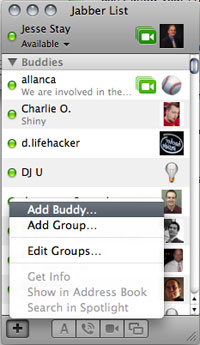
One of my favorite parts of Twitter when I started seriously using it about a year ago was that I could send and receive my Tweets, real-time, via Google Chat or other Jabber-supported services. I simply needed to add the Twitter user to my client, and all my friends' Tweets would come through as they were sent to my IM client. This meant I could open it up on my desktop, my phone, or wherever else I had a Jabber-supported IM client. I remember Scoble sharing with us in awe via Qik and elsewhere about how he was getting Tweets every second or more, and how amazing it was to see communication around the world, as it happened.

Now, because of FriendFeed, not only do we have access to the world of Twitter, but we now have access to Identi.ca, Pownce, Facebook, blogs, Flickr, Delicious, and almost the entire Social Web, real time, and you can now get that as it happens in your IM client. The premise is simple:


The First Step: Add Enjit (FriendFeed) to Your IM Client.

Set Up

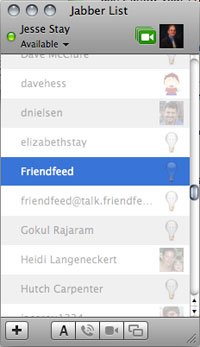
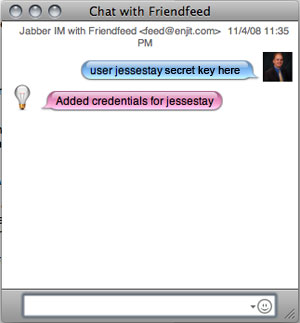
To get set up with FriendFeed IM, all you need to do is open up Google Chat, or any other Jabber-supported service or client, and add [email protected] to your Buddy List. You can name it "FriendFeed" if you like, or just leave it as is. Then, send: username to that user in your IM client. You can get your remote key from FriendFeed here.

Using Enjit FriendFeed IM

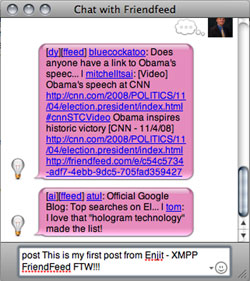
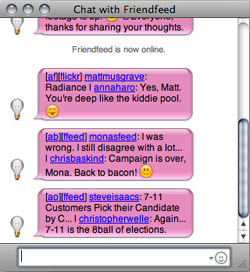
As soon as you are authenticated, you'll start getting updates from FriendFeed immediately. Your updates will come in the form of [xx][source] entry_author: entry text | comment_author: comment text - "xx" is just a unique id for each comment or post on FriendFeed. "Source" is the service the update or comment came from. "entry_author" is the author of the post or comment. Following that is the text of the comment or post.


Send and Receive Updates to FriendFeed Using IM.

Sending Updates to FriendFeed

Sending updates is easy! To send a new post or status update to FriendFeed, send post your message, where "your message" is the message you want to send to FriendFeed. To respond as a comment to any post, send xx your comment where "xx" is the "xx" above uniquely identifying the posted item you want to comment on, and "your comment" is the comment you want to append to that post.

Enjit and FriendFeed have essentially just given us all a Command-Line into the Social Web. Now, in one place, you can receive and send updates to all your updates through a simple command-line chat interface. With FriendFeed's recent integration with Twitter and the ability to send your posts to FriendFeed back to Twitter, you could even use it as a Twitter chat client! Now, the clencher - Dustin Sallings is well known in the Laconi.ca crowd for creating chat-based Track on Identi.ca and Twitter. Will we see real-time track come to FriendFeed soon? Thanks to FriendFeed, we now have chat and real-time updates back on Twitter.

Read more by Jesse Stay at Stay N' Alive.