Silicon Valley Technology Commentary & Archives · Est. 2006 3,033 Posts · 2006–2026

December 5, 2008

December 5, 2008 · 6 MIN READ · BY LOUIS GRAY

Getting Started With Google Friend Connect

Getting Started With Google Friend Connect

By Mike Fruchter of MichaelFruchter.com (Twitter/FriendFeed)


Back in May, Google announced their plans to launch Friend Connect. Friend Connect allows website owners to incorporate social aspects and elements onto their sites. It's powered by OpenSocial, which was developed by Google along with MySpace and a number of other social networks. In a nutshell, OpenSocial is basically a set of common APIs used for building and distributing social applications and their data across many websites. This data includes profile information, friends information, activities and so forth. You can find more about the OpenSocial platform here.

This post is a brief tutorial on the features and the implementation of Friend Connect.

Getting started:


Installation is very easy, and takes less then 5 minutes. First head over to the Google's Friend Connect website. Click the "Set up a new site" link to begin.

Give Google some basic info:

The next step is pretty much self explanatory. Input your site name, and the url of your website.


FTP two files to your server:

This step involves downloading two html files to your desktop. FTP those two files to your web server, and make sure they are placed in the root folder of your domain. This is important if you are going to use Friend Connect on a sub directory of your site, I.E /blog.

Test your setup
:

This will test to see if you uploaded the html files correctly. Now that you are almost finished, it's time to add and customize your gadgets.

Now for the social part, adding gadgets to your site:

The code you generate for the gadgets are html. It's a simple copy and paste process. There are two types of widgets available, social and members.

Members gadget: This allows visitors to join your site, sign in and out, see other members, and invite other people to join your site. A screen shot of the members gadget is shown below. You can also see and interact with the gadget live on the sidebar of my blog.


The other option is a sign in gadget pictured below. This is a lighter version of the members gadget without images. It's meant for small spaces and allows visitors to join your site, sign in and out, and invite others to become members.


Clicking a member's profile image on the member gadget will display their Google service profile. You can also add that person as a friend, and once they accept the request, you will able to see each other across all Friend Connect sites. You also have the option of blocking users.

Clicking the invite link brings up the email sharing aspect of the gadget. You can share a website with your Gmail contacts by clicking the Google tab. It's not limited to Gmail contacts, any email address will work. You can also add a quick, personalized note with the share.

The share tab takes it a step further up the social ladder by allowing you to post the website to Facebook, Myspace or Del.icio.us. You can also submit the site to Digg, Fark, Mixx, Live Spaces and StumbleUpon. In its current state it needs more social networks and services to plug into. Integrating other services, should be a top priority for Google. There are currently a dozen or so other free social sharing type services on the market that offer more of a selection than Friend Connect in its current state.

Social gadgets: This area is kind of sparse at the moment. There are only two worthy gadgets that are of any real social use and benefit. One is a wall gadget and the other is a review/rate gadget.Bwana, from bwana.org has all of these gadgets integrated live on his blog. Head over to his site to see them in action. The screen shots below were captured from his blog.

Wall gadget:This allows people to post comments, and also links to (YouTube) videos on your site. It's customizable and makes for a great shout out box.


Review/Rate gadget: This gadget can be used in a variety of ways. It lets people rate your content via a simple starring system. You can use this gadget to rate any type of content, videos, photos, etc. Comments can also be posted on it. This can also be used numerous times on a single page, or on separate pages of your site. I believe this will become widely used by bloggers, once they catch onto it. This is something I will be experimenting with on future blog postings.


Games? No just lame!

Being that the service just officially launched, it would of been nice for them to include at least a variety of already developed widgets other than the two mentioned above. All we get for now is the Lame Game. Hey, they named it that, not me, but what else could you really call it? Its only purpose is to allow your friends to go click crazy. This is done by clicking as often as they can which leads to trying to increase their score vs. their friends and other site members.


Lets touch on the admin area:

There is not a lot of back end features to report. I expected to see some type of url referral reporting function, similar to that offered by MyBlogLog. Where members came from, what they viewed, what they clicked, this is what I want to see. Google are you listening?

Clicking the reports link will show you two simple graphs. The first displays total membership over time, and the second displays new members over time.


Clicking the moderate posts will allow you to delete any obscenities. You can also choose to have all posts be approved before they are posted. Wall posts are immediately visible to anyone by default.

Clicking the manage members link allows you to do the normal friending functions. View members Google service profiles, add members, block members, and you can also view their friends as well. You also have the ability to grant administrative privileges to specific members.
Wrapping it all up, and some additional thoughts:

In regards to it being a MyBlogLog killer. I would seriously consider totally removing the MyBlogLog widget off my blog in favor of Friend Connect. Of course that's under two circumstances. The first is to show me the most recent visitors to my site, as does the MyBlogLog widget. The second is to give me url referral reporting and additional stats on where readers came from, what they viewed and so forth. For now, both of these widgets compliment each other fine, and although similar in function, in some aspects are two totally different beasts.

The product is still rough around the edges, as to be expected with any beta. It's a step in the right direction for data portability, and that's a plus in my book. I'm fascinated with the direction and possibility that this could lead to in helping us better connect with members in our social graph and abroad. The fact that Google is behind it, could be a blessing or a curse. Now of course getting the other players in the space, such as Facebook, to play nice, is a whole different ball game.

Will Google's Friend Connect and Facebook Connect initiatives be a progressive step toward evolving social networking or will it be just another passing fad? I believe the former, not the latter.

Read more by Mike Fruchter at MichaelFruchter.com.

December 5, 2008 · 3 MIN READ · BY LOUIS GRAY

PeopleBrowsr Turns On Social Media Dashboard for Twitter and More

PeopleBrowsr Turns On Social Media Dashboard for Twitter and More

With just about everyone signed up to many different social networks and trying to find a way to stay active on each, or simply not miss any of their friends updates, even the aggregation sites, like FriendFeed, are being seen as information silos. Essentially, if you're making comments on FriendFeed, you're not keeping as close an eye on Twitter. And if you're staring at your TweetDeck all day getting Twitter updates, you're not seeing everything that might be happening on FriendFeed, or LinkedIn, Flickr, or YouTube. And managing the firehose can be difficult. Many people are claiming social networking bankruptcy, e-mail bankruptcy and even RSS feed bankruptcy. PeopleBrowsr, a new entrant, very much in alpha, makes the firehose of data less about the information and more about the individuals themselves, as you can see all your friends activities on their various social networks, see who their friends are, and get real-time updates, on one screen, from more than one network at a time.
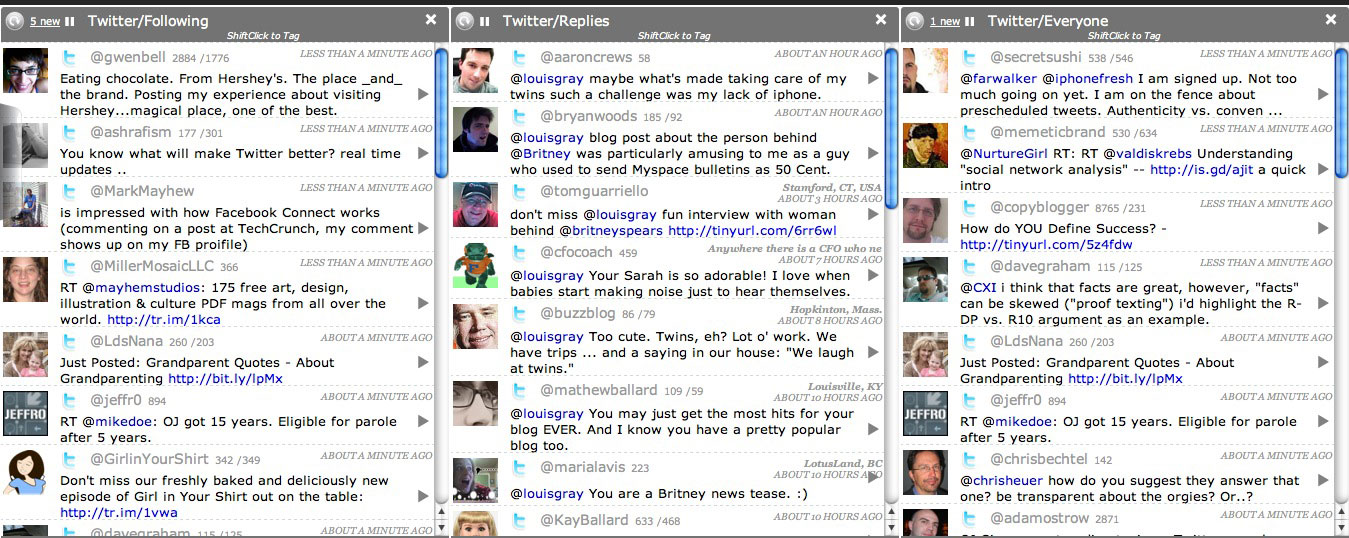
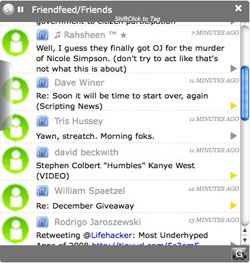

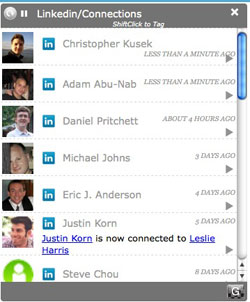
PeopleBrowsr in action (Click for Full Size)

The project, also covered by Robert Scoble and Sarah Perez of ReadWriteWeb, is a lot like TweetDeck in your browser, acting with Twitter as its main draw, segmenting updates by those you follow, "Top Twitters", and even the public feed. But should you want to step outside of the Twitterverse, you can swap out PeopleBrowsr's focus, and browse FriendFeed, Flickr, Digg, Identica, YouTube, LinkedIn, Seesmic and more. And should you want to get the networks all at once, you can even browse in what they call "Mix" mode, showing updates from more than one social network at a time, in a single stream.


Updates from FriendFeed, LinkedIn in PeopleBrowsr

Getting updates from around the Web in one place is something many people have tried in their own ways. Some apps, like Posty, let you view one network at a time through a small application. FriendFeed and others have aggregated data in one place and let you make comments on their site, or out to Twitter. PeopleBrowsr actually lets you perform almost any standard function you can do through the native site, including Twitter and FriendFeed, right from its own interface. You can Tweet, you can make comments on FriendFeed items, you can add new Twitter followers if you see an avatar you don't recognize, etc.

As the service said in a press release today, "PeopleBrowser enables social media power users - and the rest of us - to concentrate energy in one place instead of wrestling with a distributed presence." The idea is you keep PeopleBrowsr open all day long on your desktop, and use it as your distribution point to your presences around the Web.

PeopleBrowsr, if you leverage all of its tools, can be overwhelming, just like many people thought about Feedly, Assetbar, and FriendFeed. There are so many different things you can do, from viewing a friend's friends, to grouping people across networks, to tagging people, or even seeing what other tags have been given to you. You can view people in a grid format, and click on the avatars you know well, or you can view it in column mode, much like TweetDeck. The secret to finding it useful is choosing the pace of updates, limiting the followers in each area, and hiding networks you don't want updates from.

For social media nuts like Scoble (and me, I guess), any time you can use a tool to get all the updates in a more simplified way, it's great. I met with Jodee Rich, creator of PeopleBrowser, twice in preparation for the company's announcement, and mentioned how at times I felt odd that I could use PeopleBrowsr without limitations, but wouldn't say anything, back in October, until they were ready for general availability. (See: We're Open for Testing, but Please Don't Tell Anyone!) The service has gotten a lot better over the last few months, as more services were integrated and more tools were piled on, all while trying to make the flow less overwhelming. But there is still plenty of room to go, so if you run into hiccups, or find things slightly confusing, don't give up, but instead let them know, and they will continue to make updates.

That's why this service is in alpha, and why bugs are expected. But you can see the intrigue already. I know I have. Check it out at http://peoplebrowsr.com/
December 5, 2008 · 7 MIN READ · BY LOUIS GRAY

Exclusive Interview With the Woman Behind @BritneySpears

Exclusive Interview With the Woman Behind @BritneySpears

By Jesse Stay of Stay N' Alive (Twitter/FriendFeed)

I once mentioned that the moment Britney Spears joined Twitter and other social networks, her image and reputation would turn around and people would begin to see her for who she is again.  The controversial @britneyspears Twitter account (formerly @therealbritney) was recently launched, and my theory was put to the test.  I had the opportunity to interview the person behind this account today, Lauren Kozak, to see how these efforts were going.  The results were astounding, and I really got the impression Lauren knows what she's doing.  Here are the results of my interview:

The Woman Behind the Message

Lauren Kozak was introduced to Britney through a friend of a friend, and now works directly for Britney as her Social Media Director in charge of Britney's Twitter account, her Web site, her Facebook and MySpace accounts, her Circus VIP Ning Community, and her very successful YouTube campaign.  She has been leading Social Media for Britney for just 6 months, and has already seen very successful results from the efforts she has put forth.  Lauren is the former Social Media Marketing director for Fanscape.

Lauren can be found on Twitter under the handle, @tofuchica. She was very open to allowing people contact her and even gave me permission to hand out her e-mail address for those interested in talking to her.

What's it like to work with Britney?

"It's every marketer's dream!  So many marketers are trying to focus on traffic and users and engagement, but with Britney these things come easy."

"Britney's fans are 3-times more active than the average internet user, according to our studies.  Most marketers are trying to do user-generated initiatives and they really suffer in their campaigns.  We're getting user-generated content without even asking for it!  It has been a pleasure working with Britney's loyal fan base.  Everybody cares at least a little bit about Britney."

"It's really fun to run a website where you don't have to worry about traffic or engagement.  These areas which are normally a struggle come easy with Britney."

Is the Twitter Account the Real Britney Spears?

"The Twitter account was very controversial at first.  I will admit that we took the feedback from the various blogs that were criticizing the account and we have changed our strategy around the account."

"Yes, we do get Twitters directly from Britney.  We also get Twitters directly from Britney's Entourage.  We provide announcement and tour information.  We also have messages which are designed to drive traffic around Britney Spears' properties when we have something cool go on."

"Some people have suggested we should break it up into different accounts.  I don't think that's necessarily the best strategy because we're trying not to split up our followers in any way.  Britney's Twitter account is the whole world of Britney - whether it's her assistant that tells me what's going on with them or we know that we're going to release exclusive pictures or we have a big announcement.  We try to use it in a way where it's either directly from Britney or someone around her or in a way that has to do with very current content.  We're trying to keep the actual marketing messages very very low, because I don't think that's a good use for Twitter."

What inspired Britney and your team to put her on Twitter?

"We picked the 5 biggest Social Media properties.  People are obsessed with everything Britney does.  When Britney sneezes people want to know.  It was a no-brainer to post these little updates about what it's like to be with Britney or be Britney.  People are really curious about that!"

Are the messages signed with "~Britney" really coming from Britney?

"Basically, I talked to Britney about Twitter, and she totally got it and was excited about it.  She and her assistant work together on what they want to Tweet, and then they text me and I post it.  They're traveling all the time, but I'm in front of a computer, so it's just easier that way.  Britney's Tweets are her words.  I only edit it if it's more than 140 characters.  I try to put a name on it as well so you know who it's coming from."

"The Mashable article was titled something like 'Searching for the Real Britney'.  My response to the spin on authenticity is, well, we're going to tell you when it's the real Britney - it's not going to be all the time because Britney's a really busy person, but when it is the real Britney we're going to tell you.  When it comes from marketing people or social media people or her Entourage we're going to tell you that too."

Are Fans going to be able to ask Britney questions and will she answer back, or is this intended to be a one-way publish about Britney's life and career?

"A lot of the critique that we got in the beginning was from people that have a very set culture for Twitter.  I went and responded to people, talked to Gary V., responded to the Mashable and TechCrunch articles.  I responded, just because Britney isn't sitting at a computer retweeting people or responding to every message, who says you have to use the tool in a way that is the main culture of Twitter?  Think about how the L.A. Fire Department, or Obama, or CNN use Twitter.  There are lots of different ways to use Twitter.  I love the conversational element, but who's to say that the tool does other things too?"

"I think that response was a little bit close-minded as a community and I really like to think, after talking to Biz at Twitter and others, that this is really going to help celebrities.  I've looked at just about every single celebrity Twitter account and she's definitely the biggest one on there.  There are some other really cool ones that are doing it themselves such as Dave Matthews, Lance Armstrong, but it just takes awhile.  Whenever companies move onto Social Media it's a little bit awkward.  They all catch on eventually though, just like how blogs, Facebook, Myspace, and others came to be.  This is a process which takes awhile.

Twitter's audience tends to be those 25 and older - does the Twitter account still help Britney with that age group?

"The active updating of one's status is very old on the internet.  People have been doing this on AIM and other services for years.  People get status updates, whether they get Twitter or not.  We feed our Twitter account to the little box on our website and even people who have never heard of Twitter get that."

Which social network has Britney seen the most success from?

"We're also doing YouTube.  YouTube is definitely the most successful.  We're putting all our videos on YouTube and we're seeing tremendous results.  I put a video up on Saturday night and we already have over 500,000 views in just 4 days.  People love her videos.  They want to see her and see her blowing out her birthday candles in Europe and other things - they think that stuff is interesting.  Video and Britney are such a great combination."

"We have people on the ground taking video of her all the time.  We have exclusive content and access that nobody else has.  People are really, really fascinated with that content."

"Beyond that the Ning community, which is CircusVIP.com, is also quite successful.  The users there are so engaged.  We have had more photos uploaded than we have members there.  They're uploading hundreds and hundreds of photos, every photo that has ever been taken of Britney.  They're making so many different mashup videos and remake videos and dance videos and have captured every single performance she has ever done there.  The dedication of these fans has been tremendous."

Conclusion

Interviewing Lauren was a joy - she has some excellent points, and I think we have to realize that when it comes down to it, every person on Twitter has their own reason for being there.  This was a smart move on the part of the Britney campaign to get her on Twitter, and there's no doubt we're seeing results from it.

In just the last week, Britney's new album, "Circus" was released.  Britney celebrated her birthday.  Her new documentary debuted on MTV.  Her world tour was announced.  They have sold over 400,000 copies in just 3 days after launch.  And you have to admit - each one of these events was celebrated, and discussed on the Social Media outlets that the Britney campaign has established.

The beauty of this all is we now know who Britney is.  We know what she does on a day-to-day basis.  Whether she talks back to us or not, she no longer has to rely on the Paparazzi to tell her story.  From here on out, this is her story to tell, thanks to Social Media.

Read more by Jesse Stay at Stay N' Alive.

December 4, 2008

December 4, 2008 · 2 MIN READ · BY LOUIS GRAY

AOL Radio Lulls Kids to Sleep... With Metallica?

AOL Radio Lulls Kids to Sleep... With Metallica?

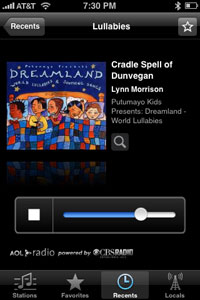
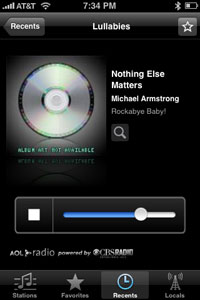
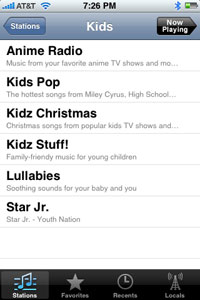
It's really getting to the point where I believe my iPhone can do anything. You've already heard me say I sleep next to it, and that it should practically run unopposed in the smartphone market. But what you don't understand is that it is rapidly finding new roles and new ways to get intertwined with my life. The newest role is helping to put the twins to sleep, thanks to the AOL Radio application, and that app's Lullabies radio station - which shockingly extends beyond the Brahms Lullaby, offering music even I found fun to hear, from new mixes of U2's "Still Haven't Found What I'm Looking For" to a cover of Metallica's "Nothing Else Matters."
It's true I already have gigabytes and gigabytes of my own music on my iPhone. But, truth be told, my music is usually for getting energetic, with beats from Underworld and Paul Van Dyk or DJ Tiesto, instead of calming music aimed to lull people to rest. That's where AOL Radio steps in.


AOL Radio Features a Lullabies Channel

The application features many genres, from Blues and Country to Dance/Electronic and Metal. But if you choose the Kids genre, there are six channels, including one called "Lullabies", featuring "Soothing sounds for your baby and you." Trust me, I was quite skeptical of this channel, expecting to mock it - but the channel manages to deliver songs that are not only calming to both Matthew and Sarah, but also good enough to keep us entertained.


From Mozart... to Metallica Covers!

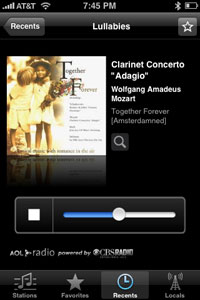
Tonight, following one Beach Boys cover and Adagio from Mozart, I heard the familiar strains of "Nothing Else Matters" stream from the iPhone, reminding me of unsuccessful junior high school crushes and long-ago settled debates over who was the best hard rock band... Metallica or Whitesnake. And guess what? The cover song was good enough I would have played it again, if given the option. (Listen to it here.)

AOL Radio does a lot more than play lullabies. It's actually also a good application for playing local music and other songs from just about any type of music you like. And it's free on iTunes. Find it here.