Silicon Valley Technology Commentary & Archives · Est. 2006 3,033 Posts · 2006–2026

December 17, 2008

December 17, 2008 · 2 MIN READ · BY LOUIS GRAY

What Happened to Facebook Connect for the iPhone?

What Happened to Facebook Connect for the iPhone?

By Jesse Stay of Stay N' Alive (Twitter/FriendFeed)

Back in July, I predicted we would see a mobile platform for Facebook announced, enabling developers to integrate Facebook into their own mobile applications.  The match makes sense.  Imagine the ability to combine the users of any app with the rich power of the Facebook platform, their friends, their friends' profiles, events, photos, and more, all from the power of your phone, and the rich capabilities of platforms such as the iPhone - GPS, contacts, portable computing all in one device.  The concept is powerful, and the natural evolution of an already powerful platform that seems to have revolutionized social app development.

Facebook confirmed, and clarified my theory at their F8 conference this year, when Benjamin Ling announced that Facebook would be releasing a framework on top of the iPhone which would enable Facebook Connect for the iPhone itself.  According to Ling (who is no longer at Facebook), the framework would be Cocoa-based, and had a projected release date for this fall.  When talking with Ling in person during the press conference at F8, Ling further confirmed these claims.

Since F8 and Ling's departure at Facebook, along with the recent Facebook Connect launch, we have yet to see any details regarding Facebook Connect on the iPhone.  Facebook has made no mention of it, nor have they hinted of future plans to integrate.  Is Connect for the iPhone still in the works?

Such news would be very welcome in light of a recent presentation organized by Jesse Pickard and Razorfish (which I also contributed to), which made the rounds recently.  The presentation gives examples of potential real-life applications of Facebook Connect.

Such potential examples included Amazon.com, iTunes, and some amazing potential examples on the iPhone.  The iPhone examples included screenshots of what it would be like if games included Facebook profiles within the games.  For instance, you could play Cro-Mag Rally with your Facebook friends online if the game were to integrate the framework.  Imagine the data that applications could post to Facebook in addition to retrieving the already rich platform Facebook provides.  Now, a true location-aware social network could really be possible, because most of the apps you use could potentially share that location with Facebook (we won't go into how scary that sounds - I'll save that for another article).

Of all the announcements from back in July, I certainly hope this one hasn't been nixed.  Facebook Connect and the iPhone are two powerful technologies, that in combination, could form one powerful partnership.  Of all predictions for 2009, Facebook Connect and the iPhone are one powerful relationship I am sure will happen.

Read more by Jesse Stay at Stay N' Alive.

December 17, 2008 · 3 MIN READ · BY LOUIS GRAY

Gawkk Delivers Video Discovery Engine With a Social Center

Gawkk Delivers Video Discovery Engine With a Social Center

It doesn't take a scholar to recognize the commentary around most YouTube videos appeals to the lowest common denominator. As is common with many Web services that have gained mass popularity, the discussion on YouTube more closely resembles a junior high locker room than an exchange between friends and family. At times, the nonsense spewed underneath the most popular videos is practically enough to make a person avoid the site altogether.

In contrast to the banal free-for-all at YouTube, where the inmates are in control of the asylum, we have seen the rise of more personal, friend-centric services to exchange links, images and video through social media in the last few years, including sites like FriendFeed, Twitter, Ballhype and Socialmedian. A new name to be included as part of that conversation is Gawkk, a social video discovery and sharing site, which pulls in the most popular videos across the Web from services including YouTube, Hulu, Break.com and others, and sets up a platform to see what videos your friends have shared or commented on.


A Gawkk Video from Hulu, With My Comment

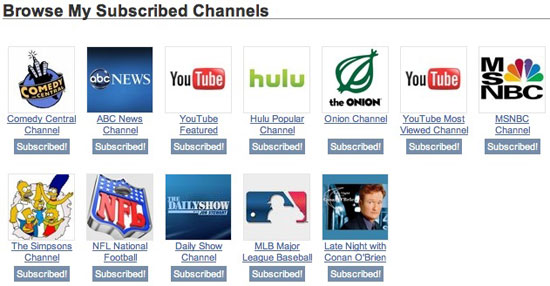
The service, created by former Direct Hit co-founder, Gary Culliss, lets you subscribe to channels as diverse as CNN and the History Channel to The Simpsons Channel, Law & Order, and even Budweiser Commercials. You can also browse the site's many different categories, see the most popular videos of the day, or simply follow the channels your friends have subscribed to.


Some Popular Videos Found on Gawkk, via MSNBC and Hulu

As a Gawkk member, you create your own personal channel, and can add videos to your channel by hitting "Save" underneath any video. You also can create an activity stream by voting videos up or down (like with Digg) or through your comments.

For example, my channel can be found here: http://www.gawkk.com/louisgray/channel and my activity feed can be found here: http://www.gawkk.com/louisgray/activity.


My Gawkk Activity Stream

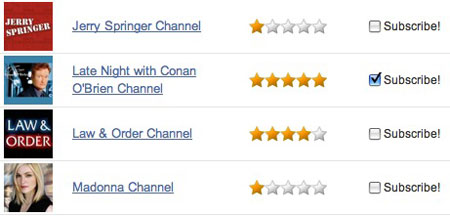
Unlike YouTube and Hulu, Gawkk does not actually store the video media on its site. Instead, it acts as way for users to share video they have found from anywhere on the Web and share it on the site (using a bookmarklet, found here). Videos are brought to Gawkk both by users themselves, or imported from the many external sites, which are then organized into thousands of public channels, chronologically, by topic, from TV shows to actors. As a member, you can subscribe to any number of channels, and even have the option, at signup, to rate each channel from one to five stars to signal your interest, and also indicate what other channels you might like.


Rating Each Gawkk Channel, Choosing to Subscribe


My Gawkk Channel Subscriptions

Videos that receive the most "up" votes are promoted to the home page for the entire community to see, just like the most popular items on Digg, Ballhype, Reddit and other social voting sites. The hope is that by breaking out of the muck that is YouTube, you can enjoy sharing video with friends and finding common interests.

You can find me on Gawkk with the ID of louisgray (as with most other services). And if you want more friends than just me, find who else is already on Gawkk by checking your online mail address book.

December 16, 2008

December 16, 2008 · 3 MIN READ · BY LOUIS GRAY

I Will Teach My Children About Steve Jobs

I Will Teach My Children About Steve Jobs


Teach Your Children the Way of The Apple Early
(Picture of Sarah Getting to Sleep Tonight)

If I ever had a chance to hear John F Kennedy give a speech, I would go. If I could see Michael Jordan in his prime, I would go to that game. If I ever had a chance to see Henry Ford at his assembly line building Model T's, I would go. If I could have seen the first moon landing on television, I would watch. And if I could see Michaelangelo sculpt, I would pull up a chair.

But I have seen Steve Jobs do a MacWorld Keynote. And it, like the others mentioned, was delivered by a person unequaled in his craft, who, like the others, will one day be a part of the past, echoed only through our media records, and through tales passed one to another. For whether you are a Mac addict, a tech geek, or finance nerd or even a luddite, you know Steve Jobs has the ability to deliver product introductions and change the technology industry like nobody else. Not Bill Gates or Steve Ballmer, Larry Ellison or Scott McNealy, Eric Schmidt or John Chambers, could play the equal to Steve Jobs on stage when the spotlight was on. And I saw one.

I saw my first (and only) Steve Jobs keynote at the 2001 MacWorld Expo. After an early morning spent taking the CalTrain north from the Peninsula, I saw the debut of the company's Titanium PowerBooks, iTunes and iDVD, as part of a large audience who "ooed and aahed" at the demo of Alias Wavefront's Maya software, and sat through our share of brainwashing around "The Megahertz Myth". My e-mail home to my dad from January 10, 2001 reminds me of our reaction:
"The Maya demo was excellent and had the entire auditorium oohing and aahing. Not seeing Maya previously, I found it amazingly solid and breath-taking, as much as any 3rd-party presentation I've seen at a similar show.

The announcements of iTunes and iDVD were enjoyed thoroughly by all. The iTunes demo was well displayed, although Steve seemed a bit enamored of the B-52's LoveShack too much for his own good. Also, the iTunes visuals smacked of SoundJam, and I was surprised not to hear any mention of any acquisition."
Outside of the MacWorld Expo, I actually have met Steve Jobs on one other occasion, when I bumped into him at the Apple Store in Palo Alto. Amusingly, I remember asking him a support question about the first generation iPod, and him getting it right.

While Steve Jobs is not only still alive and kicking, maintaining his CEO role at Apple, today's well-reported announcement that he will not be participating in MacWorld 2009, or any future MacWorld, has many thinking about the past, and what this means for his future, as well as that of the Cupertino company. I had given serious thought to attending MacWorld myself this year, in fact, but upon this news, will now most certainly pass.

But I know one thing - I once had the opportunity to see somebody on the top of their craft do what they do best, and I will be able to tell my kids (and theirs): "I saw Steve Jobs do a MacWorld Expo Keynote". And when they ask for the details, I'll tell the story again and again.
December 16, 2008 · 2 MIN READ · BY LOUIS GRAY

Adobe AIR: Deleting Locally Stored Encrypted Data

Adobe AIR: Deleting Locally Stored Encrypted Data

By Mona Nomura of Pixel Bits (FriendFeed/Twitter)

The main advantage to Windows for me, is that I am familiar with maintenance. I go straight into registry files, poke, shift, and delete stuff - confident my actions will not interfere with my PC's innards. I know Windows. OS X is a whoooole different story. Everything is so simple, but that's what scares me. The simplicity.

Call me paranoid, but because of my past experiences with Windows, 3rd party native apps freak me out, since I'm don't know what's going into where... and the biggest problem? I am an OS X moron.

So looking into 3rd party publishing tools for Twitter was confusing. All of the apps I use (personal and professionally) are web based. I do not have a need for Silverlight or Adobe Air, so I had to learn about those app before deciding on a Twitter app, since most Twitter apps require AIR or Silverlight. See? Confusing.

Long story short, I decided on Twhirl, since it came so highly recommended, installed AIR and Twhirl, then uninstalled immediately after running them for 30minutes. I am one of those that keeps separate windows to a minimum and accustomed to only a few windows: my browsers (Firefox, Safari, nightly build), documents, and Adium. Plus it slowed down my computer and it was just too busy. (for me).

So when it came to uninstalling Twhirl and AIR, I wondered if there were any files both apps plugged or hid locally. Especially since the data is encrypted and uses KeyChain to store data from the application to user. Digging through my hard drive did nothing for me, not to mention all the questions: Dragging and dropping apps don't really make all the files... disappear. Do they? Can it truly be that simple? It seems too good to be true; and the questions go on and on. (Hmmm, note to self: learn OS X.)

So I did the next best thing. Googled.

Well lo and behold, turns out I was correct. Adobe Air doesn't automatically delete files.

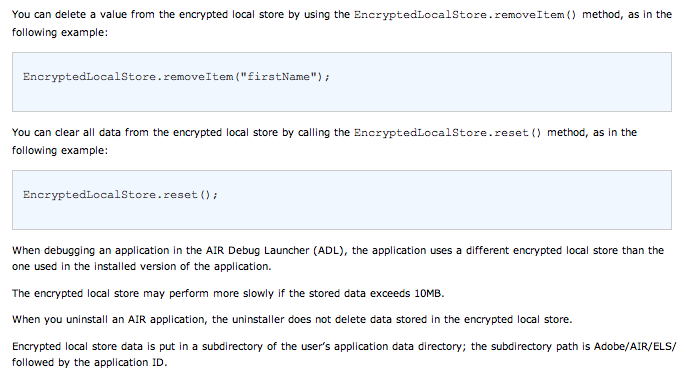
From their site:

deleting Adobe Air encrypted files
Click for larger image

"The encrypted local store may perform more slowly if the stored data exceeds 10MB.

When you uninstall an AIR application, the uninstaller does not delete data stored in the encrypted local store.

Encrypted local store data is put in a subdirectory of the user’s application data directory; the subdirectory path is Adobe/AIR/ELS/ followed by the application ID." via Adobe's site

And there you have it, folks.

Do any of you use Adobe Air? Am I missing out on good apps? Do you use Twhirl or another client?

*Originally posted on PixelBits, I thought to repost here from a TweetDeck/Adobe Air discussion stemmed from FriendFeed.

Chris Pirillo was kind enough to leave tips in the comments:
"For OS X, it’s: /Users/Username/Library/Application Support/Adobe/AIR/ - although I can’t confirm the specific path for either Windows XP or Windows Vista, though it’s likely to be somewhere either in “C:\Documents and Settings\Username\” or “C:\Users\Username\” depending on which version of Windows."
Read more by Mona Nomura at Pixel Bits