
Silicon Valley Technology Commentary & Archives · Est. 2006 3,033 Posts · 2006–2026

December 22, 2008

December 22, 2008 · 3 MIN READ · BY LOUIS GRAY

Scrapplet Sets Up Blank Canvas to Mash Up Web Activity

Scrapplet Sets Up Blank Canvas to Mash Up Web Activity

There are destination sites, and there are aggregation sites. There are enterprise-grade Web sites and then there are templates, easy to use for the average layperson. And then there is Scrapplet, a unique Web application that acts as a open slate for you to pull in data from around the Web, embedding images, RSS feeds, videos, and even complete Web sites, into a single page. The goal? Leverage the Web browser as the delivery vehicle, requiring no third party installations, and make your personalized site whatever you want it to be.

I spoke with Steve Repetti, CEO of Scrapplet, on Friday, and heard the story of how Scrapplet leverages "an efficient, pure JavaScript library that can do AJAX, windowing, messaging, data portability" and "integration with back-end components." The end result he said, is that "in the drag and drop world, the browser should do drag and drop."

If you sign up for Scrapplet, you are presented with a blank browser page, and have the option to pull in content from all around the Web, from social networks to Web sites, and can move it around, customize it and make it your own, packaged either as a single page, or you can set up many pages and build relationships between the pages so that it functions as a complete Web site.

Given the focus on data portability (Repetti sits on the board of DataPortability.org), you don't need to create yet another account to work with Scrapplet, but can login with OpenID, your FaceBook, AOL, Google or Yahoo! ID.

In our demo, it was clear the number of options available to users is tremendous - so much so it can be confusing to know where to start. But after Repetti showed me example after example of dragging thumbnails to Web sites, dragging and dropping content, and even copying over a full Web page, I tried it for myself, and with some trial and error, I managed to make a page that shows my social network profiles from around the Web, displays my FriendFeed realtime stream, the RSS feed for this side, has links to other pages around the Web, and even hot links to other friends' sites, displaying their profile images from Facebook.
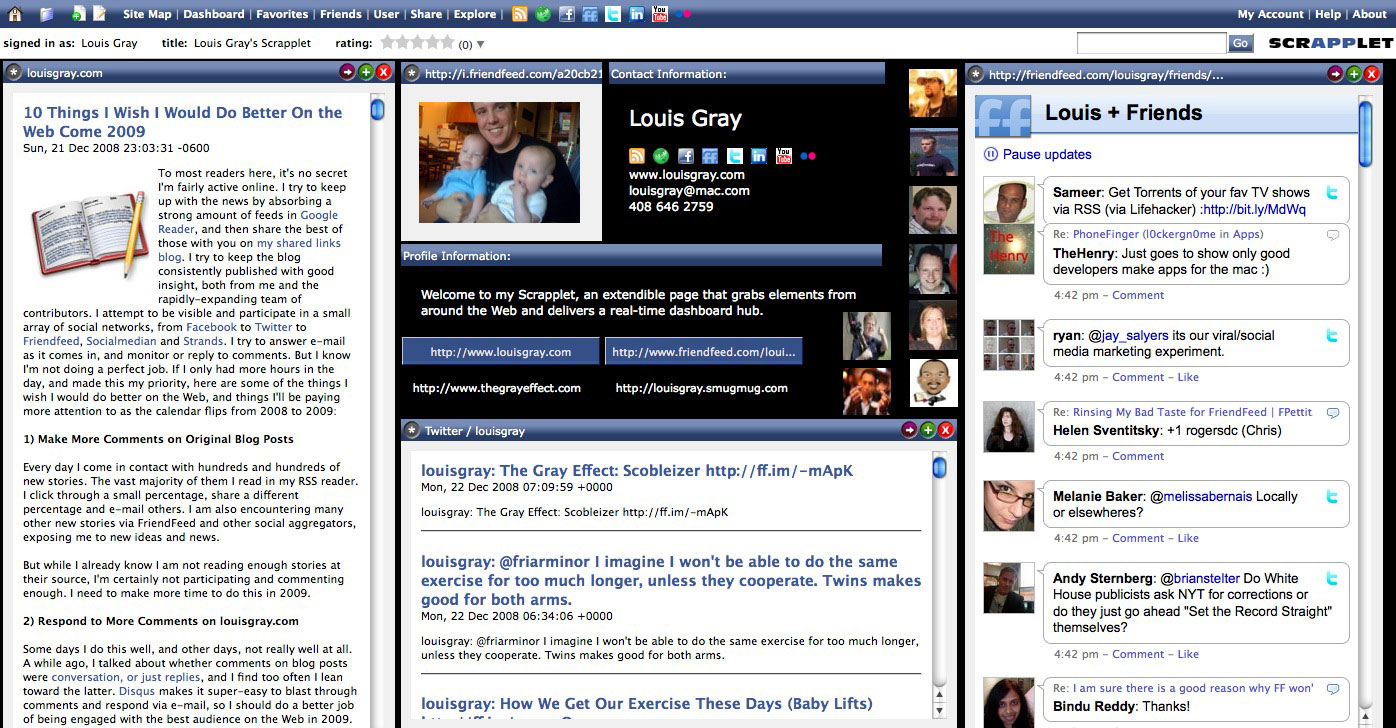

Click Image to See it in full or go to:
http://scrapplet.com/louisgray

While the technology underlying Scrapplet is advanced, the requirements to use it are very simple. They claim the product works in all browsers and operating systems - with only a few exceptions. I was told for cross-domain drag and drop, you will want to use Internet Explorer or FireFox, and if you do use FireFox, there's a 4k plug-in.

As Repetti told me Friday, one of the biggest challenges Scrapplet has is that "it looks easy, and might not be," but he added, with confidence, "if you can conceive of it, I can instantly bring it to life."

In the last few days, I've seen this already to be true as Repetti has upgraded the service and helped squash the occasional bug. Given it's absolutely a beta product, you just might find some yourself.
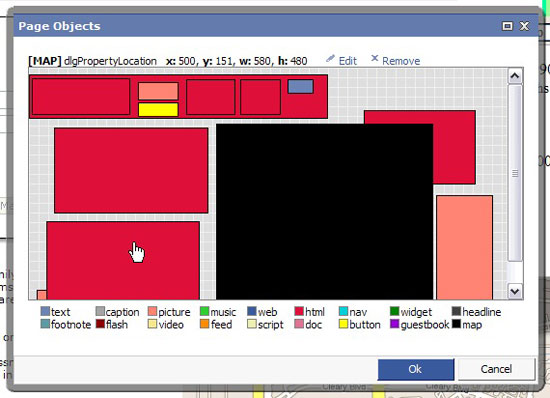

You Can Display Many Different Object Types On Scrapplet

To get started with Scrapplet, go to: scrapplet.com and use the Promo code of "louisgray" (without quotes).

To see some other users of Scrapplet, check out:
Robert Scoble: http://www.scrapplet.com/scobleizer
Brian Solis: http://www.scrapplet.com/briansolis

December 21, 2008

December 21, 2008 · 5 MIN READ · BY LOUIS GRAY

10 Things I Wish I Would Do Better On the Web Come 2009

10 Things I Wish I Would Do Better On the Web Come 2009

To most readers here, it's no secret I'm fairly active online. I try to keep up with the news by absorbing a strong amount of feeds in Google Reader, and then share the best of those with you on my shared links blog. I try to keep the blog consistently published with good insight, both from me and the rapidly-expanding team of contributors. I attempt to be visible and participate in a small array of social networks, from Facebook to Twitter to Friendfeed, Socialmedian and Strands. I try to answer e-mail as it comes in, and monitor or reply to comments. But I know I'm not doing a perfect job. If I only had more hours in the day, and made this my priority, here are some of the things I wish I would do better on the Web, and things I'll be paying more attention to as the calendar flips from 2008 to 2009:

1) Make More Comments on Original Blog Posts

Every day I come in contact with hundreds and hundreds of new stories. The vast majority of them I read in my RSS reader. I click through a small percentage, share a different percentage and e-mail others. I am also encountering many other new stories via FriendFeed and other social aggregators, exposing me to new ideas and news.

But while I already know I am not reading enough stories at their source, I'm certainly not participating and commenting enough. I need to make more time to do this in 2009.

2) Respond to More Comments on louisgray.com

Some days I do this well, and other days, not really well at all. A while ago, I talked about whether comments on blog posts were conversation, or just replies, and I find too often I lean toward the latter. Disqus makes it super-easy to blast through comments and respond via e-mail, so I should do a better job of being engaged with the best audience on the Web in 2009.

3) Be More Interactive On Twitter

There's no one right way to use Twitter, as we mentioned earlier today, but I'm pretty sure the way I use it isn't perfect. I signed up to Twitter in early 2008 after being, for me anyway, a longtime holdout. It's likely that more than half of my Twitter posts are simply announcing new blog posts here, and I could do a better job of listening and engaging than simply broadcasting in 2009.

4) Spend Less Time on a Few Sites, and More Time on Many Sites

Being visible and active on social networks that have similar capabilities, like FriendFeed, Socialmedian and Strands, is hard. It's no secret that there is a tendency to pick one or two places to build up a community and leave the others dry, and in 2008, I overweighted FriendFeed for sure. It makes sense that maybe I should dial back a bit on FriendFeed and spend more time in far-flung places in 2009.

5) Have More Time for In-Depth Reviews

At the beginning of the year, I feel I did a fairly good job of having the time to invest in fully reviewing new sites and services, to explain their every feature. From Toluu to ReadBurner to Feedly and Assetbar, it was not uncommon to show you every nook and cranny of a new site, so you could join it as an expert. But in the second half of the year, especially after the arrival of Matthew and Sarah, this time comparatively evaporated, making my reviews less detailed. I still try to do a good overview of new sites and iPhone applications, for example, but it'd be good to feel sharp about these reviews again in 2009.

6) Follow Up On Sites and Services After Their Launch

I want to avoid being a "hit and run" blogger, as I put it the other day, announcing something and then only covering them again if they had something major. Doing that, I feel, makes you a tertiary part of the story, and certainly not an embedded expert. I'd like to look back on the many different services that have either debuted here or been covered, and see how they have progressed in 2009.

7) Attend More Industry Conferences and Panels

Given blogging and the social media space is not my full-time job, I can't exactly say attending all the different events in the space is something that makes sense for my career or pocketbook. But I did get to attend Web 2.0 Expo in the Spring, and BlogWorld Expo in the fall, and enjoyed meeting many of the people with whom I'd only engaged online. I would like to make more time to see the industry mingle and participate in 2009.

8) Participate More Visiblity on Conferences and Panels

I've been lucky to learn that a panel I'll be participating in was accepted for the South By Southwest conference (SXSW) this upcoming Spring. This follows the panel I participated in with Chris Heuer and Tom Foremski, and a pair of panels and BlogWorld Expo this fall. As the blog has gained visibility, opportunities are making themselves available, and I would like to be less of a wallflower and more active in 2009.

9) Be More Active on Podcasts, Videoconferencing

Having blogged on the site for three full years now, showing I can put a blog post together and cover a story, or participate in social media is not a surprise. I also had the opportunity to participate in the Elite Tech News podcast earlier this year when it was more regular, and the ReadBurner podcast through the year. I think it would be fun to get the opportunity to showcase new entrepreneurs, bloggers and services using audio and video in 2009.

10) Highlight More Bloggers and Entrepreneurs

In 2008, one of the major focuses I had was to bring to light new bloggers that had previously toiled in obscurity. By launching the series of five new blogs each month, by bringing on a stable of talented writers and keeping a focus on startups and the people behind those services, we played a role in making people more known by the end of the year than the beginning. I don't want to lose momentum on this, and keep bringing new people to the fore in 2009.

These ten items are on my list because I believe, in combination, they will help my understanding of technology, the industry, and the people better. It will help me have a more rounded tech experience without being too focused on niche topics and insulated. 2008 saw some strides in many of these areas, but I know I need to step up my game in 2009, and I look forward to the challenge.
December 21, 2008 · 3 MIN READ · BY LOUIS GRAY

TheChanner.com - TV for Your Windows Mobile Phone

TheChanner.com - TV for Your Windows Mobile Phone

By Mike Fruchter of MichaelFruchter.com (Twitter/FriendFeed)


In the digital age that we live in, we are consumers on the go. We depend on and use our mobile devices for everything. Gone are the days where phones were just used for calling someone. Thanks to the rapid changes in technology, our mobile devices have become computers in a sense. We use them to check e-mail, take pictures, play music, play games and so forth. There is not much you can't do on a mobile device nowadays. Though we are not at the point yet where mobile devices will replace the pc, give it another ten years and then lets have this conversation.

Like many of you, I rely on my smartphone for just about everything. I check my e-mail, browse the web, frequently watch YouTube videos, and stream music on my device, but I have never watched TV on my smartphone. Recently, I came across TheChanner, an application currently only available for Windows PCs and mobile devices, which my smartphone happens to be. It's a free, simple application currently in beta, that streams TV channels from across the world.

I particularly like this application because they put some thought into it, and added some social aspects to it which I will cover in this post. For testing purposes I used my smartphone which is an HTC Kaiser running on Windows Mobile 6.


Once you have TheChanner installed on your phone, getting started is relatively easy. You need either a Wifi or 3G-enabled phone for it to work. There is variety of channels to choose from, but beware a majority of them are international. There are a few decent US based TV stations to choose from such as the Combat channel, Baseball channel and Rock television pictured in the above screenshot. The quality of the streams varies from great to horrible. It's dependent on the feed servers and your connection. I had a much better success rate compared to 3G, connecting via Wifi.


The streams can be viewed in half size or full screen mode. The menu bar will allow you to search for stations, favor a station, control the volume, and screen size. Clicking the info button will give you information about the particular channel, and also any comments left by other TheChanner viewers.


There are an impressive 163 channels to choose from. Most are Internet TV channels, which explains why I have never heard of them. While I love the selection of channels, I found no more than about 30 or so that were US-based channels. They offer a channel from just about every country on the globe, so you will definitely find something interesting to watch, that's for sure.


Clicking through 33 pages of channels is time consuming. You can filter the streams you want to watch by categories, countries and languages. As the service grows and adds more channels, you will be able to filter more effectively.


The social aspects are an added touch. You can leave comments on any stream, which are viewable to anyone else who is watching the channel. You can also share a particular station with your friends. Sharing a station is done by sending an SMS message, email, or you can beam the station using bluetooth or IR.

Final verdict:

The application has potential and beats the socks off any Web site-based viewer that lets you watch TV channels, but it's still a little rough around the edges as with any beta. I want to see more channels added, specifically US based ones. CNN India is nice, if you happen to live in India, but what about CNN United States? The other thing I was not too thrilled about was adding a shortcut to start TheChanner on my phone's home screen. Unless that was an option I selected, which I'm almost positive I did not, don't force it to be an icon on my home screen, let me choose. All in all the application is worth checking out, if you are looking for free streaming tv on your Windows Mobile device give it a shot. You can also always install the application to a Windows desktop PC, if you don't have a Windows Mobile device.

Read more by Mike Fruchter at MichaelFruchter.com.
December 21, 2008 · 3 MIN READ · BY LOUIS GRAY

Social Media Advertising: Crossing the Streams

Social Media Advertising: Crossing the Streams

By Eric Berlin of Online Media Cultist (FriendFeed/Twitter)

Can you hear it? That's the sound of social media companies scrambling, hustling, and scraping to find new revenue-generating models to beat back the hounds of this wacky economy.
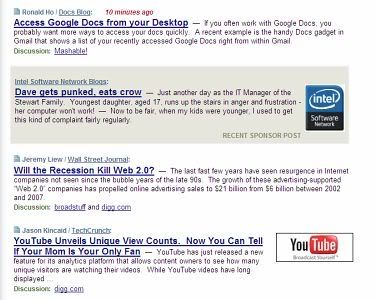
Most recently, we're starting to see talk of experimenting with the insertion of advertisements into what users normally expect to be ad-free content streams. In movie metaphor terms, it's time to look to Ghostbusters for inspiration.

As we all know, Dr. Peter Venkman (played by the amazing Bill Murray) advised that the streams of the ghostbusting team's Proton Packs were not to be crossed… right up until the end of the movie, when they had run out of ideas in defeating the Stay Puft Marshmallow Man. It was a classic "it's so crazy it just might work" movie moment.

Are some social media companies reaching a similar "crossing the streams" decision point? For instance, Techmeme, the well-known technology news aggregator, has actually employed the practice of inserting "sponsored posts" into its stream of algorithmically generated story and blog post clusters for some time.


Techmeme Interweaves Sponsors' Posts With News

With a clear label of "sponsored post" and a different colored background on what is essentially an "advertorial" ad unit, Techmeme is leading out a new form of online advertising that other social media companies might be looking to adapt.

A story on TechCrunch this week called Digg's Sorry Revenue Stream, And Rumors Of An Experimental Ad Product was illuminating in a number of ways.

Key takeaway:
One experiment Digg is working on, says one source close to the company, is a self service advertising product that will be somewhat similar to Google Adwords, but with a twist. The product would insert advertisements into the Digg news stream (presumably clearly marked). Where those ads end up, and how much an advertiser pays per click, would be based on user feedback.

So users would have the ability to vote on advertisements in the same way they vote on stories. The better ads, as determined by Digg users, will get more prominent placement and a lower cost-per-click.
I think allowing users to vote on ads that they like and have them "bubble up" to the top, social news-style, might be a rather clever addition to the Digg platform. That said, we can imagine that some of Digg's famously rowdy commenters would be incensed at the prospect of any advertising inserted into an area previously set aside for user generated story submissions.

How incensed is hard to say, but we can look at the reception that ad network Magpie received on Twitter to get an indication. To be fair, Magpie is an independent service - it has no formal affiliation with Twitter - that offers to sell "tweets" on Twitter user profiles. So its revenue model aims to cut microbloggers in on revenue, and not Twitter itself. The reaction thus far from the Twitter community has been pretty negative, and indeed signs are that Magpie is gaining very little traction.

That said, it's perhaps doubly interesting that Twitter CEO and co-founder Evan Williams would mention inserting ads into Twitter streams as a potential revenue option during a recent interview. However, he noted that they are "looking into other options." Maybe it'll come down to a "don't cross the streams" decision?

It's worth considering if Internet audiences will be generally more accepting of seeing "sponsored posts" on Techmeme – or indeed inserted into the "blog stream" on well known tech blogs such as Mashable – versus user generated content-driven platforms like Digg and Twitter.

In any event, social media companies are going to be looking for new ways to keep the lights on and servers humming, and that will likely mean seeing more forays into previously ad free content zones.

What's your opinion on crossing the streams?

Read more by Eric Berlin at Online Media Cultist