Silicon Valley Technology Commentary & Archives · Est. 2006 3,033 Posts · 2006–2026

February 18, 2009

February 18, 2009 · 2 MIN READ · BY LOUIS GRAY

Omniture Announces Developer APIs, iPhone Integration

Omniture Announces Developer APIs, iPhone Integration

By Jesse Stay of Stay N' Alive (Twitter/FriendFeed)

I am at the Omniture Annual Summit in Salt Lake City, Utah watching Josh James, CEO and founder of Omniture, deliver the first keynote for the conference. Some fascinating and useful things have been announced, but perhaps the most significant was their announcement of a developer platform around the Omniture analytics and marketing suite. The platform, called the Omniture Developer Connection, aims to give a single point for developers to connect, learn, and showcase the applications they develop.

From their recent press release:
"Omniture Developer Connection further opens up the Omniture platform, giving developers new levels of flexibility to create, and integrate with, applications that leverage Omniture data to optimize online business," said John Mellor, EVP of Strategy and Business Development at Omniture. "With approximately one trillion transactions measured each quarter, our customers are sitting on a tremendous resource of information and we are committed to rapidly expanding the ecosystem of applications available to help them drive value from that resource."
In addition to the platform, Omniture has released a series of sample applications, including a Wordpress plugin for tracking Blog traffic, and even more significant, a SOAP API for the iPhone so iPhone developers can communicate via SOAP within their applications, including interfacing and bringing live analytics and tracking into their iPhone applications. Omniture puts it this way:
"One notable omission in the iPhone SDK is the lack of a Web Services framework like WebServicesCore from the OSX SDK. Given the iPhone’s emphasis on online connectivity, it is at least surprising that there is no native framework stack for SOAP web services. So, what’s a developer to do?"
Now, developers have full access to the vast storage of data given to publishers via Omniture, on mobile devices as just one opportunity. Omniture, with over 5,000 customers, 5 of the top media companies, 6 of the top 10 retailers, 4 of the top 5 banks, 4 of the top 5 travel companies, and boasts 250,000 transactions per second, is the very definition of mainstream analytics. Now you will see sites such as Best Buy, JetBlue, Walmart, and many more begin to make a presence on the iPhone and more as they will now be able to track their presence on these mobile devices.

With the release of this developer platform Omniture has just opened up a goldmine of data around Site Analytics, and every developer has access to this information. Mobile and Social Analytics have just hit mainstream due to this platform, and will continue to strengthen due to companies like Omniture opening up their platforms to this data.

All developer APIs and documentation can be found at https://developer.omniture.com/.


Read more by Jesse Stay at Stay N' Alive.

February 17, 2009

February 17, 2009 · 1 MIN READ · BY LOUIS GRAY

TweetDeck: You Autocomplete Me (And User Names as Well)

TweetDeck: You Autocomplete Me (And User Names as Well)

TweetDeck's debut was a big one in terms of introducing a new way to absorb even the most active of Twitter accounts, through a column-based AIR desktop application, and the addition of groups, which let you break the stream down into smaller chunks. And last week, we talked about its addition of automatic translation and more. But developer Iain Dodsworth can make small updates as well.

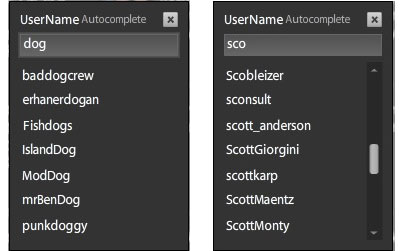
The next iterative release of TweetDeck, which you can snag here, adds the ability to autocomplete Twitter user names any time you type "D" for a direct message, or an @ anywhere in the tweet.


Immediately, a small box will pop up and with the more letters you type, TweetDeck will display all that fit the string. It doesn't just look for first letters either, so if you type 'gray', you'll get @louisgray, not just all names that start with @gray, for instance.

See Iain's video below:


If you're sending a tweet to a friend whose name you type often, the autocomplete might actually slow you down, but if you're unsure on the spelling, or it's a long name, TweetDeck has found yet another way to enhance your Twitter experience. It will be included in the next full TweetDeck release if you're not the type to play with early builds.
February 17, 2009 · 2 MIN READ · BY LOUIS GRAY

It's Not That I'm Addicted, But I Just Can't Stop Playing iShoot.

It's Not That I'm Addicted, But I Just Can't Stop Playing iShoot.

Growing up, I wasn't one to play with Army men, GI Joes and shoot toy guns. I didn't play tank and make up elaborate war fantasies that involved bombing and artillery. I don't own a gun and I've never even considered being a member of the NRA. Practically the only regular games that involved violence in my youth were when my brother and I would sit down for a game of Contra on the old 8-Bit NES. But I've found the highly popular and already much-documented iShoot for the iPhone one silly app I can't put away.

The play is simple, a good thing when it comes to iPhone games, as I've mentioned before when covering Crazy Frog and Booty Blocks, for example. You are in combat with 1 to 3 other tanks, and blow each other to smithereens using weapons you have purchased. The goal is to be the last tank standing after you've cleared the screen of your enemies, having measured your shots by angle and force, adjusting for wind speed and terrain, of course.


Up to Four Tanks Can Battle On Picturesque Backgrounds

I remember playing a similar two-player game on old green screen Apple IIs, but iShoot is, despite its simplicity, much more involved. You'll get to learn which ammunition is most desired, when to move your tank to get a better shot, or whether it ever makes sense to toss up a wall of dirt to block others from taking you out.


Play Long Enough and You Can Rack Up Weapons

The game ranges in multiple levels, from Easy to Extreme. Easy is fun if you need to get acquainted, but you will want to try Extreme and see what it is like to fight when the tanks practically never miss and have you in their sights. And if you've mastered the ability to win in five rounds, ten rounds, or fifteen, and want to start flinging Shiva Bombs around as casually as you would Mortars (play the game and see what I'm talking about), you'll want to try the infinite round mode and just keep blasting away.


Not to Mention Domination Of Your Opponents

You know it's an interesting game when Nuke, which can kill you with one massive shot, isn't even nearly the most sought-after weapon. If well placed, my Shiva Bomb can take out three tanks with one blow. So far, 191 rounds into this massive iShoot-a-thon, I've killed 361 tanks, and lead in "Wins" 88 to 32, over the second highest competition. I don't know if I'll stop after 200 rounds. Maybe it will be 250 or 500. But there's a real reason why Ethan Nicholas has racked up more than a half-million dollars from the application, including $37,000 in one day. It's fun!


Don't Just Shoot - Shoot to Kill.

You can get it yourself, if you haven't already, for only 3 bucks, at the iTunes App Store. Also, there is an iShoot Lite, but don't be so cheap - get the real one. Seriously.

February 15, 2009

February 15, 2009 · 3 MIN READ · BY LOUIS GRAY

What's Growing Faster? Software Bloat or PC Capabilities?

What's Growing Faster? Software Bloat or PC Capabilities?

There is an old adage in the storage business. No matter how large you make the hard disk, users will find a way to fill it. The same seems true in the bandwidth and networking business - build a bigger pipe, and customers will find applications that use it up. The same concept extends to me as a consumer, for my traditional software experience. While my laptop is tremendously more capable than its predecessors of 2, 5 or 10 years ago, it sure doesn't seem like the software loads any more quickly, and I still find myself closing applications or forcing them to quit when the whole thing grinds to a halt.

Back in late 1998 after I got a first-generation iMac, complete with a then-acceptable 32 megabytes of RAM and a 4 gigabyte hard disk, I marveled at the gargantuan install needed for the latest version of Microsoft Office. I remember specifically telling a friend to just wait... as the next one would take more than a gigabyte of space. Sure enough, that's practically accepted, and now, it's not too uncommon to see downloads, and even software updates, that are in the hundreds of megabytes.

But the issue is less about capacity and more about the perception of speed. Yes, my laptop can do more than its forefathers. It can do new things with the Web and with video that were never before possible. But booting Microsoft Office, Adobe PhotoShop, FireFox and other products still manages to slow down my system to a crawl. It's gotten to the point that I've even eliminated possible reasons for the slowdown. I hardly ever boot into VMware Fusion any more, to run Microsoft Outlook. I stopped using an external monitor at work, and try to recharge my iPhone only when I don't need full use of my MacBook Pro. And that doesn't even extend to other RAM and processor hungry apps, like one of my personal favorites, TweetDeck.

For whatever reason, it seems that software developers have, for the most part, chosen to add features, and not optimize for speed. I don't think it took more time to boot Microsoft Word 5.1 on my old Performa than it takes to boot Microsoft Word 2008 on my MacBook Pro, even if the Megahertz speed on the processor has increased from 33 MHz to 2.2 GHz, and the RAM from 24 Megabytes to 2 Gigabytes. And lest you think I'm picking on Microsoft, Apple's iPhoto has also been a slow to load memory hog in its own right.

If somebody told me ten years ago that I could increase my processor speed by 1,000 percent, and my RAM by about the same amount, I would have expected to be able to hit "Select All" on my Applications folder and then "Open" to run them all at once. But there's no way. At this point, even with my current machine, I probably can run Mail, iTunes, a Web browser and one more application without slowness. Add one or two more apps to the mix, and we're in spinning wheel city.

In one my recent tirades against how often my machine was slowing down, I heard the all too common reply: "Time for a new one?" but the answer should be no. It's time the pace of the treadmill whereby hardware needs to speed up to handle the new software should slow. Get it to work, and get it to work fast. Please.