Silicon Valley Technology Commentary & Archives · Est. 2006 3,045 Posts · 2006–2026

July 3, 2010

July 3, 2010 · 2 MIN READ · BY LOUIS GRAY

Should Social Profiles Live On When People Die?

Should Social Profiles Live On When People Die?


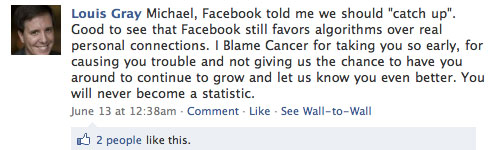
There is a friend of mine on Facebook who is just three weeks younger than me. He's interested in women, single, and is looking for friendship, dating, or a relationship, should things progress. He says he's an Orthodox Christian, and graduated college the same year I did, in 1999. But there's one thing different about Michael's profile from most of my other connections online. You see, Michael passed away in January and was laid to rest after a six month public battle with lung cancer, which he shared on his Facebook, Twitter and FriendFeed profiles. While he may have left us, his memory lives on - and Facebook continues to ask me to "reconnect" with him or to "suggest friends". It's something algorithms don't understand.

The first time Facebook suggested I "reconnect" with Michael, or suggest friends, I was a little annoyed. But despite the fact I have almost 1,800 connections, the reminders have come at an increasing rate. Whatever algorithm Facebook has going, it no doubt looks for frequency of updates or adds from that person, and the fact that Michael's Wall and friends have stayed steady has flagged the account. Brilliant.

So what should happen? We all talk about using Twitter and Facebook for "status updates", but one can't exactly post an update saying they have passed. Should Facebook have an option to change one's status to "Deceased" if they have passed on, and remove them from the algorithm?
Michael Passed On, But His Wall Still Lives

For people like Michael who shared their trials with illness with the community, their profiles have become something of a shrine to their memory. As their birthday rolls around, connected friends drop in and wish happy birthdays, like they would anybody else, and when Facebook said to reconnect, I went and wrote on his wall. But there's something odd about the whole thing.

Today's leading social networks might do fantastic work for connecting people at various stages of their lives. They can find friends from high school and college, or link up colleagues from your work history. They might find you new dates or even spouses. But it looks like they stink when it comes to dealing with one's data when they actually pass on. Is it too morbid for them to think about? Would it be too nuts if there was a "Report Person as Deceased" button on the account? Should it be treated with an editorial process, similar to Wikipedia, where you have to cite a source and show an obituary?

Either way, the way we just leave things hanging in a position of suspended animation doesn't work for me. If social networks are to celebrate births, celebrate life's milestones and mark bad news as well, they should be ready for the final passage to whatever's next. I welcome good ideas.

July 2, 2010

July 2, 2010 · 2 MIN READ · BY LOUIS GRAY

Spotify for iPhone Adds Multitasking iOS4 Support, Sharing

Spotify for iPhone Adds Multitasking iOS4 Support, Sharing

No application seems better served for multitasking on mobile devices, be they iPhone or Android, than streaming music. Spotify, the emergent streaming service with a seemingly bottomless repository of high quality instant-on sound, released an update to their iPhone app tonight which adds the ability to play Spotify tracks while using your phone, and adds the social features recently made available on its companion desktop client.

The new multitasking option, made available with iOS4 from Apple, brings the option to play music in the background while you run other iPhone applications, on the iPhone 4, iPhone 3GS and most recent version of the iPod Touch. This, like similar services from Last.fm, Pandora, Sirius XM and yes, Apple's native iTunes player, is a welcome addition - harnessing the new features just debuted from Cupertino.

   
New Options to Share Tracks In Spotify iPhone


Sharing from Spotify on iPhone to Facebook, Twitter


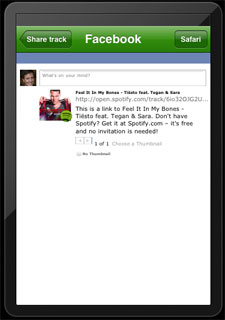
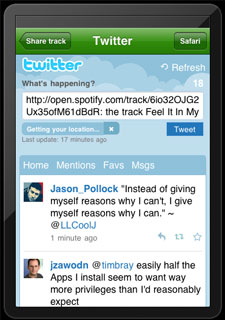
The social functionality within the newly updated iPhone app lets you share individual tracks, artists or albums to Facebook and Twitter, or, instead, you can send them directly to another Spotify user. The gap between the company's desktop client and its mobile client decreased significantly. Additionally, there is a "What's New" tab, new in this release, that highlights most recent tracks and albums.

   
Playing Music on Spotify iPhone and Syncing With iPod


While these product improvements may seem like a major tease to those of you who haven't yet gotten behind the velvet rope to enjoy Spotify, the number of people I see in my network is increasing, so it appears to be getting in the hands of more and more users, even as true launch in the US is likely months away. But from what I can tell, every Spotify user I know swears by the service. I simply don't purchase tracks from iTunes any more. Spotify remains the best streaming music service I have ever tried, on any platform.

Disclosure: I've been using Spotify free of charge thanks to early tech blogger access from August of 2009.
July 2, 2010 · 1 MIN READ · BY LOUIS GRAY

Blogger Rolls Out Real-Time Stats for All Users

Blogger Rolls Out Real-Time Stats for All Users

Initially targeted as one of the launches included in the service's 10-year anniversary, Blogger tonight introduced integrated Web statistics for its users that rival the more robust Google Analytics, but are simple to manage, and update in near real-time, giving the millions and millions of blogs that rely on Blogger greater insight into their visitor traffic, including top pages, referral data, browser data, and their country of origin.

Like you would expect from any good analytics package, the new offering displays popular search keywords to find out what your visitors are looking for, as well as showing you peaks and valleys in your daily traffic.

Blogger Stats Display Analytics for Every Blog In Real-Time

Top Pages Displayed In Blogger's Stats

The new stats package is available in the service's Blogger In Draft mode, under the "Stats" tab for all users, with no required code to install, or configuration. For those looking for deep details in analytics, including bounce rates, campaigns and ad conversions, Google Analytics is clearly more detailed, but the Blogger statistics are rapidly accessible and bring the information to the users every time they log in.

Pageviews are Cut By Time, Shown In Aggregate

If you're a Blogger user, make sure to draft.blogger.com and click stats to see for yourself.

July 1, 2010

July 1, 2010 · 1 MIN READ · BY LOUIS GRAY

Podcast: On Garner Road (Old Media & 2400 Baud Modems)

Podcast: On Garner Road (Old Media & 2400 Baud Modems)

Glen Campbell, an avid social Web user, and quiet power player on the Yahoo! News team, sat down with me earlier this week to talk about how social media is impacting traditional media and the value of individuals' connections. We even had the conversation flow into a little more of my background - how I got into the Web, dabbling in AOL, and searching online for data on baseball, Madonna and other interests while in junior high and high school.

If you remember 2400 baud modems or want to know why pictures of my twins became part of my online activity, you might be interested in this podcast. It's unlike any other you've heard me participate in:

The full content is below, and at the On Garner Road site.