
Texty, available in private beta, brings SMS text messages to and from your Chrome browser in real-time, immediately as they hit your Android device. Even more amazing is that texts you send from Chrome are synched to your phone, and the recipient doesn't have any clue - seeing your phone number as the originator.

Recent Texts Between My Wife and Me (In Texty)
If you are one of the early testers of Texty, getting started is very easy. Find the Texty Android app on Android market and install it on your phone. Then link it with your Google profile. After this is done, install the Texty Chrome extension, and login with your Google profile. If there is a match between the app on your phone and the extension and you are on the whitelist, you are good to go. The Texty extension is displayed as an add-on to Chrome, and you can head there to send and receive messages, or even monitor notifications from carriers, such as the arrival of a new voice mail.
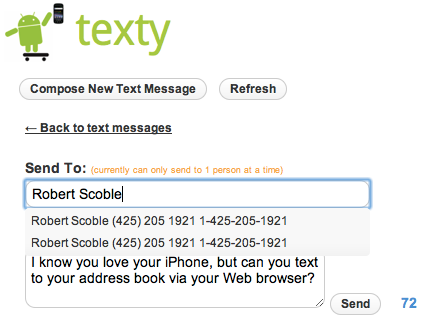
Sending a New Text to Someone In My Google Address Book
Now, instead of having to stop what I am doing on the laptop to pick up the phone and text, leery of getting yet another text shortly afterward and getting interrupted again, I just manage all my SMS texts via Chrome and keep going. For power texters who are also power desktop jockeys, the arrival of this app is going to be very useful. Shouldn't be too long yet until the app comes out of beta. Until then, if you want to join early, head to http://textyapp.com/beta and tell them Louis Gray sent you.
21 Comments
If I ever have problems with my Rackspace account, it's nice to know how to get ahold of Robert Scoble. ;)
That is true. Good thing he makes his cell phone available everywhere and is not shy about posting it publicly. (As I do as well)
:( And here I thought I was being clever. :|
Being able to text from the browser is why I love Google Voice, so Texty sounds like a home run to me.
Looks like this one will give you a notification when you are OUTSIDE of your browser (like if you're in iTunes or Excel) I think it's the new HTML5 Notifications that do "desktop" notifications.
This gives a notification when in Chrome. If Chrome is closed, you do not get a notification.
right, but if you are in excel, and chrome is still running, you will get a Notification...
So far as I can tell, Texty doesn't work with Google Voice. It appears to send SMSes from the phone's native number, not GV.
Oh I know, which is why I think it has potential. Texting from the browser is a big reason why I like Google Voice, so adding similar functionality to my phone's native number is great. I still use that number a lot to text.
Tried it out, looks good. Hate having to take my phone out of pocket, esp during meetings.
Thanks for introducing me to Texty. Great idea. I love texting, love Android and love Chrome. This is a no-brainer. Plus, I love being a beta tester. :)
Beta testers are good people.
some people love to become a beta testers because they want to use it for "FREE", before it released as a premium app ;p
For those with Google Voice and an iPhone, check out http://www.growlvoice.com/ . It's been perfect for me.
I just bought it based on your recommendation. Its nice.
Same thing: http://crosstxt.com
Works for multiple browsers.
Does it make sense to use this with Google Voice or are the two functions redundant?
You would probably want to use one or the other. The advantage of Texty is that you don't need to worry about an additional number...it basically "controls" your phone from chrome
You should give CrossTxT.com a try. :)
what about privacy issues? are all of my texts stored or pass through a TEXTY server? OR is it a direct connection from my Android---------->Internet------>My PC? Is there a Texty server involved? is there a persistent storage of all of my texts? THANKS!
really great idea very helpful in office will wait for invitation