 Gmail's introduction in 2004 changed the way people interact with Web-based mail, moving us away from needing to carefully prune old messages to save space, and introducing a conversation-oriented interface, with new label-based hierarchies, away from the desktop metaphor of folders. But while Gmail's innovation has been clear, Google's approach to Contacts has lagged, making it the target of frustration from many users. Today, the company admits as much, saying it's the thing people "are least satisfied with" about Gmail. They hope a number of improvements, rolling out immediately, will help.
The goal of the many changes introduced to Google Contacts today is to make using Contacts as intuitive as Gmail, bringing keyboard shortcuts, automatic saving, and the ability to undo edits you may have made in error. This way, if you already are a Gmail power user, you will be a Contacts power user as well.
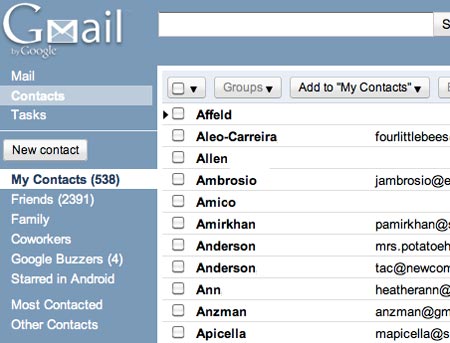
Sorting by Last Name in Contacts
In addition to the "Gmail-ization" of Contacts, the company added the option to sort by Last Name, the ability to add custom labels for phone numbers or other items, structured name fields, for titles and other details, and a more prominent notes field, so you can say just why somebody is in your address book in the first place. Also, with the upgrade, Contacts and Tasks also occupy a more prominent position in Gmail than before, sliding up the left sidebar to the top, just underneath the Gmail logo.

Editing A Contact in GMail

You Can Undo Changes In Contacts
The new Contacts view makes it easy to get all of a person's details from one place, and make edits. You can easily add job titles and family relationships, or "view recent conversations" to see the last time you traded e-mail or chats with the person. This, thanks to the tie in with Google Buzz, also surfaces Buzz posts that match the search criteria.

Merging Duplicates In Gmail
Also, for power users, you can now merge contacts from the "More Actions" menu, if you have made duplicates, or you can choose to "Find and merge duplicates", handy for the many of us who have made imports only to find friends' records multiplying. I myself merged 75 duplicate records, so I don't have names repeating ad nauseam when I go looking for numbers in my Android phone - closely tied to Contacts.
As somebody who was more closely tied to the Apple Mail and Address Book infrastructure, Google Contacts hadn't always taken a front seat in how I manage people and relationships. Moving to Android, adopting GMail more strongly, and seeing the rise of Buzz as a platform has made getting this right increasingly important. Today's moves will make it seem more natural and fluid - as Apple used to always get right, but for the Web, not the desktop.
28 Comments
I spy a Charlie Anzman and a Mark Krysnky in that post.
Your post says that this change should happen immediately. Does anyone see the new contact system yet? I don't.
no improvement of tasks planned? the existing one is too simple.
These are some much needed improvements! Very nice.
Not to mention a certain Micheal Arrington....
Now they need to work out a way for me to choose which contacts are synced with my iPhone...a set of groups, a single group...something!
Nice! but merging and searching for duplicates have been around for sometime. I started using it about 3 months ago.
You are clearly a power user among power users. :)
I was referring to this text.
http://mail.google.com/supp...
It's actually been around far longer, but for mass duplicate checking this was only possible when importing an addressbook.csv. Or when individually merging of 2 or more users, which to my knowledge randomly set values such as first last or company name to one of the selected entries rather than enabling a canonical value for the merged entry, so manual updating was still necessary.
Cool! It is funny; I was just working through contacts with the Mrs last night and she was frustrated with gmails antiquated interface. Unfortunately, I do not see the interface yet. Do you know when it will be made available to all users? (As an FYI, we are users of Google Apps.)
Another GApps user, I do not see the new interface. Any news on when this is being rolled out for GApps users?
"If you use Google Apps, you won't see these updates to Contacts quite yet. We’re actively working on making domain-specific features work well in the new interface and plan to make this new version of Contacts available to Google Apps customers too."
Great, paying users get the most useful features last?!
Skyler, I think it is rolling out today.
Yes, but like with everything else, I will have to wait until it is released to Google Apps accounts (http://gmailblog.blogspot.com/2010...).
Typical.
Is there a new keyboard shortcut to go to contacts? Can't wait to see these new features in action, my account still shows old interface.
"If you use Google Apps, you won't see these updates to Contacts quite yet. We’re actively working on making domain-specific features work well in the new interface and plan to make this new version of Contacts available to Google Apps customers too."
Mine in is not an apps a/c, and I saw the update today.
For the record, the shortcut is "gc". Accessing and searching contacts is so much better now. I forgot if they had undo for contact changes, but it is definitely nice.
when will these changes start being rolled out i still do not see it on my gmail yet.
I'm glad you mentioned Buzz in this context. Buzz is great in that you can post messages to only specific groups in your contacts rather than blanket messages to all your 'friends'. Most posts aren't germane to everyone and this feature (I believe) is unique to Buzz. Having improved tools in Contacts will make it easier to manage one's audience. Thank you for the post Ms. Gray.
this is a great improvement especially the one with duplicate contacts. im having a hard time managing my mail sometimes because of some duplicated entries which confuses me which one is still active. looking forward to this new feature.
Google contacts loose heavy on:
Group synchronization on Google Sync
Google sync's inability to connect to WiFi
I lost hundreds of contacts when I changed my wireless plan.
Google Contacts is an "afterthought" in the words of its creator, Paul. It still is not as intuitive as gmail is. It will never be, as "afterthought"s never become as good as the original.
Thanks Louis. I am so NOT a power user. Almost everyone in my contact list is a "Buzz Friend". They also made the COMPOSE MAIL button more noticeable which is good because I had the hardest time finding that thing before :)
Hi,
just wanted to let you know that the Merge Duplicates doesn't work correctly, it merges based on first and lastnames, not on mail address - which would actually be useful. I had over 8000 contacts in my due to a failed import of my LinkedIn contact list. The super connecters tend to update their names to contain their current connection count and/or their mail address, since the limit was imposed on public viewing of this number. This means that most of the matches on First and lastnames fail due to discrepancies, and in my opinion mail address would be a far more efficient way to guarantee that the John Smiths are unique people.
I love it but I was really hoping for more tag functionality. I want to be able to easily add folks to a company without having to make a ton of groups. To me a group isn't the same thing as a company.
You should improve on making some list or a group on your contacts. That one is nice always but doesn't have more difference in the older one. Thanks for letting us know.