 In December of last year, we highlighted the introduction of PeopleBrowsr, a Web-based utility to help you follow all your friends across their various social networks in one place, ranging from LinkedIn to YouTube, FriendFeed and Twitter. The product, while very robust in terms of its offerings, also seemed complex, with usability tradeoffs seemingly made for feature introductions. With several months of incubation, the site has now opened up in public beta, hoping to supplant TweetDeck and other multi-column tools, like Seesmic Desktop.
The service, which you can find at www.peoplebrowsr.com, bills itself as a "one-stop solution for managing online activity," and there's no doubt that's exactly what it does. You can add what are called "stacks" or columns from 14 different networks, and have the option to push updates to each from the single browser window.
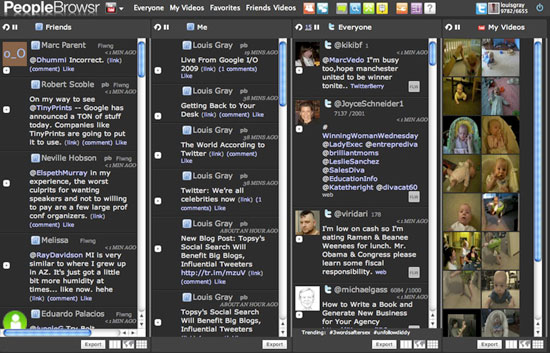
Click Here for A Larger Image of PeopleBrowsr In Action
PeopleBrowsr's goal, like other aggregation services, is to help you tame the content stream and avoid missing important posts. The service also hopes to make itself the center for conversations by letting you manage multiple user names, and follow anonymously, without the public friending that takes place on practically every network.
As we also have discussed with our recent posts on search, finding your data can be even more important than seeing it as it appears, and PeopleBrowsr has approached that as well, by offering search filtering, and the saving of searches for future use.
Like TweetDeck, the temptation to keep adding "stacks" or columns is tempting. I can follow all friends' updates on FriendFeed and Twitter with PeopleBrowsr, while watching out for updates on LinkedIn, YouTube or even RSS. Really, the only limit to the product now is the width of your screen.
9 Comments
Louis, do you see it replacing your tweetdeck or other clients you use for these services? Is it an aggregator of data for everyone and then a publisher?
I tend to rely on Twitter search to follow topics, and to rely on FriendFeed to follow people. As such, so far, the best client for FriendFeed is FriendFeed's Web interface, and I get e-mail alerts for search on Twitter. PeopleBrowsr lets you do both these things in one place, if you choose to do so, and yes, if you want FriendFeed and Twitter in the same place, that would make TweetDeck unavailable (for now). But for simply publishing to Twitter, anything works. I have been using the Web or Tweetie.
I basically use this exact strategy. I think People Browser is cool, a nifty tool and very pretty. But, I don't use it for productive reading or publishing. I use Seesmic Desktop a lot more (for Twitter), but I'm finding the lack of friendfeed publishing a bit annoying.
Friendfeed's web interface is likely the lightest, fastest tool. If only it had threading and a respond/response button/page/feed.
Any idea why @peoplebrowsr didn't implement Twitter OAuth or Facebook Connect?
I don't know why PeopleBrowsr hasn't opted to use Twitter OAuth or Facebook Connect. They may in a future release, is my guess, but the product is still very new.
I hope so. It feels a little weird to have Twitter and Facebook highlighted as the login options and then to ask the user for their username and password when a much cleaner option is available.
Admittedly, I'm starting to get overly fussy about plugging my credentials into third party sites, as well. #getoffmylawn ;)
The problem I still have with PeopleBrowser is noted in the first line: "a web-based utility." There is probably a market out there for people who don't want to use desktop apps, but likewise they're limiting themselves by being web only. Being web only also introduces some limitations in how you interact with it as well.
People Browsr's functionality is rather mind-blowing. If you look at how customized you can make the stacks, and if your firm is managing and monitoring gobs of client Twitter accounts, then you'll come to view this tool as a god-send. So, it's perfect for digital marketing firms.
Your description makes me wonder if this tool, like so many others, is a following tool that does not let you actively pursue relationships. Social Relationship Management is really the direction that I would like to see as this type of tool develops.
While CRM is internal to the organization SRM manages the social relationships outside the organization. I like what CRM helps me do in building business relationships, tracking my conversations, notes, current and future business potential. I like that several people across my organization could share this data so we were all on the same page.
On the social side of business I don't want to just follow people and only catch them from time to time. I want to set up goals about my relationships with people and business I wish to pursue. I want to track how the relationship is developing. Have I interacted with them on many levels and many sites? When was the last time I offered some value to this contact?
What I really want is to engage a very select few at very targeted times, while the rest that I am following continue within my social ecosystem. I don't think even PeopleBrowser does this.
http://xeesm.com/wendysoucie