Silicon Valley Technology Commentary & Archives · Est. 2006 3,045 Posts · 2006–2026
Showing posts with label +1 (5 posts). Show all posts

January 25, 2012

January 25, 2012 · 3 MIN READ · BY LOUIS GRAY

50 Things a +1 Can Mean

50 Things a +1 Can Mean

A +1 is simple. It’s one of the easiest ways on the web to take an action that endorses the content and says you saw something. But it can mean many different things. That’s the beauty of +1. You can +1 things you like. You can +1 bad news. You can +1 things you love. You can +1 casual status updates or items that change the world.

Often, we get asked what it means to +1. Here are some ideas. We’d love to see yours.

/via The Google+ Page (Which I maintain)

1. A +1 can say you agree with the post.
2. A +1 can say your photo is beautiful.
3. A +1 can say your joke was funny.
4. A +1 can mean you share in sympathy.
5. A +1 can mean you endorse content found on the web.
6. A +1 can say “thanks for sharing!” 
7. A +1 can say “thanks for mentioning me!”
8. A +1 can say “Glad to see you hanging out!” 
9. A +1 can say “Good to see you here!”
10. A +1 can say “Wow! That’s cool!”

11. A +1 can say your video was amazing.
12. A +1 can mean you’re excited about new features.
13. A +1 can mean your post was clever.
14. A +1 can say you like this brand.
15. A +1 can say you’re the biggest fan.
16. A +1 can mean you agree with the shared story.
17. A +1 can say “thanks for commenting!”
18. A +1 can say “I vote for this choice.”
19. A +1 can say “your high score is impressive”.
20. A +1 can say “thanks for playing!”

21. A +1 can say you’re with the band.
22. A +1 can say you love the band.
23. A +1 can mean your meme is hilarious.
24. A +1 can mean your child is adorable.
25. A +1 can mean your food looks delicious.
26. A +1 can mean that song is incredible.
27. A +1 can mean “You said what I was going to say!”
28. A +1 can say you saw the post, but have no comment.
29. A +1 can say that video is stunning.
30. A +1 can say you found the news interesting.

31. A +1 can say you sure do know how to recommend people.
32. A +1 can say “I’m rooting for you!”
33. A +1 can say “Congratulations!”
34. A +1 can mean this article is a must-read.
35. A +1 can mean “I have this product too.”
36. A +1 can mean “I love this book!”
37. A +1 can mean “I hear you.”
38. A +1 can mean “You rock.”
39. A +1 can mean “I love you.”
40. A +1 can mean “I + you.”

41. A +1 can say “I can’t wait!”
42. A +1 can say “You shouldn’t miss this!”
43. A +1 can be a smile.
44. A +1 can say “You look hot.”
45. A +1 can say “I’ve been there before, and I love it.”
46. A +1 can mean “I wish I were there.”
47. A +1 can mean “I am so proud of you.”
48. A +1 can mean “You took my breath away.”
49. A +1 can say “I’m on my phone and only have a second.”
50. A +1 can say anything.

July 15, 2011

July 15, 2011 · 2 MIN READ · BY LOUIS GRAY

Google's Data Liberation Front Frees Your +1s

Google's Data Liberation Front Frees Your +1s

In a new and innovative way to leverage the company's new Hangout feature as part of Google+, Google's Data Liberation Front held a small press briefing with a handful of tech journalists today, walking them through why the company is focused on leveraging open standards and helping users get their data out. Alongside the discussion, engineering manager Brian Fitzpatrick said the company has extended its exports to include the +1s you've made for Web sites - a small bump obviously, but one that demonstrates their seriousness about making getting your data out of Google as easy (if not easier) than it is to get it in.

Without speculating on other company's practices (namely Facebook), Fitzpatrick asked those of us participating if we would recommend a restaurant which locked its doors to prevent us from leaving after we sat down for a meal, or if we would recommend people rent an apartment that demanded it keep your furniture and family photos once you moved. The obvious answer is of course not... and Fitzpatrick said the same should be true for your online content. He recounted how when the Data Liberation Front first started with Blogger, there were some internal concerns at Google that users would leave the platform en masse for WordPress or other solutions, but in fact, they instead regularly downloaded content but kept posting - using the exports as local backup. (This is what I do as well)

Google Takeout Liberates Your Content from Multiple Services

Fitzpatrick pointed to Google Search as an example of not locking in one's data, as users, with many choices, will use the engine and can go to any other when they like. But with many online services, content goes in and doesn't come out. As I've demonstrated with my own personal backup of my Facebook wall and photos, you can get your data out of the social network, but it's possibly not configured very simply to move to another platform altogether. This is a main focus for the Data Liberation Front team, said Fitzpatrick, who said the effort is made to point to XML, Activity Streams and Microformats wherever possible, letting your data be interchangeable within services.

Downloading My +1s is a Mere 25KB.

Now that My +1s are Downloaded, I Can Move them Elsewhere

Lost in much of the coverage of Google+ a few weeks ago, the Data Liberation Front introduced its Google Takeout policy on the same day, making it easy to download data from multiple services and take them elsewhere. This list includes your +1s now, as well as Google Buzz, your Circles and Streams from Google+, and Picasa Web albums. As they mentioned at the time of that launch, if they make it simple for you to get your data out of the company, they have to work harder to keep you in.

June 28, 2011

June 28, 2011 · 4 MIN READ · BY LOUIS GRAY

Google+ Breaks Out of the Social Box, Ready to Score Users

Google+ Breaks Out of the Social Box, Ready to Score Users

More than a year after the launch of Google Buzz, rumors have been tossed about on most tech news sites about just what Google has been up to in the world of social to ebb the flow of activity that has migrated to Facebook and to a lesser extent, Twitter, over the last few years. With users spending significant time participating in social activity on the Web, it's made Google sometimes seem like the last era's winner, with it being thought the future of discovery is through friends. So long as another company owned the social graph, Google has been pushed to an unfamiliar role, as challenger. With today's launch of Google Plus (nee Google+), you can see they haven't taken the role of backup lightly - delivering a fun and engaging place that brings many of the benefits of existing social sites, but learns from their mistakes. In time, the package of Google+ could be a serious alternative for people's attention.

As a longtime Google ecosystem power user with Google Reader and Buzz, both of which I continue to use even as they've fallen in others' eyes, gaining access to Google+ today was practically second nature. Within minutes, I had started to reassemble a brand new social graph into explicit "Circles", their equivalent of lists, and could share status updates, links, and photos. The vast majority of content in Google+ feeds into a centralized stream of all friends' updates, with additional product features including built-in chat, powered by Google Talk, "Sparks", much like saved searches to surface interesting articles, "Hangouts" for instant video chats with other users, and at least on mobile, "Huddle" for group chat and instant photo uploading.

Circles, Hangouts and Sparks - All Part of Google+.

Clearly, this is no small undertaking - one Google has thought through in the year since Buzz's launch and initial privacy hiccups, and one where they have given an unprecedented (for them) amount of effort in making sure the user experience was top notch. While we've grown accustomed to helping Google test out their first iterations of beta software, Google+ is well designed out of the box, and has seen positive kudos from all corners of the Web, so far as I can tell. There are bugs, of course, but nothing dramatic.

Separating Friends By Circles In Google+

Most of us power users on various social networks, from Facebook and Twitter to lesser successes, like FriendFeed, have been reticent to adopt lists for sharing out of our corpus of friends. FriendFeed and Twitter's lists have primarily been read-only, letting you organize what you consume, and Facebook's selective filters for sharing are underutilized and challenging. The Circles in Google+ are easy, backed by starting from scratch on the social graph for the most part, and being easy enough to drag and drop to new circles, complete with old-school rotary phone like animation. I managed to set up connections with more than 400 different people on Google+ today without getting carpal tunnel syndrome. I can choose to share each post of mine with the world, or a subset of folks in each Circle.

Google + In Action With a Share from Ben Parr

The integration with Picasa and especially automatic uploading has increased the visibility and vitality of the photo service, which has similarly played second fiddle to sites like Flickr for the masses and hip apps like Instagram and Path for the geeks. Albums on Picasa are available for featuring in Google+, and photo sharing is quite simple. You can also tag any Google+ user on any photo, one of the major reasons Facebook Photos became so wildly popular - along with notifications that you'd been tagged.

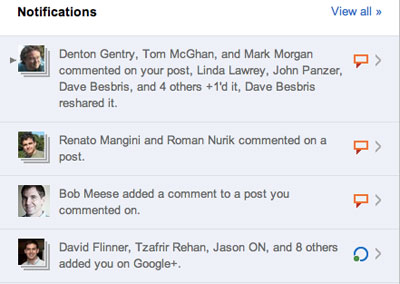
Many Different Types of Notifications, All Clear In Google+

Speaking of notifications, they're nothing if not thorough. Thankfully, unlike other networks, you get follow notifications in bulk. After a certain amount of time (not exactly clear), you can get emails saying how many new people are now following your account. On the fun of day one, I got a handful with dozens apiece, rather than hundreds of separate emails. In the site itself, you can see a small number in a square highlighting the number of notifications that beg for your attention, including new connections, comments on your posts, whether someone has tagged you in Google+, or if comments have happened on a thread where you've commented. Of course, if you don't want an email or phone push notification each time that happens, you can just disable those in your settings, and reduce the amount of bacn in your life.

Congrats! You're Followed On Google+ By Lots of People!

The biggest and most exciting piece of newness with Google+ over Buzz for me, though the services are vastly different, is that Google broke out of the Gmail box on this one. While I understood the desire to automatically create one's friend graph in Gmail and embed it in a popular app, the mere act of having to head to Gmail every time I used Buzz was a real detractor for me. Google+ is its own dedicated URL and it looks great in every browser and mobile device I've tried before, even the Galaxy Tab 10 on Honeycomb.

Sparks Bring News on Topics You Choose to Google+

Right now the service is invite only, and I don't have any invites to spare - trust me, I'd pass them around like candy, because I think this is a service you just might want to enjoy. Google has invited some skepticism for false starts in the past, but from what I've seen today, especially the excitement and wholescale adoption of the launch from prominent Googlers, this time they are absolutely serious and we'll be seeing some noise from this team. Their URL is plus.google.com and you can find me here: https://profiles.google.com/louisgray/posts.

June 5, 2011

June 5, 2011 · 2 MIN READ · BY LOUIS GRAY

New Chrome Extension Lets You +1 Tweets on Twitter

New Chrome Extension Lets You +1 Tweets on Twitter

Following the release of the Google +1 button for Web sites (such as this one) last week, the search giant's answer to the Facebook Like button is popping up everywhere. Seth Ladd, a developer advocate for Google, has gone the extra mile, posting a Chrome extension that adds the +1 functionality to Twitter.com, so you can +1 tweets you like, and have them displayed on your Google Profile. This is a lot like Jesse Stay's hack with Kynetx which added a Like button to tweets late last year.

As Twitter's Web site becomes more versatile, Twitter.com has become a target for innovative development for developers looking to bring more functionality to users, including my6sense's relevance tab which we introduced in February, and the word filter posted by Mike Grace, tapping the Kynetx platform. Seth's proximity to the +1 launch as well as his fondness for Google Chrome and HTML 5 (he's one of the more ardent advocates and presented at Google IO this year) no doubt made the interest to bring +1's to Twitter a must-do.

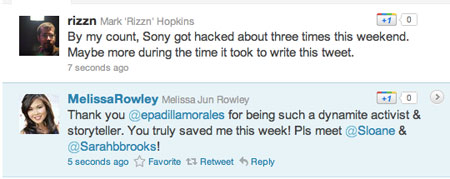
+1 Buttons and Share Counts In the Twitter Stream

The +1 extension for Twitter not only displays +1 next to tweets in the stream, letting you +1 them, but also shows how many other people across the platform have also done so. It's a lot like seeing how many people have favorited or retweeted a tweet within the tweet itself, data which can be harder to find. The extension itself is open source.

Seth's Tweet has Been +1'd 3 Times

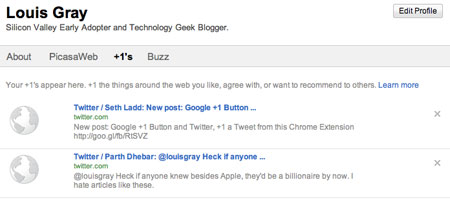
Tweets I +1 Show on My Google Profile


The extension itself is JavaScript-based and only is active when on the Twitter.com domain. Seth goes into detail on his post explaining how the +1 extension works, and how he needs to wait for the entire Twitter page to load before displaying the +1 buttons, while also explaining some shortcomings that apply to polling for new tweets in the timeline. Surely beyond version 1.0, those tweaks will come. Luckily, for those who have already grabbed the extension, it should update automatically. Go get it.

March 30, 2011

March 30, 2011 · 2 MIN READ · BY LOUIS GRAY

Google's +1 Is For Much More than Just Search Results

Google's +1 Is For Much More than Just Search Results

This morning, Google is introducing a new feature within the company's search results aiming to provide social recommendations to one's extended connections. The +1 feature lets you tag results and Web sites you find valuable with the expectation that friends of yours see your +1 and can take that into account when making a follow-up decisions. At first glimpse, this doesn't appear to be too dramatically different than previous attempts to show intent, with starring results, social search and other methods, but one can see where +1 is landing to hint at the future of the program.

In the company's introductory blog post today, Google talks about sharing recommendations with the world. The idea is that if you find a result you like in search, just hit +1. Theoretically, follow-on searchers will see the right recommendations at the right time in the right format.

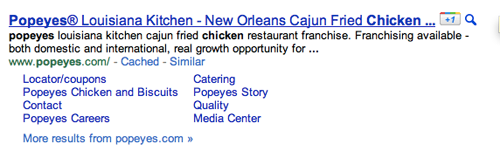
A +1 Next to Popeye's Fried Chicken

So who are your friends and how do they see your inputs? Well, for starters, they are looking at those people in your Google social graph, including chat friends and contacts. The company hints at using connections from Twitter as well, notably excluding Facebook, who hasn't historically wanted to play nice with Google in sharing data. The +1 data is also closely tied to your Google Profile, which is a sibling to Google Buzz, which also has following and friend-like attributes.

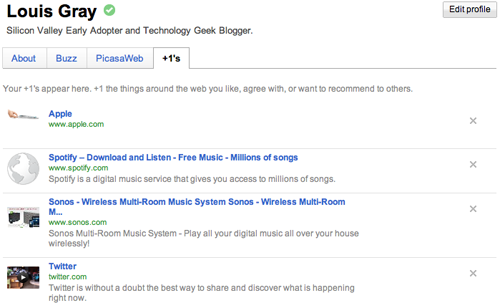
My +1s Are Displayed on My Google Profile

The introductory video for +1, almost a minute through says:
"Soon you'll be able to +1 more than just search results. You'll also find the +1 button on sites across the Web, making it easy to +1 pages after you've visited them. The Web's a big place. Sometimes it helps to have a tour guide."
This makes it sound more like a Delicious-style bookmarking tool (outwardly facing) than a RT-style Twitter endorsement. So where do these +1's go? Well, they're immediately posted to your Google profile, in a tab that you can make private or public. Says the dedicated site: "Your +1’s are stored in a new tab on your Google profile. You can show your +1’s tab to the world, or keep it private and just use it to personally manage the ever-expanding record of things you love around the web."

You can start seeing the +1 button on Google search results now by signing in to the search experiment in Google Labs. More detail on the +1 button is now available on a dedicated microsite. I would assume we might start seeing "+1" buttons all over sites that want to get more Google juice from social recommendations soon.

You can find all my +1s here: https://profiles.google.com/louisgray/plusones.