Silicon Valley Technology Commentary & Archives · Est. 2006 3,045 Posts · 2006–2026

July 11, 2011

July 11, 2011 · 2 MIN READ · BY LOUIS GRAY

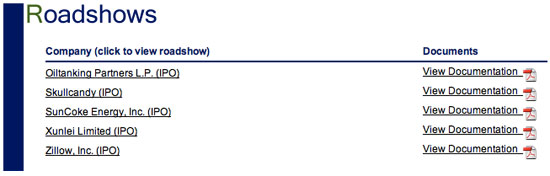
RetailRoadshow: Watch CEOs Pitch Before They Go Public

RetailRoadshow: Watch CEOs Pitch Before They Go Public

In the last decade-plus, the SEC and other agencies have pushed to bring more transparency to potential investors, who traditionally have had much less access to companies and information than Wall Street insiders. From protective rules such as the Sarbanes-Oxley act, to the public posting of SEC documents online, investors can get a much broader picture than they could not so long ago. But if you're not a Wall Street Insider, it's unlikely you've sat down face to face with the company CEO and CFO and heard them tell you just why they are the best place to put your money. For the last five years or so, I've had RetailRoadshow in my RSS feeds, and get the opportunity to see them pitch, unfiltered.

With interesting Tech or Web companies like Zillow, LivingSocial, Groupon, and others trying their hand at public markets and others like LinkedIn and Tesla Motors having done so in the last year-plus, now's as good a time as any to keep RetailRoadshow bookmarked.

Current Presentations Available on RetailRoadsho

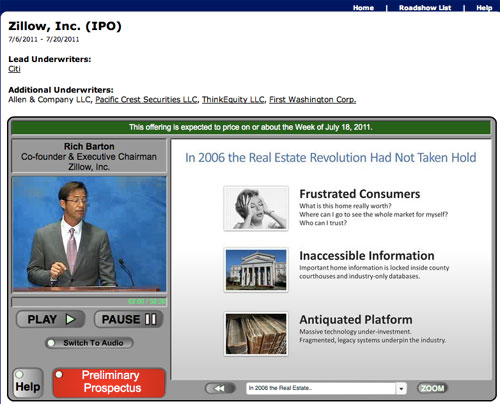
For such a vital service, RetailRoadshow is surprisingly quiet. Their Twitter account hasn't posted since April 2010, only having done so 29 times. If they've got a Facebook page, I don't know about it. But their RSS feed works and their bare bones site works. What the site lacks in visibility it makes up for in unfiltered information. You get the same data as the insiders, as the company's chief executives speak to you - uninterrupted by questions, with the company's prepared deck scrolling alongside. You even hear the mouse clicks as the exec hits the next slide.

Zillow's Co-founder and Executive Chairman Pitching His IPO

Watching presentations such as that from Zillow, LinkedIn, 3Par, FriendFinder and others in the past makes the process of bringing a company public look a lot simpler than it is, of course. Many of the execs don't have top-notch speaking skills, and often, their slides look like they need some retouching by a design guru. The hardest part of the process, typically, is getting the company to the point where they could file anyway, even if you think some of the companies looking to go public really aren't ready, or got their amazingly fast.

As someone who watches the markets like this, I really have just two browser cheats to keep on top of the process - the first being filings at the SEC that contain "S-1" in the title, and the second being RetailRoadshow. But if you do find a company whose pitch you want to see, go fast, because they don't stay live for long.
July 11, 2011 · 4 MIN READ · BY LOUIS GRAY

When Life Hands You Fragmentation, Make Fragmentade

When Life Hands You Fragmentation, Make Fragmentade

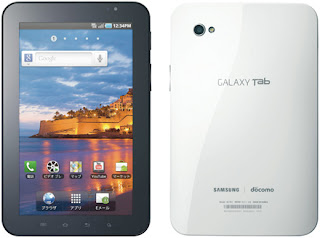
On Friday night, my 7 inch Samsung Galaxy Tab alerted me a software update was available. But not just any old software update - the much-awaited Gingerbread update, which would move the device from Froyo (Android 2.2) to its younger, hipper, brother, version 2.3. Having learned from previous experience not to dabble with unsupported Web builds, this was my first chance at Gingerbread, and the update has been without flaws. That said, it delivered a milestone of sorts, for now, officially, practically every device I have is running its own variance of an OS.

With the Android version number bump, the Galaxy Tab 7 is now on 2.3, while my Samsung Epic 4G is on Froyo 2.2. The Galaxy Tab 10 inch that came courtesy of Google IO is on Honeycomb 3.1, my Mac is on 10.6.8 (awaiting 10.7 Lion), the HP laptop is on Windows 7, the CR-48 is running ChromeOS, the iPod Touch is on iOS 4 somewhere and the iPads are somewhere in my kids' rooms, waiting to get charged. No devices I come in contact with are perfectly aligned.

With the obfuscation from handset vendors like Samsung and HTC providing their own custom skins to the Android development landscape and adding delays, the months following the first release of a build means I've practically forgotten whatever benefits I was supposed to look for in the first place. In older, more simple times, one could easily describe the benefits between version number upgrades on phones and computers, but not so much any more, lacking retail cardboard boxes and a unified release date, whereby recipients all get excited for simultaneous mass downloads and share their impressions, instead, waiting for the build to hit their phone, and even then, hope they are first in line for the serial Over the Air update crawl.

My "Laggard" Epic 4G is Chilling on Froyo 2.2.

Back when I was 'stuck' on 2.1 on the Epic seemingly forever, I couldn't wait to get my hands on Froyo 2.2, the main attraction being the option to download all my updates on Android Market simultaneously (or so I remember). But trying to preempt Samsung's release of Froyo turned out to be an "Epic" mistake - yes, pun intended. I had managed to get my hands on a build that was a dead end, one that wasn't supposed to be public, and one that couldn't go up, only down. I ended up eating my pride and going to Sprint to have the damage undone, reverting back to 2.1, and back up through official channels. So I didn't do the same for Gingerbread, having learned my lesson.

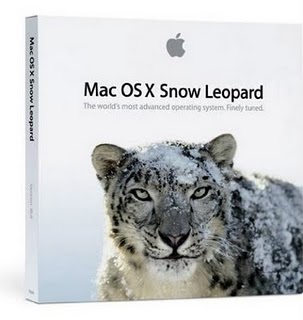
In addition to learning I should pretty much just play by the rules, the point by point upgrade system on Android has mirrored that of the Mac in recent years, whereby incremental upgrades are not much to write home about. I could barely tell you the difference between 10.5 and 10.6 as Apple patted itself on the back for "No new features" in Snow Leopard from Leopard, if you remember, so the sub-releases like 10.6.1 through 10.6.8 are scarcely worth mentioning.

Honeycomb, when it works well, is obviously a much better story. The 3.0 line of Android for tablets strongly deviated from the 2.0 line for phones, although, again, the bump from 3.0 to 3.1 was largely uneventful.

Looking back on some of the initial coverage around Froyo last year, it seemed the most anticipated capability was Flash in the browser - something I barely hit on my phone. Gingerbread 2.3.4 (what my Galaxy Tab 7 is running) is highlighted as having video chat in Google Talk, a cool feature I've already used, but oddly, something I'd expect through an application upgrade, not an OS upgrade. 2.3 also came with UI enhancements, a new keyboard, NFC support and some mysterious improvements on power management and app management. I'll take the upgrades of course, but if the improvements are so minor as to have to be researched, why then have we gotten so up in arms over the idea of fragmentation anyway? Either the product does what you expected it to and runs the apps you want, or it doesn't.

I absolutely agree, as does Google, considering their announcements at Google IO this year, that leading phone manufacturers should ship with the newest versions of software as fast as they can without mucking things up. The media and developer attention to fragmentation has definitely impacted their message and way of thinking. But as someone running different OS's on every device at this point, life's a lot less confusing than I thought it'd be.

July 11, 2011 · 3 MIN READ · BY LOUIS GRAY

Still Looking to Sync the World of Desktop, Mobile Devices

Still Looking to Sync the World of Desktop, Mobile Devices


As an over-extended digital device collector, I have my unfair share of tablets, phones and laptops strewn about my office. My kids are practically tripping over them, each one having its own use or unique operating system. As I use each of these devices, I find myself seeing gaps in the way different applications share data - keeping user information local to the device and locking it away so I lose information when I switch. While the Web and the buzzword-heavy "cloud" are helping matters, we've still got a lot of room to grow.

As I move from device to device, I'm doing so making decisions based on what applications and data I will find when I get there. By using my laptop, I lose access to games and apps that run on my Android phone and tablets. By using my phones, I lose the desktop apps. While some are looking to Apple to lead the way by merging the OS X concept with iOS, less talk has been made of bringing these iOS apps to a touch-screen enabled desktop. Maybe the idea is not happening because it's a bad one, but some smart app developers have thrown caution to the wind and brought their content to practically every screen.

Take the ubiquitous Angry Birds franchise for starters. I can play Angry Birds on my Mac from the app on the Mac App Store. I can play it on Google Chrome on the Chromebook. I can play it on my Android phone and tablets. I can play it on the iPad and iPod Touch. It's everywhere. The downside, of course, is that I have to conquer all the same levels again on every device, with no central record.

A little better is how Barnes and Noble approaches its NOOK eBooks. Purchases I make on my NOOKColor may initiate there, but I can also read the same books from my NOOK app on the Galaxy Tab (7 inch or 10 inch) and there's even a Mac client. I just have to sign in to my account and my library is right there. Very cool. If I'm connected to the Web, it will even know which book I am reading and open to the right page. That's the kind of integration I am really looking for.

You can also see smart integration of user preferences in the way Safari on iOS has the same bookmarks as on your computer, or how Chrome bookmarks follow you from Google Account-enabled machine to machine.

But most of the time apps are not behaving this way. Android's default browser is still not Chrome (and this baffles many), so the integration isn't there. Meanwhile, if I play 9 Innings baseball on my Galaxy Tab 10 and get through 81 games, starting the same app on my Galaxy Tab 7 starts at game 1. Even if I buy in-app enhancements to the game (and others like Home Run Battle 3D), those enhancements are device-specific.

Now that we can have Web-centric user profiles and can back up our user content, history and preferences, the very least we can do is be sure that our activity is matched across similar mobile devices. I recognize that often coding for desktop and mobile can be very different, but as the devices blur between smartphones, tablets, laptops and desktops, a screen is a screen is a screen, and I want to get the same stuff everywhere.

Defaulting to a Web-centric operating system like ChromeOS is a start, of course, but it's early days for that, and not everything has yet made the trip. I'd love Spotify on my CR-48 the same way it's on my phones and tablets and Mac, but it's a major hole until it hits the Web.

One practically has to make a mental matrix to remember what content and services are available on which devices, and what one loses when they choose one screen over another. I'd like to see more developers thinking about eliminating these gaps and giving users what they want no matter what screen they choose.

July 10, 2011

July 10, 2011 · 1 MIN READ · BY LOUIS GRAY

"I'm Feeling Lucky" Now on Google Books

"I'm Feeling Lucky" Now on Google Books

Doug Edwards' book "I'm Feeling Lucky' is now available as a Google eBook for $14.85. You could get it from Barnes and Noble for $23 or Borders for $19, but doesn't this seem more pure? I've been waiting for the electronic edition for a while.

/via my Google+ Profile.